display KIA Soul 2012 1.G User Guide
[x] Cancel search | Manufacturer: KIA, Model Year: 2012, Model line: Soul, Model: KIA Soul 2012 1.GPages: 393, PDF Size: 8.76 MB
Page 141 of 393
Features of your vehicle
62
4
Press start button again
If you can not operate the ENGINE
START/STOP button when there is a
problem with the ENGINE
START/STOP button system, the
warning illuminates for 10 seconds
and the chime sounds continuously
to indicate that you could start the
engine by pressing the ENGINE
START/STOP button once more.
The chime will stop if the ENGINE
START/STOP button system works
normally or the theft alarm system is
armed.
If the warning illuminates each time
you press the ENGINE
START/STOP button, take your vehi-
cle to an authorized Kia dealer and
have the system checked. Shift to "P" or "N" to start engine
If you try to start the engine with the
shift lever not in the P(Park) or
N(Neutral) position, the warning illu-
minates for about 10 seconds on the
LCD display.
You can also start the engine with
the shift lever in the N(Neutral) posi-
tion, but for your safety start the
engine with the shift lever in the
P(Park) position.
Press start button while turn steering
If the steering wheel does not unlock
normally when the ENGINE
START/STOP button is pressed, the
warning illuminates for 10 seconds
on the LCD display. Also, the warning
chime sounds once and the ENGINE
START/STOP button light blinks for
10 seconds.
When you are warned, press the
ENGINE START/STOP button while
turning the steering wheel right and
left.Steering wheel unlocked (if equipped)
If the steering wheel does not lock
normally when the ENGINE
START/STOP button turns to the
OFF position, the warning illumi-
nates for 10 minutes on the LCD dis-
play. If locks when the door is opened
or when you pull out the smart key
from the smart key holder.
Check steering wheel lock
If the steering wheel does not lock
normally when the ENGINE
START/STOP button turns to the
OFF position, the warning illumi-
nates for 10 seconds on the LCD dis-
play. Also, the warning chime sounds
for 3 seconds and the ENGINE
START/STOP button light blinks for
10 seconds.
Low tire pressure (if equipped)
If one or more of your tires is signifi-
cantly under-inflated when the igni-
tion key is turned to the "ON" posi-
tion, the warning illuminates for 10
seconds on the LCD display.
Page 142 of 393

463
Features of your vehicle
The rearview camera will activate
when the back-up light is ON with the
ignition switch ON and the shift lever
in the R (Reverse) position.
This system is a supplemental sys-
tem that shows behind the vehicle
through the rearview display mirror
while backing-up.
The rearview camera may be turned
off by pressing the ON/OFF button
(1) when the rearview camera is acti-
vated.
To turn the camera on again, press
the ON/OFF button (1) again when
the ignition switch is on and the shift
lever in R (Reverse). Also, the cam-
era will turn on automatically when-
ever the ignition switch is turned off
and on again.
Always keep the camera lens clean.
If lens is covered with foreign matter,
the camera may not operate normal-
ly.
REARVIEW CAMERA (IF EQUIPPED)
WARNING - Rearviewcamera
The rear view camera is not a
safety device. It only serves to
assist the driver in identifying
objects directly behind the mid-
dle of the vehicle. The camera
does NOT cover the complete
area behind the vehicle. While
the camera's display is general-
ly accurate, objects can be
much closer than they appear in
the display screen and can be
distorted in both size and pro-
portion.
OAM042025N
OAM042308
OAM042037
Rear view display
1
Page 164 of 393
485
Features of your vehicle
AUTOMATIC CLIMATE CONTROL SYSTEM (IF EQUIPPED)
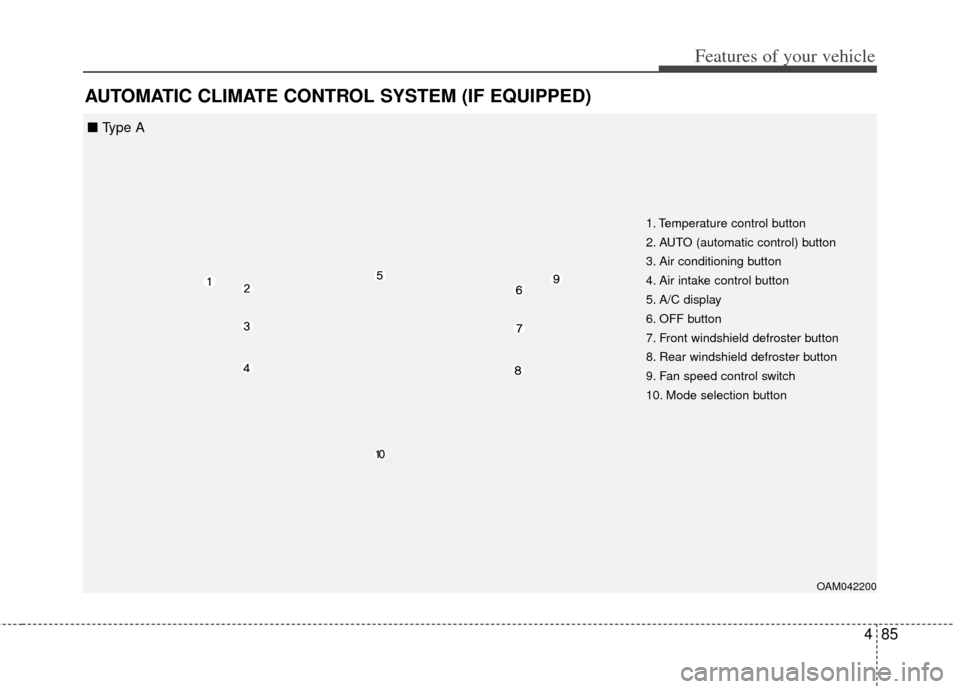
OAM042200
1. Temperature control button
2. AUTO (automatic control) button
3. Air conditioning button
4. Air intake control button
5. A/C display
6. OFF button
7. Front windshield defroster button
8. Rear windshield defroster button
9. Fan speed control switch
10. Mode selection button
■ Type A
Page 166 of 393

487
Features of your vehicle
Automatic heating and air con-
ditioning
The automatic climate control sys-
tem is controlled by simply setting
the desired temperature.
The Full Automatic Temperature
Control (FATC) system automatically
controls the heating and cooling sys-
tem as follows;
1. Push the AUTO button. It is indi-cated by AUTO on the display. The
modes, fan speeds, air intake and
air-conditioning will be controlled
automatically by temperature set-
ting. 2.Turn the temperature control knob
to set the desired temperature.
If the temperature is set to the low-
est setting (Lo), the air conditioning
system will operate continuously.
3.To turn the automatic operation off, select any button or switch of the
following:
The selected function will be con-
trolled manually while other func-
tions operate automatically.
Regardless of the temperature set-
ting, when using automatic opera-
tion, the air conditioning system can
automatically turn on to decrease the
humidity inside the vehicle, even if
the temperature is set to warm. Never place anything over the sensor
located on the instrument panel to
ensure better control of the heating
and cooling system.
OUN026312OAM042313
■
Type A■ Type B
Page 169 of 393
Features of your vehicle
90
4
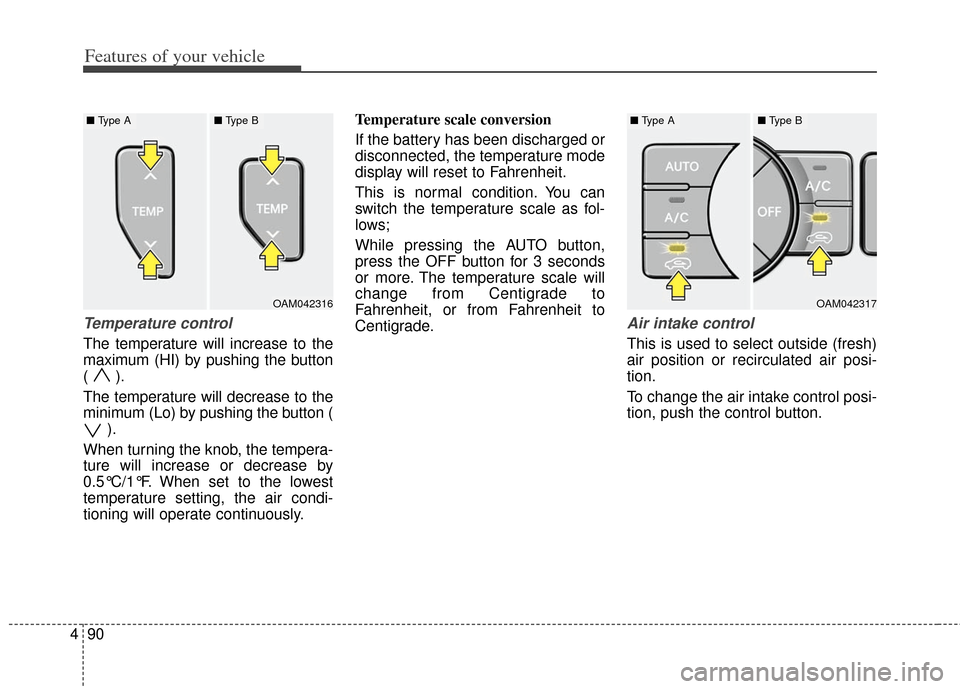
Temperature control
The temperature will increase to the
maximum (HI) by pushing the button
( ).
The temperature will decrease to the
minimum (Lo) by pushing the button (
).
When turning the knob, the tempera-
ture will increase or decrease by
0.5°C/1°F. When set to the lowest
temperature setting, the air condi-
tioning will operate continuously. Temperature scale conversion
If the battery has been discharged or
disconnected, the temperature mode
display will reset to Fahrenheit.
This is normal condition. You can
switch the temperature scale as fol-
lows;
While pressing the AUTO button,
press the OFF button for 3 seconds
or more. The temperature scale will
change from Centigrade to
Fahrenheit, or from Fahrenheit to
Centigrade.
Air intake control
This is used to select outside (fresh)
air position or recirculated air posi-
tion.
To change the air intake control posi-
tion, push the control button.
OAM042317
■
Type A■ Type B
OAM042316
■ Type A■ Type B
Page 176 of 393
497
Features of your vehicle
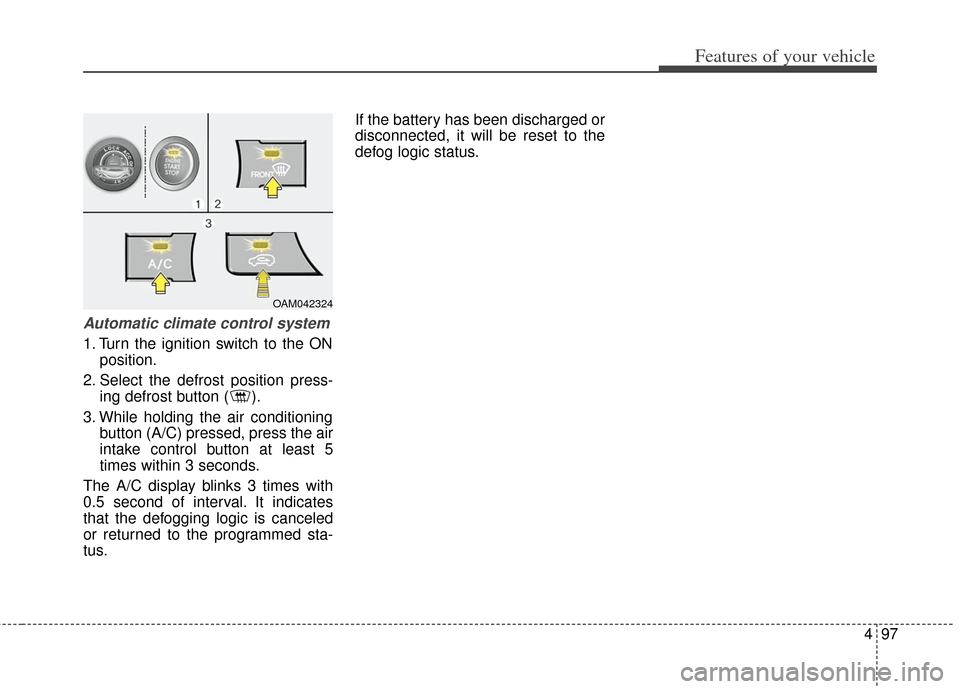
Automatic climate control system
1. Turn the ignition switch to the ONposition.
2. Select the defrost position press- ing defrost button ( ).
3. While holding the air conditioning button (A/C) pressed, press the air
intake control button at least 5
times within 3 seconds.
The A/C display blinks 3 times with
0.5 second of interval. It indicates
that the defogging logic is canceled
or returned to the programmed sta-
tus. If the battery has been discharged or
disconnected, it will be reset to the
defog logic status.
OAM042324
Page 196 of 393
4117
Features of your vehicle
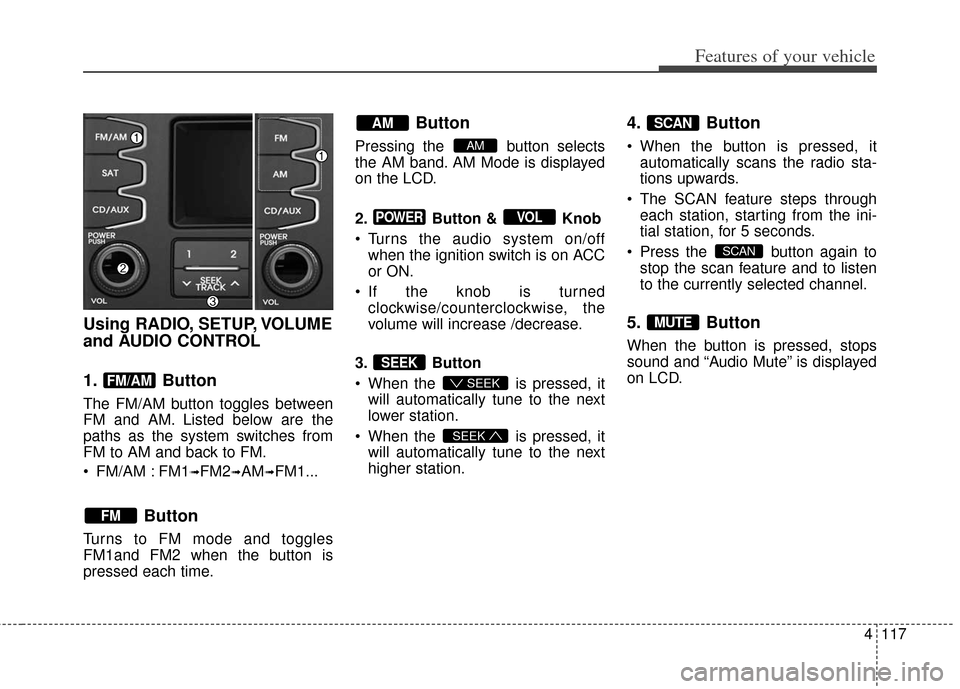
Using RADIO, SETUP, VOLUME
and AUDIO CONTROL
1. Button
The FM/AM button toggles between
FM and AM. Listed below are the
paths as the system switches from
FM to AM and back to FM.
FM/AM : FM1
➟FM2➟AM➟FM1...
Button
Turns to FM mode and toggles
FM1and FM2 when the button is
pressed each time.
Button
Pressing the button selects
the AM band. AM Mode is displayed
on the LCD.
2. Button & Knob
Turns the audio system on/offwhen the ignition switch is on ACC
or ON.
If the knob is turned clockwise/counterclockwise, the
volume will increase /decrease.
3. Button
When the is pressed, it will automatically tune to the next
lower station.
When the is pressed, it will automatically tune to the next
higher station.
4. Button
When the button is pressed, itautomatically scans the radio sta-
tions upwards.
The SCAN feature steps through each station, starting from the ini-
tial station, for 5 seconds.
Press the button again to stop the scan feature and to listen
to the currently selected channel.
5. Button
When the button is pressed, stops
sound and “Audio Mute” is displayed
on LCD.
MUTE
SCAN
SCAN
SEEK
SEEK
SEEK
VOLPOWER
AM
AM
FM
FM/AM
Page 197 of 393
Features of your vehicle
118
4
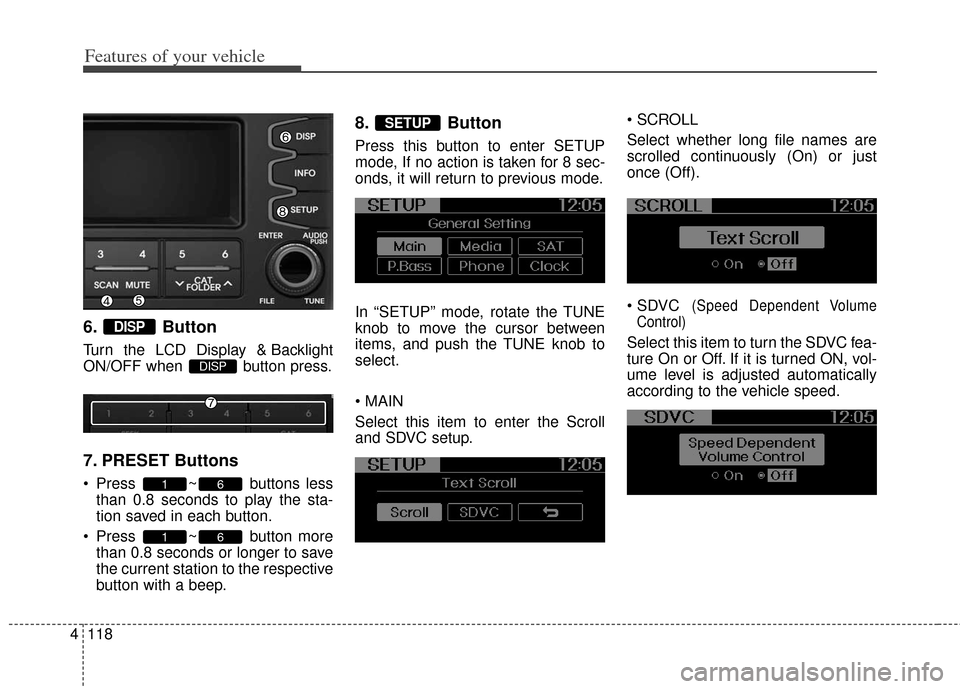
6. Button
Turn the LCD Display & Backlight
ON/OFF when button press.
7. PRESET Buttons
Press ~ buttons less
than 0.8 seconds to play the sta-
tion saved in each button.
Press ~ button more than 0.8 seconds or longer to save
the current station to the respective
button with a beep.
8. Button
Press this button to enter SETUP
mode, If no action is taken for 8 sec-
onds, it will return to previous mode.
In “SETUP” mode, rotate the TUNE
knob to move the cursor between
items, and push the TUNE knob to
select.
Select this item to enter the Scroll
and SDVC setup.
Select whether long file names are
scrolled continuously (On) or just
once (Off).
(Speed Dependent Volume
Control)
Select this item to turn the SDVC fea-
ture On or Off. If it is turned ON, vol-
ume level is adjusted automatically
according to the vehicle speed.
SETUP
61
61
DISP
DISP
Page 198 of 393
4119
Features of your vehicle
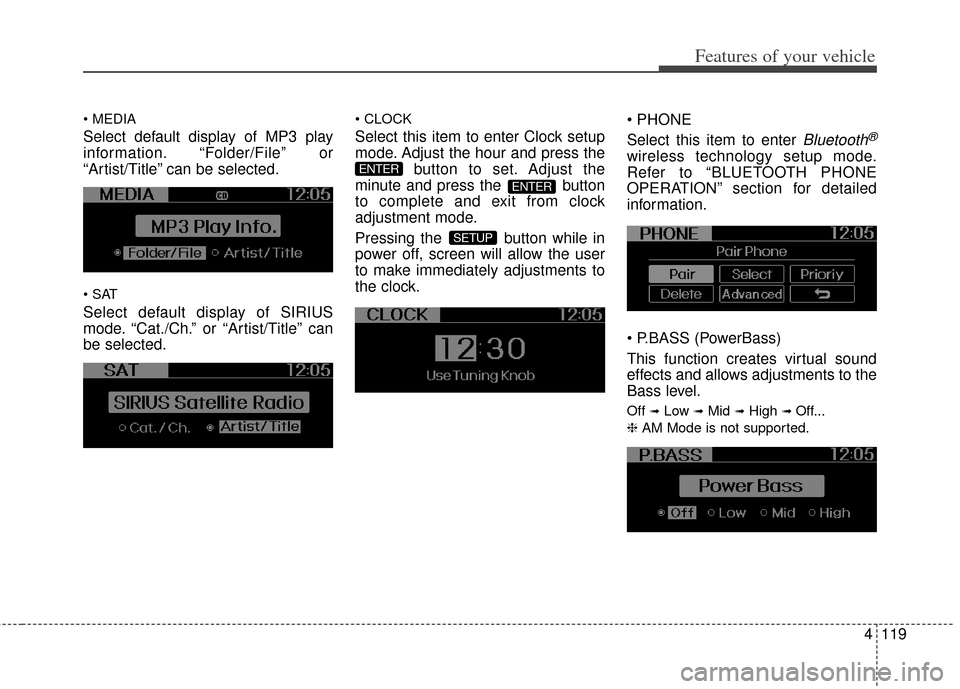
Select default display of MP3 play
information. “Folder/File” or
“Artist/Title” can be selected.
Select default display of SIRIUS
mode. “Cat./Ch.” or “Artist/Title” can
be selected.
Select this item to enter Clock setup
mode. Adjust the hour and press thebutton to set. Adjust the
minute and press the button
to complete and exit from clock
adjustment mode.
Pressing the button while in
power off, screen will allow the user
to make immediately adjustments to
the clock.
Select this item to enter Bluetooth®
wireless technology setup mode.
Refer to “BLUETOOTH PHONE
OPERATION” section for detailed
information.
(PowerBass)
This function creates virtual sound
effects and allows adjustments to the
Bass level.
Off ➟Low ➟Mid ➟High ➟ Off...
❈ AM Mode is not supported.
SETUP
ENTER
ENTER
Page 200 of 393
4121
Features of your vehicle
Using CD Player
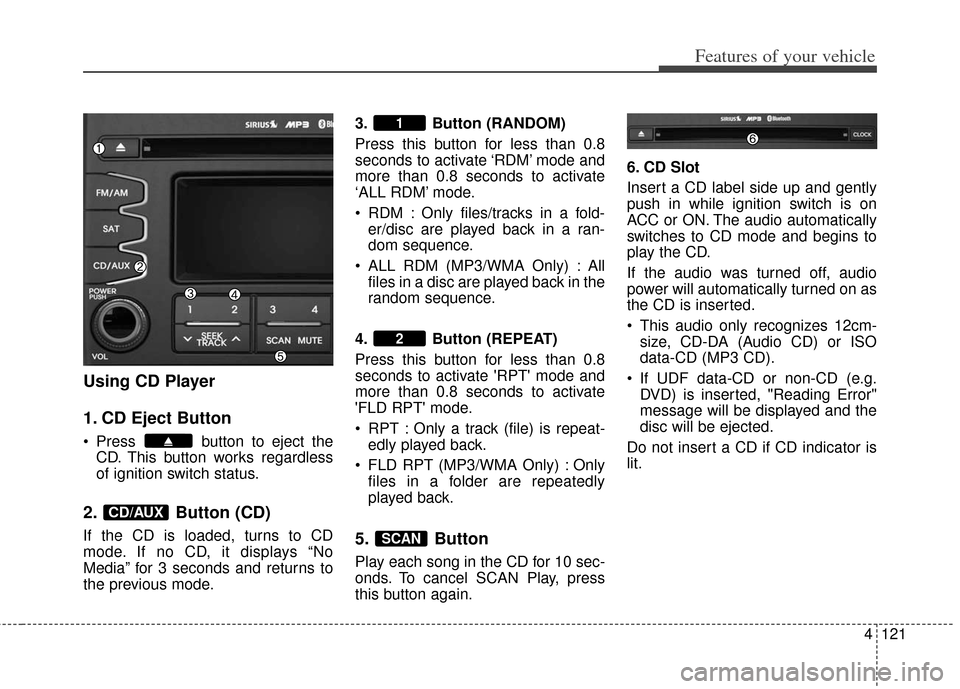
1. CD Eject Button
Press button to eject theCD. This button works regardless
of ignition switch status.
2. Button (CD)
If the CD is loaded, turns to CD
mode. If no CD, it displays “No
Media” for 3 seconds and returns to
the previous mode. 3. Button (RANDOM)
Press this button for less than 0.8
seconds to activate ‘RDM’ mode and
more than 0.8 seconds to activate
‘ALL RDM’ mode.
RDM : Only files/tracks in a fold-
er/disc are played back in a ran-
dom sequence.
ALL RDM (MP3/WMA Only) : All files in a disc are played back in the
random sequence.
4. Button (REPEAT)
Press this button for less than 0.8
seconds to activate 'RPT' mode and
more than 0.8 seconds to activate
'FLD RPT' mode.
RPT : Only a track (file) is repeat- edly played back.
FLD RPT (MP3/WMA Only) : Only files in a folder are repeatedly
played back.5. Button
Play each song in the CD for 10 sec-
onds. To cancel SCAN Play, press
this button again. 6. CD Slot
Insert a CD label side up and gently
push in while ignition switch is on
ACC or ON. The audio automatically
switches to CD mode and begins to
play the CD.
If the audio was turned off, audio
power will automatically turned on as
the CD is inserted.
This audio only recognizes 12cm-
size, CD-DA (Audio CD) or ISO
data-CD (MP3 CD).
If UDF data-CD or non-CD (e.g. DVD) is inserted, "Reading Error"
message will be displayed and the
disc will be ejected.
Do not insert a CD if CD indicator is
lit.
SCAN
2
1
CD/AUX