key KIA Soul 2012 1.G Owner's Guide
[x] Cancel search | Manufacturer: KIA, Model Year: 2012, Model line: Soul, Model: KIA Soul 2012 1.GPages: 393, PDF Size: 8.76 MB
Page 96 of 393
417
Features of your vehicle
Operating door locks from
inside the vehicle
With the door lock button
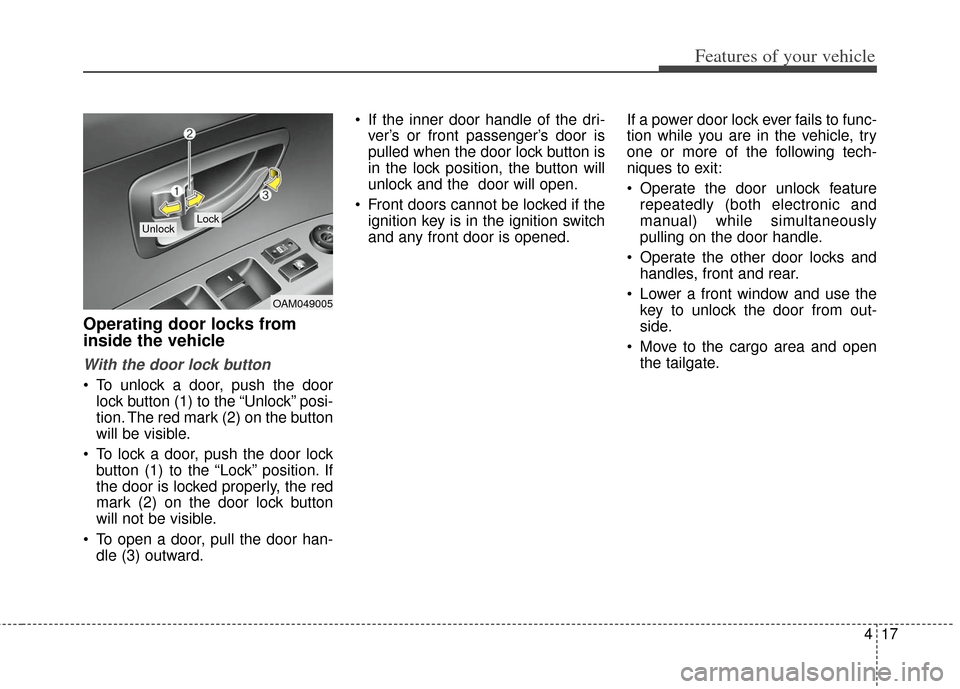
To unlock a door, push the doorlock button (1) to the “Unlock” posi-
tion. The red mark (2) on the button
will be visible.
To lock a door, push the door lock button (1) to the “Lock” position. If
the door is locked properly, the red
mark (2) on the door lock button
will not be visible.
To open a door, pull the door han- dle (3) outward. If the inner door handle of the dri-
ver’s or front passenger’s door is
pulled when the door lock button is
in the lock position, the button will
unlock and the door will open.
Front doors cannot be locked if the ignition key is in the ignition switch
and any front door is opened. If a power door lock ever fails to func-
tion while you are in the vehicle, try
one or more of the following tech-
niques to exit:
Operate the door unlock feature
repeatedly (both electronic and
manual) while simultaneously
pulling on the door handle.
Operate the other door locks and handles, front and rear.
Lower a front window and use the key to unlock the door from out-
side.
Move to the cargo area and open the tailgate.
OAM049005
Lock Unlock
Page 97 of 393

Features of your vehicle
18
4
With central door lock switch
Operate by pressing the central door
lock switch.
When pressing the front portion (1)
of the switch, all vehicle doors will
lock.
When pressing the rear portion (2) of the switch, all vehicle doors will
unlock.
If the key is in the ignition switch and any front door is opened, the
doors will not lock even though the
front portion (1) of the central door
lock switch is pressed.
Door lock/unlock features
Impact sensing door unlock sys-
tem
All doors will be automatically
unlocked when the impact is deliv-
ered to impact sensors while the igni-
tion switch is ON.
However, the doors may not be
unlocked if mechanical problems
occur with the door lock system or
battery.
Speed sensing door lock system (if equipped)
All doors will automatically lock after
the vehicle speed exceeds 15 km/h
(9.3 MPH).
Shift lever door lock/unlock sys-tem (if equipped)
All doors will automatically unlock
when the shift lever is moved into P
(Park).
OAM049006/OAM042007N
Passenger’s doorDriver’s door
WARNING - Doors
The doors should always be
fully closed and locked while
the vehicle is in motion to pre-
vent accidental opening of the
door.
WARNING - Unattended children/
animals
Never leave children or animals
unattended in your vehicle. An
enclosed vehicle can become
extremely hot, causing death or
severe injury to unattended
children or animals who cannot
escape the vehicle.
Page 99 of 393
Features of your vehicle
20
4
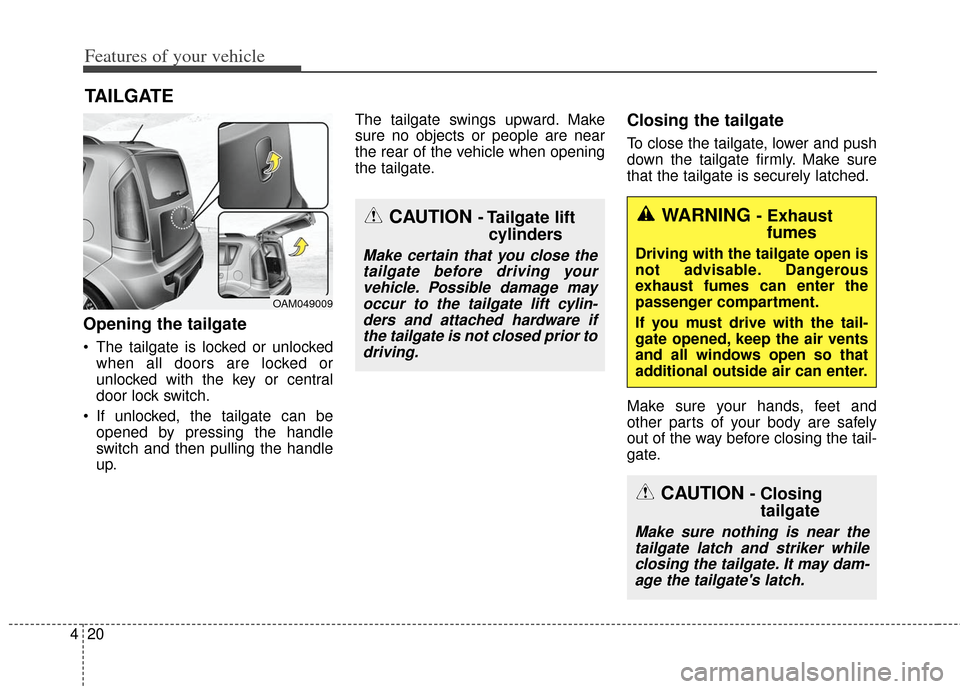
Opening the tailgate
The tailgate is locked or unlocked
when all doors are locked or
unlocked with the key or central
door lock switch.
If unlocked, the tailgate can be opened by pressing the handle
switch and then pulling the handle
up. The tailgate swings upward. Make
sure no objects or people are near
the rear of the vehicle when opening
the tailgate.
Closing the tailgate
To close the tailgate, lower and push
down the tailgate firmly. Make sure
that the tailgate is securely latched.
Make sure your hands, feet and
other parts of your body are safely
out of the way before closing the tail-
gate.
TAILGATE
OAM049009
CAUTION - Tailgate lift
cylinders
Make certain that you close the
tailgate before driving yourvehicle. Possible damage mayoccur to the tailgate lift cylin-ders and attached hardware ifthe tailgate is not closed prior todriving.
WARNING - Exhaust fumes
Driving with the tailgate open is
not advisable. Dangerous
exhaust fumes can enter the
passenger compartment.
If you must drive with the tail-
gate opened, keep the air vents
and all windows open so that
additional outside air can enter.
CAUTION - Closing tailgate
Make sure nothing is near the
tailgate latch and striker whileclosing the tailgate. It may dam-age the tailgate's latch.
Page 102 of 393
423
Features of your vehicle
Power windows
The ignition switch must be in the ON
position for power windows to oper-
ate.
Each door has a power window
switch that controls the door's win-
dow. The driver has a power window
lock button which can block the oper-
ation of passenger windows. The
power windows can be operated for
approximately 30 seconds after the
ignition key is removed or turned to
the ACC or LOCK position. However,
if the front doors are opened, the
power windows cannot be operated
even within the 30 second period.
In cold and wet climates, power win-
dows may not work properly due to
freezing conditions.
✽ ✽NOTICE
While driving with the rear windows
down or with the sunroof (if
equipped) in an open (or partially
open) position, your vehicle may
demonstrate a wind buffeting or
pulsation noise. This noise is a nor-
mal occurrence and can be reduced
or eliminated by taking the follow-
ing actions. If the noise occurs with
one or both of the rear windows
down, partially lower both front
windows approximately one inch. If
you experience the noise with the
sunroof open, slightly reduce the
size of the sunroof opening.
Window opening and closing
The driver’s door has a master power
window switch that controls all the
windows in the vehicle.
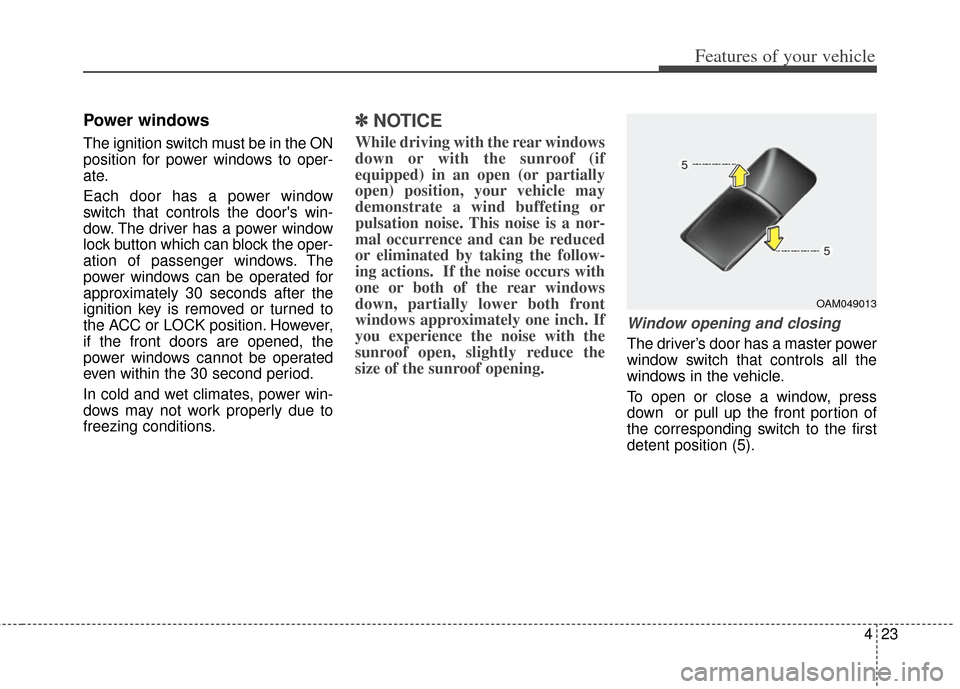
To open or close a window, press
down or pull up the front portion of
the corresponding switch to the first
detent position (5).
OAM049013
Page 135 of 393
Features of your vehicle
56
4
Tailgate open warning
light
This warning light illuminates when
the tailgate is not closed securely
with the ignition switch in any posi-
tion.
Door ajar warning light
This warning light illuminates when a
door is not closed securely with the
ignition switch in any position.
Immobilizer indicator (if equipped)
Without smart key system
This light illuminates when the immo-
bilizer key is inserted and turned to
the ON position to start the engine.
At this time, you can start the engine.
The light goes out after the engine is
running.
If this light blinks when the ignition
switch is in the ON position before
starting the engine, have the system
checked by an authorized Kia dealer.
With smart key system
If any of the following occurs in a
vehicle equipped with the smart key,
the immobilizer indicator illuminates,
blinks or goes off. When the smart key is in the vehi-
cle, if the ENGINE START/STOP
button is in the ACC or ON posi-
tion, the indicator will illuminate for
approximately 30 seconds to indi-
cate that you are able to start the
engine. However, when the smart
key is not in the vehicle, if the
ENGINE START/STOP button is
pressed, the indicator will blink for
a few seconds to indicate that you
are not be able to start the engine.
If the indicator illuminates only for 2 seconds and goes out when the
ENGINE START/STOP button is
turned to ON position with the
smart key in the vehicle, have the
system checked by an authorized
Kia dealer.
When the battery is weak, if the ENGINE START/STOP button is
pressed, the indicator will blink and
you are not able to start the
engine. However, you are able to
start the engine by inserting the
smart key in the smart key holder.
Also, if the smart key system relat-
ed parts have a problem, the indi-
cator will blink.
Page 139 of 393
Features of your vehicle
60
4
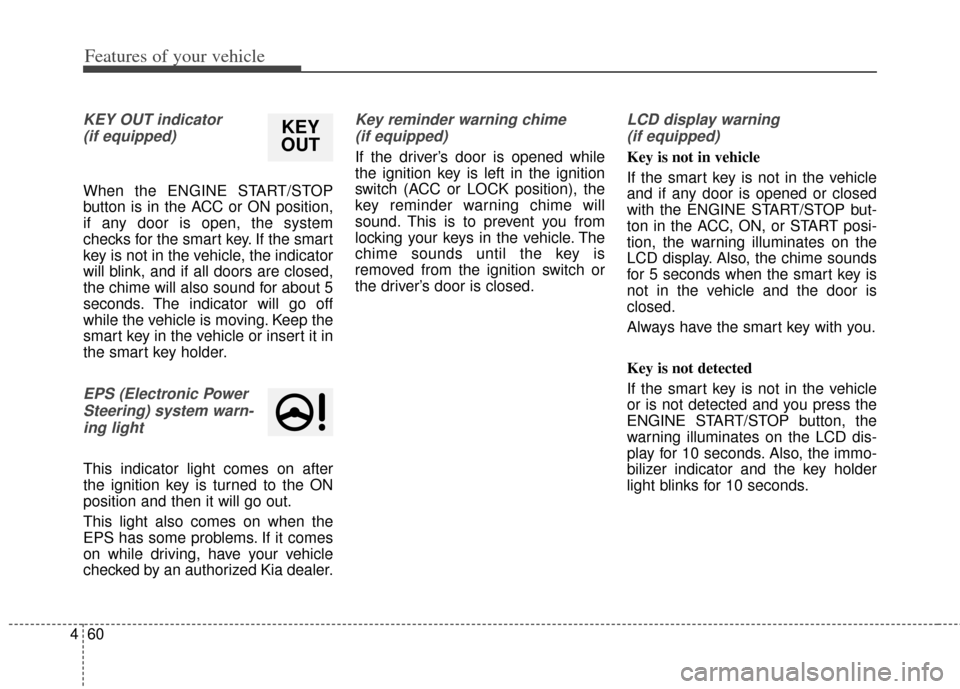
KEY OUT indicator
(if equipped)
When the ENGINE START/STOP
button is in the ACC or ON position,
if any door is open, the system
checks for the smart key. If the smart
key is not in the vehicle, the indicator
will blink, and if all doors are closed,
the chime will also sound for about 5
seconds. The indicator will go off
while the vehicle is moving. Keep the
smart key in the vehicle or insert it in
the smart key holder.
EPS (Electronic PowerSteering) system warn-ing light
This indicator light comes on after
the ignition key is turned to the ON
position and then it will go out.
This light also comes on when the
EPS has some problems. If it comes
on while driving, have your vehicle
checked by an authorized Kia dealer.
Key reminder warning chime (if equipped)
If the driver’s door is opened while
the ignition key is left in the ignition
switch (ACC or LOCK position), the
key reminder warning chime will
sound. This is to prevent you from
locking your keys in the vehicle. The
chime sounds until the key is
removed from the ignition switch or
the driver’s door is closed.
LCD display warning (if equipped)
Key is not in vehicle
If the smart key is not in the vehicle
and if any door is opened or closed
with the ENGINE START/STOP but-
ton in the ACC, ON, or START posi-
tion, the warning illuminates on the
LCD display. Also, the chime sounds
for 5 seconds when the smart key is
not in the vehicle and the door is
closed.
Always have the smart key with you.
Key is not detected
If the smart key is not in the vehicle
or is not detected and you press the
ENGINE START/STOP button, the
warning illuminates on the LCD dis-
play for 10 seconds. Also, the immo-
bilizer indicator and the key holder
light blinks for 10 seconds.
KEY
OUT
Page 140 of 393
461
Features of your vehicle
Low key battery
If the ENGINE START/STOP button
turns to the OFF position when the
smart key in the vehicle discharges,
the warning illuminates on the LCD
display for about 10 seconds. Also,
the warning chime sounds once.
Replace the battery with a new one.
Press brake pedal to start engine
If the ENGINE START/STOP button
turns to the ACC position twice by
pressing the button repeatedly with-
out depressing the brake pedal, the
warning illuminates on the LCD dis-
play for about 10 seconds to indicate
that you should depress the brake
pedal to start the engine.Press clutch pedal to start engine
(if equipped)
If the ENGINE START/STOP button
turns to the ACC position twice by
pressing the button repeatedly with-
out depressing the clutch pedal, the
warning illuminates on the LCD dis-
play for about 10 seconds to indicate
that you should depress the clutch
pedal to start the engine.
Shift to "P" position
If you try to turn off the engine with-
out the shift lever in the P (Park)
position, the ENGINE START/STOP
button will turn to the ACC position. If
the button is pressed once more it
will turn to the ON position. The
warning illuminates on the LCD dis-
play for about 10 seconds to indicate
that you should press the ENGINE
START/STOP button with the shift
lever in the P (Park) position to turn
off the engine.
Also, the warning chime sounds for
about 10 seconds. (if equipped)Remove key
When you turn off the engine with
the smart key in the smart key hold-
er, the warning illuminates on the
LCD display for about 10 seconds.
Also, the smart key holder light blinks
for about 10 seconds.
To remove the smart key push the
smart key once and pull it out from
the smart key holder.
Insert key
If you press the ENGINE
START/STOP button while "Key is
not detected" illuminates on the LCD
display, the warning “Insert key” illu-
minates for about 10 seconds. Also,
the immobilizer indicator and the key
holder light blinks for about 10 sec-
onds.
Page 141 of 393
Features of your vehicle
62
4
Press start button again
If you can not operate the ENGINE
START/STOP button when there is a
problem with the ENGINE
START/STOP button system, the
warning illuminates for 10 seconds
and the chime sounds continuously
to indicate that you could start the
engine by pressing the ENGINE
START/STOP button once more.
The chime will stop if the ENGINE
START/STOP button system works
normally or the theft alarm system is
armed.
If the warning illuminates each time
you press the ENGINE
START/STOP button, take your vehi-
cle to an authorized Kia dealer and
have the system checked. Shift to "P" or "N" to start engine
If you try to start the engine with the
shift lever not in the P(Park) or
N(Neutral) position, the warning illu-
minates for about 10 seconds on the
LCD display.
You can also start the engine with
the shift lever in the N(Neutral) posi-
tion, but for your safety start the
engine with the shift lever in the
P(Park) position.
Press start button while turn steering
If the steering wheel does not unlock
normally when the ENGINE
START/STOP button is pressed, the
warning illuminates for 10 seconds
on the LCD display. Also, the warning
chime sounds once and the ENGINE
START/STOP button light blinks for
10 seconds.
When you are warned, press the
ENGINE START/STOP button while
turning the steering wheel right and
left.Steering wheel unlocked (if equipped)
If the steering wheel does not lock
normally when the ENGINE
START/STOP button turns to the
OFF position, the warning illumi-
nates for 10 minutes on the LCD dis-
play. If locks when the door is opened
or when you pull out the smart key
from the smart key holder.
Check steering wheel lock
If the steering wheel does not lock
normally when the ENGINE
START/STOP button turns to the
OFF position, the warning illumi-
nates for 10 seconds on the LCD dis-
play. Also, the warning chime sounds
for 3 seconds and the ENGINE
START/STOP button light blinks for
10 seconds.
Low tire pressure (if equipped)
If one or more of your tires is signifi-
cantly under-inflated when the igni-
tion key is turned to the "ON" posi-
tion, the warning illuminates for 10
seconds on the LCD display.
Page 143 of 393
Features of your vehicle
64
4
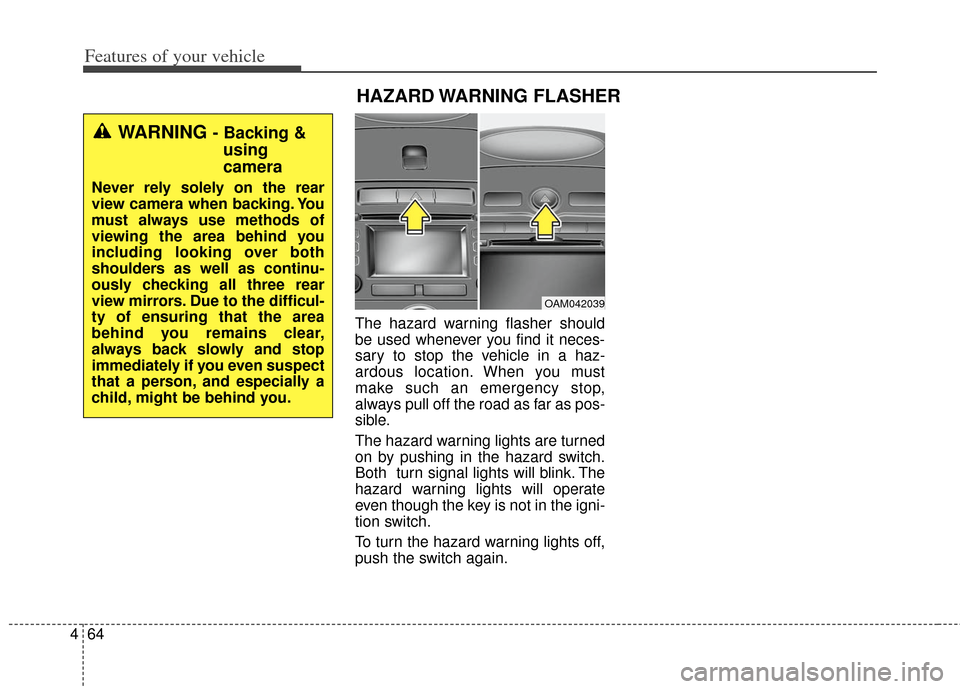
The hazard warning flasher should
be used whenever you find it neces-
sary to stop the vehicle in a haz-
ardous location. When you must
make such an emergency stop,
always pull off the road as far as pos-
sible.
The hazard warning lights are turned
on by pushing in the hazard switch.
Both turn signal lights will blink. The
hazard warning lights will operate
even though the key is not in the igni-
tion switch.
To turn the hazard warning lights off,
push the switch again.
OAM042039
HAZARD WARNING FLASHER
WARNING - Backing &
using
camera
Never rely solely on the rear
view camera when backing. You
must always use methods of
viewing the area behind you
including looking over both
shoulders as well as continu-
ously checking all three rear
view mirrors. Due to the difficul-
ty of ensuring that the area
behind you remains clear,
always back slowly and stop
immediately if you even suspect
that a person, and especially a
child, might be behind you.
Page 144 of 393
465
Features of your vehicle
Headlamp escort (if equipped)
If you turn the ignition switch to the
ACC or OFF position with the head-
lights ON, the headlights remain on
for about 20 minutes. However, if the
driver’s door is opened and closed,
the headlights are turned off after 30
seconds.
The headlights can be turned off by
pressing the lock button on the trans-
mitter (or smart key) twice or turning
the light switch to the OFF or Auto
position. However, if you turn the light
switch to the Auto position when it is
dark outside, the headlights will not
be turned off immediately.
Battery saver function
The purpose of this feature is toprevent the battery from being dis-
charged. The system automatically
turns off the parking lights when
the driver removes the ignition key
and opens the driver-side door (in
that order).
With this feature, the parking lights will turn off automatically if the driv-
er parks on the side of the road at
night.
If necessary, to keep the lights on
when the ignition key is removed,
perform the following:
1) Open the driver-side door.
2) Turn the parking lights OFF and ON again using the light switch
on the steering column.
Daytime running light
Daytime Running Lights (DRL) can
make it easier for others to see the
front of your vehicle during the day.
DRL can be helpful in many different
driving conditions, and it is especial-
ly helpful after dawn and before sun-
set.
The DRL system turns OFF when:
1. The headlight are ON.
2. The parking brake is applied.
3. Engine stops.
4. The turn signal light is ON.
LIGHTING