display KIA Soul 2013 1.G Owner's Guide
[x] Cancel search | Manufacturer: KIA, Model Year: 2013, Model line: Soul, Model: KIA Soul 2013 1.GPages: 393, PDF Size: 8.76 MB
Page 201 of 393
Features of your vehicle
122
4
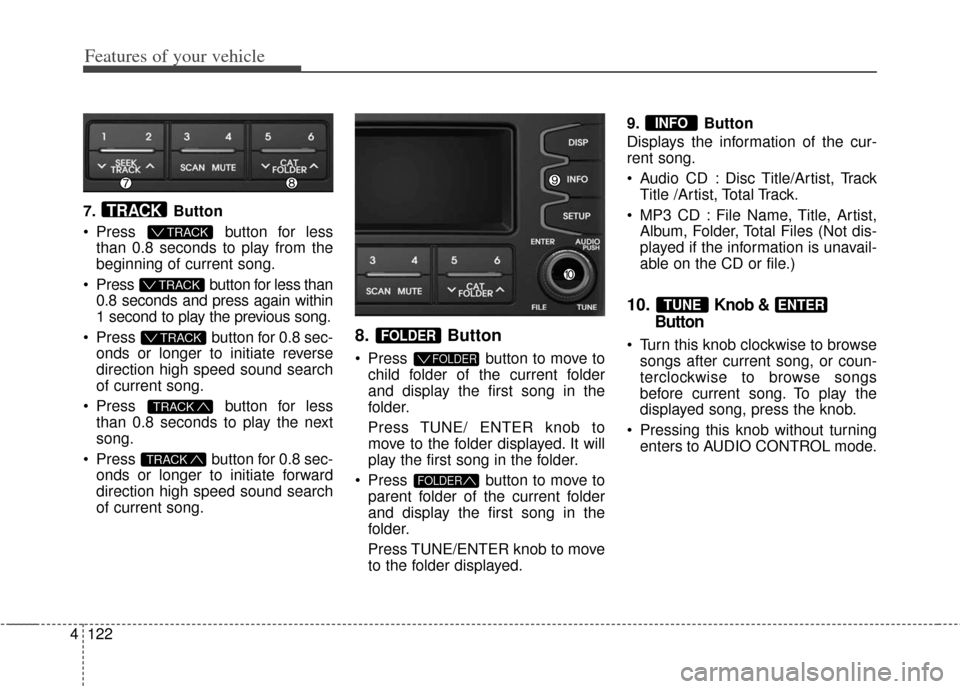
7. Button
Press button for less
than 0.8 seconds to play from the
beginning of current song.
Press button for less than 0.8 seconds and press again within
1 second to play the previous song.
Press button for 0.8 sec- onds or longer to initiate reverse
direction high speed sound search
of current song.
Press button for less
than 0.8 seconds to play the next
song.
Press button for 0.8 sec- onds or longer to initiate forward
direction high speed sound search
of current song.
8. Button
Press button to move tochild folder of the current folder
and display the first song in the
folder.
Press TUNE/ ENTER knob to
move to the folder displayed. It will
play the first song in the folder.
Press button to move to parent folder of the current folder
and display the first song in the
folder.
Press TUNE/ENTER knob to move
to the folder displayed. 9. Button
Displays the information of the cur-
rent song.
Audio CD : Disc Title/Artist, Track
Title /Artist, Total Track.
MP3 CD : File Name, Title, Artist, Album, Folder, Total Files (Not dis-
played if the information is unavail-
able on the CD or file.)
10.Knob &
Button
Turn this knob clockwise to browse
songs after current song, or coun-
terclockwise to browse songs
before current song. To play the
displayed song, press the knob.
Pressing this knob without turning enters to AUDIO CONTROL mode.
ENTERTUNE
INFO
FOLDER
FOLDER
FOLDER
TRACK
TRACK
T TRACK
T TRACK
T TRACK
TRACK
Page 203 of 393
Features of your vehicle
124
4
Using USB device
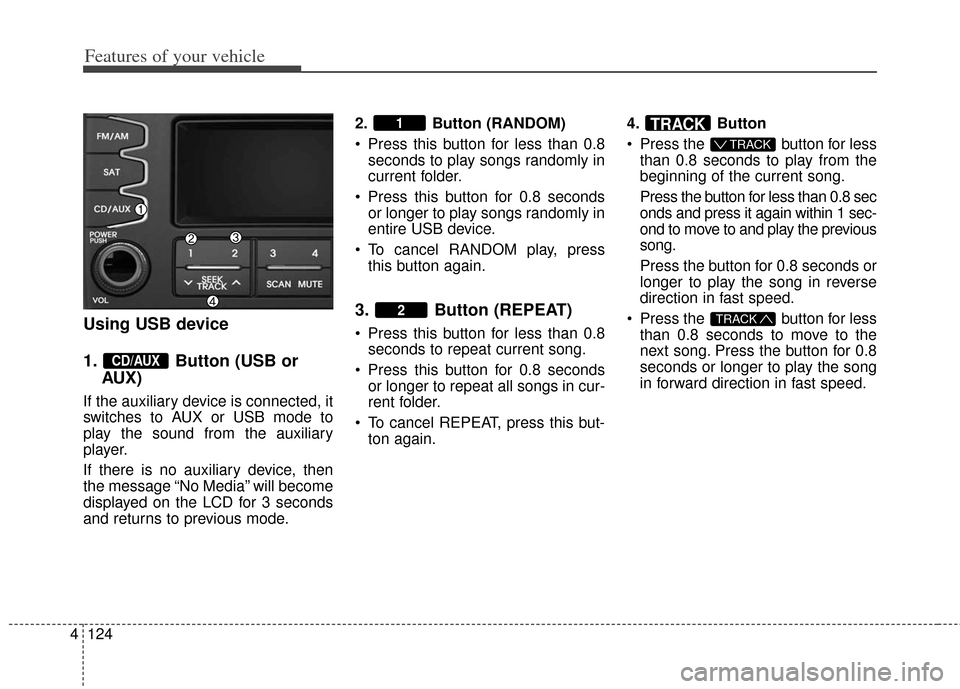
1. Button (USB or
AUX)
If the auxiliary device is connected, it
switches to AUX or USB mode to
play the sound from the auxiliary
player.
If there is no auxiliary device, then
the message “No Media” will become
displayed on the LCD for 3 seconds
and returns to previous mode. 2. Button (RANDOM)
Press this button for less than 0.8
seconds to play songs randomly in
current folder.
Press this button for 0.8 seconds or longer to play songs randomly in
entire USB device.
To cancel RANDOM play, press this button again.
3. Button (REPEAT)
Press this button for less than 0.8seconds to repeat current song.
Press this button for 0.8 seconds or longer to repeat all songs in cur-
rent folder.
To cancel REPEAT, press this but- ton again. 4. Button
Press the button for less
than 0.8 seconds to play from the
beginning of the current song.
Press the button for less than 0.8 sec
onds and press it again within 1 sec-
ond to move to and play the previous
song.
Press the button for 0.8 seconds or
longer to play the song in reverse
direction in fast speed.
Press the button for less than 0.8 seconds to move to the
next song. Press the button for 0.8
seconds or longer to play the song
in forward direction in fast speed.TRACK
T TRACK
TRACK
2
1
CD/AUX
Page 204 of 393
4125
Features of your vehicle
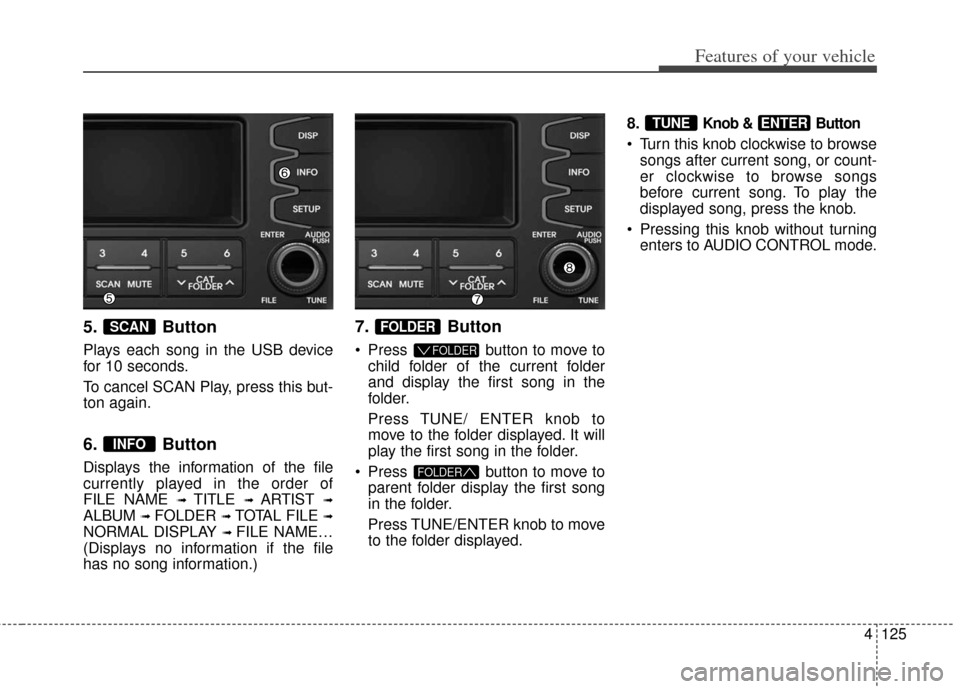
5. Button
Plays each song in the USB device
for 10 seconds.
To cancel SCAN Play, press this but-
ton again.
6. Button
Displays the information of the file
currently played in the order of
FILE NAME
➟ TITLE ➟ ARTIST ➟
ALBUM ➟ FOLDER ➟ TOTAL FILE ➟
NORMAL DISPLAY ➟ FILE NAME…
(Displays no information if the file
has no song information.)
7. Button
Press button to move to child folder of the current folder
and display the first song in the
folder.
Press TUNE/ ENTER knob to
move to the folder displayed. It will
play the first song in the folder.
Press button to move to parent folder display the first song
in the folder.
Press TUNE/ENTER knob to move
to the folder displayed. 8.
Knob & Button
Turn this knob clockwise to browse
songs after current song, or count-
er clockwise to browse songs
before current song. To play the
displayed song, press the knob.
Pressing this knob without turning enters to AUDIO CONTROL mode.
ENTERTUNE
FOLDER
FOLDER
FOLDER
INFO
SCAN
Page 207 of 393
Features of your vehicle
128
4
Using iPod®
❋
iPod®is a trademark of Apple Inc.
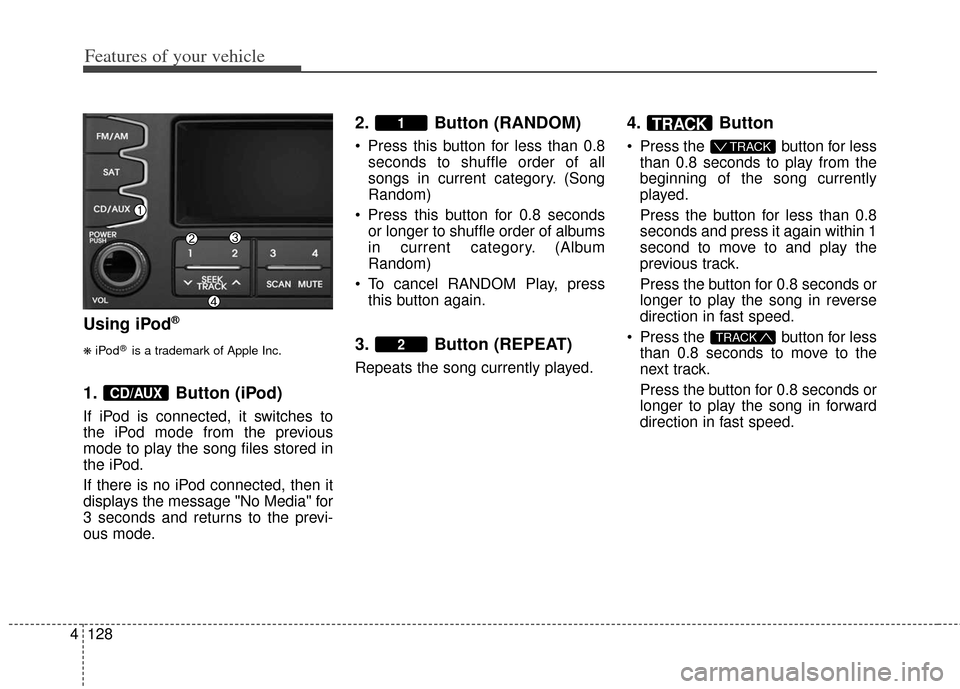
1. Button (iPod)
If iPod is connected, it switches to
the iPod mode from the previous
mode to play the song files stored in
the iPod.
If there is no iPod connected, then it
displays the message "No Media" for
3 seconds and returns to the previ-
ous mode.
2. Button (RANDOM)
Press this button for less than 0.8 seconds to shuffle order of all
songs in current category. (Song
Random)
Press this button for 0.8 seconds or longer to shuffle order of albums
in current category. (Album
Random)
To cancel RANDOM Play, press this button again.
3. Button (REPEAT)
Repeats the song currently played.
4. Button
Press the button for lessthan 0.8 seconds to play from the
beginning of the song currently
played.
Press the button for less than 0.8
seconds and press it again within 1
second to move to and play the
previous track.
Press the button for 0.8 seconds or
longer to play the song in reverse
direction in fast speed.
Press the button for less than 0.8 seconds to move to the
next track.
Press the button for 0.8 seconds or
longer to play the song in forward
direction in fast speed.
TRACK
T TRACK
TRACK
2
1
CD/AUX
Page 208 of 393
4129
Features of your vehicle
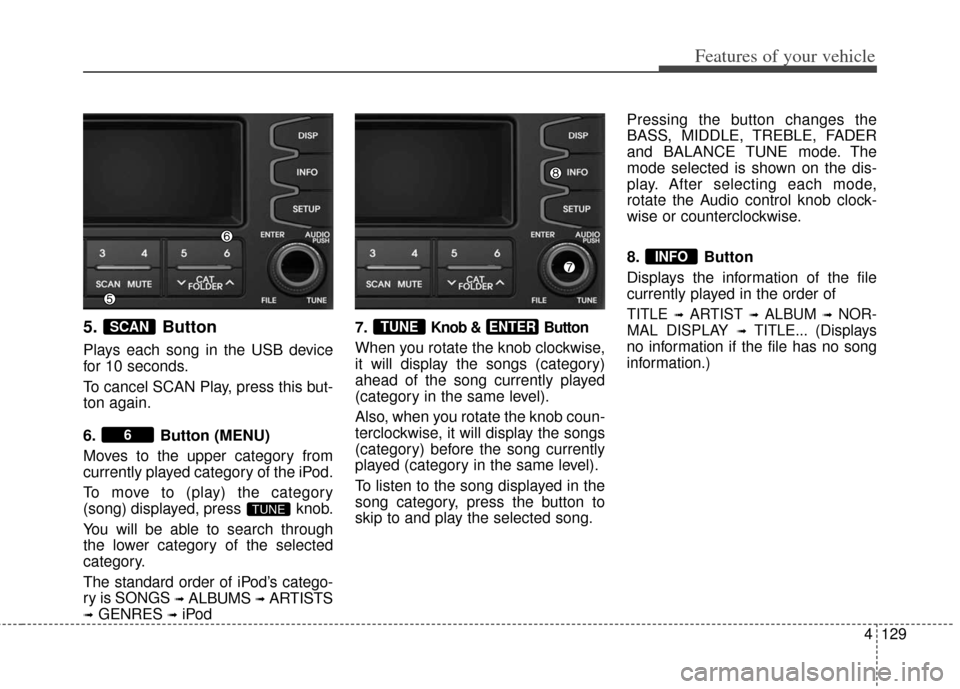
5. Button
Plays each song in the USB device
for 10 seconds.
To cancel SCAN Play, press this but-
ton again.
6. Button (MENU)
Moves to the upper category from
currently played category of the iPod.
To move to (play) the category
(song) displayed, press knob.
You will be able to search through
the lower category of the selected
category.
The standard order of iPod’s catego-
ry is SONGS
➟ALBUMS➟ARTISTS
➟GENRES➟iPod7.
Knob & Button
When you rotate the knob clockwise,
it will display the songs (category)
ahead of the song currently played
(category in the same level).
Also, when you rotate the knob coun-
terclockwise, it will display the songs
(category) before the song currently
played (category in the same level).
To listen to the song displayed in the
song category, press the button to
skip to and play the selected song. Pressing the button changes the
BASS, MIDDLE, TREBLE, FADER
and BALANCE TUNE mode. The
mode selected is shown on the dis-
play. After selecting each mode,
rotate the Audio control knob clock-
wise or counterclockwise.
8. Button
Displays the information of the file
currently played in the order of
TITLE ➟ARTIST ➟ALBUM ➟NOR-
MAL DISPLAY
➟TITLE... (Displays
no information if the file has no song
information.)
INFO
ENTERTUNE
TUNE
6
SCAN
Page 211 of 393
Features of your vehicle
132
4
Using SIRIUS Satellite Radio
Your Kia vehicle is equipped with a 3
month complimentary period of SIR-
IUS Satellite Radio so you have
access to over 130 channels of
music, information, and entertain-
ment programming.
Activation
In order to extend or reactivate your
subscription to SIRIUS Satellite
Radio, you will need to contact SIR-
IUS Customer Care at 1-888-539-
7474. Have your 12 digit SID (Sirius
Identification Number) / ESN
(Electronic Serial Number) ready. To retrieve the SID/ESN, turn on the
radio, press the [SAT] button, and
tune to channel zero.
Please note that the vehicle will need
to be turned on, in Sirius mode, and
have an unobstructed view of the sky
in order for the radio to receive the
activation signal.
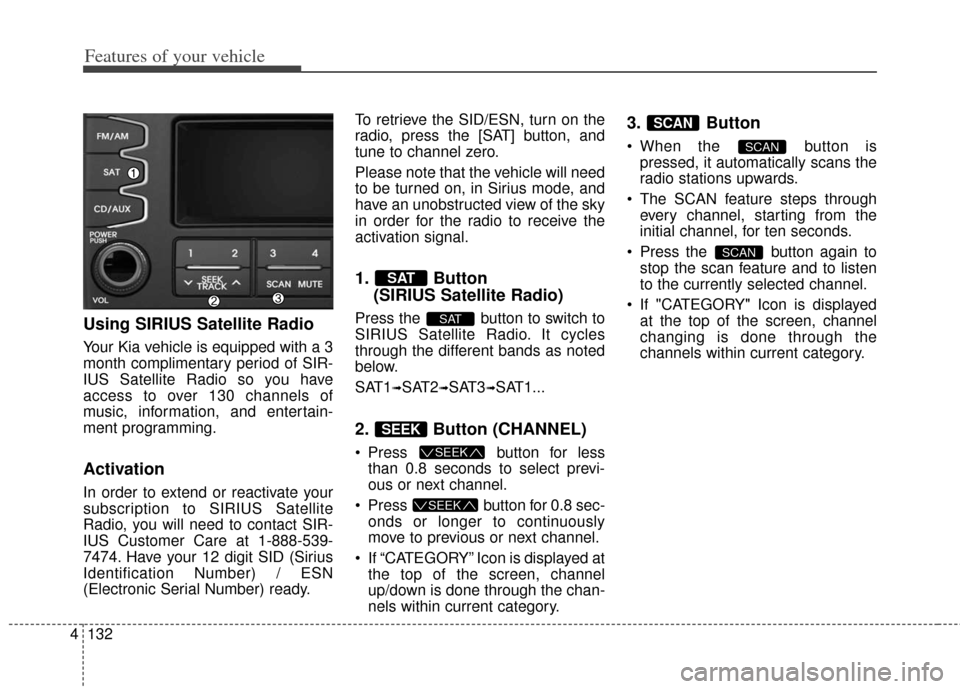
1. Button
(SIRIUS Satellite Radio)
Press the button to switch to
SIRIUS Satellite Radio. It cycles
through the different bands as noted
below.
SAT1
➟SAT2➟SAT3➟SAT1...
2. Button (CHANNEL)
Press button for less
than 0.8 seconds to select previ-
ous or next channel.
Press button for 0.8 sec- onds or longer to continuously
move to previous or next channel.
If “CATEGORY” Icon is displayed at the top of the screen, channel
up/down is done through the chan-
nels within current category.
3. Button
When the button ispressed, it automatically scans the
radio stations upwards.
The SCAN feature steps through every channel, starting from the
initial channel, for ten seconds.
Press the button again to stop the scan feature and to listen
to the currently selected channel.
If "CATEGORY" Icon is displayed at the top of the screen, channel
changing is done through the
channels within current category.
SCAN
SCAN
SCAN
SEEK
SEEK
SEEK
SAT
SAT
Page 212 of 393
4133
Features of your vehicle
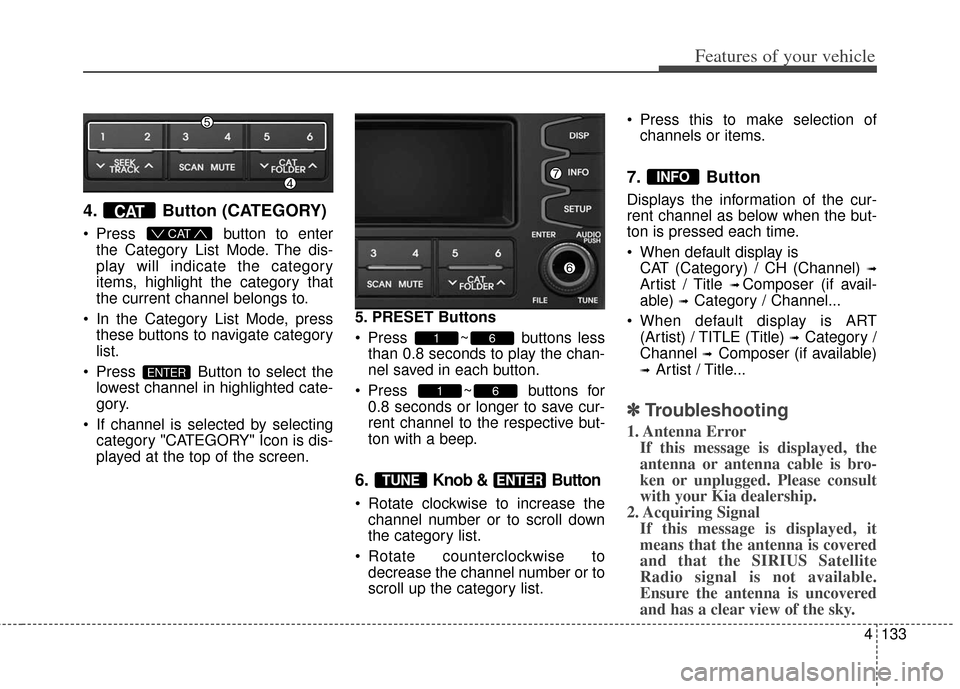
4. Button (CATEGORY)
Press button to enter
the Category List Mode. The dis-
play will indicate the category
items, highlight the category that
the current channel belongs to.
In the Category List Mode, press these buttons to navigate category
list.
Press Button to select the lowest channel in highlighted cate-
gory.
If channel is selected by selecting category "CATEGORY" Icon is dis-
played at the top of the screen. 5. PRESET Buttons
Press ~ buttons less
than 0.8 seconds to play the chan-
nel saved in each button.
Press ~ buttons for 0.8 seconds or longer to save cur-
rent channel to the respective but-
ton with a beep.
6. Knob & Button
Rotate clockwise to increase thechannel number or to scroll down
the category list.
Rotate counterclockwise to decrease the channel number or to
scroll up the category list. Press this to make selection of
channels or items.
7. Button
Displays the information of the cur-
rent channel as below when the but-
ton is pressed each time.
When default display isCAT (Category) / CH (Channel)
➟
Artist / Title ➟ Composer (if avail-
able)
➟ Category / Channel...
When default display is ART (Artist) / TITLE (Title)
➟ Category /
Channel
➟ Composer (if available)
➟ Artist / Title...
✽ ✽ Troubleshooting
1. Antenna Error
If this message is displayed, the
antenna or antenna cable is bro-
ken or unplugged. Please consult
with your Kia dealership.
2. Acquiring Signal If this message is displayed, it
means that the antenna is covered
and that the SIRIUS Satellite
Radio signal is not available.
Ensure the antenna is uncovered
and has a clear view of the sky.
INFO
ENTERTUNE
61
61
ENTER
CAT
CAT
Page 213 of 393
Features of your vehicle
134
4
BLUETOOTH®WIRELESS TECH-
NOLOGY PHONE OPERATION
Do not use a cellular phone or per-
for m
Bluetooth®wireless technolo-
gy settings (e.g. pairing a phone)
while driving.
Some
Bluetooth®wireless technol-
ogy-enabled phones may not be
recognized by the system or fully
compatible with the system.
Before using
Bluetooth®wireless
technology related features of the
audio system, refer your phone’s
User’s Manual for phone-side
Bluetooth®wireless technology
operations.
The phone must be paired to the audio system to use
Bluetooth®
wireless technologyrelated fea-
tures.
You will not be able to use the hands-free feature when your
phone (in the car) is outside of the
cellular service area (e.g. in a tun-
nel, in a underground, in a moun-
tainous area, etc.). If the cellular phone signal is poor
or the vehicles interior noise is too
loud, it may be difficult to hear the
other person’s voice during a call.
Do not place the phone near or inside metallic objects, otherwise
communications with
Bluetooth®
wireless technology system or cel-
lular service stations can be dis-
turbed.
While a phone is connected through
Bluetooth®wireless tech-
nology your phone may discharge
quicker than usual for additional
Bluetooth®wireless technology-
related operations.
Some cellular phones or other devices may cause interference
noise or malfunction to audio sys-
tem. In this case, store the device
in a different location may resolve
the situation.
Please save your phone name in English, or your phone name may
not be displayed correctly. If you need more information about
Kia’s
Bluetooth®wireless technolo-
gy. Contact kia website
“www.kia.com” (OWNERS>General
Info>
Bluetooth®wireless technolo-
gy).
Page 215 of 393
Features of your vehicle
136
4
■Receiving a Phone Call
When receiving a phone call, a ring-
tone is audible from speakers and
the audio system changes into tele-
phone mode.
When receiving a phone call,
“Incoming call” message and incom-
ing phone number (if available) are
displayed on the audio.
- Press button on the steering wheel.
- Press button on the steering
wheel.
- Use VOLUME buttons on the steer- ing wheel.
(Private Call):
- Press and hold button on the steering wheel until the audio sys-
tem transfers a call to the phone.■Talking on the Phone
When talking on the phone, “Active
Call” message and the other party’s
phone number (if available) are dis-
played on the audio.
- Press button on the steering wheel.
■Bluetooth®wireless technology
Audio Music Streaming
The audio system supports
Bluetooth®wireless technology
A2DP (Audio Advanced Distribution
Profile) and AVRCP (Audio Video
Remote Control Profile) technolo-
gies.
Both profiles provide steaming of
music via compatible “PAIRED”
Bluetooth®wireless technology
enabled Cellular phone.
To stream music from the
Bluetooth®
wireless technology enabled cellular
phone, play your music files on your
cellular phone according to your cel-
lular phone user’s manual and press
the button on the audio sys-
tem until “MP3 play” is displayed on
the LCD.
The audio system head unit displays
‘MP3 MODE’.
CD/AUX
Page 217 of 393
![KIA Soul 2013 1.G Owners Guide Features of your vehicle
138
4
➀ Press button to enter
SETUP mode.
\b Select “Phone”, then “Pair” in
PHONE menu.
➂ The audio displays “Device :
[Name] passkey: 0000”
➃ Search and](/img/2/2948/w960_2948-216.png "KIA Soul 2013 1.G Owners Guide Features of your vehicle
138
4
➀ Press button to enter
SETUP mode.
\b Select “Phone”, then “Pair” in
PHONE menu.
➂ The audio displays “Device :
[Name] passkey: 0000”
➃ Search and")
Features of your vehicle
138
4
➀ Press button to enter
SETUP mode.
\b Select “Phone”, then “Pair” in
PHONE menu.
➂ The audio displays “Device :
[Name] passkey: 0000”
➃ Search and select the device
name in your mobile phone to
starting the pairing process.
NOTE:
• If the phone is paired with two or
more vehicles of the same model,
some phones may not handle
Bluetooth®wireless technology
enabled devices of that name cor-
rectly. In this case, you may need to
change the name displayed on your
phone.
For example, if the vehicles'
name is KMC CAR, you may
need to change the name dis-
played on you phone from
KMC_CAR to JOHNS_CAR or
KMC CAR_1 to avoid ambiguity.
Refer to your phone User’s
Guide, or contact your cellular
carrier or phone manufacturer for
instructions.
When the
Bluetooth®wireless tech-
nology system is enabled, the phone
previously used is automatically
selected and re-connected. If you
want to select different phone previ-
ously paired, the phone can be
selected through “Select Phone”
menu.
Only a selected phone can be used
with the hands-free system at a time.
➀ Press button to enter
SETUP mode.
\b Select “Phone”, then “Select” in
PHONE menu. ➂
Select desired phone name from
the list shown.
➃ The
Bluetooth®wireless technolo-
gy icon appears on the upper side
of audio display when a phone is
connected.
SETUP
SETUP