display KIA Soul 2013 1.G Owner's Guide
[x] Cancel search | Manufacturer: KIA, Model Year: 2013, Model line: Soul, Model: KIA Soul 2013 1.GPages: 393, PDF Size: 8.76 MB
Page 222 of 393
4143
Features of your vehicle
➀ Press button.
\b Say "Phonebook".
➂ Say "Add Entry" after prompt.
➃ Say "By Phone" to proceed.
➄ Say “Yes” to confirm.
\f Your phone will start to transfer
phone/contact list to the audio
system.
This process may take over 10 minutes depending on the phone
model and number of entries
➆ Wait till the audio displays
“Transfer Complete” message.
Changing Name
The registered names can be modi-
fied.
➀ Press button.
\b Say “Phonebook”.
➂ Say “Change Name” after prompt.
➃ Say the name of the entry (voice
tag).
➄ Say “Yes” to confirm.
\f Say new desired name.
Deleting Name
The registered names can be delet-
ed.
➀ Press button.
\b Say “Phonebook”.
➂ Say “Delete Name” after prompt.
➃ Say the name of the entry (voice
tag).
➄ Say “Yes” to confirm.■Bluetooth®wireless Technology
Audio Speaker Adaptation
Speaker adaptation will improve per-
formance of voice recognition sys-
tem to a particular user voice.
This will degrade the performance for
other users.
➀ Press button for 10sec.
\b Say “Record profile”.
➂ Say “Yes”.
➃ Say the word displayed on Radio.
➀ Press button for 10sec.
\b Say “Delete profile”.
➂ Say “Yes”.
Page 233 of 393
511
Driving your vehicle
Even if the smart key is in the vehi-cle, if it is far away from you, the
engine may not start.
When the ENGINE START/STOP button is in the ACC position or
above, if any door is opened, the
system checks for the smart key. If
the smart key is not in the vehicle,
the " " indicator will blink or the
warning "Key is not in vehicle" will
illuminate on the LCD display. And
if all doors are closed, the chime
will sound for 5 seconds. The indi-
cator or warning will turn off while
the vehicle is moving. Always have
the smart key with you.
The engine will start, only when the
smart key is in the vehicle. If the engine stalls while the vehicle
is in motion, do not attempt to move
the shift lever to the P (Park) posi-
tion. If the traffic and road conditions
permit, you may put the shift lever in
the N (Neutral) position while the
vehicle is still moving and press the
ENGINE START/STOP button in an
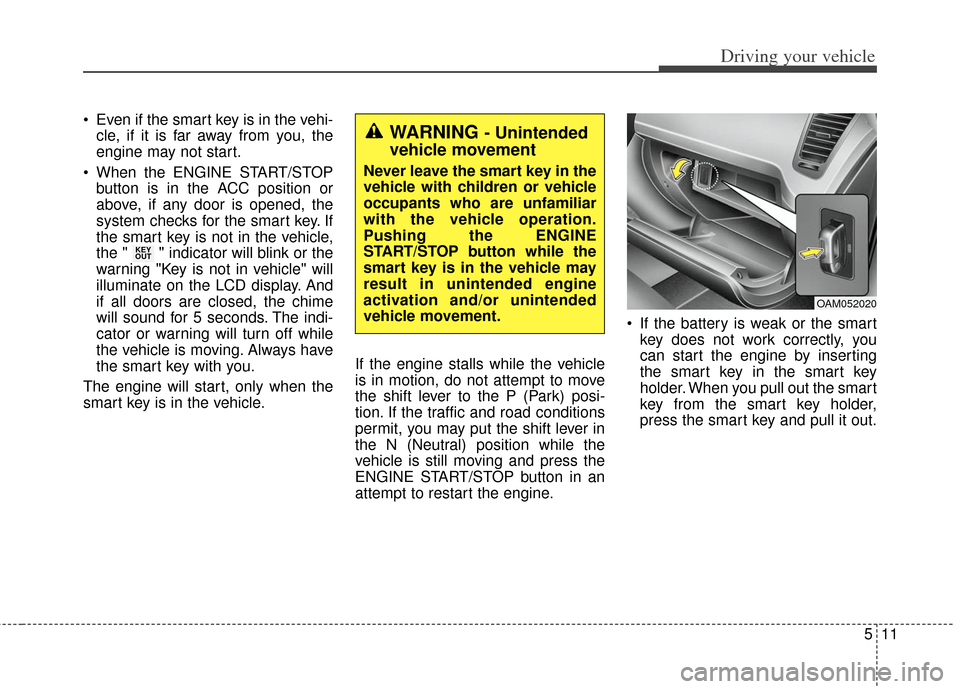
attempt to restart the engine. If the battery is weak or the smart
key does not work correctly, you
can start the engine by inserting
the smart key in the smart key
holder. When you pull out the smart
key from the smart key holder,
press the smart key and pull it out.
KEY
OUT
WARNING - Unintended
vehicle movement
Never leave the smart key in the
vehicle with children or vehicle
occupants who are unfamiliar
with the vehicle operation.
Pushing the ENGINE
START/STOP button while the
smart key is in the vehicle may
result in unintended engine
activation and/or unintended
vehicle movement.
OAM052020
Page 235 of 393
513
Driving your vehicle
Your vehicle may be equipped with
the ISG system, which reduces fuel
consumption by automatically shut-
ting down the engine, when the vehi-
cle is at a standstill. (For example :
red light, stop sign and traffic jam)
The engine starts automatically as
soon as the starting conditions are
met.
The ISG system is ON whenever the
engine is running.
✽ ✽NOTICE
When the engine automatically
starts by the ISG system, some
warning lights (ABS, ESC, ESC
OFF, EPS or Parking brake warn-
ing light) may turn on for a few sec-
onds.
This happens because of low battery
voltage. It does not mean the system
is malfunctioning.
Auto stop
To stop the engine in idle stop
mode
Stop the vehicle completely by
pressing the brake pedal. You must reach a speed of at least
8 km/h (5 mph) since last idle stop.
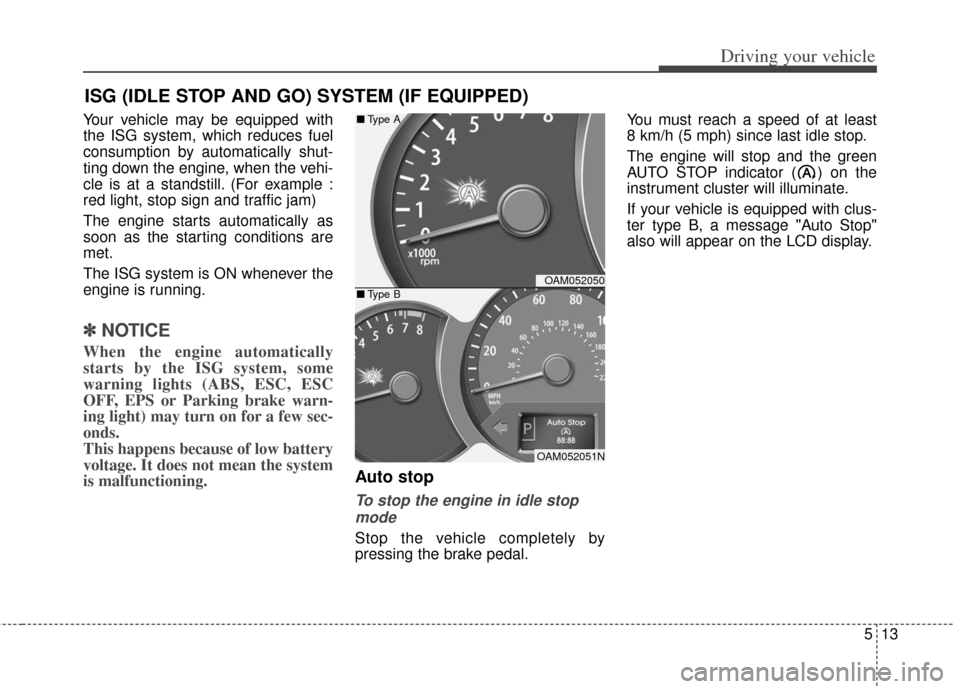
The engine will stop and the green
AUTO STOP indicator ( ) on the
instrument cluster will illuminate.
If your vehicle is equipped with clus-
ter type B, a message "Auto Stop"
also will appear on the LCD display.
ISG (IDLE STOP AND GO) SYSTEM (IF EQUIPPED)
OAM052050
OAM052051N
■
Type A
■ Type B
Page 236 of 393
Driving your vehicle
14
5
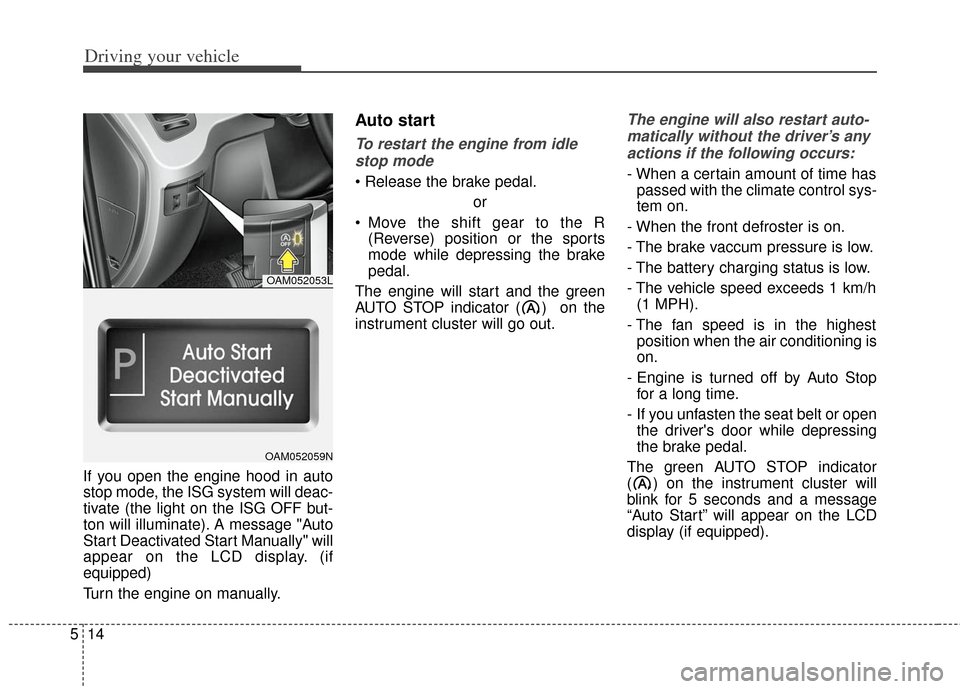
If you open the engine hood in auto
stop mode, the ISG system will deac-
tivate (the light on the ISG OFF but-
ton will illuminate). A message "Auto
Start Deactivated Start Manually" will
appear on the LCD display. (if
equipped)
Turn the engine on manually.
Auto start
To restart the engine from idle
stop mode
or
Move the shift gear to the R (Reverse) position or the sports
mode while depressing the brake
pedal.
The engine will start and the green
AUTO STOP indicator ( ) on the
instrument cluster will go out.
The engine will also restart auto- matically without the driver’s anyactions if the following occurs:
- When a certain amount of time has passed with the climate control sys-
tem on.
- When the front defroster is on.
- The brake vaccum pressure is low.
- The battery charging status is low.
- The vehicle speed exceeds 1 km/h (1 MPH).
- The fan speed is in the highest position when the air conditioning is
on.
- Engine is turned off by Auto Stop for a long time.
- If you unfasten the seat belt or open the driver's door while depressing
the brake pedal.
The green AUTO STOP indicator
( ) on the instrument cluster will
blink for 5 seconds and a message
“Auto Start” will appear on the LCD
display (if equipped).
OAM052053L
OAM052059N
Page 237 of 393
515
Driving your vehicle
Condition of ISG system oper-
ation
The ISG system will operateunder the following condition:
- The driver’s seat belt is fastened.
- The driver’s door and engine hood are closed.
- The brake vaccum pressure is ade- quate.
- The battery is sufficiently charged.
- The outside temperature is between -2°C to 35°C (28.4°F to 95°F).
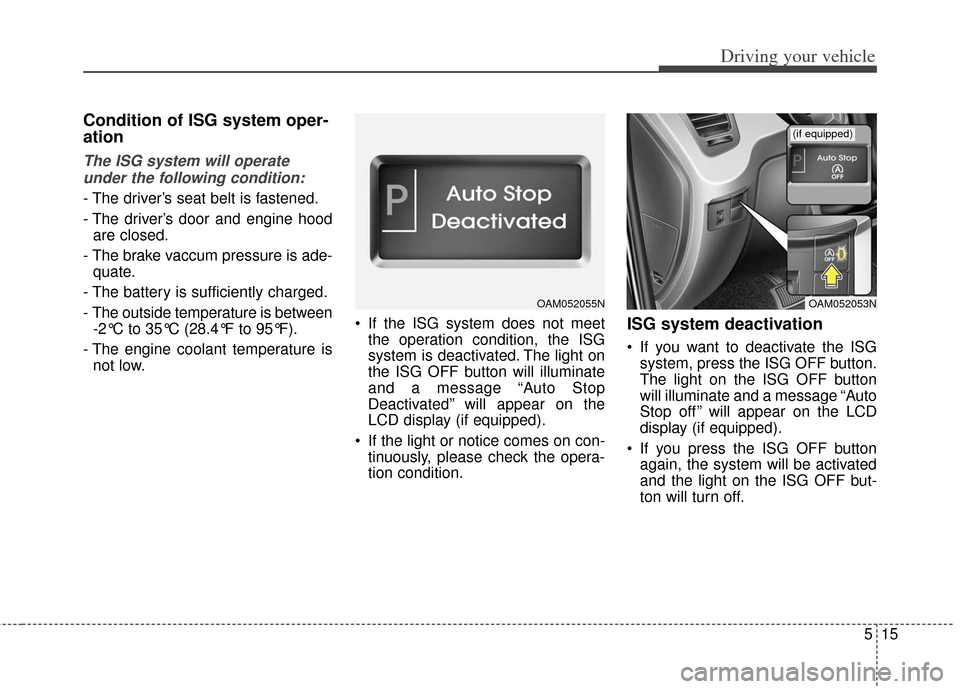
- The engine coolant temperature is not low. If the ISG system does not meet
the operation condition, the ISG
system is deactivated. The light on
the ISG OFF button will illuminate
and a message “Auto Stop
Deactivated” will appear on the
LCD display (if equipped).
If the light or notice comes on con- tinuously, please check the opera-
tion condition.
ISG system deactivation
If you want to deactivate the ISGsystem, press the ISG OFF button.
The light on the ISG OFF button
will illuminate and a message “Auto
Stop off ” will appear on the LCD
display (if equipped).
If you press the ISG OFF button again, the system will be activated
and the light on the ISG OFF but-
ton will turn off.
OAM052055NOAM052053N
(if equipped)
Page 243 of 393
521
Driving your vehicle
For smooth operation, depress thebrake pedal when shifting from N(Neutral) to a forward or reversegear.
When stopped on an upgrade, do not
hold the vehicle with engine power.
Use the service brake or the parking
brake.
Transaxle ranges
The indicator light in the instrument
cluster displays the shift lever posi-
tion when the ignition switch is in the
ON position.
P (Park)
Always come to a complete stop
before shifting into P (Park). This
position locks the transaxle and pre-
vents the front wheels from rotating.
Shifting into P (Park) while the vehi-
cle is in motion will cause the drive
wheels to lock which will cause you
to lose control of the vehicle.
WARNING - Automatic transaxle
Before leaving the driver’s seat,
always make sure the shift lever
is in the P (Park) position; then
set the parking brake fully and
shut the engine off. Do not use
the P position in place of the
parking brake. Always make
sure the shift lever is latched in
the P position and set the park-
ing brake fully. Unexpected and
sudden vehicle movement can
occur if these precautions are
not followed.
CAUTION - Transaxle
To avoid damage to your
transaxle, do not acceleratethe engine in R (Reverse) orany forward gear position withthe brakes on.
The transaxle may be dam- aged if you shift into P (Park)while the vehicle is in motion.
Page 302 of 393
623
What to do in an emergency
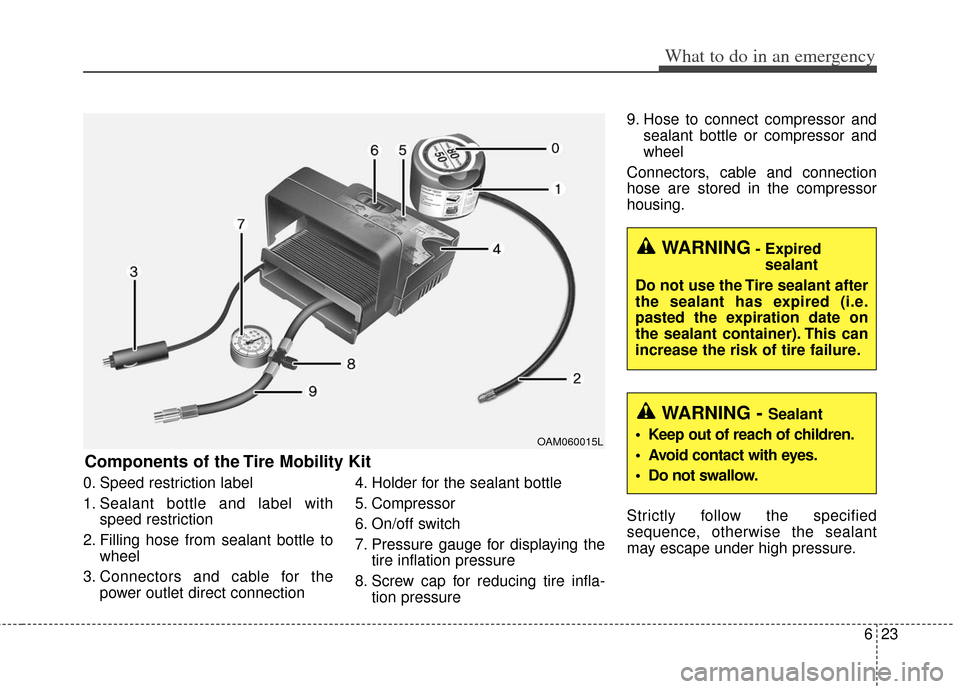
0. Speed restriction label
1. Sealant bottle and label withspeed restriction
2. Filling hose from sealant bottle to wheel
3. Connectors and cable for the power outlet direct connection 4. Holder for the sealant bottle
5. Compressor
6. On/off switch
7. Pressure gauge for displaying the
tire inflation pressure
8. Screw cap for reducing tire infla- tion pressure 9. Hose to connect compressor and
sealant bottle or compressor and
wheel
Connectors, cable and connection
hose are stored in the compressor
housing.
Strictly follow the specified
sequence, otherwise the sealant
may escape under high pressure.
Components of the Tire Mobility Kit
OAM060015L
WARNING- Expired sealant
Do not use the Tire sealant after
the sealant has expired (i.e.
pasted the expiration date on
the sealant container). This can
increase the risk of tire failure.
WARNING - Sealant
• Keep out of reach of children.
Avoid contact with eyes.
Do not swallow.
Page 358 of 393
Maintenance
48
7
3. Checking tire life (TIN : Tire
Identification Number)
Any tires that are over 6 years old,
based on the manufacturing date,
(including the spare tire) should be
replaced by new ones. You can find
the manufacturing date on the tire
sidewall (possibly on the inside of the
wheel), displaying the DOT Code.
The DOT Code is a series of num-
bers on a tire consisting of numbers
and English letters. The manufactur-
ing date is designated by the last four
digits (characters) of the DOT code.
DOT : XXXX XXXX OOOO
The front part of the DOT means a
plant code number, tire size and
tread pattern and the last four num-
bers indicate week and year manu-
factured.
For example:
DOT XXXX XXXX 1611 represents
that the tire was produced in the 16th
week of 2011.
4. Tire ply composition and mate-rial
The number of layers or plies of rub-
ber-coated fabric in the tire. Tire
manufacturers also must indicate the
materials in the tire, which include
steel, nylon, polyester, and others.
The letter "R" means radial ply con-
struction; the letter "D" means diago-
nal or bias ply construction; and the
letter "B" means belted-bias ply con-
struction.
5. Maximum permissible inflationpressure
This number is the greatest amount
of air pressure that should be put in
the tire. Do not exceed the maximum
permissible inflation pressure. Refer
to the Tire and Loading Information
label for recommended inflation
pressure.
6. Maximum load rating
This number indicates the maximum
load in kilograms and pounds that
can be carried by the tire. When
replacing the tires on the vehicle,
always use a tire that has the same
load rating as the factory installed
tire.
WARNING - Tire age
Replace tires within the recom-
mended time frame. Failure to
replace tires as recommended
can result in sudden tire failure,
which could lead to a loss of
control and an accident.