instrument cluster KIA Soul 2014 2.G Owner's Manual
[x] Cancel search | Manufacturer: KIA, Model Year: 2014, Model line: Soul, Model: KIA Soul 2014 2.GPages: 500, PDF Size: 13.89 MB
Page 3 of 500

ii
1
2
3
4
5
6
7
8I
IntroductionHow to use this manual / Fuel requirements / Vehicle break-in process
Your vehicle at a glance
Exterior overview / Interior overview / Instrument panel overview / Engi\
ne compartment
Safety features of your vehicle
Seats / Seat belts / Child restraint system / Air bag
Features of your vehicleKeys / Door locks / Tailgate / Windows / Hood / Fuel filler lid / Panoramic sunroof / Steering wheel / Mirrors/ Instrument cluster / Lighting / Wipers & Washers / Climate control system / Audio system / Etc.
Driving your vehicleBefore driving / Engine start/stop button / Transaxle / Brake system / Cruise control system /
Active ECO system / Winter driving / Vehicle load limit / Etc.
What to do in an emergencyRoad warning / Emergency while driving / Emergency starting / Engine overheat / Flat tire / Towing / Etc.
MaintenanceEngine compartment / Maintenance service / Engine oil / Engine coolant /\
Brake fluid / Washer fluid /
Parking brake / Air cleaner / Wiper blades / Battery / Tire and wheels / Fuses / Etc.
Specifications & Consumer information
Index
table of contents
Page 14 of 500
25
Your vehicle at a glance
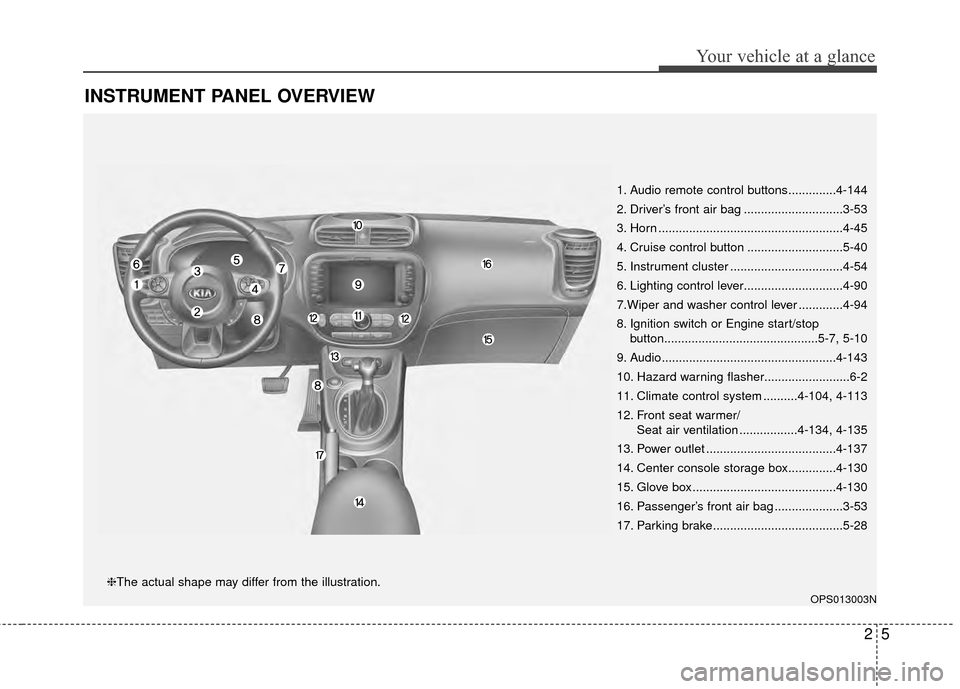
INSTRUMENT PANEL OVERVIEW
1. Audio remote control buttons..............4-144
2. Driver’s front air bag .............................3-53
3. Horn ......................................................4-45
4. Cruise control button ............................5-40
5. Instrument cluster .................................4-54
6. Lighting control lever.............................4-90
7.Wiper and washer control lever .............4-94
8. Ignition switch or Engine start/stopbutton.............................................5-7, 5-10
9. Audio...................................................4-143
10. Hazard warning flasher.........................6-2
11. Climate control system ..........4-104, 4-113
12. Front seat warmer/ Seat air ventilation .................4-134, 4-135
13. Power outlet ......................................4-137
14. Center console storage box..............4-130
15. Glove box ..........................................4-130
16. Passenger’s front air bag ....................3-53
17. Parking brake......................................5-28
OPS013003N
❈The actual shape may differ from the illustration.
Page 62 of 500
Safety features of your vehicle
46
3
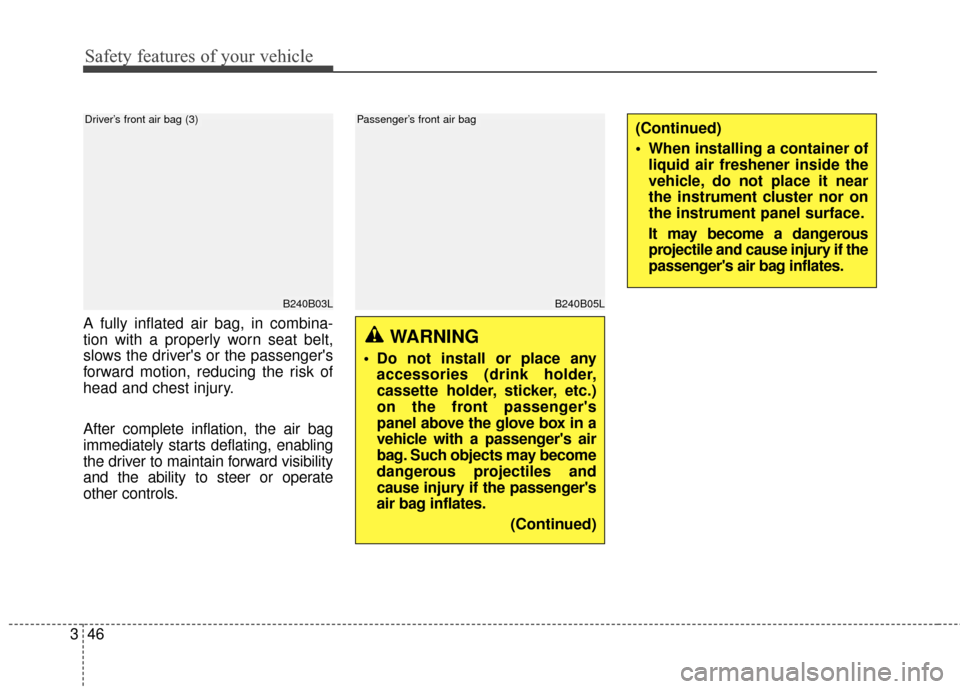
A fully inflated air bag, in combina-
tion with a properly worn seat belt,
slows the driver's or the passenger's
forward motion, reducing the risk of
head and chest injury.
After complete inflation, the air bag
immediately starts deflating, enabling
the driver to maintain forward visibility
and the ability to steer or operate
other controls.
B240B03L
Driver’s front air bag (3)
WARNING
Do not install or place any
accessories (drink holder,
cassette holder, sticker, etc.)
on the front passenger's
panel above the glove box in a
vehicle with a passenger's air
bag. Such objects may become
dangerous projectiles and
cause injury if the passenger's
air bag inflates.
(Continued)
(Continued)
When installing a container ofliquid air freshener inside the
vehicle, do not place it near
the instrument cluster nor on
the instrument panel surface.
It may become a dangerous
projectile and cause injury if the
passenger's air bag inflates.
B240B05L
Passenger’s front air bag
Page 88 of 500
Instrument cluster . . . . . . . . . . . . . . . . . . . . . . . . . 4-54
. . . . . . . . . . . . . . . . . . . . 4-55
. . . . . . . . . . . . . . . . . . . . . . . . . 4-55
. . . . . . . . . . . . . . . . . . . . . . . . . . . . . . . . . . . . \
. 4-56
. . . . . . . . . . . . . . . . . . . . . . 4-60
LCD Display . . . . . . . . . . . . . . . . . . . . . . . . . . . . . . 4-62
. . . . . . . . . . . . . . . . . . . . . . . . . . . . . . . . . 4-62
. . . . . . . . . . . . . . . . . . . . . . . . . . . . . . . . 4-63
. . . . . . . . . . . . . . . . . . . . . . . . . . . 4-64
. . . . . . . . . . . . . . . . . . . . . . . . . . . . . . . . . . . 4-\
66
. . . . . . . . . . . . . . . . . . . . . . . . . . 4-67
. . . . . . . . . . . . . . . . . . . . . . . . . . . . 4-67
Trip computer . . . . . . . . . . . . . . . . . . . . . . . . . . . . . 4-72
. . . . . . . . . . . . . . . . . . . . . . . . . . . . . . . . . . . . \
4-73
. . . . . . . . . . . . . . . . . . . . . . . . . . . . . . . 4-74
Warning and indicator lights . . . . . . . . . . . . . . . . 4-76
. . . . . . . . . . . . . . . . . . . . . . . . . . . . . . . 4-76
. . . . . . . . . . . . . . . . . . . . . . . . . . . . . . 4-83
Rear camera display . . . . . . . . . . . . . . . . . . . . . . . 4-88
Lighting . . . . . . . . . . . . . . . . . . . . . . . . . . . . . . . . . . 4-89\
. . . . . . . . . . . . . . . . . . . . . . . . . . . . . 4-89
. . . . . . . . . . . . . . . . . . . . . . . . . 4-89 . . . . . . . . . . . . . . . . . . . . . . . . . . . . . . 4-90
. . . . . . . . . . . . . . . . . . . . . . . . . 4-91
. . . . . . . . . . . . 4-92
. . . . . . . . . . . . . . . . . . . . . . . . . . . . . . . 4-93
Wipers and Washers . . . . . . . . . . . . . . . . . . . . . . . 4-94
. . . . . . . . . . . . . . . . . . . . . . 4-94
. . . . . . . . . . . . . . . . . . . . 4-94
. . . . . . . . . . . . . . . . . . . . . . . . . . . 4-94
. . . . . . . . . . 4-96
Interior light . . . . . . . . . . . . . . . . . . . . . . . . . . . . . . 4-97
. . . . . . . . . . . . . . . . . . . . . . . . . . . . . . . . . . 4-97\
. . . . . . . . . . . . . . . . . . . . . . . . . . . . . . . . . . 4-98\
. . . . . . . . . . . . . . . . . . . . . . . . . . 4-99
. . . . . . . . . . . . . . . . . . . . . . . . . . 4-99
. . . . . . . . . . . . . . . . . . . . . . . . . . . . . 4-101
. . . . . . . . . . . . . . . . . . . . . . . . . . 4-101
Defroster . . . . . . . . . . . . . . . . . . . . . . . . . . . . . . . . 4-102
. . . . . . . . . . . . . . . . . . . . . . . 4-102
Manual climate control system . . . . . . . . . . . . . 4-104
. . . . . . . . . . . . . . . . . . 4-105
. . . . . . . . . . . . . . . . . . . . . . . . . . . . 4-110
. . . . . . . . . . . . . . . . . . . . . . 4-112
4
Page 129 of 500
443
Features of your vehicle
Electric power steering (EPS)
The power steering uses a motor to
assist you in steering the vehicle. If
the engine is off or if the power steer-
ing system becomes inoperative, the
vehicle may still be steered, but it will
require increased steering effort.
The motor driven power steering is
controlled by a power steering con-
trol unit which senses the steering
wheel torque and vehicle speed to
command the motor.
The steering becomes heavier as
the vehicle’s speed increases and
becomes lighter as the vehicle’s
speed decreases for optimum steer-
ing control.
Should you notice any change in the
effort required to steer during normal
vehicle operation, have the power
steering checked by an authorized
Kia dealer.
✽ ✽NOTICE
The following symptoms may occur
during normal vehicle operation:
• The EPS warning light does not
illuminate.
• The steering gets heavy immedi- ately after turning the ignition
switch on. This happens as the sys-
tem performs the EPS system
diagnostics. When the diagnostics
are completed, the steering wheel
will return to its normal condition.
• A click noise may be heard from the EPS relay after the ignition
switch is turned to the ON or
LOCK (OFF) position.
• A motor noise may be heard when the vehicle is at a stop or at a low
driving speed.
• If the Electric Power Steering System does not operate normally,
the warning light will illuminate on
the instrument cluster. The steer-
ing wheel may become difficult to
control or operate abnormally.
Take your vehicle to an authorized
Kia dealer and have the vehicle
checked as soon as possible. (Continued)
STEERING WHEEL
CAUTION
If the Electric Power Steering
System does not operate nor-mally, the warning light willilluminate on the instrumentcluster. The steering wheelmay require increased steer-ing effort. Take your vehicle toan authorized Kia dealer andhave the vehicle checked assoon as possible.
When you operate the steering wheel in low temperature,noise may occur. If temperaturerises, the noise will likely disap-pear. This is a normal condition.
When the vehicle is stationary, when the steering wheel isturned all the way to the left orright continuously, the steer-ing wheel becomes harder toturn. The power assist is limit-ed to protect the motor fromoverheating.
As time passes, the steeringwheel return to its normalcondition.
Page 132 of 500
Features of your vehicle
46
4
FLEX STEER
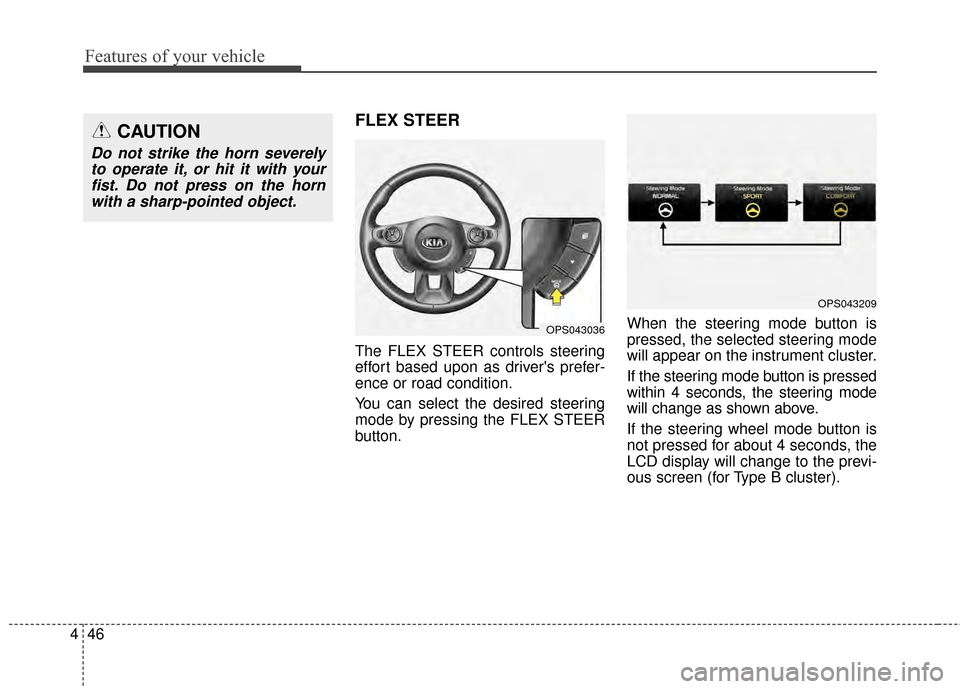
The FLEX STEER controls steering
effort based upon as driver's prefer-
ence or road condition.
You can select the desired steering
mode by pressing the FLEX STEER
button. When the steering mode button is
pressed, the selected steering mode
will appear on the instrument cluster.
If the steering mode button is pressed
within 4 seconds, the steering mode
will change as shown above.
If the steering wheel mode button is
not pressed for about 4 seconds, the
LCD display will change to the previ-
ous screen (for Type B cluster).
CAUTION
Do not strike the horn severely
to operate it, or hit it with yourfist. Do not press on the hornwith a sharp-pointed object.
OPS043036
OPS043209
Page 140 of 500
Features of your vehicle
54
4
INSTRUMENT CLUSTER
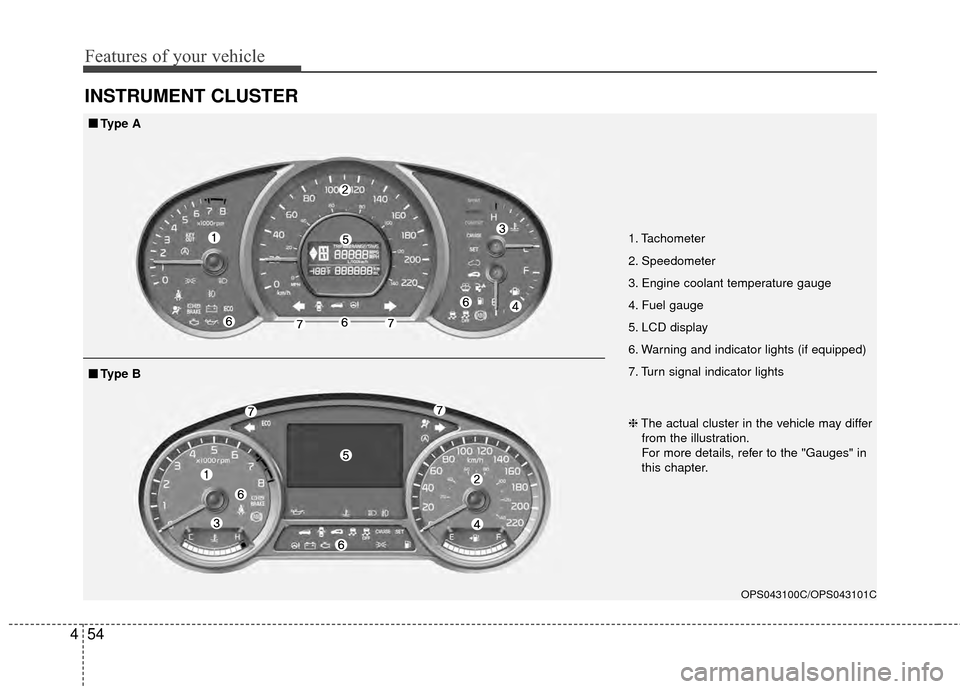
1. Tachometer
2. Speedometer
3. Engine coolant temperature gauge
4. Fuel gauge
5. LCD display
6. Warning and indicator lights (if equipped)
7. Turn signal indicator lights
OPS043100C/OPS043101C
■
■
Type A
❈The actual cluster in the vehicle may differ
from the illustration.
For more details, refer to the "Gauges" in
this chapter.
■
■ Type B
Page 141 of 500
455
Features of your vehicle
Instrument Cluster Control
Adjusting Instrument ClusterIllumination
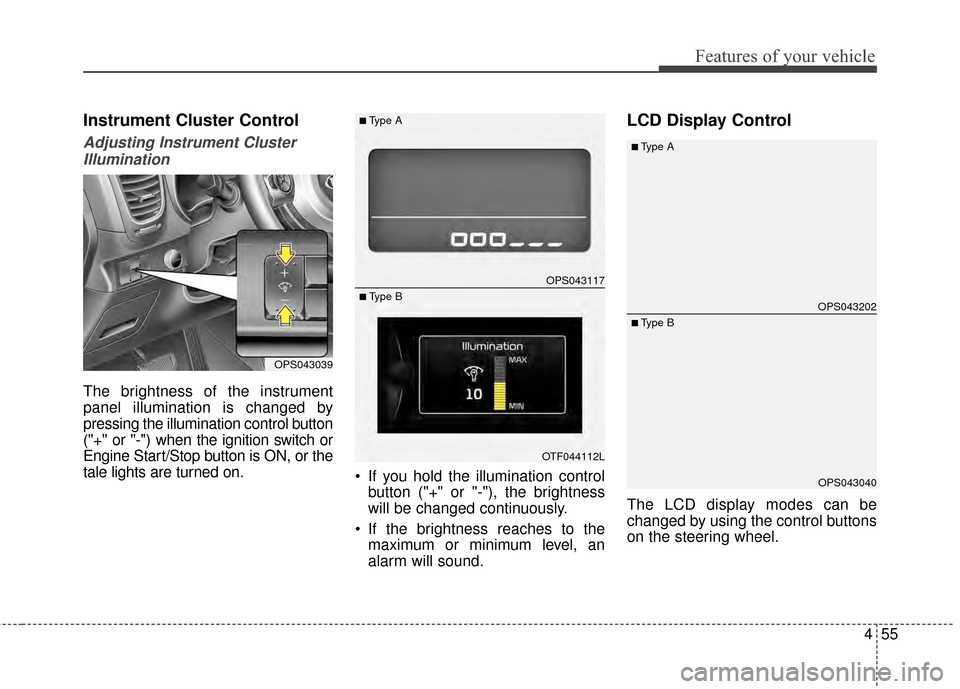
The brightness of the instrument
panel illumination is changed by
pressing the illumination control button
("+" or "-") when the ignition switch or
Engine Start/Stop button is ON, or the
tale lights are turned on. If you hold the illumination control
button ("+" or "-"), the brightness
will be changed continuously.
If the brightness reaches to the maximum or minimum level, an
alarm will sound.
LCD Display Control
The LCD display modes can be
changed by using the control buttons
on the steering wheel.
OPS043039
OPS043117
OTF044112L
■Type A
■ Type BOPS043202
OPS043040
■Type A
■ Type B
Page 323 of 500
Driving your vehicle
36
5
✽
✽
NOTICE
• When operating the vehicle on a
dynamometer, ensure that the
ESC is turned off (ESC OFF light
illuminated). If the ESC is left on,
it may prevent the vehicle speed
from increasing, and result in false
diagnosis.
• Turning the ESC off does not affect ABS or brake system opera-
tion.
Vehicle stability management
(VSM)
This system provides further
enhancements to vehicle stability
and steering responses when a vehi-
cle is driving on a slippery road or a
vehicle detects changes in coeffi-
cient of friction between right wheels
and left wheels when braking.
VSM operation
When the VSM is in operation, ESC
indicator light ( ) blinks.
When the vehicle stability manage-
ment is operating properly, you can
feel a slight pulsation in the vehicle
and/or abnormal steering responses
(EPS). This is only the effect of brake
and EPS control and indicates noth-
ing unusual. The VSM does not operate when:
Driving on bank road such as gra-
dient or incline
Driving in reverse
ESC OFF indicator light ( ) remains on the instrument cluster
EPS indicator light remains on the instrument cluster
VSM operation off
If you press the ESC OFF button to
turn off the ESC, the VSM will also
cancel and the ESC OFF indicator
light ( ) illuminates.
To turn on the VSM, press the button
again. The ESC OFF indicator light
goes out.
Page 327 of 500
Driving your vehicle
40
5
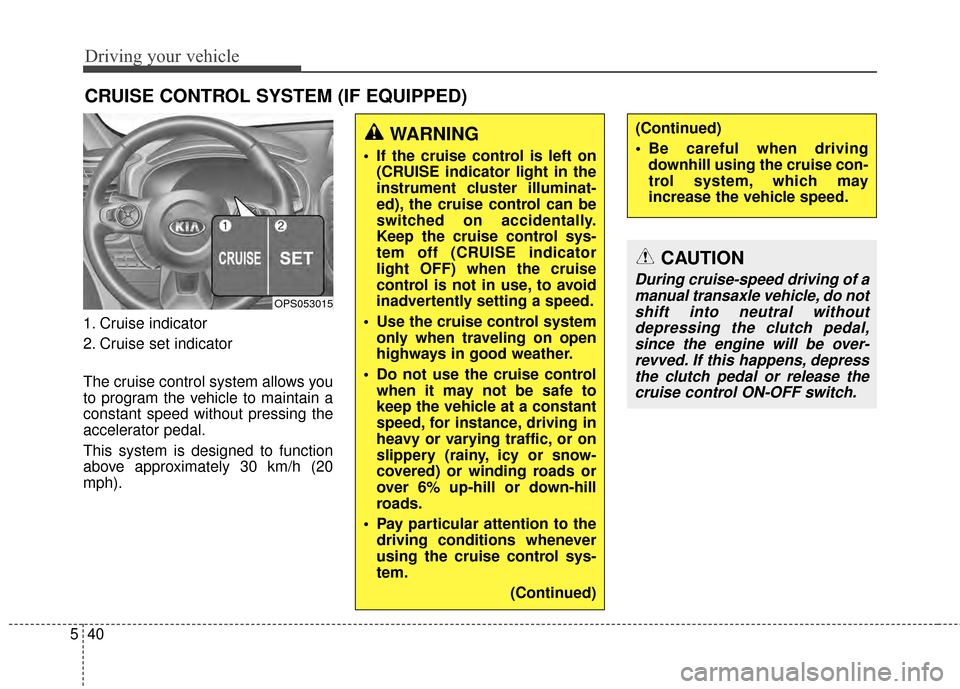
1. Cruise indicator
2. Cruise set indicator
The cruise control system allows you
to program the vehicle to maintain a
constant speed without pressing the
accelerator pedal.
This system is designed to function
above approximately 30 km/h (20
mph).
CRUISE CONTROL SYSTEM (IF EQUIPPED)
WARNING
If the cruise control is left on
(CRUISE indicator light in the
instrument cluster illuminat-
ed), the cruise control can be
switched on accidentally.
Keep the cruise control sys-
tem off (CRUISE indicator
light OFF) when the cruise
control is not in use, to avoid
inadvertently setting a speed.
Use the cruise control system only when traveling on open
highways in good weather.
Do not use the cruise control when it may not be safe to
keep the vehicle at a constant
speed, for instance, driving in
heavy or varying traffic, or on
slippery (rainy, icy or snow-
covered) or winding roads or
over 6% up-hill or down-hill
roads.
Pay particular attention to the driving conditions whenever
using the cruise control sys-
tem.
(Continued)
(Continued)
Be careful when drivingdownhill using the cruise con-
trol system, which may
increase the vehicle speed.
OPS053015
CAUTION
During cruise-speed driving of amanual transaxle vehicle, do notshift into neutral withoutdepressing the clutch pedal,since the engine will be over-revved. If this happens, depressthe clutch pedal or release thecruise control ON-OFF switch.