lock KIA SOUL 2015 Workshop Manual
[x] Cancel search | Manufacturer: KIA, Model Year: 2015, Model line: SOUL, Model: KIA SOUL 2015Pages: 544, PDF Size: 19.81 MB
Page 183 of 544
Features of your vehicle
106
4
System operation
Ventilation
1. Set the mode to the position.
2. Set the air intake control to the
outside (fresh) air position.
3. Set the temperature control to the desired position.
4. Set the fan speed control to the desired speed.
Heating
1. Set the mode to the position.
2. Set the air intake control to theoutside (fresh) air position.
3. Set the temperature control to the desired position.
4. Set the fan speed control to the desired speed.
5. If dehumidified heating is desired, turn the air conditioning system (if
equipped) on.
If the windshield fogs up, set the mode to the
orposition. Operation Tips
To keep dust or unpleasant fumes
from entering the vehicle through
the ventilation system, temporarily
set the air intake control to the
recirculated air position. Be sure to
return the control to the fresh air
position when the irritation has
passed to keep fresh air in the
vehicle. This will help keep the driv-
er alert and comfortable.
Air for the heating/cooling system is drawn in through the grilles just
ahead of the windshield. Care
should be taken that these are not
blocked by leaves, snow, ice or
other obstructions.
To prevent interior fog on the wind- shield, set the air intake control to
the fresh air position and fan speed
to the desired position, turn on the
air conditioning system, and adjust
the temperature control to desired
temperature.
Air conditioning (if equipped)
All Kia Air Conditioning Systems are
filled with R-134a refrigerant.
1. Start the engine. Press the air con- ditioning button.
2. Set the mode to the position.
3. Set the air intake control to the outside air or recirculated air posi-
tion.
4. Adjust the fan speed control and temperature control to maintain
maximum comfort.
When maximum cooling is desired, set the temperature control to the
extreme left position, set the mode
control to the MAX A/C position,
then set the fan speed control to
the highest speed.
Page 196 of 544
4119
Features of your vehicle
Operation Tips
To keep dust or unpleasant fumesfrom entering the vehicle through
the ventilation system, temporarily
set the air intake control to the
recirculated air position. Be sure to
return the control to the fresh air
position when the irritation has
passed to keep fresh air in the
vehicle. This will help keep the driv-
er alert and comfortable.
Air for the heating/cooling system is drawn in through the grilles just
ahead of the windshield. Care
should be taken that these are not
blocked by leaves, snow, ice or
other obstructions.
To prevent interior fog on the wind- shield, set the air intake control to
the fresh air position and fan speed
to the desired position, turn on the
air conditioning system, and adjust
the temperature control to desired
temperature.Air conditioning (if equipped)
All Kia Air Conditioning Systems are
filled with R-134a refrigerant.
1. Start the engine. Press the air con- ditioning button.
2. Set the mode to the position.
3. Set the air intake control to the outside air or recirculated air posi-
tion.
4. Adjust the fan speed control and temperature control to maintain
maximum comfort.
When maximum cooling is desired, set the temperature control to the
extreme left position, set the mode
control to the MAX A/C position,
then set the fan speed control to
the highest speed.CAUTION- Excessive A/C
When using the air conditioningsystem, monitor the enginecoolant closely while driving uphills or in heavy traffic when out-side temperatures are high. Airconditioning system operationmay cause engine overheatingand potential engine damage.Continue to use the blower fanbut turn the air conditioning sys-tem off if the engine coolanttemperature gauge indicatesengine overheating.
Page 206 of 544
4129
Features of your vehicle
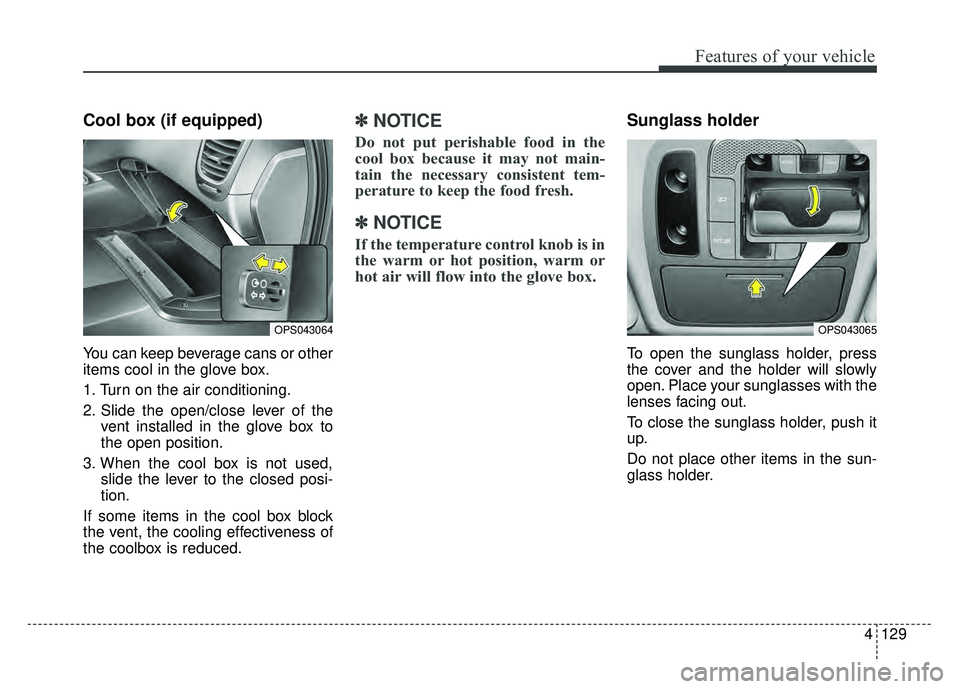
Cool box (if equipped)
You can keep beverage cans or other
items cool in the glove box.
1. Turn on the air conditioning.
2. Slide the open/close lever of thevent installed in the glove box to
the open position.
3. When the cool box is not used, slide the lever to the closed posi-
tion.
If some items in the cool box block
the vent, the cooling effectiveness of
the coolbox is reduced.
✽ ✽
NOTICE
Do not put perishable food in the
cool box because it may not main-
tain the necessary consistent tem-
perature to keep the food fresh.
✽ ✽
NOTICE
If the temperature control knob is in
the warm or hot position, warm or
hot air will flow into the glove box.
Sunglass holder
To open the sunglass holder, press
the cover and the holder will slowly
open. Place your sunglasses with the
lenses facing out.
To close the sunglass holder, push it
up.
Do not place other items in the sun-
glass holder.
OPS043064OPS043065
Page 207 of 544
Features of your vehicle
130
4
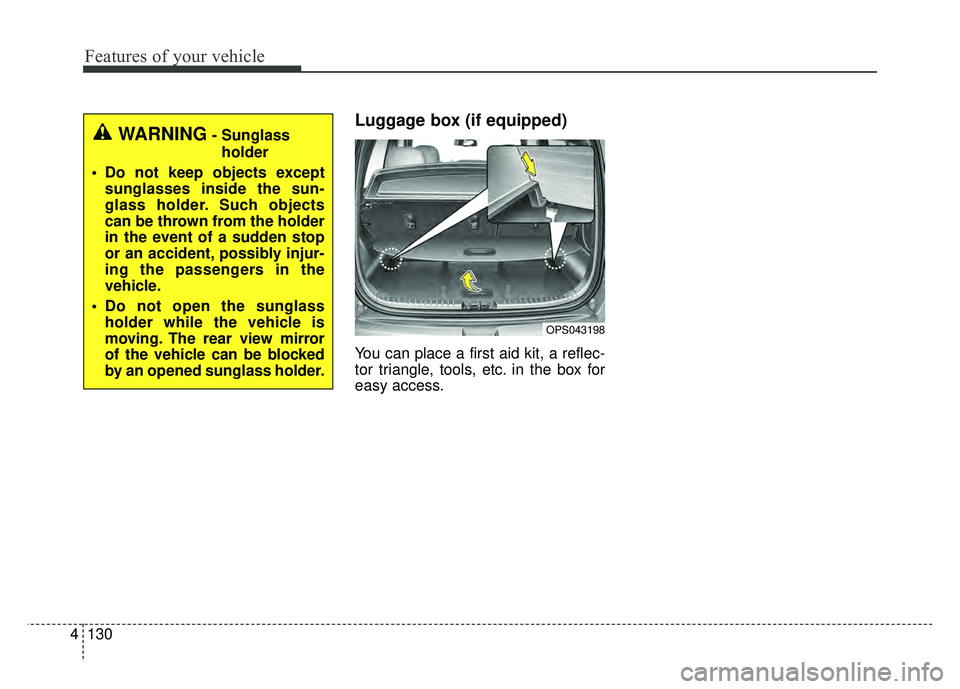
Luggage box (if equipped)
You can place a first aid kit, a reflec-
tor triangle, tools, etc. in the box for
easy access.
OPS043198
WARNING- Sunglass
holder
Do not keep objects except sunglasses inside the sun-
glass holder. Such objects
can be thrown from the holder
in the event of a sudden stop
or an accident, possibly injur-
ing the passengers in the
vehicle.
Do not open the sunglass holder while the vehicle is
moving. The rear view mirror
of the vehicle can be blocked
by an opened sunglass holder.
Page 220 of 544
4143
Features of your vehicle
If you install aftermarket HID head
lamps, your vehicle’s audio and elec-
tronic devices may malfunction.Antenna (if equipped)
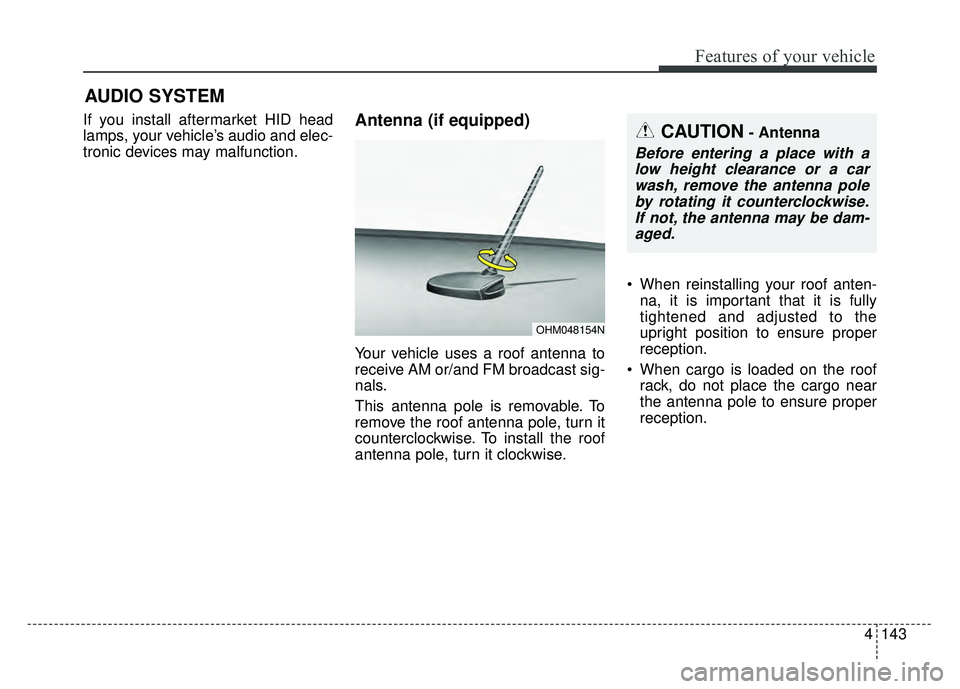
Your vehicle uses a roof antenna to
receive AM or/and FM broadcast sig-
nals.
This antenna pole is removable. To
remove the roof antenna pole, turn it
counterclockwise. To install the roof
antenna pole, turn it clockwise. When reinstalling your roof anten-
na, it is important that it is fully
tightened and adjusted to the
upright position to ensure proper
reception.
When cargo is loaded on the roof rack, do not place the cargo near
the antenna pole to ensure proper
reception.
OHM048154N
AUDIO SYSTEM
CAUTION- Antenna
Before entering a place with alow height clearance or a carwash, remove the antenna poleby rotating it counterclockwise.If not, the antenna may be dam-aged.
Page 225 of 544
Features of your vehicle
148
4
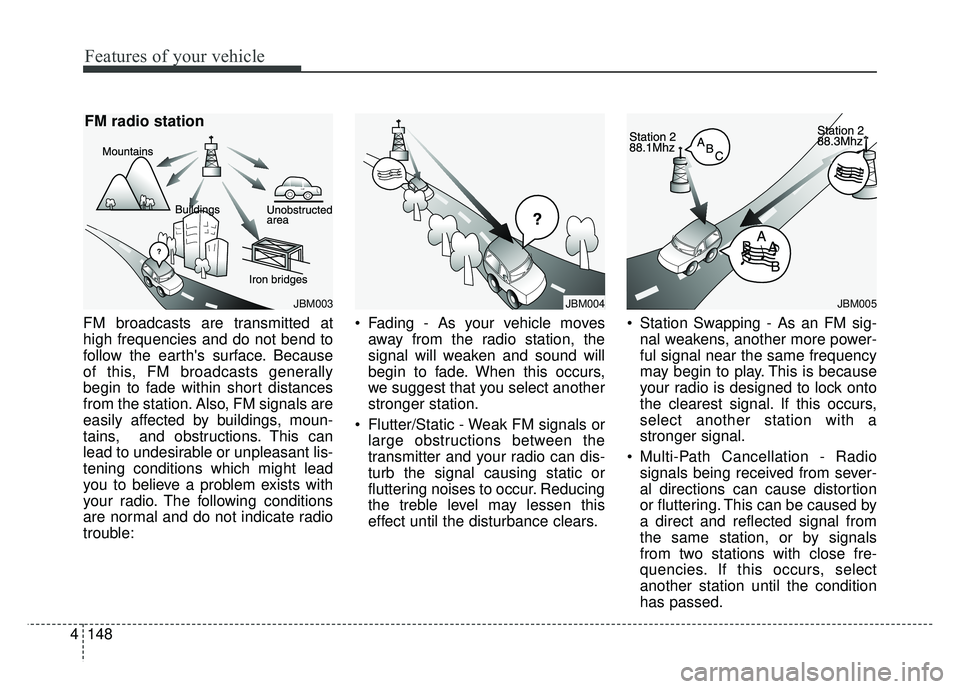
FM broadcasts are transmitted at
high frequencies and do not bend to
follow the earth's surface. Because
of this, FM broadcasts generally
begin to fade within short distances
from the station. Also, FM signals are
easily affected by buildings, moun-
tains, and obstructions. This can
lead to undesirable or unpleasant lis-
tening conditions which might lead
you to believe a problem exists with
your radio. The following conditions
are normal and do not indicate radio
trouble: Fading - As your vehicle moves
away from the radio station, the
signal will weaken and sound will
begin to fade. When this occurs,
we suggest that you select another
stronger station.
Flutter/Static - Weak FM signals or large obstructions between the
transmitter and your radio can dis-
turb the signal causing static or
fluttering noises to occur. Reducing
the treble level may lessen this
effect until the disturbance clears. Station Swapping - As an FM sig-
nal weakens, another more power-
ful signal near the same frequency
may begin to play. This is because
your radio is designed to lock onto
the clearest signal. If this occurs,
select another station with a
stronger signal.
Multi-Path Cancellation - Radio signals being received from sever-
al directions can cause distortion
or fluttering. This can be caused by
a direct and reflected signal from
the same station, or by signals
from two stations with close fre-
quencies. If this occurs, select
another station until the condition
has passed.
JBM003
FM radio station
JBM005
¢¢¢
JBM004
Page 235 of 544
Features of your vehicle
158
4
SYSTEM CONTROLLERS
AND FUNCTIONS
❈ Display and settings may differ
depending on the selected audio.
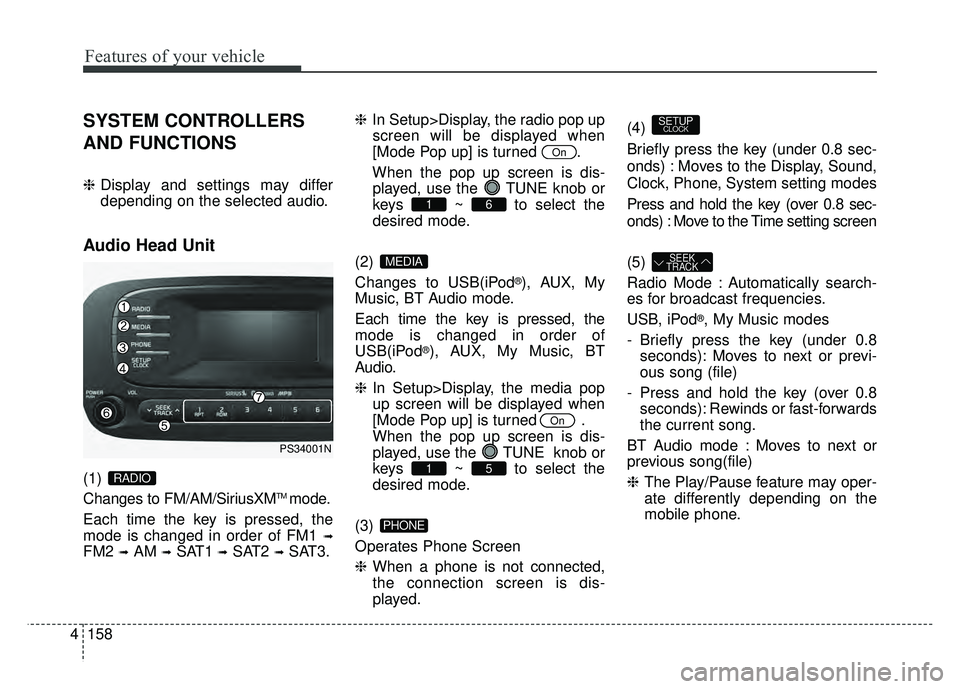
Audio Head Unit
(1)
Changes to FM/AM/SiriusXMTM mode.
Each time the key is pressed, the
mode is changed in order of FM1
➟
FM2 ➟AM ➟SAT1 ➟SAT2 ➟SAT3. ❈
In Setup>Display, the radio pop up
screen will be displayed when
[Mode Pop up] is turned .
When the pop up screen is dis- played, use the TUNE knob or
keys ~ to select the
desired mode.
(2)
Changes to USB(iPod
®), AUX, My
Music, BT Audio mode.
Each time the key is pressed, the
mode is changed in order of
USB(iPod
®), AUX, My Music, BT
Audio.
❈ In Setup>Display, the media pop
up screen will be displayed when
[Mode Pop up] is turned .
When the pop up screen is dis-
played, use the TUNE knob or
keys ~ to select the
desired mode.
(3)
Operates Phone Screen
❈ When a phone is not connected,
the connection screen is dis-
played. (4)
Briefly press the key (under 0.8 sec-
onds) : Moves to the Display, Sound,
Clock, Phone, System setting modes
Press and hold the key (over 0.8 sec-
onds) : Move to the Time setting screen
(5)
Radio Mode : Automatically search-
es for broadcast frequencies.
USB, iPod
®, My Music modes
- Briefly press the key (under 0.8 seconds): Moves to next or previ-
ous song (file)
- Press and hold the key (over 0.8 seconds): Rewinds or fast-forwards
the current song.
BT Audio mode : Moves to next or
previous song(file)
❈ The Play/Pause feature may oper-
ate differently depending on the
mobile phone.
SEEK
TRACK
SETUPCLOCK
PHONE
51
On
MEDIA
61
On
RADIO
PS34001N
Page 240 of 544
![KIA SOUL 2015 Workshop Manual 4163
Features of your vehicle
CLOCK SETTINGS
Press the key Select [Clock]
through TUNE knob or key
Select menu through TUNE knob
Sound Settings
This menu is used to set the time.
Select [Clock Set](/img/2/54647/w960_54647-239.png "KIA SOUL 2015 Workshop Manual 4163
Features of your vehicle
CLOCK SETTINGS
Press the key Select [Clock]
through TUNE knob or key
Select menu through TUNE knob
Sound Settings
This menu is used to set the time.
Select [Clock Set")
4163
Features of your vehicle
CLOCK SETTINGS
Press the key Select [Clock]
through TUNE knob or key
Select menu through TUNE knob
Sound Settings
This menu is used to set the time.
Select [Clock Settings] Set throughTUNE knob Press TUNE knob
❈Adjust the number currently in
focus to set the [hour] and press
the tune knob to set the [minute]
and [AM/PM].
Calendar Settings
This menu is used to set the date
(MM/DD/YYYY).
Select [Calendar Settings] Set through TUNE knob Press TUNE knob
❈Adjust the number currently in
focus to make the settings and
press the tune knob to move to the
next setting. (Set in order of
Year/Month/Day)
Time Format
This function is used to set the
12/24 hour time format of the
audio system. Select [Time
Format] Set 12Hr / 24Hr through
TUNEknob
Clock Display when Power is OFF
Select [Clock Disp.(Pwr Off) Set
/through TUNEknob
: Displays time/date on screen : Turn off.
Off
On
OffOn
3
SETUPCLOCK
Page 279 of 544
Features of your vehicle
202
4
SYSTEM CONTROLLERS
AND FUNCTIONS
❈ Display and settings may differ
depending on the selected audio.
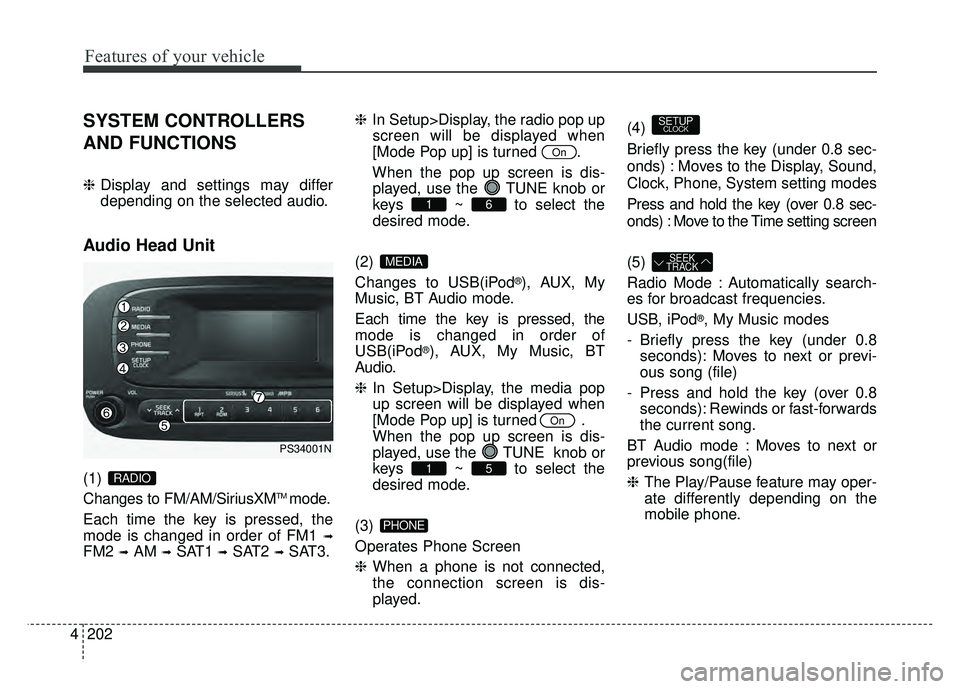
Audio Head Unit
(1)
Changes to FM/AM/SiriusXMTMmode.
Each time the key is pressed, the
mode is changed in order of FM1
➟
FM2 ➟AM ➟SAT1 ➟SAT2 ➟SAT3. ❈
In Setup>Display, the radio pop up
screen will be displayed when
[Mode Pop up] is turned .
When the pop up screen is dis- played, use the TUNE knob or
keys ~ to select the
desired mode.
(2)
Changes to USB(iPod
®), AUX, My
Music, BT Audio mode.
Each time the key is pressed, the
mode is changed in order of
USB(iPod
®), AUX, My Music, BT
Audio.
❈ In Setup>Display, the media pop
up screen will be displayed when
[Mode Pop up] is turned .
When the pop up screen is dis-
played, use the TUNE knob or
keys ~ to select the
desired mode.
(3)
Operates Phone Screen
❈ When a phone is not connected,
the connection screen is dis-
played. (4)
Briefly press the key (under 0.8 sec-
onds) : Moves to the Display, Sound,
Clock, Phone, System setting modes
Press and hold the key (over 0.8 sec-
onds) : Move to the Time setting screen
(5)
Radio Mode : Automatically search-
es for broadcast frequencies.
USB, iPod
®, My Music modes
- Briefly press the key (under 0.8 seconds): Moves to next or previ-
ous song (file)
- Press and hold the key (over 0.8 seconds): Rewinds or fast-forwards
the current song.
BT Audio mode : Moves to next or
previous song(file)
❈ The Play/Pause feature may oper-
ate differently depending on the
mobile phone.
SEEK
TRACK
SETUPCLOCK
PHONE
51
On
MEDIA
61
On
RADIO
PS34001N
Page 284 of 544
![KIA SOUL 2015 Workshop Manual 4207
Features of your vehicle
CLOCK SETTINGS
Press the key Select [Clock]
through TUNE knob or key
Select menu through TUNE knob
Sound Settings
This menu is used to set the time.
Select [Clock Set](/img/2/54647/w960_54647-283.png "KIA SOUL 2015 Workshop Manual 4207
Features of your vehicle
CLOCK SETTINGS
Press the key Select [Clock]
through TUNE knob or key
Select menu through TUNE knob
Sound Settings
This menu is used to set the time.
Select [Clock Set")
4207
Features of your vehicle
CLOCK SETTINGS
Press the key Select [Clock]
through TUNE knob or key
Select menu through TUNE knob
Sound Settings
This menu is used to set the time.
Select [Clock Settings] Set throughTUNE knob Press TUNE knob
❈Adjust the number currently in
focus to set the [hour] and press
the tune knob to set the [minute].
Calendar Settings
This menu is used to set the date
(MM/DD/YYYY).
Select [Calendar Settings] Set through TUNE knob Press TUNE knob
❈Adjust the number currently in
focus to make the settings and
press the tune knob to move to the
next setting. (Set in order of
Year/Month/Day)
Time Format
This function is used to set the
12/24 hour time format of the
audio system. Select [Time
Format] Set 12Hr / 24Hr through
TUNEknob
Clock Display when Power is OFF
Select [Clock Disp.(Pwr Off) Set
/through TUNEknob
: Displays time/date on screen : Turn off.
Off
On
OffOn
3
SETUPCLOCK