change time KIA SOUL 2017 User Guide
[x] Cancel search | Manufacturer: KIA, Model Year: 2017, Model line: SOUL, Model: KIA SOUL 2017Pages: 589, PDF Size: 13.3 MB
Page 183 of 589
497
Features of your vehicle
ROOM (2) :- The map lamp and room lampstays on at all times.
- To turn off the ROOM mode, press the ROOM button (2) once
again (not pressed.)
DOOR (3) : - The map lamp and room lampcomes on when a door is opened.
The lamps go out after approxi-
mately 30 seconds.
- The map lamp and room lamp comes on for approximately 30
seconds when doors are unlocked
with a transmitter or smart key as
long as the doors are not opened.
- The map lamp and room lamp will stay on for approximately 20 min-
utes if a door is opened with the
ignition switch in the ACC or
LOCK/OFF position.
- The map lamp and room lamp will stay on continuously if the door is
opened with the ignition switch in
the ON position. - The map lamp and room lamp will
go out immediately if the ignition
switch is changed to the ON posi-
tion or all doors are locked.
- To turn off the DOOR mode, press the DOOR button (3) once
again (not pressed).
✽ ✽ NOTICE
• When the lamp is turned on by
pressing the lens (1), the lamp does
not turn off even if the DOOR
mode or ROOM mode is not
selected (not pressed).
• If the ROOM button and DOOR button are pressed at the same
time, the map lamp and room
lamp will stay on at all times
(ROOM mode will be selected).
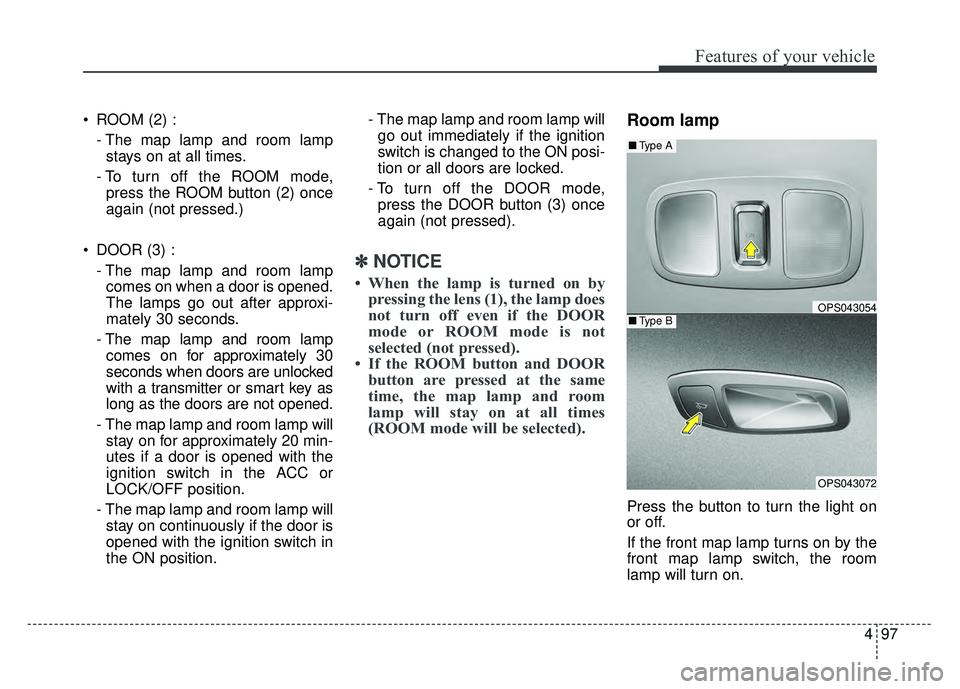
Room lamp
Press the button to turn the light on
or off.
If the front map lamp turns on by the
front map lamp switch, the room
lamp will turn on.
OPS043054
OPS043072
■ Type B
■Type A
Page 193 of 589
4107
Features of your vehicle
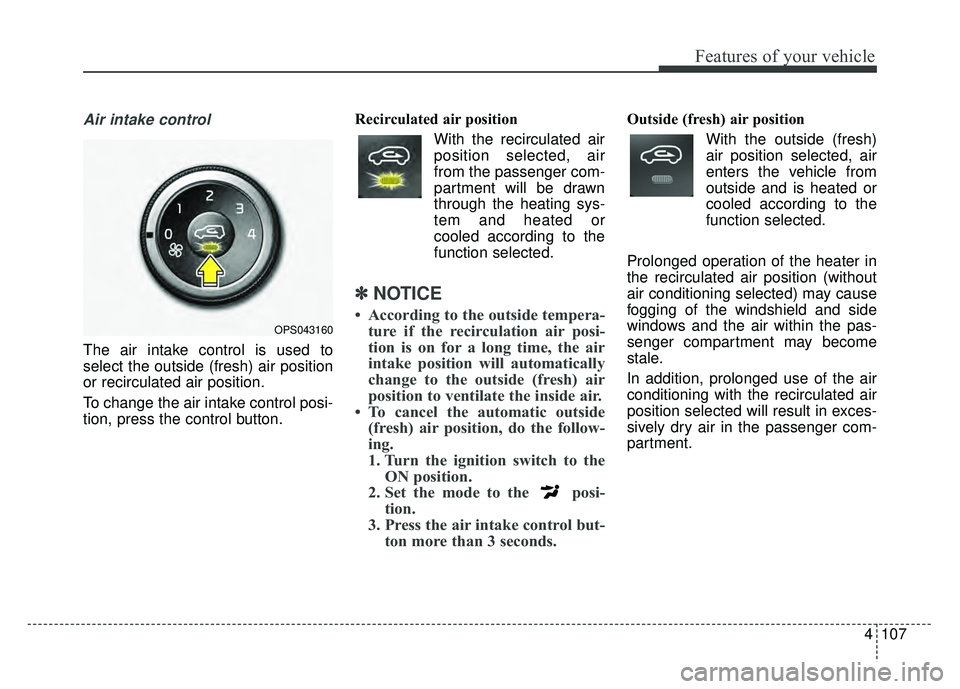
Air intake control
The air intake control is used to
select the outside (fresh) air position
or recirculated air position.
To change the air intake control posi-
tion, press the control button.Recirculated air position
With the recirculated airposition selected, air
from the passenger com-
partment will be drawn
through the heating sys-
tem and heated or
cooled according to the
function selected.
✽ ✽ NOTICE
• According to the outside tempera-
ture if the recirculation air posi-
tion is on for a long time, the air
intake position will automatically
change to the outside (fresh) air
position to ventilate the inside air.
• To cancel the automatic outside (fresh) air position, do the follow-
ing.
1. Turn the ignition switch to the ON position.
2. Set the mode to the posi- tion.
3. Press the air intake control but- ton more than 3 seconds.
Outside (fresh) air position
With the outside (fresh)
air position selected, air
enters the vehicle from
outside and is heated or
cooled according to the
function selected.
Prolonged operation of the heater in
the recirculated air position (without
air conditioning selected) may cause
fogging of the windshield and side
windows and the air within the pas-
senger compartment may become
stale.
In addition, prolonged use of the air
conditioning with the recirculated air
position selected will result in exces-
sively dry air in the passenger com-
partment.
OPS043160
Page 197 of 589
4111
Features of your vehicle
Air conditioning system operation tips
If the vehicle has been parked indirect sunlight during hot weather,
open the windows for a short time
to let the hot air inside the vehicle
escape.
To help reduce moisture inside of the windows on rainy or humid
days, decrease the humidity inside
the vehicle by operating the air
conditioning system.
During air conditioning system operation, you may occasionally
notice a slight change in engine
speed as the air conditioning com-
pressor cycles. This is a normal
system operation characteristic.
Use the air conditioning system every month only for a few minutes
to ensure maximum system per-
formance. When using the air conditioning
system, you may notice clear water
dripping (or even puddling) on the
ground under the passenger side
of the vehicle. This is a normal sys-
tem operation characteristic.
Operating the air conditioning sys- tem in the recirculated air position
provides maximum cooling, how-
ever, continual operation in this
mode may cause the air inside the
vehicle to become stale.
During cooling operation, you may occasionally notice a misty air flow
because of rapid cooling and
humid air intake. This is a normal
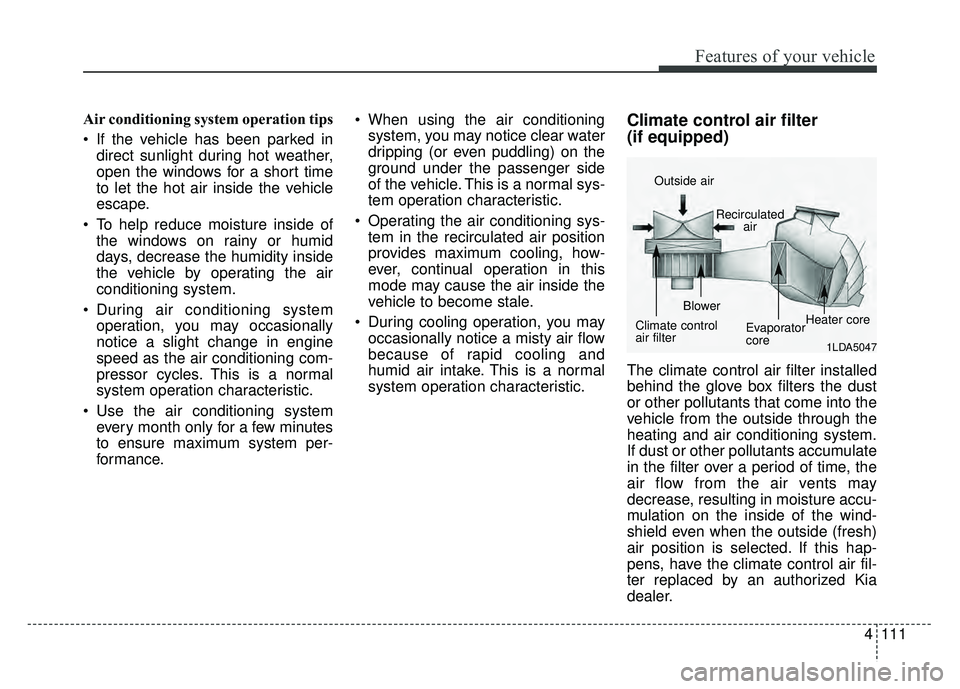
system operation characteristic.Climate control air filter
(if equipped)
The climate control air filter installed
behind the glove box filters the dust
or other pollutants that come into the
vehicle from the outside through the
heating and air conditioning system.
If dust or other pollutants accumulate
in the filter over a period of time, the
air flow from the air vents may
decrease, resulting in moisture accu-
mulation on the inside of the wind-
shield even when the outside (fresh)
air position is selected. If this hap-
pens, have the climate control air fil-
ter replaced by an authorized Kia
dealer.
1LDA5047
Outside air
Recirculatedair
Climate control
air filter Blower
Evaporator
coreHeater core
Page 206 of 589
Features of your vehicle
120
4
Recirculated air position
The indicator light on the
button illuminates when
the recirculated air posi-
tion is selected.
With the recirculated air position selected, air from
passenger compartment
will be drawn through the
heating system and heat-
ed or cooled according to
the function selected.✽ ✽ NOTICE
• According to the outside tempera-
ture if the recirculation air posi-
tion is on for a long time, the air
intake position will automatically
change to the outside (fresh) air
position to ventilate the inside air.
• To cancel the automatic outside (fresh) air position, do the following.
1. Turn the ignition switch to the ON position.
2. Set the mode to the position.
3. Press the air intake control but- ton more than 3 seconds.
Outside (fresh) air position
The indicator light on the
button does not illumi-
nate when the outside
(fresh) air position is
selected.
With the outside (fresh)
air position selected, air
enters the vehicle from
outside and is heated or
cooled according to the
function selected.
Prolonged operation of the heater in
the recirculated air position (without
air conditioning selected) may cause
fogging of the windshield and side
windows and the air within the pas-
senger compartment may become
stale.
In addition, prolonged use of the air
conditioning with the recirculated air
position selected will result in exces-
sively dry air in the passenger com-
partment.
Page 211 of 589
4125
Features of your vehicle
Air conditioning system operation tips
If the vehicle has been parked indirect sunlight during hot weather,
open the windows for a short time
to let the hot air inside the vehicle
escape.
To help reduce moisture inside of the windows on rainy or humid
days, decrease the humidity inside
the vehicle by operating the air
conditioning system.
During air conditioning system operation, you may occasionally
notice a slight change in engine
speed as the air conditioning com-
pressor cycles. This is a normal
system operation characteristic.
Use the air conditioning system every month only for a few minutes
to ensure maximum system per-
formance. When using the air conditioning
system, you may notice clear water
dripping (or even puddling) on the
ground under the passenger side
of the vehicle. This is a normal sys-
tem operation characteristic.
Operating the air conditioning sys- tem in the recirculated air position
provides maximum cooling, how-
ever, continual operation in this
mode may cause the air inside the
vehicle to become stale.
During cooling operation, you may occasionally notice a misty air flow
because of rapid cooling and
humid air intake. This is a normal
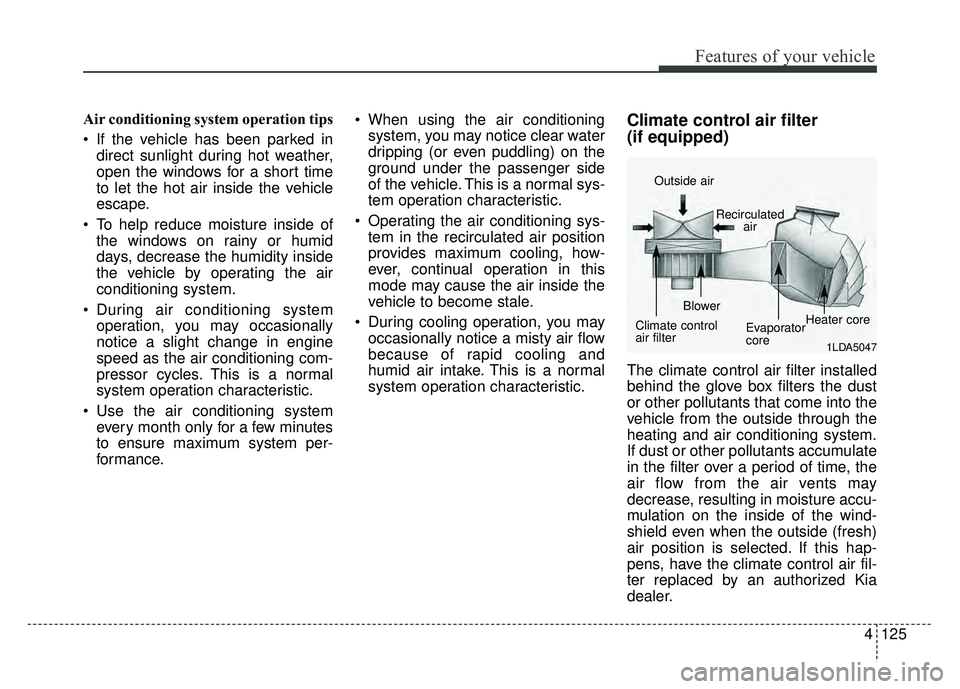
system operation characteristic.Climate control air filter
(if equipped)
The climate control air filter installed
behind the glove box filters the dust
or other pollutants that come into the
vehicle from the outside through the
heating and air conditioning system.
If dust or other pollutants accumulate
in the filter over a period of time, the
air flow from the air vents may
decrease, resulting in moisture accu-
mulation on the inside of the wind-
shield even when the outside (fresh)
air position is selected. If this hap-
pens, have the climate control air fil-
ter replaced by an authorized Kia
dealer.
1LDA5047
Outside air
Recirculatedair
Climate control
air filter Blower
Evaporator
coreHeater core
Page 224 of 589
Features of your vehicle
138
4
During mild weather or under condi-
tions where the operation of the seat
warmer is not needed, keep the
switches in the “OFF” position.
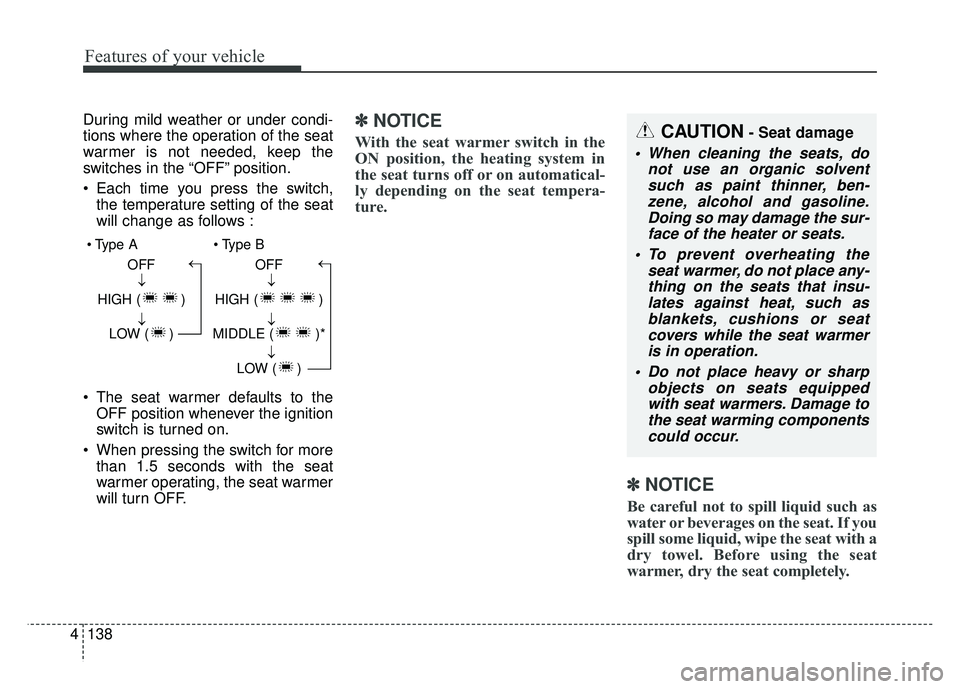
Each time you press the switch,
the temperature setting of the seat
will change as follows :
The seat warmer defaults to the OFF position whenever the ignition
switch is turned on.
When pressing the switch for more than 1.5 seconds with the seat
warmer operating, the seat warmer
will turn OFF.✽ ✽ NOTICE
With the seat warmer switch in the
ON position, the heating system in
the seat turns off or on automatical-
ly depending on the seat tempera-
ture.
✽ ✽NOTICE
Be careful not to spill liquid such as
water or beverages on the seat. If you
spill some liquid, wipe the seat with a
dry towel. Before using the seat
warmer, dry the seat completely.
CAUTION- Seat damage
When cleaning the seats, do
not use an organic solventsuch as paint thinner, ben-zene, alcohol and gasoline.Doing so may damage the sur-face of the heater or seats.
To prevent overheating the seat warmer, do not place any-thing on the seats that insu-lates against heat, such asblankets, cushions or seatcovers while the seat warmeris in operation.
Do not place heavy or sharp objects on seats equippedwith seat warmers. Damage tothe seat warming componentscould occur.
OFF
HIGH ( ) LOW ( )→→→ OFF
HIGH ( )
MIDDLE ( )* LOW ( )
→→→→
Page 225 of 589
4139
Features of your vehicle
Seat air ventilation (if equipped)
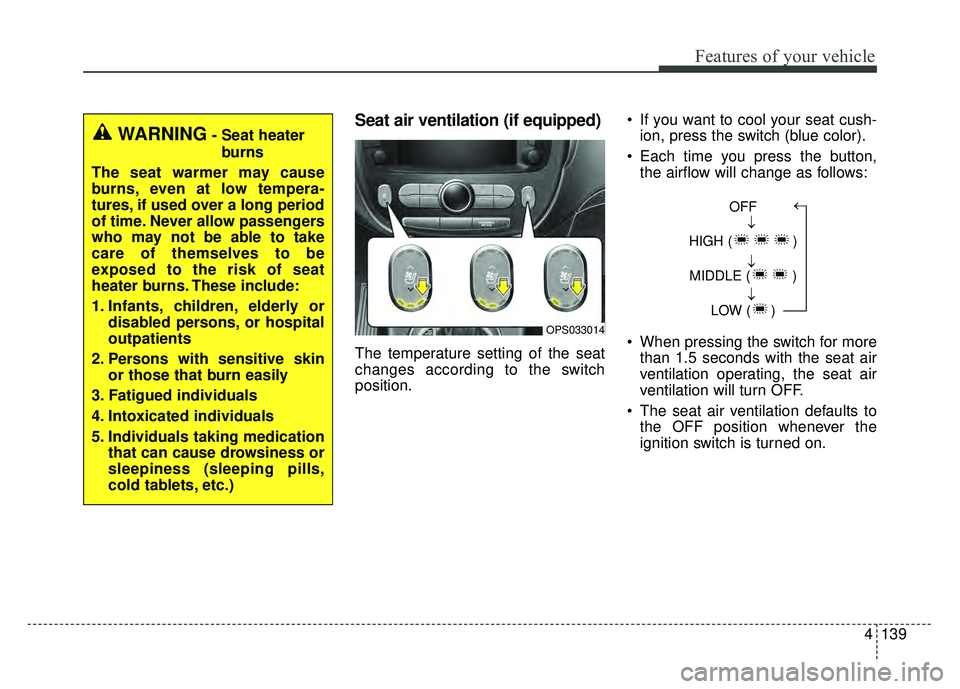
The temperature setting of the seat
changes according to the switch
position. If you want to cool your seat cush-
ion, press the switch (blue color).
Each time you press the button, the airflow will change as follows:
When pressing the switch for more than 1.5 seconds with the seat air
ventilation operating, the seat air
ventilation will turn OFF.
The seat air ventilation defaults to the OFF position whenever the
ignition switch is turned on.
WARNING- Seat heater
burns
The seat warmer may cause
burns, even at low tempera-
tures, if used over a long period
of time. Never allow passengers
who may not be able to take
care of themselves to be
exposed to the risk of seat
heater burns. These include:
1. Infants, children, elderly or disabled persons, or hospital
outpatients
2. Persons with sensitive skin or those that burn easily
3. Fatigued individuals
4. Intoxicated individuals
5. Individuals taking medication that can cause drowsiness or
sleepiness (sleeping pills,
cold tablets, etc.)
OPS033014
OFF
HIGH ( ) MIDDLE ( ) LOW ( )→→→→
Page 249 of 589
Audio system
14
5 Adjust the volume to levels that
allow the driver to hear sounds
from outside of the vehicle. Driving
in a state where external sounds
cannot be heard may lead to acci-
dents.
Pay attention to the volume setting when turning the device on. A sud-
den output of extreme volume
upon turning the device on could
lead to hearing impairment. (Adjust
the volume to a suitable levels
before turning off the device.)
If you want to change the position of device installation, please
inquire with your place of purchase
or service maintenance center.
Technical expertise is required to
install or disassemble the device. Turn on the car ignition before
using this device. Do not operate
the audio system for long periods
of time with the ignition turned off
as such operations may lead to
battery discharge.
In case of product malfunction, please contact your place of pur-
chase or After Service center.
Placing the audio system within an electromagnetic environment may
result in noise interference.
WARNING - Driver
distraction
Operating the device while driv-
ing could lead to accidents due
to a lack of attention to external
surroundings. First park the
vehicle before operating the
device.CAUTION
When cleaning the device, make sure to turn off theaudio system and use a dryand smooth cloth.
Do not place beverages close to the audio system. Spillingbeverages may lead to systemmalfunction.
Never use tough materials, chemical cloths, or solvents(alcohol, benzene, thinners,etc.) as such materials maydamage the device panel orcause color/quality deteriora-tion.
Prevent caustic solutions such as perfume and cosmet-ic oil from contacting thedashboard because they maycause damage or discol-oration.
CAUTION- LCD Monitor
Do not subject the device to
severe shock or impact. Direct
pressure onto the front side of
the monitor may cause damage
to the LCD or touch screen.
Page 254 of 589
Audio system
519
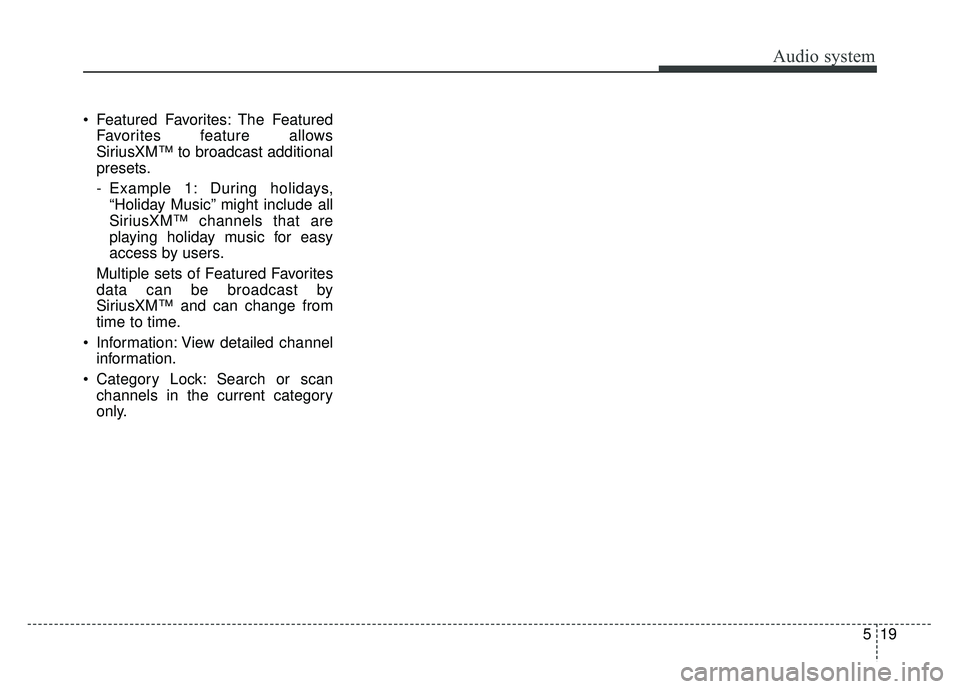
Featured Favorites: The Featured
Favorites feature allows
SiriusXM™ to broadcast additional
presets.
- Example 1: During holidays,“Holiday Music” might include all
SiriusXM™ channels that are
playing holiday music for easy
access by users.
Multiple sets of Featured Favorites
data can be broadcast by
SiriusXM™ and can change from
time to time.
Information: View detailed channel information.
Category Lock: Search or scan channels in the current category
only.
Page 270 of 589
Audio system
535
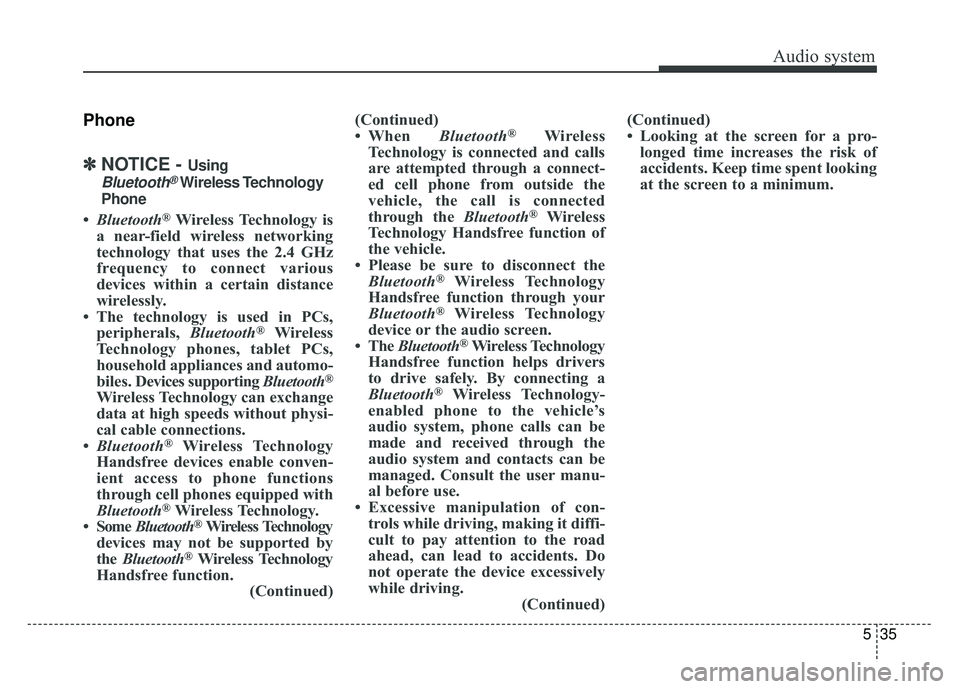
Phone
✽
✽NOTICE - Using
Bluetooth®Wireless Technology
Phone
• Bluetooth®Wireless Technology is
a near-field wireless networking
technology that uses the 2.4 GHz
frequency to connect various
devices within a certain distance
wirelessly.
• The technology is used in PCs, peripherals, Bluetooth
®Wireless
Technology phones, tablet PCs,
household appliances and automo-
biles. Devices supporting Bluetooth
®
Wireless Technology can exchange
data at high speeds without physi-
cal cable connections.
• Bluetooth
®Wireless Technology
Handsfree devices enable conven-
ient access to phone functions
through cell phones equipped with
Bluetooth
®Wireless Technology.
• Some Bluetooth®Wireless Technology
devices may not be supported by
the Bluetooth
®Wireless Technology
Handsfree function. (Continued)(Continued)
• When
Bluetooth
®Wireless
Technology is connected and calls
are attempted through a connect-
ed cell phone from outside the
vehicle, the call is connected
through the Bluetooth
®Wireless
Technology Handsfree function of
the vehicle.
• Please be sure to disconnect the Bluetooth
®Wireless Technology
Handsfree function through your
Bluetooth
®Wireless Technology
device or the audio screen.
• The Bluetooth
®Wireless Technology
Handsfree function helps drivers
to drive safely. By connecting a
Bluetooth
®Wireless Technology-
enabled phone to the vehicle’s
audio system, phone calls can be
made and received through the
audio system and contacts can be
managed. Consult the user manu-
al before use.
• Excessive manipulation of con- trols while driving, making it diffi-
cult to pay attention to the road
ahead, can lead to accidents. Do
not operate the device excessively
while driving. (Continued)(Continued)
• Looking at the screen for a pro-
longed time increases the risk of
accidents. Keep time spent looking
at the screen to a minimum.