air KIA SOUL 2021 Navigation System Quick Reference Guide
[x] Cancel search | Manufacturer: KIA, Model Year: 2021, Model line: SOUL, Model: KIA SOUL 2021Pages: 211, PDF Size: 6.67 MB
Page 139 of 211
7-17
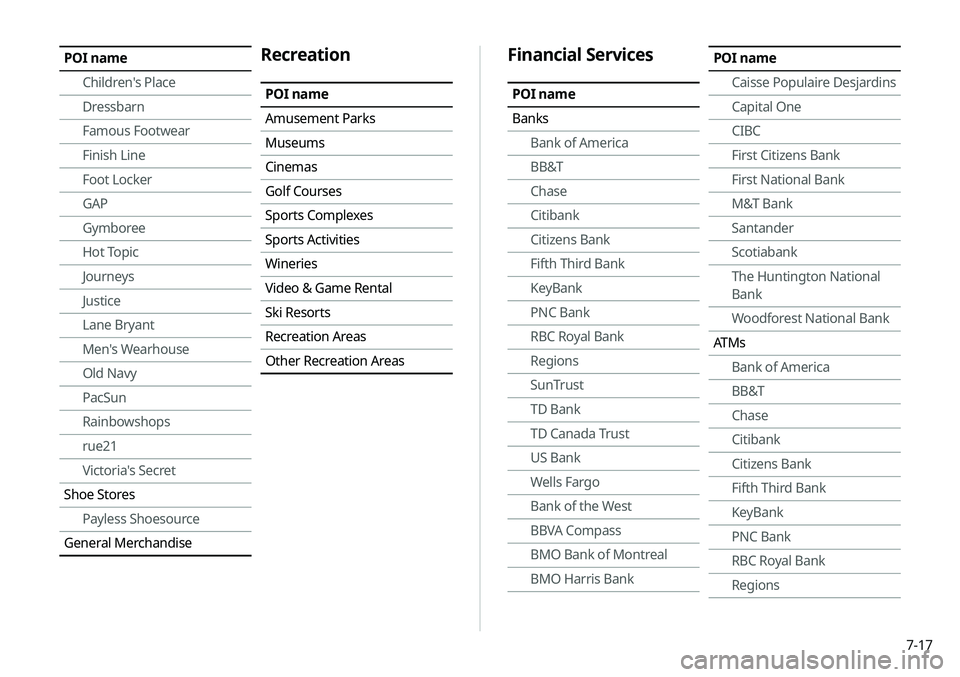
Financial Services
POI name
BanksBank of America
BB&T
Chase
Citibank
Citizens Bank
Fifth Third Bank
KeyBank
PNC Bank
RBC Royal Bank
Regions
SunTrust
TD Bank
TD Canada Trust
US Bank
Wells Fargo
Bank of the West
BBVA Compass
BMO Bank of Montreal
BMO Harris Bank
POI name
Caisse Populaire Desjardins
Capital One
CIBC
First Citizens Bank
First National Bank
M&T Bank
Santander
Scotiabank
The Huntington National
Bank
Woodforest National Bank
ATMs Bank of America
BB&T
Chase
Citibank
Citizens Bank
Fifth Third Bank
KeyBank
PNC Bank
RBC Royal Bank
RegionsPOI name
Children's Place
Dressbarn
Famous Footwear
Finish Line
Foot Locker
GAP
Gymboree
Hot Topic
Journeys
Justice
Lane Bryant
Men's Wearhouse
Old Navy
PacSun
Rainbowshops
rue21
Victoria's Secret
Shoe Stores Payless Shoesource
General MerchandiseRecreation
POI name
Amusement Parks
Museums
Cinemas
Golf Courses
Sports Complexes
Sports Activities
Wineries
Video & Game Rental
Ski Resorts
Recreation Areas
Other Recreation Areas
Page 140 of 211
7-18
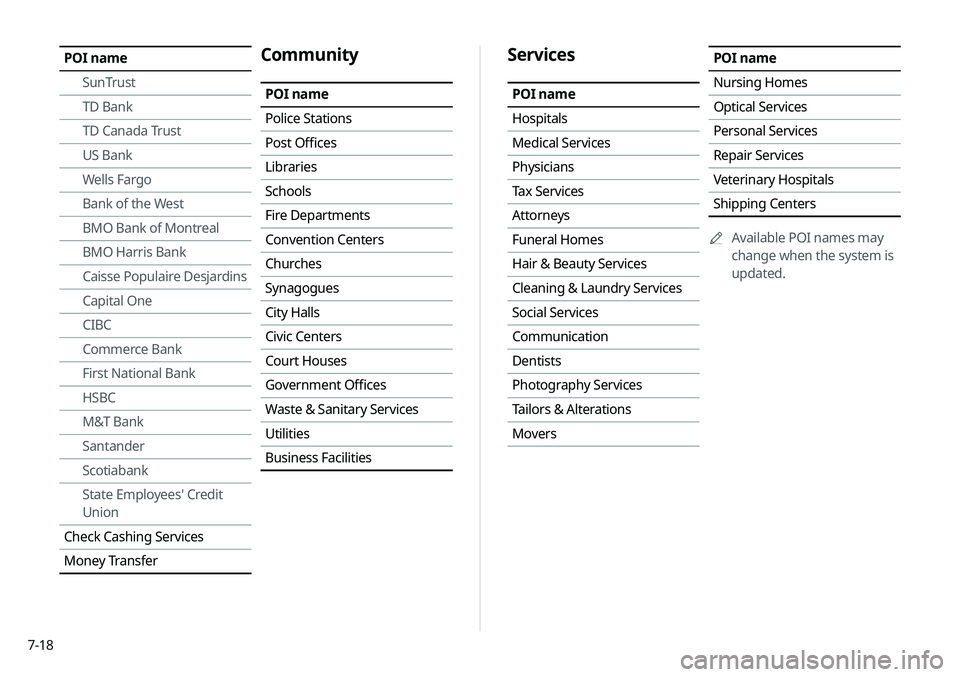
Services
POI name
Hospitals
Medical Services
Physicians
Tax Services
Attorneys
Funeral Homes
Hair & Beauty Services
Cleaning & Laundry Services
Social Services
Communication
Dentists
Photography Services
Tailors & Alterations
Movers
POI name
Nursing Homes
Optical Services
Personal Services
Repair Services
Veterinary Hospitals
Shipping Centers0000
A
Available POI names may
change when the system is
updated.POI name
SunTrust
TD Bank
TD Canada Trust
US Bank
Wells Fargo
Bank of the West
BMO Bank of Montreal
BMO Harris Bank
Caisse Populaire Desjardins
Capital One
CIBC
Commerce Bank
First National Bank
HSBC
M&T Bank
Santander
Scotiabank
State Employees' Credit
Union
Check Cashing Services
Money TransferCommunity
POI name
Police Stations
Post Offices
Libraries
Schools
Fire Departments
Convention Centers
Churches
Synagogues
City Halls
Civic Centers
Court Houses
Government Offices
Waste & Sanitary Services
Utilities
Business Facilities
Page 143 of 211

7-21
Playing a voice memo
You can select and play a recorded voice memo.
From the list of Voice Memos, touch the desired voice
memo.
Recording a voice memo
1 On the Voice Memo screen, touch .
It starts recording a voice memo.
2 When recording is finished, touch on the
screen or press the [
] button on the steering
wheel.
The voice memo is automatically saved.
0000
A
To temporarily stop recording, touch
.
0000
A
When recording starts, the other audio functions are muted
or playback is paused.
0000
A
When you make or receive a call while recording, the
recording is paused.
0000
A
When you make an emergency call or you are connected to
an emergency call after airbag deployment, the recording is
stopped and the recorded voice memo is automatically saved.
Page 157 of 211

9-3
Android Auto
You can activate the Android Auto function to pair your Android
smartphone with the system.
Apple CarPlay
You can activate the Apple CarPlay function to pair your iPhone
with the system.
Auto Connection Priority
Set Bluetooth connection priority for devices to automatically
connect them when starting the vehicle.
Bluetooth Voice Prompts
Set whether to hear voice prompts for events related to Bluetooth
connections.
Message Settings
\225Message Notification: Sets to receive message notifications.
\225Predefined Messages : Can edit message templates for replies.
0000
A
This option may not be available in some phone models.
Bluetooth System Info
You can see and edit the Bluetooth information of the system.
Privacy Mode
Enable or disable Privacy Mode.
Hide data including contacts and call history from showing up on
the system screen to protect privacy.
Reset
You can delete all registered Bluetooth devices and initialize
Bluetooth settings. All data for Bluetooth devices are also deleted.
Page 170 of 211

9-16
Configuring the UVO settings
You can subscribe to the UVO service or see the modem
information.
1 On the All Menus screen, touch Setup >
UVO .
The UVO settings screen appears.
2 Configure the settings required:
Activate UVO
You can subscribe to the UVO service by using the UVO settings
menu.
0000A
For more information: > see “Subscribing to the service.”
911 Connect
This feature provides you with immediate assistance when an
accident occurs and an airbag is deployed.
1 On the All Menus screen, touch Setup >
UVO >
UVO Settings.
2 Touch 911 Connect to activate it.
Page 171 of 211

9-17
3 Read the terms of use and touch Accept.
0000
A
The feature is activated and appears at the top right
of the screen.
0000
A
When an airbag is deployed, the system automatically
makes a call to 911 and sends your location to the 911
operator.
Modem Information
You can check the modem information for use of the UVO service.
Modem Status
You can check the modem status for use of the UVO service.