air KIA SOUL 2021 Navigation System Quick Reference Guide
[x] Cancel search | Manufacturer: KIA, Model Year: 2021, Model line: SOUL, Model: KIA SOUL 2021Pages: 211, PDF Size: 6.67 MB
Page 5 of 211
3
\334System handling
Do NOT apply excessive force to the system.
\225When you apply excessive pressure to the screen, the LCD panel or touch
panel may get damaged.
To clean the screen or button panel, first turn off the vehicle
and then use a dry, soft cloth to wipe it.
\225Do not wipe using a rough or hard cloth, chemical fiber, organic solvent (e.g.
alcohol, benzene, thinner), or air freshener. The panel surface may become
scratched or damaged due to a chemical reaction.
When you install an air freshener on the air conditioner vent,
the surface may be deformed due to leakage.
0000
A
If you experience any problems with the system, contact your
place of purchase or dealer.
Safety Precautions
Be sure to keep the following instructions. Otherwise, it may
cause minor injury or system damage.
\334Operation
Use the system with the vehicle started.
\225
When you use the system for a long time with the vehicle stopped, it may\
cause battery discharge.
Do NOT install unapproved products.
\225Using unapproved products may cause an error while using the system.
\225System errors caused by installing unapproved products are not covered
under the warranty.
Page 15 of 211
5
\334System handling
Do NOT apply excessive force to the system.
\225 When you apply excessive pressure to the screen, the LCD panel or touch
panel may get damaged.
To clean the screen or button panel, first turn off the vehicle
and then use a dry, soft cloth to wipe it.
\225Do not wipe using a rough or hard cloth, chemical fiber, organic solvent (e.g.
alcohol, benzene, thinner), or air freshener. The panel surface may become
scratched or damaged due to a chemical reaction.
When you install an air freshener on the air conditioner vent,
the surface may be deformed due to leakage.
0000
A
If you experience any problems with the system, contact your
place of purchase or dealer.
Be sure to keep the following instructions. Otherwise, it may
cause minor injury or system damage.
\334Operation
Use the system with the vehicle started.
\225 When you use the system for a long time with the vehicle stopped, it may\
cause battery discharge.
Do NOT install unapproved products.
\225Using unapproved products may cause an error while using the system.
\225System errors caused by installing unapproved products are not covered
under the warranty.
Safety Precautions
Page 16 of 211

6
Contents
01 System overview
Component names and functions 1-2
Control panel 1-2
Steering wheel remote control 1-3
Turning the system on or off 1-4
Turning on the system 1-4
Turning off the system 1-5
Using the touch screen 1-6
“Touch” gesture 1-7
“Touch and hold” gesture 1-7
“Slide” gesture 1-8
“Drag” gesture 1-8
“Swipe” gesture 1-9
“Spread/pinch” gesture 1-9
Using the Home screen 1-10
Home screen 1-10
Editing widgets on the Home screen 1-11
Editing icons on the Home screen 1-11
Seeing the All Menus screen 1-12
Split screen 1-12
Opening the split screen 1-12
Editing the split screen 1-13
Closing the split screen 1-13
02 Useful functions
Using the phone projection function 2-2
Pairing to an Android smartphone via Android Auto 2-2
Pairing to an iPhone via Apple CarPlay 2-4
Using the driving assist display 2-6
Using the rear-view display 2-7
Using the HD Radio Data 2-8
Viewing traffic information 2-9
Checking weather information via HD Radio Data 2-10
Checking weather information in Doppler Radar 2-10
Using the sound mood lamp 2-11
Page 36 of 211
2-2
Pairing to an Android smartphone via
Android Auto
When you connect an Android smartphone to the vehicle with
Android Auto, you can run and control applications on the phone
through the widescreen using its user-friendly interface.
1 To use Android Auto, first check the following.
\225Visit the Android Auto website at https://www.android.
com/auto to check the list of countries, device types, and
models that support Android Auto.
\225Download and install the Android Auto application from
Google Play Store. It is not possible to install Android Auto
in countries that do not support the feature.
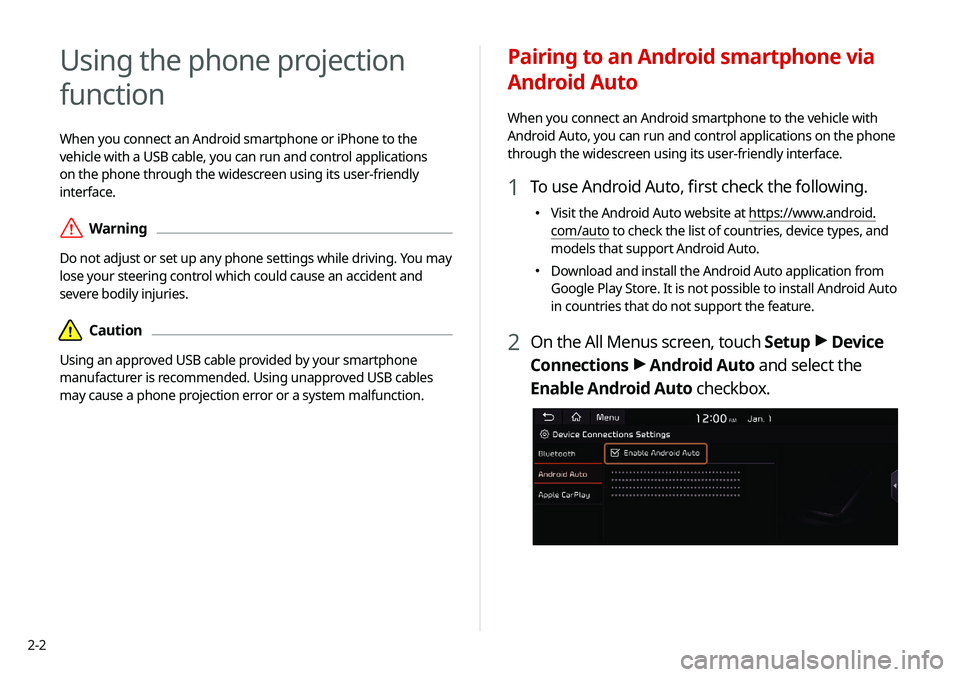
2 On the All Menus screen, touch Setup >
Device
Connections >
Android Auto and select the
Enable Android Auto checkbox.
Using the phone projection
function
When you connect an Android smartphone or iPhone to the
vehicle with a USB cable, you can run and control applications
on the phone through the widescreen using its user-friendly
interface.
\335Warning
Do not adjust or set up any phone settings while driving. You may
lose your steering control which could cause an accident and
severe bodily injuries.
\334Caution
Using an approved USB cable provided by your smartphone
manufacturer is recommended. Using unapproved USB cables
may cause a phone projection error or a system malfunction.
Page 38 of 211
2-4
Pairing to an iPhone via Apple CarPlay
After you connect an iPhone to the vehicle with Apple CarPlay,
you can run and control applications on the phone through the
system screen.
1 To use Apple CarPlay, first check the following:
\225For iPhone models that support Apple CarPlay, visit the
Apple website at https://www.apple.com/ios/carplay .
\225
Make sure Apple CarPlay and Siri are enabled in your
iPhone settings. If you do not see options for Apple
CarPlay or Siri, update to the latest iOS version.
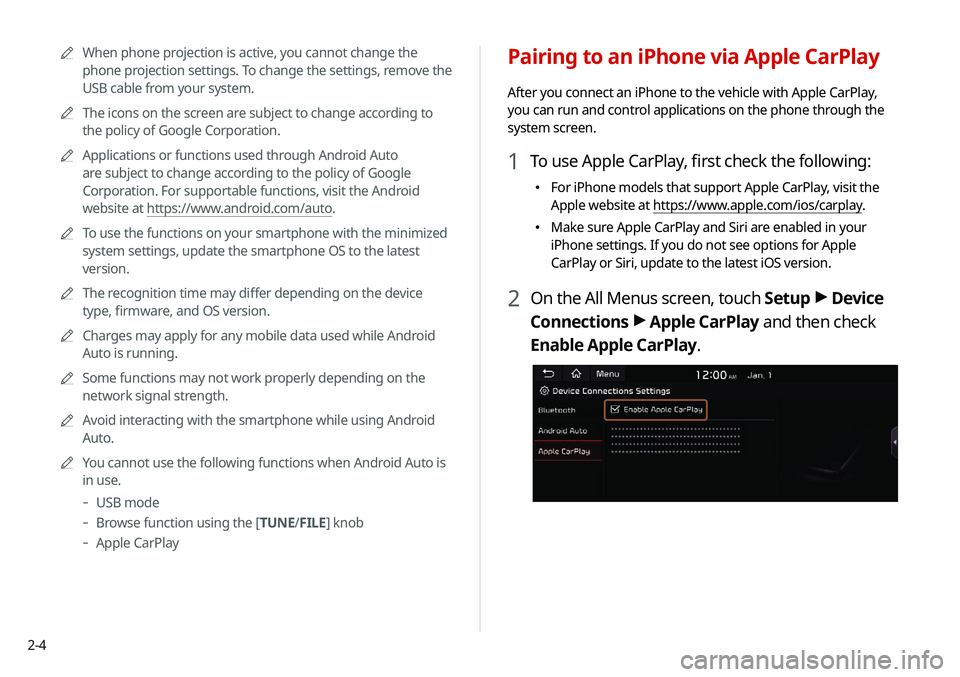
2 On the All Menus screen, touch Setup >
Device
Connections >
Apple CarPlay and then check
Enable Apple CarPlay.
0000
A
When phone projection is active, you cannot change the
phone projection settings. To change the settings, remove the
USB cable from your system.
0000
A
The icons on the screen are subject to change according to
the policy of Google Corporation.
0000
A
Applications or functions used through Android Auto
are subject to change according to the policy of Google
Corporation. For supportable functions, visit the Android
website at https://www.android.com/auto.
0000
A
To use the functions on your smartphone with the minimized
system settings, update the smartphone OS to the latest
version.
0000
A
The recognition time may differ depending on the device
type, firmware, and OS version.
0000
A
Charges may apply for any mobile data used while Android
Auto is running.
0000
A
Some functions may not work properly depending on the
network signal strength.
0000
A
Avoid interacting with the smartphone while using Android
Auto.
0000
A
You cannot use the following functions when Android Auto is
in use.
-USB mode
-Browse function using the [TUNE/ FILE] knob
-
Apple CarPlay
Page 124 of 211
7-2
Voice recognition
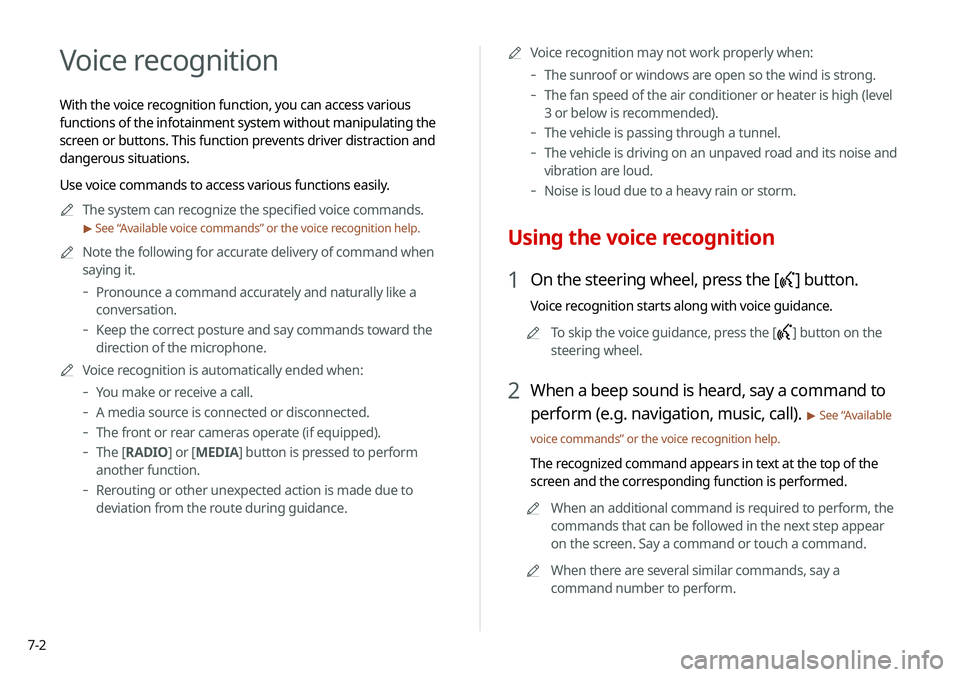
With the voice recognition function, you can access various
functions of the infotainment system without manipulating the
screen or buttons. This function prevents driver distraction and
dangerous situations.
Use voice commands to access various functions easily.0000
A
The system can recognize the specified voice commands.
> See “ Available voice commands” or the voice recognition help.
0000
A
Note the following for accurate delivery of command when
saying it.
-Pronounce a command accurately and naturally like a
conversation.
-Keep the correct posture and say commands toward the
direction of the microphone.
0000
A
Voice recognition is automatically ended when:
-You make or receive a call.
-A media source is connected or disconnected.
-The front or rear cameras operate (if equipped).
-The [RADIO] or [MEDIA] button is pressed to perform
another function.
- Rerouting or other unexpected action is made due to
deviation from the route during guidance. 0000
A
Voice recognition may not work properly when:
-The sunroof or windows are open so the wind is strong.
-The fan speed of the air conditioner or heater is high (level
3 or below is recommended).
-The vehicle is passing through a tunnel.
-The vehicle is driving on an unpaved road and its noise and
vibration are loud.
-Noise is loud due to a heavy rain or storm.
Using the voice recognition
1 On the steering wheel, press the [] button.
Voice recognition starts along with voice guidance.
0000
A
To skip the voice guidance, press the [
] button on the
steering wheel.
2 When a beep sound is heard, say a command to
perform (e.g. navigation, music, call).
> See “ Available
voice commands” or the voice recognition help.
The recognized command appears in text at the top of the
screen and the corresponding function is performed. 0000
A
When an additional command is required to perform, the
commands that can be followed in the next step appear
on the screen. Say a command or touch a command.
0000
A
When there are several similar commands, say a
command number to perform.
Page 133 of 211

7-11
POI names
Restaurants
POI name
Fast Food RestaurantsArby's
Boston Market
BURGER KING
Carl's Jr
Chick-fil-A
Chipotle
Church's Chicken
Dairy Queen
Firehouse Subs
Hardee's
IHOP
In-N-Out Burger
Jack in the Box
Jimmy John's
KFC
Little Caesars
POI name
Long John Silver's
McAlister's Deli
McDonald's
Panda Express
Panera Bread
Popeyes
Quiznos Sub
Schlotzsky's
SONIC
SUBWAY
Taco Bell
Taco John's
Waffle House
Wendy's
White Castle
Blimpie
Checkers
Culver's
Five Guys Burgers and Fries
Jamba Juice
Jersey Mike's SubsPOI nameSmoothie King
Steak n Shake
Whataburger
Coffee Shops Starbucks
Dunkin' Donuts
Tim Hortons
American Restaurants Applebee's
Bahama Breeze
Boston's Restaurant &
Sports Bar
Cheeseburger in Paradise
Chili's Grill & Bar
Cool River
Denny's
Frisch's Big Boy
Good Eats
III Forks
Lee Roy Selmon'sPOI name
Lone Star Steakhouse &
Saloon
Longhorn Steakhouse
Luckys Cafe
Outback Steakhouse
Ponderosa
Publix
Seasons 52
Sheetz
Silver Fox
Texas Roadhouse
TGI Friday's
The Capital Grille
A&W
Bob Evans
Buffalo Wild Wings
Cracker Barrel Old Country
Store
Golden Corral
Red Robin
Ruby Tuesday
Page 135 of 211
7-13
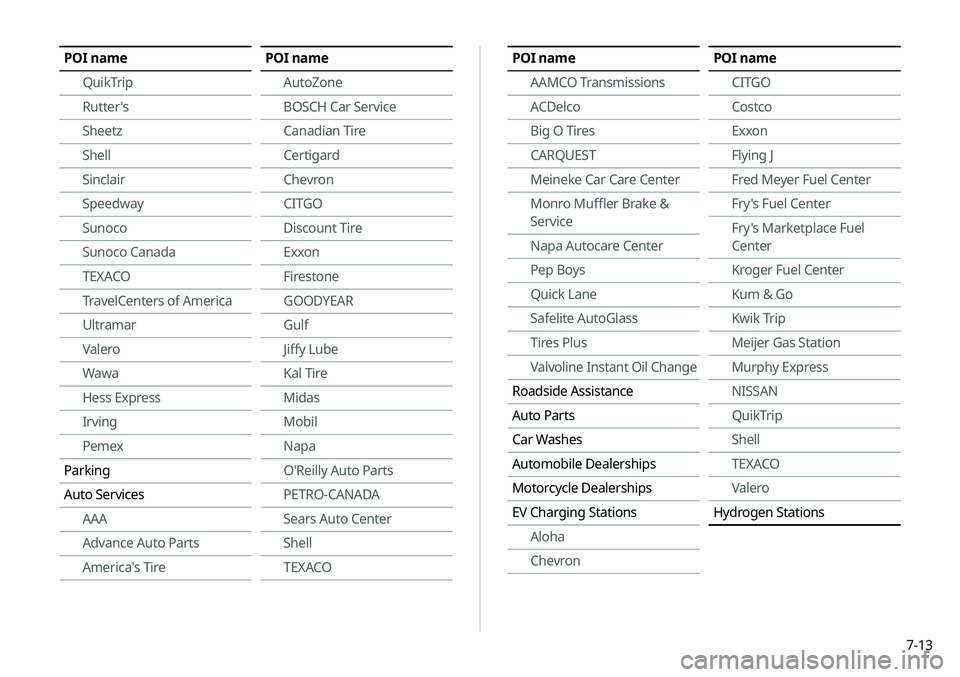
POI nameAAMCO Transmissions
ACDelco
Big O Tires
CARQUEST
Meineke Car Care Center
Monro Muffler Brake &
Service
Napa Autocare Center
Pep Boys
Quick Lane
Safelite AutoGlass
Tires Plus
Valvoline Instant Oil Change
Roadside Assistance
Auto Parts
Car Washes
Automobile Dealerships
Motorcycle Dealerships
EV Charging Stations Aloha
ChevronPOI name
CITGO
Costco
Exxon
Flying J
Fred Meyer Fuel Center
Fry's Fuel Center
Fry's Marketplace Fuel
Center
Kroger Fuel Center
Kum & Go
Kwik Trip
Meijer Gas Station
Murphy Express
NISSAN
QuikTrip
Shell
TEXACO
Valero
Hydrogen StationsPOI name
QuikTrip
Rutter's
Sheetz
Shell
Sinclair
Speedway
Sunoco
Sunoco Canada
TEXACO
TravelCenters of America
Ultramar
Valero
Wawa
Hess Express
Irving
Pemex
Parking
Auto Services AAA
Advance Auto Parts
America's TirePOI name
AutoZone
BOSCH Car Service
Canadian Tire
Certigard
Chevron
CITGO
Discount Tire
Exxon
Firestone
GOODYEAR
Gulf
Jiffy Lube
Kal Tire
Midas
Mobil
Napa
O'Reilly Auto Parts
PETRO-CANADA
Sears Auto Center
Shell
TEXACO
Page 136 of 211
7-14
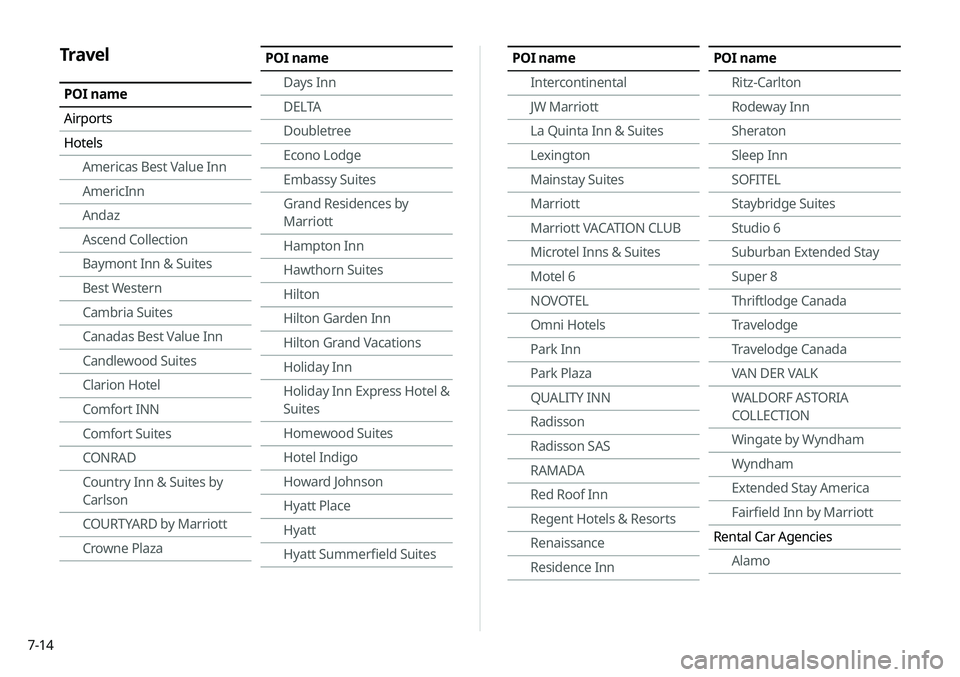
POI nameIntercontinental
JW Marriott
La Quinta Inn & Suites
Lexington
Mainstay Suites
Marriott
Marriott VACATION CLUB
Microtel Inns & Suites
Motel 6
NOVOTEL
Omni Hotels
Park Inn
Park Plaza
QUALITY INN
Radisson
Radisson SAS
RAMADA
Red Roof Inn
Regent Hotels & Resorts
Renaissance
Residence InnPOI nameRitz-Carlton
Rodeway Inn
Sheraton
Sleep Inn
SOFITEL
Staybridge Suites
Studio 6
Suburban Extended Stay
Super 8
Thriftlodge Canada
Travelodge
Travelodge Canada
VAN DER VALK
WALDORF ASTORIA
COLLECTION
Wingate by Wyndham
Wyndham
Extended Stay America
Fairfield Inn by Marriott
Rental Car Agencies AlamoTravel
POI name
Airports
HotelsAmericas Best Value Inn
AmericInn
Andaz
Ascend Collection
Baymont Inn & Suites
Best Western
Cambria Suites
Canadas Best Value Inn
Candlewood Suites
Clarion Hotel
Comfort INN
Comfort Suites
CONRAD
Country Inn & Suites by
Carlson
COURTYARD by Marriott
Crowne Plaza
POI name
Days Inn
DELTA
Doubletree
Econo Lodge
Embassy Suites
Grand Residences by
Marriott
Hampton Inn
Hawthorn Suites
Hilton
Hilton Garden Inn
Hilton Grand Vacations
Holiday Inn
Holiday Inn Express Hotel &
Suites
Homewood Suites
Hotel Indigo
Howard Johnson
Hyatt Place
Hyatt
Hyatt Summerfield Suites
Page 138 of 211
7-16
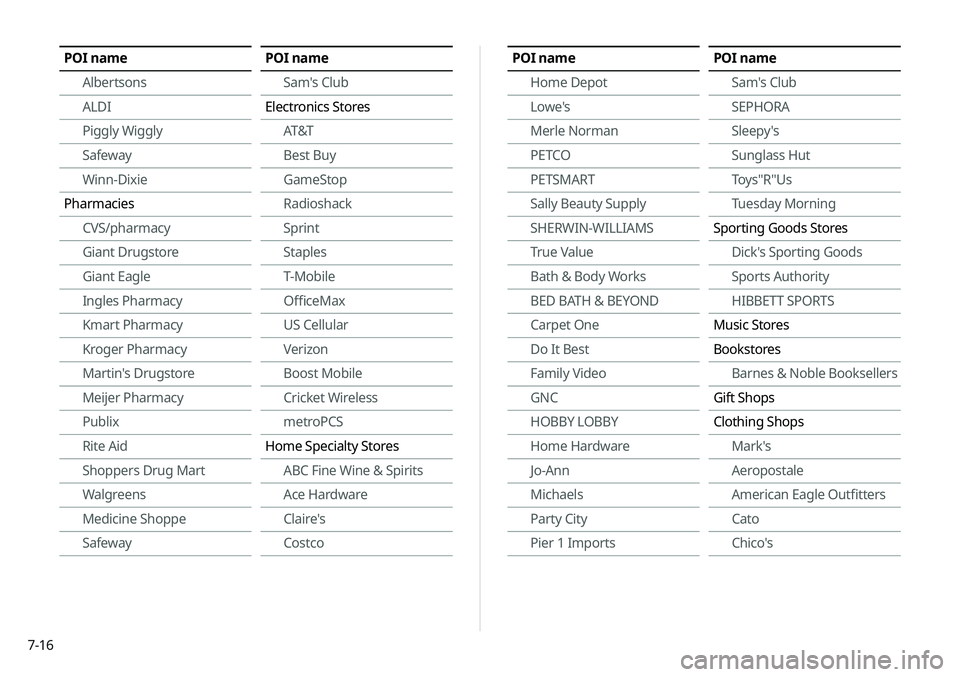
POI nameAlbertsons
ALDI
Piggly Wiggly
Safeway
Winn-Dixie
Pharmacies CVS/pharmacy
Giant Drugstore
Giant Eagle
Ingles Pharmacy
Kmart Pharmacy
Kroger Pharmacy
Martin's Drugstore
Meijer Pharmacy
Publix
Rite Aid
Shoppers Drug Mart
Walgreens
Medicine Shoppe
SafewayPOI name
Sam's Club
Electronics Stores AT&T
Best Buy
GameStop
Radioshack
Sprint
Staples
T-Mobile
OfficeMax
US Cellular
Verizon
Boost Mobile
Cricket Wireless
metroPCS
Home Specialty Stores ABC Fine Wine & Spirits
Ace Hardware
Claire's
CostcoPOI name
Home Depot
Lowe's
Merle Norman
PETCO
PETSMART
Sally Beauty Supply
SHERWIN-WILLIAMS
True Value
Bath & Body Works
BED BATH & BEYOND
Carpet One
Do It Best
Family Video
GNC
HOBBY LOBBY
Home Hardware
Jo-Ann
Michaels
Party City
Pier 1 ImportsPOI nameSam's Club
SEPHORA
Sleepy's
Sunglass Hut
Toys"R"Us
Tuesday Morning
Sporting Goods Stores Dick's Sporting Goods
Sports Authority
HIBBETT SPORTS
Music Stores
Bookstores Barnes & Noble Booksellers
Gift Shops
Clothing Shops Mark's
Aeropostale
American Eagle Outfitters
Cato
Chico's