stop start KIA Soul EV 2016 2.G User Guide
[x] Cancel search | Manufacturer: KIA, Model Year: 2016, Model line: Soul EV, Model: KIA Soul EV 2016 2.GPages: 524, PDF Size: 25.82 MB
Page 428 of 524
Maintenance
54
7
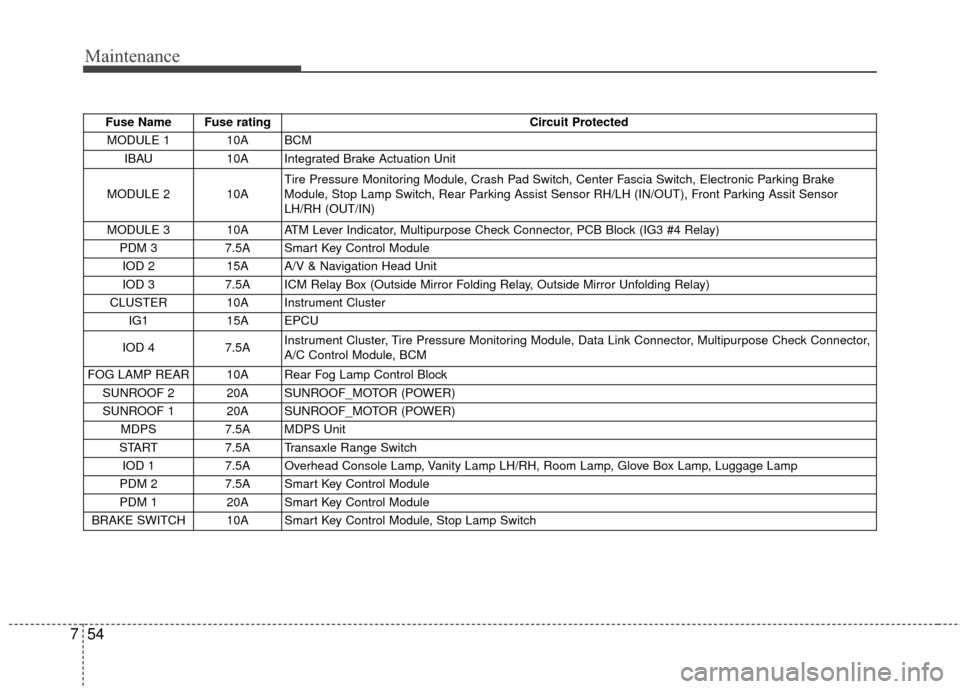
Fuse Name Fuse rating Circuit Protected
MODULE 1 10A BCM IBAU 10A Integrated Brake Actuation Unit
MODULE 2 10A Tire Pressure Monitoring Module, Crash Pad Switch, Center Fascia Switch, Electronic Parking Brake
Module, Stop Lamp Switch, Rear Parking Assist Sensor RH/LH (IN/OUT), Front Parking Assit Sensor
LH/RH (OUT/IN)
MODULE 3 10A ATM Lever Indicator, Multipurpose Check Connector, PCB Block (IG3 #4 Relay) PDM 3 7.5A Smart Key Control Module
IOD 2 15A A/V & Navigation Head Unit
IOD 3 7.5A ICM Relay Box (Outside Mirror Folding Relay, Outside Mirror Unfolding Relay)
CLUSTER 10A Instrument Cluster IG1 15A EPCU
IOD 4 7.5A Instrument Cluster, Tire Pressure Monitoring Module, Data Link Connector, Multipurpose Check Connector,
A/C Control Module, BCM
FOG LAMP REAR 10A Rear Fog Lamp Control Block SUNROOF 2 20A SUNROOF_MOTOR (POWER)
SUNROOF 1 20A SUNROOF_MOTOR (POWER) MDPS 7.5A MDPS Unit
START 7.5A Transaxle Range Switch
IOD 1 7.5A Overhead Console Lamp, Vanity Lamp LH/RH, Room Lamp, Glove Box Lamp, Luggage Lamp
PDM 2 7.5A Smart Key Control Module
PDM 1 20A Smart Key Control Module
BRAKE SWITCH 10A Smart Key Control Module, Stop Lamp Switch
Page 430 of 524
Maintenance
56
7
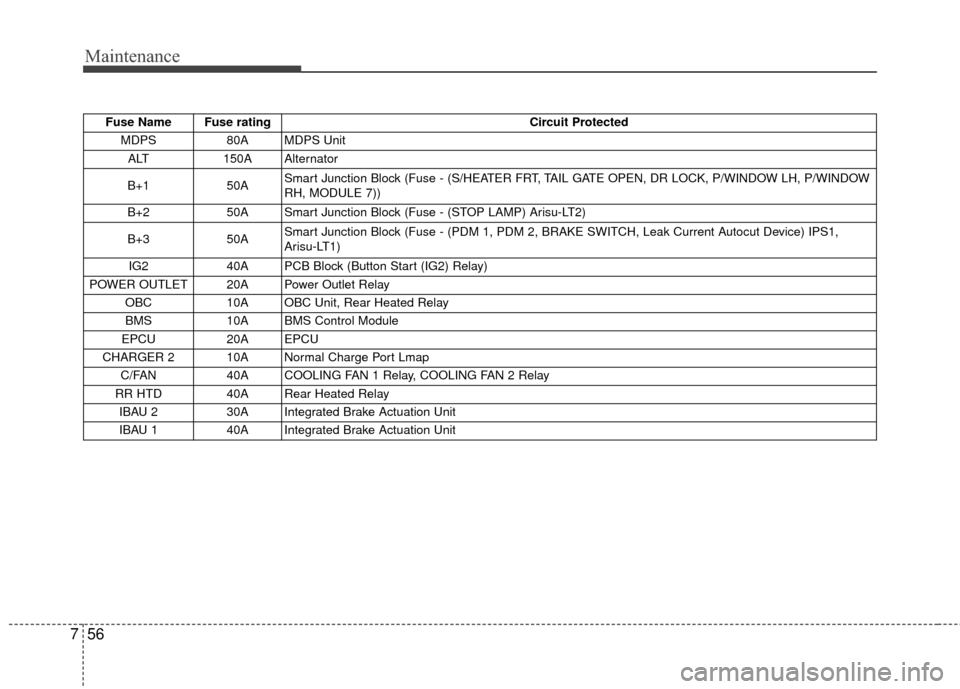
Fuse Name Fuse rating Circuit Protected
MDPS 80A MDPS Unit
ALT 150A Alternator
B+1 50A Smart Junction Block (Fuse - (S/HEATER FRT, TAIL GATE OPEN, DR LOCK, P/WINDOW LH, P/WINDOW
RH, MODULE 7))
B+2 50A Smart Junction Block (Fuse - (STOP LAMP) Arisu-LT2)
B+3 50A Smart Junction Block (Fuse - (PDM 1, PDM 2, BRAKE SWITCH, Leak Current Autocut Device) IPS1,
Arisu-LT1)
IG2 40A PCB Block (Button Start (IG2) Relay)
POWER OUTLET 20A Power Outlet Relay OBC 10A OBC Unit, Rear Heated Relay
BMS 10A BMS Control Module
EPCU 20A EPCU
CHARGER 2 10A Normal Charge Port Lmap C/FAN 40A COOLING FAN 1 Relay, COOLING FAN 2 Relay
RR HTD 40A Rear Heated Relay IBAU 2 30A Integrated Brake Actuation Unit
IBAU 1 40A Integrated Brake Actuation Unit
Page 466 of 524
Electric Vehicle Guide
❈This is an electric vehicle guide to assist drivers with
understanding their vehicle.
Refer to the following content for electric vehicle details
and precautions
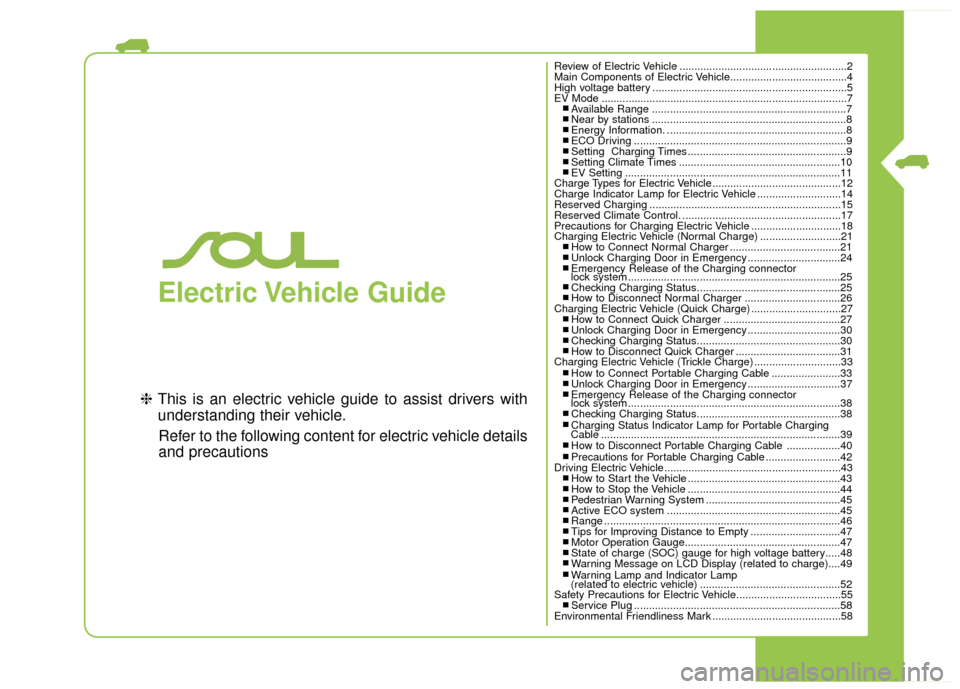
Review of Electric Vehicle ........................................................2
Main Components of Electric Vehicle.......................................4
High voltage battery .................................................................5
EV Mode ........................................................................\
..........7
■ Available Range .................................................................7■ Near by stations .................................................................8■ Energy Information. ............................................................8■ ECO Driving .......................................................................9\
■ Setting Charging Times .....................................................9■ Setting Climate Times ......................................................10■ EV Setting ........................................................................\
11
Charge Types for Electric Vehicle...........................................12
Charge Indicator Lamp for Electric Vehicle ............................14
Reserved Charging ................................................................15
Reserved Climate Control. .....................................................17
Precautions for Charging Electric Vehicle ..............................18
Charging Electric Vehicle (Normal Charge) ...........................21
■ How to Connect Normal Charger .....................................21■ Unlock Charging Door in Emergency ...............................24■ Emergency Release of the Charging connector
lock system .......................................................................2\
5
■ Checking Charging Status................................................25■ How to Disconnect Normal Charger ................................26
Charging Electric Vehicle (Quick Charge) ..............................27
■ How to Connect Quick Charger .......................................27■ Unlock Charging Door in Emergency ...............................30■ Checking Charging Status................................................30■ How to Disconnect Quick Charger ...................................31
Charging Electric Vehicle (Trickle Charge) .............................33
■ How to Connect Portable Charging Cable .......................33■ Unlock Charging Door in Emergency ...............................37■ Emergency Release of the Charging connector
lock system .......................................................................3\
8
■ Checking Charging Status................................................38■ Charging Status Indicator Lamp for Portable Charging
Cable ........................................................................\
........39
■ How to Disconnect Portable Charging Cable ..................40■ Precautions for Portable Charging Cable .........................42
Driving Electric Vehicle ...........................................................43
■ How to Start the Vehicle ...................................................43■ How to Stop the Vehicle ...................................................44■ Pedestrian Warning System .............................................45■ Active ECO system ..........................................................45■ Range ........................................................................\
.......46■ Tips for Improving Distance to Empty ..............................47■ Motor Operation Gauge....................................................47■ State of charge (SOC) gauge for high voltage battery.....48■ Warning Message on LCD Display (related to charge)....49■ Warning Lamp and Indicator Lamp
(related to electric vehicle) ...............................................52
Safety Precautions for Electric Vehicle...................................55
■ Service Plug .....................................................................58
Environmental Friendliness Mark ...........................................58
Page 488 of 524
23
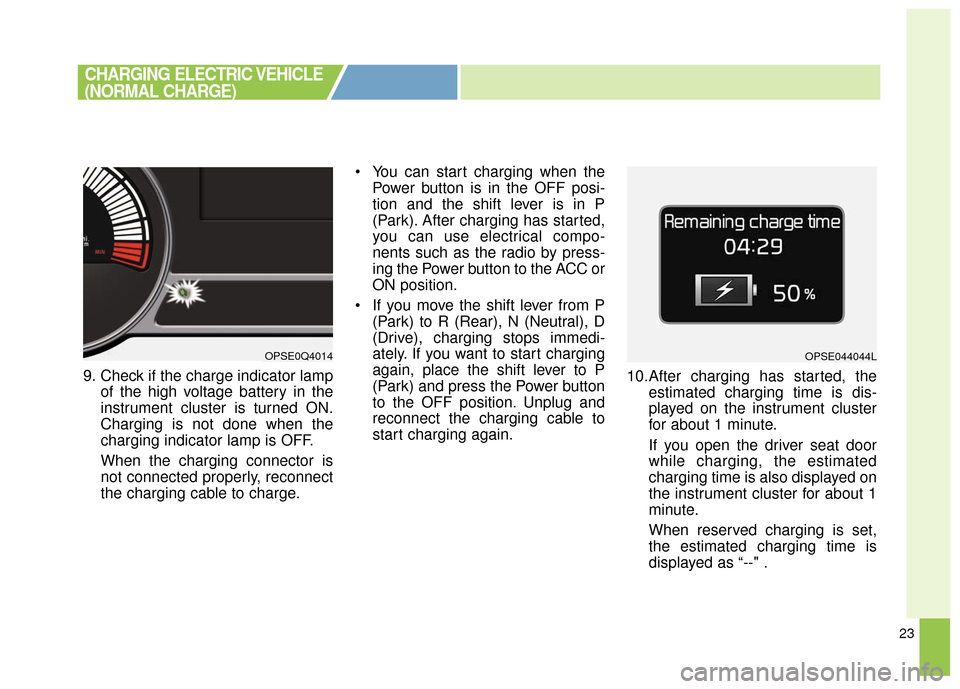
9. Check if the charge indicator lampof the high voltage battery in the
instrument cluster is turned ON.
Charging is not done when the
charging indicator lamp is OFF.
When the charging connector is
not connected properly, reconnect
the charging cable to charge. You can start charging when the
Power button is in the OFF posi-
tion and the shift lever is in P
(Park). After charging has started,
you can use electrical compo-
nents such as the radio by press-
ing the Power button to the ACC or
ON position.
If you move the shift lever from P (Park) to R (Rear), N (Neutral), D
(Drive), charging stops immedi-
ately. If you want to start charging
again, place the shift lever to P
(Park) and press the Power button
to the OFF position. Unplug and
reconnect the charging cable to
start charging again. 10.After charging has started, the
estimated charging time is dis-
played on the instrument cluster
for about 1 minute.
If you open the driver seat door
while charging, the estimated
charging time is also displayed on
the instrument cluster for about 1
minute.
When reserved charging is set,
the estimated charging time is
displayed as “--" .
OPSE0Q4014OPSE044044L
CHARGING ELECTRIC VEHICLE
(NORMAL CHARGE)
Page 495 of 524
30
❈During cold weather, quick charg-
ing may not be available to prevent
high voltage battery degradation.
You can start charging when the Power button is in the OFF posi-
tion and the shift lever is in P
(Park).
After charging has started, you
can use electrical components
such as the radio by pressing the
Power button to ACC or ON posi-
tion.
If you move the shift lever from P (Park) to R (Reverse), N (Neutral),
D (Drive), charging stops immedi-
ately. If you want to start charging
again, place the shift lever to P
(Park) and press the Power button
to the OFF position. Unplug and
reconnect the charging cable to
start charging again.
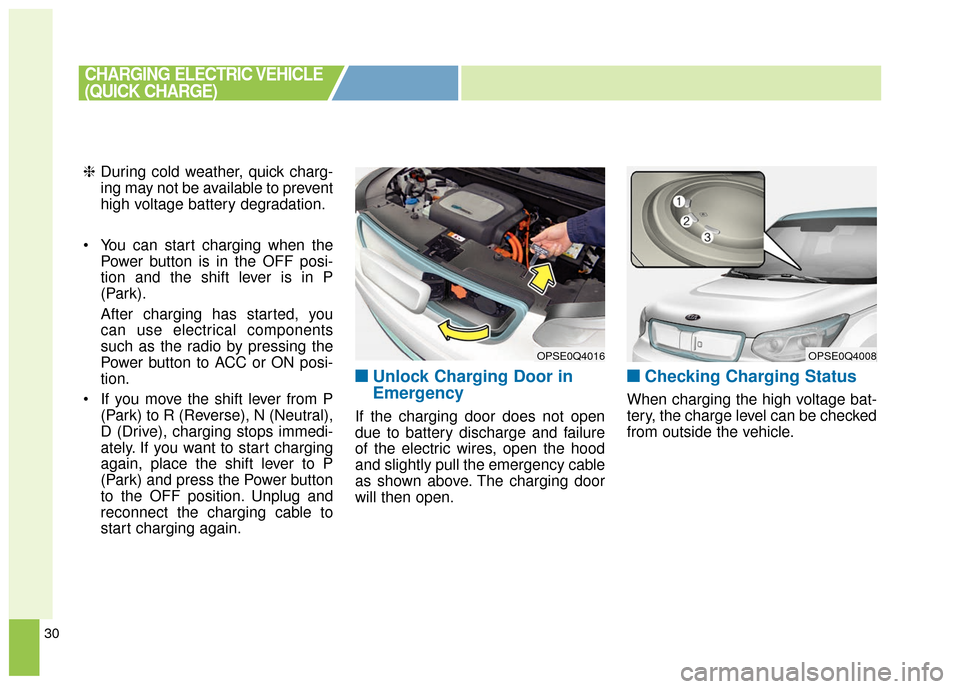
■ ■Unlock Charging Door in
Emergency
If the charging door does not open
due to battery discharge and failure
of the electric wires, open the hood
and slightly pull the emergency cable
as shown above. The charging door
will then open.
■ ■Checking Charging Status
When charging the high voltage bat-
tery, the charge level can be checked
from outside the vehicle.
OPSE0Q4016
CHARGING ELECTRIC VEHICLE
(QUICK CHARGE)
OPSE0Q4008
Page 501 of 524
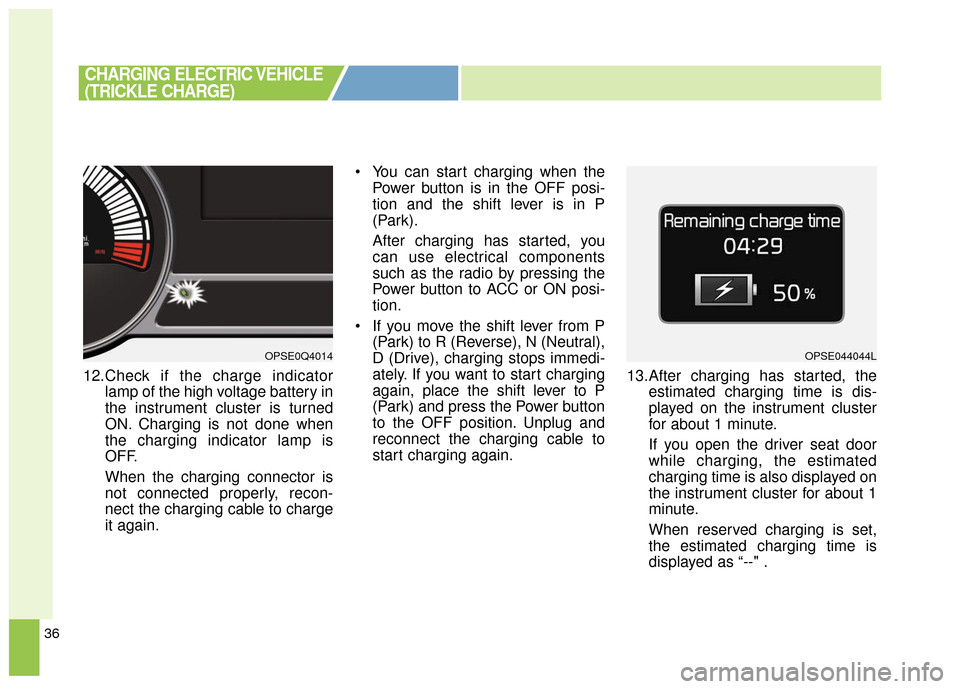
36
12.Check if the charge indicatorlamp of the high voltage battery in
the instrument cluster is turned
ON. Charging is not done when
the charging indicator lamp is
OFF.
When the charging connector is
not connected properly, recon-
nect the charging cable to charge
it again. You can start charging when the
Power button is in the OFF posi-
tion and the shift lever is in P
(Park).
After charging has started, you
can use electrical components
such as the radio by pressing the
Power button to ACC or ON posi-
tion.
If you move the shift lever from P (Park) to R (Reverse), N (Neutral),
D (Drive), charging stops immedi-
ately. If you want to start charging
again, place the shift lever to P
(Park) and press the Power button
to the OFF position. Unplug and
reconnect the charging cable to
start charging again. 13.After charging has started, the
estimated charging time is dis-
played on the instrument cluster
for about 1 minute.
If you open the driver seat door
while charging, the estimated
charging time is also displayed on
the instrument cluster for about 1
minute.
When reserved charging is set,
the estimated charging time is
displayed as “--" .
CHARGING ELECTRIC VEHICLE
(TRICKLE CHARGE)
OPSE0Q4014OPSE044044L