climate control KIA Soul EV 2016 2.G Owner's Guide
[x] Cancel search | Manufacturer: KIA, Model Year: 2016, Model line: Soul EV, Model: KIA Soul EV 2016 2.GPages: 524, PDF Size: 25.82 MB
Page 392 of 524
Maintenance
18
7
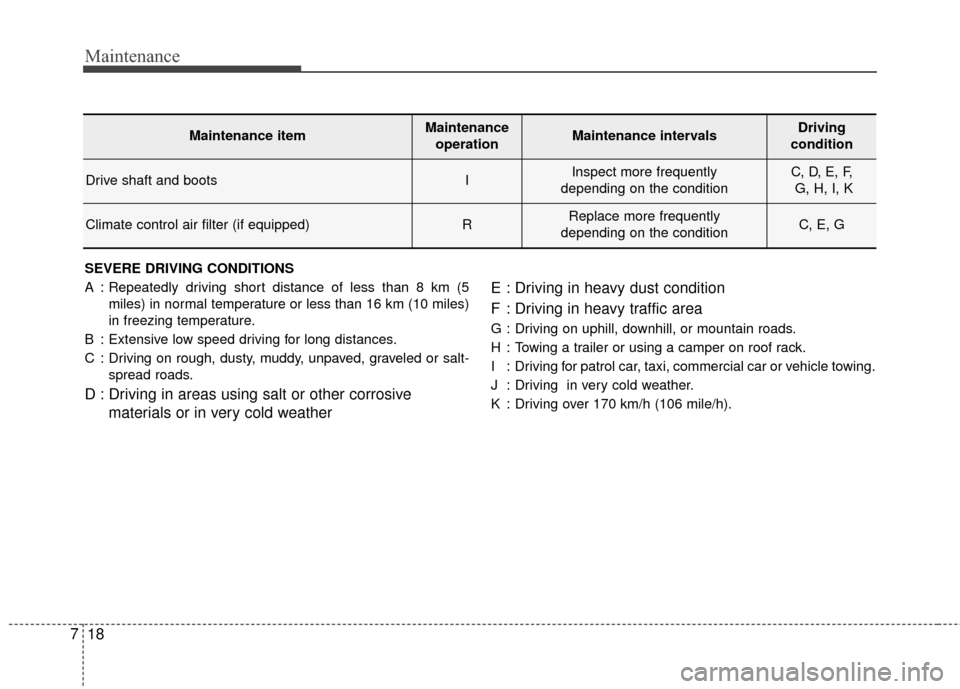
SEVERE DRIVING CONDITIONS
A : Repeatedly driving short distance of less than 8 km (5
miles) in normal temperature or less than 16 km (10 miles)
in freezing temperature.
B : Extensive low speed driving for long distances.
C : Driving on rough, dusty, muddy, unpaved, graveled or salt- spread roads.
D : Driving in areas using salt or other corrosive materials or in very cold weather E : Driving in heavy dust condition
F : Driving in heavy traffic area
G : Driving on uphill, downhill, or mountain roads.
H : Towing a trailer or using a camper on roof rack.
I : Driving for patrol car, taxi, commercial car or vehicle towing.
J : Driving in very cold weather.
K : Driving over 170 km/h (106 mile/h).
Maintenance itemMaintenance
operationMaintenance intervalsDriving
condition
Drive shaft and bootsIInspect more frequently
depending on the conditionC, D, E, F, G, H, I, K
Climate control air filter (if equipped)RReplace more frequently
depending on the conditionC, E, G
Page 399 of 524
725
Maintenance
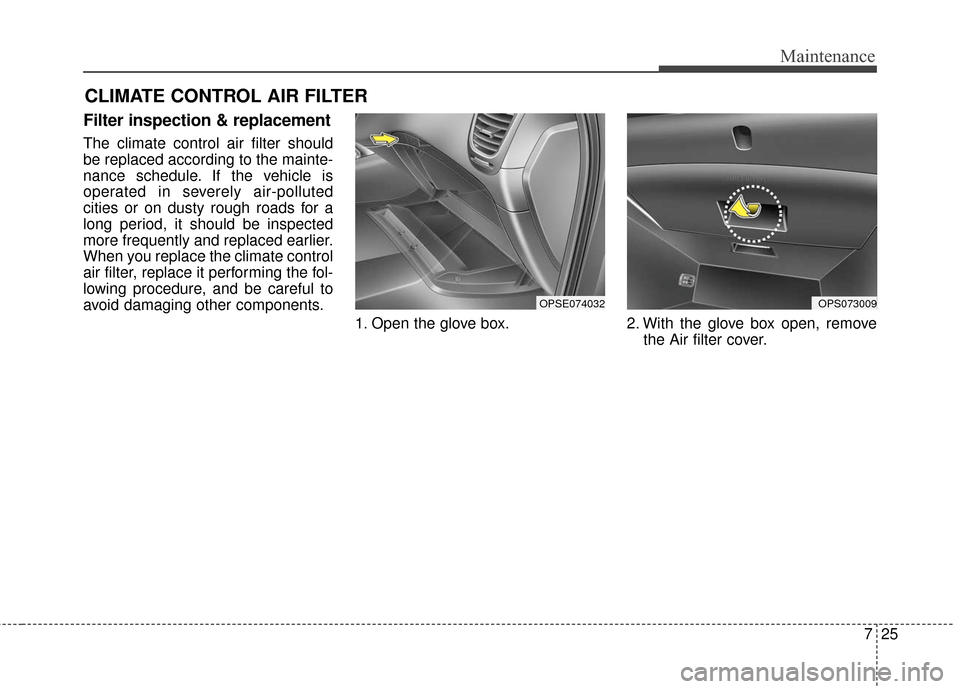
CLIMATE CONTROL AIR FILTER
Filter inspection & replacement
The climate control air filter should
be replaced according to the mainte-
nance schedule. If the vehicle is
operated in severely air-polluted
cities or on dusty rough roads for a
long period, it should be inspected
more frequently and replaced earlier.
When you replace the climate control
air filter, replace it performing the fol-
lowing procedure, and be careful to
avoid damaging other components.1. Open the glove box. 2. With the glove box open, remove the Air filter cover.
OPS073009OPSE074032
Page 400 of 524
Maintenance
26
7
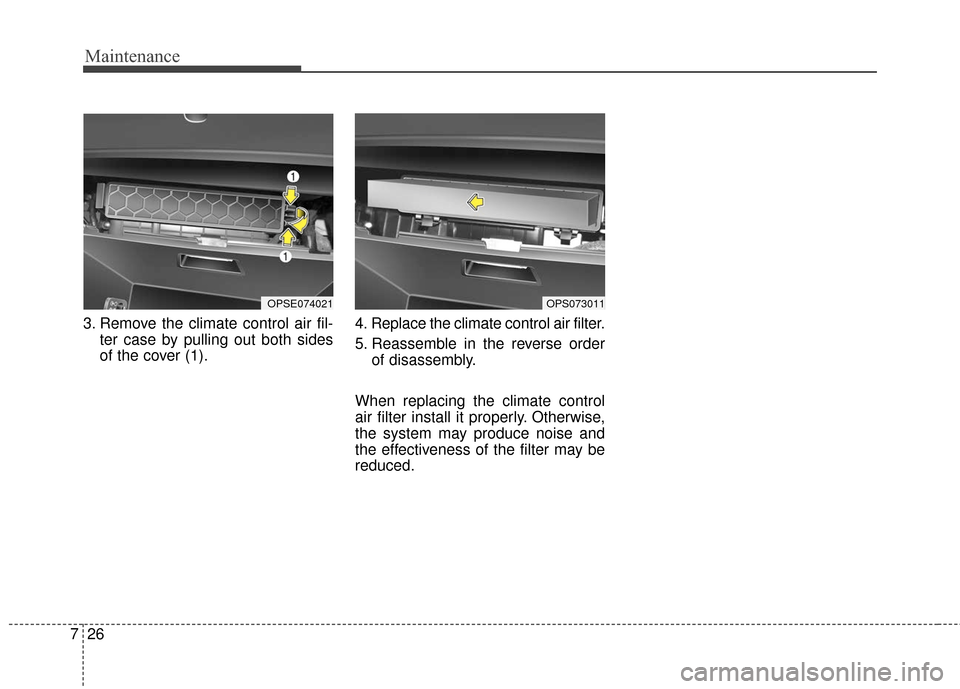
3. Remove the climate control air fil-
ter case by pulling out both sides
of the cover (1). 4. Replace the climate control air filter.
5. Reassemble in the reverse order
of disassembly.
When replacing the climate control
air filter install it properly. Otherwise,
the system may produce noise and
the effectiveness of the filter may be
reduced.
OPSE074021OPS073011
Page 407 of 524
733
Maintenance
Disconnect the battery charger inthe following order:
1. Turn off the battery charger main switch.
2. Unhook the negative clamp from the negative battery terminal.
3. Unhook the positive clamp from the positive battery terminal.
Before performing maintenance or recharging the battery, turn off all
accessories and stop the vehicle.
The negative battery cable must be removed first and installed last
when the battery is disconnected.Reset items
Items should be reset after the bat-
tery has been discharged or the bat-
tery has been disconnected.
Auto up/down window (See chapter 4)
Trip computer (See chapter 4)
Climate control system (See chapter 4)
Audio (See chapter 4)
Page 415 of 524
741
Maintenance
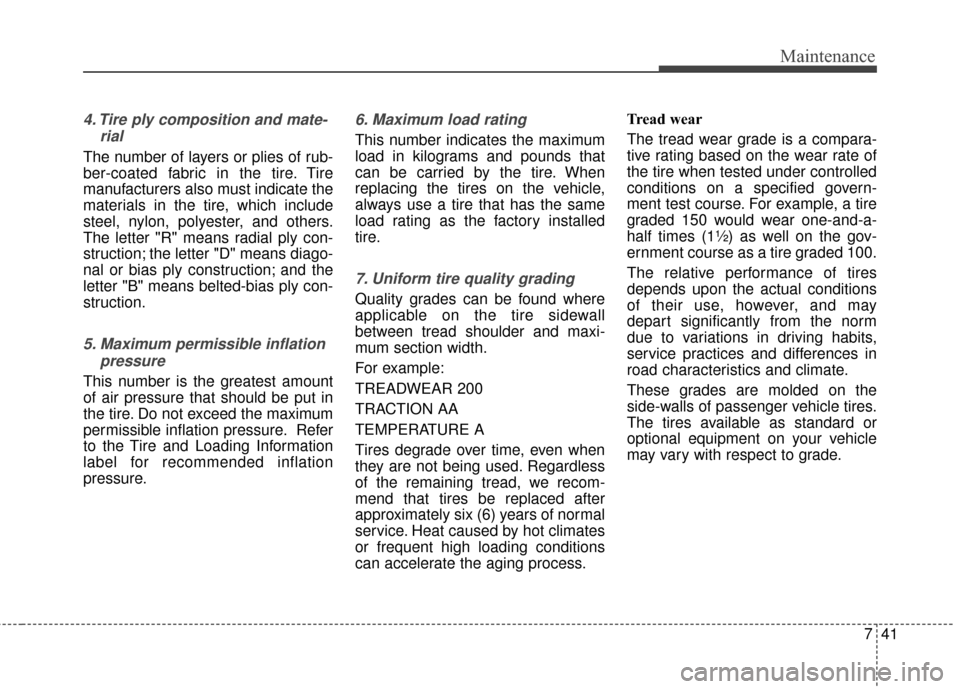
4. Tire ply composition and mate-rial
The number of layers or plies of rub-
ber-coated fabric in the tire. Tire
manufacturers also must indicate the
materials in the tire, which include
steel, nylon, polyester, and others.
The letter "R" means radial ply con-
struction; the letter "D" means diago-
nal or bias ply construction; and the
letter "B" means belted-bias ply con-
struction.
5. Maximum permissible inflationpressure
This number is the greatest amount
of air pressure that should be put in
the tire. Do not exceed the maximum
permissible inflation pressure. Refer
to the Tire and Loading Information
label for recommended inflation
pressure.
6. Maximum load rating
This number indicates the maximum
load in kilograms and pounds that
can be carried by the tire. When
replacing the tires on the vehicle,
always use a tire that has the same
load rating as the factory installed
tire.
7. Uniform tire quality grading
Quality grades can be found where
applicable on the tire sidewall
between tread shoulder and maxi-
mum section width.
For example:
TREADWEAR 200
TRACTION AA
TEMPERATURE A
Tires degrade over time, even when
they are not being used. Regardless
of the remaining tread, we recom-
mend that tires be replaced after
approximately six (6) years of normal
service. Heat caused by hot climates
or frequent high loading conditions
can accelerate the aging process. Tread wear
The tread wear grade is a compara-
tive rating based on the wear rate of
the tire when tested under controlled
conditions on a specified govern-
ment test course. For example, a tire
graded 150 would wear one-and-a-
half times (1½) as well on the gov-
ernment course as a tire graded 100.
The relative performance of tires
depends upon the actual conditions
of their use, however, and may
depart significantly from the norm
due to variations in driving habits,
service practices and differences in
road characteristics and climate.
These grades are molded on the
side-walls of passenger vehicle tires.
The tires available as standard or
optional equipment on your vehicle
may vary with respect to grade.
Page 459 of 524
Index
2I
Active ECO system. . . . . . . . . . . . . . . . . . . . . . . . . . . . 5-10Active ECO operation . . . . . . . . . . . . . . . . . . . . . . . 5-10
Air bag - advanced supplemental restraint system . . . . 3-34 Adding equipment to or modifying your airbag-equipped vehicle . . . . . . . . . . . . . . . . . . . . . . . 3-57
Air bag warning label. . . . . . . . . . . . . . . . . . . . . . . . 3-57
Air bag warning light . . . . . . . . . . . . . . . . . . . . . . . . 3-37
Curtain air bag . . . . . . . . . . . . . . . . . . . . . . . . . . . . . 3-50
Do not installing a child restraint on a front passenger's seat . . . . . . . . . . . . . . . . . . . . . . . . . . . 3-37
Driver's and passenger's front air bag . . . . . . . . . . . 3-46
How does the air bag system operate . . . . . . . . . . . 3-35
Inflation and non-inflation conditions of the air bag . . 3-51
Occupant Detection System (ODS) . . . . . . . . . . . . . 3-41
Side air bag. . . . . . . . . . . . . . . . . . . . . . . . . . . . . . . . 3-49
SRS Care . . . . . . . . . . . . . . . . . . . . . . . . . . . . . . . . . 3-56
SRS components and functions . . . . . . . . . . . . . . . . 3-38
Air conditioning system . . . . . . . . . . . . . . . . . . . . . . . . . 8-3
Appearance care . . . . . . . . . . . . . . . . . . . . . . . . . . . . . . 7-69 Exterior care . . . . . . . . . . . . . . . . . . . . . . . . . . . . . . . 7-69
Interior care . . . . . . . . . . . . . . . . . . . . . . . . . . . . . . . 7-74
Audio system . . . . . . . . . . . . . . . . . . . . . . . . . . . . . . . 4-126 Antenna . . . . . . . . . . . . . . . . . . . . . . . . . . . . . . . . . 4-126
Audio . . . . . . . . . . . . . . . . . . . . . . . . . . . . . . . . . . . 4-\
140
Audio remote control . . . . . . . . . . . . . . . . . . . . . . . 4-127
Aux, USB and iPod
®port . . . . . . . . . . . . . . . . . . . 4-128 How vehicle audio works . . . . . . . . . . . . . . . . . . . . 4-130
Precautions for Safe Driving . . . . . . . . . . . . . . . . . 4-137
Speaker lights . . . . . . . . . . . . . . . . . . . . . . . . . . . . . 4-129
Using iPod
®device . . . . . . . . . . . . . . . . . . . . . . . . 4-135
Using the USB device . . . . . . . . . . . . . . . . . . . . . . 4-134
Voice Recognition . . . . . . . . . . . . . . . . . . . . . . . . . 4-138
When connecting a Bluetooth
®Phone. . . . . . . . . . 4-137
Auto defogging system . . . . . . . . . . . . . . . . . . . . . . . . 4-114
Automatic climate control system . . . . . . . . . . . . . . . . 4-94 Automatic heating and air conditioning. . . . . . . . . . 4-95
Checking the amount of air conditioner refrigerantand compressor lubricant . . . . . . . . . . . . . . . . . . . 4-109
Climate control air filter. . . . . . . . . . . . . . . . . . . . . 4-108
Manual heating and air conditioning . . . . . . . . . . . . 4-96
System operation . . . . . . . . . . . . . . . . . . . . . . . . . . 4-106
Battery. . . . . . . . . . . . . . . . . . . . . . . . . . . . . . . . . . . . \
. . 7-31 Battery recharging . . . . . . . . . . . . . . . . . . . . . . . . . . 7-32
For best battery service . . . . . . . . . . . . . . . . . . . . . . 7-31
Reset items . . . . . . . . . . . . . . . . . . . . . . . . . . . . . . . . 7-33
Before driving . . . . . . . . . . . . . . . . . . . . . . . . . . . . . . . . . 5-3 Before entering vehicle . . . . . . . . . . . . . . . . . . . . . . . 5-3
Before starting . . . . . . . . . . . . . . . . . . . . . . . . . . . . . . 5-3
Necessary inspections . . . . . . . . . . . . . . . . . . . . . . . . 5-3
Brake fluid . . . . . . . . . . . . . . . . . . . . . . . . . . . . . . . . . . 7-23\
A
B
Page 460 of 524
I3
Index
Checking the brake fluid level . . . . . . . . . . . . . . . . . 7-23
Brake system. . . . . . . . . . . . . . . . . . . . . . . . . . . . . . . . . 5-16 Anti-lock brake system (ABS) . . . . . . . . . . . . . . . . . 5-22
Electronic parking brake (EPB) . . . . . . . . . . . . . . . . 5-18
Electronic stability control (ESC) . . . . . . . . . . . . . . 5-24
Good braking practices . . . . . . . . . . . . . . . . . . . . . . 5-30
Hill-start assist control (HAC) . . . . . . . . . . . . . . . . . 5-29
Power brakes . . . . . . . . . . . . . . . . . . . . . . . . . . . . . 5-16
Vehicle stability management (VSM) . . . . . . . . . . . 5-28
Bulb wattage . . . . . . . . . . . . . . . . . . . . . . . . . . . . . . . . . . 8-4
Child restraint system . . . . . . . . . . . . . . . . . . . . . . . . . . 3-26 Lower anchor system . . . . . . . . . . . . . . . . . . . . . . . . 3-32
Tether anchor system . . . . . . . . . . . . . . . . . . . . . . . . 3-31
Using a child restraint system . . . . . . . . . . . . . . . . . 3-27
Clean air . . . . . . . . . . . . . . . . . . . . . . . . . . . . . . . . . . . 4-\
113
Climate control air filter . . . . . . . . . . . . . . . . . . . . . . . . 7-25 Filter inspection . . . . . . . . . . . . . . . . . . . . . . . . . . . . 7-25
Filter replacement. . . . . . . . . . . . . . . . . . . . . . . . . . . 7-25
Coolant . . . . . . . . . . . . . . . . . . . . . . . . . . . . . . . . . . . . \
. 7-20 Changing the coolant . . . . . . . . . . . . . . . . . . . . . . . . 7-22
Checking the coolant level . . . . . . . . . . . . . . . . . . . . 7-20
Cruise control system . . . . . . . . . . . . . . . . . . . . . . . . . . 5-32 Cruise control switch . . . . . . . . . . . . . . . . . . . . . . . . 5-33
To cancel cruise control . . . . . . . . . . . . . . . . . . . . . . 5-35
To decrease the cruising speed . . . . . . . . . . . . . . . . . 5-34 To increase cruise control set speed . . . . . . . . . . . . . 5-34
To resume cruising speed at more than approximately
30 km/h (20 mph) . . . . . . . . . . . . . . . . . . . . . . . . . 5-35
To set cruise control speed . . . . . . . . . . . . . . . . . . . . 5-33
To temporarily accelerate with the cruise control on. . 5-34
To turn cruise control off . . . . . . . . . . . . . . . . . . . . . 5-36
Defroster . . . . . . . . . . . . . . . . . . . . . . . . . . . . . . . . . . . . \
4-93 Rear window defroster . . . . . . . . . . . . . . . . . . . . . . . 4-93
Dimensions . . . . . . . . . . . . . . . . . . . . . . . . . . . . . . . . . . . 8-\
2
Door locks . . . . . . . . . . . . . . . . . . . . . . . . . . . . . . . . . . 4-11\
Auto door lock/unlock feature . . . . . . . . . . . . . . . . . 4-13
Child-protector rear door lock . . . . . . . . . . . . . . . . . 4-14
Impact sensing door unlock system . . . . . . . . . . . . . 4-13
Operating door locks from inside the vehicle . . . . . 4-12
Operating door locks from outside the vehicle . . . . 4-11
Speed sensing door lock system . . . . . . . . . . . . . . . 4-13
Economical operation . . . . . . . . . . . . . . . . . . . . . . . . . . 5-37
Emergency starting . . . . . . . . . . . . . . . . . . . . . . . . . . . . . 6-5 Jump starting . . . . . . . . . . . . . . . . . . . . . . . . . . . . . . . 6-6
Push-starting . . . . . . . . . . . . . . . . . . . . . . . . . . . . . . . . 6-7
Explanation of scheduled maintenance items . . . . . . . 7-19
Exterior overview . . . . . . . . . . . . . . . . . . . . . . . . . . . . . . 2-2
C
D
E
Page 465 of 524
Index
8I
Warning and indicator lights. . . . . . . . . . . . . . . . . . . . . 4-65Indicator Lights . . . . . . . . . . . . . . . . . . . . . . . . . . . . 4-72
Warning lights . . . . . . . . . . . . . . . . . . . . . . . . . . . . . 4-65
Washer fluid . . . . . . . . . . . . . . . . . . . . . . . . . . . . . . . . . 7-24 Checking the washer fluid level . . . . . . . . . . . . . . . . 7-24
Windows . . . . . . . . . . . . . . . . . . . . . . . . . . . . . . . . . . . 4-\
17 Power windows . . . . . . . . . . . . . . . . . . . . . . . . . . . . 4-18
Windshield defrosting and defogging. . . . . . . . . . . . . 4-110 Automatic climate control system . . . . . . . . . . . . . 4-110
Defogging logic . . . . . . . . . . . . . . . . . . . . . . . . . . . 4-112
Winter driving . . . . . . . . . . . . . . . . . . . . . . . . . . . . . . . . 5-44 Carry emergency equipment . . . . . . . . . . . . . . . . . . 5-46
Check battery and cables . . . . . . . . . . . . . . . . . . . . . 5-45
Don’t let your parking brake freeze . . . . . . . . . . . . . 5-46
Don't let ice and snow accumulate underneath . . . . 5-46
Snowy or icy conditions . . . . . . . . . . . . . . . . . . . . . . 5-44
To keep locks from freezing. . . . . . . . . . . . . . . . . . . 5-45
Use approved window washer anti-freeze in system . . 5-45
Use high quality ethylene glycol coolant. . . . . . . . . 5-45
Wiper blades . . . . . . . . . . . . . . . . . . . . . . . . . . . . . . . . . 7-27 Blade inspection . . . . . . . . . . . . . . . . . . . . . . . . . . . . 7-27
Blade replacement . . . . . . . . . . . . . . . . . . . . . . . . . . 7-27
Wipers and washers . . . . . . . . . . . . . . . . . . . . . . . . . . . 4-87 Rear window wiper and washer switch . . . . . . . . . . 4-89
Rear window wiper/washer . . . . . . . . . . . . . . . . . . . 4-87
Windshield washers . . . . . . . . . . . . . . . . . . . . . . . . . 4-88 Windshield wiper/washer . . . . . . . . . . . . . . . . . . . . . 4-87
Windshield wipers . . . . . . . . . . . . . . . . . . . . . . . . . . 4-87
W
Page 466 of 524
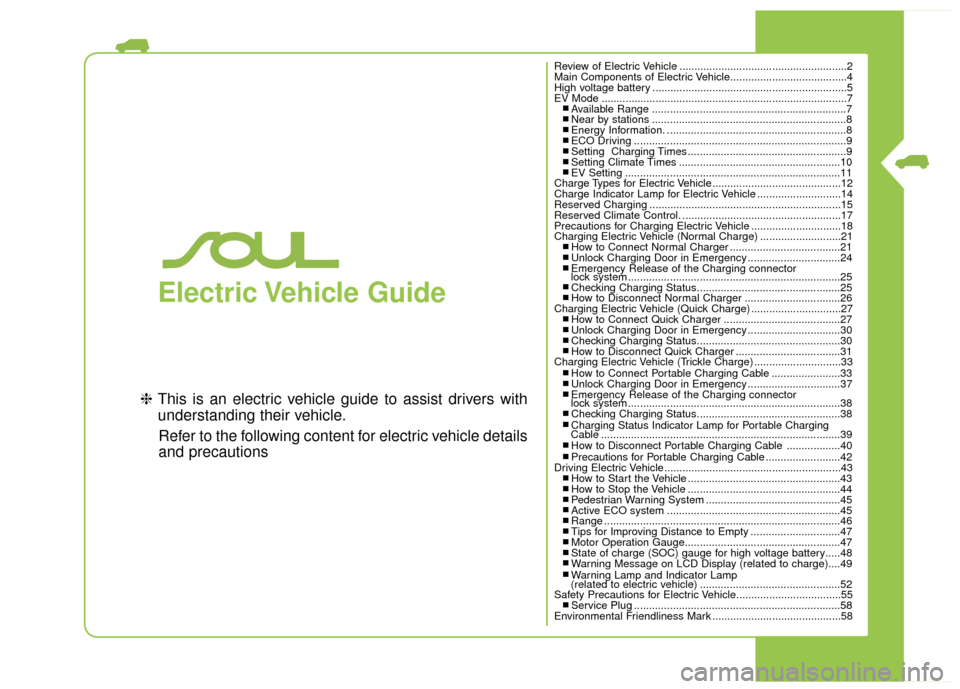
Electric Vehicle Guide
❈This is an electric vehicle guide to assist drivers with
understanding their vehicle.
Refer to the following content for electric vehicle details
and precautions
Review of Electric Vehicle ........................................................2
Main Components of Electric Vehicle.......................................4
High voltage battery .................................................................5
EV Mode ........................................................................\
..........7
■ Available Range .................................................................7■ Near by stations .................................................................8■ Energy Information. ............................................................8■ ECO Driving .......................................................................9\
■ Setting Charging Times .....................................................9■ Setting Climate Times ......................................................10■ EV Setting ........................................................................\
11
Charge Types for Electric Vehicle...........................................12
Charge Indicator Lamp for Electric Vehicle ............................14
Reserved Charging ................................................................15
Reserved Climate Control. .....................................................17
Precautions for Charging Electric Vehicle ..............................18
Charging Electric Vehicle (Normal Charge) ...........................21
■ How to Connect Normal Charger .....................................21■ Unlock Charging Door in Emergency ...............................24■ Emergency Release of the Charging connector
lock system .......................................................................2\
5
■ Checking Charging Status................................................25■ How to Disconnect Normal Charger ................................26
Charging Electric Vehicle (Quick Charge) ..............................27
■ How to Connect Quick Charger .......................................27■ Unlock Charging Door in Emergency ...............................30■ Checking Charging Status................................................30■ How to Disconnect Quick Charger ...................................31
Charging Electric Vehicle (Trickle Charge) .............................33
■ How to Connect Portable Charging Cable .......................33■ Unlock Charging Door in Emergency ...............................37■ Emergency Release of the Charging connector
lock system .......................................................................3\
8
■ Checking Charging Status................................................38■ Charging Status Indicator Lamp for Portable Charging
Cable ........................................................................\
........39
■ How to Disconnect Portable Charging Cable ..................40■ Precautions for Portable Charging Cable .........................42
Driving Electric Vehicle ...........................................................43
■ How to Start the Vehicle ...................................................43■ How to Stop the Vehicle ...................................................44■ Pedestrian Warning System .............................................45■ Active ECO system ..........................................................45■ Range ........................................................................\
.......46■ Tips for Improving Distance to Empty ..............................47■ Motor Operation Gauge....................................................47■ State of charge (SOC) gauge for high voltage battery.....48■ Warning Message on LCD Display (related to charge)....49■ Warning Lamp and Indicator Lamp
(related to electric vehicle) ...............................................52
Safety Precautions for Electric Vehicle...................................55
■ Service Plug .....................................................................58
Environmental Friendliness Mark ...........................................58
Page 475 of 524
10
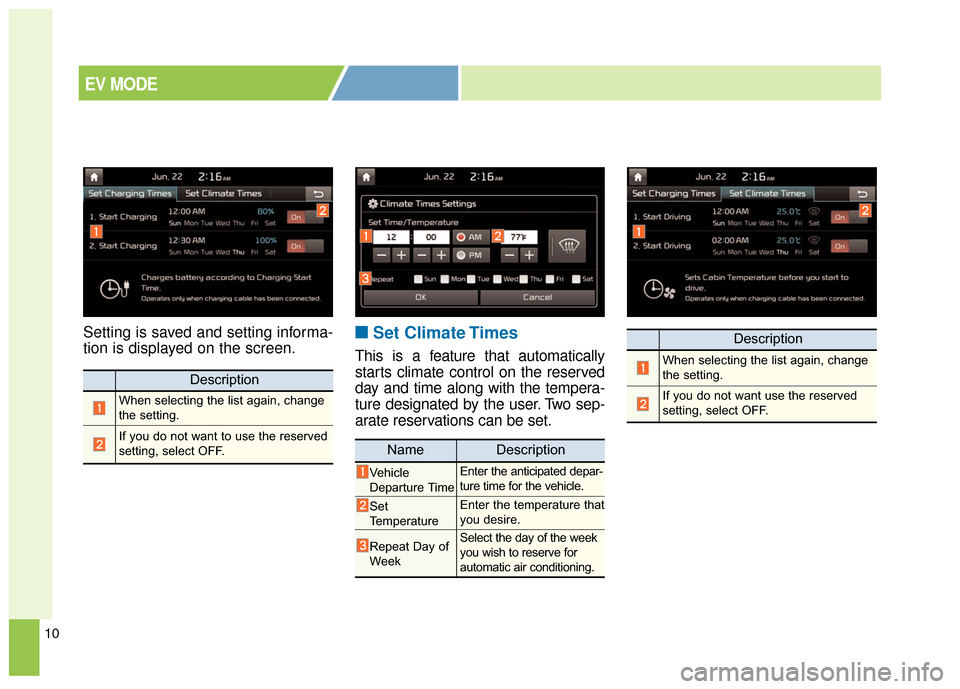
Setting is saved and setting informa-
tion is displayed on the screen.■ ■Set Climate Times
This is a feature that automatically
starts climate control on the reserved
day and time along with the tempera-
ture designated by the user. Two sep-
arate reservations can be set.
Description
When selecting the list again, change
the setting.
If you do not want to use the reserved
setting, select OFF.
Description
When selecting the list again, change
the setting.
If you do not want use the reserved
setting, select OFF.
NameDescription
Vehicle
Departure TimeEnter the anticipated depar-
ture time for the vehicle.
Set
TemperatureEnter the temperature that
you desire.
Repeat Day of
WeekSelect the day of the week
you wish to reserve for
automatic air conditioning.
EV MODE