door open KIA SOUL EV 2018 Owner's Manual
[x] Cancel search | Manufacturer: KIA, Model Year: 2018, Model line: SOUL EV, Model: KIA SOUL EV 2018Pages: 496, PDF Size: 15.13 MB
Page 142 of 496
411
Features of your vehicle
Operating door locks from
inside the vehicle
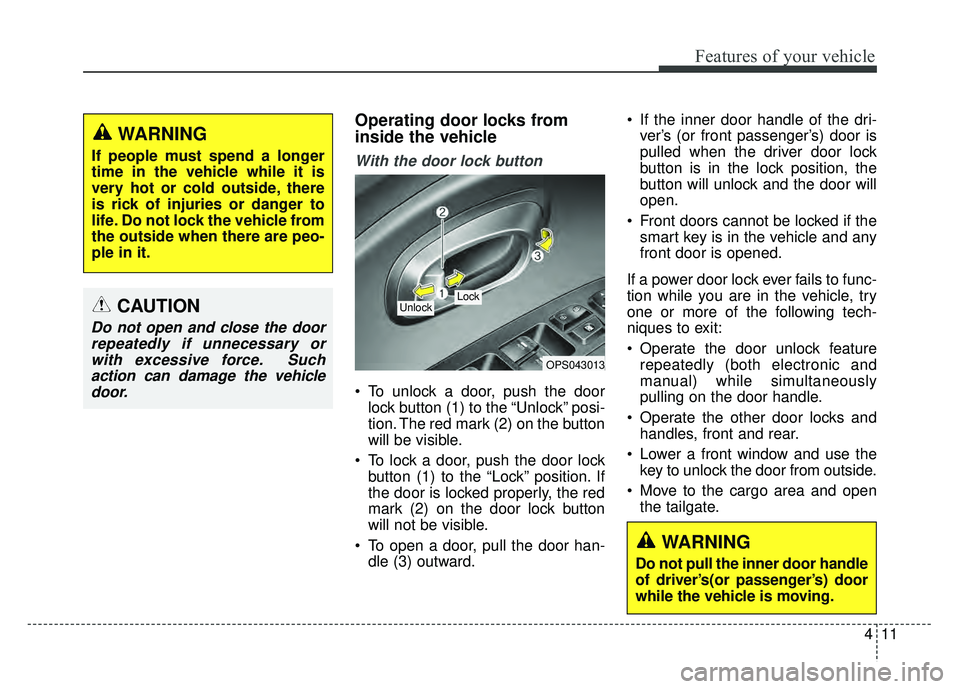
With the door lock button
To unlock a door, push the doorlock button (1) to the “Unlock” posi-
tion. The red mark (2) on the button
will be visible.
To lock a door, push the door lock button (1) to the “Lock” position. If
the door is locked properly, the red
mark (2) on the door lock button
will not be visible.
To open a door, pull the door han- dle (3) outward. If the inner door handle of the dri-
ver’s (or front passenger’s) door is
pulled when the driver door lock
button is in the lock position, the
button will unlock and the door will
open.
Front doors cannot be locked if the smart key is in the vehicle and any
front door is opened.
If a power door lock ever fails to func-
tion while you are in the vehicle, try
one or more of the following tech-
niques to exit:
Operate the door unlock feature repeatedly (both electronic and
manual) while simultaneously
pulling on the door handle.
Operate the other door locks and handles, front and rear.
Lower a front window and use the key to unlock the door from outside.
Move to the cargo area and open the tailgate.
OPS043013
Lock Unlock
WARNING
Do not pull the inner door handle
of driver’s(or passenger’s) door
while the vehicle is moving.
WARNING
If people must spend a longer
time in the vehicle while it is
very hot or cold outside, there
is rick of injuries or danger to
life. Do not lock the vehicle from
the outside when there are peo-
ple in it.
CAUTION
Do not open and close the doorrepeatedly if unnecessary orwith excessive force. Suchaction can damage the vehicledoor.
Page 143 of 496
Features of your vehicle
12
4
With central door lock switch
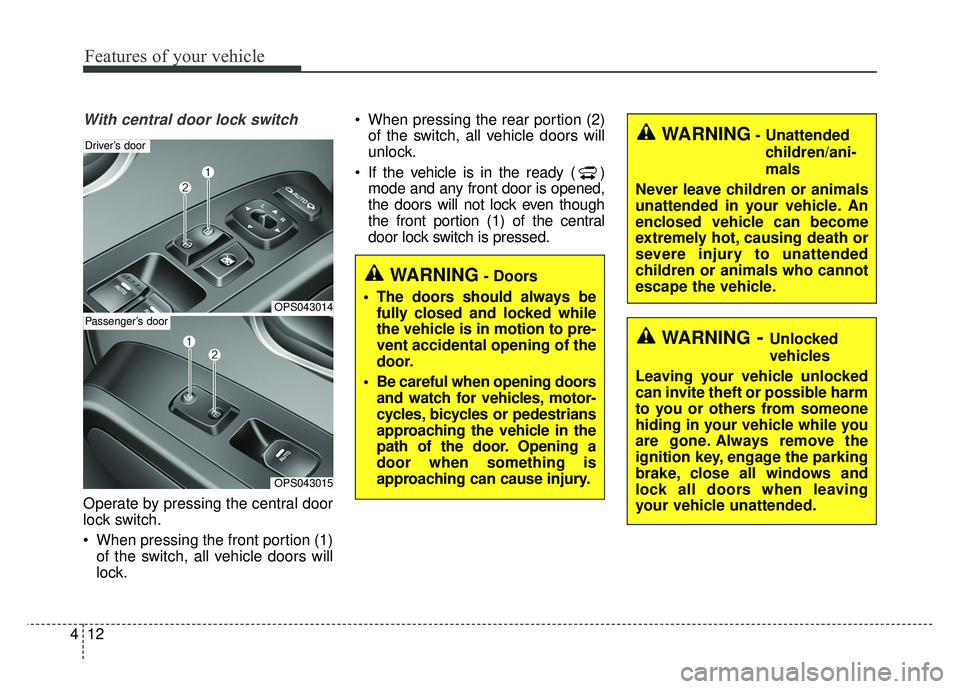
Operate by pressing the central door
lock switch.
When pressing the front portion (1)
of the switch, all vehicle doors will
lock. When pressing the rear portion (2)
of the switch, all vehicle doors will
unlock.
If the vehicle is in the ready ( ) mode and any front door is opened,
the doors will not lock even though
the front portion (1) of the central
door lock switch is pressed.
OPS043014
Driver’s door
OPS043015
Passenger’s door
WARNING- Unattended
children/ani-
mals
Never leave children or animals
unattended in your vehicle. An
enclosed vehicle can become
extremely hot, causing death or
severe injury to unattended
children or animals who cannot
escape the vehicle.
WARNING- Doors
The doors should always be fully closed and locked while
the vehicle is in motion to pre-
vent accidental opening of the
door.
Be careful when opening doors and watch for vehicles, motor-
cycles, bicycles or pedestrians
approaching the vehicle in the
path of the door. Opening a
door when something is
approaching can cause injury.
WARNING- Unlocked
vehicles
Leaving your vehicle unlocked
can invite theft or possible harm
to you or others from someone
hiding in your vehicle while you
are gone. Always remove the
ignition key, engage the parking
brake, close all windows and
lock all doors when leaving
your vehicle unattended.
Page 144 of 496
413
Features of your vehicle
Impact sensing door unlock
system
In the event of air bag deployment
resulting from a vehicle impact, all
doors will automatically unlock.
Auto door lock/unlock feature
You can activate or deactivate the
auto door lock/unlock features in the
vehicle. Refer to "User settings" in
this chapter.
Speed sensing door lock
system
All doors will be automatically locked
after the vehicle speed exceeds 9.3
mph (15 km/h).
Child-protector rear door lock
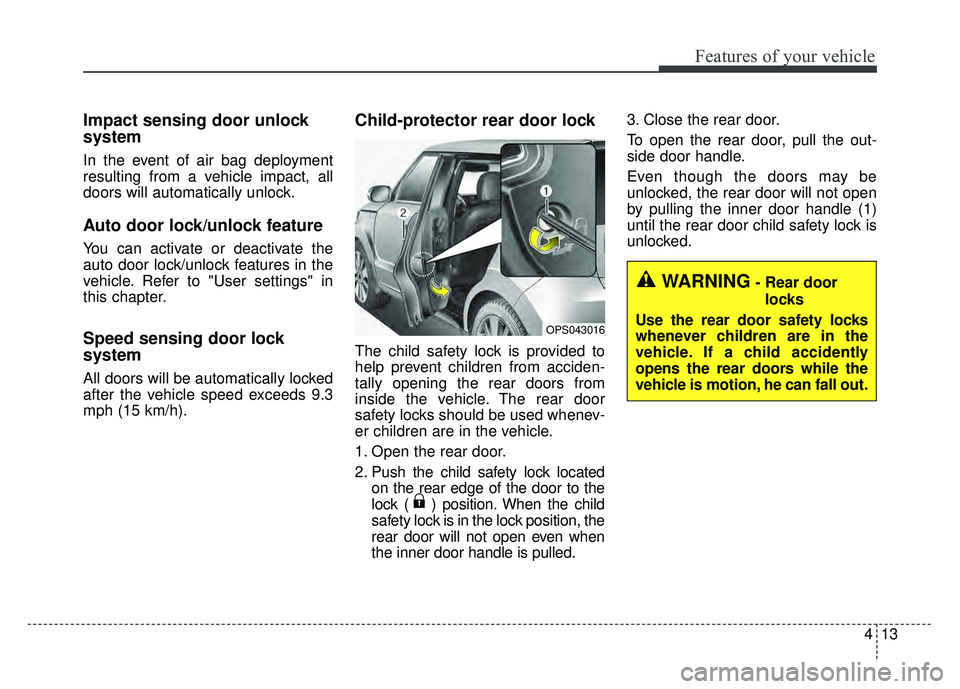
The child safety lock is provided to
help prevent children from acciden-
tally opening the rear doors from
inside the vehicle. The rear door
safety locks should be used whenev-
er children are in the vehicle.
1. Open the rear door.
2. Push the child safety lock locatedon the rear edge of the door to the
lock ( ) position. When the child
safety lock is in the lock position, the
rear door will not open even when
the inner door handle is pulled. 3. Close the rear door.
To open the rear door, pull the out-
side door handle.
Even though the doors may be
unlocked, the rear door will not open
by pulling the inner door handle (1)
until the rear door child safety lock is
unlocked.
OPS043016
WARNING- Rear door
locks
Use the rear door safety locks
whenever children are in the
vehicle. If a child accidently
opens the rear doors while the
vehicle is motion, he can fall out.
Page 145 of 496
Features of your vehicle
14
4
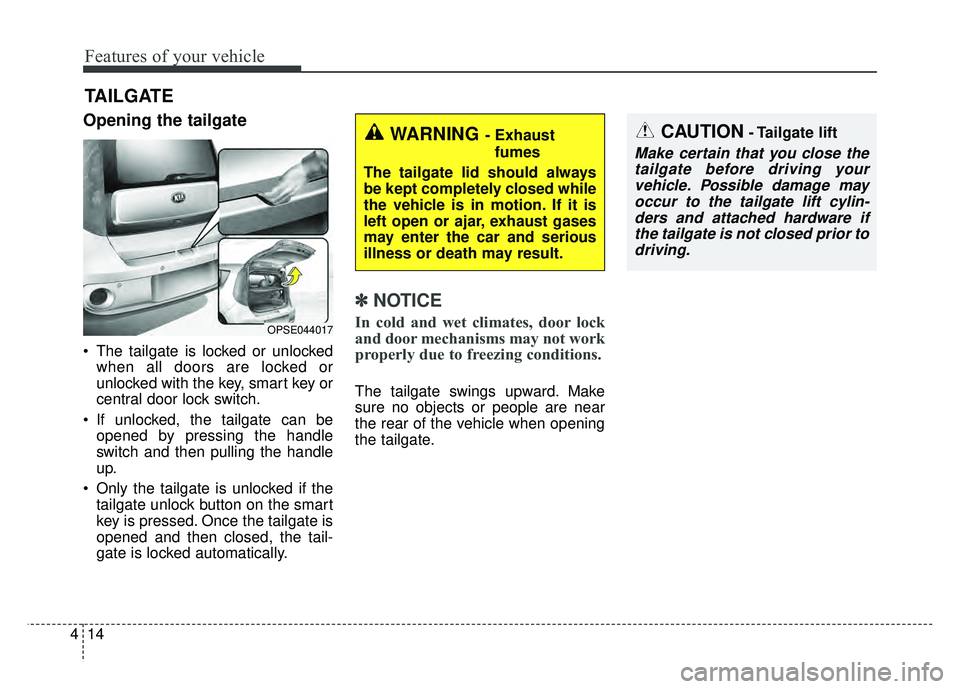
Opening the tailgate
The tailgate is locked or unlocked
when all doors are locked or
unlocked with the key, smart key or
central door lock switch.
If unlocked, the tailgate can be opened by pressing the handle
switch and then pulling the handle
up.
Only the tailgate is unlocked if the tailgate unlock button on the smart
key is pressed. Once the tailgate is
opened and then closed, the tail-
gate is locked automatically.
✽ ✽ NOTICE
In cold and wet climates, door lock
and door mechanisms may not work
properly due to freezing conditions.
The tailgate swings upward. Make
sure no objects or people are near
the rear of the vehicle when opening
the tailgate.
TAILGATE
CAUTION- Tailgate lift
Make certain that you close the
tailgate before driving yourvehicle. Possible damage mayoccur to the tailgate lift cylin-ders and attached hardware ifthe tailgate is not closed prior todriving.
OPSE044017
WARNING- Exhaust
fumes
The tailgate lid should always
be kept completely closed while
the vehicle is in motion. If it is
left open or ajar, exhaust gases
may enter the car and serious
illness or death may result.
Page 148 of 496
417
Features of your vehicle
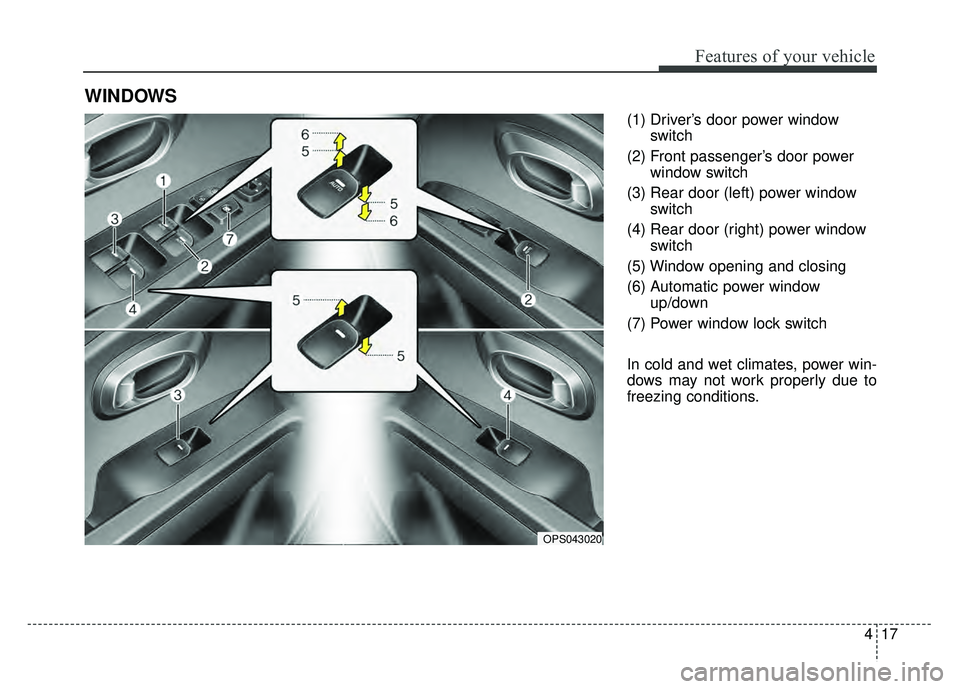
(1) Driver’s door power windowswitch
(2) Front passenger’s door power window switch
(3) Rear door (left) power window switch
(4) Rear door (right) power window switch
(5) Window opening and closing
(6) Automatic power window up/down
(7) Power window lock switch
In cold and wet climates, power win-
dows may not work properly due to
freezing conditions.
WINDOWS
OPS043020
Page 149 of 496
Features of your vehicle
18
4
Power windows
The POWER button must be in the
ON position for power windows to
operate.
Each door has a power window
switch that controls the door's win-
dow. The driver has a power window
lock button which can block the oper-
ation of the rear passenger windows.
The power windows can be operated
for approximately 30 seconds after
the vehicle turned off or turned to the
ACC position. However, if the front
doors are opened, the power win-
dows cannot be operated even with-
in the 30 second period.
If the window cannot be close
because it is blocked by objects,
remove the objects and close the
window.
✽ ✽
NOTICE
While driving with the rear windows
down or with the sunroof (if
equipped) in an open (or partially
open) position, your vehicle may
demonstrate a wind buffeting or
pulsation noise. This noise is a nor-
mal occurrence and can be reduced
or eliminated by taking the follow-
ing actions. If the noise occurs with
one or both of the rear windows
down, partially lower both front
windows approximately one inch. If
you experience the noise with the
sunroof open, slightly reduce the
size of the sunroof opening.
Window opening and closing
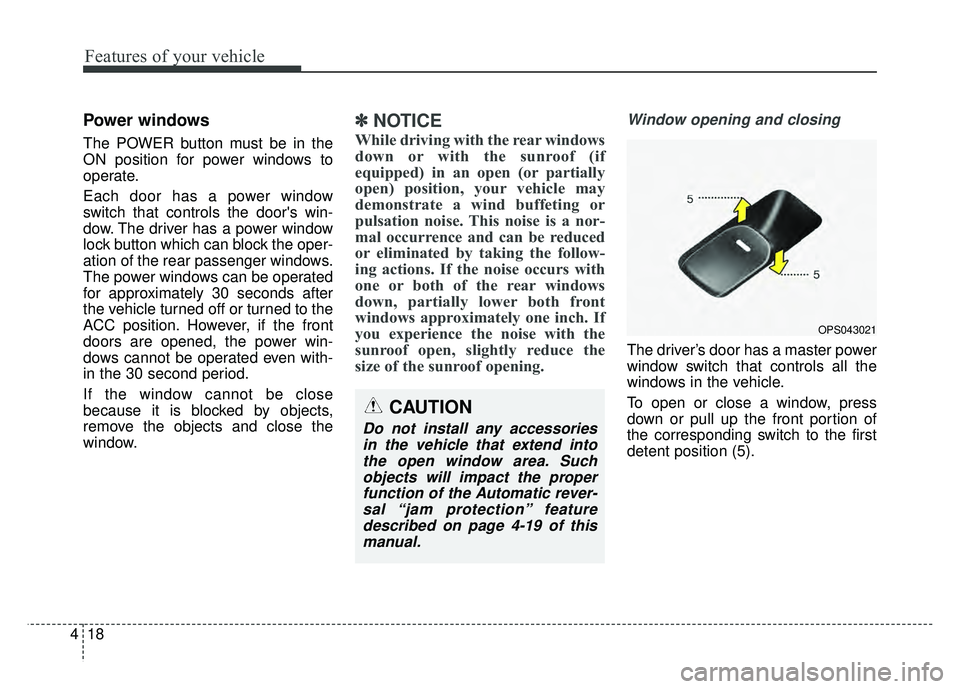
The driver’s door has a master power
window switch that controls all the
windows in the vehicle.
To open or close a window, press
down or pull up the front portion of
the corresponding switch to the first
detent position (5).
OPS043021
CAUTION
Do not install any accessories
in the vehicle that extend intothe open window area. Suchobjects will impact the properfunction of the Automatic rever-sal “jam protection” featuredescribed on page 4-19 of thismanual.
Page 152 of 496
421
Features of your vehicle
When the power window lock
switch is pressed :
- The driver's master control can
operate all the power windows.
- The front passenger's control can operate the front passenger's
power window.
- The rear passenger's control can- not operate the rear passenger's
power window. Always double check to make sure
all arms, hands, head and other
obstructions are safely out of the way
before closing a window.
CAUTION- Opening /
closing Window
To prevent possible damage tothe power window system, donot open or close two windowsor more at the same time. Thiswill also ensure the longevity ofthe fuse.
WARNING- Power
windows
Do not allow children to play with the power windows. Keep
the power window lock switch
(on the driver's door) in the
LOCK (pressed) position.
Do not extend a face or arms outside through the window
opening while driving.
Page 155 of 496
Features of your vehicle
24
4
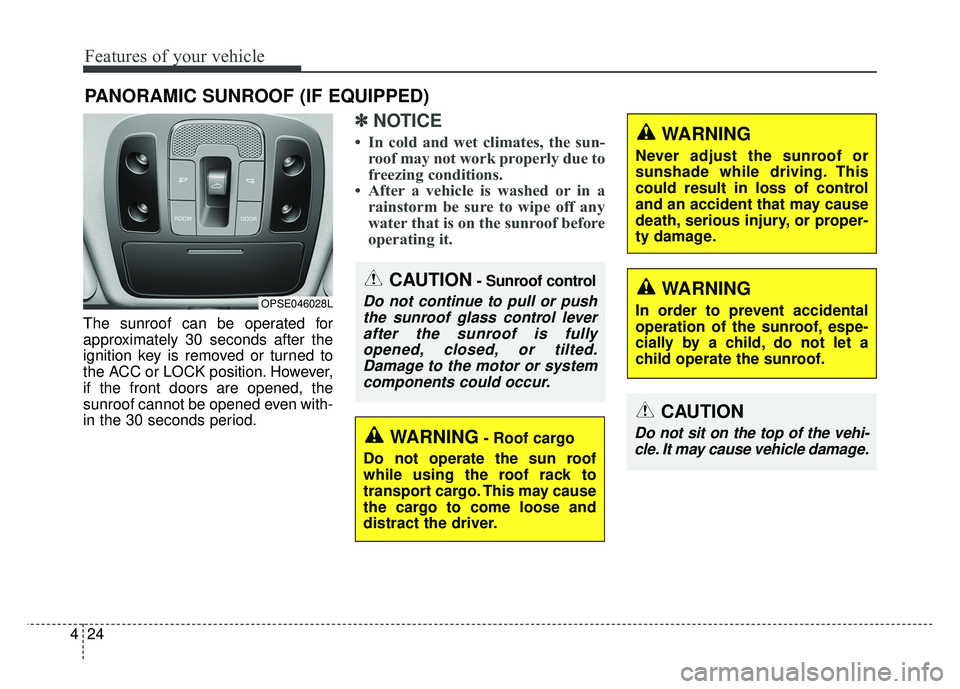
The sunroof can be operated for
approximately 30 seconds after the
ignition key is removed or turned to
the ACC or LOCK position. However,
if the front doors are opened, the
sunroof cannot be opened even with-
in the 30 seconds period.
✽ ✽
NOTICE
• In cold and wet climates, the sun-
roof may not work properly due to
freezing conditions.
• After a vehicle is washed or in a rainstorm be sure to wipe off any
water that is on the sunroof before
operating it.
PANORAMIC SUNROOF (IF EQUIPPED)
CAUTION- Sunroof control
Do not continue to pull or push
the sunroof glass control leverafter the sunroof is fullyopened, closed, or tilted.Damage to the motor or systemcomponents could occur.OPSE046028L
WARNING- Roof cargo
Do not operate the sun roof
while using the roof rack to
transport cargo. This may cause
the cargo to come loose and
distract the driver.
CAUTION
Do not sit on the top of the vehi- cle. It may cause vehicle damage.
WARNING
Never adjust the sunroof or
sunshade while driving. This
could result in loss of control
and an accident that may cause
death, serious injury, or proper-
ty damage.
WARNING
In order to prevent accidental
operation of the sunroof, espe-
cially by a child, do not let a
child operate the sunroof.
Page 185 of 496
Features of your vehicle
54
4
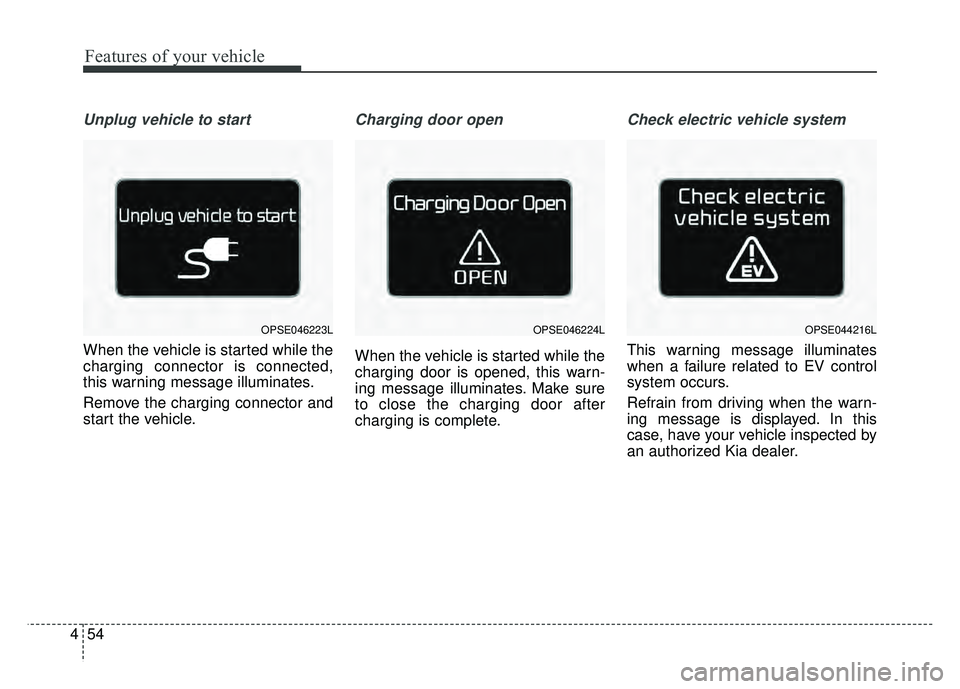
Unplug vehicle to start
When the vehicle is started while the
charging connector is connected,
this warning message illuminates.
Remove the charging connector and
start the vehicle.
Charging door open
When the vehicle is started while the
charging door is opened, this warn-
ing message illuminates. Make sure
to close the charging door after
charging is complete.
Check electric vehicle system
This warning message illuminates
when a failure related to EV control
system occurs.
Refrain from driving when the warn-
ing message is displayed. In this
case, have your vehicle inspected by
an authorized Kia dealer.
OPSE044216LOPSE046223LOPSE046224L
Page 188 of 496
457
Features of your vehicle
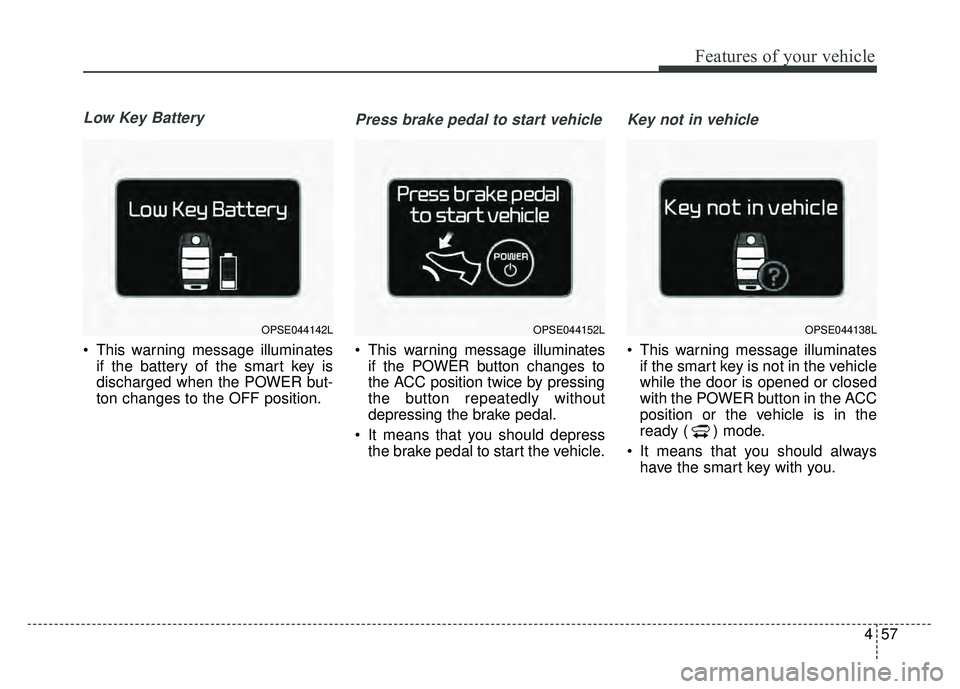
Low Key Battery
This warning message illuminatesif the battery of the smart key is
discharged when the POWER but-
ton changes to the OFF position.
Press brake pedal to start vehicle
This warning message illuminatesif the POWER button changes to
the ACC position twice by pressing
the button repeatedly without
depressing the brake pedal.
It means that you should depress the brake pedal to start the vehicle.
Key not in vehicle
This warning message illuminatesif the smart key is not in the vehicle
while the door is opened or closed
with the POWER button in the ACC
position or the vehicle is in the
ready ( ) mode.
It means that you should always have the smart key with you.
OPSE044142LOPSE044152LOPSE044138L