brake KIA SOUL EV 2019 Owner's Guide
[x] Cancel search | Manufacturer: KIA, Model Year: 2019, Model line: SOUL EV, Model: KIA SOUL EV 2019Pages: 455, PDF Size: 15.52 MB
Page 283 of 455
Driving your vehicle
45
WARNING- Check sur-roundings
Always check the surrounding
areas near your vehicle for peo-
ple, especially children, before
putting a vehicle into D (Drive)
or R (Reverse).
WARNING- Loose objects
Securely store items in your
vehicle. When you make a sud-
den stop or turn the steering
wheel rapidly, loose objects
may drop on the floor and it
could interfere with the opera-
tion of the foot pedals, possibly
causing an accident.
WARNING- Driving while intoxicated
Do not drive while intoxicated.
Drinking and driving is danger-
ous. Even a small amount of
alcohol will affect your reflexes,
perceptions and judgment.
Driving while under the influ-
ence of drugs is as dangerous
as or more dangerous than driv-
ing drunk.
WARNING - Proper footwear
Always wear appropriate shoes
when operating your vehicle.
Unsuitable shoes (high heels, ski
boots, sandals, etc.) may inter-
fere with your ability to use the
brake and accelerator pedals.
Page 284 of 455
55
Driving your vehicle
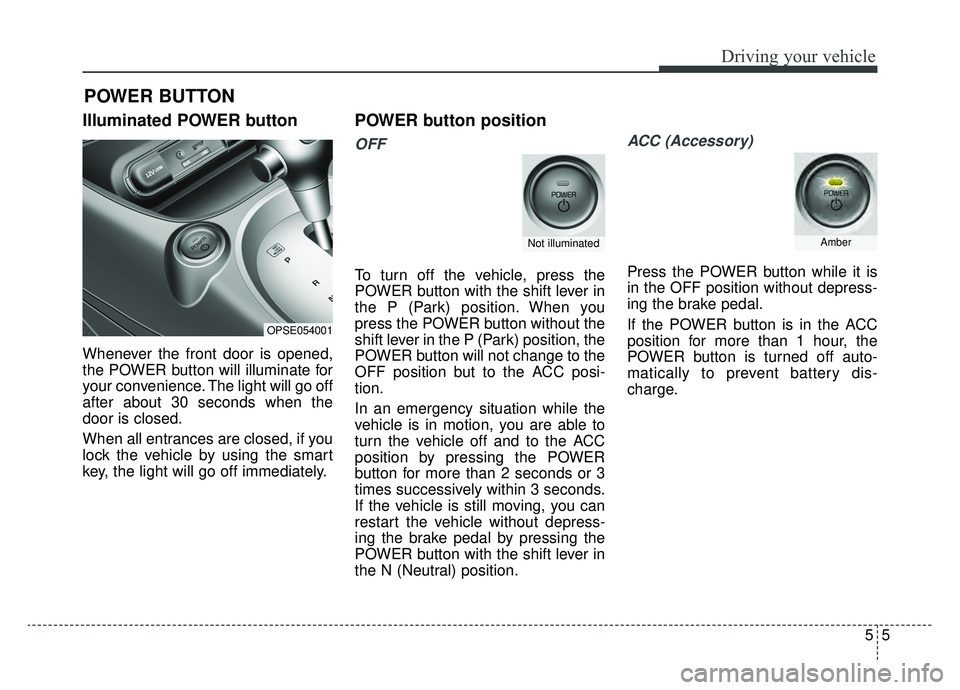
Illuminated POWER button
Whenever the front door is opened,
the POWER button will illuminate for
your convenience. The light will go off
after about 30 seconds when the
door is closed.
When all entrances are closed, if you
lock the vehicle by using the smart
key, the light will go off immediately.
POWER button position
OFF
To turn off the vehicle, press the
POWER button with the shift lever in
the P (Park) position. When you
press the POWER button without the
shift lever in the P (Park) position, the
POWER button will not change to the
OFF position but to the ACC posi-
tion.
In an emergency situation while the
vehicle is in motion, you are able to
turn the vehicle off and to the ACC
position by pressing the POWER
button for more than 2 seconds or 3
times successively within 3 seconds.
If the vehicle is still moving, you can
restart the vehicle without depress-
ing the brake pedal by pressing the
POWER button with the shift lever in
the N (Neutral) position.
ACC (Accessory)
Press the POWER button while it is
in the OFF position without depress-
ing the brake pedal.
If the POWER button is in the ACC
position for more than 1 hour, the
POWER button is turned off auto-
matically to prevent battery dis-
charge.
POWER BUTTON
OPSE054001
Not illuminatedAmber
Page 285 of 455
Driving your vehicle
65
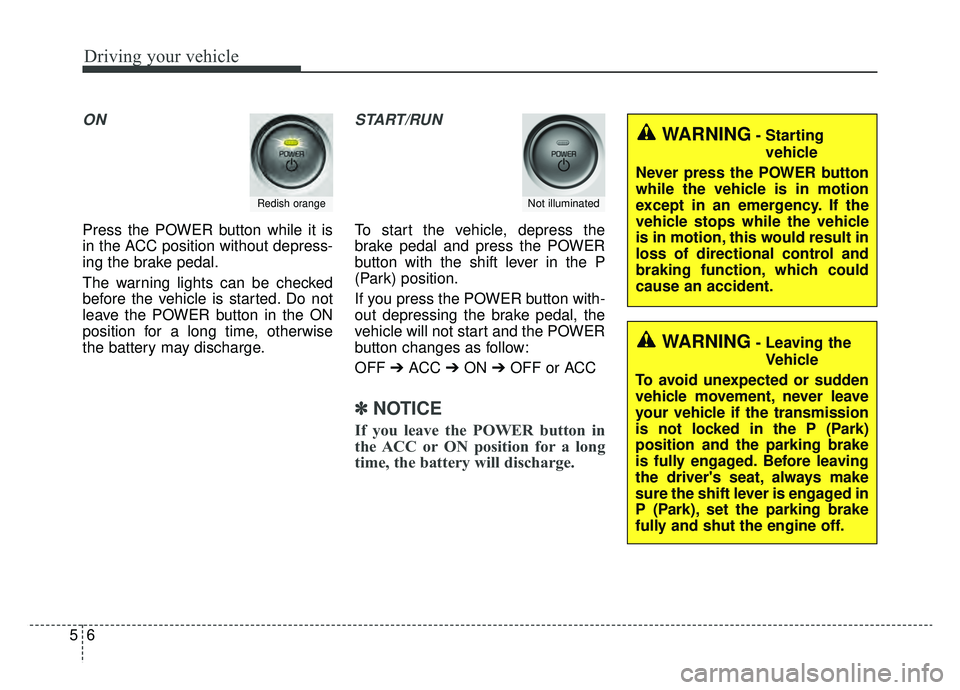
ON
Press the POWER button while it is
in the ACC position without depress-
ing the brake pedal.
The warning lights can be checked
before the vehicle is started. Do not
leave the POWER button in the ON
position for a long time, otherwise
the battery may discharge.
START/RUN
To start the vehicle, depress the
brake pedal and press the POWER
button with the shift lever in the P
(Park) position.
If you press the POWER button with-
out depressing the brake pedal, the
vehicle will not start and the POWER
button changes as follow:
OFF ➔ACC ➔ON ➔OFF or ACC
✽ ✽
NOTICE
If you leave the POWER button in
the ACC or ON position for a long
time, the battery will discharge.
Redish orangeNot illuminated
WARNING- Starting
vehicle
Never press the POWER button
while the vehicle is in motion
except in an emergency. If the
vehicle stops while the vehicle
is in motion, this would result in
loss of directional control and
braking function, which could
cause an accident.
WARNING- Leaving the Vehicle
To avoid unexpected or sudden
vehicle movement, never leave
your vehicle if the transmission
is not locked in the P (Park)
position and the parking brake
is fully engaged. Before leaving
the driver's seat, always make
sure the shift lever is engaged in
P (Park), set the parking brake
fully and shut the engine off.
Page 286 of 455
57
Driving your vehicle
Starting the vehicle
1. Carry the smart key or leave itinside the vehicle.
2. Make sure the parking brake is firmly applied
3. Place the transaxle shift lever in P (Park). Depress the brake pedal
fully.
4. Press the POWER button until the ready " " indicator light in the
cluster is turned on. Even if the smart key is in the vehi-
cle, if it is far away from you, the
vehicle may not start.
When the POWER button is in the ACC position or above, if any door
is opened, the system checks for
the smart key. If the smart key is
not in the vehicle, a message "key
is not in the vehicle" will appear on
the LCD display. And if all doors
are closed, the chime will sound for
5 seconds. The indicator or warn-
ing will turn off while the vehicle is
moving. Always have the smart key
with you.CAUTION
If the vehicle stalls while thevehicle is in motion, do notattempt to move the shift leverto the P (Park) position. If thetraffic and road conditions per-mit, you may put the shift leverin the N (Neutral) position whilethe vehicle is still moving andpress the POWER button in anattempt to restart the vehicle.
WARNING- Proper
footwear
Always wear appropriate shoes
when operating your vehicle.
Unsuitable shoes (high heels, ski
boots, sandals, etc.) may inter-
fere with your ability to use the
brake and accelerator pedals.
Page 287 of 455
Driving your vehicle
85
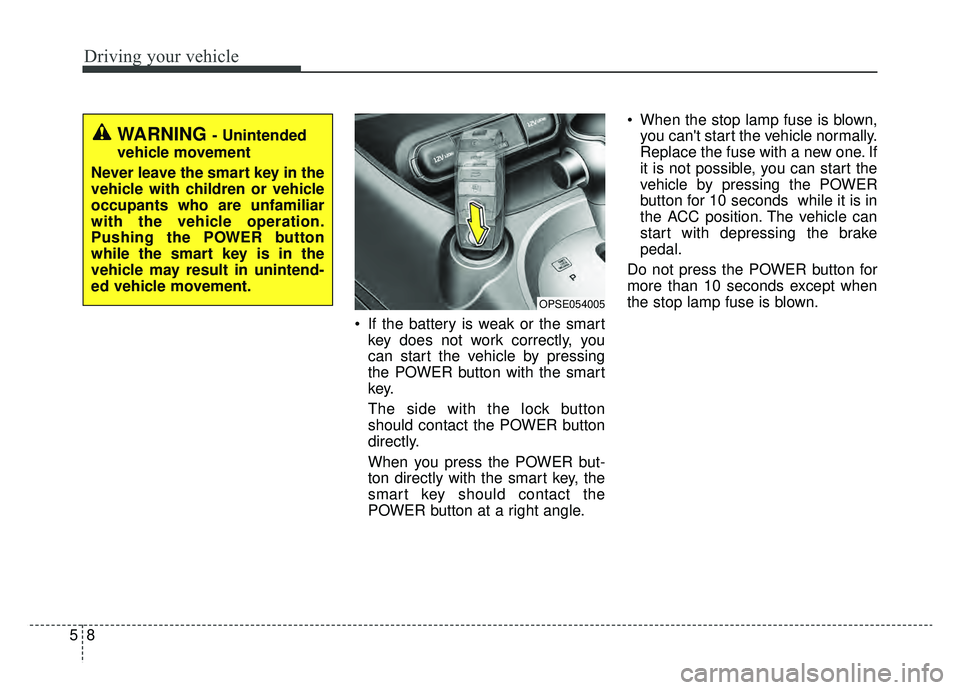
If the battery is weak or the smartkey does not work correctly, you
can start the vehicle by pressing
the POWER button with the smart
key.
The side with the lock button
should contact the POWER button
directly.
When you press the POWER but-
ton directly with the smart key, the
smart key should contact the
POWER button at a right angle. When the stop lamp fuse is blown,
you can't start the vehicle normally.
Replace the fuse with a new one. If
it is not possible, you can start the
vehicle by pressing the POWER
button for 10 seconds while it is in
the ACC position. The vehicle can
start with depressing the brake
pedal.
Do not press the POWER button for
more than 10 seconds except when
the stop lamp fuse is blown.
OPSE054005
WARNING - Unintended
vehicle movement
Never leave the smart key in the
vehicle with children or vehicle
occupants who are unfamiliar
with the vehicle operation.
Pushing the POWER button
while the smart key is in the
vehicle may result in unintend-
ed vehicle movement.
Page 288 of 455
59
Driving your vehicle
Pedestrian Warning System
The Pedestrian Warning System
generates engine sound for pedestri-
ans to hear vehicle sound because
there is little sound while the Electric
Vehicle (EV) is operating.
If the vehicle is moving low speed,
the Pedestrian Warning System will
operated.
- When the reduction gear is shifted to[R], the Pedestrian Warning System
will be operated immediately.
Turing off the Vehicle
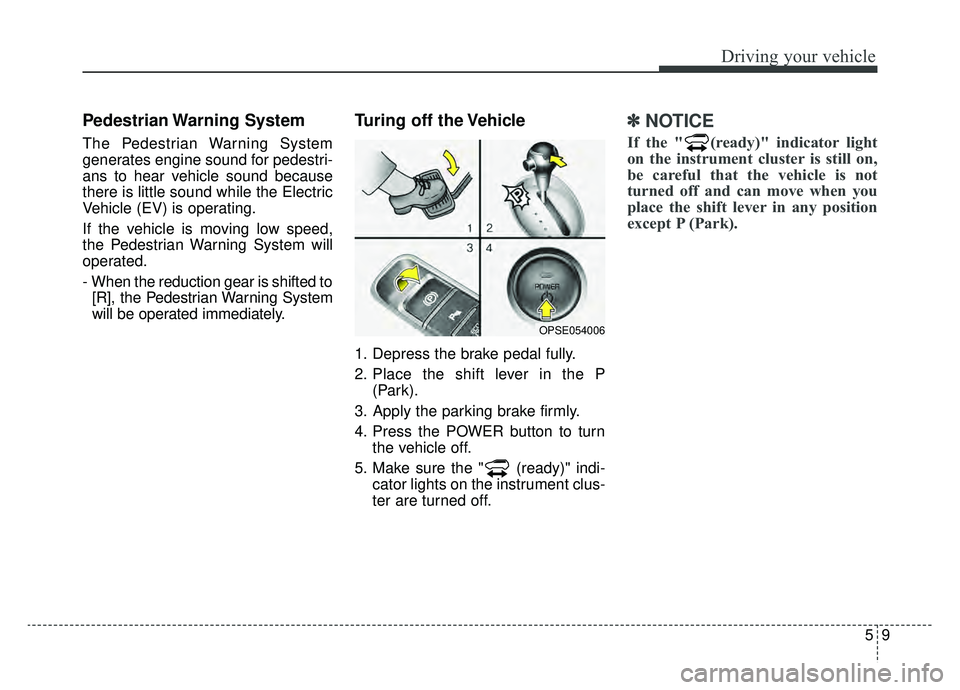
1. Depress the brake pedal fully.
2. Place the shift lever in the P (Park).
3. Apply the parking brake firmly.
4. Press the POWER button to turn the vehicle off.
5. Make sure the " (ready)" indi- cator lights on the instrument clus-
ter are turned off.
✽ ✽
NOTICE
If the " (ready)" indicator light
on the instrument cluster is still on,
be careful that the vehicle is not
turned off and can move when you
place the shift lever in any position
except P (Park).
OPSE054006
Page 290 of 455
511
Driving your vehicle
REDUCTION GEAR
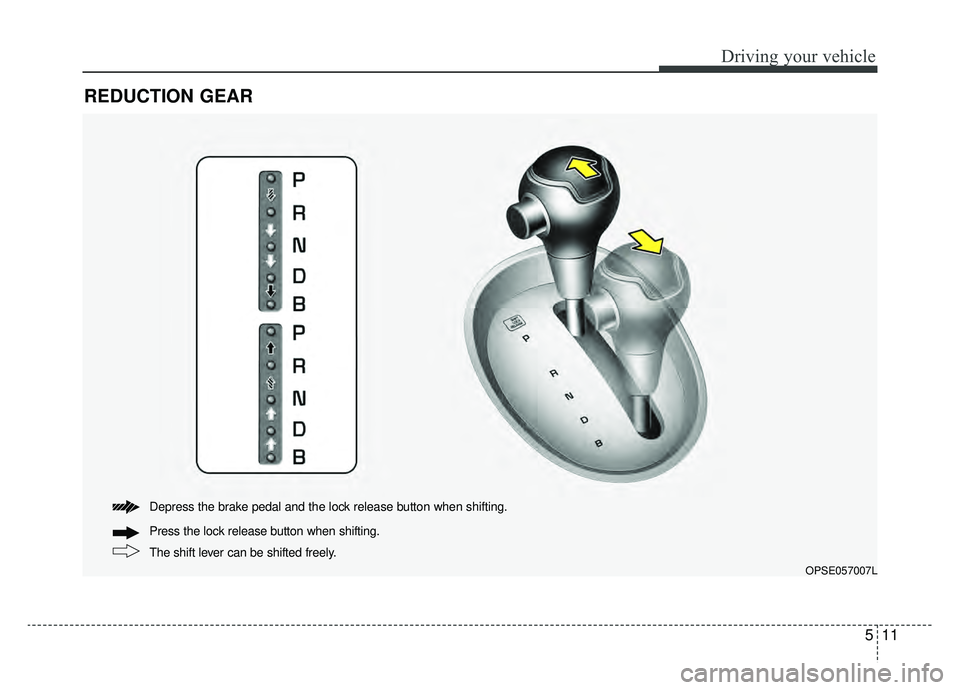
The shift lever can be shifted freely. Press the lock release button when shifting. Depress the brake pedal and the lock release button when shifting.
OPSE057007L
Page 291 of 455
Driving your vehicle
12
5
Reduction gear operation
When stopped on an incline, do not
hold the vehicle with the motor
power. Use the service brake or the
parking brake.
Reduction gear ranges
The indicator in the instrument clus-
ter displays the shift lever position
when the POWER button is in the
ON position.
P (Park)
Always come to a complete stop
before shifting into P (Park). This
position locks the gear and prevents
the drive wheels from rotating.
Shifting into P (Park) while the vehi-
cle is in motion will cause the drive
wheels to lock which will cause you
to lose control of the vehicle.
WARNING- Leaving the
vehicle
Before leaving the driver’s seat,
always make sure the shift lever
is in the P (Park) position; then
set the parking brake fully and
shut the vehicle off. Do not use
the P position in place of the
parking brake. Always make
sure the shift lever is latched in
the P position and set the park-
ing brake fully. Unexpected and
sudden vehicle movement can
occur if these precautions are
not followed.
CAUTION- Reduction gear
To avoid damage to your reduc-tion gear, do not accelerate thevehicle in R (Reverse) or anyforward gear position with thebrakes on. The reduction gearmay be damaged if you shiftinto P (Park) while the vehicle isin motion.
Page 292 of 455
513
Driving your vehicle
R (Reverse)
Use this position to drive the vehicle
backward.N (Neutral)
The wheels and gear are not
engaged. The vehicle will roll freely
even on the slightest incline unless
the parking brake or service brakes
are applied.
D (Drive)
This is the normal forward driving
position. The gear will automatically
shift providing the best energy econ-
omy and power.
✽ ✽
NOTICE
Always come to a complete stop
before shifting into D (Drive).
B (Regenerative brake): maximum
regenerative braking mode
Use it when you desire to use regen-
erative braking.
It is useful when you drive on a long
downhill on a highway, mountain
trails, or a slope.
❈ If you use regenerative braking,
you can achieve the same effect
as engine braking of a combustion
engine.
CAUTION- Shifting
Always come to a complete stop
before shifting into or out of R(Reverse); you may damage thegear if you shift into R (Reverse)while the vehicle is in motion,except when “Rocking the vehi-cle” explained in this section.
Page 293 of 455
Driving your vehicle
14
5
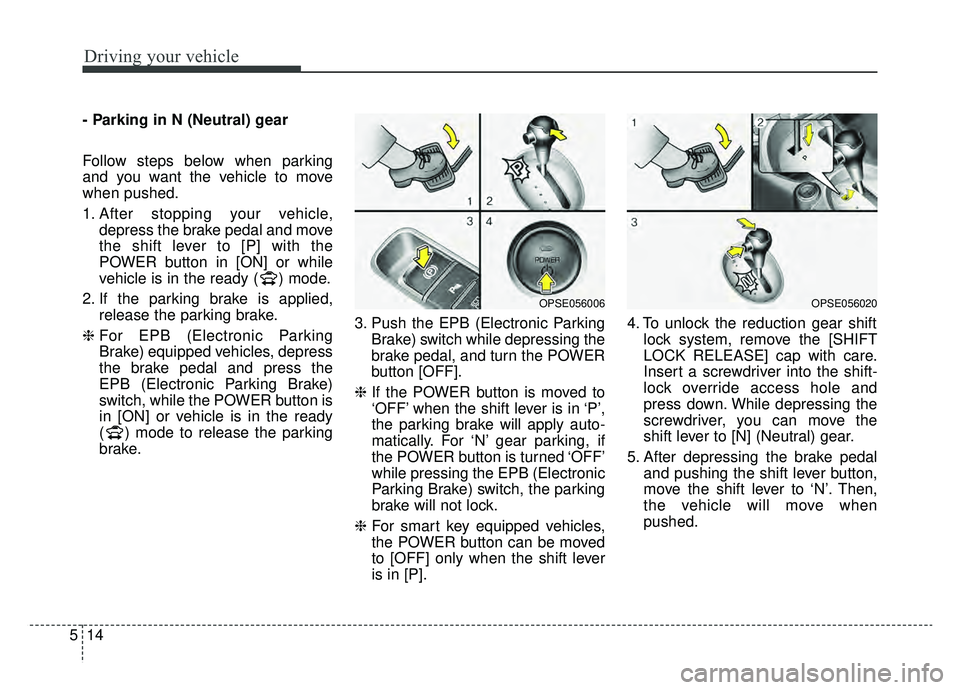
- Parking in N (Neutral) gear
Follow steps below when parking
and you want the vehicle to move
when pushed.
1. After stopping your vehicle,
depress the brake pedal and move
the shift lever to [P] with the
POWER button in [ON] or while
vehicle is in the ready ( ) mode.
2. If the parking brake is applied, release the parking brake.
❈ For EPB (Electronic Parking
Brake) equipped vehicles, depress
the brake pedal and press the
EPB (Electronic Parking Brake)
switch, while the POWER button is
in [ON] or vehicle is in the ready
( ) mode to release the parking
brake. 3. Push the EPB (Electronic Parking
Brake) switch while depressing the
brake pedal, and turn the POWER
button [OFF].
❈ If the POWER button is moved to
‘OFF’ when the shift lever is in ‘P’,
the parking brake will apply auto-
matically. For ‘N’ gear parking, if
the POWER button is turned ‘OFF’
while pressing the EPB (Electronic
Parking Brake) switch, the parking
brake will not lock.
❈ For smart key equipped vehicles,
the POWER button can be moved
to [OFF] only when the shift lever
is in [P]. 4. To unlock the reduction gear shift
lock system, remove the [SHIFT
LOCK RELEASE] cap with care.
Insert a screwdriver into the shift-
lock override access hole and
press down. While depressing the
screwdriver, you can move the
shift lever to [N] (Neutral) gear.
5. After depressing the brake pedal and pushing the shift lever button,
move the shift lever to ‘N’. Then,
the vehicle will move when
pushed.
OPSE056006OPSE056020