battery KIA SOUL EV 2019 Service Manual
[x] Cancel search | Manufacturer: KIA, Model Year: 2019, Model line: SOUL EV, Model: KIA SOUL EV 2019Pages: 455, PDF Size: 15.52 MB
Page 120 of 455
341
Safety features of your vehicle
If an air bag deploys, there may bea loud noise followed by a fine dust
released in the vehicle. These con-
ditions are normal and are not haz-
ardous - the air bags are packed in
this fine powder. The dust generat-
ed during air bag deployment may
cause skin or eye irritation as well
as aggravate asthma for some per-
sons. Always wash all exposed
skin areas thoroughly with cold
water and a mild soap after an
accident in which the air bags were
deployed. The SRS can function only when
the POWER button is in the ON
position. If the SRS air bag warning
light does not illuminate, or contin-
uously remains on after illuminat-
ing for about 6 seconds when the
POWER button is turned to the ON
position, or after the vehicle is in
the ready ( ) mode, comes on
while driving, the SRS is not work-
ing properly. If this occurs, have
your vehicle immediately inspected
by an authorized Kia dealer.
✽ ✽ NOTICE
Before you replace a fuse or discon-
nect a battery terminal, turn the
vehicle off. Never remove or replace
the air bag related fuse(s) when the
POWER button is in the ON posi-
tion. Failure to heed this warning
will cause the SRS air bag warning
light to illuminate.
Occupant Detection System
(ODS)
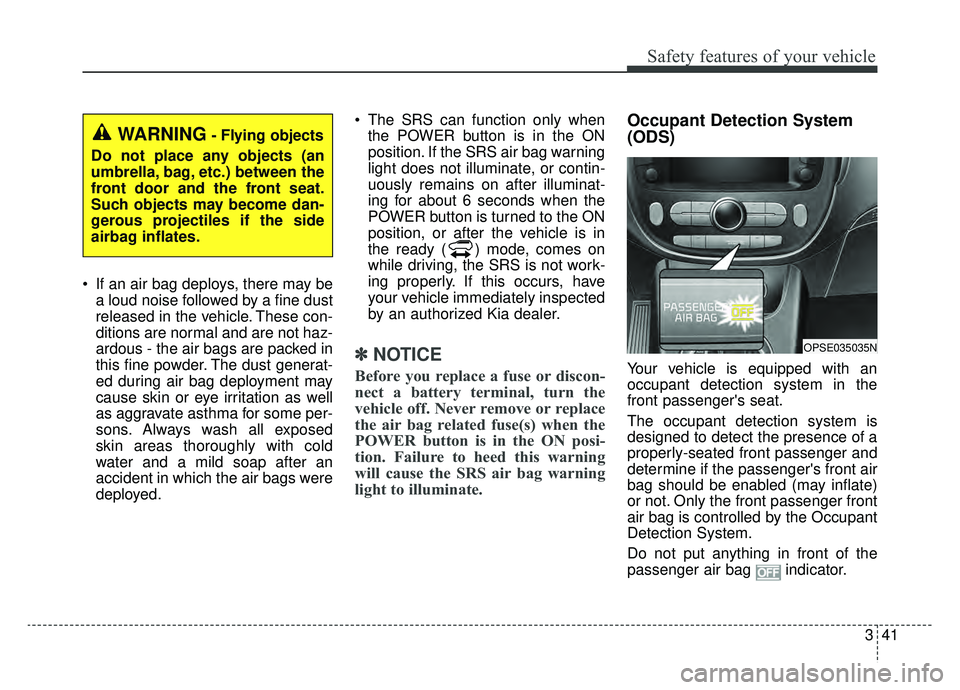
Your vehicle is equipped with an
occupant detection system in the
front passenger's seat.
The occupant detection system is
designed to detect the presence of a
properly-seated front passenger and
determine if the passenger's front air
bag should be enabled (may inflate)
or not. Only the front passenger front
air bag is controlled by the Occupant
Detection System.
Do not put anything in front of the
passenger air bag indicator.
WARNING- Flying objects
Do not place any objects (an
umbrella, bag, etc.) between the
front door and the front seat.
Such objects may become dan-
gerous projectiles if the side
airbag inflates.
OPSE035035N
Page 146 of 455
49
Features of your vehicle
This device complies with Part 15
of the FCC rules.
Operation is subject to the following
two conditions:
1. This device may not cause harm-ful interference, and
2. This device must accept any inter- ference received, including inter-
ference that may cause undesired
operation.
✽ ✽NOTICE
Changes or modifications not
expressly approved by the party
responsible for compliance could void
the user’s authority to operate the
equipment. If the keyless entry sys-
tem is inoperative due to changes or
modifications not expressly approved
by the party responsible for compli-
ance, it will not be covered by your
manufacturer’s vehicle warranty.
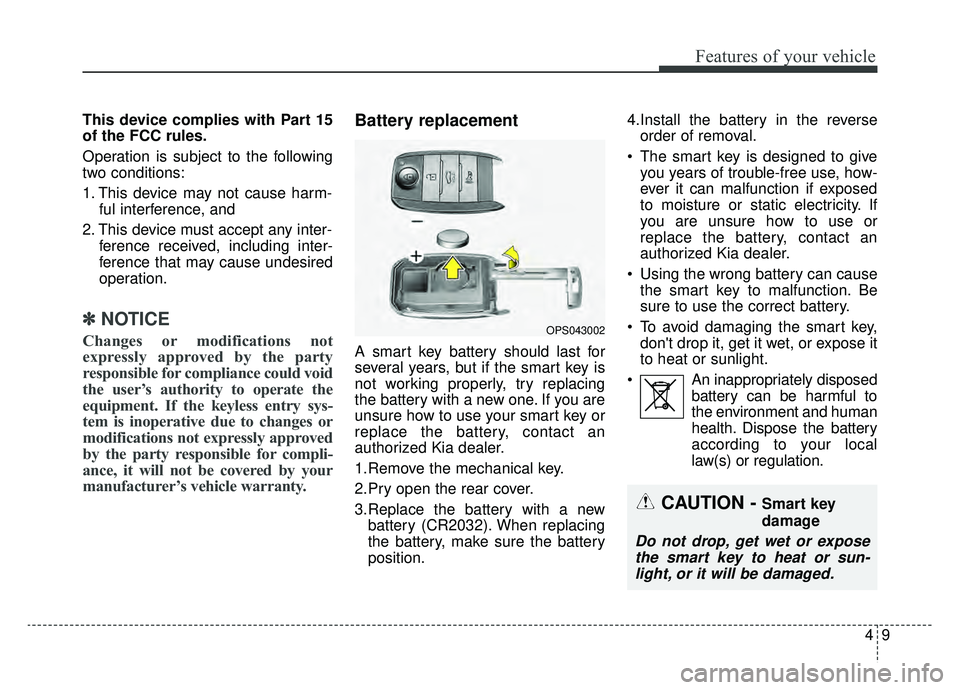
Battery replacement
A smart key battery should last for
several years, but if the smart key is
not working properly, try replacing
the battery with a new one. If you are
unsure how to use your smart key or
replace the battery, contact an
authorized Kia dealer.
1.Remove the mechanical key.
2.Pry open the rear cover.
3.Replace the battery with a new
battery (CR2032). When replacing
the battery, make sure the battery
position. 4.Install the battery in the reverse
order of removal.
The smart key is designed to give you years of trouble-free use, how-
ever it can malfunction if exposed
to moisture or static electricity. If
you are unsure how to use or
replace the battery, contact an
authorized Kia dealer.
Using the wrong battery can cause the smart key to malfunction. Be
sure to use the correct battery.
To avoid damaging the smart key, don't drop it, get it wet, or expose it
to heat or sunlight.
An inappropriately disposed battery can be harmful to
the environment and human
health. Dispose the battery
according to your local
law(s) or regulation.
OPS043002
CAUTION - Smart key
damage
Do not drop, get wet or exposethe smart key to heat or sun-light, or it will be damaged.
Page 166 of 455

429
Features of your vehicle
Resetting the sunroof
Whenever the vehicle battery is dis-
connected or discharged, you must
reset your sunroof system as follows:
1.Start the engine.
2.Close the sunshade and sunroofcompletely if opened.
3.Release the sunroof control lever.
4.Push the sunroof control lever for- ward in the direction of close
(about 10 seconds) until the sun-
shade slightly moves. Then,
release the lever. 5.Push the sunroof glass control
lever forward in the direction of
close, until the sunroof operates as
follows again:
Sunshade open → Glass tilt open
→ Glass slide open → Glass slide
close →Sunshade close
Then, release the lever.
When this is complete, the sunroof
system is reset.
✽ ✽ NOTICE
If you do not reset the sunroof, it
may not work properly.
✽ ✽NOTICE
If the sunroof is not reset when the
vehicle battery is disconnected or
discharged, or related fuse is blown,
the sunroof may operate improper-
ly.
Page 168 of 455
431
Features of your vehicle
(Continued)
• When you operate the steeringwheel in low temperature, abnor-
mal noise may occur. If tempera-
ture rises, the noise will likely dis-
appear. This is a normal condition.
• When the charging system warn- ing light comes on due to the low
voltage (When the alternator or
battery) does not operate normal-
ly or it malfunctions), the steering
wheel may require increased
steering effort.Tilt and telescopic steering
Tilt and telescopic steering allows
you to adjust the steering wheel
before you drive. You can also raise it
to give your legs more room when
you exit and enter the vehicle.
The steering wheel should be posi-
tioned so that it is comfortable for
you to drive, while permitting you to
see the instrument panel warning
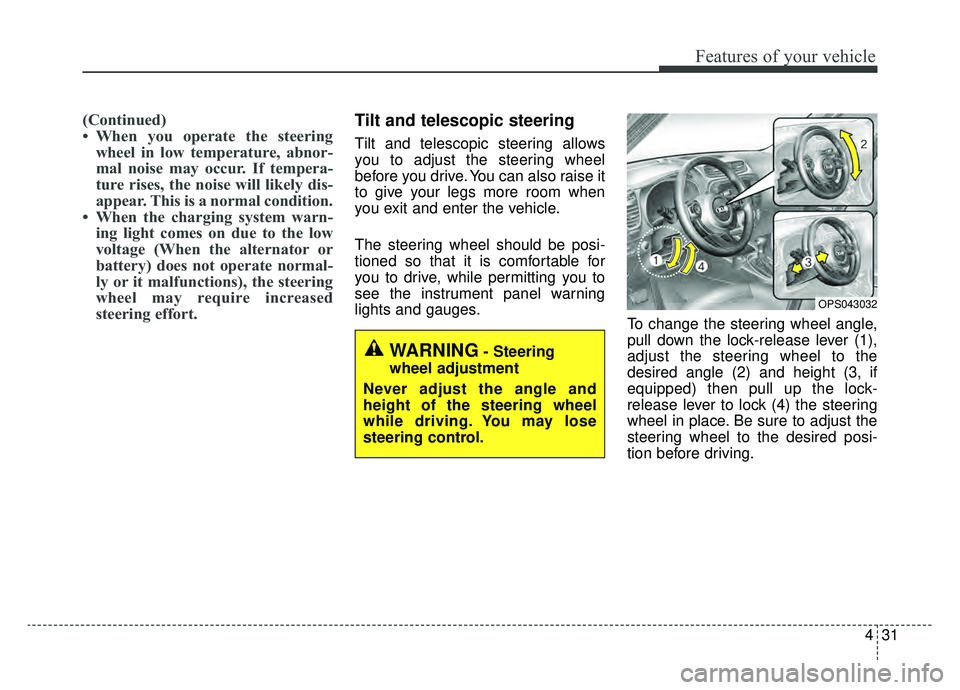
lights and gauges. To change the steering wheel angle,
pull down the lock-release lever (1),
adjust the steering wheel to the
desired angle (2) and height (3, if
equipped) then pull up the lock-
release lever to lock (4) the steering
wheel in place. Be sure to adjust the
steering wheel to the desired posi-
tion before driving.
OPS043032
WARNING- Steering
wheel adjustment
Never adjust the angle and
height of the steering wheel
while driving. You may lose
steering control.
Page 176 of 455
439
Features of your vehicle
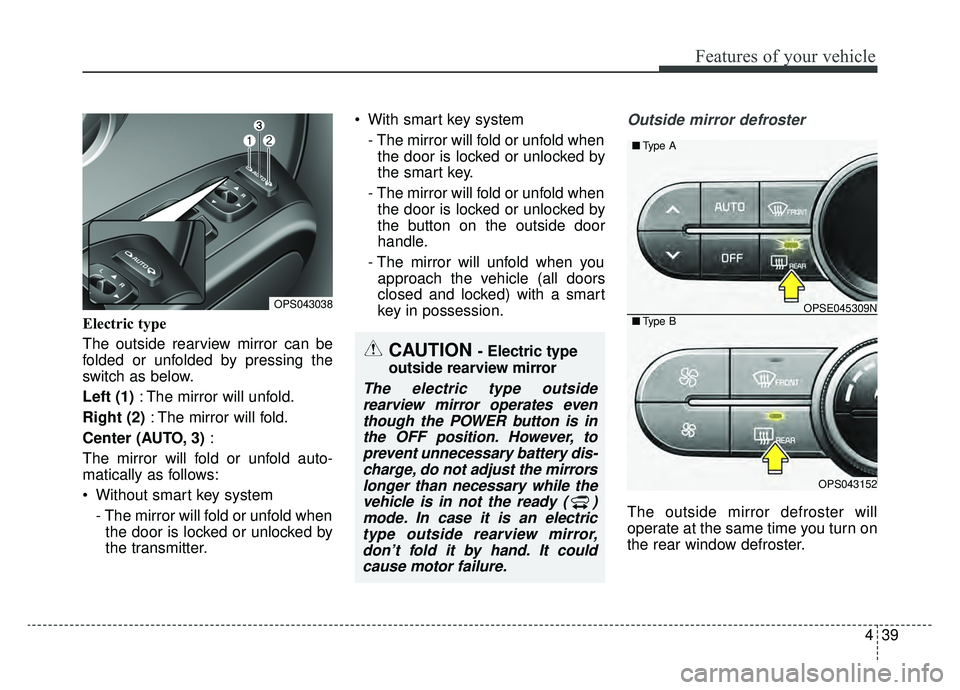
Electric type
The outside rearview mirror can be
folded or unfolded by pressing the
switch as below.
Left (1): The mirror will unfold.
Right (2) : The mirror will fold.
Center (AUTO, 3) :
The mirror will fold or unfold auto-
matically as follows:
Without smart key system - The mirror will fold or unfold whenthe door is locked or unlocked by
the transmitter. With smart key system
- The mirror will fold or unfold whenthe door is locked or unlocked by
the smart key.
- The mirror will fold or unfold when the door is locked or unlocked by
the button on the outside door
handle.
- The mirror will unfold when you approach the vehicle (all doors
closed and locked) with a smart
key in possession.
Outside mirror defroster
The outside mirror defroster will
operate at the same time you turn on
the rear window defroster.
CAUTION - Electric type
outside rearview mirror
The electric type outside rearview mirror operates eventhough the POWER button is inthe OFF position. However, toprevent unnecessary battery dis-charge, do not adjust the mirrorslonger than necessary while thevehicle is in not the ready ( )mode. In case it is an electrictype outside rearview mirror,don’t fold it by hand. It couldcause motor failure.
OPS043038OPSE045309N
OPS043152
■ Type B
■Type A
Page 179 of 455
Features of your vehicle
42
4
Gauges
Speedometer
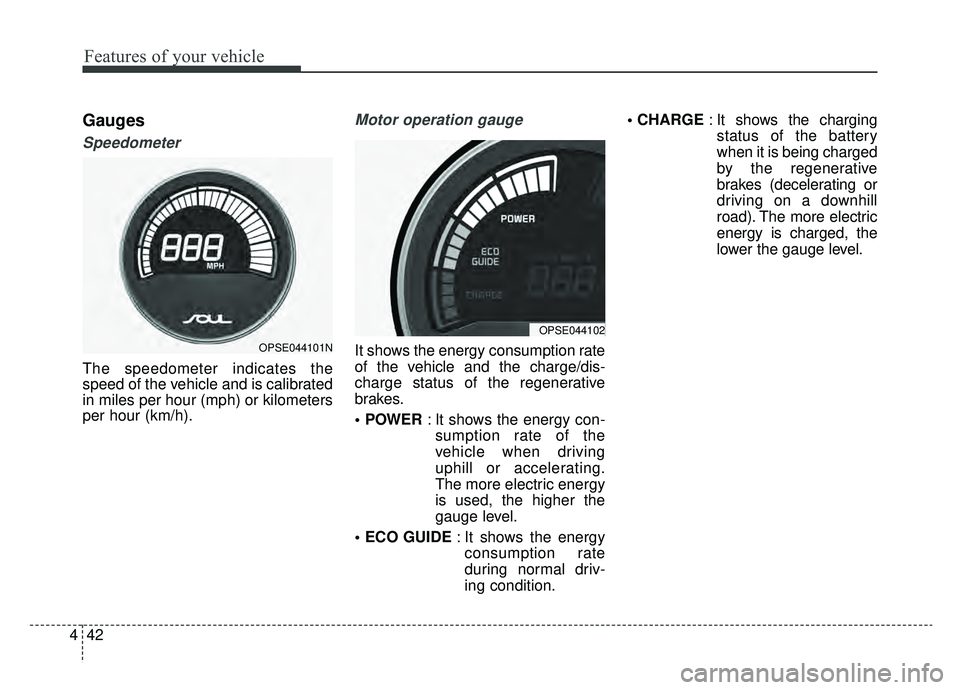
The speedometer indicates the
speed of the vehicle and is calibrated
in miles per hour (mph) or kilometers
per hour (km/h).
Motor operation gauge
It shows the energy consumption rate
of the vehicle and the charge/dis-
charge status of the regenerative
brakes.
: It shows the energy con-
sumption rate of the
vehicle when driving
uphill or accelerating.
The more electric energy
is used, the higher the
gauge level.
: It shows the energy
consumption rate
during normal driv-
ing condition.
: It shows the charging
status of the battery
when it is being charged
by the regenerative
brakes (decelerating or
driving on a downhill
road). The more electric
energy is charged, the
lower the gauge level.OPSE044101N
OPSE044102
Page 180 of 455
443
Features of your vehicle
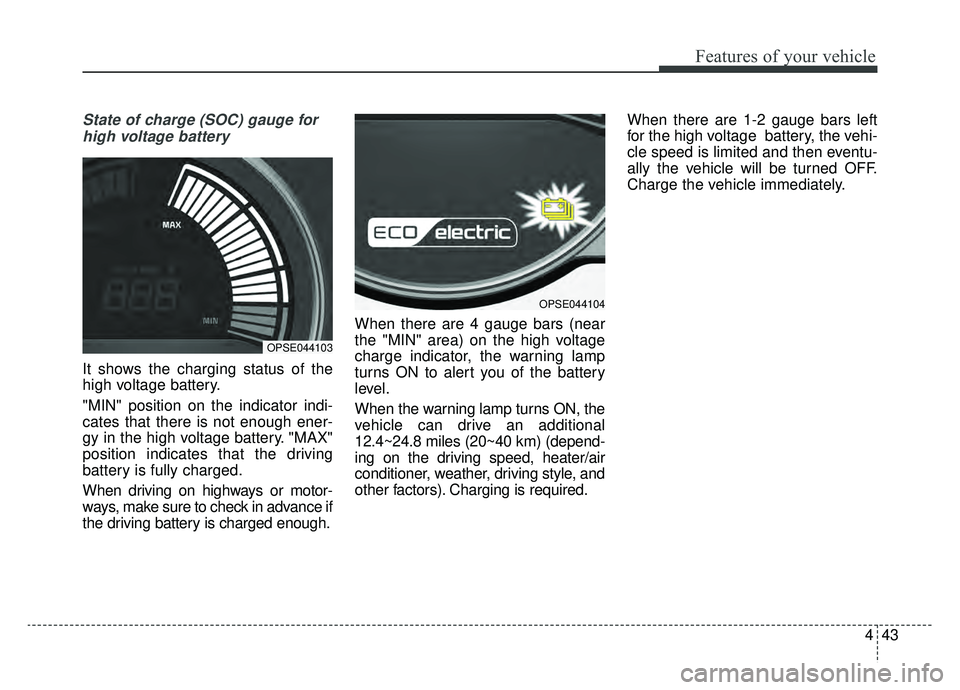
State of charge (SOC) gauge forhigh voltage battery
It shows the charging status of the
high voltage battery.
"MIN" position on the indicator indi-
cates that there is not enough ener-
gy in the high voltage battery. "MAX"
position indicates that the driving
battery is fully charged.
When driving on highways or motor-
ways, make sure to check in advance if
the driving battery is charged enough. When there are 4 gauge bars (near
the "MIN" area) on the high voltage
charge indicator, the warning lamp
turns ON to alert you of the battery
level.
When the warning lamp turns ON, the
vehicle can drive an additional
12.4~24.8 miles (20~40 km) (depend-
ing on the driving speed, heater/air
conditioner, weather, driving style, and
other factors). Charging is required.When there are 1-2 gauge bars left
for the high voltage battery, the vehi-
cle speed is limited and then eventu-
ally the vehicle will be turned OFF.
Charge the vehicle immediately.
OPSE044103
OPSE044104
Page 184 of 455
447
Features of your vehicle
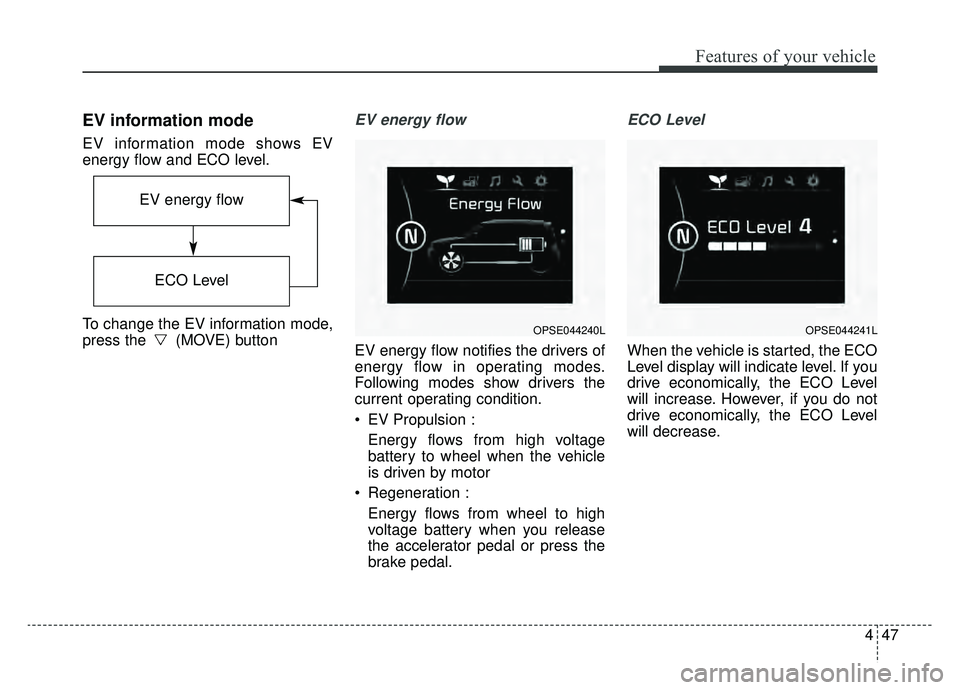
EV information mode
EV information mode shows EV
energy flow and ECO level.
To change the EV information mode,
press the (MOVE) button
EV energy flow
EV energy flow notifies the drivers of
energy flow in operating modes.
Following modes show drivers the
current operating condition.
EV Propulsion :Energy flows from high voltage
battery to wheel when the vehicle
is driven by motor
Regeneration : Energy flows from wheel to high
voltage battery when you release
the accelerator pedal or press the
brake pedal.
ECO Level
When the vehicle is started, the ECO
Level display will indicate level. If you
drive economically, the ECO Level
will increase. However, if you do not
drive economically, the ECO Level
will decrease.
OPSE044240L
EV energy flow
ECO Level
OPSE044241L
Page 186 of 455
449
Features of your vehicle
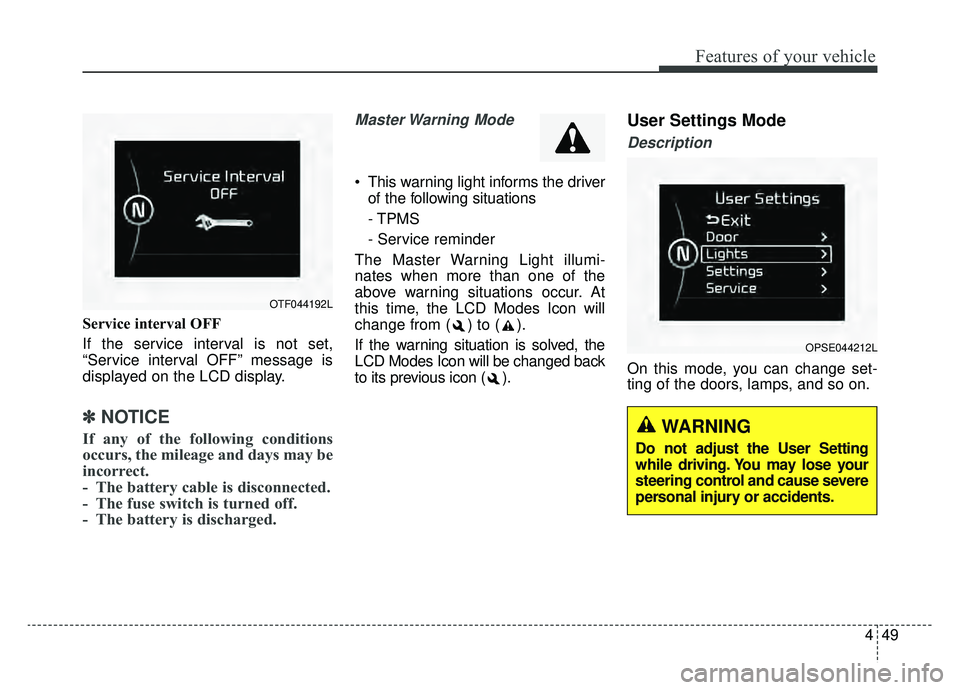
Service interval OFF
If the service interval is not set,
“Service interval OFF” message is
displayed on the LCD display.
✽ ✽NOTICE
If any of the following conditions
occurs, the mileage and days may be
incorrect.
- The battery cable is disconnected.
- The fuse switch is turned off.
- The battery is discharged.
Master Warning Mode
This warning light informs the driver
of the following situations
- TPMS
- Service reminder
The Master Warning Light illumi-
nates when more than one of the
above warning situations occur. At
this time, the LCD Modes Icon will
change from ( ) to ( ).
If the warning situation is solved, the
LCD Modes Icon will be changed back
to its previous icon ( ).
User Settings Mode
Description
On this mode, you can change set-
ting of the doors, lamps, and so on.
OPSE044212L
OTF044192L
WARNING
Do not adjust the User Setting
while driving. You may lose your
steering control and cause severe
personal injury or accidents.
Page 188 of 455
451
Features of your vehicle
Lamp
One Touch Turn Lamp (if equipped)
If this item is checked, the lane
change signals will blink 3, 5 or 7
times when the turn signal lever is
moved slightly.
Head Lamp Delay (if equipped)
If this item is checked, the headlamp
delay function will be activated.
Settings
Language
Choose the language you prefer
within the LCD.
Temperature Unit
Convert the temperature unit from °C
to °F or from °F to °C.
Welcome Sound (if equipped)
If this item is checked, the welcome
sound function will be activated.Energy Consumption Auto Reset
The average energy consumption will
reset automatically when charge the
high voltage battery more than 10%
The average energy consumption
will not reset automatically when
charge the high voltage battery more
than 10%