display KIA SPORTAGE 2015 Quick Reference Guide
[x] Cancel search | Manufacturer: KIA, Model Year: 2015, Model line: SPORTAGE, Model: KIA SPORTAGE 2015Pages: 38, PDF Size: 7.54 MB
Page 17 of 38
15
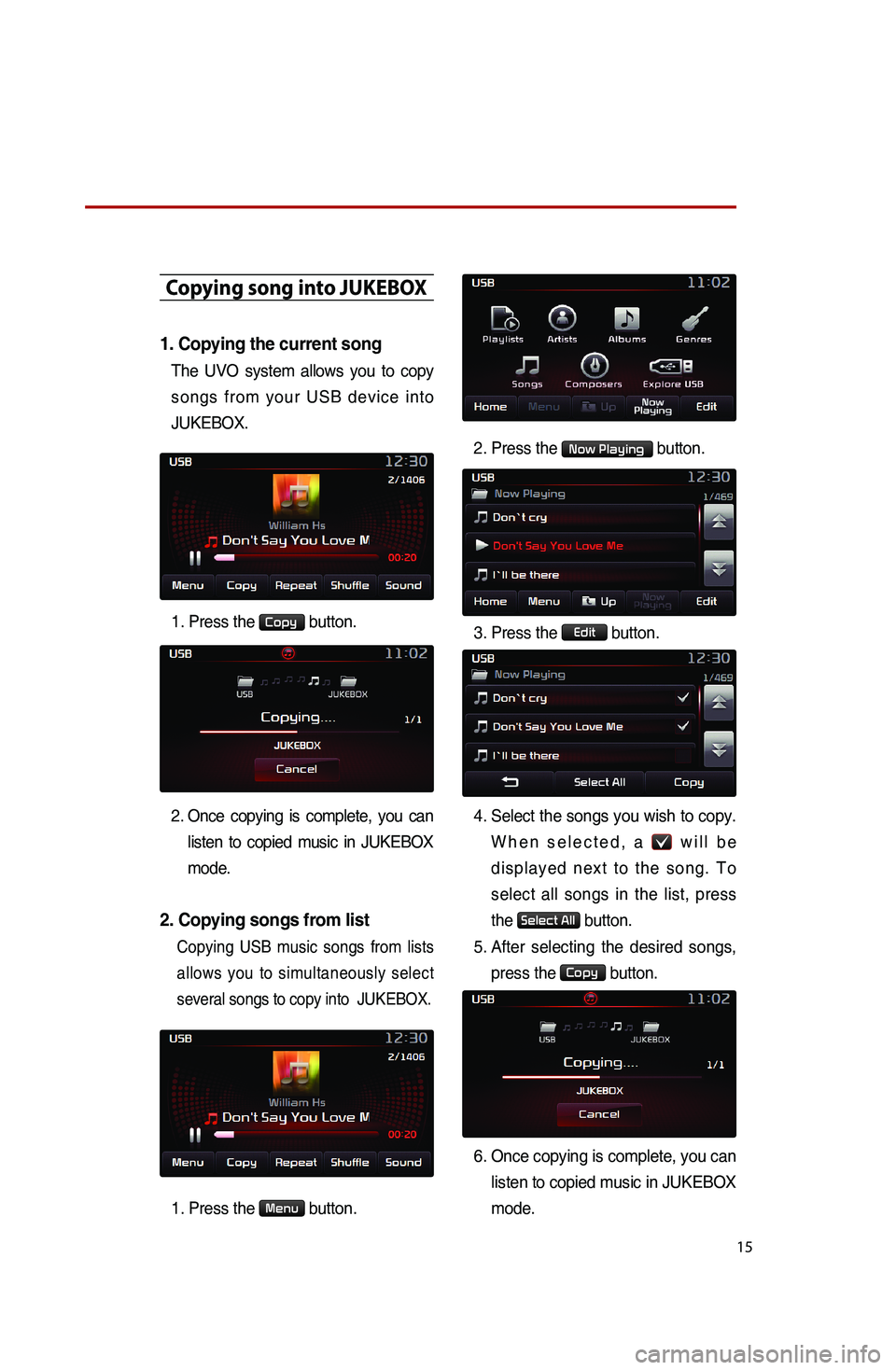
Copying song into JUKEBOX
1. Copying the current song
The UVO system allows you to copy
songs from your USB device into
JUKEBOX.
1. Press the Copy button.
2
. Once copying is complete, you can listen to copied music in JUKEBOX
mode.
2. Copying songs from list
Copying USB music songs from lists
allows you to simultaneously select
several songs to copy into JUKEBOX.
1. Press the Menu button. 2. Press the
Now Playing button.
3. Press the
Edit button.
4. Select the songs you wish to copy.
When selected, a
will be
displayed next to the song. To
select all songs in the list, press
the
Select All button.
5. After selecting the desired songs,
press the
Copy button.
6.
Once copying is complete, you can
listen to copied music in JUKEBOX
mode.
Page 18 of 38
16
Listening to music from your
BluetoothⓇ wireless technology enabled device
Listening to music from your
BluetoothⓇ wireless technology
enabled device
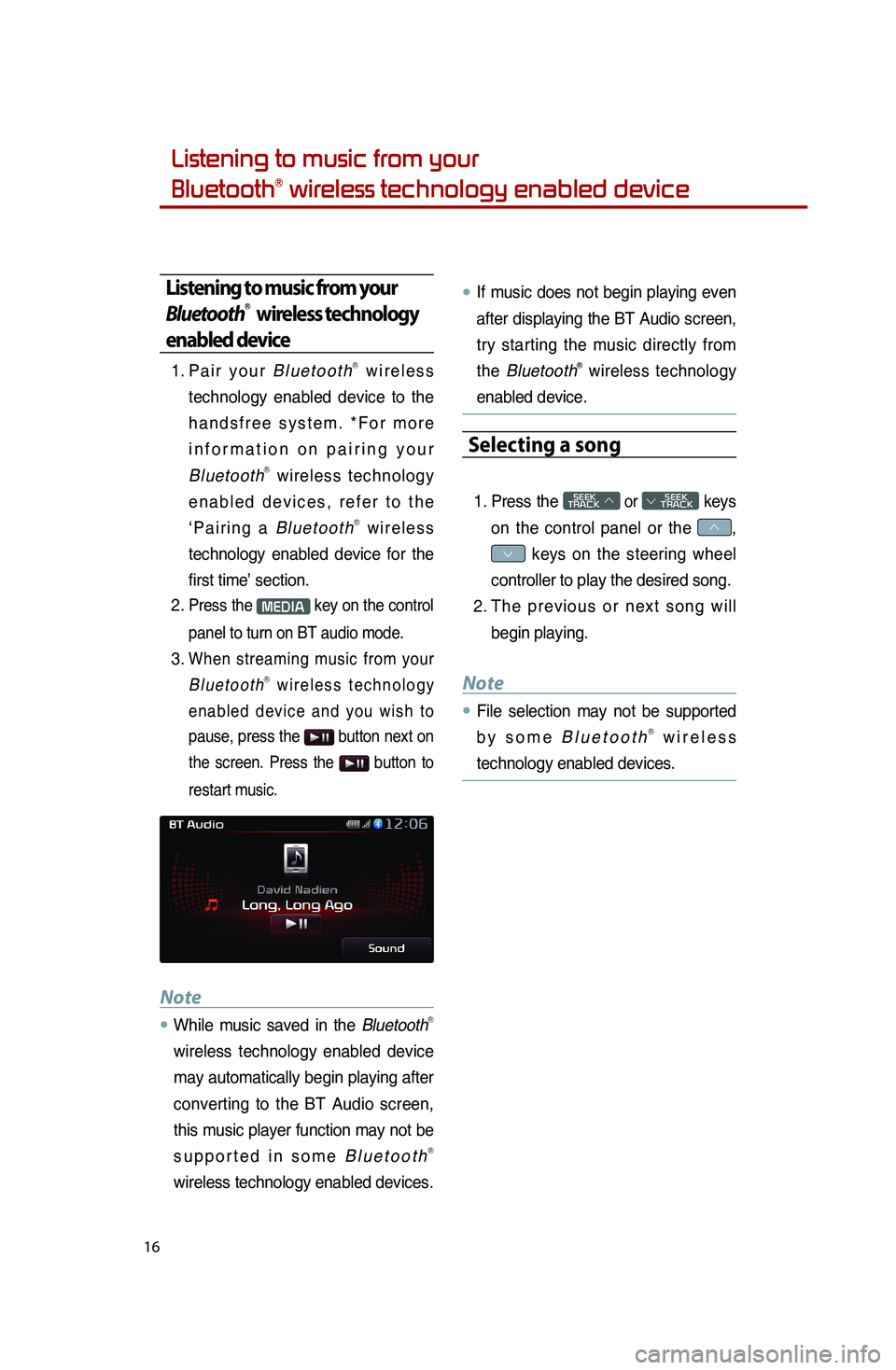
1. Pair your BluetoothⓇ wireless
technology enabled device to the
handsfree system. *For more
information on pairing your
Bluetooth
Ⓡ wireless technology
enabled devices, refer to the
‘Pairing a Bluetooth
Ⓡ wireless
technology enabled device for the
first time’ section.
2.
Press the MEDIA key on the control
panel to turn on BT audio mode.
3. When streaming music from your
BluetoothⓇ wireless technology
enabled device and you wish to
pause, press the
button next on
the screen. Press the
button to
restart music.
Note
●.While music saved in the BluetoothⓇ
wireless technology enabled device
may automatically begin playing after
converting to the BT Audio screen,
this music player function may not be
supported in some Bluetooth
Ⓡ
wireless technology enabled devices.
●.If music does not begin playing even
after displaying the BT Audio screen,
try starting the music directly from
the Bluetooth
Ⓡ wireless technology
enabled device.
Selecting a song
1. Press the SEEK
TRACK ∧ or
SEEK
∨ TRACK keys
on the control panel or the
∧,
∨ keys on the steering wheel
controller to play the desired song.
2. The previous or next song will
begin playing.
Note
●.File selection may not be supported
by some BluetoothⓇ wireless
technology enabled devices.
Page 20 of 38
18
Adding Favorites
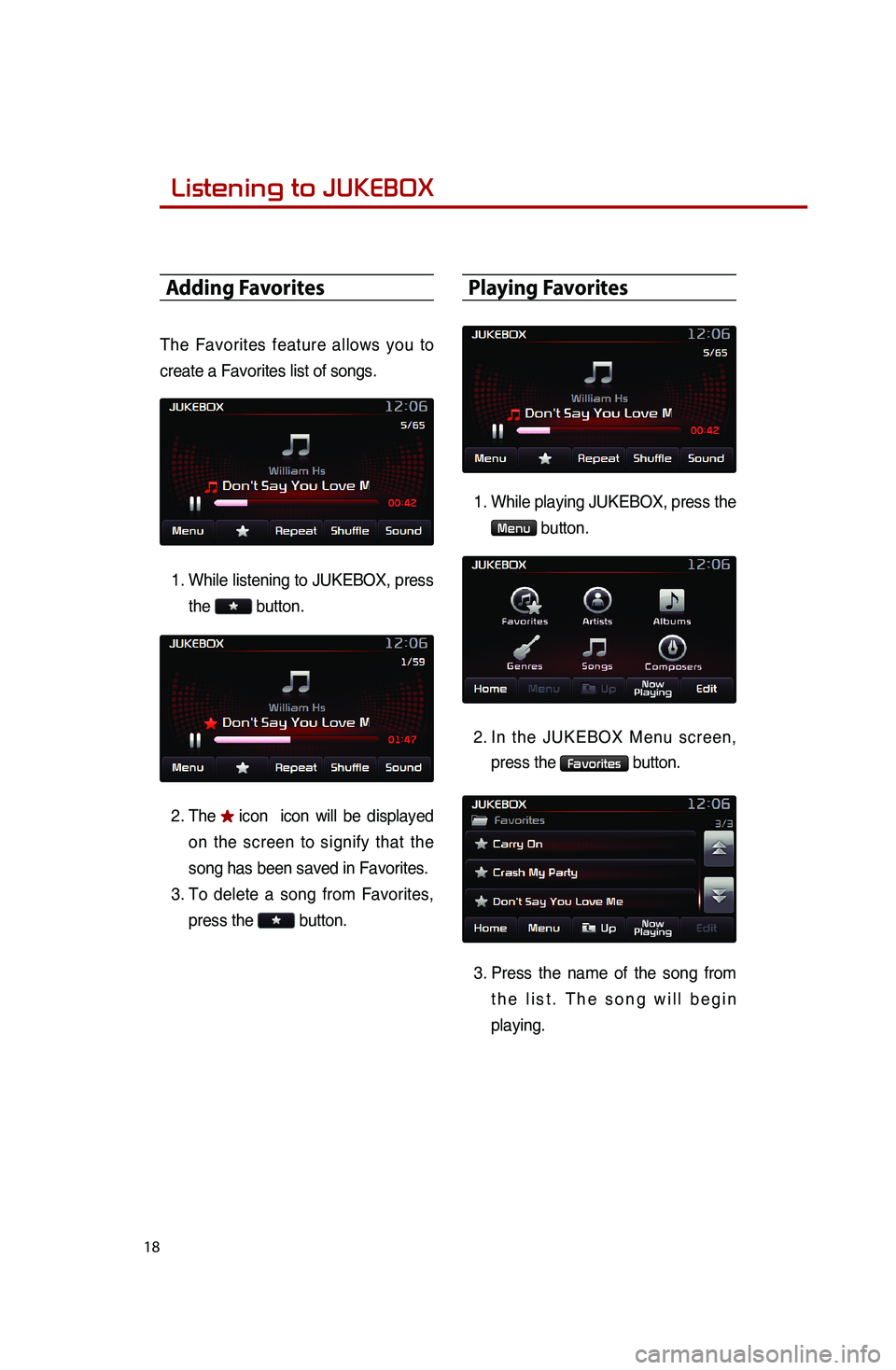
The Favorites feature allows you to
create a Favorites list of songs.1. While listening to JUKEBOX, press
the
button.
2. The
icon icon will be displayed
on the screen to signify that the
song has been saved in Favorites.
3. To delete a song from Favorites,
press the
button.
Playing Favorites
1.
While playing JUKEBOX, press the
Menu button.
2.
In the JUKEBOX Menu screen,
press the
Favorites button.
3.
Press the name of the song from
the list. The song will begin
playing.
Listening to JUKEBOX
0001
Page 22 of 38
20
Answering an incoming call
Connecting a handset device
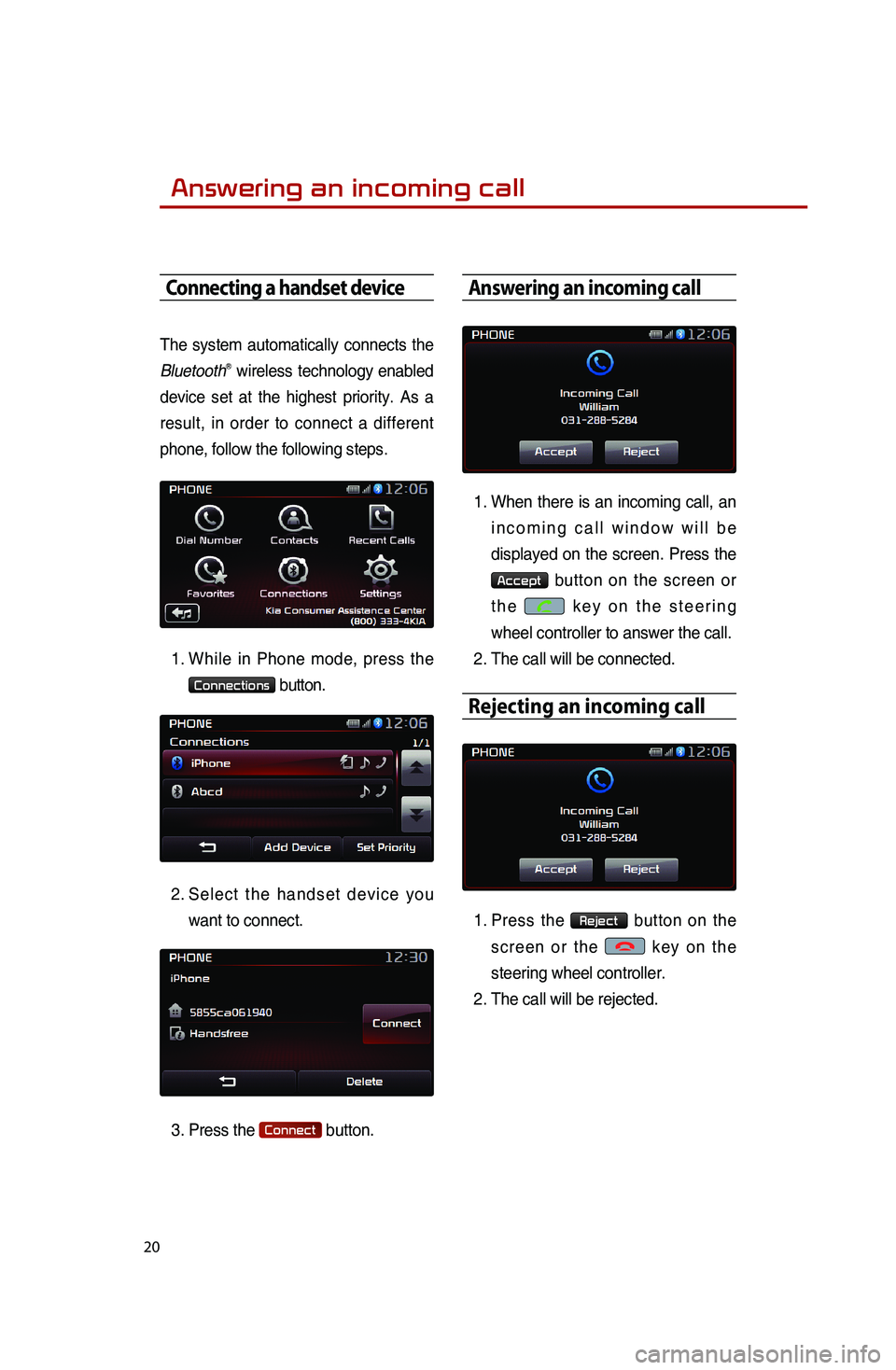
The system automatically connects the
BluetoothⓇ wireless technology enabled
device set at the highest priority. As a
result, in order to connect a different
phone, follow the following steps.
1. While in Phone mode, press the
Connections button.
2.
Select the handset device you
want to connect.
3. Press the
Connect button.
Answering an incoming call
1.
When there is an incoming call, an
incoming call window will be
displayed on the screen. Press the
Accept button on the screen or
the
key on the steering
wheel controller to answer the call.
2. The call will be connected.
Rejecting an incoming call
1. Press the Reject button on the
screen or the
key on the
steering wheel controller.
2. The call will be rejected.
0001
Page 25 of 38
23
SMS
SMS
1.
Downloading SMS messages
(from mobile phone)
When an SMS enabled mobile
phone is paired with the system,
unread messages will automatically
be downloaded to the system. While
you will not be able to check SMS
messages through the system due
to legal regulations, the system will
read back messages for you for
added convenience. The SMS read
back is also possible when the
vehicle is in motion.
2. Checking an SMS message
1. Press the key on the
steering wheel.
2. Say the command 'Read SMS'.
3.
The system will read back the
new message.
Note
●.To listen to the message again, say
‘Read again’. To listen to the next
message, say ‘Next’. To send a
reply, say ‘Reply’. To call the sender,
say ‘Call’.
●.When an SMS enabled mobile
phone is paired, new incoming
messages will automatically be
notified through the system.
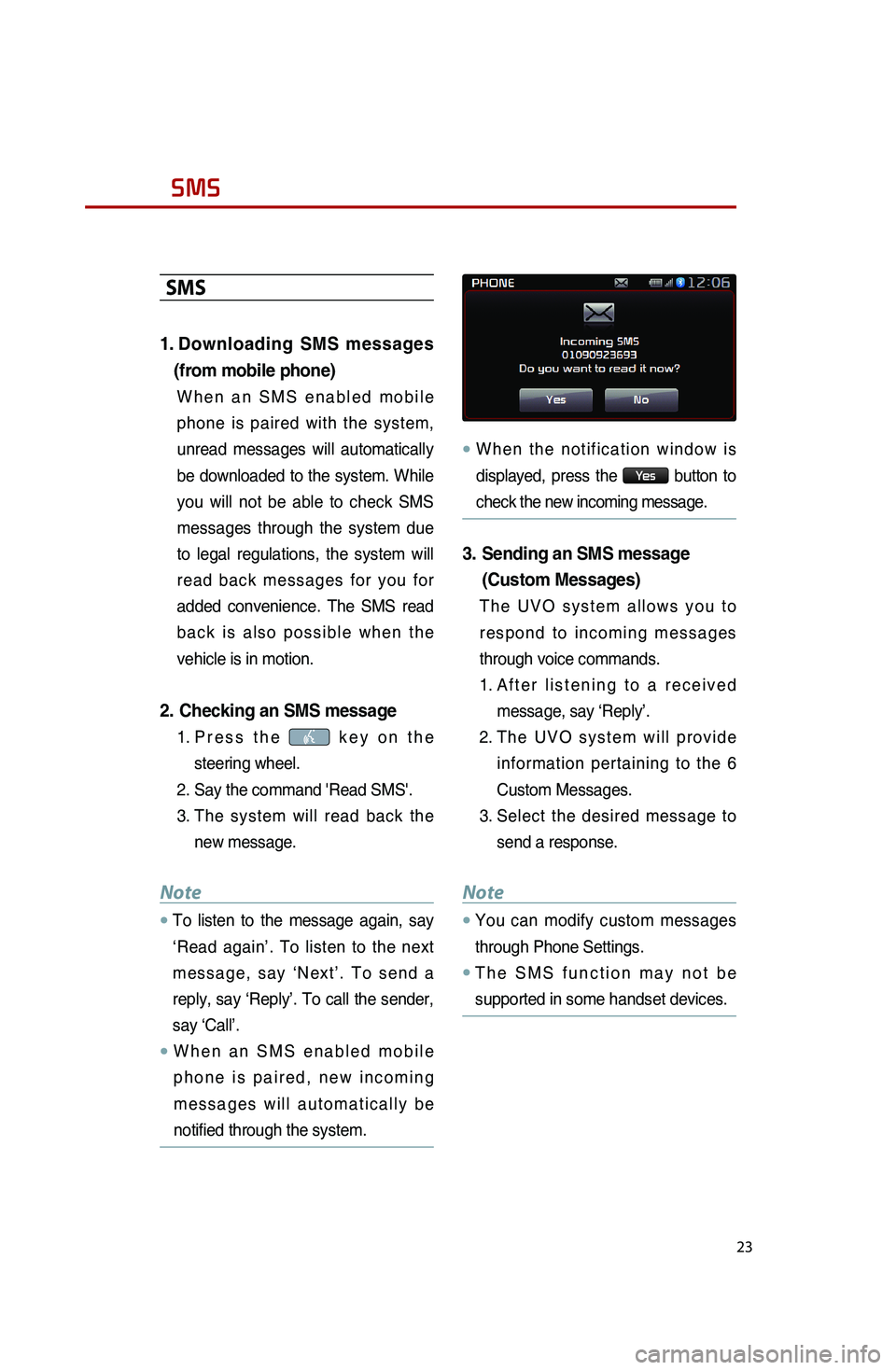
●.When the notification window is
displayed, press the
Ye s button to
check the new incoming message.
3. Sending an SMS message
(Custom Messages)
The UVO system allows you to
respond to incoming messages
through voice commands.
1. After listening to a received
message, say ‘Reply’.
2.
The UVO system will provide
information pertaining to the 6
Custom Messages.
3. Select the desired message to
send a response.
Note
●.You can modify custom messages
through Phone Settings.
●.The SMS function may not be
supported in some handset devices.
Page 26 of 38
24
Operating Voice Command
Using Voice Command
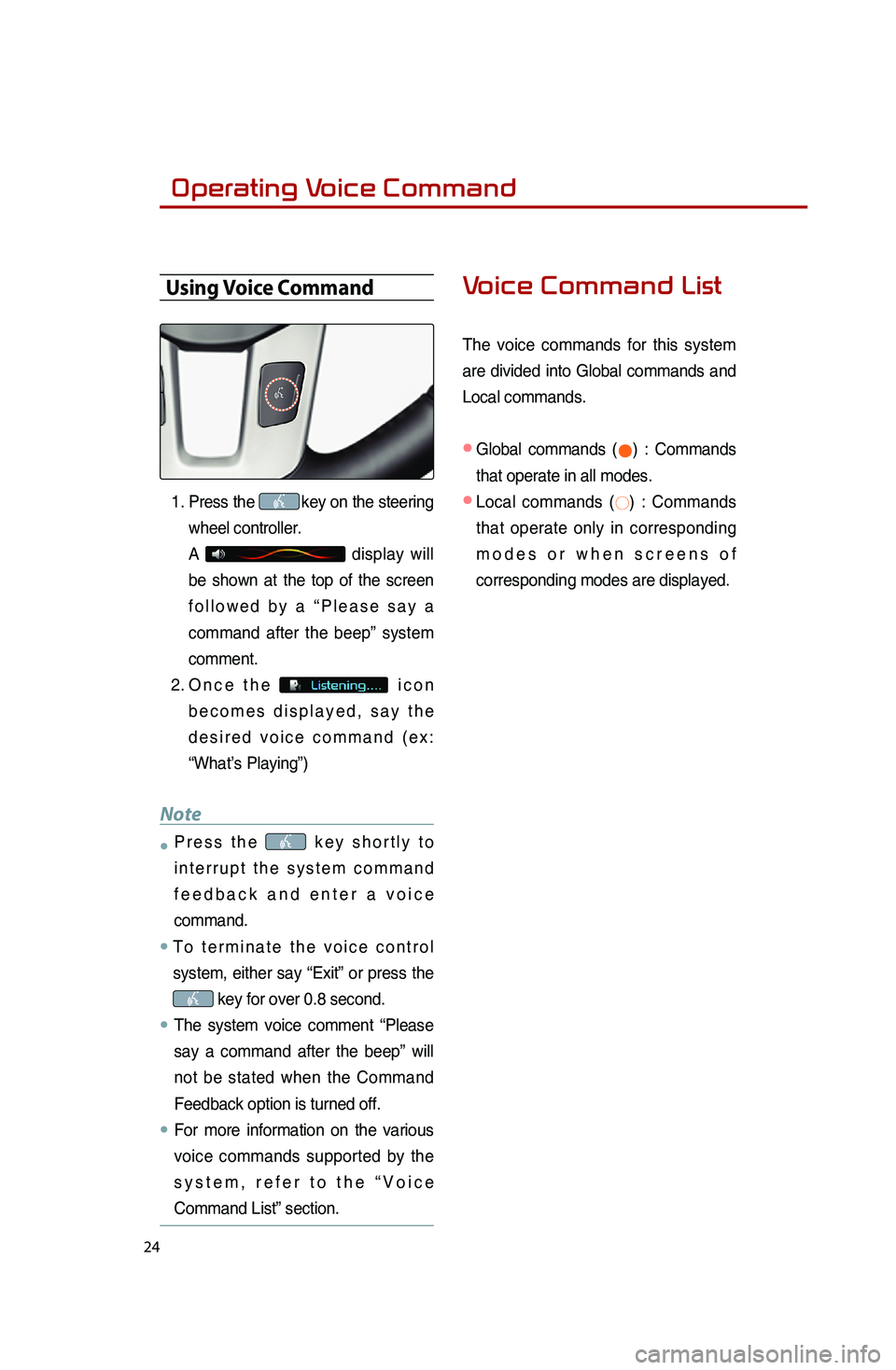
1. Press the key on the steering
wheel controller.
A
display will
be shown at the top of the screen
followed by a “Please say a
command after the beep” system
comment.
2. Once the
icon
becomes displayed, say the
desired voice command (ex:
“What’s Playing”)
Note
●.Press the key shortly to
interrupt the system command
feedback and enter a voice
command.
●.To terminate the voice control
system, either say “Exit” or press the
key for over 0.8 second.
●.The system voice comment “Please
say a command after the beep” will
not be stated when the Command
Feedback option is turned off.
●..For more information on the various
voice commands supported by the
system, refer to the “Voice
Command List” section.
Voice Command List
The voice commands for this system
are divided into Global commands and
Local commands.
● Global commands (●) : Commands
that operate in all modes.
●
Local commands (○) : Commands
that operate only in corresponding
modes or when screens of
corresponding modes are displayed.
0001
Page 30 of 38
28
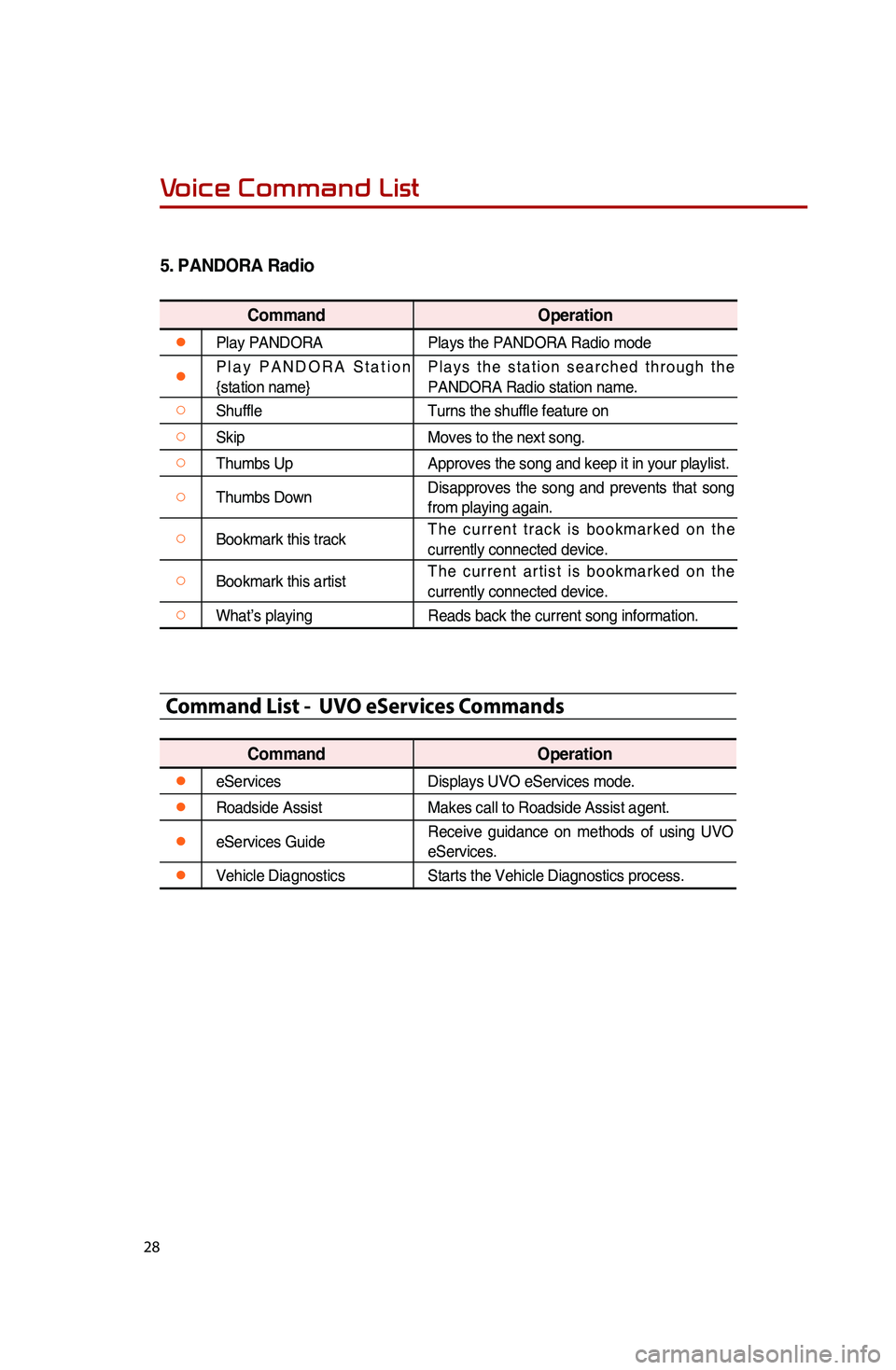
5.
PANDORA Radio
Command Operation
●Play PANDORA Plays the PANDORA Radio mode
●Play PANDORA Station
{station name} Plays the station searched through the
PANDORA Radio station name.
○Shuffle
Turns the shuffle feature on
○SkipMoves to the next song.
○Thumbs UpApproves the song and keep it in your playlist.
○Thumbs DownDisapproves the song and prevents that song
from playing again.
○Bookmark this trackThe current track is bookmarked on the
currently connected device.
○Bookmark this artistThe current artist is bookmarked on the
currently connected device.
○What’s playing
Reads back the current song information.
Command List - UVO eServices Commands
Command Operation
●eServicesDisplays UVO eServices mode.
●Roadside AssistMakes call to Roadside Assist agent.
●eServices GuideReceive guidance on methods of using UVO
eServices.
●Vehicle Diagnostics
Starts the Vehicle Diagnostics process.
Voice Command List