lock KIA SPORTAGE 2018 Features and Functions Guide
[x] Cancel search | Manufacturer: KIA, Model Year: 2018, Model line: SPORTAGE, Model: KIA SPORTAGE 2018Pages: 54, PDF Size: 3.81 MB
Page 35 of 54

33ALWAYS CHECK THE OWNER’S MANUAL FOR COMPLETE OPER ATING INFORMATION AND SAFET Y WARNINGS .
SEATING
E
E
F
Front Seat Headrest
Adjustment
Unfastening Center Seat Belt
To recline the Rear Seatback:
1 . Pull lever E up to unlock seat
2 . Holding the lever E up, adjust
Seatback to desired position F
3 . Release the lever E and ensure
the Seatback is locked in place
To fold the Rear Seatback:
1 . Pull lever E up to unlock seat
2 . Fold Seatback flat F
Reclining/Folding Rear Seats (Seat type with lever in front)
When adjusting seat forward or backwards, ensure seat clicks or locks into place before driving the vehicle .
QUICK TIP
REMINDER: The lever must return to its original position for the Seatback to lock .
To raise headrest — Pull headrest up to
the desired position .
To lower headrest — Press lock A, then
press the headrest down .
A
1 . If Seat Belt is buckled,
press the release button
on the buckle .
2 . To retract the center
seatbelt webbing G in
2nd and/or 3rd rows,
use the lap belt tongue
plate H to push the
“release button” in the
small slot on the center
belt buckle J .
J
H
GG
H
J
Second and Third Row Center Seatbelt Video To view a video on your mobile device, snap this QR Code or visit the listed website .
Refer to page 2 for more information .
www.youtube.com/KiaFeatureVideos
QR CODE
Page 36 of 54
*IF EQUIPPED SPORTAGE FEATURES & FUNCTIONS GUIDE
OTHER KEY FEATURES
34
HOLD
Engine Start/Stop Button & Smart Key Video To view a video on your mobile device, snap this QR Code or visit the listed website .
Refer to page 2 for more information .
www.youtube.com/KiaFeatureVideos
QR CODE
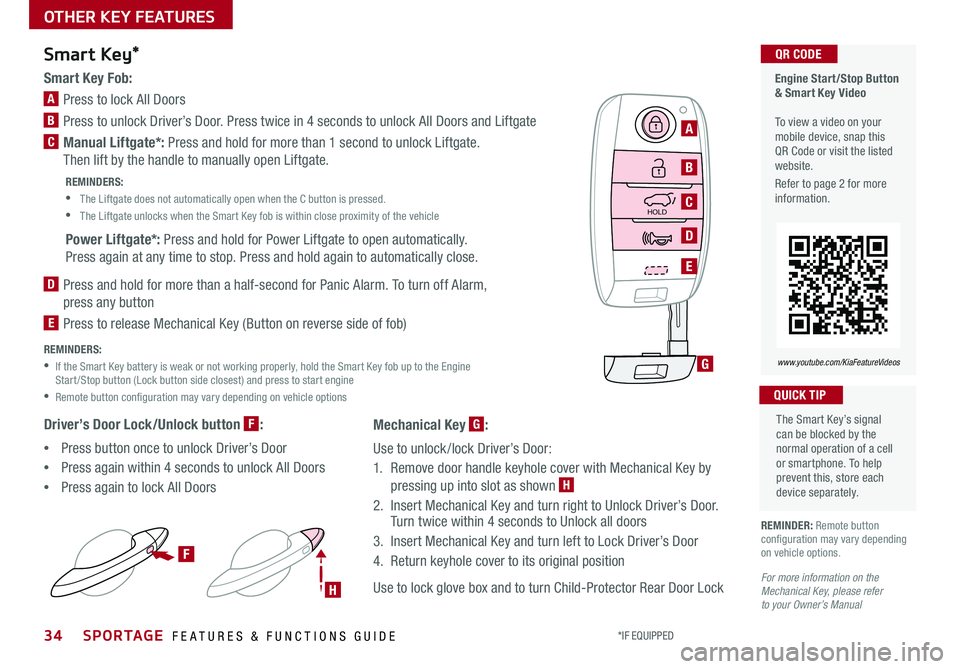
Smart Key Fob:
A Press to lock All Doors
B Press to unlock Driver’s Door . Press twice in 4 seconds to unlock All Doors and Liftgate
C Manual Liftgate*: Press and hold for more than 1 second to unlock Liftgate .
Then lift by the handle to manually open Liftgate .
REMINDERS:
•
The Liftgate does not automatically open when the C button is pressed .
•
The Liftgate unlocks when the Smart Key fob is within close proximity of the vehicle
Power Liftgate*: Press and hold for Power Liftgate to open automatically .
Press again at any time to stop . Press and hold again to automatically close .
D
Press and hold for more than a half-second for Panic Alarm . To turn off Alarm,
press any button
E
Press to release Mechanical Key (Button on reverse side of fob)
REMINDERS:
•
If the Smart Key battery is weak or not working properly, hold the Smart Key fob up to the Engine Start /Stop button (Lock button side closest) and press to start engine
•Remote button configuration may vary depending on vehicle options
Driver’s Door Lock/Unlock button F:
•Press button once to unlock Driver’s Door
•Press again within 4 seconds to unlock All Doors
•Press again to lock All Doors
Smart Key*
REMINDER: Remote button configuration may vary depending on vehicle options .
The Smart Key’s signal can be blocked by the normal operation of a cell or smartphone . To help prevent this, store each device separately .
QUICK TIP
HOLD
F
H
G
A
B
C
D
E
For more information on the Mechanical Key, please refer to your Owner’s Manual
Mechanical Key G:
Use to unlock /lock Driver’s Door:
1 . Remove door handle keyhole cover with Mechanical Key by
pressing up into slot as shown H
2 . Insert Mechanical Key and turn right to Unlock Driver’s Door . Turn twice within 4 seconds to Unlock all doors
3 . Insert Mechanical Key and turn left to Lock Driver’s Door
4 . Return keyhole cover to its original position
Use to lock glove box and to turn Child-Protector Rear Door Lock
Page 37 of 54
*IF EQUIPPED 35ALWAYS CHECK THE OWNER’S MANUAL FOR COMPLETE OPER ATING INFORMATION AND SAFET Y WARNINGS .
OTHER KEY FEATURES
HOLD
L ock U
nlo ck
L ock U
nlo ck
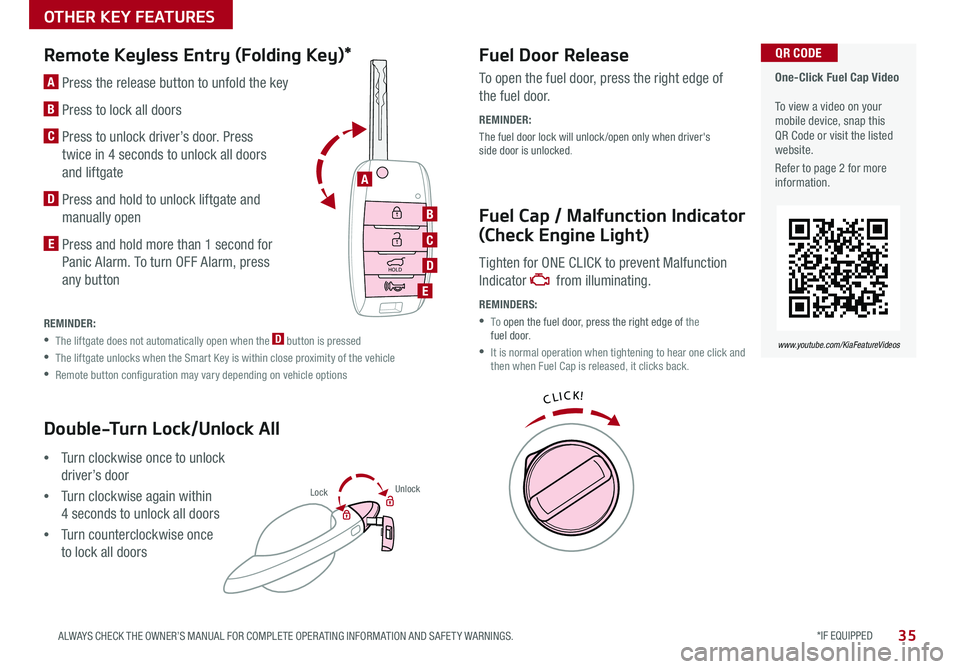
Double-Turn Lock/Unlock All
•Turn clockwise once to unlock
driver’s door
•Turn clockwise again within
4 seconds to unlock all doors
•Turn counterclockwise once
to lock all doors
Remote Keyless Entry (Folding Key)*Fuel Door Release
Fuel Cap / Malfunction Indicator
(Check Engine Light)
A Press the release button to unfold the key
B Press to lock all doors
C
Press to unlock driver’s door . Press
twice in 4 seconds to unlock all doors
and liftgate
D Press and hold to unlock liftgate and
manually open
E Press and hold more than 1 second for
Panic Alarm . To turn OFF Alarm, press
any button
To open the fuel door, press the right edge of
the fuel door .
REMINDER:
The fuel door lock will unlock /open only when driver's side door is unlocked .
Tighten for ONE CLICK to prevent Malfunction
Indicator from illuminating .
REMINDERS:
• To open the fuel door, press the right edge of the fuel door .
•
It is normal operation when tightening to hear one click and then when Fuel Cap is released, it clicks back .
REMINDER:
•
The liftgate does not automatically open when the D button is pressed
•
The liftgate unlocks when the Smart Key is within close proximity of the vehicle
•
Remote button configuration may vary depending on vehicle options
One-Click Fuel Cap Video To view a video on your mobile device, snap this QR Code or visit the listed website .
Refer to page 2 for more information .
www.youtube.com/KiaFeatureVideos
QR CODE
B
C
D
E
A
HOLD
Lock U
nlo ck
L ock U
nlo ck
HOLD
L ock U
nlo ck
L ock U
nlo ck
Page 39 of 54

*IF EQUIPPED 37ALWAYS CHECK THE OWNER’S MANUAL FOR COMPLETE OPER ATING INFORMATION AND SAFET Y WARNINGS .
OTHER KEY FEATURES
Map/Room LampsPanoramic Sunroof Operation*
Automatic turn off function*
The interior lights automatically turn off approximately 30 seconds after
the ignition or Engine Start /Stop button* is OFF .
Map Lamp/Room Lamp Operation
Push the lens A to turn the map lamp ON/OFF . This light produces a spot
beam for convenient use as a map lamp or as a personal lamp for the
driver or the front passenger .
Map/Room Lamp Button – Press button B, to turn the front and rear
room lamps on and off .
Door Mode Button – Press button C, to enable or disable Door Mode .
In Door Mode, the map and room lamps turn on when any door is opened .
When all doors are locked or the ignition is on, the map and room lamp
will turn off immediately .
Rear Room Lamps – Press the button D
to turn the rear passenger lamp ON/OFF .
The sunroof operation is controlled through a multi-directional switch/
lever . The ignition or Engine Start /Stop button* needs to be in the ON
position to operate the sunroof .
To slide the sunshade and sunroof:
• Auto Open: Slide the lever E backward to the farthest position and
release
• Auto Close (sunroof only): Slide the lever E forward to the farthest
position and release
To slide the sunshade only:
•
Open: Slide the lever E partially backward to the first detent position
and release
• Auto Close: Slide the lever E partially forward to the first detent
position and release
To slide the sunroof (with sunshade open):
• Open: Slide the lever E backward to the first detent position and
release
• Close: Slide the lever E forward to the first detent position and
release to close sunroof glass only . Slide the lever backward to the
farthest position and release to close sunroof glass and sunshade
To tilt the sunroof:
• Raise: Push lever E upward .
• Lower: Push lever E upward again
or slide the lever forward to the
first detent position and release
• When doors are unlocked by the Smart Key, the lamp turns ON for approximately 30 seconds
• If your vehicle is equipped with the theft alarm system, the interior lights automatically turn off approximately 3 seconds after the system is in armed stage
• Using interior lights for an extended period of time may cause battery discharge
QUICK TIP
To stop the sunroof/sunshade at any position, push or pull the sunroof control lever in any direction .
QUICK TIP
AA
BCE
D
REMINDERS:
• Sunshade needs to remain OPEN while sunroof is open and vehicle is moving
• Sunshade cannot slide when it is in the tilt position or tilt while in an open or slide position
( Type B)
Page 41 of 54

*IF EQUIPPED 39ALWAYS CHECK THE OWNER’S MANUAL FOR COMPLETE OPER ATING INFORMATION AND SAFET Y WARNINGS .
OTHER KEY FEATURES
REMINDERS:
•All doors are closed and locked after about 15 seconds
•The Smart Power Liftgate feature will not operate when:
- The doors are recently closed and locked, and the Smart Key is still detected after 15 seconds near the vehicle or within 60 inches of the door handles- A door is not locked or closed- The Smart Key is in the vehicle
•
Press any button on the Smart Key fob during the Detect and Alert stage to deactivate the Smart Power Liftgate function .
Smart Power Liftgate Video
To view a video on your mobile device, snap this QR Code or visit the listed website .
Refer to page 2 for more information .
www.youtube.com/KiaFeatureVideos
QR CODE
• During the Smart Power Liftgate alert, the Smart Power Liftgate can be deactivated with the Smart Key by pressing any button on the key fob .
• The open height can be adjusted . For information on how to set open height, see your owner's manual
QUICK TIPS
HOLD
C
Liftgate Release ButtonSmart Power Liftgate*
Located underneath the rear liftgate hatch . With
liftgate unlocked, press the Liftgate Release Button A and pull the liftgate up by the handle to open .
• The liftgate must be unlocked before it can be opened by the Liftgate Release Button
• aThe liftgate unlocks automatically, and can then be opened, when the Smart Key fob* is within close proximity to the vehicle
QUICK TIPS
HOLD
(Liftgate release button)
A
When the Smart Key fob is on your person and you are near
the back of the vehicle, within close proximity, the hazard
lights will blink and a chime will sound for about 3 seconds
as an alert that the Smart Power Liftgate is about to open .
Then the alert system will blink and chime two additional
times before opening the Smart Power Liftgate .
The Smart Power Liftgate
feature is off by default . To
enable the Smart Power
Liftgate, go to User Settings
in the LCD Instrument
Cluster modes .
Page 42 of 54

40*IF EQUIPPED SPORTAGE FEATURES & FUNCTIONS GUIDE
OTHER KEY FEATURES
Child-Protector Rear Door Lock
Located on the rear edge of the rear passenger doors .
Insert the ignition key into the hole and turn the key
to the LOCK position to disable the inner door handles
from opening the rear doors .
REMINDER: Child-Protector Rear Door Lock is located on rear passenger’s door jamb .
Sunvisor
Use the sunvisor to shield direct light through the front or side windows .
To adjust, move sunvisor left or right .
(Located on rear edge of rear passenger doors)
REMINDERS:
• Sunvisor may not shield all direct light
• The sunvisor may impair visibility if not adjusted properly
• Do not operate the vehicle if the sunvisor is impairing your visibility
• Be aware of seating position when adjusting or swinging sunvisor around to or from the front or side windows
(Rear Camera)(Rear Camera Display)
Rear-Camera Display*
REMINDER:
While camera is active, only the volume controls on the Audio System can be operated
The Rear-Camera Display is not a substitute for proper and safe backing-up procedures. Always drive safely and use caution when backing up. The Rear-Camera Display may not detect every object behind the vehicle.
The Rear-Camera Display system is not a safety device . It is a
supplemental system that displays the view behind the vehicle through the
Standard Audio System, UVO eServices System* or UVO eServices with
Premium Navigation* screens while the vehicle is in Reverse .
The Rear-Camera Display activates when the:
1 . Engine Start /Stop* button is in the ON position (Green Light)
2 .
Gear Shift Lever is in the R (Reverse) position
P
R
N
DSHIFTL OCK
RELEASE
Page 43 of 54

*IF EQUIPPED 41ALWAYS CHECK THE OWNER’S MANUAL FOR COMPLETE OPER ATING INFORMATION AND SAFET Y WARNINGS .
OTHER KEY FEATURES
Opening the Hood:
1 . Pull the Hood Release Lever A to unlatch the Hood
2 . In the front of the vehicle, lift the Hood slightly, push
the secondary Latch B to the left inside of the
Hood’s center and lift the Hood
Closing the Hood:
Lower the Hood and then press down to securely lock
in place .
Hood Release Lever and Latch
A
B
A
B
•The Tire Mobility Kit is a temporary fix and is to be used for one tire only; the tire should be inspected as soon as possible •The kit should only be used for sealing/inflating passenger car tires; do not use for inflating any other type of tires •Some damaged tires cannot be sealed completely; do not use the kit if it appears a tire is damaged beyond repair
Tire Mobility Kit*
The Tire Mobility Kit may temporarily seal certain
types of tire damage .
For operational information, please refer to the
Owner’s Manual .
A Sealant Bottle
B Compressor
REMINDER: After tire is properly sealed, drive cautiously at a maximum speed of 50 mph for a maximum distance of up to 120 miles .
Tire Mobility Kit Video To view a video on your mobile device, snap this QR Code or visit the listed website .
Refer to page 2 for more information .
QR CODE
QUICK TIPS
www.youtube.com/KiaFeatureVideos
Page 44 of 54

SAFETY FEATURES
42*IF EQUIPPED SPORTAGE FEATURES & FUNCTIONS GUIDE
ODS detects the presence of the front passenger and adjusts or
turns off airbag deployment accordingly .
Depending on the situation and type of accident, the system may:
•Deploy airbag (Adult)
•Not deploy the airbag (Unoccupied)
If the system determines that the airbag should not be deployed,
the “PASSENGER AIRBAG OFF” indicator will illuminate .
Occupant Detection System (ODS) /
Passenger Airbag Off IndicatorTo properly fasten your seat belts:
1 .
Insert the belt tongue plate C into the buckle D until it clicks
2 .
Position the lap portion of the belt across your lap as LOW ON THE
HIPS as possible E . Adjust the belt to a SNUG FIT by pulling up on the
shoulder portion F .
D
F
E
C
Seat Belts
Seat Belt Retractor Locks
Retractor locks allow lap/shoulder seat belts to remain unlocked during
normal vehicle operation for freedom of movement and increased comfort .
During a STRONG STOP, SUDDEN TURN OR CERTAIN COLLISIONS, seat
belt retractors will automatically lock the belts to reduce the risk of injury .
REMINDER: For maximum protection, always wear your seat belt .
The Seat Belt warning chime operates for driver’s seat only .
QUICK TIP
( Type B)
Page 52 of 54
ECO Mode (Active ECO) – page 8 Parking Assist System* – page 30 Digital Clock – page 24 Engine Start /Stop Button* – page 13 HomeLink
® with Auto-Dimming Rearview Mirror* – page 36
Panoramic Sunroof Operation* – page 37 Passenger Airbag Off Indicator – page 42 Rear-Camera Display* – page 40
Reclining/Folding Rear Seats – page 33 Seat Warmers / Ventilated Seats* – page 31 Smart Key* – page 34 Sunvisor – page 40 Tire Pressure Monitoring System ( TPMS) – page 5 Aux/USB/iPod
® Port & Power Outlets – page 24
*if equipped
Standard Audio System*
– page 20
For more information, refer to the Owner’s Manual.
UVO eServices / Android Auto
™ /
Apple CarPlay
® Setup*
– page 21
For further UVO eServices System operations, refer to the Car Multimedia System User’s Manual. For other audio system information, refer to pages 20-23.
UVO eServices System*
– page 22
For more information, refer to the
Car Multimedia System User’s Manual.
Cruise Control
– page 17
Demonstrate operation
Bluetooth
® Wireless Technology
–
p a g e s 18 -19
Demonstrate operation
UVO eServices System with Premium Navigation*
– page 23
For more information, refer to the Car Multimedia System User’s Manual.
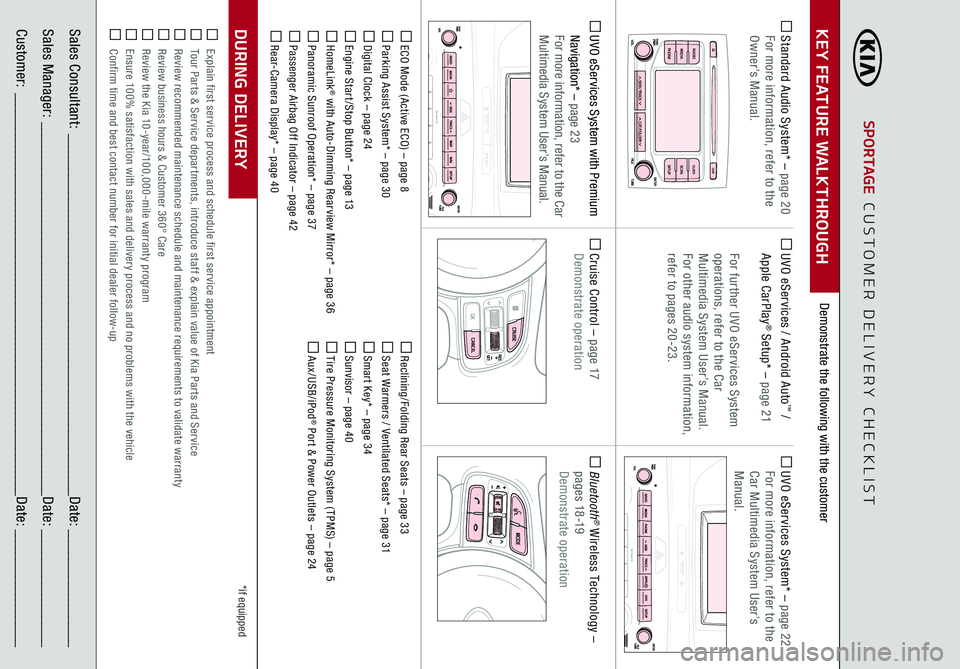
Demonstrate the following with the customer
SPORTAGE
CUSTOMER DELIVERY CHECKLIST
KEY FEATURE WALKTHROUGHSales Consultant:
______________________________________________________________
Date:
____________________
Sales Manager:
________________________________________________________________
Date:
____________________
Customer:
_____________________________________________________________________
Date:
____________________
Explain first service process and schedule first service appointment Tour Parts & Service departments, introduce staff & explain value of Kia Parts and Service Review recommended maintenance schedule and maintenance requirements to validate warranty Review business hours & Customer 360° Care Review the Kia 10-year/100,000-mile warranty program Ensure 100% satisfaction with sales and delivery process and no problems with the vehicle Confirm time and best contact number for initial dealer follow-upDURING DELIVERY
DISP
C AT/FO LDER
SEEK/T RACK
RADIO
M
EDIA
CLO CKSETU P
SCA
N
PHONE
T H E S YSTE M