sensor KIA SPORTAGE 2021 Repair Manual
[x] Cancel search | Manufacturer: KIA, Model Year: 2021, Model line: SPORTAGE, Model: KIA SPORTAGE 2021Pages: 631, PDF Size: 10.56 MB
Page 423 of 631
5 137
Driving your vehicle
✽NOTICE
Smart Cruise Control may not oper-
ate temporarily due to:
- Electrical interference
- Modified suspension
- Differences in tire abrasion or tirepressure
- Installation of different type of tires(Continued)
• Always be aware of the select-
ed speed and distance to the
vehicle ahead.
• Smart Cruise Control may not recognize complex driving sit-
uations, always pay attention
to driving conditions and con-
trol your vehicle speed.
• After an engine start, please stop for several seconds. If
system initialization is not
completed, SCC does not nor-
mally operate.
• After starting the engine, if objects are not detected or
the sensor cover is covered
with foreign substances, the
SCC may not work.(Continued)
• Smart Cruise Control cannotrecognize a stopped vehicle,
pedestrians or an oncoming
vehicle.
Always look ahead cautiously
to prevent unexpected and
sudden situations from occur-
ring.
• When other vehicles are changing lanes in front of you
frequently, Smart Cruise
Control may not operate
appropriately.
Always drive cautiously to
prevent unexpected and sud-
den situations from occurring.
• Smart Cruise Control is not a substitute for safe driving
practices but a convenience
function only. It is the respon-
sibility of the driver to always
check to the vehicle ahead.
(Continued)
WARNING
For safe operation, carefully
read and follow the instructions
in this manual before use.
Page 425 of 631
5 139
Driving your vehicle
System description
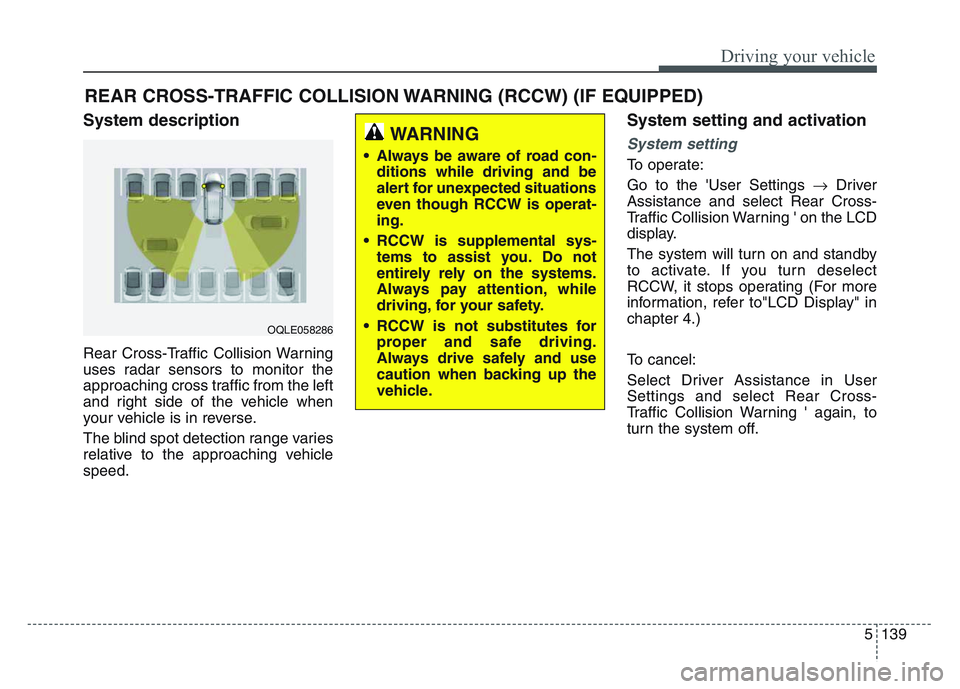
Rear Cross-Traffic Collision Warning
uses radar sensors to monitor the
approaching cross traffic from the left
and right side of the vehicle when
your vehicle is in reverse.
The blind spot detection range varies
relative to the approaching vehicle
speed.
System setting and activation
System setting
To operate:
Go to the 'User Settings Driver
Assistance and select Rear Cross-
Traffic Collision Warning ' on the LCD
display.
The system will turn on and standby
to activate. If you turn deselect
RCCW, it stops operating (For more
information, refer to"LCD Display" in
chapter 4.)
To cancel:
Select Driver Assistance in User
Settings and select Rear Cross-
Traffic Collision Warning ' again, to
turn the system off.
REAR CROSS-TRAFFIC COLLISION WARNING (RCCW) (IF EQUIPPED)
OQLE058286
WARNING
• Always be aware of road con- ditions while driving and be
alert for unexpected situations
even though RCCW is operat-
ing.
• RCCW is supplemental sys- tems to assist you. Do not
entirely rely on the systems.
Always pay attention, while
driving, for your safety.
• RCCW is not substitutes for proper and safe driving.
Always drive safely and use
caution when backing up the
vehicle.
Page 427 of 631
5 141
Driving your vehicle
If the vehicle detected by the sensors
approaches from the rear left/right
side of your vehicle, the warning
chime will sound, the warning light
on the outside rearview mirror will
blink and a message will appear on
the LCD display. If the rear view mon-
itor system is in activation, a mes-
sage will also appear on the
‘Infortainment System’.
The warning will stop when:
- The vehicle moving at the rearleft/right side of your vehicle is not
in the detection range.
- The vehicle is right behind your vehicle.
- The vehicle is not driving towards your vehicle.
- The vehicle’s approaching speed is decreased.✽NOTICE
• When the operation condition ofRCCW is met, the warning will
occur every time a vehicle
approaches the side or rear of
your stopped (0 mph (0 km/h)
vehicle speed) vehicle.
• The system's warning or brake may not operate properly if the
left or right of your vehicle's rear
bumper is blocked by a vehicle or
obstacle.
• The driver should always use extreme caution while operating
the vehicle, whether or not the
warning light on the outer side
view mirror illuminates or there is
a warning alarm.
• Playing the vehicle audio system at high volume may prevent occu-
pants from hearing the system's
warning sounds.
• If any other warning sound such as seat belt warning chime is
already generated, the RCCW
warning may not sound.WARNING
• Drive safely even though the
vehicle is equipped with Rear
Cross-Traffic Collision
Warning. Do not solely rely on
the system but check your
surrounding when backing
the vehicle up.
• The driver is responsible for accurate brake control.
• Always pay extreme caution while driving. Rear Cross-
Traffic Collision Warning may
not operate properly or
unnecessarily operate
depending on traffic and driv-
ing conditions.
Page 428 of 631
Driving your vehicle
1425
Detecting Sensor
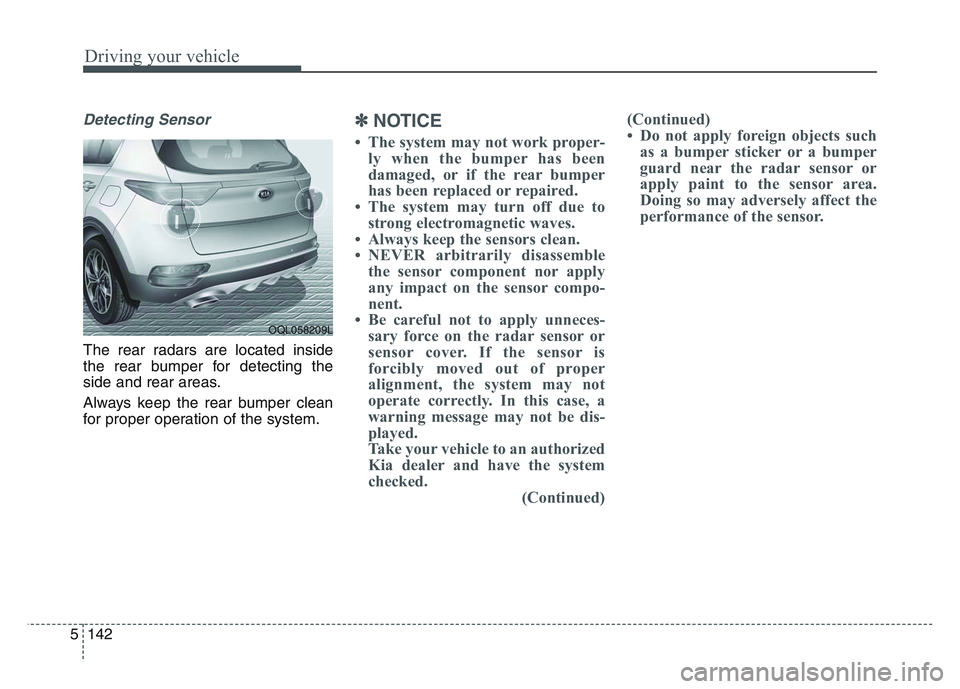
The rear radars are located inside
the rear bumper for detecting the
side and rear areas.
Always keep the rear bumper clean
for proper operation of the system.
✽ NOTICE
• The system may not work proper-
ly when the bumper has been
damaged, or if the rear bumper
has been replaced or repaired.
• The system may turn off due to strong electromagnetic waves.
• Always keep the sensors clean.
• NEVER arbitrarily disassemble the sensor component nor apply
any impact on the sensor compo-
nent.
• Be careful not to apply unneces- sary force on the radar sensor or
sensor cover. If the sensor is
forcibly moved out of proper
alignment, the system may not
operate correctly. In this case, a
warning message may not be dis-
played.
Take your vehicle to an authorized
Kia dealer and have the system
checked. (Continued)(Continued)
• Do not apply foreign objects such
as a bumper sticker or a bumper
guard near the radar sensor or
apply paint to the sensor area.
Doing so may adversely affect the
performance of the sensor.
OQL058209L
Page 429 of 631
5 143
Driving your vehicle
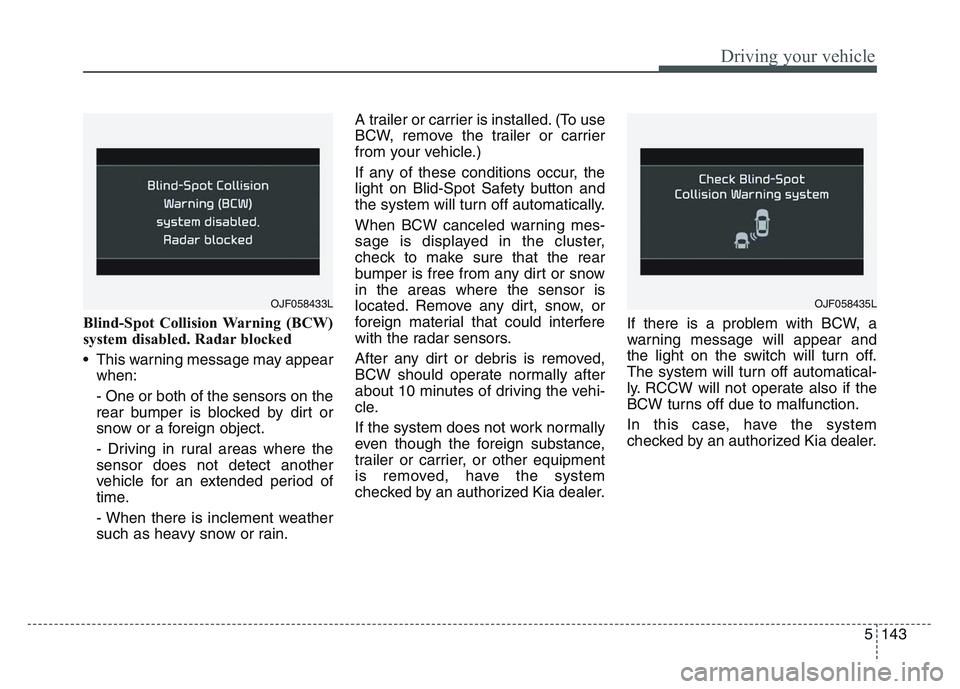
Blind-Spot Collision Warning (BCW)
system disabled. Radar blocked
• This warning message may appearwhen:
- One or both of the sensors on the
rear bumper is blocked by dirt or
snow or a foreign object.
- Driving in rural areas where the
sensor does not detect another
vehicle for an extended period of
time.
- When there is inclement weather
such as heavy snow or rain. A trailer or carrier is installed. (To use
BCW, remove the trailer or carrier
from your vehicle.)
If any of these conditions occur, the
light on Blid-Spot Safety button and
the system will turn off automatically.
When BCW canceled warning mes-
sage is displayed in the cluster,
check to make sure that the rear
bumper is free from any dirt or snow
in the areas where the sensor is
located. Remove any dirt, snow, or
foreign material that could interfere
with the radar sensors.
After any dirt or debris is removed,
BCW should operate normally after
about 10 minutes of driving the vehi-
cle.
If the system does not work normally
even though the foreign substance,
trailer or carrier, or other equipment
is removed, have the system
checked by an authorized Kia dealer.
If there is a problem with BCW, a
warning message will appear and
the light on the switch will turn off.
The system will turn off automatical-
ly. RCCW will not operate also if the
BCW turns off due to malfunction.
In this case, have the system
checked by an authorized Kia dealer.
OJF058433LOJF058435L
Page 430 of 631
Driving your vehicle
1445
Non-operating condition
Outside rearview mirror may not
alert the driver when:
- The outside rearview mirror hous-ing is damaged or covered with
debris.
- The window is covered with debris.
- The windows are severely tinted.
- The mirror is covered with dirt, snow, or debris.
Limitations of the system
The driver must be cautious in the
below situations, because the sys-
tem may not detect other vehicles or
objects in certain circumstances.
• When a trailer or carrier isinstalled.
• The vehicle drives in inclement weather such as heavy rain or
snow.
• The sensor is polluted with rain, snow, mud, etc.
• The rear bumper where the sensor is located is covered with a foreign
object such as a bumper sticker, a
bumper guard, a bike rack, etc.
• The rear bumper is damaged, or the sensor is out of the original
default position.
• The vehicle height gets lower or higher due to heavy loading in a
liftgate, abnormal tire pressure,
etc.
• When the temperature of the rear bumper is high. • When the sensors are blocked by
other vehicles, walls or parking-lot
pillars.
• The vehicle drives on a curved road.
• The road pavement (or the periph- eral ground) abnormally contains
metallic components (i.e. possibly
due to subway construction).
• There is a fixed object near the vehicle, such as a guardrail.
• While going down or up a steep road where the height of the lane is
different.
• Driving on a narrow road where trees or grass or overgrown.
• Driving in rural areas where the sensor does not detect another
vehicle for an extended period of
time.
• Driving on a wet road.
• Driving on a road where the guardrail or wall is in double structure.
• A big vehicle is near such as a bus or truck.
• When the other vehicle approaches very close.
Page 433 of 631
5 147
Driving your vehicle
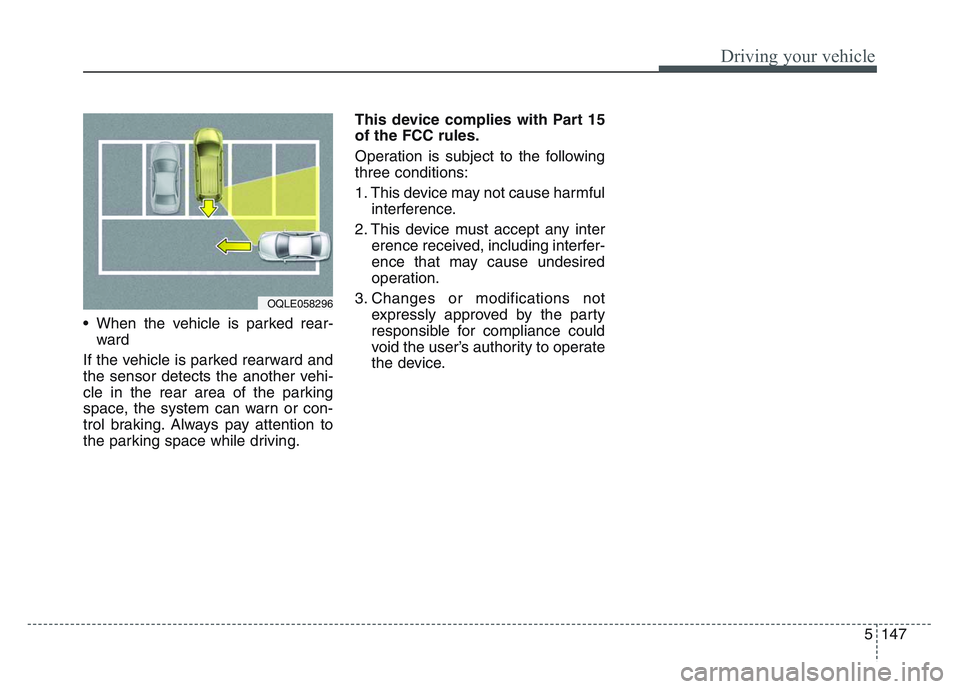
• When the vehicle is parked rear-ward
If the vehicle is parked rearward and
the sensor detects the another vehi-
cle in the rear area of the parking
space, the system can warn or con-
trol braking. Always pay attention to
the parking space while driving. This device complies with Part 15
of the FCC rules.
Operation is subject to the following
three conditions:
1. This device may not cause harmful
interference.
2. This device must accept any inter erence received, including interfer-
ence that may cause undesired
operation.
3. Changes or modifications not expressly approved by the party
responsible for compliance could
void the user’s authority to operate
the device.
OQLE058296
Page 471 of 631
6 11
What to do in an emergency
When you drive your vehicle from a
warm area to a cold area or from a
cold area to a warm area, or the out-
side temperature is greatly higher or
lower, you should check the tire infla-
tion pressure and adjust the tires to
the recommended tire inflation pres-
sure.
When filling tires with more air, con-
ditions to turn off the low tire pres-
sure telltale may not be met. This is
because a tire inflator has a margin
of error in performance. The low tire
pressure telltale will be turned off if
the tire pressure is above the recom-
mended tire inflation pressure.TPMS (Tire PressureMonitoring System)malfunction indicator
The low tire pressure telltale will illu-
minate after it blinks for approximate-
ly one minute when there is a prob-
lem with the Tire Pressure
Monitoring System. If the system is
able to correctly detect an underinfla-
tion warning at the same time as sys-
tem failure then it will illuminate both
the TPMS malfunction and low tire
pressure position telltales e.g. if
Front Left sensor fails, the TPMS
malfunction indicator illuminates, but
if the Front Right, Rear Left, or Rear
Right tire is under-inflated, the low
tire pressure position telltales may
illuminate together with the TPMS
malfunction indicator.
Have the system checked by an
authorized Kia dealer as soon as
possible to determine the cause of
the problem. • The TPMS malfunction indicator
may be illuminated if the vehicle is
moving around electric power sup-
ply cables or radios transmitters
such as at police stations, govern-
ment and public offices, broadcast-
ing stations, military installations,
airports, or transmitting towers,
etc. This can interfere with normal
operation of the Tire Pressure
Monitoring System (TPMS).
• The TPMS malfunction indicator may be illuminated if snow chains
are used or some separate elec-
tronic devices such as notebook
computer, mobile charger, remote
starter or navigation etc., are used
in the vehicle. This can interfere
with normal operation of the Tire
Pressure Monitoring System
(TPMS).
WARNING- Low pressure
damage
Do not drive on low pressure
tires. Significantly low tire pres-
sure can cause the tires to over-
heat and fail making the vehicle
unstable resulting in increased
braking distances and a loss of
vehicle control.
Page 472 of 631
What to do in an emergency
126
Changing a tire with TPMS
If you have a flat tire, the Low Tire
Pressure telltale will come on. Have
the flat tire repaired by an authorized
Kia dealer as soon as possible or
replace the flat tire with the spare
tire.
Each wheel is equipped with a tire
pressure sensor mounted inside the
tire behind the valve stem. You must
use TPMS specific wheels. It is rec-
ommended that you always have
your tires serviced by an authorized
Kia dealer.Even if you replace the low pressure
tire with the spare tire, the Low Tire
Pressure telltale will remain on until
the low pressure tire is repaired and
placed on the vehicle.
After you replace the low pressure
tire with the spare tire, the TPMS
malfunction indicator may illuminate
after a few minutes because the
TPMS sensor mounted on the spare
wheel is not initiated.
Once the low pressure tire is inflated
again to the recommended pressure
and installed on the vehicle or the
TPMS sensor mounted on the
replaced spare wheel is initiated by
an authorized Kia dealer, the TPMS
malfunction indicator and the low tire
pressure telltale will turn off within a
few minutes of driving.
If the indicator has not disappeared
after a few minutes of driving, please
visit an authorized Kia dealer.
If an original mounted tire is replaced
with the spare tire, the TPMS sensor
on the replaced spare wheel should
be initiated and the TPMS sensor on
the original mounted wheel should be
deactivated. If the TPMS sensor on
the original mounted wheel located in
the spare tire carrier still activates,
the tire pressure monitoring system
may not operate properly. Have the
tire with TPMS serviced or replaced
by an authorized Kia dealer.
CAUTION- Repair Agents
Never use a puncture-repairing
agent not approved by Kia torepair and/or inflate a low pres-sure tire. The sealant notapproved by Kia may damagethe tire pressure sensor.
Page 473 of 631
6 13
What to do in an emergency
You may not be able to identify a low
tire by simply looking at it. Always
use a good quality tire pressure
gauge to measure the tire's inflation
pressure. Please note that a tire that
is hot (from being driven) will have a
higher pressure measurement than a
tire that is cold (from sitting station-
ary for at least 3 hours and driven
less than 1 mile (1.6 km) during that
3 hour period).
Allow the tire to cool before measur-
ing the inflation pressure. Always be
sure the tire is cold before inflating to
the recommended pressure.
A cold tire means the vehicle has
been sitting for 3 hours and driven for
less than 1 mile (1.6 km) in that 3
hour period.
Never use tire sealant if your vehicle
is equipped with a Tire Pressure
Monitoring System. The liquid
sealant can damage the tire pres-
sure sensors.• The TPMS cannot alert you to
severe and sudden tire damage
caused by external factors such as
nails or road debris.
• If you feel any vehicle instability, immediately take your foot off the
accelerator, apply the brakes grad-
ually and with light force, and slow-
ly move to a safe position off the
road.✽NOTICE - Protecting TPMS
Tampering with, modifying, or dis-
abling the Tire Pressure Monitoring
System (TPMS) components may
interfere with the system's ability to
warn the driver of low tire pressure
conditions and/or TPMS malfunc-
tions. Tampering with, modifying,
or disabling the Tire Pressure
Monitoring System (TPMS) compo-
nents may void the warranty for
that portion of the vehicle.