sound KIA SPORTAGE 2022 Service Manual
[x] Cancel search | Manufacturer: KIA, Model Year: 2022, Model line: SPORTAGE, Model: KIA SPORTAGE 2022Pages: 630, PDF Size: 9.69 MB
Page 333 of 630
Driving your vehicle
48
5
ESC operation
ESC ON condition
ON, ESC and ESC OFF
indicator lights illuminate for
approximately 3 seconds,
then ESC is turned on.
ESC ESC OFF/ESC
OFF (TCS OFF) ESC OFF
indicator will illuminate.
Select the ESC ON, ESC
OFF indicator light will go
off.
you may hear a slight tick-
ing sound. This is the ESC
performing an automatic
system self-check and
does not indicate a prob-
lem. When operating
When the ESC is in opera-
tion, ESC indicator light
blinks.
Stability Control is operat-
ing properly, you can feel a
slight pulsation in the vehi-
cle. This is only the effect
of brake control and indi-
cates nothing unusual.
mud or slippery road, the
engine rpm (revolution per
minute) may not increase
even if you press the
accelerator pedal deeply.
This is to maintain the sta-
bility and traction of the
vehicle and does not indi-
cate a problem.
ESC operation off
ESC OFF state
This car has 2 kinds of ESC
off states.
If the engine stops when
ESC is off, ESC remains off.
Upon restarting the engine,
the ESC will automatically
turn on again.
-
Page 346 of 630
561
Driving your vehicle
Prerequisite for activation
FCA gets ready to be activated,
when FCA is selected on the LCD
display, and when the following pre-
requisites are satisfied.
- The ESC (Electronic StabilityControl) is activated.
- Vehicle speed is over 8 km/h (5 mph). (FCA is only activated within
a certain speed range.)
- The system detects a vehicle or pedestrian in front, which may col-
lide with your vehicle. (FCA may
not be activated or may sound a
warning alarm in accordance with
the driving situation or vehicle con-
dition.)
❈ FCA may not operate properly
according to the frontal situation,
the direction and speed of pedes-
trian.
✽ ✽
NOTICE
FCA automatically deactivates upon
canceling the ESC (Electronic
Stability Control). When the ESC is
canceled, FCA cannot be activated
on the LCD display. FCA warning
light will illuminate, but it does not
indicate a malfunction of the system.
FCA warning message and
system control
FCA produces warning messages,
warning alarms, alarms in accor-
dance with the collision risk levels,
such as abrupt stopping of the vehi-
cle in front, insufficient braking dis-
tance detection. Also, it controls the
brakes in accordance with the colli-
sion risk levels.
The driver can select the initial warn-
ing activation time in the User
Settings in the LCD display. The
options for the initial Forward
Collision Warning include Early,
Normal or Late initial warning time.
WARNING
Completely stop the vehicle
on a safe location before
operating the switch on the
steering wheel to activate/
deactivate FCA.
FCA automatically activates upon placing the Engine
Start/Stop button to the ON
position. The driver can deac-
tivate FCA by canceling the
system setting on the LCD
display. To avoid driver dis-
tractions, do not attempt to
set or cancel FCA while driv-
ing the vehicle.
Page 361 of 630
Driving your vehicle
76
5
Prerequisite for activation
FCA gets ready to be activated,
when FCA is selected on the LCD
display, and when the following pre-
requisites are satisfied.
- The ESC (Electronic Stability
Control) is activated.
- Vehicle speed is over 5 mph (8 km/h). (FCA is only activated with-
in a certain speed range.)
- The system detects a vehicle or a pedestrian in front, which may col-
lide with your vehicle. (FCA may
not be activated or may sound a
warning alarm in accordance with
the driving situation or vehicle con-
dition.)
❈ FCA may not operate properly
according to the frontal situation,
the direction and speed of pedes-
trian.
FCA warning message and
system control
FCA produces warning messages,
warning alarms, and emergency
braking based on the level of risk of
a frontal collision, such as when a
vehicle ahead suddenly brakes.
The driver can select the initial warn-
ing activation time in the User
Settings in the LCD display. The
options for the initial Forward
Collision Warning include Early,
Normal or Late initial warning time.
WARNING
Completely stop the vehicle in
a safe location before operat-
ing the switch on the steering
wheel to activate/deactivate
FCA.
FCA automatically activates upon placing the ignition
switch to the ON position. The
driver can deactivate FCA by
canceling the system setting
on the LCD display or
Infotainment System screen.
FCA automatically deacti- vates upon canceling the
ESC. When the ESC is can-
celed, FCA cannot be activat-
ed on the LCD display or
Infotainment System screen.
FCA warning light will illumi-
nate, which is normal.
Page 363 of 630
Driving your vehicle
78
5
- For pedestrians, the vehicle
speed is greater than or equal to
5 mph (8 km/h) and less than 44
mph (70 km/h). (Depending on
the condition of pedestrians and
bike riders and the surrounding
environment the possible maxi-
mum operating speed may be
reduced.)
FCA controls the brakes within cer- tain limit to release shock from the
collision.
FCA controls the maximum brakes
just before the collision.
- If you select “Warning Only”,FCA activates and produces only
warning alarms in accordance
with the collision risk levels. You
should control the brake directly
because FCA do not control the
brake.Brake operation
In an urgent situation, the braking system enters into the ready status
for prompt reaction to assist the
driver in depressing the brake
pedal.
FCA provides additional braking power for optimum braking per-
formance, when the driver
depresses the brake pedal.
The braking control is automatical- ly deactivated, when the driver
sharply depresses the accelerator
pedal, or when the driver abruptly
operates the steering wheel.
The braking control is automatical- ly canceled, when risk factors dis-
appear.CAUTION
The driver should always pay great caution to vehicle opera-tion, even though there is nowarning message or warningalarm.
If any other warning sound such as seat belt warningchime is already generated,Forward Collision-AvoidanceAssist warning may notsound.
Excessive audio volume may disturb the sound of the sys-tem warning alarm.
Page 376 of 630
591
Driving your vehicle
✽ ✽NOTICE
• The operation of the LKA can be
canceled or not work properly
according to road condition and
surroundings. Always be cautious
when driving.
• Do not disassemble the front view camera temporarily for tinting
windows or attaching any types of
coatings and accessories.
Do not disassemble the camera.
take your vehicle to an authorized
Kia dealer and have the system
checked to need a calibration.
• When you replace the windshield glass, front view camera or parts
of the steering, take your vehicle
to an authorized Kia dealer and
have the system checked to need a
calibration. (Continued)(Continued)
• The system is designed to detect
lane markers using a front view
camera. If the lane markers are
hard to detect, then the system
may be limited. Always be cau-
tious when using the system.
• When the lane markers are hard to detect, please refer to “Driver’s
Attention”.
• Do not remove or damage the related parts of LKA.
• Do not place objects on the dash- board that reflects light such as
mirrors, white paper, etc. It may
cause malfunction of LKA if the
sunlight is reflected.
• You may not hear warning sound of LKA if the audio volume is
high. (Continued)(Continued)
• If you drive with your hands off
the steering wheel, LKA will stop
controlling the steering wheel
after the hands off alarm. If you
drive with your hands on the
steering wheel again, the control
will be activated again.
• If the vehicle speed is high, steer- ing torque for assistance will not
be enough to keep your vehicle
within the lane. If so, the vehicle
may move out of its lane. Obey
speed limit when using LKA.
• If you attach objects to the steer- ing wheel, the system may not
assist steering.
• If you attach objects to the steer- ing wheel, hands off alarm may
not work properly.
Page 384 of 630

599
Driving your vehicle
System description
BCW uses radar sensors in the rear
bumper to monitor and warn the driv-
er of an approaching vehicle in the
driver's blind spot area.
1) Blind-Spot Area
It warns by detecting the vehicles in
the blind spots.
The blind spot detection range varies
relative to vehicle speed.
Note that if your vehicle is traveling
much faster than the vehicles around
you, the warning will not occur.2) Closing at high speed
BCW feature will alert you when a
vehicle is approaching in an adjacent
lane at a high rate of speed. If the
driver activates the turn signal when
the system detects an oncoming
vehicle, the system sounds an audi-
ble alert.
BLIND-SPOT COLLISION WARNING (BCW) (IF EQUIPPED)
OQLE058284
OQLE058285
WARNING
BCW is a supplemental sys-
tem to assist you. Do not
entirely rely on the system.
Always pay attention, while
driving, for your safety.
Always be aware of road con- ditions while driving and be
alert for unexpected situa-
tions even though BCW is
operating.
BCW is not a substitute for proper and safe driving.
Always drive safely and use
caution when changing lanes
or backing up the vehicle.
BCW may not detect every
object alongside the vehicle.
Page 387 of 630

Driving your vehicle
102
5
Detecting Sensor
The rear corner radars are the sen-
sors inside the rear bumper for
detecting the side/rear areas. Always
keep the rear bumper clean for prop-
er operation of the system.
✽ ✽
NOTICE
• The system may not work proper-
ly when the bumper has been
damaged, or if the rear bumper
has been replaced or repaired.
• The sensing range differs some- what according to the width of the
road. When the road is narrow,
the system may detect other vehi-
cles in the next lane.
• The system may turn off due to strong electromagnetic waves.
• Always keep the sensor clean.
• NEVER arbitrarily disassemble the sensor component nor apply
any impact on the sensor compo-
nent.
• Be careful not to apply unneces- sary force on the radar sensor or
sensor cover. If the sensor is
forcibly moved out of proper
alignment, the system may not
operate correctly. In this case, a
warning message may not be dis-
played. (Continued)CAUTION
The driver should always use
extreme caution while operat-ing the vehicle, whether or notthe warning light on the out-side rearview mirror illumi-nates or there is a warningalarm.
Playing the vehicle audio sys- tem at high volume may offsetBlind-Spot Collision Warningwarning sounds.
The warning of the Blind-Spot Collision Warning may notsound while other system'swarning sounds.
OQL058209L
■Rear corner radars
Page 395 of 630

Driving your vehicle
110
5
The driver can monitor their driving
conditions on the LCD display.
- Select 'User Settings Mode' andthen 'Driver Assistance' on the
LCD display. (For more informa-
tion, refer to “LCD Display” in
chapter 4.)
The driver's attention level is dis- played on the scale of 1 to 5. The
lower the number is, the more inat-
tentive the driver is.
The number decreases when the driver does not take a break for a
certain period of time.
The number increases when the driver attentively drives for a cer-
tain period of time.
When the driver turns on the sys- tem while driving, it displays ‘Last
Break time’.Take a break
The “Consider taking a break”message appears on the LCD dis-
play and a warning sounds to sug-
gest that the driver take a break,
when the driver's attention level is
below 1. Driver Attention Warning will not
suggest a break when the total
driving time is shorter than 10 min-
utes.
OJF058425L
■Type A
■Type B
OJF058426L
CAUTION
While other warning systemssuch as the seat belt warningsound are in operation andoverride the DAW alarming sys-tem, DAW sounds may notoccur.
Page 409 of 630
Driving your vehicle
124
5
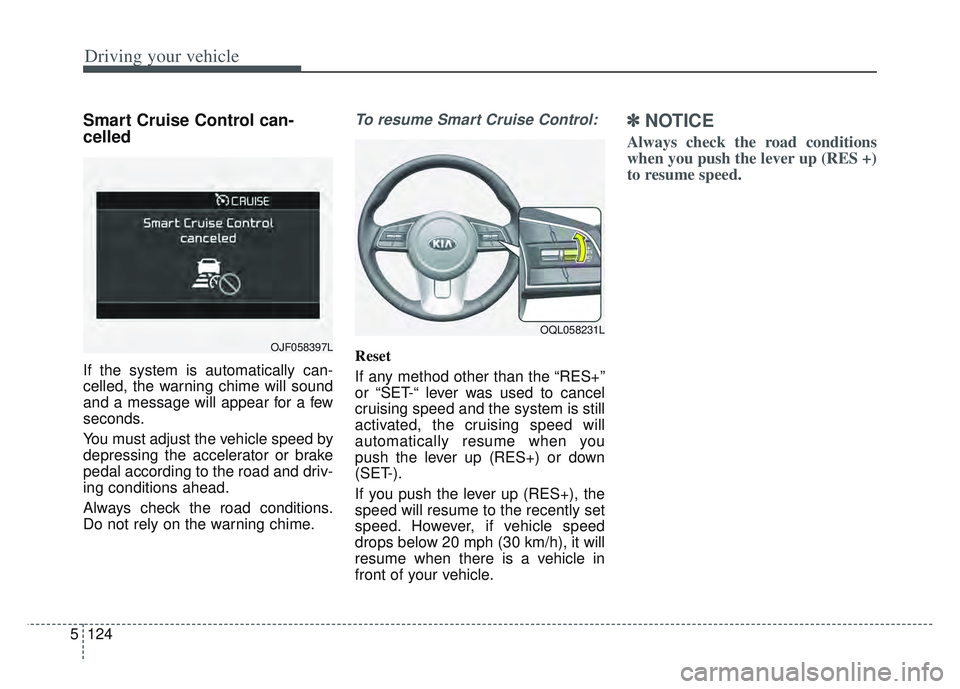
Smart Cruise Control can-
celled
If the system is automatically can-
celled, the warning chime will sound
and a message will appear for a few
seconds.
You must adjust the vehicle speed by
depressing the accelerator or brake
pedal according to the road and driv-
ing conditions ahead.
Always check the road conditions.
Do not rely on the warning chime.
To resume Smart Cruise Control:
Reset
If any method other than the “RES+”
or “SET-“ lever was used to cancel
cruising speed and the system is still
activated, the cruising speed will
automatically resume when you
push the lever up (RES+) or down
(SET-).
If you push the lever up (RES+), the
speed will resume to the recently set
speed. However, if vehicle speed
drops below 20 mph (30 km/h), it will
resume when there is a vehicle in
front of your vehicle.
✽ ✽
NOTICE
Always check the road conditions
when you push the lever up (RES +)
to resume speed.
OQL058231L
OJF058397L
Page 413 of 630

Driving your vehicle
128
5
If there is a high risk of collision due
to sudden braking of the front vehicle
or lack of safety distance with the
vehicle ahead during SCC driving, so
that if the driver's brake or steering
wheel operation is required, the
Distance Step with the vehicle ahead
will blink on the cluster and a colli-
sion warning will sound.
In this case, immediately reduce the
speed.
CAUTION
If the vehicle ahead (vehicle
speed: less than 20 mph (30km/h) moves to the next lane,the warning chime will soundand a message will appear.Adjust your vehicle speed forvehicles or objects that cansuddenly appear in front of youby depressing the brake pedalaccording to the road conditionahead and driving condition.
OJF058401L
WARNING
When using Smart Cruise
Control :
The warning message appears and warning chime sounds, if
the vehicle is unable to main-
tain the selected distance
from the vehicle ahead.
If the warning message appears and warning chime
sounds, depress the brake
pedal to actively adjust the
vehicle speed, and the dis-
tance to the vehicle ahead.
Even if the warning message does not appear and warning
chime is does not sound,
always pay attention to the
driving conditions to prevent
dangerous situations from
occurring.
Playing the vehicle audio sys- tem at high volume may cause
the vehicle occupants not to
hear the system warning
sounds.
OQL058200L