engine KIA SPORTAGE 2022 Workshop Manual
[x] Cancel search | Manufacturer: KIA, Model Year: 2022, Model line: SPORTAGE, Model: KIA SPORTAGE 2022Pages: 630, PDF Size: 9.69 MB
Page 198 of 630
4109
Features of your vehicle
Low Tire PressureWarning Light
This warning light illuminates:
Once you set the ignition switch or Engine Start/Stop Button to the ON
position.
- It illuminates for approximately 3seconds and then goes off.
When one or more of your tires are significantly underinflated.
❈ For more details, refer to “Tire
Pressure Monitoring System
(TPMS)” in chapter 6.
This warning light remains on after
blinking for approximately 60 seconds
or repeats blinking on and off at the
intervals of approximately 3 seconds:
When there is a malfunction with the TPMS.
In this case, have your vehicle
inspected by an authorized Kia
dealer as soon as possible.
❈ For more details, refer to “Tire
Pressure Monitoring System
(TPMS)” in chapter 6.
CAUTION - Engine
damage
If the engine is not stopped
immediately after the engine oilpressure warning light is illumi-nated and stays on while theengine is running, seriousengine damage may result.
CAUTION - Engine
Overheating
Do not continue driving with theengine overheated. Otherwise,the engine may be damaged.
WARNING - Low tire
pressure
Significantly low tire pressure makes the vehicle unstable
and can contribute to loss of
vehicle control and increased
braking distances.
Continued driving on low pres- sure tires will cause the tires to
overheat and fail.
WARNING
The TPMS cannot alert you tosevere and sudden tire dam-
age caused by external fac-
tors.
If you notice any vehicle insta- bility, immediately take your
foot off the accelerator pedal,
apply the brakes gradually
with light force, and slowly
move to a safe position off the
road.
Page 199 of 630
Features of your vehicle
110
4
Electronic Parking Brake
(EPB) Warning Light(if equipped)
This warning light illuminates:
Once you set the ignition switch or Engine Start/Stop Button to the ON
position.
- It illuminates for approximately 3seconds and then goes off.
When there is a malfunction with the EPB.
In this case, have your vehicle
inspected by an authorized Kia
dealer.
✽ ✽ NOTICE- Electronic Parking
Brake (EPB) Warning Light
The Electronic Parking Brake
(EPB) Warning Light may illumi-
nate when the Electronic Stability
control (ESC) Indicator Light comes
on to indicate that the ESC is not
working properly (This does not
indicate malfunction of the EPB).
Master Warning light
This warning light informs the driv- er of the following situations
- LED head lamp malfunction (if equipped)
- Smart Cruise Control with Stop & Go malfunction (if equipped)
- Smart Cruise Control with Stop & Go radar blind (if equipped)
- Forward Collision-Avoidance Assist malfunction (if equipped)
- Blind-Spot Collision Warning radar blind (if equipped)
- Lamp malfunction
- High Beam Assist malfunction
- Tire Pressure Monitoring System (TPMS) malfunction The Master Warning Light illumi-
nates if one or more of the above
warning situations occur.
If the warning situation is solved, the
master warning light will be turned
off.
EPB
Page 200 of 630
4111
Features of your vehicle
Forward Collision-avoid-ance Assist Warninglight (FCA, if equipped)
This indicator light illuminates:
When there is a malfunction with the FCA.
In this case, have the vehicle
inspected by an authorized Kia deal-
er.
All Wheel Drive (AWD) Warning Light
This indicator light illuminates:
When there is a malfunction with the AWD system.
In this case, have the vehicle inspect-
ed by an authorized Kia dealer.
LED Headlamp Warning Light (if equipped)
This warning light illuminates:
Once you set the ignition switch or Engine Start/Stop Button to the ON
position.
- It illuminates for approximately 3seconds and then goes off.
When there is a malfunction with the LED headlamp.
In this case, have your vehicle inspect-
ed by an authorized Kia dealer.
This warning light blinks:
When there is a malfunction with a LED headlamp related part.
In this case, have your vehicle inspect-
ed by an authorized Kia dealer.
Indicator Lights
Electronic Stability Control (ESC) IndicatorLight
This indicator light illuminates:
Once you set the ignition switch or Engine Start/Stop Button to the ON
position.
- It illuminates for approximately 3seconds and then goes off.
When there is a malfunction with the ESC system.
In this case, have your vehicle
inspected by an authorized Kia
dealer.
This indicator light blinks:
While the ESC is operating.
❈ For more details, refer to
“Electronic Stability Control (ESC)”
in chapter 5.
Page 201 of 630
Features of your vehicle
112
4
Electronic Stability
Control (ESC) OFFIndicator Light (if equipped)
This indicator light illuminates:
Once you set the Engine Start/Stop Button to the ON posi-
tion.
- It illuminates for approximately 3seconds and then goes off.
When you deactivate the ESC sys- tem by pressing the ESC OFF but-
ton.
❈ For more details, refer to
“Electronic Stability Control (ESC)”
in chapter 5.
All Wheel Drive (AWD)
LOCK Indicator Light
This indicator light illuminates:
Once you set the ignition switch or Engine Start/Stop Button to the ON
position.
- It illuminates for approximately 3seconds and then goes off.
When you select AWD Lock mode by pressing the AWD LOCK button.
- The AWD LOCK mode is toincrease the drive power when
driving on wet pavement, snow
covered roads and/or off-road.
CAUTION - LED
Headlamp Warning Light
Continuous driving with the LED Headlamp Warning Lighton or blinking can reduce LEDheadlamp (low beam) life.
CAUTION - AWD Lock
Mode
Do not use AWD LOCK mode ondry paved roads or highway, itcan cause noise, vibration ordamage of AWD related parts.
Page 202 of 630
4113
Features of your vehicle
Immobilizer IndicatorLight (Without Smart Key)(if equipped)
This indicator light illuminates:
When the vehicle detects the immobilizer in your key properly
while the ignition switch is ON.
- At this time, you can start theengine.
- The indicator light goes off after starting the engine.
This indicator light blinks:
When there is a malfunction with the immobilizer system.
In this case, have your vehicle
inspected by an authorized Kia
dealer.
Immobilizer Indicator
Light (With Smart Key) (if equipped)
This indicator light illuminates for up
to 30 seconds:
When the vehicle detects the smart key in the vehicle properly
while the Engine Start/Stop Button
is ACC or ON.
- At this time, you can start theengine.
- The indicator light goes off after starting the engine.
This indicator light blinks for a few
seconds:
When the smart key is not in the vehicle.
- At this time, you can not start theengine. This indicator light illuminates for 2
seconds and goes off:
When the vehicle can not detect
the smart key which is in the vehi-
cle while the Engine Start/Stop
Button is ON.
In this case, have your vehicle
inspected by an authorized Kia
dealer.
This indicator light blinks:
When the battery of the smart key is weak.
- At this time, you can not start theengine. However, you can start the
engine if you press the Engine
Start/Stop Button with the smart
key. (For more details, refer to
“Starting the Engine” in chapter 5).
When there is a malfunction with the immobilizer system.
In this case, have your vehicle
inspected by an authorized Kia
dealer.
Page 205 of 630
Features of your vehicle
116
4
ECO Indicator Light
(if equipped)
This indicator light illuminates :
When the Active ECO system is activated by pressing the DRIVE
mode button.
The ECO indicator (green) will illu- minate to show that the Active
ECO is operating.
❈ For more details, refer to “Drive
Mode Integrated Control System"
in chapter 5.
SPORT Mode Indicator
Light (if equipped)
This indicator light illuminates:
When you select “SPORT” mode as drive mode.
❈ For more details, refer to “Drive
Mode Integrated Control System”
in chapter 5.
Downhill Brake Control
(DBC) Indicator Light (if equipped)
This warning light illuminates:
Once you set the ignition switch or Engine Start/Stop Button to the ON
position.
- It illuminates for approximately 3seconds and then goes off.
When you activate the DBC sys- tem by pressing the DBC button.
This warning light blinks:
When the DBC is operating.
This warning light illuminates yellow:
When there is a malfunction with the DBC system.
In this case, have your vehicle
inspected by an authorized Kia
dealer.
❈ For more details, refer to “Downhill
Brake Control (DBC) System” in
chapter 5.
Page 206 of 630
4117
Features of your vehicle
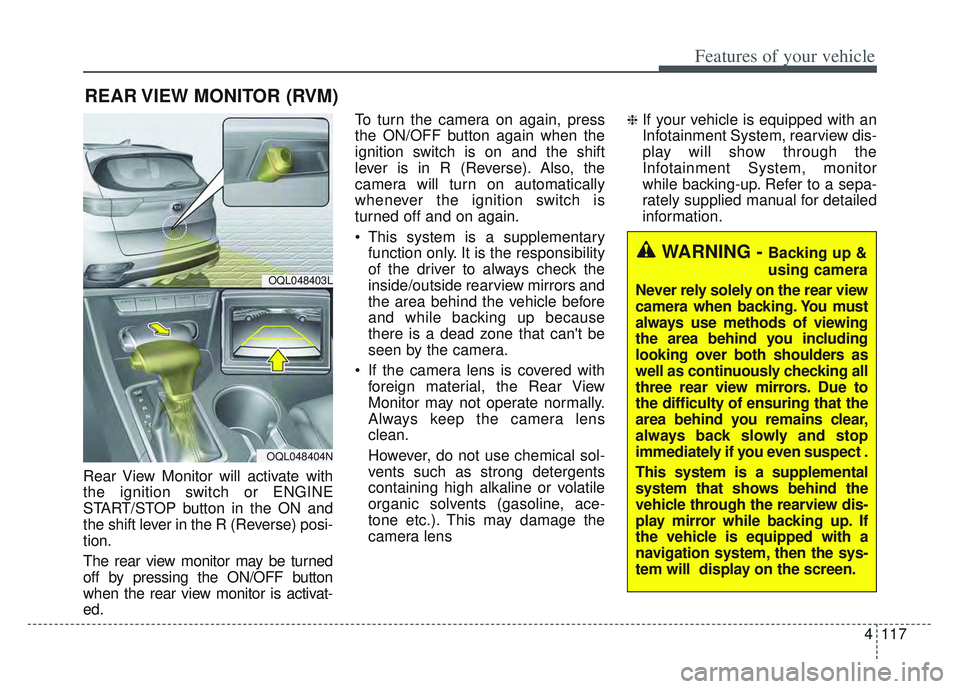
Rear View Monitor will activate with
the ignition switch or ENGINE
START/STOP button in the ON and
the shift lever in the R (Reverse) posi-
tion.
The rear view monitor may be turned
off by pressing the ON/OFF button
when the rear view monitor is activat-
ed.To turn the camera on again, press
the ON/OFF button again when the
ignition switch is on and the shift
lever is in R (Reverse). Also, the
camera will turn on automatically
whenever the ignition switch is
turned off and on again.
• This system is a supplementary
function only. It is the responsibility
of the driver to always check the
inside/outside rearview mirrors and
the area behind the vehicle before
and while backing up because
there is a dead zone that can't be
seen by the camera.
If the camera lens is covered with foreign material, the Rear View
Monitor may not operate normally.
Always keep the camera lens
clean.
However, do not use chemical sol-
vents such as strong detergents
containing high alkaline or volatile
organic solvents (gasoline, ace-
tone etc.). This may damage the
camera lens
❈If your vehicle is equipped with an
Infotainment System, rearview dis-
play will show through the
Infotainment System, monitor
while backing-up. Refer to a sepa-
rately supplied manual for detailed
information.
REAR VIEW MONITOR (RVM)
OQL048403L
OQL048404N
WARNING - Backing up &
using camera
Never rely solely on the rear view
camera when backing. You must
always use methods of viewing
the area behind you including
looking over both shoulders as
well as continuously checking all
three rear view mirrors. Due to
the difficulty of ensuring that the
area behind you remains clear,
always back slowly and stop
immediately if you even suspect .
This system is a supplemental
system that shows behind the
vehicle through the rearview dis-
play mirror while backing up. If
the vehicle is equipped with a
navigation system, then the sys-
tem will display on the screen.
Page 208 of 630
4119
Features of your vehicle
This system will activate whenbacking up with the ignition switch
ON.
If the vehicle is moving at a speed
over 3 mph (5 km/h), the system
may not be activated correctly.
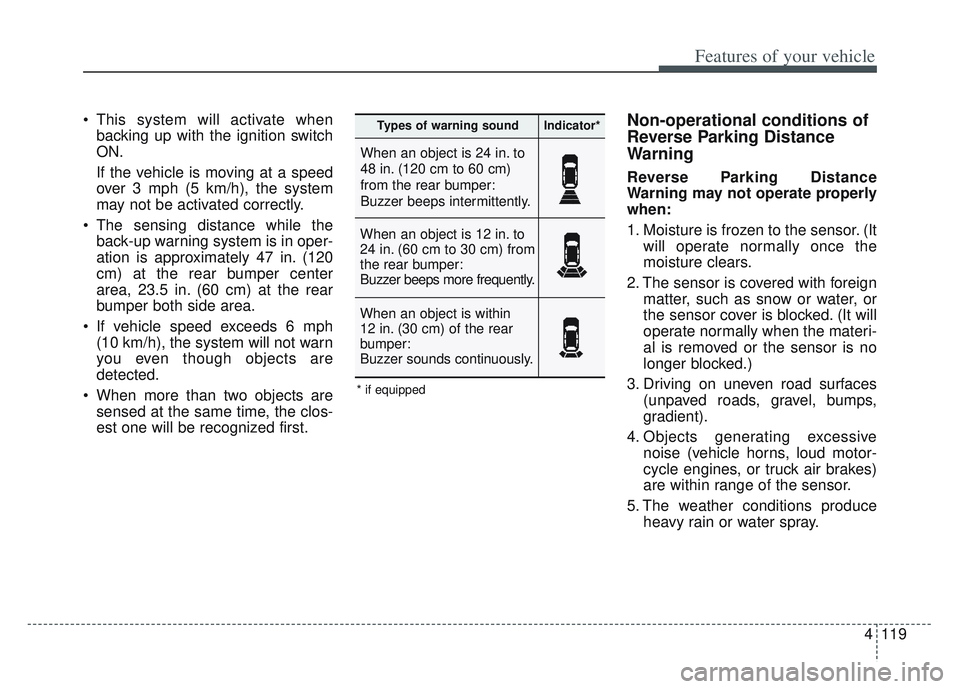
The sensing distance while the back-up warning system is in oper-
ation is approximately 47 in. (120
cm) at the rear bumper center
area, 23.5 in. (60 cm) at the rear
bumper both side area.
If vehicle speed exceeds 6 mph (10 km/h), the system will not warn
you even though objects are
detected.
When more than two objects are sensed at the same time, the clos-
est one will be recognized first.Non-operational conditions of
Reverse Parking Distance
Warning
Reverse Parking Distance
Warning may not operate properly
when:
1. Moisture is frozen to the sensor. (It will operate normally once the
moisture clears.
2. The sensor is covered with foreign matter, such as snow or water, or
the sensor cover is blocked. (It will
operate normally when the materi-
al is removed or the sensor is no
longer blocked.)
3. Driving on uneven road surfaces (unpaved roads, gravel, bumps,
gradient).
4. Objects generating excessive noise (vehicle horns, loud motor-
cycle engines, or truck air brakes)
are within range of the sensor.
5. The weather conditions produce heavy rain or water spray.
When an object is 24 in. to
48 in. (120 cm to 60 cm)
from the rear bumper:
Buzzer beeps intermittently.
When an object is 12 in. to
24 in. (60 cm to 30 cm) from
the rear bumper:
Buzzer beeps more frequently.
When an object is within
12 in. (30 cm) of the rear
bumper:
Buzzer sounds continuously.
Types of warning soundIndicator*
* if equipped
Page 211 of 630
Features of your vehicle
122
4
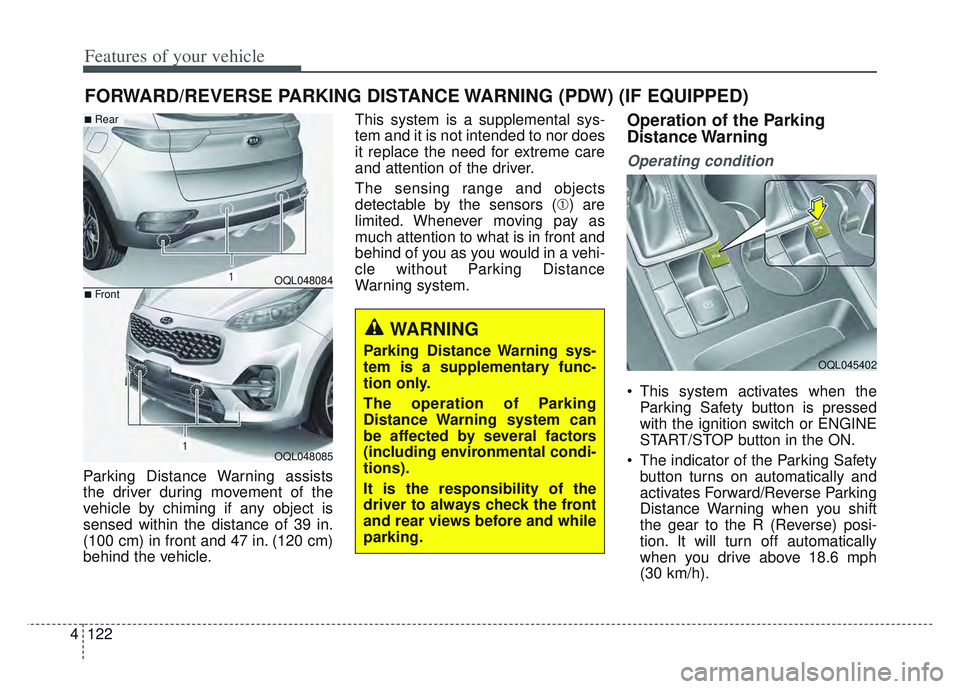
Parking Distance Warning assists
the driver during movement of the
vehicle by chiming if any object is
sensed within the distance of 39 in.
(100 cm) in front and 47 in. (120 cm)
behind the vehicle. This system is a supplemental sys-
tem and it is not intended to nor does
it replace the need for extreme care
and attention of the driver.
The sensing range and objects
detectable by the sensors (➀) are
limited. Whenever moving pay as
much attention to what is in front and
behind of you as you would in a vehi-
cle without Parking Distance
Warning system.
Operation of the Parking
Distance Warning
Operating condition
This system activates when the
Parking Safety button is pressed
with the ignition switch or ENGINE
START/STOP button in the ON.
The indicator of the Parking Safety button turns on automatically and
activates Forward/Reverse Parking
Distance Warning when you shift
the gear to the R (Reverse) posi-
tion. It will turn off automatically
when you drive above 18.6 mph
(30 km/h).
FORWARD/REVERSE PARKING DISTANCE WARNING (PDW) (IF EQUIPPED)
WARNING
Parking Distance Warning sys-
tem is a supplementary func-
tion only.
The operation of Parking
Distance Warning system can
be affected by several factors
(including environmental condi-
tions).
It is the responsibility of the
driver to always check the front
and rear views before and while
parking.
OQL048084
OQL048085
■Rear
■Front
OQL045402
Page 213 of 630
Features of your vehicle
124
4
✽ ✽
NOTICE
• This system can only sense objects
within the range and location of
the sensors. It cannot detect
objects in other areas where sen-
sors are not installed. Also, small
or slim objects, such as poles or
objects located between sensors
may not be detected by the sen-
sors. Always visually check behind
the vehicle when backing up.
• Be sure to inform any drivers of the vehicle that may be unfamiliar
with the system regarding the sys-
tems capabilities and limitations.
Non-operational conditions of
Parking Distance Warning
Parking Distance Warning may
not operate normally when:
1. Moisture is frozen to the sensor. (It will operate normally when mois-
ture melts.)
2. Sensor is covered with foreign matter, such as snow or water, or
the sensor cover is blocked. (It will
operate normally when the materi-
al is removed or the sensor is no
longer blocked.)
3. Sensor is stained with foreign mat- ter such as snow or water.
(Sensing range will return to nor-
mal when Cleaned.)
4.The Parking Distance Warning sys- tem button is off.
There is a possibility of Parking
Distance Warning malfunctionwhen:
1. Driving on uneven road surfaces such as unpaved roads, gravel,
bumps, or gradient.
2. Objects generating excessive noise such as vehicle horns, loud
motorcycle engines, or truck air
brakes can interfere with the sen-
sor.
3. The weather conditions produce heavy rain or water spray
4. Wireless transmitters or mobile phones are present near the sen-
sor.
5. Sensor is covered with snow.