Warning volume KIA SPORTAGE 2022 Owners Manual
[x] Cancel search | Manufacturer: KIA, Model Year: 2022, Model line: SPORTAGE, Model: KIA SPORTAGE 2022Pages: 630, PDF Size: 9.69 MB
Page 181 of 630
Features of your vehicle
92
4
Sound
Cluster Voice Guidance Volume (if
equipped) :
- This used to set/adjust the voiceguidance volume.
Parking Distance Warning Volume (if equipped) :
- Adjust the Park Assist Systemvolume. (Level 1 ~ 3)
Welcome Sound (if equipped) : - If this item is checked, the wel-come sound function will be acti-
vated. Convenience
Welcome Mirror/Light (if equipped) :
- If this item is checked, the wel-come mirror/light function will be
activated.
Wireless Charging System (if equipped) :
- If this is checked, the wirelesscharging system function will be
activated.
Wiper/Light Display (if equipped) : - If this item is checked, thewiper/light display will be activated.
Auto rear wiper (in R) (if equipped) : - If this is checked, the rear wiper willautomatically activated when the
front wiper is in ON position and
shift lever is in R (reverse) position.
Gear Position Pop-up (if equipped) : - If this item is checked, the gearposition pop-up display will be
activated.
Icy Road Warning (if equipped) : - If this item is checked, the icyroad warning display will be acti-
vated. Service interval
Enable Service Interval :
- To activate or deactivate the serv-ice interval function.
Adjust Interval : - To adjust the interval by mileageand period.
Reset : - To reset the service interval func-tion.
✽ ✽ NOTICE
To use the service interval menu,
consult an authorized Kia dealer.
Page 280 of 630
4191
Features of your vehicle
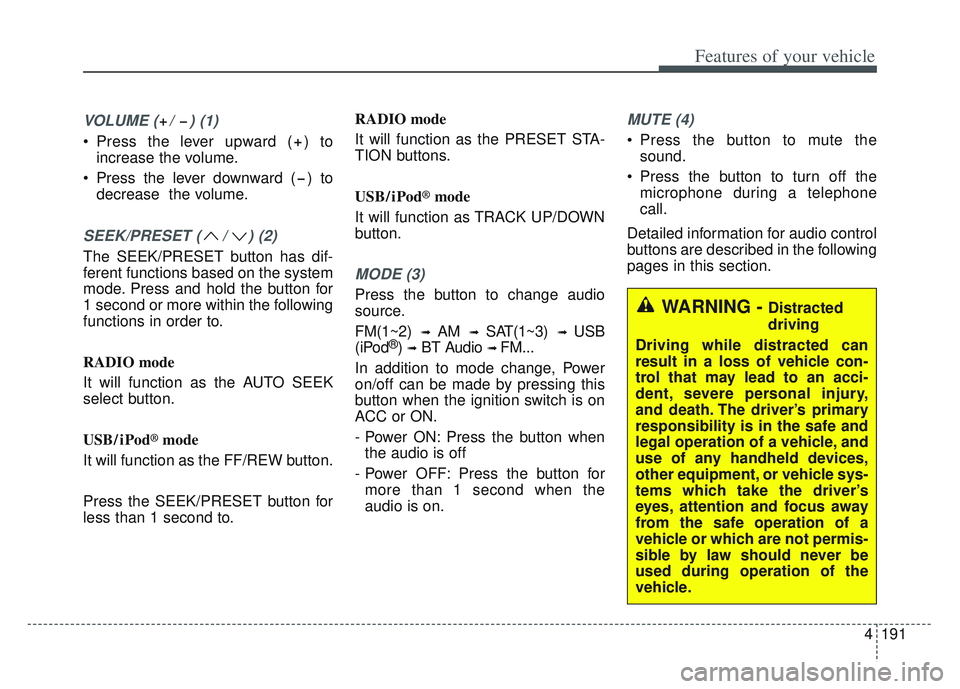
VOLUME ( / ) (1)
Press the lever upward ( ) toincrease the volume.
Press the lever downward ( ) to decrease the volume.
SEEK/PRESET ( / ) (2)
The SEEK/PRESET button has dif-
ferent functions based on the system
mode. Press and hold the button for
1 second or more within the following
functions in order to.
RADIO mode
It will function as the AUTO SEEK
select button.
USB/ iPod
®mode
It will function as the FF/REW button.
Press the SEEK/PRESET button for
less than 1 second to. RADIO mode
It will function as the PRESET STA-
TION buttons.
USB/ iPod
®mode
It will function as TRACK UP/DOWN
button.
MODE (3)
Press the button to change audio
source.
FM(1~2)
➟ AM ➟ SAT(1~3) ➟ USB
(iPod®) ➟BT Audio ➟ FM...
In addition to mode change, Power
on/off can be made by pressing this
button when the ignition switch is on
ACC or ON.
- Power ON: Press the button when the audio is off
- Power OFF: Press the button for more than 1 second when the
audio is on.
MUTE (4)
Press the button to mute the sound.
Press the button to turn off the microphone during a telephone
call.
Detailed information for audio control
buttons are described in the following
pages in this section.
WARNING - Distracted
driving
Driving while distracted can
result in a loss of vehicle con-
trol that may lead to an acci-
dent, severe personal injury,
and death. The driver’s primary
responsibility is in the safe and
legal operation of a vehicle, and
use of any handheld devices,
other equipment, or vehicle sys-
tems which take the driver’s
eyes, attention and focus away
from the safe operation of a
vehicle or which are not permis-
sible by law should never be
used during operation of the
vehicle.
Page 349 of 630
Driving your vehicle
64
5
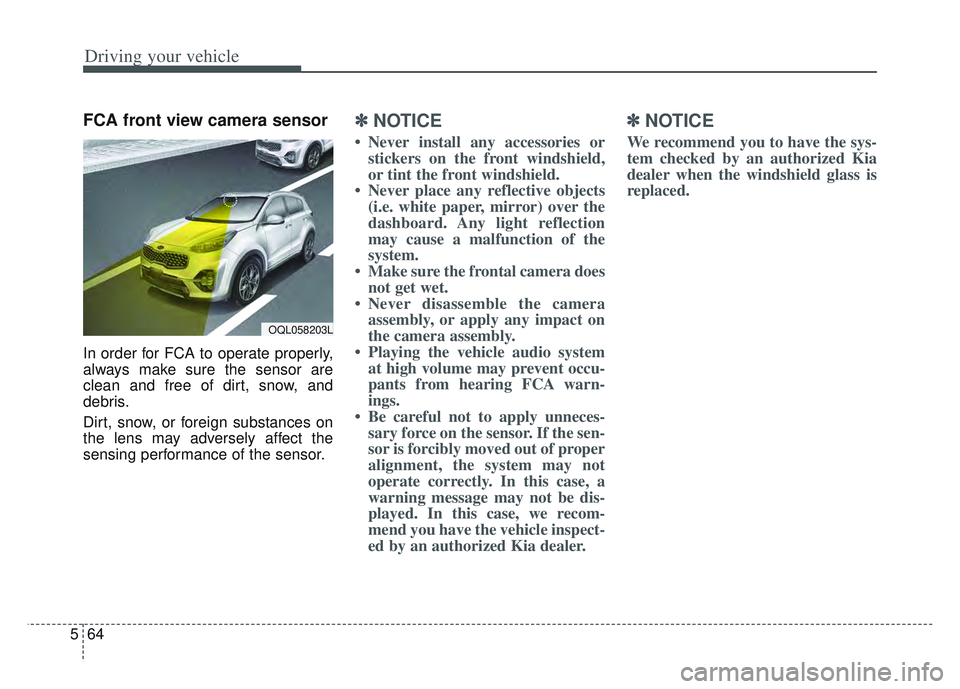
FCA front view camera sensor
In order for FCA to operate properly,
always make sure the sensor are
clean and free of dirt, snow, and
debris.
Dirt, snow, or foreign substances on
the lens may adversely affect the
sensing performance of the sensor.
✽ ✽
NOTICE
• Never install any accessories or
stickers on the front windshield,
or tint the front windshield.
• Never place any reflective objects (i.e. white paper, mirror) over the
dashboard. Any light reflection
may cause a malfunction of the
system.
• Make sure the frontal camera does not get wet.
• Never disassemble the camera assembly, or apply any impact on
the camera assembly.
• Playing the vehicle audio system at high volume may prevent occu-
pants from hearing FCA warn-
ings.
• Be careful not to apply unneces- sary force on the sensor. If the sen-
sor is forcibly moved out of proper
alignment, the system may not
operate correctly. In this case, a
warning message may not be dis-
played. In this case, we recom-
mend you have the vehicle inspect-
ed by an authorized Kia dealer.
✽ ✽ NOTICE
We recommend you to have the sys-
tem checked by an authorized Kia
dealer when the windshield glass is
replaced.
OQL058203L
Page 363 of 630
Driving your vehicle
78
5
- For pedestrians, the vehicle
speed is greater than or equal to
5 mph (8 km/h) and less than 44
mph (70 km/h). (Depending on
the condition of pedestrians and
bike riders and the surrounding
environment the possible maxi-
mum operating speed may be
reduced.)
FCA controls the brakes within cer- tain limit to release shock from the
collision.
FCA controls the maximum brakes
just before the collision.
- If you select “Warning Only”,FCA activates and produces only
warning alarms in accordance
with the collision risk levels. You
should control the brake directly
because FCA do not control the
brake.Brake operation
In an urgent situation, the braking system enters into the ready status
for prompt reaction to assist the
driver in depressing the brake
pedal.
FCA provides additional braking power for optimum braking per-
formance, when the driver
depresses the brake pedal.
The braking control is automatical- ly deactivated, when the driver
sharply depresses the accelerator
pedal, or when the driver abruptly
operates the steering wheel.
The braking control is automatical- ly canceled, when risk factors dis-
appear.CAUTION
The driver should always pay great caution to vehicle opera-tion, even though there is nowarning message or warningalarm.
If any other warning sound such as seat belt warningchime is already generated,Forward Collision-AvoidanceAssist warning may notsound.
Excessive audio volume may disturb the sound of the sys-tem warning alarm.
Page 365 of 630
Driving your vehicle
80
5
✽ ✽
NOTICE
• Do not apply license plate molding
or foreign objects such as a
bumper sticker or a bumper guard
licence plate molding near the
radar sensor. Doing so may
adversely affect the sensing per-
formance of the radar.
• Always keep the radar sensor and the radar cover clean and free of
dirt and debris.
• Use only a soft cloth to wash the vehicle. Do not spray pressurized
water directly on the sensor or
sensor cover.
• Be careful not to apply unneces- sary force on the radar sensor or
sensor cover. If the sensor is
forcibly moved out of proper
alignment, FCA may not operate
correctly. In this case, a warning
message may not be displayed. In
this case, we recommend you have
the vehicle inspected by an
authorized Kia dealer. (Continued)(Continued)
• If the front bumper becomes dam-
aged in the area around the radar
sensor, FCA system may not oper-
ate properly. In this case, we rec-
ommend you have the vehicle
inspected by an authorized Kia
dealer.
• Use only genuine parts to repair or replace a damaged sensor or sen-
sor cover. Do not paint to the sen-
sor cover.
• Never install any accessories or stickers on the front windshield,
or tint the front windshield.
• Never place any reflective objects (i.e. white paper, mirror) over the
dashboard. Any light reflection
may cause a malfunction of the
system.
• Make sure the frontal camera does not get wet.
• Never disassemble the camera assembly, or apply any impact on
the camera assembly.
• Playing the vehicle audio system at high volume may prevent occu-
pants from hearing FCA warn-
ings. (Continued)(Continued)
• Be careful not to apply unneces-
sary force on the sensor. If the sen-
sor is forcibly moved out of proper
alignment, the system may not
operate correctly. In this case, a
warning message may not be dis-
played. In this case, we recom-
mend you have the vehicle inspect-
ed by an authorized Kia dealer.
Page 367 of 630
Driving your vehicle
82
5
(Continued)
If the vehicle in front stops
suddenly, you may have less
control of the brake system.
Therefore, always keep safe
distance between your vehicle
and the vehicle in front of you.
FCA may activate during brak- ing and the vehicle may stop
suddenly. And the load in the
vehicle may endanger passen-
gers. Therefore, always be
mindful of the load volume in
the vehicle.
FCA may not activate if the driver applies the brake pedal
to avoid risk of collision.
FCA does not operate when the vehicle is in reverse. In
these circumstances, you
must maintain a safe braking
distance, and if necessary,
depress the brake pedal to
reduce the driving speed in
order to maintain a safe dis
tance.
(Continued)WARNING
FCA is only a supplementalsystem for the driver’s con-
venience. The driver has the
ultimate responsibility to con-
trol and operate the vehicle
safely. Do not solely depend
on FCA. Rather, maintain a
safe braking distance, and, if
necessary, depress the brake
pedal to lower the driving
speed.
In certain instances and under certain driving condi-
tions, FCA may activate unin-
tentionally. This initial warning
message appears on the LCD
display with a warning chime.
Also, in certain instances the
front radar sensor or camera
recognition system may not
detect the vehicle or pedestri-
an ahead. FCA may not acti-
vate and the warning mes-
sage will not be displayed.
(Continued)
(Continued)
FCA may unnecessarily pro-duce the warning message
and the warning alarms. Also,
due to the sensing limitation,
FCA may not produce the
warning message and the
warning alarm at all.
When there is a malfunction with FCA, the braking control
does not operate upon detect-
ing a collision risk even with
other braking systems nor-
mally operating.
FCA operates only for the vehicle/pedestrian in front,
while driving forward. It does
not operate for any animals or
vehicles in the opposite direc-
tion.
FCA does not recognize the vehicle, which transversally
drives across the crossroad,
or the vehicle, which is parked
in the transversal direction.
(Continued)
Page 376 of 630
591
Driving your vehicle
✽ ✽NOTICE
• The operation of the LKA can be
canceled or not work properly
according to road condition and
surroundings. Always be cautious
when driving.
• Do not disassemble the front view camera temporarily for tinting
windows or attaching any types of
coatings and accessories.
Do not disassemble the camera.
take your vehicle to an authorized
Kia dealer and have the system
checked to need a calibration.
• When you replace the windshield glass, front view camera or parts
of the steering, take your vehicle
to an authorized Kia dealer and
have the system checked to need a
calibration. (Continued)(Continued)
• The system is designed to detect
lane markers using a front view
camera. If the lane markers are
hard to detect, then the system
may be limited. Always be cau-
tious when using the system.
• When the lane markers are hard to detect, please refer to “Driver’s
Attention”.
• Do not remove or damage the related parts of LKA.
• Do not place objects on the dash- board that reflects light such as
mirrors, white paper, etc. It may
cause malfunction of LKA if the
sunlight is reflected.
• You may not hear warning sound of LKA if the audio volume is
high. (Continued)(Continued)
• If you drive with your hands off
the steering wheel, LKA will stop
controlling the steering wheel
after the hands off alarm. If you
drive with your hands on the
steering wheel again, the control
will be activated again.
• If the vehicle speed is high, steer- ing torque for assistance will not
be enough to keep your vehicle
within the lane. If so, the vehicle
may move out of its lane. Obey
speed limit when using LKA.
• If you attach objects to the steer- ing wheel, the system may not
assist steering.
• If you attach objects to the steer- ing wheel, hands off alarm may
not work properly.
Page 387 of 630

Driving your vehicle
102
5
Detecting Sensor
The rear corner radars are the sen-
sors inside the rear bumper for
detecting the side/rear areas. Always
keep the rear bumper clean for prop-
er operation of the system.
✽ ✽
NOTICE
• The system may not work proper-
ly when the bumper has been
damaged, or if the rear bumper
has been replaced or repaired.
• The sensing range differs some- what according to the width of the
road. When the road is narrow,
the system may detect other vehi-
cles in the next lane.
• The system may turn off due to strong electromagnetic waves.
• Always keep the sensor clean.
• NEVER arbitrarily disassemble the sensor component nor apply
any impact on the sensor compo-
nent.
• Be careful not to apply unneces- sary force on the radar sensor or
sensor cover. If the sensor is
forcibly moved out of proper
alignment, the system may not
operate correctly. In this case, a
warning message may not be dis-
played. (Continued)CAUTION
The driver should always use
extreme caution while operat-ing the vehicle, whether or notthe warning light on the out-side rearview mirror illumi-nates or there is a warningalarm.
Playing the vehicle audio sys- tem at high volume may offsetBlind-Spot Collision Warningwarning sounds.
The warning of the Blind-Spot Collision Warning may notsound while other system'swarning sounds.
OQL058209L
■Rear corner radars
Page 413 of 630

Driving your vehicle
128
5
If there is a high risk of collision due
to sudden braking of the front vehicle
or lack of safety distance with the
vehicle ahead during SCC driving, so
that if the driver's brake or steering
wheel operation is required, the
Distance Step with the vehicle ahead
will blink on the cluster and a colli-
sion warning will sound.
In this case, immediately reduce the
speed.
CAUTION
If the vehicle ahead (vehicle
speed: less than 20 mph (30km/h) moves to the next lane,the warning chime will soundand a message will appear.Adjust your vehicle speed forvehicles or objects that cansuddenly appear in front of youby depressing the brake pedalaccording to the road conditionahead and driving condition.
OJF058401L
WARNING
When using Smart Cruise
Control :
The warning message appears and warning chime sounds, if
the vehicle is unable to main-
tain the selected distance
from the vehicle ahead.
If the warning message appears and warning chime
sounds, depress the brake
pedal to actively adjust the
vehicle speed, and the dis-
tance to the vehicle ahead.
Even if the warning message does not appear and warning
chime is does not sound,
always pay attention to the
driving conditions to prevent
dangerous situations from
occurring.
Playing the vehicle audio sys- tem at high volume may cause
the vehicle occupants not to
hear the system warning
sounds.
OQL058200L
Page 426 of 630
5141
Driving your vehicle
If the vehicle detected by the sensors
approaches from the rear left/right
side of your vehicle, the warning
chime will sound, the warning light
on the outside rearview mirror will
blink and a message will appear on
the LCD display. If the rear view mon-
itor system is in activation, a mes-
sage will also appear on the
‘Infortainment System’.
The warning will stop when:
- The vehicle moving at the rearleft/right side of your vehicle is not
in the detection range.
- The vehicle is right behind your vehicle.
- The vehicle is not driving towards your vehicle.
- The vehicle’s approaching speed is decreased.✽ ✽ NOTICE
• When the operation condition of
RCCW is met, the warning will
occur every time a vehicle
approaches the side or rear of
your stopped (0 mph (0 km/h)
vehicle speed) vehicle.
• The system's warning or brake may not operate properly if the
left or right of your vehicle's rear
bumper is blocked by a vehicle or
obstacle.
• The driver should always use extreme caution while operating
the vehicle, whether or not the
warning light on the outer side
view mirror illuminates or there is
a warning alarm.
• Playing the vehicle audio system at high volume may prevent occu-
pants from hearing the system's
warning sounds.
• If any other warning sound such as seat belt warning chime is
already generated, the RCCW
warning may not sound.WARNING
Drive safely even though the
vehicle is equipped with Rear
Cross-Traffic Collision
Warning. Do not solely rely on
the system but check your
surrounding when backing
the vehicle up.
The driver is responsible for accurate brake control.
Always pay extreme caution while driving. Rear Cross-
Traffic Collision Warning may
not operate properly or
unnecessarily operate
depending on traffic and driv-
ing conditions.