mirror KIA STINGER 2018 User Guide
[x] Cancel search | Manufacturer: KIA, Model Year: 2018, Model line: STINGER, Model: KIA STINGER 2018Pages: 551, PDF Size: 13.75 MB
Page 151 of 551
Features of your vehicle
64
4
Outside rearview mirror
Be sure to adjust the mirror angles
before driving.
Your vehicle is equipped with both
left-hand and right-hand outside
rearview mirrors. The mirrors can be
adjusted remotely with the remote
switch. The mirror heads can be fold-
ed back to prevent damage during an
automatic vehicle wash or when
passing through a narrow street.
The right outside rearview mirror is
convex. Objects seen in the mirror
are closer than they appear.
Use your interior rearview mirror or
direct observation to determine the
actual distance of following vehicles
when changing lanes. If the mirror is jammed with ice, do
not adjust the mirror by force. Use an
approved spray de-icer (not radiator
antifreeze) to release the frozen
mechanism or move the vehicle to a
warm place and allow the ice to melt.
Adjusting outside rearview mirror
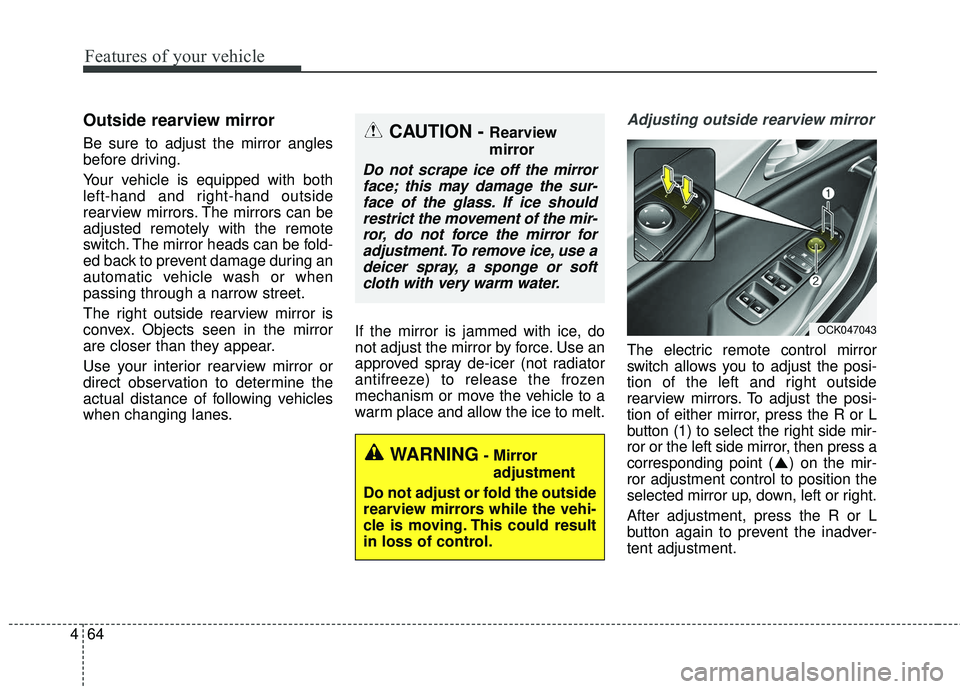
The electric remote control mirror
switch allows you to adjust the posi-
tion of the left and right outside
rearview mirrors. To adjust the posi-
tion of either mirror, press the R or L
button (1) to select the right side mir-
ror or the left side mirror, then press a
corresponding point ( ) on the mir-
ror adjustment control to position the
selected mirror up, down, left or right.
After adjustment, press the R or L
button again to prevent the inadver-
tent adjustment.
WARNING- Mirror
adjustment
Do not adjust or fold the outside
rearview mirrors while the vehi-
cle is moving. This could result
in loss of control.
CAUTION - Rearview
mirror
Do not scrape ice off the mirror face; this may damage the sur-face of the glass. If ice shouldrestrict the movement of the mir-ror, do not force the mirror foradjustment. To remove ice, use adeicer spray, a sponge or softcloth with very warm water.
OCK047043
Page 152 of 551
465
Features of your vehicle
Reverse parking aid function (if equipped)
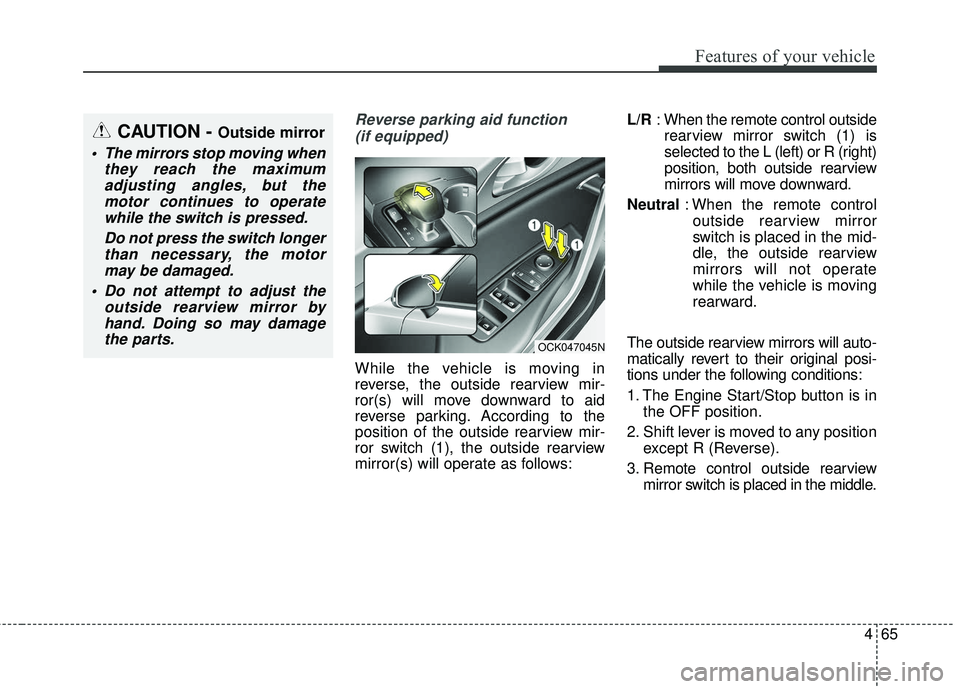
While the vehicle is moving in
reverse, the outside rearview mir-
ror(s) will move downward to aid
reverse parking. According to the
position of the outside rearview mir-
ror switch (1), the outside rearview
mirror(s) will operate as follows: L/R
: When the remote control outside
rearview mirror switch (1) is
selected to the L (left) or R (right)
position, both outside rearview
mirrors will move downward.
Neutral : When the remote control
outside rearview mirror
switch is placed in the mid-
dle, the outside rearview
mirrors will not operate
while the vehicle is moving
rearward.
The outside rearview mirrors will auto-
matically revert to their original posi-
tions under the following conditions:
1. The Engine Start/Stop button is in the OFF position.
2. Shift lever is moved to any position except R (Reverse).
3. Remote control outside rearview mirror switch is placed in the middle.
CAUTION - Outside mirror
The mirrors stop moving whenthey reach the maximumadjusting angles, but themotor continues to operatewhile the switch is pressed.
Do not press the switch longerthan necessary, the motormay be damaged.
Do not attempt to adjust the outside rearview mirror byhand. Doing so may damagethe parts.
OCK047045N
Page 153 of 551
Features of your vehicle
66
4
Folding the outside rearview mirror
Electric type
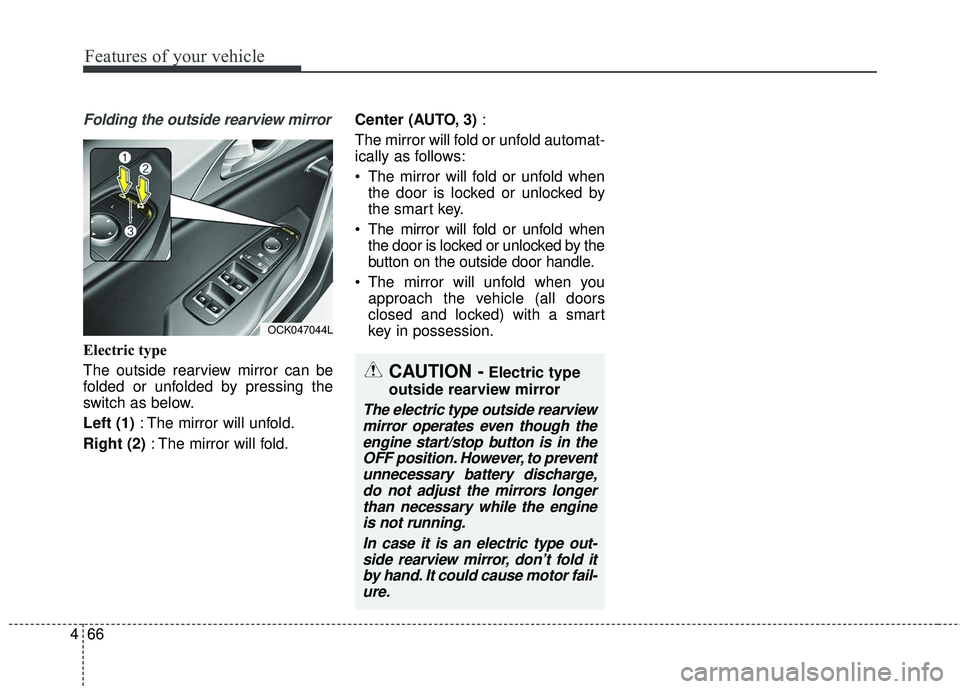
The outside rearview mirror can be
folded or unfolded by pressing the
switch as below.
Left (1) : The mirror will unfold.
Right (2) : The mirror will fold. Center (AUTO, 3)
:
The mirror will fold or unfold automat-
ically as follows:
The mirror will fold or unfold when the door is locked or unlocked by
the smart key.
The mirror will fold or unfold when the door is locked or unlocked by the
button on the outside door handle.
The mirror will unfold when you approach the vehicle (all doors
closed and locked) with a smart
key in possession.
OCK047044L
CAUTION -Electric type
outside rearview mirror
The electric type outside rearview mirror operates even though theengine start/stop button is in theOFF position. However, to preventunnecessary battery discharge,do not adjust the mirrors longerthan necessary while the engineis not running.
In case it is an electric type out-side rearview mirror, don’t fold itby hand. It could cause motor fail-ure.
Page 173 of 551
Features of your vehicle
86
4
Steering Easy Access (if
equipped)
- On (checked) : The steeringwheel will automatically move to
the top of Steering column when
leaving the vehicle and move to
the last saved position when
entering the vehicle for the driver
enter or exit the vehicle comfort-
ably.
- Off (unchecked) : The steering easy access function will be
deactivated.
❈ For more details, refer to “Driver
Position Memory System” in chap-
ter 3.
Welcome Mirror/Light (if equipped) : - If this item checked, the welcomeMirror/light function will be acti-
vated.
Wiper/Light Display (if equipped) : If this item checked, the
Wiper/Light Display will be activat-
ed. Gear Position Pop-up (if equipped)
: If this item checked, the gear posi-
tion pop-up display will be activat-
ed.
Icy road warning (if equipped) : If this item checked, the Icy road
warning display will be activated.
Service interval
Service Interval To activate or deactivate the serv-
ice interval function.
Adjust Interval To adjust the interval by mileage-
and period.
Reset To reset the service interval func-
tion. Other features
Fuel Economy Auto Reset
- Off : The average fuel economywill not reset automatically when-
ever refueling.
- After Ignition : The average fuel economy will reset automatically
whenever it has passed 4 hours
after turning OFF the engine.
- After Refueling : The average fuel economy will reset automatically
when refueling.
❈ For more details, refer to “Trip
Computer” in this chapter.
Fuel Economy Unit - Choose the fuel economy unit.(L/100km, US gallon, UK gallon)
Temperature Unit - Choose the temperature unit.(°C,°F)
Page 199 of 551
Features of your vehicle
112
4
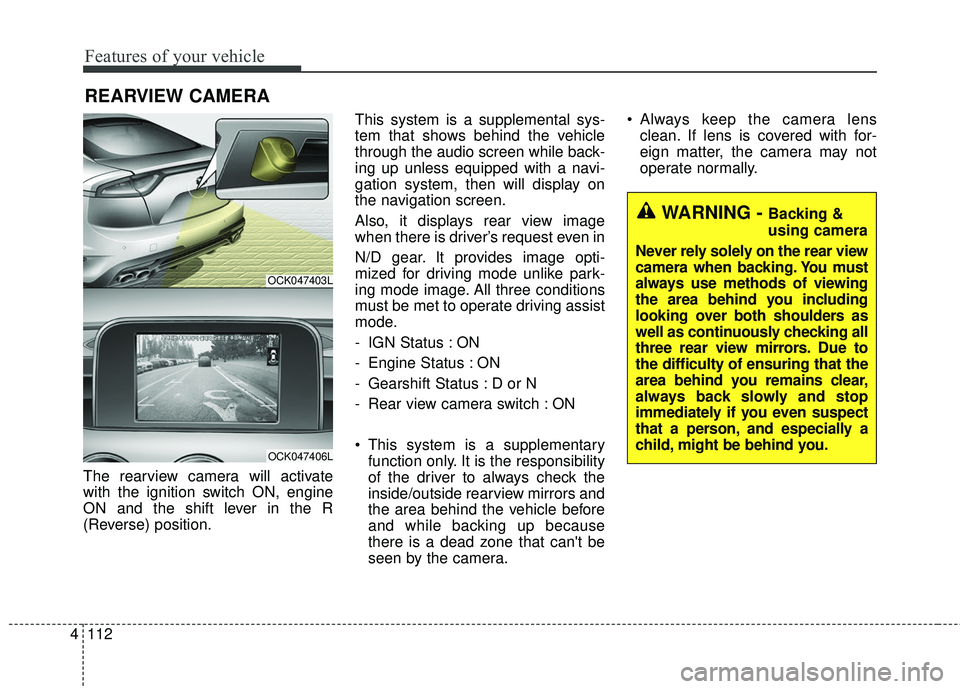
The rearview camera will activate
with the ignition switch ON, engine
ON and the shift lever in the R
(Reverse) position. This system is a supplemental sys-
tem that shows behind the vehicle
through the audio screen while back-
ing up unless equipped with a navi-
gation system, then will display on
the navigation screen.
Also, it displays rear view image
when there is driver’s request even in
N/D gear. It provides image opti-
mized for driving mode unlike park-
ing mode image. All three conditions
must be met to operate driving assist
mode.
- IGN Status : ON
- Engine Status : ON
- Gearshift Status : D or N
- Rear view camera switch : ON
This system is a supplementary
function only. It is the responsibility
of the driver to always check the
inside/outside rearview mirrors and
the area behind the vehicle before
and while backing up because
there is a dead zone that can't be
seen by the camera. Always keep the camera lens
clean. If lens is covered with for-
eign matter, the camera may not
operate normally.
REARVIEW CAMERA
OCK047403L
OCK047406L
WARNING - Backing &
using camera
Never rely solely on the rear view
camera when backing. You must
always use methods of viewing
the area behind you including
looking over both shoulders as
well as continuously checking all
three rear view mirrors. Due to
the difficulty of ensuring that the
area behind you remains clear,
always back slowly and stop
immediately if you even suspect
that a person, and especially a
child, might be behind you.
Page 200 of 551
4113
Features of your vehicle
The 360° camera monitoring system
is not a substitute for proper and safe
parking procedures. The 360° cam-
era monitoring system may not
detect every object surrounding the
vehicle. Always drive safely and use
caution when parking.The 360° camera monitoring system
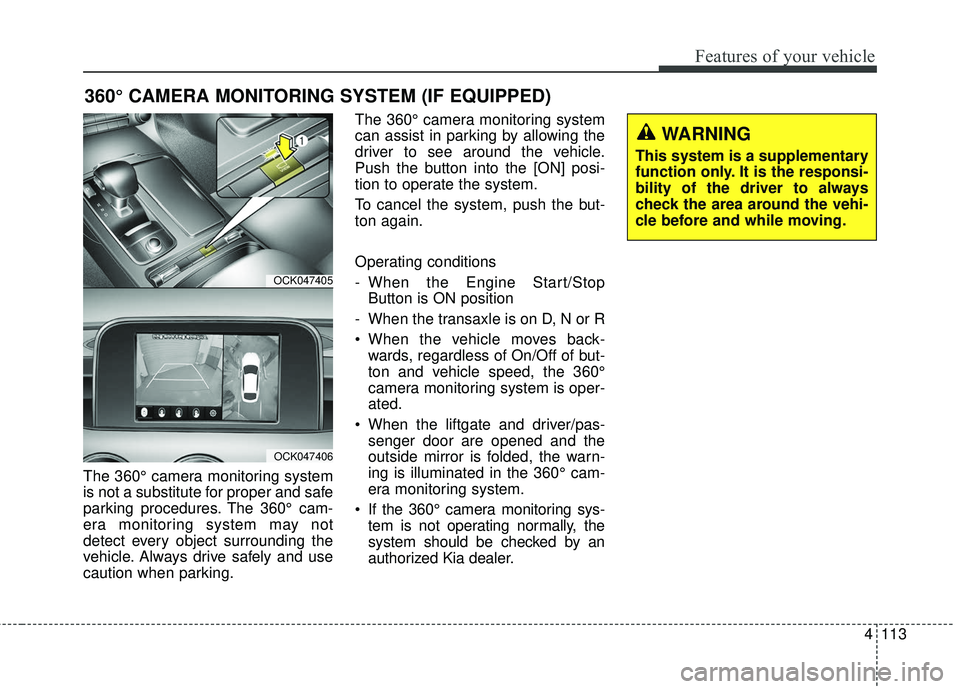
can assist in parking by allowing the
driver to see around the vehicle.
Push the button into the [ON] posi-
tion to operate the system.
To cancel the system, push the but-
ton again.
Operating conditions
- When the Engine Start/Stop
Button is ON position
- When the transaxle is on D, N or R
When the vehicle moves back- wards, regardless of On/Off of but-
ton and vehicle speed, the 360°
camera monitoring system is oper-
ated.
When the liftgate and driver/pas- senger door are opened and the
outside mirror is folded, the warn-
ing is illuminated in the 360° cam-
era monitoring system.
If the 360° camera monitoring sys- tem is not operating normally, the
system should be checked by an
authorized Kia dealer.
360° CAMERA MONITORING SYSTEM (IF EQUIPPED)
OCK047405
OCK047406
WARNING
This system is a supplementary
function only. It is the responsi-
bility of the driver to always
check the area around the vehi-
cle before and while moving.
Page 205 of 551
Features of your vehicle
118
4
The high beam switches to low beam
in the below conditions.
- When the High Beam Assist is off.
- When the light switch is not in the
AUTO position.
- When the headlamp is detected from the on-coming vehicle.
- When the tail lamp is detected from the front vehicle.
- When the surrounding is bright enough high beams are not need-
ed.
- When streetlights or other lights are detected.
- When vehicle speed is below 24 km/h (15 mph).
- When headlamp / taillamp of bicy- cle/motorcycle is detected The system may not operate normal-
ly in the below conditions.
When the light from the on-coming
or front vehicle is not detected
because of lamp damage, hidden
from sight, etc.
When the lamp of the on-coming or front vehicle is covered with dust,
snow or water.
When the light from the on-coming or front vehicle is not detected
because of exhaust fume, smoke,
fog, snow, etc.
When the front window is covered with foreign matters such as ice,
dust, fog, or is damaged.
When there is a similar shape lamp with the front vehicle’s lamps.
When it is hard to see because of fog, heavy rain or snow.
When the headlamp is not repaired or replaced at an authorized deal-
er.
When headlamp aiming is not properly adjusted.
When driving on a narrow curved road or rough road. When driving downhill or uphill.
When only part of the vehicle in
front is visible on a crossroad or
curved road.
When there is a traffic light, reflect- ing sign, flashing sign or mirror.
When the road conditions are bad such as being wet or covered with
snow.
When the front vehicle’s head- lamps are off but the fog lamps on.
When a vehicle suddenly appears from a curve.
When the vehicle is tilted from a flat tire or being towed.
When the LKA (Lane Keeping Assist) system warning light illumi-
nates. (if equipped)
Page 206 of 551
4119
Features of your vehicle
✽ ✽NOTICE
• Do not place any accessories,
stickers or tint the windshield.
• Have the windshield glass replaced from an authorized dealer.
• Do not remove or damage related parts of the High Beam Assist sys-
tem.
• Be careful that water doesn’t get into the High Beam Assist unit.
• Do not place objects on the dash- board that reflect light such as
mirrors, white paper, etc. The sys-
tem may malfunction if sunlight is
reflected.
• At times, the High Beam Assist system may not work properly,
always check the road conditions
for your safety. When the system
does not operate normally, manu-
ally change between the high
beam and low beam.
Turn signals and lane change
signals
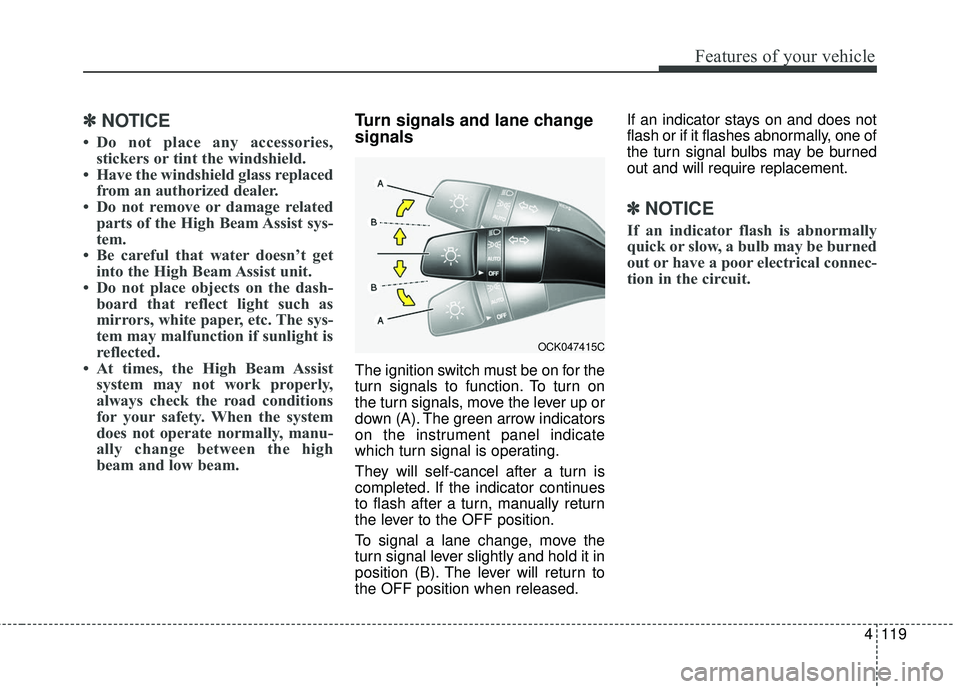
The ignition switch must be on for the
turn signals to function. To turn on
the turn signals, move the lever up or
down (A). The green arrow indicators
on the instrument panel indicate
which turn signal is operating.
They will self-cancel after a turn is
completed. If the indicator continues
to flash after a turn, manually return
the lever to the OFF position.
To signal a lane change, move the
turn signal lever slightly and hold it in
position (B). The lever will return to
the OFF position when released. If an indicator stays on and does not
flash or if it flashes abnormally, one of
the turn signal bulbs may be burned
out and will require replacement.
✽ ✽
NOTICE
If an indicator flash is abnormally
quick or slow, a bulb may be burned
out or have a poor electrical connec-
tion in the circuit.
OCK047415C
Page 215 of 551
Features of your vehicle
128
4
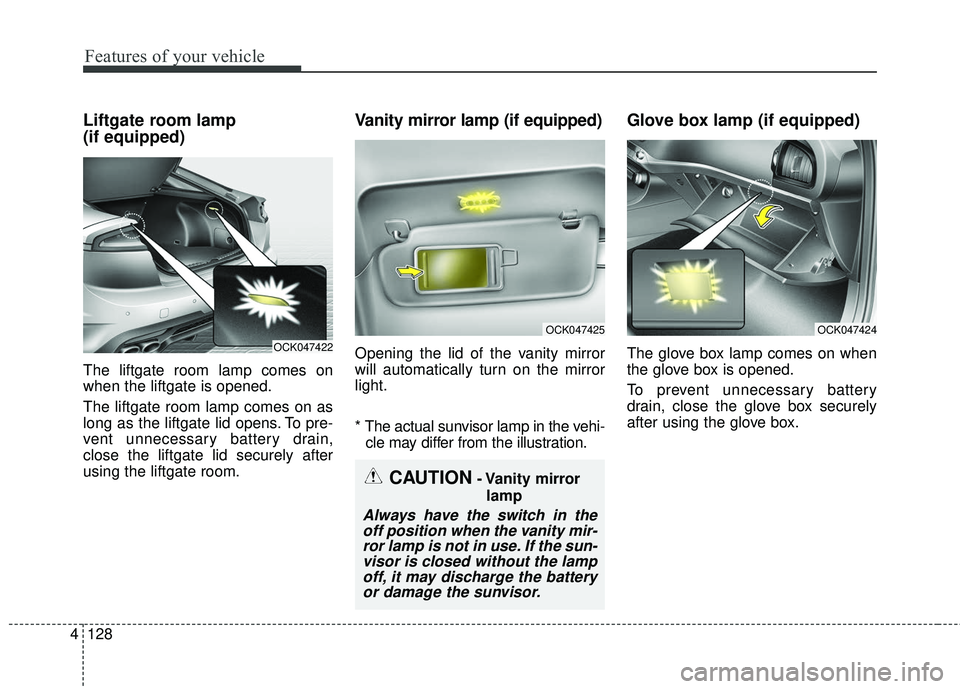
Liftgate room lamp
(if equipped)
The liftgate room lamp comes on
when the liftgate is opened.
The liftgate room lamp comes on as
long as the liftgate lid opens. To pre-
vent unnecessary battery drain,
close the liftgate lid securely after
using the liftgate room.
Vanity mirror lamp (if equipped)
Opening the lid of the vanity mirror
will automatically turn on the mirror
light.
* The actual sunvisor lamp in the vehi-
cle may differ from the illustration.
Glove box lamp (if equipped)
The glove box lamp comes on when
the glove box is opened.
To prevent unnecessary battery
drain, close the glove box securely
after using the glove box.
CAUTION- Vanity mirror
lamp
Always have the switch in theoff position when the vanity mir-ror lamp is not in use. If the sun-visor is closed without the lampoff, it may discharge the batteryor damage the sunvisor.
OCK047422
OCK047425OCK047424
Page 218 of 551
4131
Features of your vehicle
If you want to defrost and defog the
front windshield, refer to “Windshield
defrosting and defogging” in this sec-
tion.
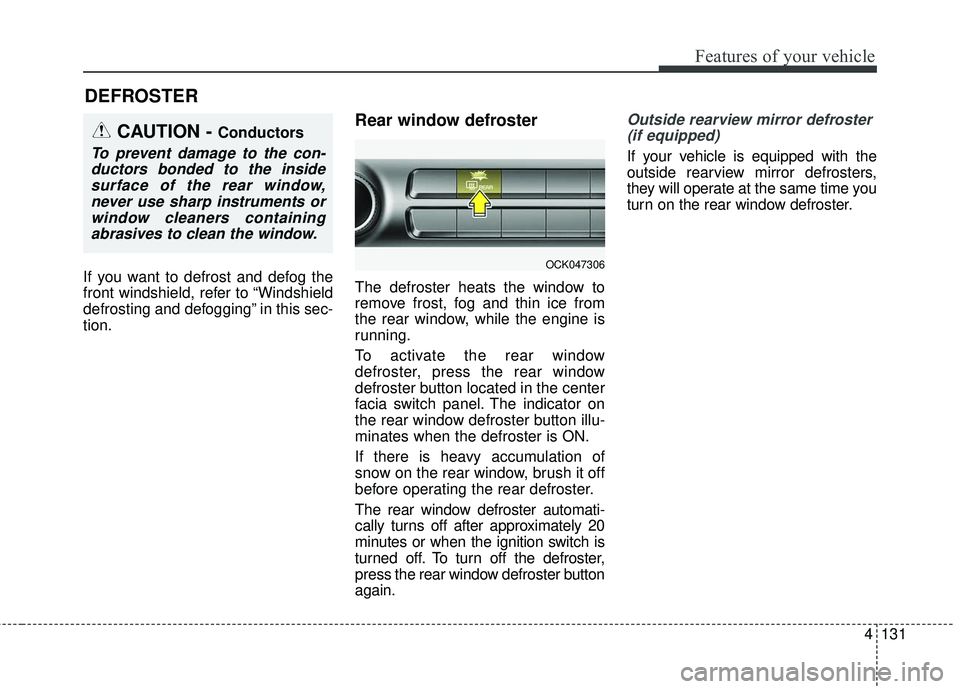
Rear window defroster
The defroster heats the window to
remove frost, fog and thin ice from
the rear window, while the engine is
running.
To activate the rear window
defroster, press the rear window
defroster button located in the center
facia switch panel. The indicator on
the rear window defroster button illu-
minates when the defroster is ON.
If there is heavy accumulation of
snow on the rear window, brush it off
before operating the rear defroster.
The rear window defroster automati-
cally turns off after approximately 20
minutes or when the ignition switch is
turned off. To turn off the defroster,
press the rear window defroster button
again.
Outside rearview mirror defroster (if equipped)
If your vehicle is equipped with the
outside rearview mirror defrosters,
they will operate at the same time you
turn on the rear window defroster.
DEFROSTER
CAUTION - Conductors
To prevent damage to the con-ductors bonded to the insidesurface of the rear window,never use sharp instruments orwindow cleaners containingabrasives to clean the window.
OCK047306