mirror KIA STINGER 2018 Owner's Manual
[x] Cancel search | Manufacturer: KIA, Model Year: 2018, Model line: STINGER, Model: KIA STINGER 2018Pages: 551, PDF Size: 13.75 MB
Page 233 of 551
Features of your vehicle
146
4
For maximum defrosting, set the
temperature control to the extreme
right/hot position and the fan speed
control to the highest speed.
If warm air to the floor is desired while defrosting or defogging, set
the mode to the floor-defrost posi-
tion.
Before driving, clear all snow and ice from the windshield, rear win-
dow, outside rear view mirrors, and
all side windows.
Clear all snow and ice from the hood and air inlet in the cowl grill to
improve heater and defroster effi-
ciency and to reduce the probabili-
ty of fogging up the inside of the
windshield.Automatic climate control
system
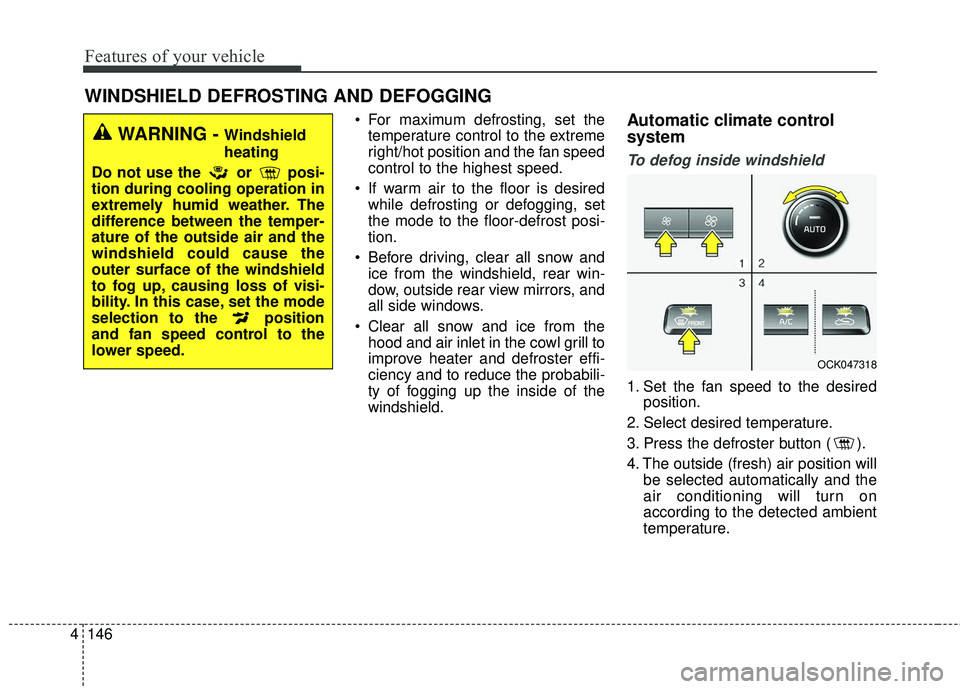
To defog inside windshield
1. Set the fan speed to the desired position.
2. Select desired temperature.
3. Press the defroster button ( ).
4. The outside (fresh) air position will be selected automatically and the
air conditioning will turn on
according to the detected ambient
temperature.
WINDSHIELD DEFROSTING AND DEFOGGING
WARNING - Windshield
heating
Do not use the or posi-
tion during cooling operation in
extremely humid weather. The
difference between the temper-
ature of the outside air and the
windshield could cause the
outer surface of the windshield
to fog up, causing loss of visi-
bility. In this case, set the mode
selection to the position
and fan speed control to the
lower speed.
OCK047318
Page 242 of 551
4155
Features of your vehicle
The seat warmer (with air ventila-tion) defaults to the OFF position
whenever the ignition switch is
turned on.Sunvisor
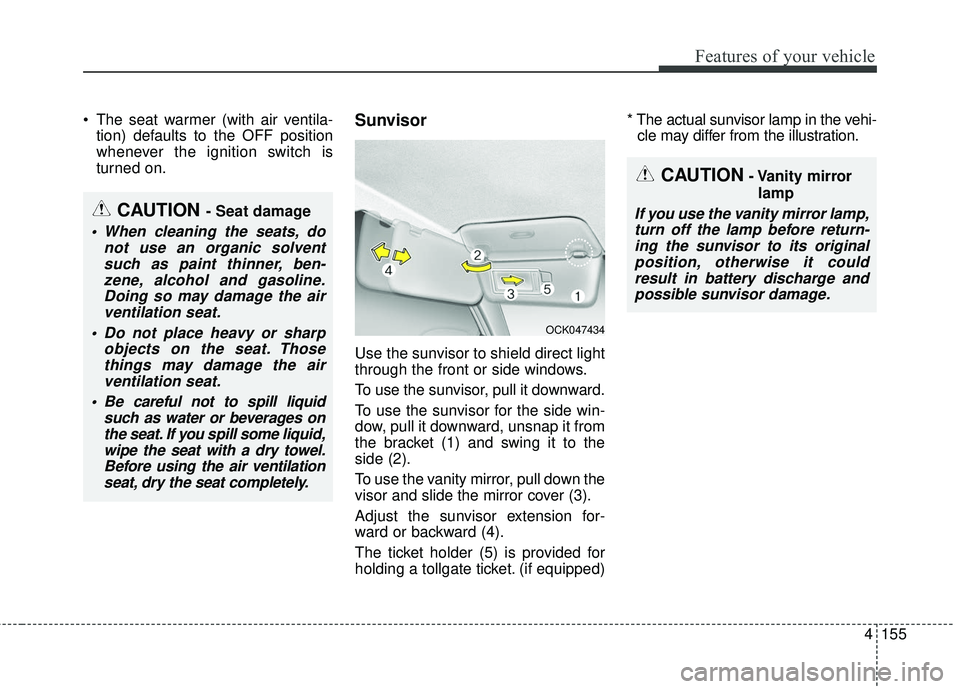
Use the sunvisor to shield direct light
through the front or side windows.
To use the sunvisor, pull it downward.
To use the sunvisor for the side win-
dow, pull it downward, unsnap it from
the bracket (1) and swing it to the
side (2).
To use the vanity mirror, pull down the
visor and slide the mirror cover (3).
Adjust the sunvisor extension for-
ward or backward (4).
The ticket holder (5) is provided for
holding a tollgate ticket. (if equipped) * The actual sunvisor lamp in the vehi-
cle may differ from the illustration.
CAUTION- Vanity mirror
lamp
If you use the vanity mirror lamp,turn off the lamp before return-ing the sunvisor to its originalposition, otherwise it couldresult in battery discharge andpossible sunvisor damage.CAUTION - Seat damage
When cleaning the seats, do not use an organic solventsuch as paint thinner, ben-zene, alcohol and gasoline.Doing so may damage the airventilation seat.
Do not place heavy or sharp objects on the seat. Thosethings may damage the airventilation seat.
Be careful not to spill liquid such as water or beverages onthe seat. If you spill some liquid,wipe the seat with a dry towel.Before using the air ventilationseat, dry the seat completely.
OCK047434
Page 258 of 551
55
Driving your vehicle
Before entering vehicle
• Be sure that all windows, outsidemirror(s), and outside lights are
clean.
Check the condition of the tires.
Check under the vehicle for any sign of leaks.
Be sure there are no obstacles behind you if you intend to back up.
Necessary inspections
Fluid levels, such as engine oil,
engine coolant, brake fluid, and
washer fluid should be checked on a
regular basis, at the exact interval
depending on the fluid. Further
details are provided in chapter 7,
“Maintenance”.
Before starting
Close and lock all doors.
Position the seat so that all con-trols are easily reached.
Buckle your seat belt.
Adjust the inside and outside rearview mirrors.
Be sure that all lights work.
Check all gauges.
Check the operation of warning lights when the ignition switch is
turned to the ON position.
Release the parking brake and make sure the brake warning light
goes out.
For safe operation, be sure you are
familiar with your vehicle and its
equipment.
BEFORE DRIVING
WARNING - Distracted driving
Focus on the road while driving.
The driver's primary responsi-
bility is in the safe and legal
operation of the vehicle. Use of
any handled devices, other
equipment or vehicle systems
that distract the drive should
not be used during vehicle
operation.
Page 322 of 551
569
Driving your vehicle
✽ ✽NOTICE
• Do not install any accessories, such
as a license plate bracket or
bumper sticker near the sensor
area. Do not replace the bumper
by yourself. Doing so may adverse-
ly affect the sensing performance.
• Always keep the sensor/bumper area clean.
• Use only a soft cloth to wash the vehicle. Also, do not spray highly
pressurized water on the sensor
installed on the bumper.
• Be careful not to apply unneces- sary force on the frontal sensor
area. When the sensor moves out
of the correct position due to
external force, the system may not
operate correctly even without the
warning light or message. In this
case, we recommend you to have
the vehicle inspected by an
authorized Kia dealer.
• Use only the genuine Kia sensor cover. Do not arbitrarily apply
paint on the sensor cover. (Continued)(Continued)
• Do not tint the window or install
stickers, accessories around the
inside mirror where the camera is
installed.
• Make sure the frontal camera installation point does not get wet.
• Do not impact or arbitrarily remove any radar/camera compo-
nents.
• Do not place reflective objects(white paper ormirror etc.)
on the crash pad. The system may
activate unnecessarily due to
reflect of the sunlight.
• Excessive audio volume may dis turb the sound of the system warn
ing alarm.
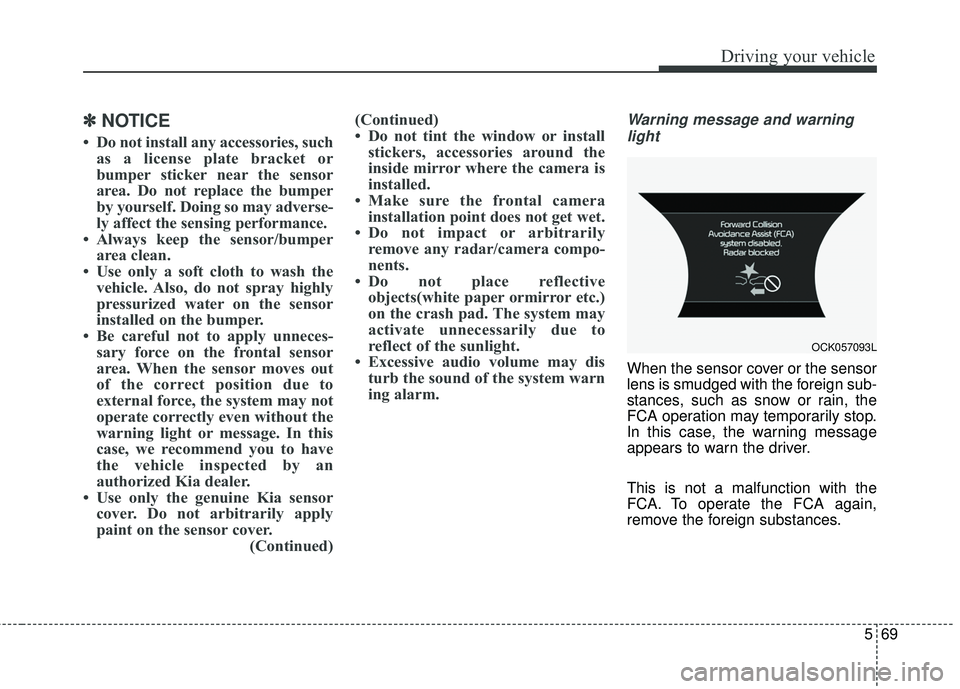
Warning message and warning
light
When the sensor cover or the sensor
lens is smudged with the foreign sub-
stances, such as snow or rain, the
FCA operation may temporarily stop.
In this case, the warning message
appears to warn the driver.
This is not a malfunction with the
FCA. To operate the FCA again,
remove the foreign substances.
OCK057093L
Page 373 of 551
Driving your vehicle
120
5
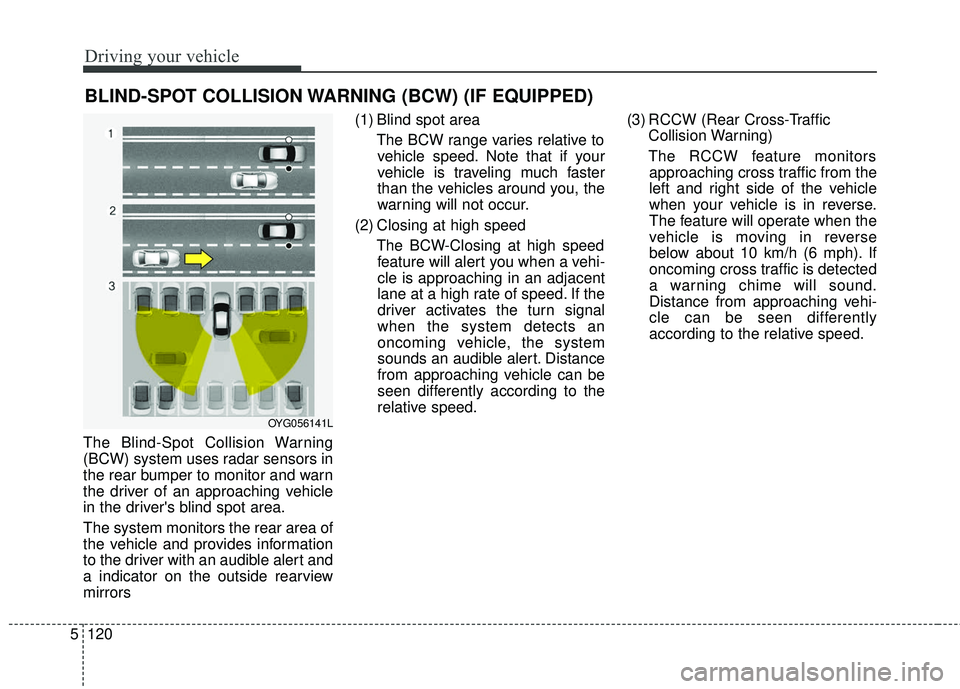
The Blind-Spot Collision Warning
(BCW) system uses radar sensors in
the rear bumper to monitor and warn
the driver of an approaching vehicle
in the driver's blind spot area.
The system monitors the rear area of
the vehicle and provides information
to the driver with an audible alert and
a indicator on the outside rearview
mirrors (1) Blind spot area
The BCW range varies relative tovehicle speed. Note that if your
vehicle is traveling much faster
than the vehicles around you, the
warning will not occur.
(2) Closing at high speed The BCW-Closing at high speedfeature will alert you when a vehi-
cle is approaching in an adjacent
lane at a high rate of speed. If the
driver activates the turn signal
when the system detects an
oncoming vehicle, the system
sounds an audible alert. Distance
from approaching vehicle can be
seen differently according to the
relative speed. (3) RCCW (Rear Cross-Traffic
Collision Warning)
The RCCW feature monitors approaching cross traffic from the
left and right side of the vehicle
when your vehicle is in reverse.
The feature will operate when the
vehicle is moving in reverse
below about 10 km/h (6 mph). If
oncoming cross traffic is detected
a warning chime will sound.
Distance from approaching vehi-
cle can be seen differently
according to the relative speed.
BLIND-SPOT COLLISION WARNING (BCW) (IF EQUIPPED)
OYG056141L
Page 374 of 551
5121
Driving your vehicle
BCW (Blind-Spot Collision
Warning)
Operating conditions
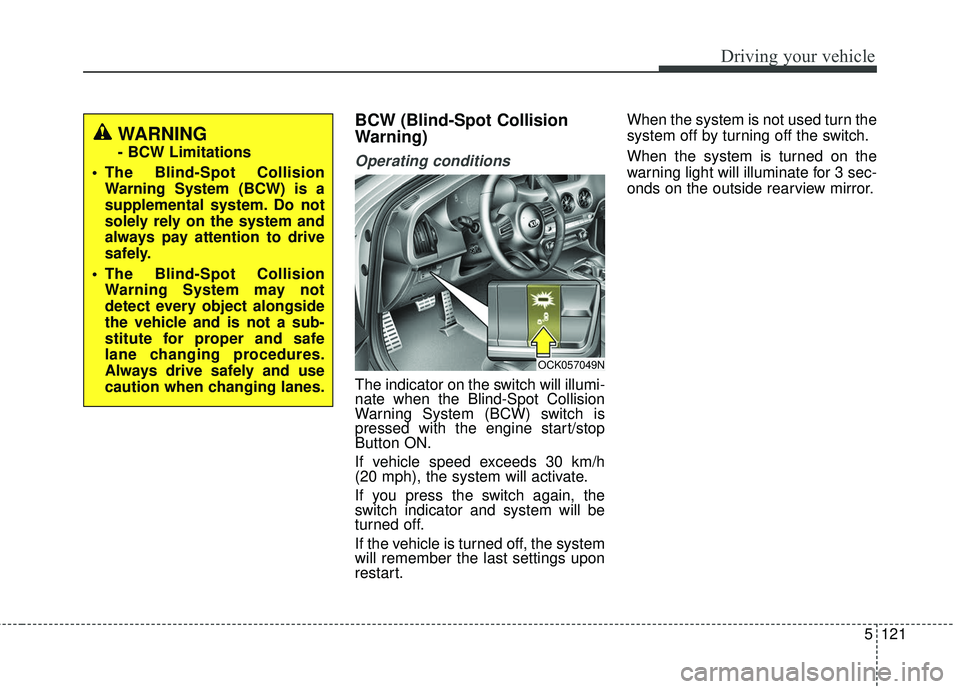
The indicator on the switch will illumi-
nate when the Blind-Spot Collision
Warning System (BCW) switch is
pressed with the engine start/stop
Button ON.
If vehicle speed exceeds 30 km/h
(20 mph), the system will activate.
If you press the switch again, the
switch indicator and system will be
turned off.
If the vehicle is turned off, the system
will remember the last settings upon
restart.When the system is not used turn the
system off by turning off the switch.
When the system is turned on the
warning light will illuminate for 3 sec-
onds on the outside rearview mirror.
OCK057049N
WARNING
- BCW Limitations
The Blind-Spot Collision Warning System (BCW) is a
supplemental system. Do not
solely rely on the system and
always pay attention to drive
safely.
The Blind-Spot Collision Warning System may not
detect every object alongside
the vehicle and is not a sub-
stitute for proper and safe
lane changing procedures.
Always drive safely and use
caution when changing lanes.
Page 375 of 551
Driving your vehicle
122
5
Warning type
The system will activate when:
1. The system is on.
2. Vehicle speed is above 30 km/h
(20 mph).
3. Other vehicles are detected in the rear side.
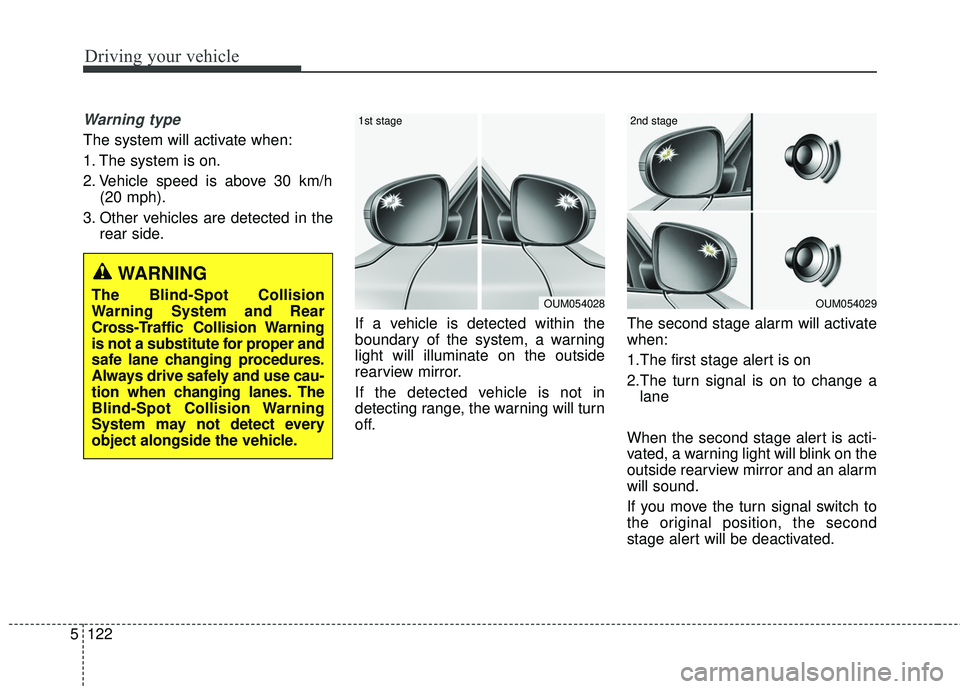
If a vehicle is detected within the
boundary of the system, a warning
light will illuminate on the outside
rearview mirror.
If the detected vehicle is not in
detecting range, the warning will turn
off. The second stage alarm will activate
when:
1.The first stage alert is on
2.The turn signal is on to change a
lane
When the second stage alert is acti-
vated, a warning light will blink on the
outside rearview mirror and an alarm
will sound.
If you move the turn signal switch to
the original position, the second
stage alert will be deactivated.
OUM054029
2nd stage
OUM054028
1st stage
WARNING
The Blind-Spot Collision
Warning System and Rear
Cross-Traffic Collision Warning
is not a substitute for proper and
safe lane changing procedures.
Always drive safely and use cau-
tion when changing lanes. The
Blind-Spot Collision Warning
System may not detect every
object alongside the vehicle.
Page 377 of 551
Driving your vehicle
124
5
Operating conditions
Select RCCW (Rear Cross-Traffic
Collision Warning) in “User
Settings” under “Driving Assist” on
the instrument cluster. The system
will turn on and standby to activate.
Select RCCW again, to turn the system off.
If the vehicle is turned off, the RCCW system will remember the
last settings upon restart. Always
turn the RCCW system off when
not in use.
The system operates when the vehicle speed is below 10km/h (6
mph) with the shift lever in R
(Reverse).
The RCCW (Rear Cross-Traffic Collision Warning) detecting range
is 0.5 m ~ 20 m (1.6 feet ~ 65 feet)
based on the side direction. If the
approaching vehicle speed is
4 km/h (2.5 mph) ~ 36 km/h (22
mph) within sensing range, it is
detected. However, the system
sensing range can vary based on
conditions. Always pay attention to
your surroundings.
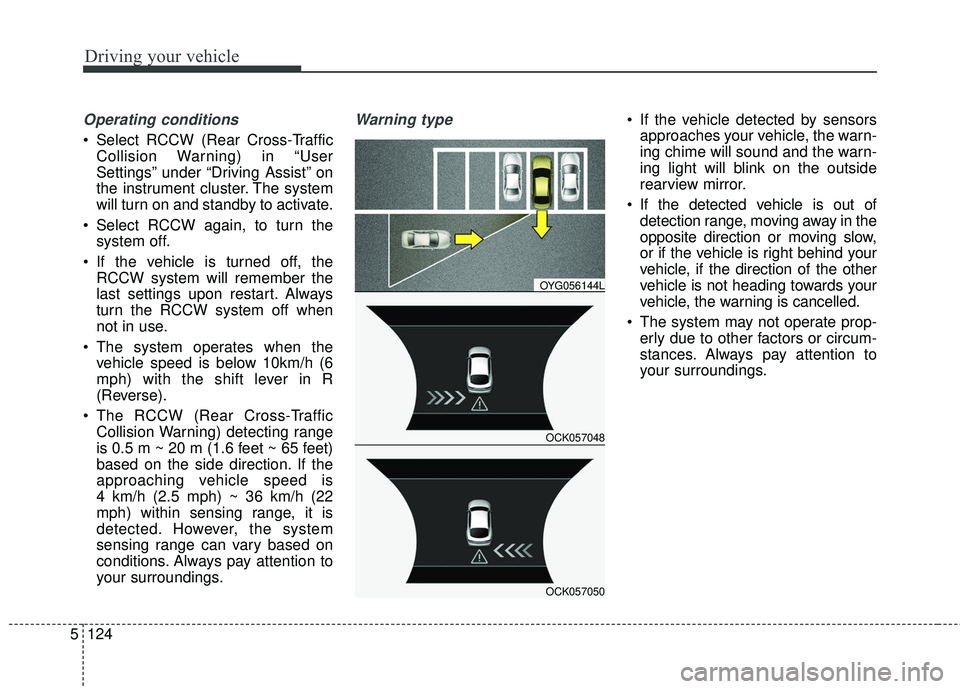
Warning type If the vehicle detected by sensorsapproaches your vehicle, the warn-
ing chime will sound and the warn-
ing light will blink on the outside
rearview mirror.
If the detected vehicle is out of detection range, moving away in the
opposite direction or moving slow,
or if the vehicle is right behind your
vehicle, if the direction of the other
vehicle is not heading towards your
vehicle, the warning is cancelled.
The system may not operate prop- erly due to other factors or circum-
stances. Always pay attention to
your surroundings.
OCK057048
OYG056144L
OCK057050
Page 378 of 551
5125
Driving your vehicle
\bIf your vehicle's left or right side
bumper is blinded by a barrier or
vehicles, the system sensing abili-
ty may be deteriorated.✽ ✽
NOTICE
• The system may not work proper-
ly if the bumper has been replaced
or if repair work has been done
near the sensor.
• The detection area differs accord- ing to the road's width. If the road
is narrow the system may detect
other vehicles in the next lane.
• If the road is very wide the system may not detect other vehicles.
• The system may turn off due to strong electromagnetic interfer-
ence.
WARNING
The Blind-Spot Collision
Warning System and Rear
Cross-Traffic Collision
Warning is not a substitute for
proper and safe lane chang-
ing procedures. Always drive
safely and use caution when
changing lanes. The Blind-
Spot Collision Warning
System may not detect every
object alongside the vehicle.
(Continued)
(Continued)
When the BCW system isbeing activated, The warning
light on the outside rearview
mirror will illuminate whenev-
er a vehicle is detected at the
rear side by the system. To
avoid accidents, do not focus
only on the warning light and
neglect to see the surround-
ing of the vehicle.
Drive safely even though the vehicle is equipped with a BCW
(Blind-Spot Collision Warning)
system. Do not solely rely on
the system but check for your-
self before changing lanes.
The system may not alert the
driver in some conditions so
always check the surround-
ings while driving.
Page 380 of 551
5127
Driving your vehicle
Non-operating condition
Outside rearview mirror may not
alert the driver when:
- The outside rearview mirror housingis damaged or covered with debris.
- The window is covered with debris.
- The windows are severely tinted.
Driver's Attention
The driver must be cautious in the
below situations, because the sys-
tem may not detect other vehicles
or objects in certain circumstances.
- The vehicle drives on a curved road or through a tollgate.
- The sensor is polluted with rain, snow, mud, etc.
- The rear bumper, in which the sensor is located, is covered or
blocked with a foreign matter
such as a sticker, a bumper
guard, a bicycle stand, etc.
- The rear bumper is damaged, or the sensor is out of the original
default position.
- The vehicle height gets lower or higher due to heavy loading in a
liftgate, abnormal tire pressure,
etc.
- The vehicle drives in a bad weather such as heavy rain or
snow.
(Continued)(Continued)
- There is a fixed object near the
vehicle, such as a guardrail,
pedestrian, animal, tunnel, etc.
- A big vehicle is near such as a bus or truck.
- A motorcycle or bicycle is near.
- A flat trailer is near.
- If the vehicle has started at the same time as the vehicle next to
you and has accelerated.
- When the other vehicle passes at a very fast speed.
- While changing lanes.
- When going down or up a steep road where the height of the lane
is different.
- When the other vehicle approaches very close.
- When a trailer or carrier is installed.
- When the temperature of the rear bumper is very high or low.
(Continued)