display KIA STINGER 2020 Workshop Manual
[x] Cancel search | Manufacturer: KIA, Model Year: 2020, Model line: STINGER, Model: KIA STINGER 2020Pages: 555, PDF Size: 13.49 MB
Page 308 of 555

555
Driving your vehicle
Warning messages
When the EPB is applied from Auto
Hold, a warning will sound and a
message will appear.When the conversion from Auto Hold
to EPB is not working properly a
warning will sound and a message
will appear.
✽ ✽
NOTICE
When this message is displayed, the
Auto Hold and EPB may not oper-
ate. For your safety, depress the
brake pedal.
If you do not apply the brake pedal
when you release the Auto Hold by
pressing the [AUTO HOLD] switch, a
warning will sound and a message
will appear.OCK057081L
OCK057079LOCK057083L
Page 309 of 555
![KIA STINGER 2020 Workshop Manual Driving your vehicle
56
5
When you press the [AUTO HOLD]
switch, if the drivers door and engine
hood are not closed or the drivers
seat belt is unfastened, a warning
will sound and a message will
ap](/img/2/40389/w960_40389-308.png "KIA STINGER 2020 Workshop Manual Driving your vehicle
56
5
When you press the [AUTO HOLD]
switch, if the drivers door and engine
hood are not closed or the drivers
seat belt is unfastened, a warning
will sound and a message will
ap")
Driving your vehicle
56
5
When you press the [AUTO HOLD]
switch, if the driver's door and engine
hood are not closed or the driver's
seat belt is unfastened, a warning
will sound and a message will
appear on the LCD display. At this
moment, press the [AUTO HOLD]
button after closing the driver's door
and engine hood and fastening the
seat belt.
Anti-lock brake system (ABS)
ABS (or ESC) will not prevent acci-
dents due to improper or dangerous
driving maneuvers. Even though
vehicle control is improved during
emergency braking, always maintain
a safe distance between you and
objects ahead. Vehicle speeds
should always be reduced during
extreme road conditions. The vehicle
should be driven at reduced speeds
in the following circumstances:
When driving on rough, gravel or
snow-covered roads
When driving on roads where the road surface is pitted or has differ-
ent surface heights.
Driving in these conditions increases
the stopping distance for your vehicle. The ABS continuously senses the
speed of the wheels. If the wheels
are going to lock, the ABS system
repeatedly modulates the hydraulic
brake pressure to the wheels.
When you apply your brakes under
conditions which may lock the
wheels, you may hear a “tik-tik’’
sound from the brakes, or feel a cor-
responding sensation in the brake
pedal. This is normal and it means
your ABS is active.
In order to obtain the maximum benefit
from your ABS in an emergency situa-
tion, do not attempt to modulate your
brake pressure and do not try to pump
your brakes. Press your brake pedal as
hard as possible to allow the ABS to
control the force being delivered to the
brakes.
✽ ✽
NOTICE
A click sound may be heard in the
engine compartment when the vehi-
cle begins to move after the engine is
started. These conditions are normal
and indicate that the anti-lock brake
system is functioning properly.
OCK057084L
Page 320 of 555

567
Driving your vehicle
The warning light illumi-
nates on the LCD display,
when you cancel the FCA
system. The driver can
monitor the FCA ON/OFF status on
the LCD display. Also, the warning
light illuminates when the
ESC(Electronic Stability Control) is
turned off (Traction & Stability control
disabled.). When the warning light
remains ON with the FCA activated,
have the system checked by an
authorized Kia dealer.
The driver can select the initial warn-
ing activation time in the User
Settings in the instrument cluster
LCD display. The options for the ini-
tial Forward Collision Warning
include the following:
selected, the initial
Forward Collision Warning
is activated earlier than
normal. This setting maxi-
mizes the amount of dis-
tance between the vehicle
or pedestrian ahead before
the initial warning occurs. If
the ‘EARLY’ condition feels
too sensitive, change it into
‘NORMAL’.
selected, the initial
Forward Collision
Warning is activated
normally. This setting
allows for a smaller
amount of distance
between the vehicle or
pedestrian ahead
before the initial warn-
ing occurs than EARLY
mode.
selected, the initial Forward
Collision Warning is activat-
ed later than normal. This
setting reduces the amount
of distance between the
vehicle or pedestrian ahead
before the initial warning
occurs. Select this condition
only when traffic is light,
and you are driving slowly.
Page 321 of 555
Driving your vehicle
68
5
Prerequisite for activation
The FCA will activate when the FCA
is selected on the LCD display, and
when the following prerequisites are
satisfied:
- The ESC (Electronic Stability
Control) is activated.
- The driving speed is over 10 km/h (6 mph). (The FCA only works
within a certain range of vehicle
speeds)
- When the FCA recognizes a vehi- cle or the pedestrian in front. (The
FCA may not recognize every
obstacle or provide warnings and
braking in every situation, so do
not rely on the FCA to stop the
vehicle in instances where the driv-
er sees an obstacle and has the
ability to apply the brakes) The FCA automatically activates
upon placing the ignition switch to
the ON position. The driver can
deactivate the FCA by canceling the
system setting on the LCD display.
The FCA automatically deactivates upon canceling the ESC. When the
ESC is canceled, the FCA cannot
be activated on the LCD display.
In this situation, the FCA warning
light will illuminate.WARNING
To avoid driver distractions, do
not attempt to set or cancel the
FCA while operating the vehicle.
Page 322 of 555
569
Driving your vehicle
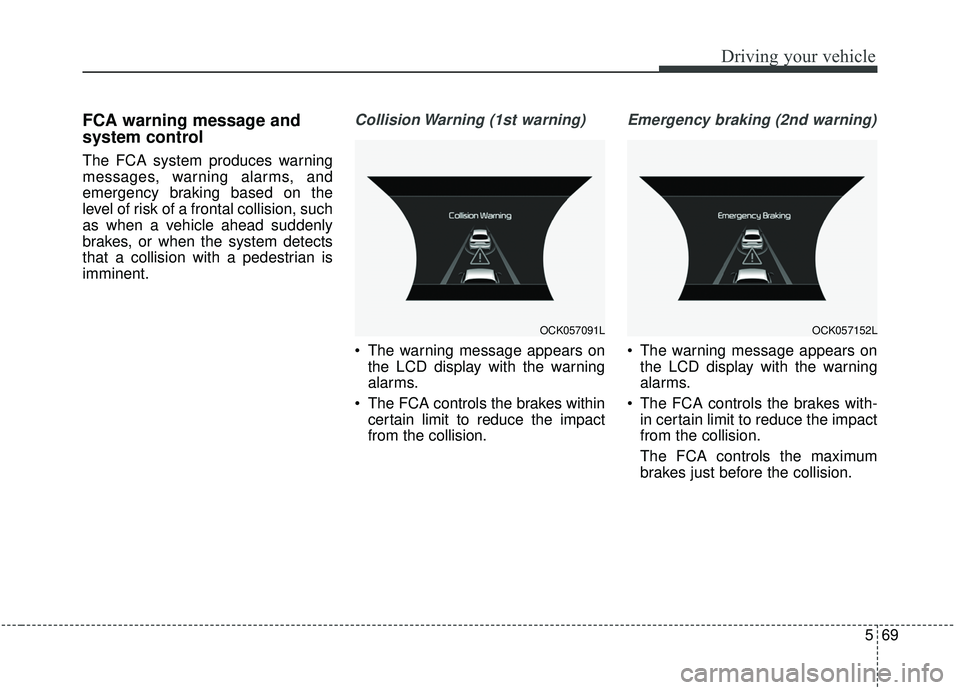
FCA warning message and
system control
The FCA system produces warning
messages, warning alarms, and
emergency braking based on the
level of risk of a frontal collision, such
as when a vehicle ahead suddenly
brakes, or when the system detects
that a collision with a pedestrian is
imminent.
Collision Warning (1st warning)
The warning message appears onthe LCD display with the warning
alarms.
The FCA controls the brakes within certain limit to reduce the impact
from the collision.
Emergency braking (2nd warning)
The warning message appears onthe LCD display with the warning
alarms.
The FCA controls the brakes with- in certain limit to reduce the impact
from the collision.
The FCA controls the maximum
brakes just before the collision.
OCK057091LOCK057152L
Page 331 of 555

Driving your vehicle
78
5
- The radar or camera or camera
lens is damaged.
- If the headlights of the vehicle are not used at night or in a tunnel sec-
tion, or the light is too weak
- If street light or the light of a vehi- cle coming from the opposite direc-
tion is reflected or when sunlight is
reflected by the water on the road
surface
- When the back light is projected in the direction of the vehicle's motion
(including the headlights of vehi-
cles)
- Road sign, shadow on the road, tunnel entrance, toll gate, partial
pavement
- If the moist on the front windshield is not entirely removed or it is
frozen
- The weather is foggy
- The radar/camera sensor recogni- tion is limited.
WARNING
The FCA cannot avoid all colli-
sions. The FCA might not com-
pletely stop the vehicle before a
collision, due to ambient weath-
er and road conditions. The
driver has the responsibility to
drive safely and control the
vehicle.
WARNING
Do not use the FCA systemwhen towing a vehicle. Cancel
the FCA in the User Settings
on the LCD display before
towing. Brake application by
the FCA system while towing
may adversely affect your
safety.
Use extreme caution when the vehicle in front of you has
cargo that extends rearward
from the cab, or when the
vehicle in front of you has
higher ground clearance.
The FCA system is designed to detect and monitor the
vehicle ahead or detect a
pedestrian in the roadway
through radar signals and
camera recognition. It is not
designed to detect bicycles,
motorcycles, or smaller
wheeled objects such as lug-
gage bags, shopping carts, or
strollers.
Page 342 of 555

589
Driving your vehicle
The smart cruise control systemhas malfunctioned.
The accelerator pedal is continu- ously depressed for long time.
When activating the ISG mode.
When the braking control is operat- ed for Forward Collision-Avoidance
Assist(FCA)
The vehicle stops and goes repeat- edly for a long period of time.
When the parking brake is locked. Engine has some problems.
Each of these actions will cancel the
smart cruise control system opera-
tion. (The set speed and vehicle-to-
vehicle distance on the LCD display
will go off.)
If the smart cruise control system is
cancelled automatically, the smart
cruise control system will not
resume even though the RES+ or
SET- lever is moved.
If the smart cruise control system is
canceled during a scenario that is
not discussed in the preceding
"Cancelled automatically" section,
have the system checked by an
authorized Kia dealer.
✽ ✽ NOTICE
If the system is automatically can-
celled, the warning chime will sound
and a message will appear for a few
seconds. You must adjust the vehicle
speed by depressing the accelerator
or brake pedal according to the road
and driving conditions ahead.
Always check the road conditions.
Do not rely on the warning chime.
OCK057098L
Page 346 of 555

593
Driving your vehicle
The vehicle will maintain the setspeed, when the lane ahead is
clear.
The vehicle will slow down or speed up within selected speed to
maintain the selected distance,
when there is a vehicle ahead of
you in the lane. (A vehicle will
appear in front of your vehicle in
the LCD display only when there is
an actual vehicle in front of you)
If the vehicle ahead speeds up, your vehicle will travel at a steady
cruising speed after accelerating to
the selected speed.
The warning chime sounds and LCD display blinks if it is hard to
maintain the selected distance to
the vehicle ahead.
If the warning chime sounds, actively adjust the vehicle speed by
depressing the brake pedal
according to the road condition
ahead and driving condition.
Even if the warning chime is not acti- vated, always pay attention to the
driving conditions to prevent danger-
ous situations from occurring. If the vehicle ahead (vehicle speed:
less than 30 km/h (20 mph)) moves
to the next lane, the warning chime
will sound and a message will
appear.
Adjust your vehicle speed for vehi-
cles or objects that can suddenly
appear in front of you by depressing
the brake pedal according to the
road and driving conditions ahead.In heavy traffic
Use switch or pedal to accelerate
In traffic, your vehicle will stop if the
vehicle ahead of you stops. Also, if
the vehicle ahead of you starts
moving, your vehicle will start as
well. However, if the vehicle stops
for more than 3 seconds, you must
depress the accelerator pedal or
push up the toggle switch (RES+)
to start driving.
OCK057107L
OCK057108L
Page 347 of 555

Driving your vehicle
94
5
If you push the smart cruise control
toggle switch (RES+ or SET-) while
Auto Hold and smart cruise control
is operating the Auto Hold will be
released regardless of accelerator
pedal operation and the vehicle will
start to move. The AUTO HOLD
indicator changes from green to
white. (if equipped with EPB
(Electronic Parking Brake))Radar to detect distance to the
vehicle ahead
The sensor detects distance to the
vehicle ahead.
If the sensor is covered with dirt or
other foreign matter, the vehicle to
vehicle distance control may not
operate correctly.
Always keep the sensor clean.
Radar check message
When the sensor lens cover is blocked
with dirt, snow, or debris, the Smart
Cruise Control System operation may
stop temporarily. If this occurs, a warn-
ing message will appear on the LCD
display. Remove any dirt, snow, or
debris and clean the radar sensor lens
cover before operating the Smart
Cruise Control System. The Smart
Cruise Control system may not prop-
erly activate, if the radar is totally con-
taminated, or if any substance is not
detected after turning ON the engine
(e.g. in an open terrain).OCK057023L
OCK057109L
Page 356 of 555

5103
Driving your vehicle
Your vehicle may be equipped with
the ISG system, which reduces fuel
consumption by automatically shut-
ting down the engine, when the vehi-
cle is at a standstill. (For example :
red light, stop sign and traffic jam)
The engine starts automatically as
soon as the starting conditions are
met.
The ISG system is ON whenever the
engine is running.
✽ ✽NOTICE
When the engine automatically
starts by the ISG system, some
warning lights (ABS, ESC, ESC
OFF, EPS or Parking brake warn-
ing light) may turn on for a few sec-
onds.
This happens because of low battery
voltage. It does not mean the system
has malfunctioned.
Auto stop
To stop the engine in idle stop
mode
Stop the vehicle completely by
pressing the brake pedal when the
shift lever is in the D (Drive) or N
(Neutral) position.
The engine will stop and the green
AUTO STOP( ) indicator on the
instrument cluster will illuminate.
✽ ✽ NOTICE
If you open the engine hood in auto
stop mode, the following will hap-
pen:
• The ISG system will deactivate
(the light on the ISG OFF button
will illuminate).
• A message will appear on the LCD display. (Continued)
ISG (IDLE STOP AND GO) SYSTEM
OCK057144
OCK057095L