display KIA STINGER 2020 Repair Manual
[x] Cancel search | Manufacturer: KIA, Model Year: 2020, Model line: STINGER, Model: KIA STINGER 2020Pages: 555, PDF Size: 13.49 MB
Page 358 of 555

5105
Driving your vehicle
Condition of ISG system oper-
ation
The ISG system will operateunder the following condition:
- The driver’s seat belt is fastened.
- The driver’s door and engine hood are closed.
- The brake vacuum pressure is ade- quate.
- The battery is sufficiently charged.
- The outside temperature is between 14°F to 95°F (-10°C to 35°C).
- The engine coolant temperature is not too low.
✽ ✽ NOTICE
• If the ISG system does not meet
the operation condition, the ISG
system is deactivated. The light on
the ISG OFF button will illumi-
nate and a message “Auto Stop
conditions not met” will appear on
the LCD display.
• If the light or notice comes on con- tinuously, please check the opera-
tion condition.
ISG system deactivation
If you wish to deactivate the ISG
system, press the ISG OFF button
(1). The light on the ISG OFF but-
ton will illuminate.
If you press the ISG OFF button again, the system will be activated
and the light on the ISG OFF but-
ton will turn off.
OCK057026N
Page 367 of 555
Driving your vehicle
114
5
LKA system operation
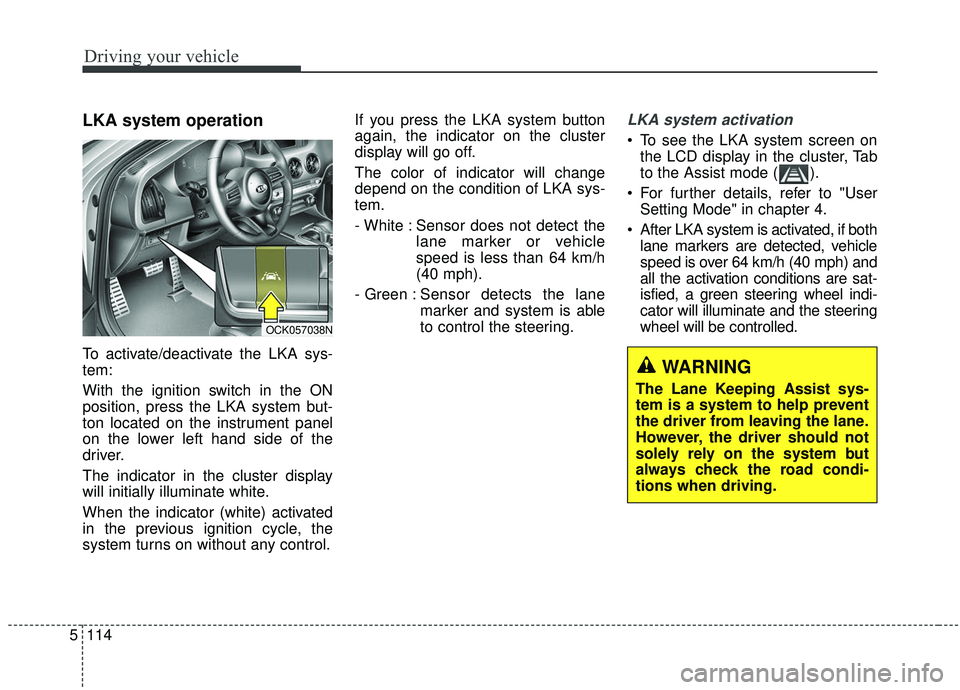
To activate/deactivate the LKA sys-
tem:
With the ignition switch in the ON
position, press the LKA system but-
ton located on the instrument panel
on the lower left hand side of the
driver.
The indicator in the cluster display
will initially illuminate white.
When the indicator (white) activated
in the previous ignition cycle, the
system turns on without any control. If you press the LKA system button
again, the indicator on the cluster
display will go off.
The color of indicator will change
depend on the condition of LKA sys-
tem.
- White : Sensor does not detect the
lane marker or vehicle
speed is less than 64 km/h
(40 mph).
- Green : S ensor detects the lane
marker and system is able
to control the steering.
LKA system activation
To see the LKA system screen on the LCD display in the cluster, Tab
to the Assist mode ( ).
For further details, refer to "User Setting Mode" in chapter 4.
After LKA system is activated, if both lane markers are detected, vehicle
speed is over 64 km/h (40 mph) and
all the activation conditions are sat-
isfied, a green steering wheel indi-
cator will illuminate and the steering
wheel will be controlled.
OCK057038N
WARNING
The Lane Keeping Assist sys-
tem is a system to help prevent
the driver from leaving the lane.
However, the driver should not
solely rely on the system but
always check the road condi-
tions when driving.
Page 368 of 555
5115
Driving your vehicle
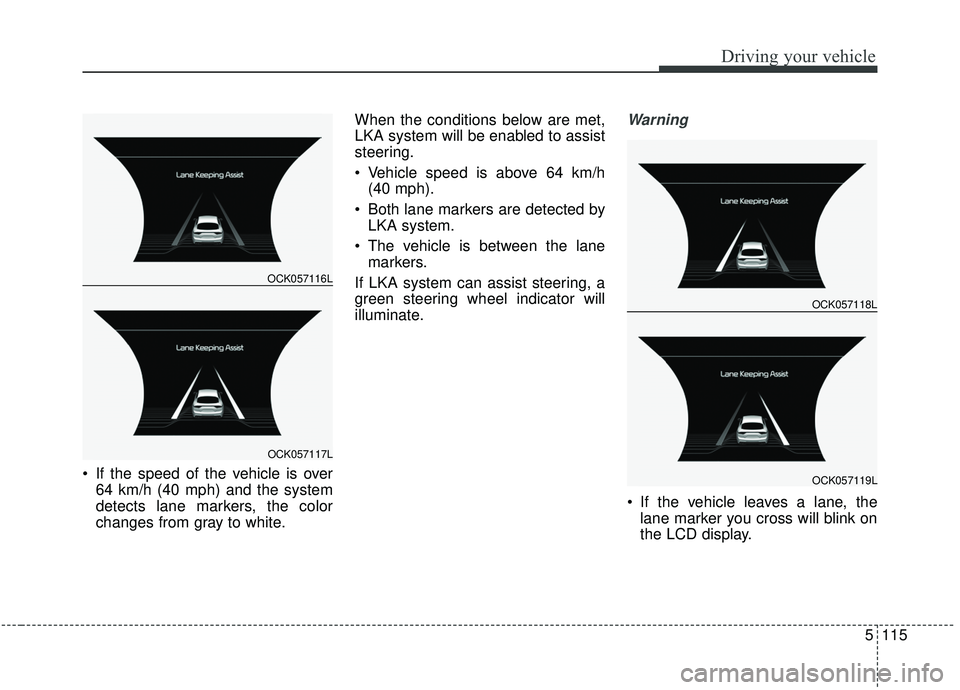
If the speed of the vehicle is over64 km/h (40 mph) and the system
detects lane markers, the color
changes from gray to white. When the conditions below are met,
LKA system will be enabled to assist
steering.
Vehicle speed is above 64 km/h
(40 mph).
Both lane markers are detected by LKA system.
The vehicle is between the lane markers.
If LKA system can assist steering, a
green steering wheel indicator will
illuminate.
Warning
If the vehicle leaves a lane, the lane marker you cross will blink on
the LCD display.
OCK057116L
OCK057117L
OCK057118L
OCK057119L
Page 373 of 555
Driving your vehicle
120
5
LKA system fail indicator
The LKA system fail indicator (yel-
low) will illuminate with an audible
warning if the LKA system is not
working properly. In this case, have
the system checked by an authorized
Kia dealer. When there is a problem with the sys-
tem do one of the following:
Turn the system on after turning
the engine off and on again.
Check if the ignition switch is in the ON position.
Check if the system is affected by the weather. (ex: fog, heavy rain,
etc.)
Check if there is foreign matter on the camera lens
If the problem is not solved, have the
system checked by an authorized
Kia dealer.
LKA system Function Change
The driver can change LKA to Lane
Departure Warning System (LDW
system) or change the LKA system
mode between Standard LKA and
Active LKA from the User Settings
Mode on the LCD display.
The driver can choose them by plac-
ing the ignition switch to the ON posi-
tion and by selecting ‘User Settings’,
‘Driver Assistance’, and ‘Lane
Keeping Assist’.
The system is automatically set to
Standard LKA.
Page 378 of 555

5125
Driving your vehicle
- The second stage alarm can bedeactivated.
To activate the alarm: Go to the User Settings Mode →
Driver Assistance and select
"Blind-Spot Collision Warning
Sound" on the LCD display.
To deactivate the alarm: Go to the User Settings Mode →
Driver Assistance and deselect
"Blind-Spot Collision Warning
Sound" on the LCD display.
✽ ✽
NOTICE
The alarm function helps alert the
driver. Deactivate this function only
when it is necessary.
Detecting sensor
The sensors are located inside of the
rear bumper.
Always keep the rear bumper clean
for the system to work properly.
RCCW (Rear Cross-Traffic
Collision Warning)
When your vehicle moves backwards
from a parking position, the sensor
detects approaching vehicles to the
left or right side direction and gives
information to the driver.
OCK057051L
OYG056140
Page 384 of 555

5131
Driving your vehicle
The Driver Attention Warning (DAW)
system is designed to warn the driv-
er of potentially hazardous driving
situations if it detects inattentive driv-
ing practices.System setting and activation
System setting
The Driver Attention Warning sys-tem is set in the OFF position when
your vehicle is first delivered to you
from the factory.
To turn ON the Driver Attention Warning system, turn on the
engine, and then select 'User
Settings →Assist →Driver
Attention Warning →Normal/Early'
on the LCD display. The driver can select the Driver
Attention Warning system mode.
- Off : The Driver Attention Warningsystem is deactivated.
- Normal : The Driver Attention Warning system alerts the driver
of his/her fatigue level or inatten-
tive driving practices.
- Early : The Driver Attention Warning system alerts the driver
of his/her fatigue level or inatten-
tive driving practices faster than
Normal mode.
The set-up of the Driver Attention Warning system will be maintained
when the engine is re-started.
DRIVER ATTENTION WARNING (DAW, IF EQUIPPED)
Page 385 of 555

Driving your vehicle
132
5
Display of the driver's attention
level
The driver can monitor their driving conditions on the LCD display. - Select 'User Settings Mode' and
then 'Assist' on the LCD display.
(For more information, refer to
"LCD Display" in chapter 4.)
The driver's attention level is dis- played on the scale of 1 to 5. The
lower the number is, the more inat-
tentive the driver is.
The number decreases when the driver does not take a break for a
certain period of time.
The number increases when the driver attentively drives for a cer-
tain period of time.
When the driver turns on the sys- tem while driving, it displays 'Last
Break time'.
Take a break
The "Consider taking a break"message appears on the LCD dis-
play and a warning sounds to sug-
gest that the driver take a break
when the driver's attention level is
below 1.
The Driver Attention Warning sys- tem will not suggest a break when
the total driving time is shorter than
10 minutes.
OCK057137L
OCK057138L
OCK057139L
Page 386 of 555

5133
Driving your vehicle
Resetting the system
The last break time is set to 00:00and the driver's attention level is
set to 5 (very attentive) when the
driver resets the Driver Attention
Warning system.
The driver attention warning sys- tem resets in the following situa-
tions. - The engine is turned OFF.
- The driver unfastens the seat belt
and then opens the driver’s door.
- The driver takes a break from driving that lasts more than 10
minutes.
The driver attention warning sys- tem operates again, when the driv-
er restarts driving.
System disabled
The Driver Attention Warning system
enters the ready status and displays
the 'Disabled' screen in the following
situations.
- The camera sensor is unable todetect the lanes.
- Driving speed remains under 60 km/h (37 mph) or over 180 km/h
(112 mph).
OCK057140L
Page 411 of 555
What to do in an emergency
86
TIRE PRESSURE MONITORING SYSTEM (TPMS)
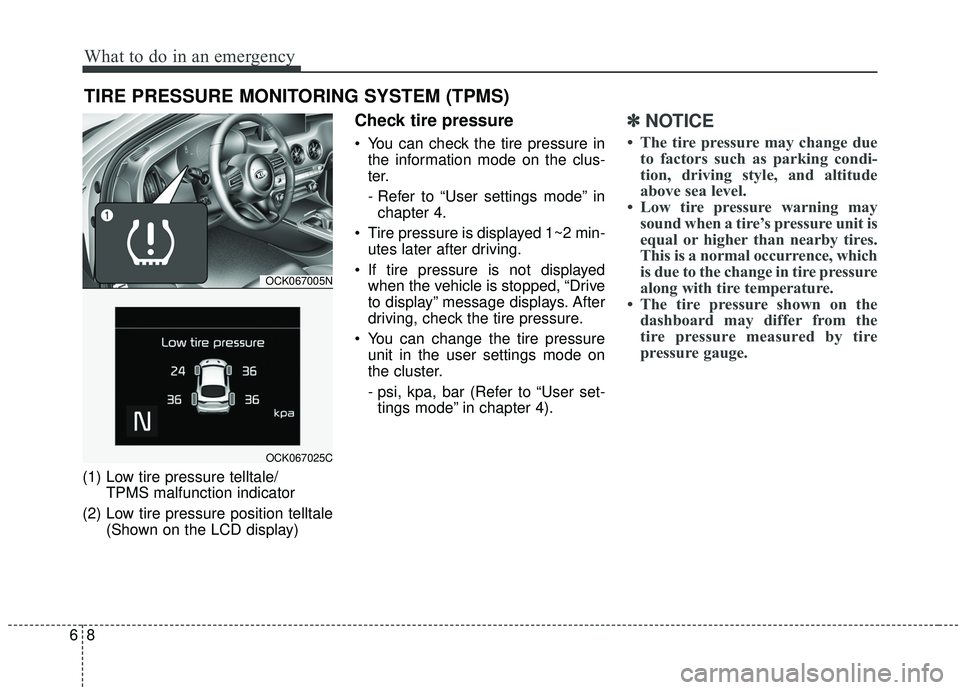
(1) Low tire pressure telltale/TPMS malfunction indicator
(2) Low tire pressure position telltale (Shown on the LCD display)
Check tire pressure
You can check the tire pressure inthe information mode on the clus-
ter.
- Refer to “User settings mode” inchapter 4.
Tire pressure is displayed 1~2 min- utes later after driving.
If tire pressure is not displayed when the vehicle is stopped, “Drive
to display” message displays. After
driving, check the tire pressure.
You can change the tire pressure unit in the user settings mode on
the cluster.
- psi, kpa, bar (Refer to “User set-tings mode” in chapter 4).
✽ ✽ NOTICE
• The tire pressure may change due
to factors such as parking condi-
tion, driving style, and altitude
above sea level.
• Low tire pressure warning may sound when a tire’s pressure unit is
equal or higher than nearby tires.
This is a normal occurrence, which
is due to the change in tire pressure
along with tire temperature.
• The tire pressure shown on the dashboard may differ from the
tire pressure measured by tire
pressure gauge.
OCK067005N
OCK067025C
Page 477 of 555

Maintenance
46
7
Tire speed ratings
The chart below lists many of the dif-
ferent speed ratings currently being
used for passenger vehicles. The
speed rating is part of the tire size
designation on the sidewall of the
tire. This symbol corresponds to that
tire's designed maximum safe oper-
ating speed.3. Checking tire life (TIN : Tire
Identification Number)
Any tires that are over 6 years old,
based on the manufacturing date,
(including the spare tire) should be
replaced by new ones. You can find
the manufacturing date on the tire
sidewall (possibly on the inside of the
wheel), displaying the DOT Code.
The DOT Code is a series of num-
bers on a tire consisting of numbers
and English letters. The manufactur-
ing date is designated by the last four
digits (characters) of the DOT code.
DOT : XXXX XXXX OOOO
The front part of the DOT means a
plant code number, tire size and
tread pattern and the last four num-
bers indicate week and year manu-
factured.
For example:
DOT XXXX XXXX 1618 represents
that the tire was produced in the 16th
week of 2018.
4. Tire ply composition and mate-rial
The number of layers or plies of rub-
ber-coated fabric in the tire. Tire
manufacturers also must indicate the
materials in the tire, which include
steel, nylon, polyester, and others.
The letter "R" means radial ply con-
struction; the letter "D" means diago-
nal or bias ply construction; and the
letter "B" means belted-bias ply con-
struction.
WARNING - Tire age
Replace tires within the recom-
mended time frame. Failure to
replace tires as recommended
can result in sudden tire failure,
which could lead to a loss of
control and an accident.
Speed
Rating
Symbol Maximum Speed
S 180 km/h (112 mph) T 190 km/h (118 mph)
H 210 km/h (130 mph) V 240 km/h (149 mph)
W 270 km/h (168 mph) Y 300 km/h (186 mph)Z Above 240 km/h (149 mph)