warning KIA STINGER 2021 Owners Manual
[x] Cancel search | Manufacturer: KIA, Model Year: 2021, Model line: STINGER, Model: KIA STINGER 2021Pages: 585, PDF Size: 10.87 MB
Page 203 of 585

Features of your vehicle
114 4
✽
✽
NOTICE
1. The warning may not sound
sequentially depending on the
speed and shapes of the objects
detected.
2. Parking Distance Warning system
may malfunction if the vehicle
bumper height or sensor installa-
tion has been modified. Any non-
factory installed equipment or
accessories may also interfere
with the sensor performance.
3. Sensor may not recognize objects
less than 12 in. (30 cm) from the
sensor, or it may sense an incor-
rect distance. Use with caution.
4. When the sensor is frozen or
stained with snow or water, the
sensor may be inoperative until
the stains are removed using a
soft cloth.
5. Do not push, scratch or strike the
sensor with any hard objects that
could damage the surface of the
sensor. Sensor damage could
occur.
✽ ✽
NOTICE
This system can only sense objects
within the range and location of the
sensors, it can not detect objects in
other areas where sensors are not
installed. Also, small or slim objects,
or objects located between sensors
may not be detected.
Always visually check in front and
behind the vehicle when driving.
Be sure to inform any drivers in the
vehicle that may be unfamiliar with
the system regarding the system's
capabilities and limitations.
Pay close attention when the vehicle
is driven close to objects on the
road, particularly pedestrians, and
especially children. Be aware that
some objects may not be detected
by the sensors, due to the objects
distance, size or material, all of
which can limit the effectiveness of
the sensor. Always perform a visual
inspection to make sure the vehicle
is clear of all obstructions before
moving the vehicle in any direction.
Page 204 of 585
4115
Features of your vehicle
Self-diagnosis
When you shift the gear to the R
(Reverse) position and if one or more
of the below occurs you may have a
malfunction in Parking Distance
Warning system.
You don't hear an audible warning
sound or if the buzzer sounds inter-
mittently.
If this occurs, we recommend that the
system be checked by an authorized
Kia dealer.
✽ ✽
NOTICE
Your new vehicle warranty does not
cover any accidents or damage to
the vehicle or injuries to its occu-
pants. Always drive safely and cau-
tiously.
is displayed. (if equipped)
(blinks)
Page 205 of 585

Features of your vehicle
116 4
Rear View Monitor will activate with
the ignition switch ON, engine ON
and the shift lever in the R (Reverse)
position.This system is a supplemental sys-
tem that shows the area behind the
vehicle on the audio screen while
backing up. If the vehicle is equipped
with a navigation system, then will
display the image on the navigation
screen.
This system is a supplemental sys-
tem only. It is the responsibility of
the driver to always check the
inside/outside rearview mirrors and
the area behind the vehicle before
and while backing up.
Always keep the camera lens
clean. If lens is covered with for-
eign matter, the camera may not
operate normally.
REAR VIEW MONITOR (RVM) SYSTEM (IF EQUIPPED)
OCK047403L
OCK048406N
WARNING - Backing &
using camera
Never rely solely on Rear View
Monitor. You must always use
methods of viewing the area
behind you including looking
over both shoulders as well as
continuously checking all three
rear view mirrors. Due to the dif-
ficulty of ensuring that the area
behind you remains clear, always
back up slowly and stop immedi-
ately if you suspect that a per-
son, and especially a child, might
be behind you.
Page 206 of 585
4117
Features of your vehicle
Surround View Monitoring (SVM)
system is not a substitute for proper
and safe parking procedures.
Surround View Monitoring (SVM)
system may not detect every object
surrounding the vehicle. Always drive
safely and use caution when parking.Surround View Monitoring (SVM)
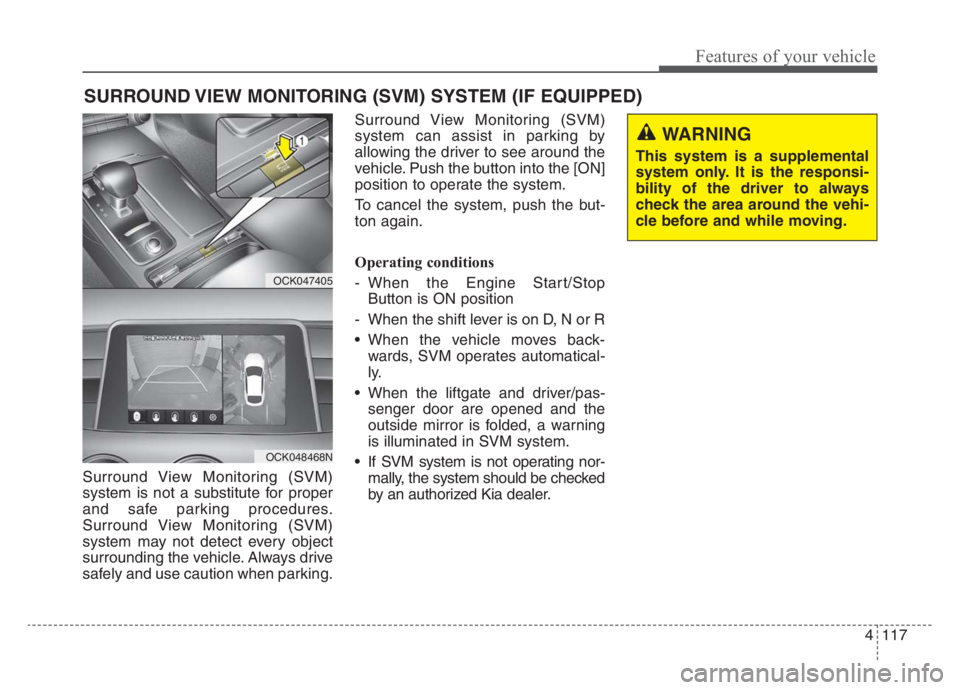
system can assist in parking by
allowing the driver to see around the
vehicle. Push the button into the [ON]
position to operate the system.
To cancel the system, push the but-
ton again.
Operating conditions
- When the Engine Start/Stop
Button is ON position
- When the shift lever is on D, N or R
When the vehicle moves back-
wards, SVM operates automatical-
ly.
When the liftgate and driver/pas-
senger door are opened and the
outside mirror is folded, a warning
is illuminated in SVM system.
If SVM system is not operating nor-
mally, the system should be checked
by an authorized Kia dealer.
SURROUND VIEW MONITORING (SVM) SYSTEM (IF EQUIPPED)
OCK047405
OCK048468N
WARNING
This system is a supplemental
system only. It is the responsi-
bility of the driver to always
check the area around the vehi-
cle before and while moving.
Page 209 of 585

Features of your vehicle
120 4
High beam operation
To turn on the high beam headlamp,
push the lever away from you.
The high beam indicator will light
when the headlight high beams are
switched on.
To prevent the battery from being
discharged, do not leave the lights
on for a prolonged time while the
engine is not running.
WARNING - High beams
Do not use high beam when
there are other vehicles in front
of your vehicle. Using high
beam could obstruct the other
driver's vision.
OCK047414N
CAUTION
Never place anything over the
sensor (1) located on the
instrument panel, this will
ensure better auto-light sys-
tem control.
Don’t clean the sensor using a
window cleaner, the cleaner
may leave a light film which
could interfere with sensor
operation.
If your vehicle has window tint
or other types of metallic coat-
ing on the front windshield,
the Auto light system may not
work properly.
Page 211 of 585

Features of your vehicle
122 4
The high beam switches to low beam
in the following conditions:
- When High Beam Assist (HBA)
system is off.
- When the light switch is not in the
AUTO position.
- When the headlamp is detected
from the on-coming vehicle.
- When the tail lamp is detected
from the front vehicle.
- When the surrounding is bright
enough that high beams are not
needed.
- When streetlights or other lights
are detected.
- When vehicle speed is below 15
mph (24 km/h).
- When headlamp / taillamp of bicy-
cle/motorcycle is detectedThe system may not operate in the
following conditions:
When the light from a vehicle is not
detected because of lamp dam-
age, or because it is hidden from
sight, etc.
When the lamp of a vehicle is cov-
ered with dust, snow or water.
When the light from a vehicle is not
detected because of exhaust fume,
smoke, fog, snow, etc.
When the front window is covered
with foreign matters such as ice,
dust, fog, or is damaged.
When there is a similar shape lamp
with the front vehicle’s lamps.
When it is hard to see because of
fog, heavy rain or snow.
When the headlamp is not repaired
or replaced at an authorized deal-
er.
When headlamp aiming is not
properly adjusted.
When driving on a narrow curved
road or rough road. When driving downhill or uphill.
When only part of the vehicle in
front is visible on a crossroad or
curved road.
When there is a traffic light, reflect-
ing sign, flashing sign or mirror.
When the road conditions are bad
such as being wet or covered with
snow.
When the front vehicle’s head-
lamps are off but the fog lamps on.
When a vehicle suddenly appears
from a curve.
When the vehicle is tilted from a
flat tire or being towed.
When Lane Keeping Assist (LKA)
system warning light illuminates. (if
equipped)
Page 213 of 585

Features of your vehicle
124 4
One-touch lane change function
To activate an one-touch lane
change function, move the turn sig-
nal lever slightly and then release it.
The lane change signals will blink 3,
5 or 7 times.
You can choose one-touch lane
change blinking function in “One
touch turn lamp” of “User setting”.
Refer to “User setting” in chapter 4
✽ ✽
NOTICE
If the turn signal indicator stays on
and does not flash, or if it flashes
abnormally, a bulb may be burned
out or have a poor electrical connec-
tion in the circuit. The bulb may
require replacement.
Check headlight
This warning message illuminates if
there is a malfunction (burned-out
bulb except LED lamp or circuit mal-
function) with the headlamp. In this
case, have your vehicle inspected by
an authorized Kia dealer.
✽ ✽
NOTICE
• When replacing the bulb, use the
same wattage bulb.
For more information, refer to
“BULB WATTAGE” in chapter 8.
• If a different wattage bulb is
installed on the vehicle, this warn-
ing message is not displayed.
Headlight leveling device
(if equipped)
Automatic type
To ensure the proper headlight beam
is used under various conditions, the
headlight beam levels are automati-
cally adjusted depending on the
number of passengers, the weight in
the liftgate, and other driving condi-
tions.
✽ ✽
NOTICE
If it does not work properly even
though your car is inclined backward
according to passenger's posture, or
the headlight beam is irradiated to
the high or low position, have the sys-
tem be inspected by an authorized
Kia dealer.
Do not attempt to inspect or replace
the wiring yourself.OJFA055274
Page 216 of 585

4127
Features of your vehicle
Auto control (if equipped)
The rain sensor (A) located on the
upper end of the windshield glass
senses the amount of rainfall and
controls the wiping cycle for the
proper interval. The more it rains, the
faster the wiper operates. When the
rain stops, the wiper stops.
To vary the speed setting, turn the
speed control knob (1).
If the wiper switch is set in AUTO
mode when the ignition switch is ON,
the wiper will operate once to per-
form a self-check of the system. Set
the wiper to OFF position when the
wiper is not in use.
OCK047458N
CAUTION
When washing the vehicle, set
the wiper switch in the OFF
position to stop the auto wiper
operation.
The wiper may operate and be
damaged if the switch is set in
the AUTO mode while washing
the vehicle.
Do not remove the sensor
cover located on the upper
end of the passenger side
windshield glass. Damage to
system parts could occur and
may not be covered by your
vehicle warranty.
When starting the vehicle in
winter, set the wiper switch in
the OFF position. Otherwise,
wipers may operate and ice
may damage the windshield
wiper blades. Always remove
all snow and ice and defrost
the windshield properly prior
to operating the windshield
wipers.
WARNING
When the ignition switch is ON
and the windshield wiper switch
is placed in the AUTO mode,
use caution in the following sit-
uations to avoid any injury to
the hands or other parts of the
body:
Do not touch the upper end of
the windshield glass facing
the rain sensor.
Do not wipe the upper end of
the windshield glass with a
damp or wet cloth.
Do not put pressure on the
windshield glass.
Page 217 of 585

Features of your vehicle
128 4
Front windshield washers
In the OFF position, pull the lever
gently toward you to spray washer
fluid on the windshield and to run the
wipers 1-3 cycles.
Use this function when the wind-
shield is dirty.
The spray and wiper operation will
continue until you release the lever.
If the washer does not work, check
the washer fluid level. If the fluid level
is not sufficient, you will need to add
appropriate non-abrasive windshield
washer fluid to the washer reservoir.The reservoir filler neck is located in
the front of the engine compartment
on the passenger side.
OCK047419
CAUTION - Washer pump
To prevent possible damage to
the washer pump, do not oper-
ate the washer when the fluid
reservoir is empty.
WARNING - Obscured
visibility
Do not use the washer in freez-
ing temperatures without first
warming the windshield with
the defrosters; the washer solu-
tion could freeze on the wind-
shield and obscure your vision.
CAUTION -Wipers &
windshields
To prevent possible damage
to the wipers or windshield,
do not operate the wipers
when the windshield is dry.
To prevent damage to the wiper
blades, do not use gasoline,
kerosene, paint thinner, or
other solvents on or near them.
To prevent damage to the
wiper arms and other compo-
nents, do not attempt to move
the wipers manually.
Page 218 of 585

4129
Features of your vehicle
Do not use the interior lights for
extended periods when the engine is
not running.
It may cause battery discharge.Automatic turn off function
(if equipped)
The interior lights automatically turn
off approximately 20 minutes after
the ignition switch is turned off, if the
lights are in the ON position.
If your vehicle is equipped with the
theft alarm system, the interior lights
automatically turn off approximately
5 seconds after the system is armed.
Room lamp
: The light stays on at all times.
INTERIOR LIGHTS
WARNING - Interior
Lights
Do not use the interior lights
when driving in the dark.
Accidents could happen
because the view may be
obscured by interior lights.
OCK047421