park assist KIA STINGER 2021 Owners Manual
[x] Cancel search | Manufacturer: KIA, Model Year: 2021, Model line: STINGER, Model: KIA STINGER 2021Pages: 585, PDF Size: 10.87 MB
Page 7 of 585

Introduction
2 1
HOW TO USE THIS MANUAL
We want to help you get the greatest
possible driving pleasure from your
vehicle. Your Owner’s Manual can
assist you in many ways. We strong-
ly recommend that you read the
entire manual. In order to minimize
the chance of death or injury, you
must read the WARNING and CAU-
TION sections in the manual.
Illustrations complement the words
in this manual to best explain how to
enjoy your vehicle. By reading your
manual, you will learn about fea-
tures, important safety information,
and driving tips under various road
conditions.
The general layout of the manual is
provided in the Table of Contents.
Use the index when looking for a
specific area or subject; it has an
alphabetical listing of all information
in your manual.
Sections: This manual has eight sec-
tions plus an index. Each section
begins with a brief list of contents so
you can tell at a glance if that section
has the information you want.You will find various WARNINGs,
CAUTIONs, and NOTICEs in this
manual. These WARNINGs were pre-
pared to enhance your personal safe-
ty. You should carefully read and follow
ALL procedures and recommenda-
tions provided in these WARNINGs,
CAUTIONs and NOTICEs.
✽ ✽
NOTICE
A NOTICE indicates interesting or
helpful information is being provided.
For the optimal engine performance,
we recommend you use unleaded
gasoline which has an octane rating
of RON (Research Octane Number)
95/AKI (Anti Knock Index) 91 or high-
er.
Using Unleaded gasoline with an
octane rating lower than RON 95
could result in loss of engine power
and increase in fuel consumption.
Your new vehicle is designed to
obtain maximum performance with
UNLEADED FUEL, as well as mini-
mize exhaust emissions and spark
plug fouling.
Never add any fuel system cleaning
agents to the fuel tank other than
what has been specified. (Consult an
authorized Kia dealer for details.)
Tighten the cap until it clicks one
time, otherwise the Check Engine
light will illuminate.
WARNING
A WARNING indicates a situa-
tion in which harm, serious bod-
ily injury or death could result if
the warning is ignored.
CAUTION
A CAUTION indicates a situation
in which damage to your vehicle
could result if the caution is
ignored.
FUEL REQUIREMENTS
Page 91 of 585

Mirrors . . . . . . . . . . . . . . . . . . . . . . . . . . . . . . . . . . 4-55
• Inside rearview mirror . . . . . . . . . . . . . . . . . . . . . . . . 4-55
• Outside rearview mirror. . . . . . . . . . . . . . . . . . . . . . . 4-64
Instrument cluster . . . . . . . . . . . . . . . . . . . . . . . . . 4-67
• Instrument cluster control . . . . . . . . . . . . . . . . . . . . . 4-68
• LCD display control . . . . . . . . . . . . . . . . . . . . . . . . . . 4-68
• Gauges . . . . . . . . . . . . . . . . . . . . . . . . . . . . . . . . . . . . . 4-69
• Transmission shift indicator . . . . . . . . . . . . . . . . . . . . 4-72
LCD windows . . . . . . . . . . . . . . . . . . . . . . . . . . . . . 4-73
• Over view . . . . . . . . . . . . . . . . . . . . . . . . . . . . . . . . . . . 4-73
• Trip information (Trip computer) . . . . . . . . . . . . . . . 4-73
• LCD modes. . . . . . . . . . . . . . . . . . . . . . . . . . . . . . . . . . 4-77
• Distance to empty . . . . . . . . . . . . . . . . . . . . . . . . . . . . 4-81
• User settings mode. . . . . . . . . . . . . . . . . . . . . . . . . . . . 4-82
• Warning messages . . . . . . . . . . . . . . . . . . . . . . . . . . . . 4-87
Warning and indicator lights . . . . . . . . . . . . . . . . 4-92
• Warning lights . . . . . . . . . . . . . . . . . . . . . . . . . . . . . . . 4-92
• Indicator lights. . . . . . . . . . . . . . . . . . . . . . . . . . . . . . 4-100
Head Up Display (HUD) . . . . . . . . . . . . . . . . . . . 4-105
• Description . . . . . . . . . . . . . . . . . . . . . . . . . . . . . . . . . 4-105
• Head Up Display on/off. . . . . . . . . . . . . . . . . . . . . . . 4-106
• Head Up Display information . . . . . . . . . . . . . . . . . 4-106
• Head Up Display setting . . . . . . . . . . . . . . . . . . . . . . 4-106
Reverse Parking Distance Warning . . . . . . . . . . 4-107
• Operation of Reverse Parking Distance Warning . 4-107
• Non-operational conditions of Reverse Parking
Distance Warning . . . . . . . . . . . . . . . . . . . . . . . . . . 4-108
• Reverse Parking Distance Warning precautions . . 4-109
• Self-diagnosis . . . . . . . . . . . . . . . . . . . . . . . . . . . . . . . 4-110
Parking Distance Warning (PDW) system . . . . . 4-111
• Operation of Parking Distance Warning. . . . . . . . . 4-111
• Non-operational conditions of Parking Distance
Warning . . . . . . . . . . . . . . . . . . . . . . . . . . . . . . . . . . 4-113
• Self-diagnosis . . . . . . . . . . . . . . . . . . . . . . . . . . . . . . . 4-115
Rear View Monitor (RVM) system . . . . . . . . . . . 4-116
Surround View Monitoring (SVM) system . . . . 4-117
Lighting . . . . . . . . . . . . . . . . . . . . . . . . . . . . . . . . . 4-118
• Battery saver function . . . . . . . . . . . . . . . . . . . . . . . . 4-118
• Daytime running light . . . . . . . . . . . . . . . . . . . . . . . . 4-118
• Lighting control . . . . . . . . . . . . . . . . . . . . . . . . . . . . . 4-118
• High beam operation. . . . . . . . . . . . . . . . . . . . . . . . . 4-120
• High Beam Assist (HBA) system . . . . . . . . . . . . . . . 4-121
• Turn signals and lane change signals . . . . . . . . . . . 4-123
• Check headlight . . . . . . . . . . . . . . . . . . . . . . . . . . . . . 4-124
• Headlight leveling device . . . . . . . . . . . . . . . . . . . . . 4-124
• Dynamic Bending Light (DBL) . . . . . . . . . . . . . . . . 4-125
4
Page 196 of 585

4107
Features of your vehicle
Reverse Parking Distance Warning
assists the driver during backward
movement of the vehicle by chiming if
any object is sensed within a distance
of 120 cm (47 in.) behind the vehicle.
This system is a supplemental sys-
tem and it is not intended to nor does
it replace the need for extreme care
and attention of the driver. The sens-
ing range and objects detectable by
the back sensors (1) are limited.
Whenever backing-up, pay as much
attention to what is behind you as
you would in a vehicle without
Reverse Parking Distance Warning.
Operation of Reverse Parking
Distance Warning
Operating condition
This system will activate when
backing up with the ignition switch
ON.
If the vehicle is moving at a speed
over 5 km/h (3 mph), the system
may not be activated correctly.
The sensing distance while
Reverse Parking Distance Warning
is in operation is approximately
120 cm (47 in.).
When more than two objects are
sensed at the same time, the clos-
est one will be recognized first.
REVERSE PARKING DISTANCE WARNING (IF EQUIPPED)
WARNING
Reverse Parking Distance
Warning is a supplementary
function only. The operation of
Reverse Parking Distance
Warning can be affected by sev-
eral factors (including environ-
mental conditions). It is the
responsibility of the driver to
always check the area behind
the vehicle before and while
backing up.
OCK047400L
Page 200 of 585

4111
Features of your vehicle
Parking Distance Warning assists
the driver during movement of the
vehicle by chiming if any object is
sensed within the distance of 39 in.
(100 cm) in front and 47 in. (120 cm)
behind the vehicle.This system is a supplemental sys-
tem and it is not intended to nor does
it replace the need for extreme care
and attention of the driver.
The sensing range and objects
detectable by the sensors (➀) are
limited. Whenever moving pay as
much attention to what is in front and
behind of you as you would in a vehi-
cle without Parking Distance
Warning.
Operation of Parking Distance
Warning
Operating condition
This system activates when Parking
Distance Warning button is pressed
with the ignition switch ON.
The indicator of Parking Distance
Warning button turns on automati-
cally and activates Parking Distance
Warning when you shift the gear to
the R (Reverse) position. It will turn
off automatically when you drive
above 12.4 mph (20 km/h).
PARKING DISTANCE WARNING (PDW) SYSTEM (IF EQUIPPED)
WARNING
Parking Distance Warning is a
supplemental system only.
The operation of Parking
Distance Warning can be affect-
ed by several factors (including
environmental conditions).
It is the responsibility of the
driver to always check the areas
around the vehicle before and
while parking.
OCK047400L
OCK047401L
■Rear
■Front
OCK047402N
Page 206 of 585
4117
Features of your vehicle
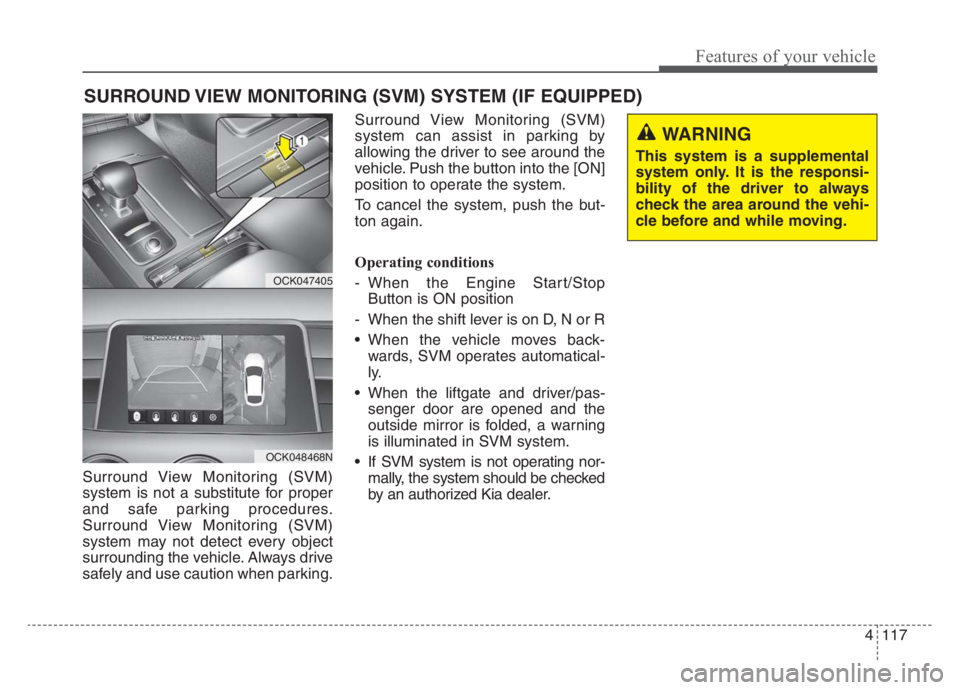
Surround View Monitoring (SVM)
system is not a substitute for proper
and safe parking procedures.
Surround View Monitoring (SVM)
system may not detect every object
surrounding the vehicle. Always drive
safely and use caution when parking.Surround View Monitoring (SVM)
system can assist in parking by
allowing the driver to see around the
vehicle. Push the button into the [ON]
position to operate the system.
To cancel the system, push the but-
ton again.
Operating conditions
- When the Engine Start/Stop
Button is ON position
- When the shift lever is on D, N or R
When the vehicle moves back-
wards, SVM operates automatical-
ly.
When the liftgate and driver/pas-
senger door are opened and the
outside mirror is folded, a warning
is illuminated in SVM system.
If SVM system is not operating nor-
mally, the system should be checked
by an authorized Kia dealer.
SURROUND VIEW MONITORING (SVM) SYSTEM (IF EQUIPPED)
OCK047405
OCK048468N
WARNING
This system is a supplemental
system only. It is the responsi-
bility of the driver to always
check the area around the vehi-
cle before and while moving.
Page 326 of 585

565
Driving your vehicle
Good braking practices
Check to be sure the parking brake
is not engaged and the parking
brake indicator light is out before
driving away.
Driving through water may get the
brakes wet. They can also get wet
when the vehicle is washed. Wet
brakes can be dangerous! Your
vehicle will not stop as quickly if the
brakes are wet. Wet brakes may
cause the vehicle to pull to one side.
To dry the brakes, apply the brakes
lightly until the braking action
returns to normal, taking care to
keep the vehicle under control at all
times. If the braking action does not
return to normal, stop as soon as it
is safe to do so and call an author-
ized Kia dealer for assistance.
Don't coast down hills with the
vehicle out of gear. This is extreme-
ly hazardous. Keep the vehicle in
gear at all times, use the brakes to
slow down, then shift to a lower
gear so that engine braking will
help you maintain a safe speed. Don't "ride" the brake pedal.
Resting your foot on the brake
pedal while driving can be danger-
ous because the brakes might
overheat and lose their effective-
ness. It also increases the wear of
the brake components.
If a tire goes flat while you are driv-
ing, apply the brakes gently and
keep the vehicle pointed straight
ahead while you slow down. When
you are moving slowly enough for it
to be safe to do so, pull off the road
and stop in a safe place.
If your vehicle is equipped with an
Automatic Transmission, don't let
your vehicle creep forward. To
avoid creeping forward, keep your
foot firmly on the brake pedal when
the vehicle is stopped.WARNING- Maintaining
Brake Pressure on Incline
HAC does not replace the need
to apply brakes while stopped on
an incline. While stopped, make
sure you maintain brake pres-
sure sufficient to prevent your
vehicle from rolling backward
and causing an accident. Don’t
release the brake pedal until you
are ready to accelerate forward.
Page 351 of 585

Driving your vehicle
90 5
Smart Cruise Control system has
malfunctioned.
The accelerator pedal is continu-
ously depressed for long time.
When activating the ISG mode.
When the braking control is operat-
ed for Forward Collision-Avoidance
Assist(FCA)
The vehicle stops and goes repeat-
edly for a long period of time.
When the parking brake is locked. Engine has some problems.
Each of these actions will cancel
Smart Cruise Control system opera-
tion. (The set speed and vehicle-to-
vehicle distance on the LCD display
will go off.)
If Smart Cruise Control system is
cancelled automatically, Smart
Cruise Control system will not
resume even though the RES+ or
SET- lever is moved.
If Smart Cruise Control system is
canceled during a scenario that is
not discussed in the preceding
"Cancelled automatically" section,
have the system checked by an
authorized Kia dealer.
✽ ✽
NOTICE
If the system is automatically can-
celled, the warning chime will sound
and a message will appear for a few
seconds. You must adjust the vehicle
speed by depressing the accelerator
or brake pedal according to the road
and driving conditions ahead.
Always check the road conditions.
Do not rely on the warning chime.
OCK057098L
Page 388 of 585

5127
Driving your vehicle
RCCW (Rear Cross-Traffic
Collision Warning)
When your vehicle moves backwards
from a parking position, the sensor
detects approaching vehicles to the
left or right side direction and gives
information to the driver.
Operating conditions
Select RCCW (Rear Cross-Traffic
Collision Warning) in “User
Settings” under “Driver Assistance”
on the instrument cluster. The sys-
tem will turn on and standby to
activate.
Select RCCW again, to turn the
system off.
If the vehicle is turned off, RCCW
system will remember the last set-
tings upon restart.
The system operates when the
vehicle speed is below 6 mph (10
km/h) with the shift lever in R
(Reverse).
RCCW (Rear Cross-Traffic
Collision Warning) detecting range
is 1.6 feet ~ 65 feet (0.5 m ~ 20 m)
based on the side direction. If the
approaching vehicle speed is
2.5 mph (4 km/h) ~ 22 mph (36
km/h) within sensing range, it is
detected. However, the system
sensing range can vary based on
conditions. Always pay attention to
your surroundings.
Warning type
OCK057048
OYG056144L
OCK057050
OYG056140
Page 417 of 585

63
What to do in an emergency
If the engine stalls at a cross-
road or crossing
If the engine stalls at a crossroad or
crossing, set the shift lever in the N
(Neutral) position and then push the
vehicle to a safe place.
If you have a flat tire while
driving
If a tire goes flat while you are driv-
ing:
1. Take your foot off the accelerator
pedal and let the vehicle slow
down while driving straight ahead.
Do not apply the brakes immedi-
ately or attempt to pull off the road
as this may cause a loss of con-
trol. When the vehicle has slowed
to such a speed that it is safe to do
so, brake carefully and pull off the
road. Drive off the road as far as
possible and park on firm level
ground. If you are on a divided
highway, do not park in the median
area between the two traffic lanes.2. When the vehicle is stopped, turn
on your emergency hazard flash-
ers, set the parking brake and put
the transmission in P.
3. Have all passengers get out of the
vehicle. Be sure they all get out on
the side of the vehicle that is away
from traffic.
4. When changing a flat tire, follow
the instruction provided later in
this section.
If the engine stalls while driv-
ing
1. Reduce your speed gradually,
keeping a straight line. Move cau-
tiously off the road to a safe place.
2. Turn on your emergency flashers.
3. Try to start the engine again. If
your vehicle will not start, contact
an authorized Kia dealer or seek
other qualified assistance.
✽ ✽
NOTICE
If there was a check engine light and
loss of power or stall and if safe to do
so, wait at least 10 seconds to restart
the vehicle after it stalls. This may
reset the car so it will no longer run
at low power (limp home) condition.
IN CASE OF AN EMERGENCY WHILE DRIVING
Page 418 of 585

What to do in an emergency
4 6
IF THE ENGINE WILL NOT START
If engine doesn't turn over or
turns over slowly
1. Be sure the shift lever is in N
(Neutral) or P (Park) and the
emergency brake is set.
2. Check the battery connections to
be sure they are clean and tight.
3. Turn on the interior light. If the light
dims or goes out when you oper-
ate the starter, the battery is dis-
charged.
4. Check the starter connections to
be sure they are securely tight-
ened.
5. Do not push or pull the vehicle to
start it. See instructions for "Jump
starting".
If engine turns over normally
but does not start
1. Check the fuel level.
2. With the Engine Start/Stop Button
in the OFF position, check all con-
nectors at the ignition coils and
spark plugs. Reconnect any that
may be disconnected or loose.
3. Check the fuel line in the engine
compartment.
4. If the engine still does not start,
call an authorized Kia dealer or
seek other qualified assistance.
WARNING - Push/
pull start
Do not push or pull the vehicle
to start it. Push or pull starting
may cause the catalytic con-
verter to overload and create a
fire hazard.