window KIA TELLURIDE 2020 Navigation System Quick Reference Guide
[x] Cancel search | Manufacturer: KIA, Model Year: 2020, Model line: TELLURIDE, Model: KIA TELLURIDE 2020Pages: 219, PDF Size: 9.16 MB
Page 98 of 219
5-22
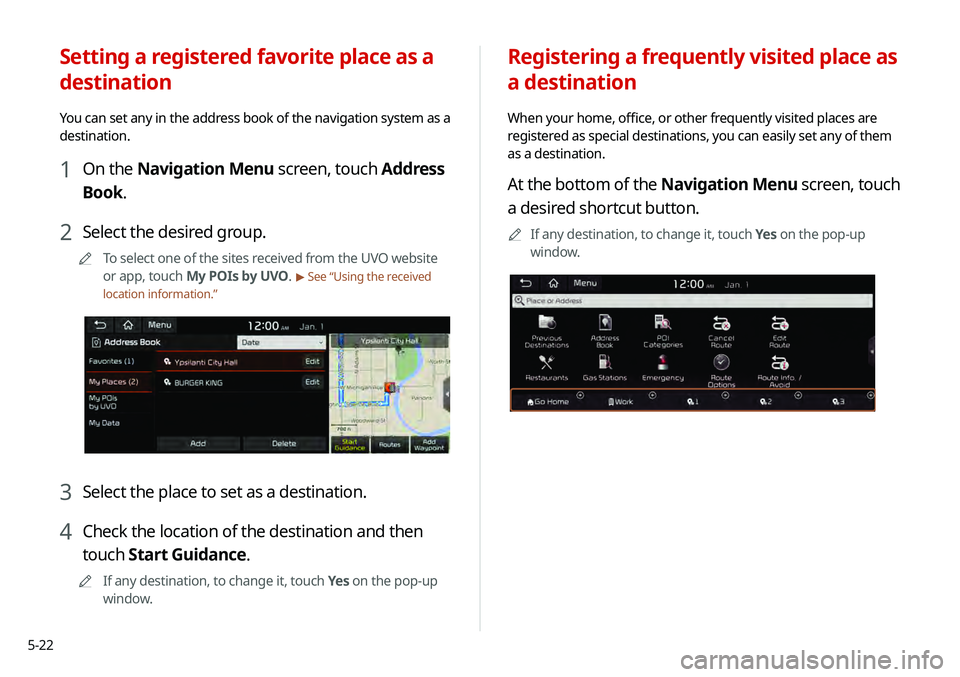
Registering a frequently visited place as
a destination
When your home, office, or other frequently visited places are
registered as special destinations, you can easily set any of them
as a destination.
At the bottom of the Navigation Menu screen, touch
a desired shortcut button.
0000
A
If any destination, to change it, touch Yes on the pop-up
window.
Setting a registered favorite place as a
destination
You can set any in the address book of the navigation system as a
destination.
1 On the Navigation Menu screen, touch Address
Book.
2 Select the desired group.
0000
A
To select one of the sites received from the UVO website
or app, touch My POIs by UVO.
> See “Using the received
location information.”
3 Select the place to set as a destination.
4 Check the location of the destination and then
touch Start Guidance.
0000
A
If any destination, to change it, touch Yes on the pop-up
window.
Page 111 of 219
6-3
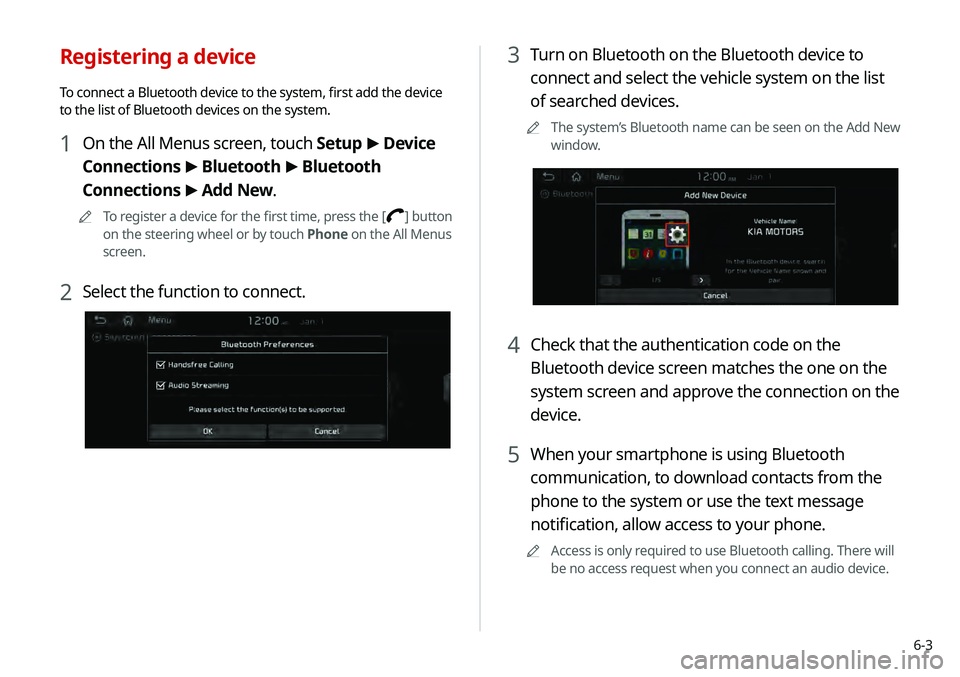
3 Turn on Bluetooth on the Bluetooth device to
connect and select the vehicle system on the list
of searched devices.
0000
A
The system’s Bluetooth name can be seen on the Add New
window.
4 Check that the authentication code on the
Bluetooth device screen matches the one on the
system screen and approve the connection on the
device.
5 When your smartphone is using Bluetooth
communication, to download contacts from the
phone to the system or use the text message
notification, allow access to your phone.
0000
A
Access is only required to use Bluetooth calling. There will
be no access request when you connect an audio device.
Registering a device
To connect a Bluetooth device to the system, first add the device
to the list of Bluetooth devices on the system.
1 On the All Menus screen, touch Setup >
Device
Connections >
Bluetooth >
Bluetooth
Connections >
Add New.
0000
A
To register a device for the first time, press the [] button
on the steering wheel or by touch Phone on the All Menus
screen.
2 Select the function to connect.
Page 125 of 219
6-17
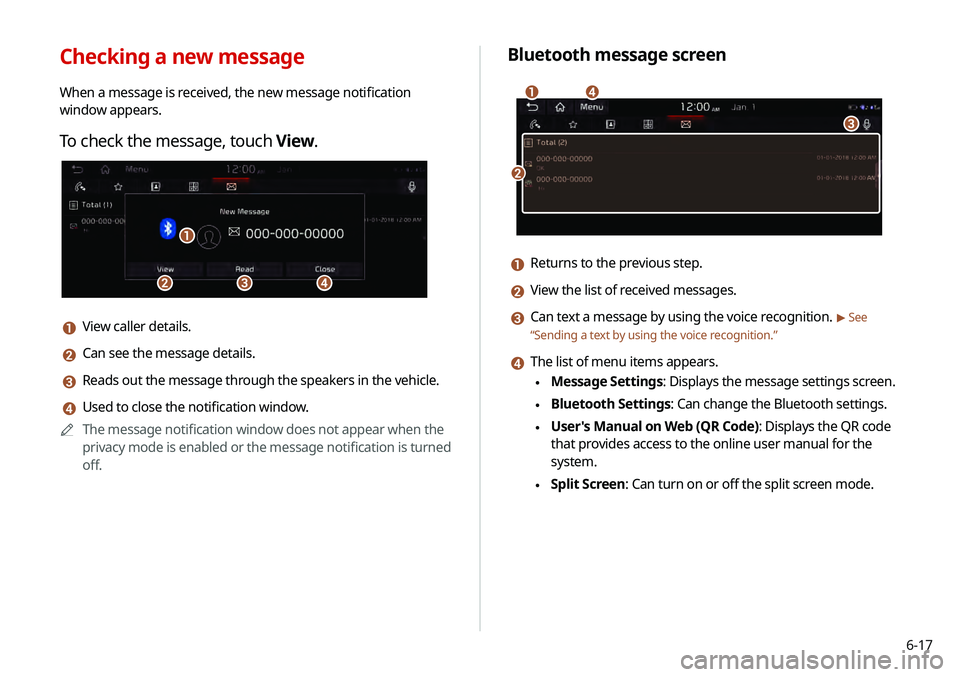
Bluetooth message screen
\037
\036
\035
\034
a Returns to the previous step.
b View the list of received messages.
c Can text a message by using the voice recognition. > See
“ Sending a text by using the voice recognition .”
d The list of menu items appears.
\225Message Settings: Displays the message settings screen.
\225Bluetooth Settings: Can change the Bluetooth settings.
\225User's Manual on Web (QR Code): Displays the QR code
that provides access to the online user manual for the
system.
\225Split Screen: Can turn on or off the split screen mode.
Checking a new message
When a message is received, the new message notification
window appears.
To check the message, touch View.
\037\036
\035
\034
a View caller details.
b Can see the message details.
c Reads out the message through the speakers in the vehicle.
d Used to close the notification window.
0000
A
The message notification window does not appear when the
privacy mode is enabled or the message notification is turned
off.
Page 130 of 219

7-2
Voice recognition
With the voice recognition function, you can access various
functions of the infotainment system without manipulating the
screen or buttons. This function prevents driver distraction and
dangerous situations.
Use voice commands to access various functions easily.0000
A
The system can recognize the specified voice commands.
> See “ Available voice commands” or the voice recognition help.
0000
A
Note the following for accurate delivery of command when
saying it.
-Pronounce a command accurately and naturally like a
conversation.
-Keep the correct posture and say commands toward the
direction of the microphone.
0000
A
Voice recognition is automatically ended when:
-You make or receive a call.
-A media source is connected or disconnected.
-The front or rear cameras operate (if equipped).
-The
[RADIO] or [MEDIA] button is pressed to perform
another function.
- Rerouting or other unexpected action is made due to
deviation from the route during guidance. 0000
A
Voice recognition may not work properly when:
-The sunroof or windows are open so the wind is strong.
-The fan speed of the air conditioner or heater is high (level
3 or below is recommended).
-The vehicle is passing through a tunnel.
-The vehicle is driving on an unpaved road and its noise and
vibration are loud.
-Noise is loud due to a heavy rain or storm.
Using the voice recognition
1 On the steering wheel, press the [] button.
Voice recognition starts along with voice guidance.
0000
A
To skip the voice guidance, press the [
] button on the
steering wheel.
2 When a beep sound is heard, say a command to
perform (e.g. navigation, music, call).
> See “ Available
voice commands” or the voice recognition help.
The recognized command appears in text at the top of the
screen and the corresponding function is performed. 0000
A
When an additional command is required to perform, the
commands that can be followed in the next step appear
on the screen. Say a command or touch a command.
0000
A
When there are several similar commands, say a
command number to perform.
Page 176 of 219
9-16
Display
You can specify the information to display on the navigation map
screen.
Unit
You can set the distance unit of the navigation map to mile or
km.
Show Previous Destinations after Navigation
Start-up
You can set to automatically display the previous destinations on
a pop-up window when the navigation system starts.
Auto Re-center Map
You can set the system to automatically display the current
position when the specified period of time elapses after changing
to another position on the map.
Save Previous Destinations
You can set to automatically save the previous destinations,
searched ones, and starting points.
Speed Limits
Sets whether or not to display the speed limits on the screen.
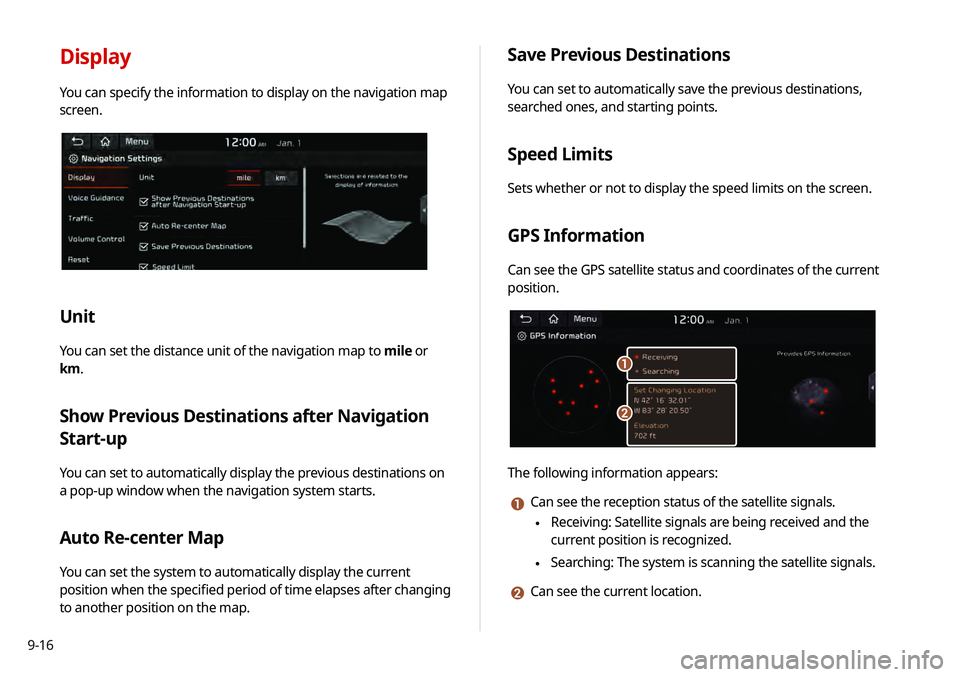
GPS Information
Can see the GPS satellite status and coordinates of the current
position.
\037
\036
The following information appears:
a Can see the reception status of the satellite signals.
\225 Receiving: Satellite signals are being received and the
current position is recognized.
\225Searching: The system is scanning the satellite signals.
b Can see the current location.
Page 177 of 219
9-17
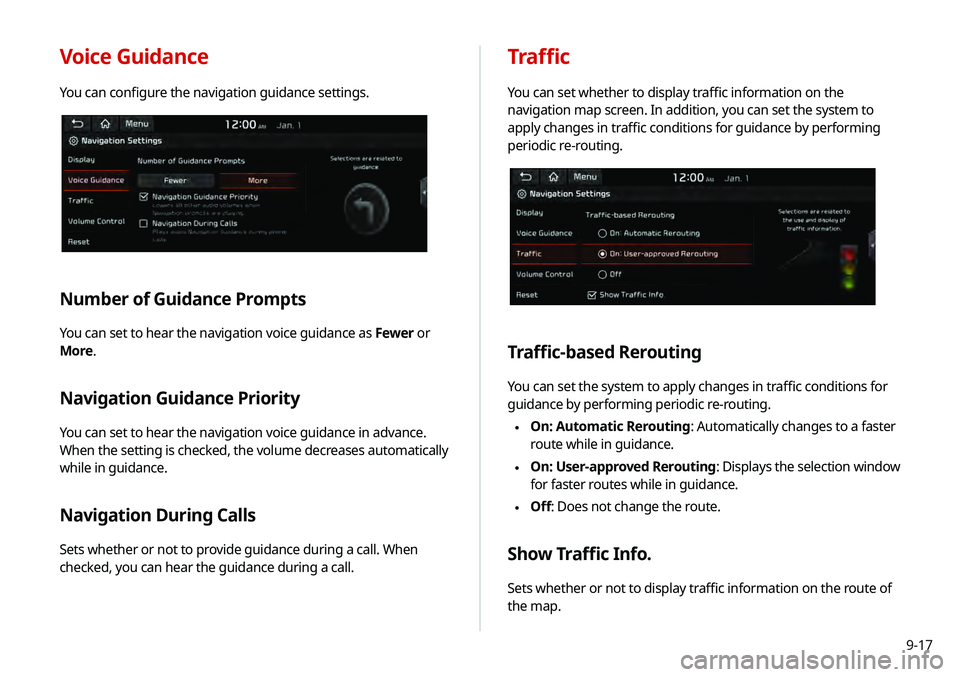
Voice Guidance
You can configure the navigation guidance settings.
Number of Guidance Prompts
You can set to hear the navigation voice guidance as Fewer or
More.
Navigation Guidance Priority
You can set to hear the navigation voice guidance in advance.
When the setting is checked, the volume decreases automatically
while in guidance.
Navigation During Calls
Sets whether or not to provide guidance during a call. When
checked, you can hear the guidance during a call.
Traffic
You can set whether to display traffic information on the
navigation map screen. In addition, you can set the system to
apply changes in traffic conditions for guidance by performing
periodic re-routing.
Traffic-based Rerouting
You can set the system to apply changes in traffic conditions for
guidance by performing periodic re-routing.
\225 On: Automatic Rerouting: Automatically changes to a faster
route while in guidance.
\225On: User-approved Rerouting
: Displays the selection window
for faster routes while in guidance.
\225 Off: Does not change the route.
Show Traffic Info.
Sets whether or not to display traffic information on the route of
the map.
Page 182 of 219
9-22
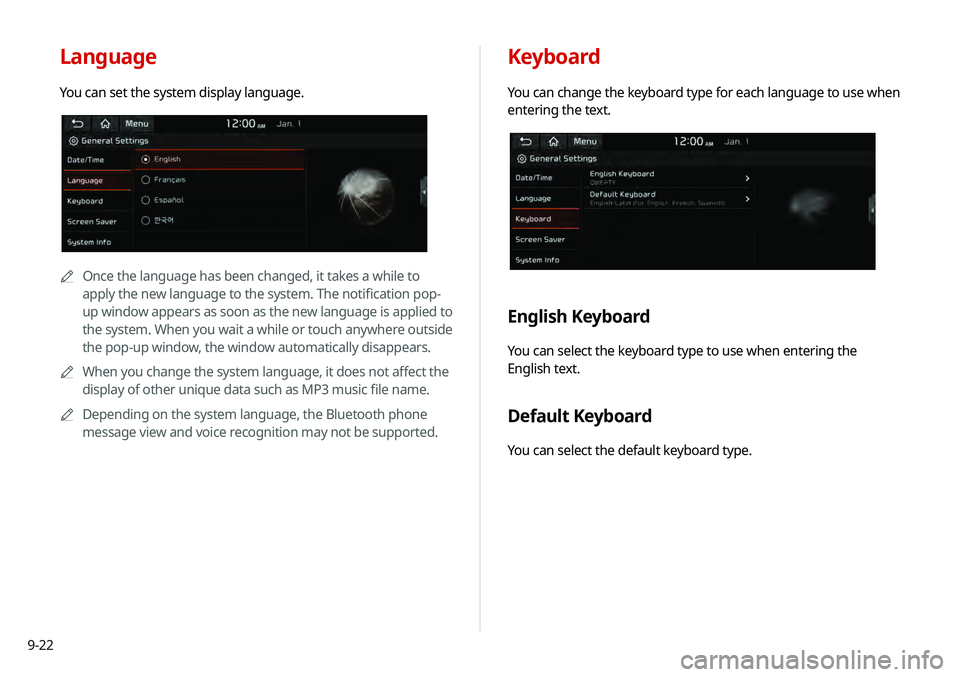
Keyboard
You can change the keyboard type for each language to use when
entering the text.
English Keyboard
You can select the keyboard type to use when entering the
English text.
Default Keyboard
You can select the default keyboard type.
Language
You can set the system display language.
0000
A
Once the language has been changed, it takes a while to
apply the new language to the system. The notification pop-
up window appears as soon as the new language is applied to
the system. When you wait a while or touch anywhere outside
the pop-up window, the window automatically disappears.
0000
A
When you change the system language, it does not affect the
display of other unique data such as MP3 music file name.
0000
A
Depending on the system language, the Bluetooth phone
message view and voice recognition may not be supported.
Page 198 of 219
10-12
Broadcast reception
QI turned on the radio while driving but I heard no sound
but noise.
ADepending on the location, obstacles may cause
reception to deteriorate.
Radio reception rate may also drop when an on-glass
antenna is mounted on the rear window and the window
is tinted with metallic window films.
QI bought a new mobile phone and want to replace my old
phone with the new one to connect the system. How can
I register the new phone to the system?
AAn additional device can be registered in the same way
as in registration of a new device. You can register up
to 6 devices in the list of Bluetooth devices. To delete a
previously registered device, touch Delete Devices from
the list of Bluetooth devices, select the device to delete,
and then touch Delete.
> See “Deleting a registered device.”
QHow can I access the list of contacts while using a
Bluetooth phone?
AApprove access to the contacts when connecting your
mobile phone to the system via Bluetooth. The list of
contacts on the phone is downloaded to the system.
To see the downloaded list of contacts, press the [
]
button on the steering wheel and touch
on the call
screen. You can search for a contact and make a call to
the contact, or add the contact to the favorites.
> See
“ Dialing from the contacts.”