window KIA VENGA 2011 User Guide
[x] Cancel search | Manufacturer: KIA, Model Year: 2011, Model line: VENGA, Model: KIA VENGA 2011Pages: 761, PDF Size: 34.65 MB
Page 97 of 761
421
Features of your vehicle
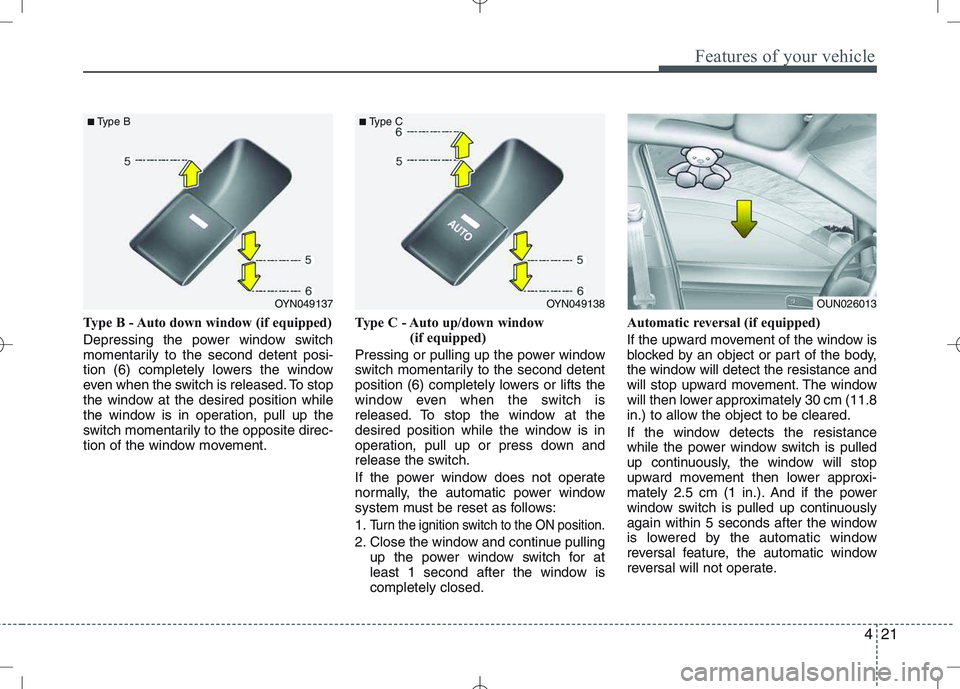
Type B - Auto down window (if equipped)
Depressing the power window switch
momentarily to the second detent posi-
tion (6) completely lowers the window
even when the switch is released. To stop
the window at the desired position while
the window is in operation, pull up the
switch momentarily to the opposite direc-
tion of the window movement.Type C - Auto up/down window
(if equipped)
Pressing or pulling up the power window
switch momentarily to the second detent
position (6) completely lowers or lifts the
window even when the switch is
released. To stop the window at the
desired position while the window is in
operation, pull up or press down and
release the switch.
If the power window does not operate
normally, the automatic power window
system must be reset as follows: 1.
Turn the ignition switch to the ON position.
2. Close the window and continue pulling up the power window switch for at
least 1 second after the window iscompletely closed. Automatic reversal (if equipped)
If the upward movement of the window is
blocked by an object or part of the body,
the window will detect the resistance and
will stop upward movement. The window
will then lower approximately 30 cm (11.8
in.) to allow the object to be cleared.
If the window detects the resistance
while the power window switch is pulled
up continuously, the window will stop
upward movement then lower approxi-
mately 2.5 cm (1 in.). And if the power
window switch is pulled up continuously
again within 5 seconds after the window
is lowered by the automatic window
reversal feature, the automatic window
reversal will not operate.
OYN049137
■
Type BOYN049138
■
Type COUN026013
Page 98 of 761
Features of your vehicle
22
4
✽✽
NOTICE
The automatic reverse feature for the
window is only active when the “auto
up” feature is used by fully pulling up
the switch. The automatic reverse fea-
ture will not operate if the window is
raised using the halfway position on the
power window switch.
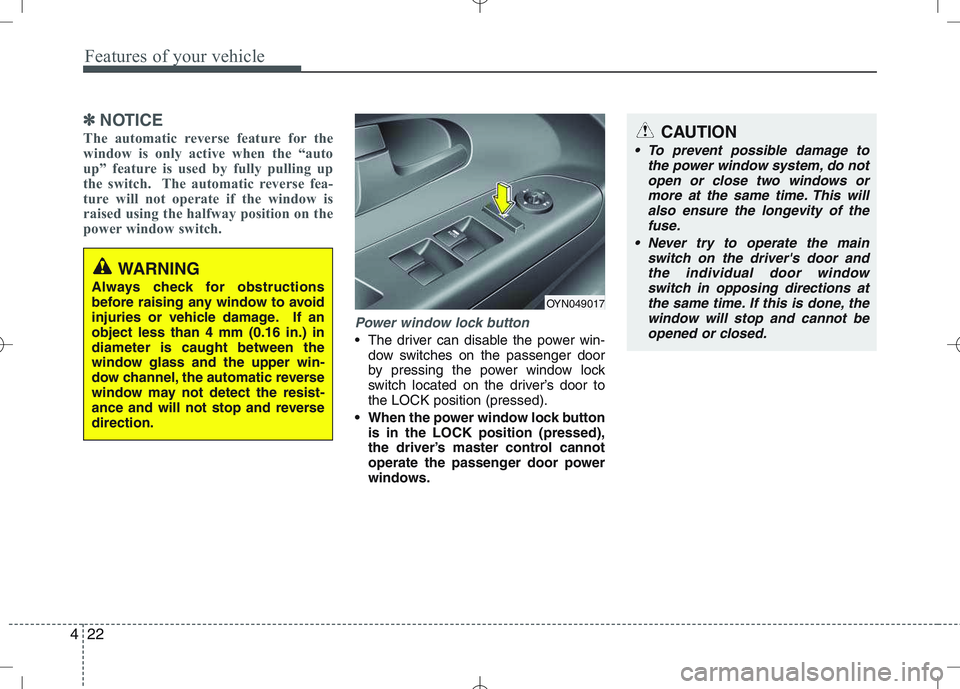
Power window lock button
The driver can disable the power win- dow switches on the passenger door
by pressing the power window lock
switch located on the driver’s door tothe LOCK position (pressed).
When the power window lock button is in the LOCK position (pressed),
the driver’s master control cannot
operate the passenger door power
windows.
CAUTION
To prevent possible damage to
the power window system, do not
open or close two windows or more at the same time. This willalso ensure the longevity of thefuse.
Never try to operate the main switch on the driver's door andthe individual door window switch in opposing directions at
the same time. If this is done, the window will stop and cannot beopened or closed.
WARNING
Always check for obstructions
before raising any window to avoid
injuries or vehicle damage. If anobject less than 4 mm (0.16 in.) indiameter is caught between the
window glass and the upper win-
dow channel, the automatic reverse
window may not detect the resist-
ance and will not stop and reversedirection.
OYN049017
Page 99 of 761
423
Features of your vehicle
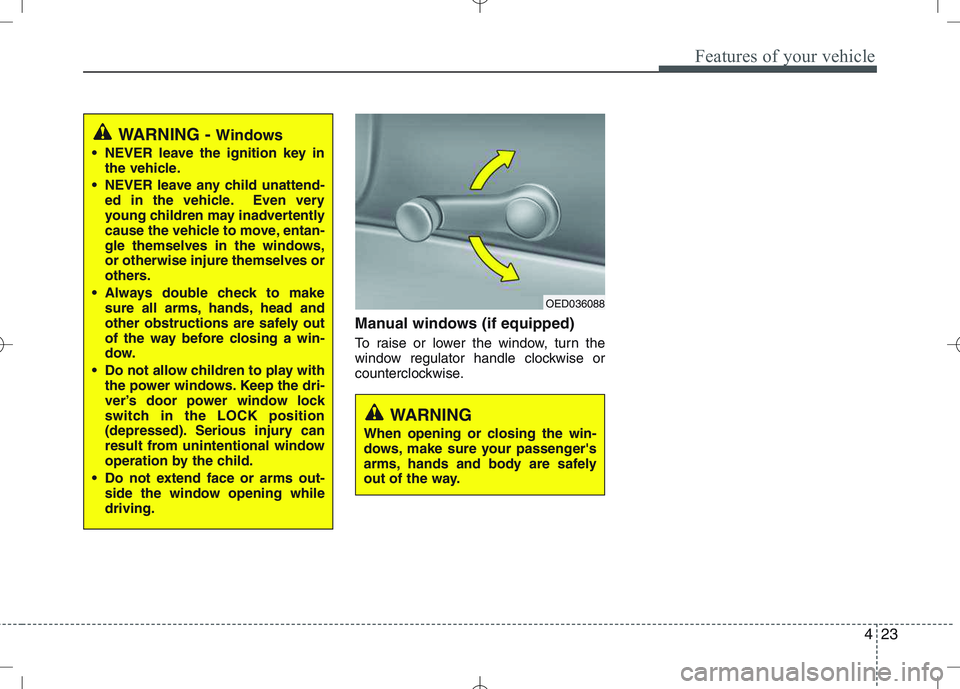
Manual windows (if equipped)
To raise or lower the window, turn the
window regulator handle clockwise or
counterclockwise.
WARNING - Windows
NEVER leave the ignition key in the vehicle.
NEVER leave any child unattend- ed in the vehicle. Even very
young children may inadvertently
cause the vehicle to move, entan-
gle themselves in the windows,or otherwise injure themselves or
others.
Always double check to make sure all arms, hands, head and
other obstructions are safely out
of the way before closing a win-
dow.
Do not allow children to play with the power windows. Keep the dri-
ver’s door power window lock
switch in the LOCK position
(depressed). Serious injury can
result from unintentional window
operation by the child.
Do not extend face or arms out- side the window opening whiledriving.
OED036088
WARNING
When opening or closing the win-
dows, make sure your passenger's
arms, hands and body are safely
out of the way.
Page 111 of 761

435
Features of your vehicle
Inside rearview mirror
Adjust the rearview mirror so that the
center view through the rear window is
seen. Make this adjustment before you
start driving.
Day/night rearview mirror (if equipped)
Make this adjustment before you start
driving and while the day/night lever is in
the day position.
Pull the day/night lever toward you to reduce glare from the headlights of the
vehicles behind you during night driving.
Remember that you lose some rearviewclarity in the night position.
Electrochromic mirror (ECM)
(if equipped)
The electric rearview mirror automatical- ly controls the glare from the headlights
of the car behind you in nighttime or low
light driving conditions. The sensormounted in the mirror senses the light
level around the vehicle, and automati-cally controls the headlight glare from
vehicles behind you.
When the engine is running, the glare is
automatically controlled by the sensor
mounted in the rearview mirror.
Whenever the shift lever is shifted into
reverse (R), the mirror will automatically
go to the brightest setting in order to
improve the drivers view behind the vehi-
cle.
MIRRORS
OAM049023
CAUTION
When cleaning the mirror, use a
paper towel or similar material dampened with glass cleaner. Donot spray glass cleaner directly on
the mirror as that may cause the liq-uid cleaner to enter the mirror hous-ing.
Day
Night
WARNING - Rear visibility
Do not place objects in the rear
seat or cargo area which would
interfere with your vision out the
rear window.
WARNING
Do not adjust the rearview mirror
while the vehicle is moving. This
could result in loss of control, and
an accident which could cause
death, serious injury or property
damage.
WARNING
Do not modify the inside mirror and
do not install a wide mirror. It could
result in injury, during an accident
or deployment of the air bag.
Page 115 of 761
439
Features of your vehicle
Electric Type (if equipped)
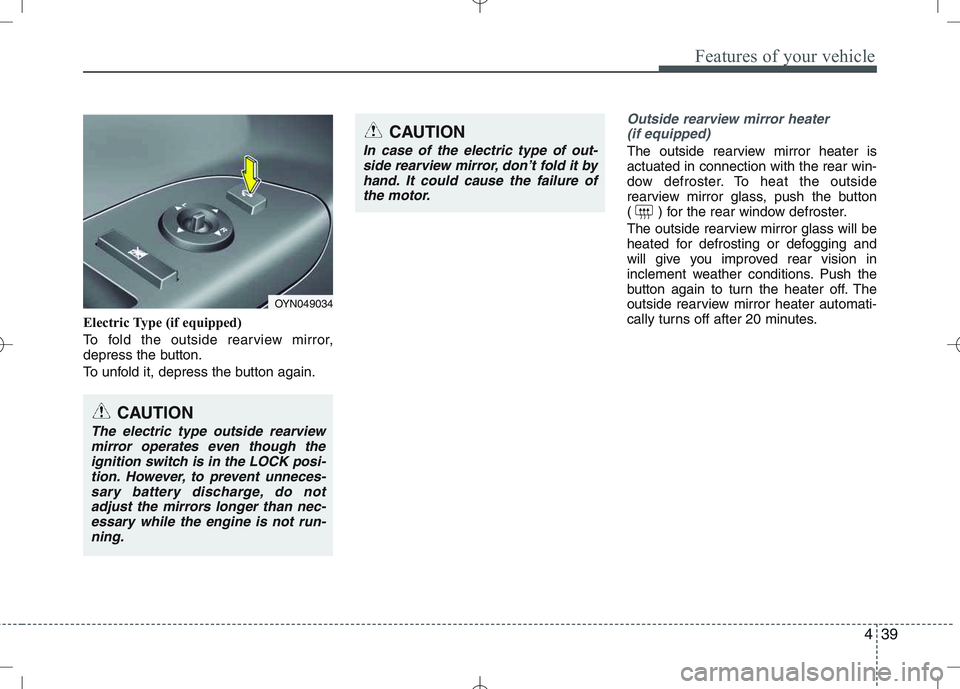
To fold the outside rearview mirror,
depress the button.
To unfold it, depress the button again.
Outside rearview mirror heater (if equipped)
The outside rearview mirror heater is actuated in connection with the rear win-
dow defroster. To heat the outside
rearview mirror glass, push the button
( ) for the rear window defroster.
The outside rearview mirror glass will be
heated for defrosting or defogging and
will give you improved rear vision in
inclement weather conditions. Push the
button again to turn the heater off. The
outside rearview mirror heater automati-
cally turns off after 20 minutes.
CAUTION
In case of the electric type of out- side rearview mirror, don’t fold it by
hand. It could cause the failure ofthe motor.
CAUTION
The electric type outside rearviewmirror operates even though the
ignition switch is in the LOCK posi-tion. However, to prevent unneces-sary battery discharge, do notadjust the mirrors longer than nec-
essary while the engine is not run-ning.
OYN049034
Page 139 of 761

463
Features of your vehicle
Auto light position (if equipped)
When the light switch is in the AUTO light position, the taillights and headlights will
be turned ON or OFF automaticallydepending on the amount of light outside
the vehicle.High beam operation
To turn on the high beam headlights, push
the lever away from you. Pull it back for
low beams. The high beam indicator will light when
the headlight high beams are switched on.
To prevent the battery from being dis-
charged, do not leave the lights on for aprolonged time while the engine is not
running.
OED040801
CAUTION
Never place anything over sensor
(1) located on the instrument
panel, this will ensure better auto- light system control.
Don’t clean the sensor using a window cleaner, the cleanser may
leave a light film which could interfere with sensor operation.
If your vehicle has window tint or other types of metallic coating onthe front windshield, the Auto
light system may not work prop-erly.
OYN049201
WARNING
Do not use high beam when there
are other vehicles. Using high beamcould obstruct the other driver'svision.
Page 145 of 761
469
Features of your vehicle
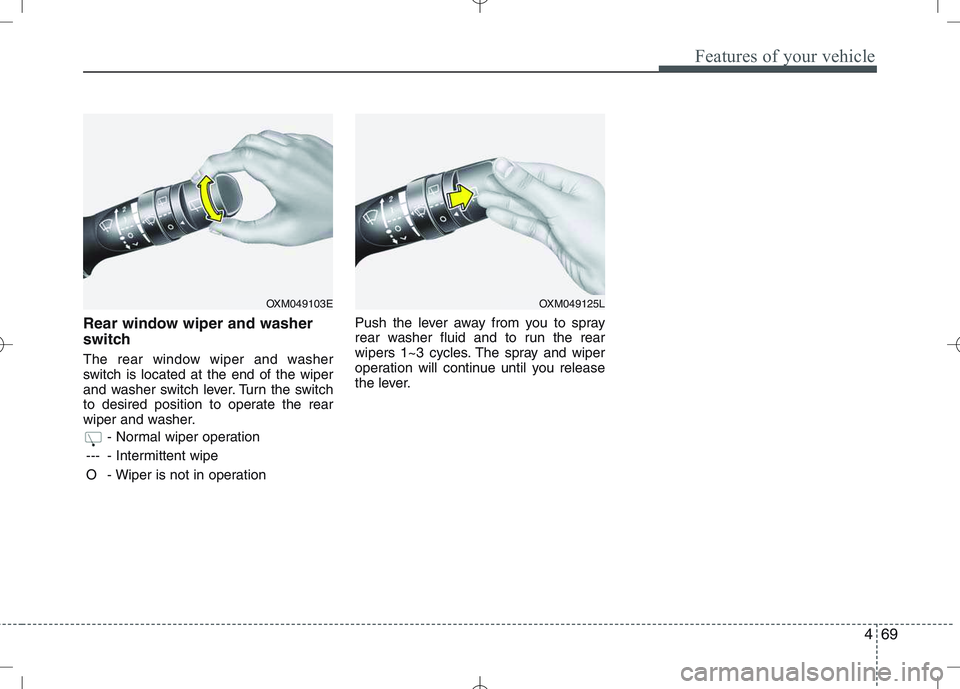
Rear window wiper and washer
switch
The rear window wiper and washer
switch is located at the end of the wiper
and washer switch lever. Turn the switch
to desired position to operate the rear
wiper and washer.- Normal wiper operation
--- - Intermittent wipe
O - Wiper is not in operation Push the lever away from you to spray
rear washer fluid and to run the rear
wipers 1~3 cycles. The spray and wiper
operation will continue until you release
the lever.
OXM049103EOXM049125L
Page 147 of 761
471
Features of your vehicle
✽✽NOTICE
If you want to defrost and defog the
front windshield, refer to “Windshield
defrosting and defogging” in this sec-
tion.
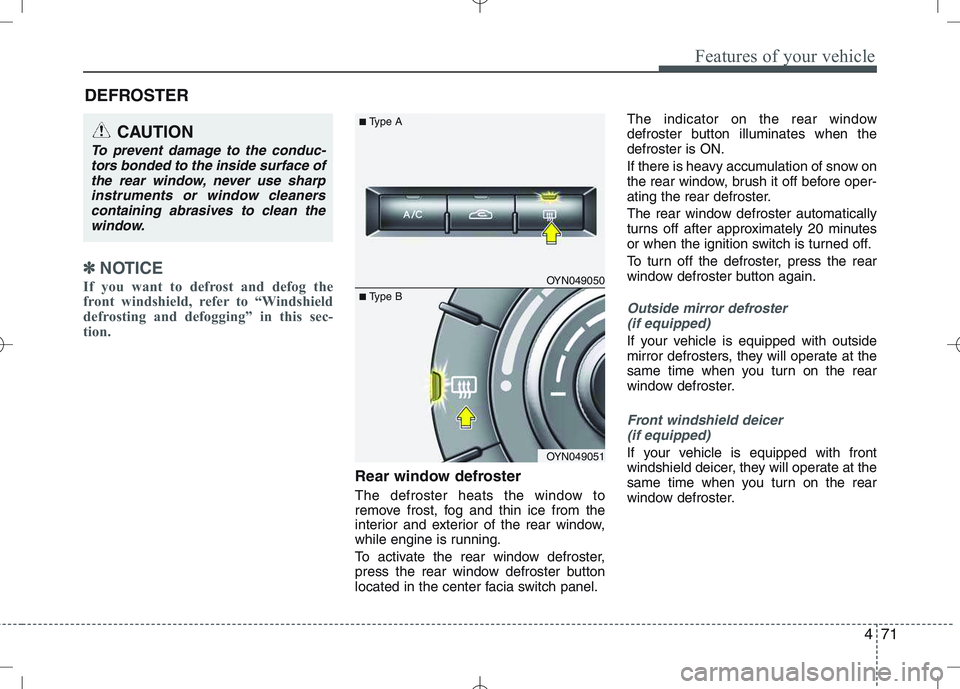
Rear window defroster
The defroster heats the window to
remove frost, fog and thin ice from the
interior and exterior of the rear window,
while engine is running.
To activate the rear window defroster,
press the rear window defroster button
located in the center facia switch panel. The indicator on the rear window
defroster button illuminates when thedefroster is ON.
If there is heavy accumulation of snow on
the rear window, brush it off before oper-
ating the rear defroster.
The rear window defroster automatically
turns off after approximately 20 minutes
or when the ignition switch is turned off.
To turn off the defroster, press the rear
window defroster button again.
Outside mirror defroster
(if equipped)
If your vehicle is equipped with outside
mirror defrosters, they will operate at the
same time when you turn on the rear
window defroster.
Front windshield deicer (if equipped)
If your vehicle is equipped with front
windshield deicer, they will operate at the
same time when you turn on the rear
window defroster.
DEFROSTER
CAUTION
To prevent damage to the conduc-
tors bonded to the inside surface of
the rear window, never use sharpinstruments or window cleanerscontaining abrasives to clean the window.
OYN049050
OYN049051
■ Type A
■Type B
Page 148 of 761
Features of your vehicle
72
4
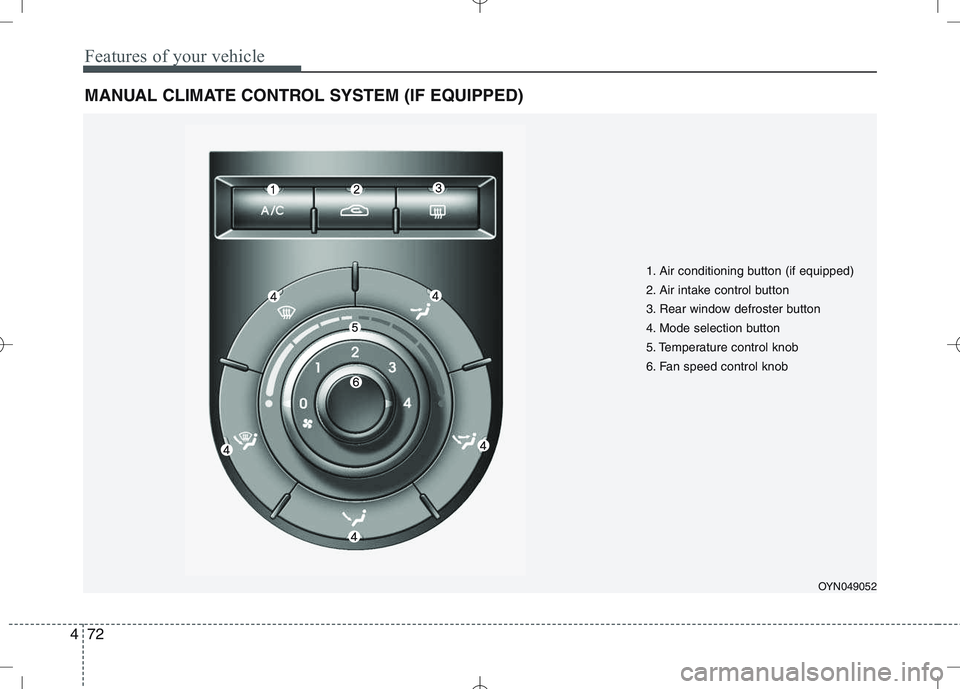
MANUAL CLIMATE CONTROL SYSTEM (IF EQUIPPED)
OYN049052
1. Air conditioning button (if equipped)
2. Air intake control button
3. Rear window defroster button
4. Mode selection button
5. Temperature control knob
6. Fan speed control knob
Page 150 of 761
Features of your vehicle
74
4
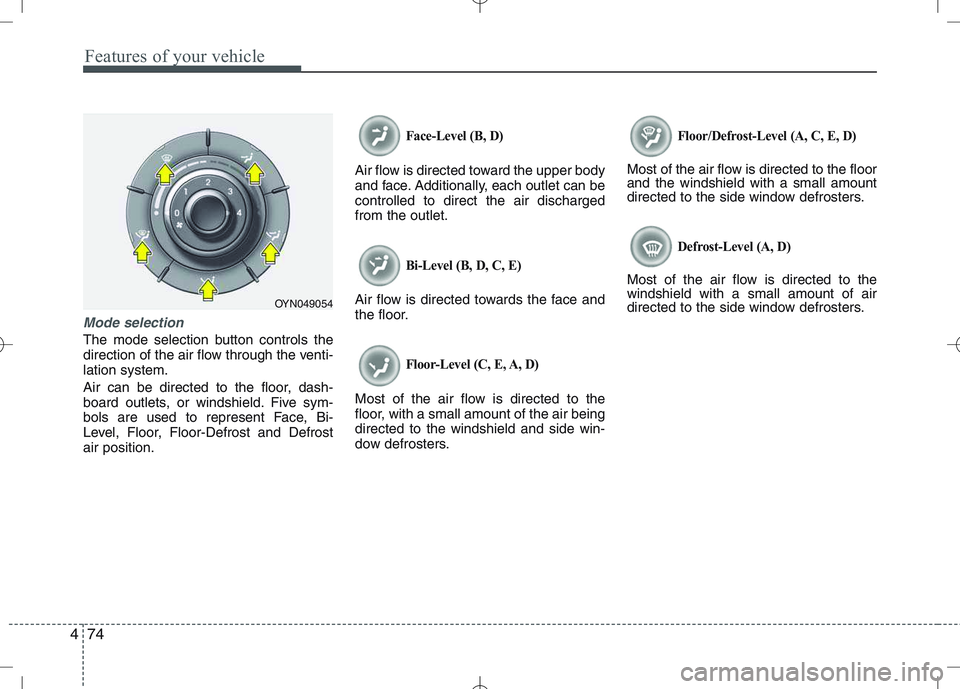
Mode selection
The mode selection button controls the
direction of the air flow through the venti-lation system.
Air can be directed to the floor, dash-
board outlets, or windshield. Five sym-
bols are used to represent Face, Bi-
Level, Floor, Floor-Defrost and Defrostair position.
Face-Level (B, D)
Air flow is directed toward the upper body
and face. Additionally, each outlet can becontrolled to direct the air dischargedfrom the outlet.
Bi-Level (B, D, C, E)
Air flow is directed towards the face and
the floor.
Floor-Level (C, E, A, D)
Most of the air flow is directed to the
floor, with a small amount of the air beingdirected to the windshield and side win-
dow defrosters.
Floor/Defrost-Level (A, C, E, D)
Most of the air flow is directed to the floor and the windshield with a small amount
directed to the side window defrosters.
Defrost-Level (A, D)
Most of the air flow is directed to thewindshield with a small amount of air
directed to the side window defrosters.
OYN049054