reset KIA VENGA 2011 Owner's Manual
[x] Cancel search | Manufacturer: KIA, Model Year: 2011, Model line: VENGA, Model: KIA VENGA 2011Pages: 761, PDF Size: 34.65 MB
Page 468 of 761
447
Features of your vehicle
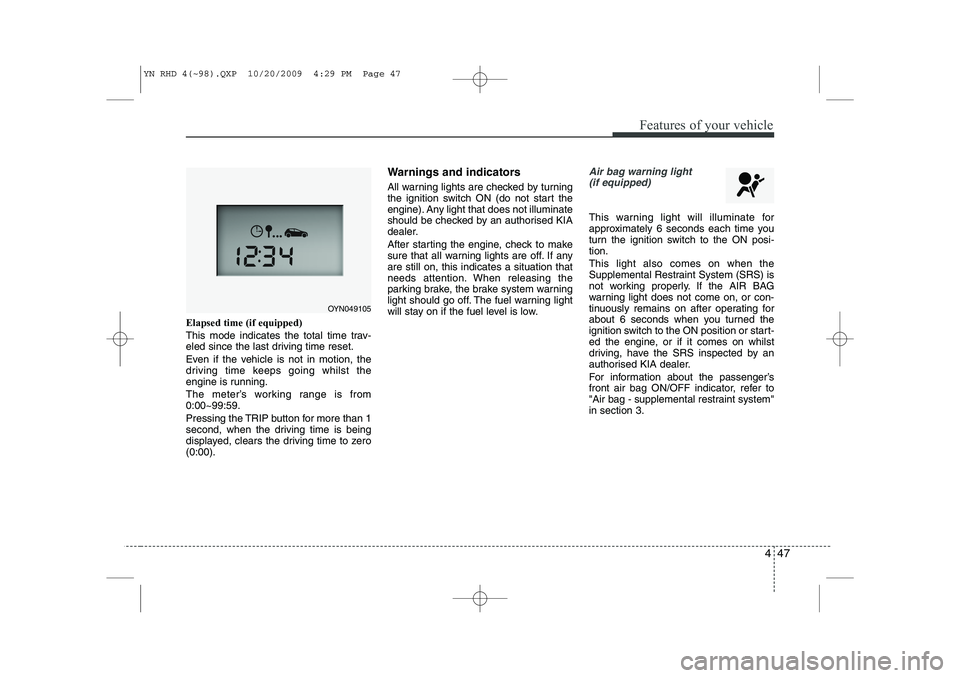
Elapsed time (if equipped)
This mode indicates the total time trav-
eled since the last driving time reset.
Even if the vehicle is not in motion, the
driving time keeps going whilst the
engine is running.
The meter’s working range is from 0:00~99:59.
Pressing the TRIP button for more than 1
second, when the driving time is being
displayed, clears the driving time to zero(0:00).Warnings and indicators
All warning lights are checked by turning
the ignition switch ON (do not start the
engine). Any light that does not illuminate
should be checked by an authorised KIA
dealer.
After starting the engine, check to make
sure that all warning lights are off. If anyare still on, this indicates a situation that
needs attention. When releasing the
parking brake, the brake system warning
light should go off. The fuel warning light
will stay on if the fuel level is low.
Air bag warning light
(if equipped)
This warning light will illuminate for
approximately 6 seconds each time you
turn the ignition switch to the ON posi-tion. This light also comes on when the
Supplemental Restraint System (SRS) is
not working properly. If the AIR BAG
warning light does not come on, or con-
tinuously remains on after operating for
about 6 seconds when you turned the
ignition switch to the ON position or start-
ed the engine, or if it comes on whilst
driving, have the SRS inspected by an
authorised KIA dealer.
For information about the passenger’s
front air bag ON/OFF indicator, refer to
"Air bag - supplemental restraint system"in section 3.
OYN049105
YN RHD 4(~98).QXP 10/20/2009 4:29 PM Page 47
Page 506 of 761
485
Features of your vehicle
Temperature conversion
If the battery has been discharged or dis-
connected, the temperature mode dis-
play will reset to Centigrade.
This is normal condition. You can switch the
temperature mode between Centigrade to
Fahrenheit as follows;
Whilst depressing the AUTO button,
depress the OFF button for 3 seconds or
more. The display will change from
Centigrade to Fahrenheit, or from
Fahrenheit to Centigrade.
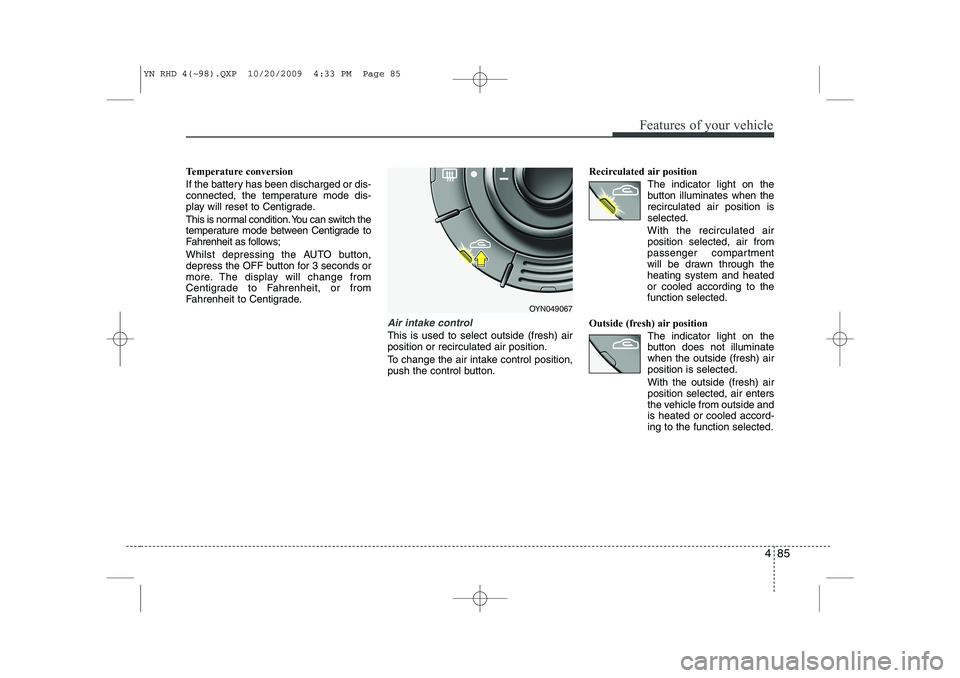
Air intake control
This is used to select outside (fresh) air position or recirculated air position.
To change the air intake control position,
push the control button.Recirculated air position
The indicator light on the
button illuminates when therecirculated air position isselected.
With the recirculated air position selected, air from
passenger compartment
will be drawn through theheating system and heatedor cooled according to thefunction selected.
Outside (fresh) air position The indicator light on the
button does not illuminatewhen the outside (fresh) airposition is selected. With the outside (fresh) air position selected, air enters
the vehicle from outside andis heated or cooled accord-ing to the function selected.
OYN049067
YN RHD 4(~98).QXP 10/20/2009 4:33 PM Page 85
Page 528 of 761
4 107
Features of your vehicle
1
2
3
4 56
78 9
10
11 12
13
14
15
1617
18
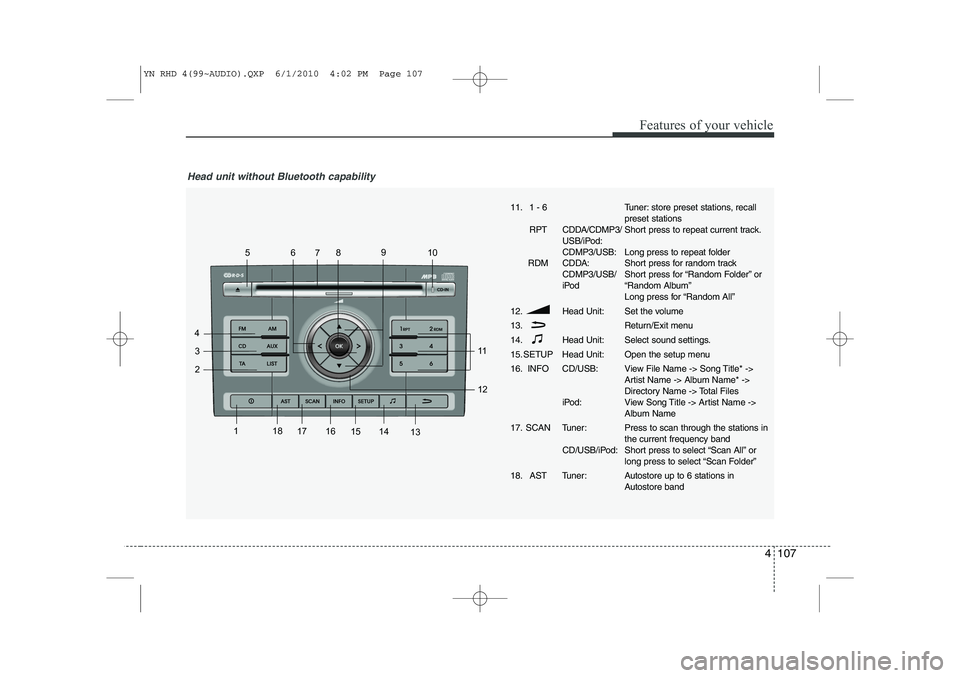
Head unit without Bluetooth capability
11. 1 - 6
RPT CDDA/CDMP3/ USB/iPod: CDMP3/USB:
RDM CDDA: CDMP3/USB/
iPod
12. Head Unit: 13.
14. Head Unit:
15. SETUP Head Unit:
16. INFO CD/USB:
iPod:
17. SCAN Tuner: CD/USB/iPod:
18. AST Tuner:Tuner: store preset stations, recall preset stations
Short press to repeat current track.
Long press to repeat folder
Short press for random track
Short press for “Random Folder” or
“Random Album”
Long press for “Random All”
Set the volume
Return/Exit menu
Select sound settings.
Open the setup menu
View File Name -> Song Title* ->
Artist Name -> Album Name* ->
Directory Name -> Total Files
View Song Title -> Artist Name ->
Album Name Press to scan through the stations in the current frequency band
Short press to select “Scan All” or
long press to select “Scan Folder”
Autostore up to 6 stations in
Autostore band
YN RHD 4(99~AUDIO).QXP 6/1/2010 4:02 PM Page 107
Page 531 of 761
Features of your vehicle
110
4
Listening to the Tuner
Selecting FM or AM
The tuner offers you two different wave
bands.
) Either press the FMor the AMbutton.
✎ The unit switches to band selected.
Selecting a FM band
The tuner offers you to select three FM
bands.
) Short press the FMbutton till the
required FM band is selected.
‰ FM 1
‰ FM 2
‰ FMA (AST):
9 In the FM 1 and FM 2 band you can
manually store up to 6 FM stationseach.
9 In the FMA band up to 6 FM stationswill be automatically stored. Selecting an AM band
The tuner offers you to select the one AM
waveband, the AM. You can select from
two AM bands.
)
Short press the AMbutton till the
required AM band is selected.
‰ AM
‰ AMA (AST):
9 In AM you can manually store up to 6
AM stations.
9 In the AMA band up to 6 AM stationswill be automatically stored.
Autostore This function automatically stores
received stations fulfilling the presetreception quality into the FMA or AMAband.
) Short press the AST button to store
strongest stations in the AST memory.
9 The maximum number of stations
stored in each AST-band is 6.
✎ Execute “Autostore” to update the list
of the stations (e.g. when leaving anarea). Automatic search
With this function you can search for the
next or previous station that fulfils the
preset reception quality.
)
Press the or button to search
for the previous/next station in the
currently selected waveband.
9 Search will always start for the stationwith the strongest signal at LOCAL
search level. If no station is found at
LOCAL level, search will be continued
at the DISTANCE level.
) To exit, press or button respec-
tively.
Manual tune
With this function you can increase or
decrease the radio frequency manually.
) Press the (Tune Down) or
(Tune up) button to decrease or
increase the frequency.
Fast tune
With this function you can continuously
increase or decrease the radio frequen-
cy.
) Either press and hold the or or
the or button to increase or
decrease the frequency.
9 The operation shall continue as long
as the button is pressed.
YN RHD 4(99~AUDIO).QXP 6/1/2010 4:03 PM Page 110
Page 532 of 761
4 111
Features of your vehicle
Frequency Scan
The tuner will tune to each available sta-
tion from the current waveband for 5 sec-
onds before scanning for the next higherfrequency station.
)Short press the SCANbutton to acti-
vate/ deactivate the scan function.
Storing preset stations
In the FM 1 and 2 waveband there are 12
station presets and in the AM waveband
there are 6 station presets.
(Also see “Selecting FM or AM wave- band”).
) Select the waveband, FM or AM.
) Tune to the desired station.
) Press and hold one of the preset (1 -
6) button till you hear a beep.
9 The station selected is stored under
the preset button.
Recalling preset stations
With this function you can recall a preset station.
) Short press the desired preset button
(1 through 6) to recall the previouslyset station. Radio Data System (RDS)
Many FM stations broadcast RDS infor-
mation. The RDS provides you with infor-
mation of the following:
Traffic announcement (TA)
This function enables you to hear traffic
announcements (TA). You will also hear
traffic announcements when in CD/USB/
iPOD/ AUX mode.
)
Short press the TA button to
enable/disable function.
) Press the SCAN button to scan for
Traffic Programme (TP) stations.
OR
) Press the or to search for TP
stations.
) Set the required volume for the traffic
announcements in the SETUP menu.
9 The TA symbol will be displayed when
TA is enabled.
✎ In FM mode: If no TP stations are
found, the unit will remain at the cur-
rent station displaying “NO TA/TP” for
5 seconds.
✎ In CD/USB/IPOD/AUX: If no TP sta-
tion is found, the unit will remain at the
current station. TP seek will be carried
out at the background periodically
every 30 seconds until a TP station is
found or TA will be disabled. TP lost ✎
If the TP signal of tuned station is lost
after 30 seconds, an automatic TP
seek for the next TP station will be
performed. If no TP station is found,the unit will remain at the current sta-
tion and display “TP LOST” for 5 sec-
onds.
9 TP seek will be performed periodical-
ly every 30 seconds until a TP station
is found.
Traffic announcements from other sta-tions – EON With the EON function (Enhanced Other
Networks) you will hear traffic announce-
ments even if the set station does not
provide this service but is operating on a
network with other stations. ✎ If you have activated Traffic info, sta-
tions with EON will be treated like traf-
fic stations, i.e. the search will also
stop at these stations.
✎ When a traffic announcement is
made, the unit switches to a traffic
information station linked to EON.After the announcement, the unit
returns to the previous programme.
YN RHD 4(99~AUDIO).QXP 6/1/2010 4:03 PM Page 111
Page 545 of 761
Features of your vehicle
124
4
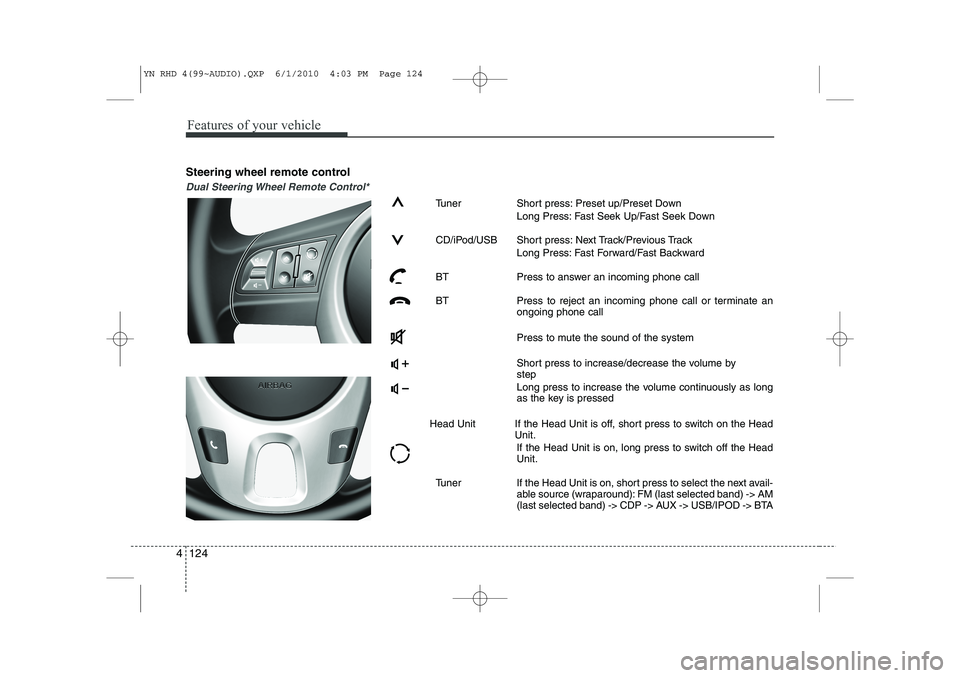
Steering wheel remote control
Dual Steering Wheel Remote Control*
Tuner Short press: Preset up/Preset Down
Long Press: Fast Seek Up/Fast Seek Down
CD/iPod/USB Short press: Next Track/Previous Track Long Press: Fast Forward/Fast Backward
BT Press to answer an incoming phone call
BT Press to reject an incoming phone call or terminate an ongoing phone call
Press to mute the sound of the system
Short press to increase/decrease the volume by step
Long press to increase the volume continuously as long
as the key is pressed
Head Unit If the Head Unit is off, short press to switch on the Head Unit.
If the Head Unit is on, long press to switch off the HeadUnit.
Tuner If the Head Unit is on, short press to select the next avail- able source (wraparound): FM (last selected band) -> AM
(last selected band) -> CDP -> AUX -> USB/IPOD -> BTA
YN RHD 4(99~AUDIO).QXP 6/1/2010 4:03 PM Page 124
Page 546 of 761
4 125
Features of your vehicle
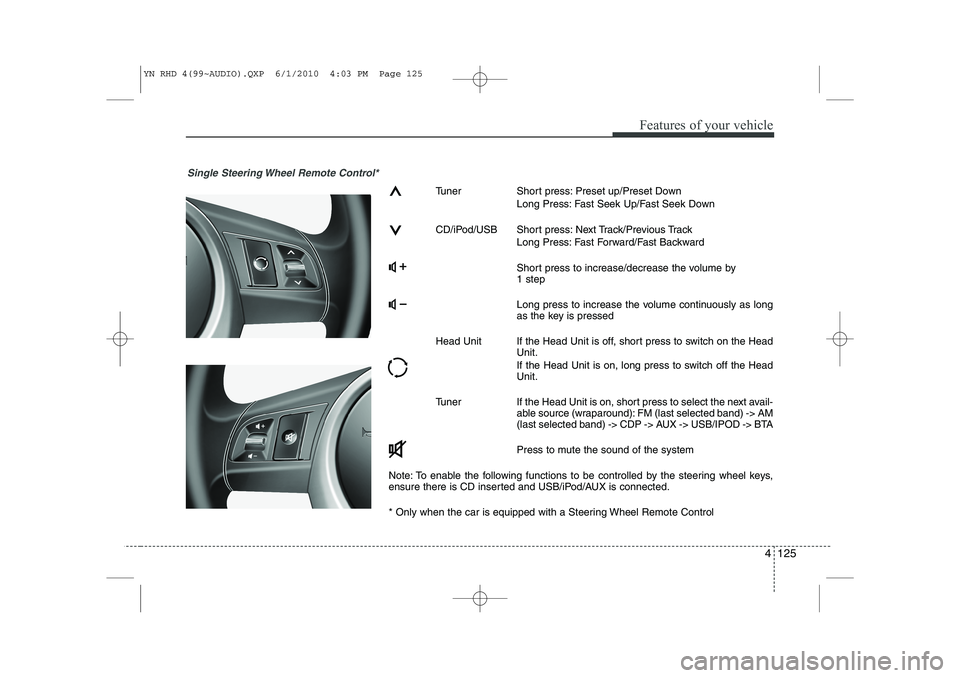
Single Steering Wheel Remote Control*
Tuner Short press: Preset up/Preset DownLong Press: Fast Seek Up/Fast Seek Down
CD/iPod/USB Short press: Next Track/Previous Track Long Press: Fast Forward/Fast Backward
Short press to increase/decrease the volume by 1 step
Long press to increase the volume continuously as long
as the key is pressed
Head Unit If the Head Unit is off, short press to switch on the Head Unit.
If the Head Unit is on, long press to switch off the Head Unit.
Tuner If the Head Unit is on, short press to select the next avail- able source (wraparound): FM (last selected band) -> AM
(last selected band) -> CDP -> AUX -> USB/IPOD -> BTA
Press to mute the sound of the system
Note: To enable the following functions to be controlled by the steering wheel keys,
ensure there is CD inserted and USB/iPod/AUX is connected.
* Only when the car is equipped with a Steering Wheel Remote Control
YN RHD 4(99~AUDIO).QXP 6/1/2010 4:03 PM Page 125
Page 550 of 761
4 129
Features of your vehicle
Troubleshooting
In rare instances, your Head Unit may not be functioning the way you
expect it to do. Before calling the service department, please read the
operating instructions thoroughly and go through the following check
list; it may be possible to quickly solve the problem malfunction.
General
Status
The operating panel generates some heat.
The volume decreases automati-
cally. The volume can no longerbe increased.
Tuner
Status
“PI search” on the display
Stored radio stations disappearedExplanation / How to check
No error. The unit feels warm.
An integrated safety circuit pre-
vents the temperature in the unit
from exceeding a certain value.
Allow the unit to cool down
(set low volume).
The volume and equalizer is self-
adjusted based on radio signal
intensity and its quality level withinfluence of region and location. Explanation / How to check
When recall is preset, the PI infor-
mation is not available (due to very
weak signal) or has been changed
(due to different region).
Meanwhile, check the REG set-
tings in Setup menu.
By switching the FM button, 3 dif-
ferent memory banks (FM1, FM2,
FMA) are able to store 6 differentstations each. Status
Increasing / decreasing volume Bad or no reception of the broad- cast signal The frequency instead of the sta-
tion name is displayed The required station cannot be tuned to using automatic search
No traffic announcements are
switched through (during iPod
playback)
Explanation / How to check
By switching the AM button, 2 dif-
ferent memory banks (MW, MWA)
are able to store 6 different sta-tions each.
Check SDVC setting (1-5 / off) in
Setup menu.
Check if the antenna is correctly connected.
Check whether the supply volt-
age‘s negative pole (brown cable)
is correctly connected to earth
(vehicle chassis). The unit is tuned to a station that
does not transmit RDS signals or
the transmitter is too weak.
The desired station is too weak.
Set desired station manually
(manual tuning)
Check whether the antenna is completely and correctly connect-ed.
Activate the traffic announcement
by pressing TA button.
YN RHD 4(99~AUDIO).QXP 6/1/2010 4:03 PM Page 129
Page 589 of 761
537
Driving your vehicle
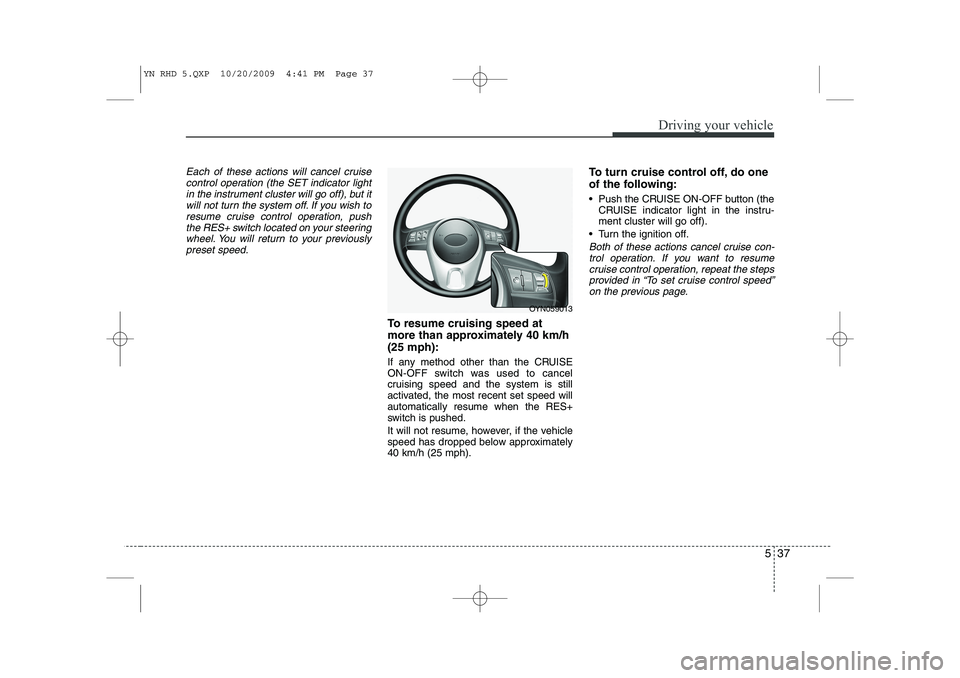
Each of these actions will cancel cruisecontrol operation (the SET indicator lightin the instrument cluster will go off), but itwill not turn the system off. If you wish to
resume cruise control operation, pushthe RES+ switch located on your steeringwheel. You will return to your previously
preset speed.
To resume cruising speed at
more than approximately 40 km/h(25 mph):
If any method other than the CRUISE
ON-OFF switch was used to cancel
cruising speed and the system is still
activated, the most recent set speed willautomatically resume when the RES+
switch is pushed.
It will not resume, however, if the vehicle
speed has dropped below approximately40 km/h (25 mph). To turn cruise control off, do one
of the following:
Push the CRUISE ON-OFF button (the
CRUISE indicator light in the instru- ment cluster will go off).
Turn the ignition off.
Both of these actions cancel cruise con- trol operation. If you want to resume cruise control operation, repeat the stepsprovided in “To set cruise control speed” on the previous page.
OYN059013
YN RHD 5.QXP 10/20/2009 4:41 PM Page 37
Page 590 of 761
Driving your vehicle
38
5
You can set the speed limit when you
don’t want to drive over a specific speed.
If you drive over the preset speed limit,
the warning system operates (set speed
limit will blink and chime will sound) until
the vehicle speed returns within thespeed limit.
✽✽
NOTICE
Whilst speed limit control in operation,
the cruise control system cannot be acti-vated.
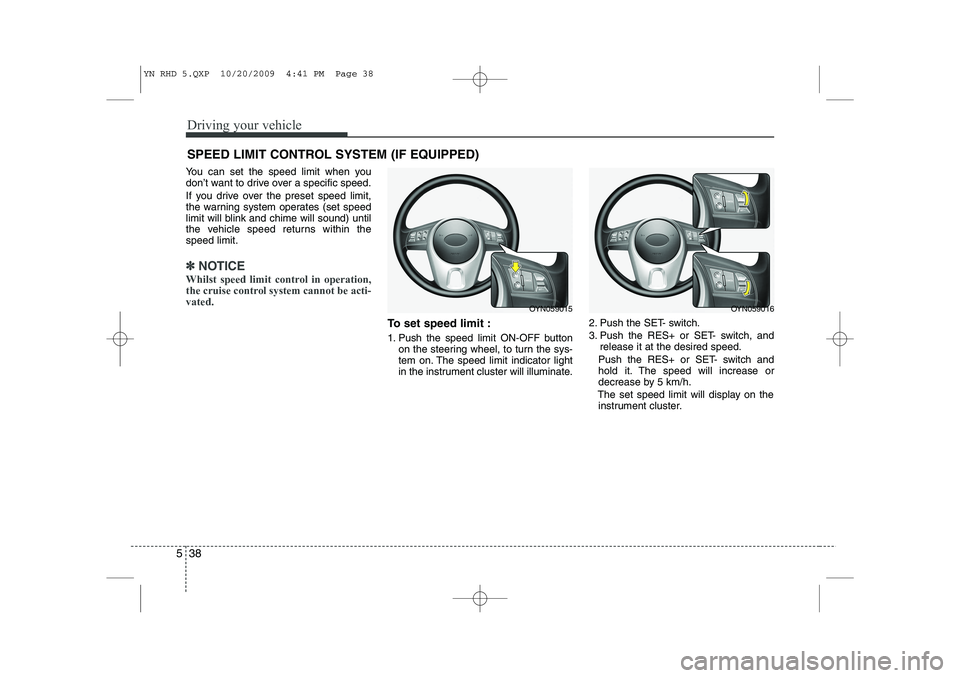
To set speed limit :
1. Push the speed limit ON-OFF button on the steering wheel, to turn the sys-
tem on. The speed limit indicator light
in the instrument cluster will illuminate. 2. Push the SET- switch.
3. Push the RES+ or SET- switch, and
release it at the desired speed.
Push the RES+ or SET- switch and
hold it. The speed will increase or
decrease by 5 km/h.
The set speed limit will display on the instrument cluster.
SPEED LIMIT CONTROL SYSTEM (IF EQUIPPED)
OYN059015OYN059016
YN RHD 5.QXP 10/20/2009 4:41 PM Page 38