reset KIA VENGA 2011 Owner's Guide
[x] Cancel search | Manufacturer: KIA, Model Year: 2011, Model line: VENGA, Model: KIA VENGA 2011Pages: 761, PDF Size: 34.65 MB
Page 591 of 761
539
Driving your vehicle
If you would like to drive over the preset
speed limit when you depress the accel-
erator pedal less than approximately
50%, the vehicle speed will maintainwithin speed limit.
However if you depress the accelerator
pedal more than approximately 70%, you
can drive over the speed limit. Then the
set speed limit will blink and chime will
sound until return the vehicle speed with-in speed limit.To turn off the speed limit con-
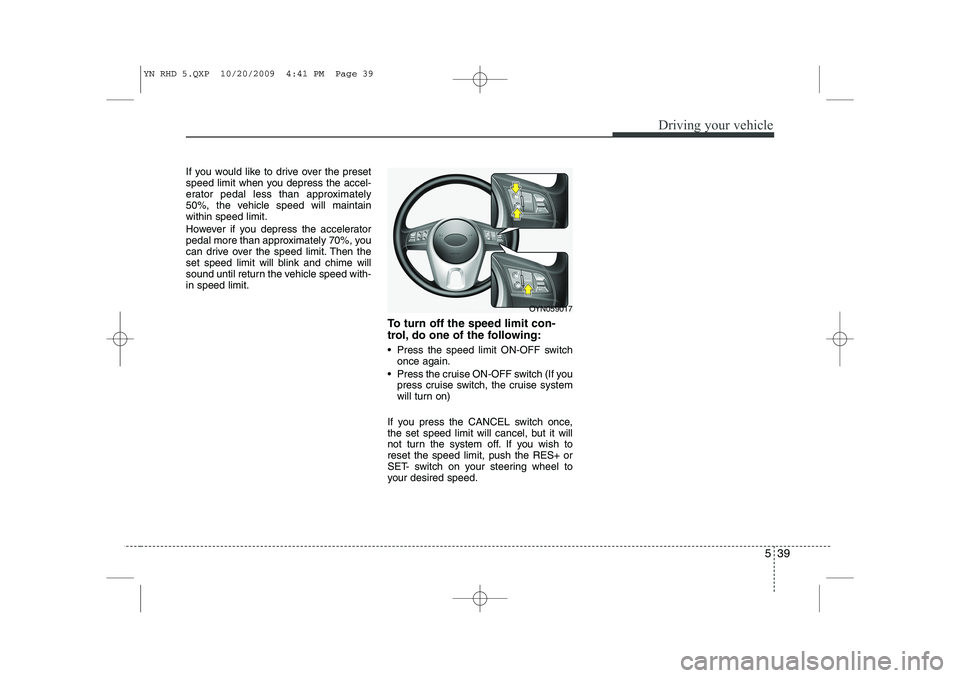
trol, do one of the following:
Press the speed limit ON-OFF switchonce again.
Press the cruise ON-OFF switch (If you press cruise switch, the cruise system
will turn on)
If you press the CANCEL switch once,
the set speed limit will cancel, but it will
not turn the system off. If you wish toreset the speed limit, push the RES+ or
SET- switch on your steering wheel to
your desired speed.
OYN059017
YN RHD 5.QXP 10/20/2009 4:41 PM Page 39
Page 679 of 761
739
Maintenance
Reset items
Items should be reset after the battery
has been discharged or the battery hasbeen disconnected.
Auto up/down window (See section 4)
Sunroof (See section 4)
Trip computer (See section 4)
Climate control system (See section 4)
Clock (See section 4)
Audio (See section 4)
WARNING
Before performing maintenance or recharging the battery, turn off all accessories and stop the
engine.
The negative battery cable must be removed first and installed
last when the battery is discon-nected.WARNING - Recharging
battery
When recharging the battery,
observe the following precautions:
The battery must be removed from the vehicle and placed in an area with good ventilation.
Do not allow cigarettes, sparks, or flame near the battery.
Watch the battery during charg- ing, and stop or reduce the charg-
ing rate if the battery cells begin
gassing (boiling) violently or if
the temperature of the electrolyte
of any cell exceeds 49°C (120°F).
Wear eye protection when check- ing the battery during charging.
Disconnect the battery charger in the following order.
1. Turn off the battery charger main switch.
2. Unhook the negative clamp from the negative battery terminal.
3. Unhook the positive clamp from the positive battery terminal.
YN RHD 7.QXP 1/25/2010 11:45 AM Page 39
Page 683 of 761
743
Maintenance
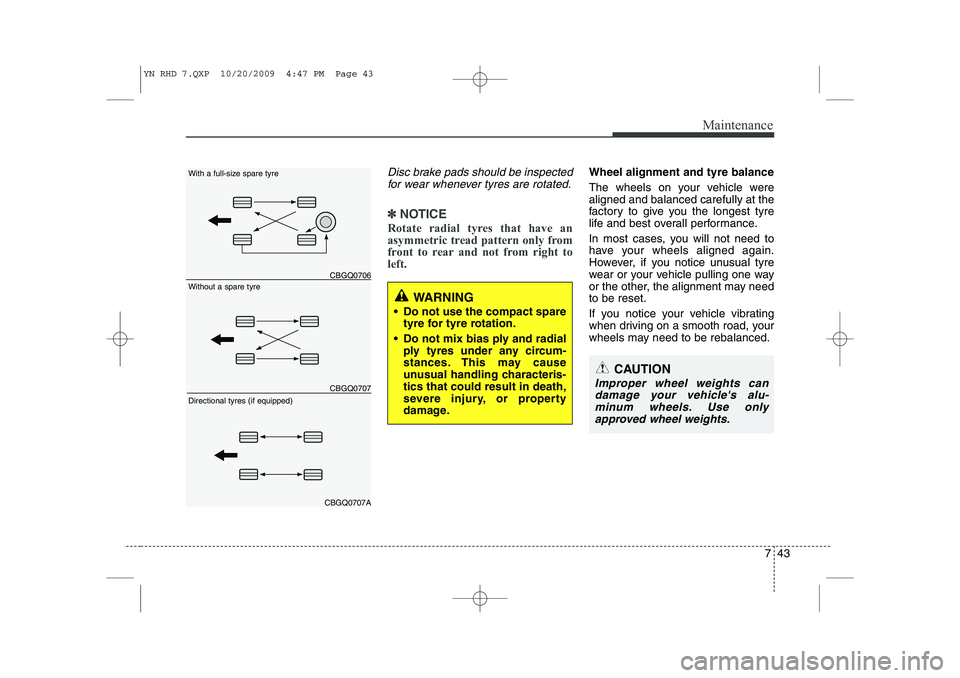
Disc brake pads should be inspectedfor wear whenever tyres are rotated.
✽✽ NOTICE
Rotate radial tyres that have an
asymmetric tread pattern only from
front to rear and not from right toleft.
Wheel alignment and tyre balance
The wheels on your vehicle were aligned and balanced carefully at the
factory to give you the longest tyre
life and best overall performance.
In most cases, you will not need to
have your wheels aligned again.
However, if you notice unusual tyre
wear or your vehicle pulling one way
or the other, the alignment may needto be reset.
If you notice your vehicle vibrating
when driving on a smooth road, your
wheels may need to be rebalanced.
WARNING
Do not use the compact spare tyre for tyre rotation.
Do not mix bias ply and radial ply tyres under any circum-
stances. This may cause
unusual handling characteris-tics that could result in death,
severe injury, or property
damage.
CAUTION
Improper wheel weights can
damage your vehicle's alu-minum wheels. Use onlyapproved wheel weights.
CBGQ0706
CBGQ0707
CBGQ0707A
Without a spare tyre
With a full-size spare tyre Directional tyres (if equipped)
YN RHD 7.QXP 10/20/2009 4:47 PM Page 43
Page 737 of 761
Features of your vehicle
108
4
1
2
3
4 56
78 9
10
11 12
13
14
15
1617
18
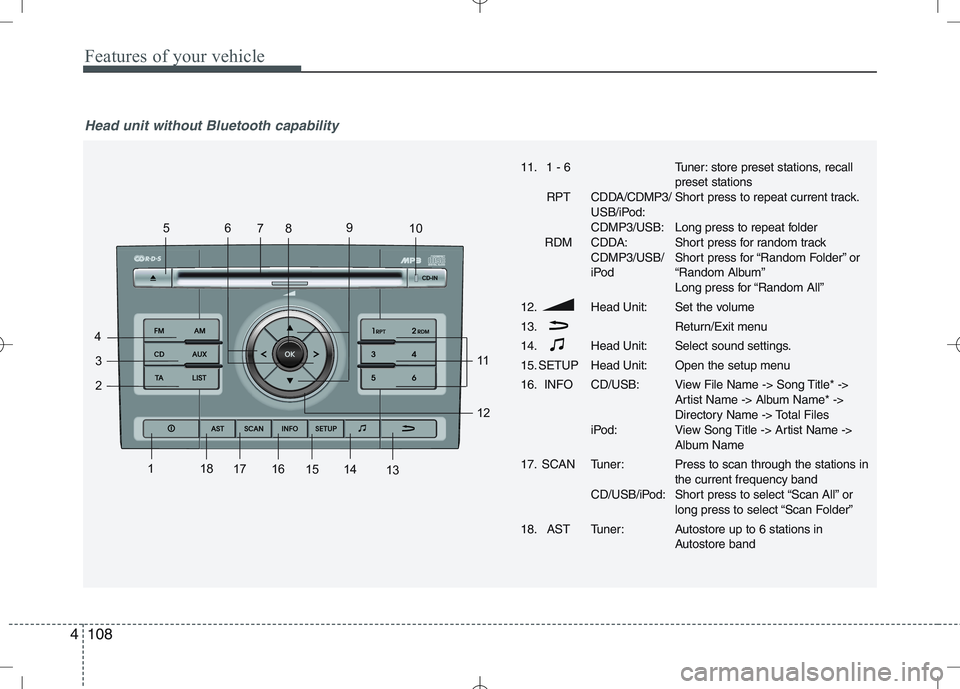
Head unit without Bluetooth capability
11. 1 - 6
RPT CDDA/CDMP3/ USB/iPod: CDMP3/USB:
RDM CDDA: CDMP3/USB/
iPod
12. Head Unit: 13.
14. Head Unit:
15. SETUP Head Unit:
16. INFO CD/USB:
iPod:
17. SCAN Tuner: CD/USB/iPod:
18. AST Tuner:Tuner: store preset stations, recall preset stations
Short press to repeat current track.
Long press to repeat folder
Short press for random track
Short press for “Random Folder” or
“Random Album”
Long press for “Random All”
Set the volume
Return/Exit menu
Select sound settings.
Open the setup menu
View File Name -> Song Title* ->
Artist Name -> Album Name* ->
Directory Name -> Total Files
View Song Title -> Artist Name ->
Album Name Press to scan through the stations in the current frequency band
Short press to select “Scan All” or
long press to select “Scan Folder”
Autostore up to 6 stations in
Autostore band
Page 740 of 761
4111
Features of your vehicle
Listening to the Tuner
Selecting FM or AM
The tuner offers you two different wave
bands.
Either press the FMor the AMbutton.
✎ The unit switches to band selected.
Selecting a FM band
The tuner offers you to select three FM
bands.
Short press the FMbutton till the
required FM band is selected.
FM 1
FM 2
FMA (AST):
In the FM 1 and FM 2 band you can
manually store up to 6 FM stationseach.
In the FMA band up to 6 FM stationswill be automatically stored. Selecting an AM band
The tuner offers you to select the one AM
waveband, the AM. You can select from
two AM bands.
Short press the AMbutton till the
required AM band is selected.
AM
AMA (AST):
In AM you can manually store up to 6
AM stations.
In the AMA band up to 6 AM stationswill be automatically stored.
Autostore This function automatically stores
received stations fulfilling the presetreception quality into the FMA or AMAband.
Short press the AST button to store
strongest stations in the AST memory.
The maximum number of stations
stored in each AST-band is 6.
✎ Execute “Autostore” to update the list
of the stations (e.g. when leaving anarea). Automatic search
With this function you can search for the
next or previous station that fulfils the
preset reception quality.
Press the or button to search
for the previous/next station in the
currently selected waveband.
Search will always start for the stationwith the strongest signal at LOCAL
search level. If no station is found at
LOCAL level, search will be continued
at the DISTANCE level.
To exit, press or button respec-
tively.
Manual tune
With this function you can increase or
decrease the radio frequency manually.
Press the (Tune Down) or
(Tune up) button to decrease or
increase the frequency.
Fast tune
With this function you can continuously
increase or decrease the radio frequen-
cy.
Either press and hold the or or
the or button to increase or
decrease the frequency.
The operation shall continue as long
as the button is pressed.
Page 741 of 761
Features of your vehicle
112
4
Frequency Scan
The tuner will tune to each available sta-
tion from the current waveband for 5 sec-
onds before scanning for the next higherfrequency station.
Short press the SCANbutton to acti-
vate/ deactivate the scan function.
Storing preset stations
In the FM 1 and 2 waveband there are 12
station presets and in the AM waveband
there are 6 station presets.
(Also see “Selecting FM or AM wave- band”).
Select the waveband, FM or AM.
Tune to the desired station.
Press and hold one of the preset (1 -
6) button till you hear a beep.
The station selected is stored under
the preset button.
Recalling preset stations
With this function you can recall a preset station.
Short press the desired preset button
(1 through 6) to recall the previouslyset station. Radio Data System (RDS)
Many FM stations broadcast RDS infor-
mation. The RDS provides you with infor-
mation of the following:
Traffic announcement (TA)
This function enables you to hear traffic
announcements (TA). You will also hear
traffic announcements when in CD/USB/
iPOD/ AUX mode.
Short press the TA button to
enable/disable function.
Press the SCAN button to scan for
Traffic Programme (TP) stations.
OR
Press the or to search for TP
stations.
Set the required volume for the traffic
announcements in the SETUP menu.
The TA symbol will be displayed when
TA is enabled.
✎ In FM mode: If no TP stations are
found, the unit will remain at the cur-
rent station displaying “NO TA/TP” for
5 seconds.
✎ In CD/USB/IPOD/AUX: If no TP sta-
tion is found, the unit will remain at the
current station. TP seek will be carried
out at the background periodically
every 30 seconds until a TP station is
found or TA will be disabled. TP lost ✎
If the TP signal of tuned station is lost
after 30 seconds, an automatic TP
seek for the next TP station will be
performed. If no TP station is found,the unit will remain at the current sta-
tion and display “TP LOST” for 5 sec-
onds.
TP seek will be performed periodical-
ly every 30 seconds until a TP station
is found.
Traffic announcements from other sta-
tions – EON With the EON function (Enhanced Other
Networks) you will hear traffic announce-
ments even if the set station does not
provide this service but is operating on a
network with other stations. ✎ If you have activated Traffic info, sta-
tions with EON will be treated like traf-
fic stations, i.e. the search will also
stop at these stations.
✎ When a traffic announcement is
made, the unit switches to a traffic
information station linked to EON.After the announcement, the unit
returns to the previous programme.
Page 754 of 761
4125
Features of your vehicle
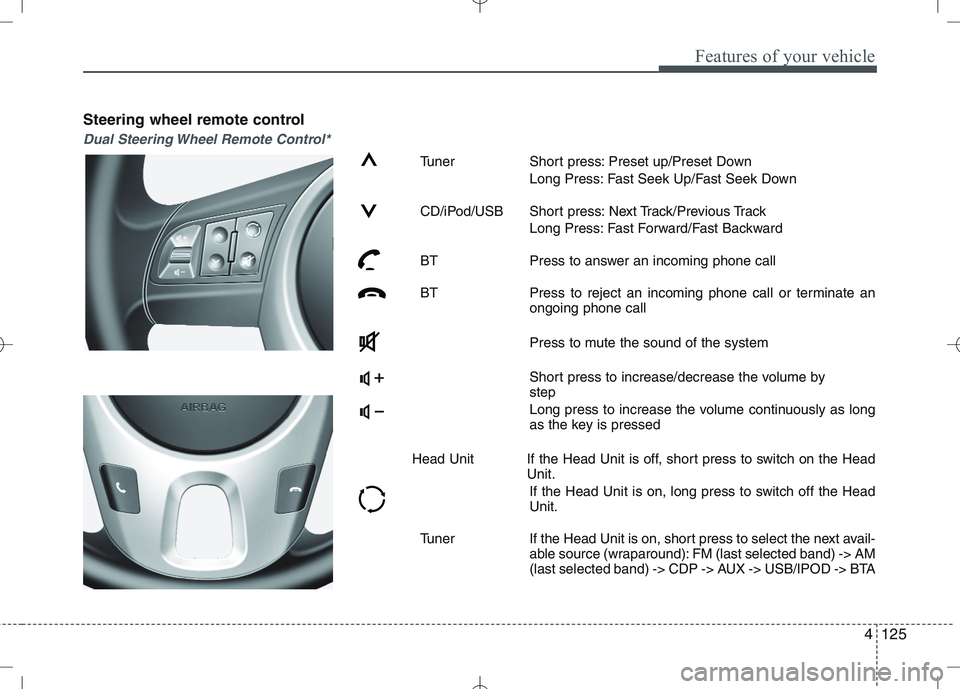
Steering wheel remote control
Dual Steering Wheel Remote Control*
Tuner Short press: Preset up/Preset DownLong Press: Fast Seek Up/Fast Seek Down
CD/iPod/USB Short press: Next Track/Previous Track Long Press: Fast Forward/Fast Backward
BT Press to answer an incoming phone call
BT Press to reject an incoming phone call or terminate an ongoing phone call
Press to mute the sound of the system
Short press to increase/decrease the volume by step
Long press to increase the volume continuously as long
as the key is pressed
Head Unit If the Head Unit is off, short press to switch on the Head Unit.
If the Head Unit is on, long press to switch off the HeadUnit.
Tuner If the Head Unit is on, short press to select the next avail- able source (wraparound): FM (last selected band) -> AM
(last selected band) -> CDP -> AUX -> USB/IPOD -> BTA
Page 755 of 761
Features of your vehicle
126
4
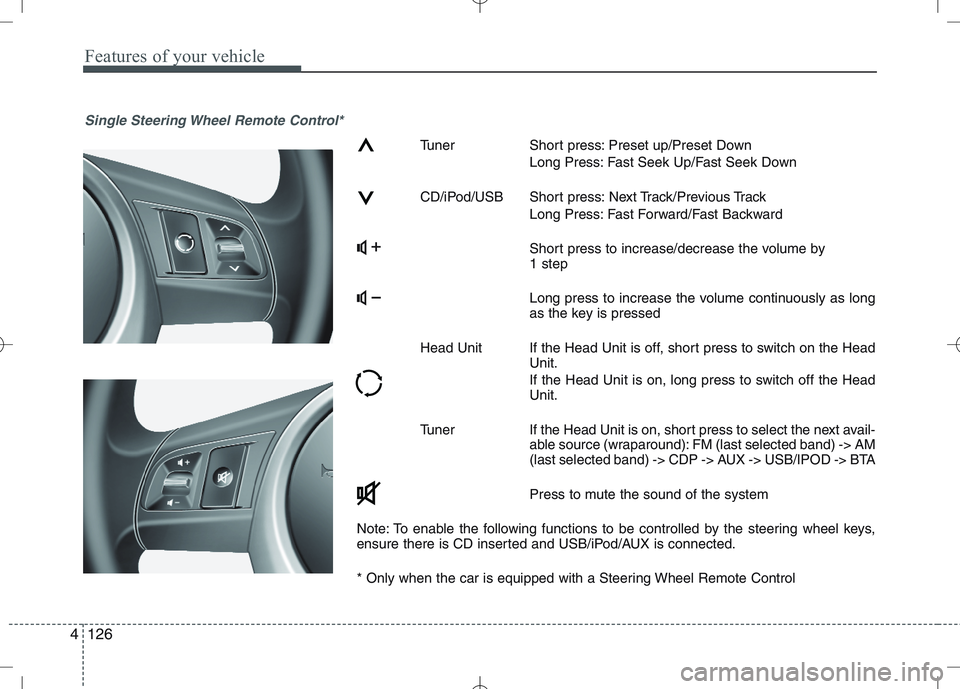
Single Steering Wheel Remote Control*
Tuner Short press: Preset up/Preset Down
Long Press: Fast Seek Up/Fast Seek Down
CD/iPod/USB Short press: Next Track/Previous Track Long Press: Fast Forward/Fast Backward
Short press to increase/decrease the volume by 1 step
Long press to increase the volume continuously as long
as the key is pressed
Head Unit If the Head Unit is off, short press to switch on the Head Unit.
If the Head Unit is on, long press to switch off the Head Unit.
Tuner If the Head Unit is on, short press to select the next avail- able source (wraparound): FM (last selected band) -> AM
(last selected band) -> CDP -> AUX -> USB/IPOD -> BTA
Press to mute the sound of the system
Note: To enable the following functions to be controlled by the steering wheel keys,
ensure there is CD inserted and USB/iPod/AUX is connected.
* Only when the car is equipped with a Steering Wheel Remote Control
Page 759 of 761
Features of your vehicle
130
4
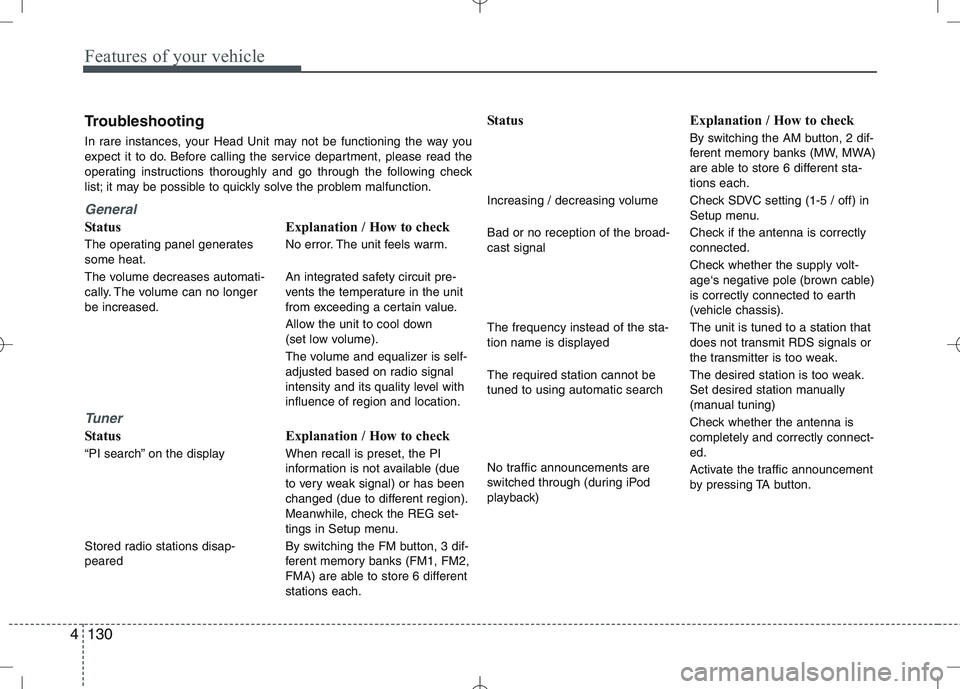
Troubleshooting
In rare instances, your Head Unit may not be functioning the way you
expect it to do. Before calling the service department, please read the
operating instructions thoroughly and go through the following check
list; it may be possible to quickly solve the problem malfunction.
General
Status
The operating panel generates some heat.
The volume decreases automati-
cally. The volume can no longerbe increased.
Tuner
Status
“PI search” on the display
Stored radio stations disap- peared Explanation / How to check
No error. The unit feels warm.
An integrated safety circuit pre-
vents the temperature in the unit
from exceeding a certain value.
Allow the unit to cool down
(set low volume).
The volume and equalizer is self-
adjusted based on radio signal
intensity and its quality level withinfluence of region and location.
Explanation / How to check When recall is preset, the PI
information is not available (due
to very weak signal) or has been
changed (due to different region).
Meanwhile, check the REG set-
tings in Setup menu.
By switching the FM button, 3 dif-
ferent memory banks (FM1, FM2,
FMA) are able to store 6 differentstations each. Status
Increasing / decreasing volume Bad or no reception of the broad- cast signal The frequency instead of the sta-
tion name is displayed The required station cannot be tuned to using automatic search
No traffic announcements are
switched through (during iPod
playback)
Explanation / How to check
By switching the AM button, 2 dif-
ferent memory banks (MW, MWA)
are able to store 6 different sta-tions each.
Check SDVC setting (1-5 / off) in
Setup menu.
Check if the antenna is correctly connected.
Check whether the supply volt-
age‘s negative pole (brown cable)
is correctly connected to earth
(vehicle chassis). The unit is tuned to a station that
does not transmit RDS signals or
the transmitter is too weak.
The desired station is too weak.
Set desired station manually
(manual tuning)
Check whether the antenna is completely and correctly connect-ed.
Activate the traffic announcement
by pressing TA button.