audio KIA VENGA 2011 Repair Manual
[x] Cancel search | Manufacturer: KIA, Model Year: 2011, Model line: VENGA, Model: KIA VENGA 2011Pages: 761, PDF Size: 34.65 MB
Page 743 of 761
Features of your vehicle
114
4
Listening to CD
Notes on CD
This CD player is suitable for 12 cm discs and 8 cm discs with an adaptoronly and can read both audio and
MP3 format CD.
Please do not use irregular shaped
CDs.
CD-R’s or CD-RW’s can generally be
played. Due to varying quality of sur-
face conditions of CDs, as well as the
performance and condition of the CD
writer, certain CD-R/CD-RW CD may
not operate normally on this unit.
Notes on WMA
WMA files up to WMA Version 9.0 are
supported. CD playback
Starting/Stopping a CDIf no CD is located in the unit:
Insert a CD.
The CD will be played from the first
title.
If a CD is located in the unit:
Press CD button to start playback.
✎ If no CD is loaded into the unit “NO
DISC” will appear the display.
Playback will stop when anothersource is selected.
Ejecting a CD
Press the button.
Remove the disc from the CD slot.
The previous used source will be selected.
If the CD is not removed from the slot,
it will be re-tracked into the unit with-
out being played.
Previous/Next Track
Press the or button to select the
previous or next title OR Fast Forward/Reverse
Press and hold the or button to
for fast forward and reverse.
✎ During fast forward and fast reverse
audio is audible at reduced volume
Random Track
Press the RDMbutton to activate/
deactivate “Random Track” feature.
Repeat Track
Press the RPTbutton to activate/
deactivate the “Repeat Track” feature.
Scan Track
Press SCAN button to activate/deac-
tivate the track (title) scan feature.
The first 10 seconds of each track/title
will be played.
Page 744 of 761
4115
Features of your vehicle
Viewing Information of Audio Files
Short press the INFObutton.
Disk Title, Disk Artist, Track Title and
Track Artist can be displayed.
✎ If no information is available “NO
INFO” will be displayed, otherwise the
corresponding information will be dis-
played for 5 seconds.
To abort this mode: press one of the
following buttons - / , Fast
/ , RPT, RDM, LIST.
List Function Audio Files ✎ With this mode you can browse all
supported tracks on the CD.
The main menu of the LIST functionconsists of:
Short press LIST to enter track brows-ing.
Short press or button to
browse through the list of the selected
category.
Short press OK to playback of the
selected track.
To abort this mode: press one of the
following buttons / , Fast
/ , RPT, RDM, INFO, SOUND,
SETUP and LIST. Notes on WMA files
The following WMA files are supported:
Bit rate: Up to 192 kbit/s
Sampling frequency: Up to 44.1 kHz
WMA file names must have the
“.wma” extension.
Notes on MP3 files
The following MP3 files are supported by
the CD player:
Files conform with MPEG1/2 or 2.5-
Layer 3.
The format of the CD must be ISO
9660 Level 1 or Level 2 or Joliet with
sector format in Mode 1 or Mode 2
Form 1. Other formats cannot be
played reliably.
The maximum number of folders is99.
The Maximum number of folders and
number of files is 490. Additional files
and folders will be ignored.
Bit rate: Maximum of 320 kbit/s, con-
stant or variable.
Sampling frequency: Maximum of 48kHz.
Text display: ID3 tag V1 and ID3 tag
V2. MP3 tracks can contain addition
information such as artist, track and
album names (ID3 tags with maxi-
mum not more than 12 characters).
Characters other than upper
case/lower case letters (“Aa to Zz”)
and underscore (“_”) may not be dis-
played.
Only files with .mp3 extension are
recognized as MP3 files.
The unit may not play the first track in
the order that you wrote them to thedisc.
The unit plays only the first session ifthe disc contains both CD audio
tracks and MP3 files.
When playing a disc of 8 kbps or vari-
able bit rate (VBR), the elapsed play-
ing time in the display window maynot be correct.
Make sure that a MP3 CD-R/CD-RW
is burned that is formatted as a data
disc and NOT as an audio disc.
MP3 files are not compatible with
packet write data transfer.
Page 745 of 761
Features of your vehicle
116
4
Playing MP3/WMA files
Starting/Stopping playback
Press CD button to start playback.
Playback will stop when another source is selected.
Previous/Next Track
Press the or buttons to select
previous or next track.
Previous/Next Folder
Press the or button to select
the previous or next folder.
Fast Forward/Reverse
Press and hold the or button to
for fast reverse and fast forward.
✎ During fast forward and fast reverse
audio is audible at reduced volume.
Random
Short press the RDM button to select
the Random Folder option.
✎ All files in the Random Folder will be
played randomly.
Long press the RDM button to selectthe Random All option.
✎ All files on the CD will be played ran-
domly. Repeat
Short press the RPT button to select the Repeat file option.
✎ The current file will be repeated.
Long press the RPT button to select
the Repeat Folder option.
✎ All files in the current folder will berepeated.
Scan
Short press the SCAN button to select the Scan All option.
✎ All files in the CD will be scanned.
Long press the SCAN button to select
the Scan Folder option.
✎ The first file in each folder will bescanned.
CD plays the first 10 seconds of thesong.
When a folder ends: scanning contin-
ues with the first file of the next folder.
When a CD ends: scanning continues
with the first file of the first folder. Viewing Information of Compressed
Audio Files
Short press the INFObutton.
File name, Song title*, Album name,
Artist name, Directory name and Total
track can be displayed.
✎ If no ID3 Tag is available “NO INFO”
will be displayed, otherwise the corre-
sponding information will be displayed
for 5 seconds.
To abort this mode: press one of the
following buttons: or , Fast
or , RPT, RDM, INFO, SOUND,
SETUP and LIST.
List Function Compressed Audio Files ✎ With this mode you can browse fold-
ers and files located on the CD.
The main menu of the LIST functionconsists of:
Short press LIST to enter track brows-ing.
Short press or button to
browse through the list of the selected
category.
Short press OK to playback of the
selected track.
To abort this mode: press one of the
following buttons: or , Fast
or , RPT, RDM, INFO, SOUND,
SETUP and LIST.
Page 746 of 761
4117
Features of your vehicle
Using an iPod
Connecting the iPod ✎Use the supplied KIA iPod interface
cable to connect the iPod to the car’s
interface connector.
Insert the KIA iPod interface cable
into the connectors of the iPod and
the car.
When an iPod is connected and the
radio is on, the iPod will be detected
automatically. The iPod will be select-
ed as Source and the “iPod” icon will
be displayed.
The playing time, title and artist (if
available) of the current track will be
displayed.
If no supported file is detected on the
iPod, the iPod source will not be acti-
vated.
Disconnecting the iPod
Remove the KIA iPod interface cable
from iPod and car interface connector.
✎ The last used source will be activated. Previous/Next files (File Up/Down)
Short press to Seek Up or to
Seek Down.
✎ The next/previous file will be played.
Manual Seek – Fast-forward/
Fastbackward
Press and hold the or button
(Seek Down / Up).
Release the or button when the
desired time has been found.
✎ During manual seek audio is audible
at reduced volume.
Repeat File
Short press the RPTbutton.
✎ The current file will be repeated once the current file has ended.
To cancel the “Repeat File” mode,
short press the RPTbutton again. Random File/Album
Short press the RDMbutton for
Random Album playback.
✎ The albums of the current selection
will be played in random order (songs
in album remain in order).
Long press the RDMbutton for
Random File playback.
✎ All music files of the current selection
will be played in random order.
✎ With “Random File” on, the next file is
selected in the iPOD device in a non-
sequential, random order.
To cancel the “Random File/Album”
mode, short press the RDM buttonagain.
Viewing Information of iPod Music files
Short press the INFObutton.
✎ Song title, artist name and album
name can be displayed.
✎ File and directory name can not be
displayed.
To abort this mode: press one of the
following buttons - Seek Up / Down,
Fast Forward / Reverse, RPT, RDM,
LIST.
Page 747 of 761
Features of your vehicle
118
4
List Function
With this function you can navigate
through all tracks in the iPOD file sys-tem.
✎ The main menu of the LIST functionconsists of:
✎ PLAYLIST, ARTIST, ALBUM,GENRE, SONG and COMPOSER.
Short press the OKbutton to enter the
selected category or the sub-category.
Short press the button to go to the
previous category.
Short press or button to navi-gate through the list of the selected
category.
The songs in the selected play-list will
be displayed.
Artist : a list of albums of the selected
artist will displayed, the user can then
select an album from this list to view
the songs in the album selected.
Album : the songs in the selected
album will be displayed.
Genre : the list of artists for the select-
ed Genre will be displayed. After the
selection of an artist, a list of albums
for this artist is displayed. The user
can now select an album in this list to
view the songs in the selected album.
Song : all songs in the album will be
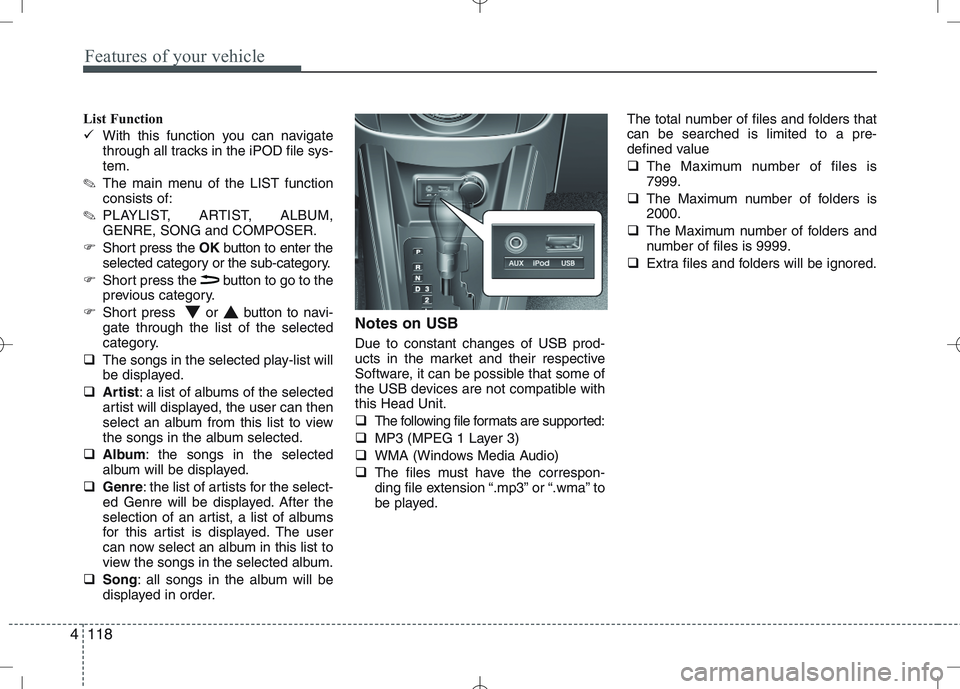
displayed in order. Notes on USB Due to constant changes of USB prod-
ucts in the market and their respective
Software, it can be possible that some of
the USB devices are not compatible withthis Head Unit.
The following file formats are supported:
MP3 (MPEG 1 Layer 3)
WMA (Windows Media Audio)
The files must have the correspon-
ding file extension “.mp3” or “.wma” to
be played. The total number of files and folders thatcan be searched is limited to a pre-
defined value
The Maximum number of files is 7999.
The Maximum number of folders is2000.
The Maximum number of folders and
number of files is 9999.
Extra files and folders will be ignored.
Page 748 of 761
4119
Features of your vehicle
Notes on USB Sticks (Thumb drives)
Only use USB sticks (thumb drives) of
wellknown manufacturers. The use of
other drives may result in malfunction ofthe set.
Do not connect other USB devices such as hard discs or other digital equipment
to the USB hub. Connecting other
devices can cause malfunction or even
destroy the audio equipment.Inserting and removing an USB stick
(thumb drive)
Insert the USB stick into the USB hub The USB hub is located in the con-
sole (also see Car Manual).
✎ Please keep lid closed when not in
use.
Playback of files ✎ Playback starts automatically, in case
there are MP3 or WMA files on the
USB stick,
OR
When the device is inserted but a dif-
ferent source was selected before,press the AUXbutton to start play-
back.
Previous/Next Folder
Press the or buttons to select
previous or next folder.
Previous/Next File
Press the or buttons to select
previous or next song file✽✽
NOTICE
In rare cases it is possible that an USB stick (thumb drive) is not recognized
by the unit or may cause a malfunc-
tion.
This is not a system fault. Some USB
sticks do not comply with the USB
thumb drive specifications.
CAUTION
The USB hub is designed for a
charge and supply current of upto 500 mA.
When using external equipment with a current consumptionexceeding the specified 500 mA,
the unit switches off the USB huband gives a warning.
CAUTION
We strongly recommend only using USB sticks (thumb drives)
of well-known manufacturers.
On no account must other USB devices such as hard discs orother digital equipment be con- nected to the USB hub.
Connecting other devices can cause malfunction or evendestroy the audio equipment.
Page 749 of 761
Features of your vehicle
120
4
Manual Seek – Fast Forward/Fast back-
ward
Press and hold the or button to
go fast forward or fast backward.
During manual seek audio is audible
at reduced volume.
Repeat File/Folder
Short press the RPTbutton to select
Repeat File.
The current file will be repeated.
Long press the RPTbutton to select
Repeat Folder.
All files within the current folder will be repeated.
To cancel the “Repeat File/Folder”
mode, short press the RPTbutton
again. Random Folder/All Files
Short press the RDMbutton to acti-
vate the “Random Folder” option.
All files in the folder will be played at
random.
OR
Long press the RDMbutton to acti-
vate the “Random All” option.
All files on the USB device will be
played at random.
To deactivate the “Random Folder/All
Files” feature, press the RDMbutton
again.
Scan File/Folder
Long press the SCANbutton to acti-
vate the “Scan Folder” option.
✎ The first track of each folder will be
scanned, except the root directory.
OR
Short press the SCANbutton to acti-
vate the “Scan All” option.
All files on the USB device will be scanned.
To deactivate the “Scan Folder/All
Files” feature, short press the SCAN
button again to abort “Scan All” Viewing MP3 Information
With this function text information of the
MP3 files can displayed on the LCD-
Display.
Short press the press INFObutton.
The following information will be shown
in the following sequence.
Filename (“NO INFO” will appear if
the file name contains characters that
do not pertain to the ASCII characterset)
ID3 tag info – Song Title (“NO INFO”
will appear if there is no Song Title
available)
ID3 tag info – Artist name (“NO INFO”
will appear if there is no Artist Name
available)
ID3 tag info – Album name (“NO
INFO” will appear if will appear if there
is no Album Name available).
Directory name
Total no. of files on the USB device
The information will be visible on the
LCD-display for 5 seconds.
Page 750 of 761
4121
Features of your vehicle
Auxiliary In
Via the Auxiliary Input (3.5 mm plug)
you can connect your portable deviceto the Head Unit.
Insert the 3.5 mm plug (connected to
your portable device) into the Auxinput.
✎ Audio output from the auxiliary source
is directly audible when the device isplugged in.
✎ The Auxiliary Source is aborted when
another source becomes active.
To re-select the Auxiliary Sourcewhen it is plugged in already:
Short press the AUXbutton on the
Head Unit.
OR
Short press the Modebutton on the
Steering Wheel Remote Control.
✎ If no Auxiliary Source is detected,
“NO MEDIA” will be displayed for 5
seconds and the Head Unit will return
to the previous selected source.✽✽
NOTICE
The AUX source is not available if an
iPod is connected.
The volume setting of Auxiliary source
is independent of other sources. Any volume changes in Auxiliary source
is memorized and used whenever the
Auxiliary source is selected.
Page 751 of 761
Features of your vehicle
122
4
Bluetooth
You can use a Bluetooth device in your
car to make a hands-free phone call or to
stream music onto your in-car speakers
(via this Head Unit). This Head Unit sup-
ports HFP, A2DP and AVRCP connec-tion.
Advanced Audio Distribution Profile
(A2DP)
This profile defines how high quality audio (stereo or mono) can be streamed
from one device to another over a
Bluetooth connection. For example:
music streamed from a mobile phone to
a wireless headset or car audio.
Audio/Video Remote Control Profile
(AVRCP)
This profile is designed to provide a stan-
dard interface to control TVs, Hi-fi equip-
ment, etc. to allow a single remote con-
trol (or other device) to control all of theA/V equipment to which a user has
access. It may be used in concert with
Advanced Audio Distribution Profile. Hands-Free Profile (HFP)
This is commonly used to allow car
handsfree kits to communicate with
mobile phones in the car.
Notes for mobile phones
Some functions (e.g. starting of speech
recognition) are not supported by all
mobile phones. We cannot guarantee
that all functions described will be sup-
ported by all mobile phones withBluetooth.
New device
This function allows you to add a new phone to the Head Units Bluetooth
Device List. Maximum of 5 devices can
be added to the list. If the list is full, the
oldest device will be replaced by the
newly added Bluetooth device, based on
last pairing date.
Pairing
To pair your Bluetooth-enabled device to
this Head Unit, make sure that no deviceis currently streaming to this Head Unitfirst.
Short press the SETUPbutton to
enter the Setup menu.
Short press the or button to
access the Bluetooth sub-menu.
Now select “New Device”.
Press the or button to select
the number of the first digit.
Press the or button to select the
next digit.
Repeat the above steps for the other
three digits.
Press the OKbutton to confirm the 4-
digit PIN for authentication and acti-
vate the “Discoverable Mode”.
In “Discoverable Mode” the Head Unit
broadcasts a Bluetooth ID.
Look for the “KIA-BLUETOOTH” on
your Bluetooth device.
Enter identically the same PIN in your
Bluetooth device and authenticate
pairing on your Bluetooth device.
When pairing is established, the ID of
the Bluetooth device and the service
list info will be stored in the Head Unit
Bluetooth Device List.
Page 753 of 761
Features of your vehicle
124
4
Transferring a Call
This function allows you to transfer a call
during an ongoing call.
From the tuner to the phone
From the phone to the tuner
Long press the Callbutton on the
Steering Wheel Remote Control to
transfer the ongoing call back to the
phone or back to the tuner again.
Audio Streaming
Start Audio Streaming
This function allows the Head Unit to
start streaming music from phone.
The Bluetooth device must be con- nected with the Head Unit.
Press the AUXbutton and select BT
AUDIO.
✎ The Head Unit starts streaming the
audio from the phone and will start
playing the audio files.
✎ The Head Unit has no control on the
sequence of track playback in phone. Next/Previous Track
This function allows you to select the
next/ previous track of phone‘s music
player by using the next/previous track
buttons on the Head Unit or SteeringWheel Remote Control.
Short press the or button on the
Head Unit or the Steering WheelRemote Control.
Suspend Audio Streaming
This function allows you to suspend
streaming music from the phone to theHead Unit.
Short press the Mutebutton on the
Steering Wheel Remote Control.
Press the AUXbutton and de-select
BT AUDIO.