audio KIA VENGA 2015 User Guide
[x] Cancel search | Manufacturer: KIA, Model Year: 2015, Model line: VENGA, Model: KIA VENGA 2015Pages: 480, PDF Size: 23.15 MB
Page 246 of 480
Features of your vehicle
102
4
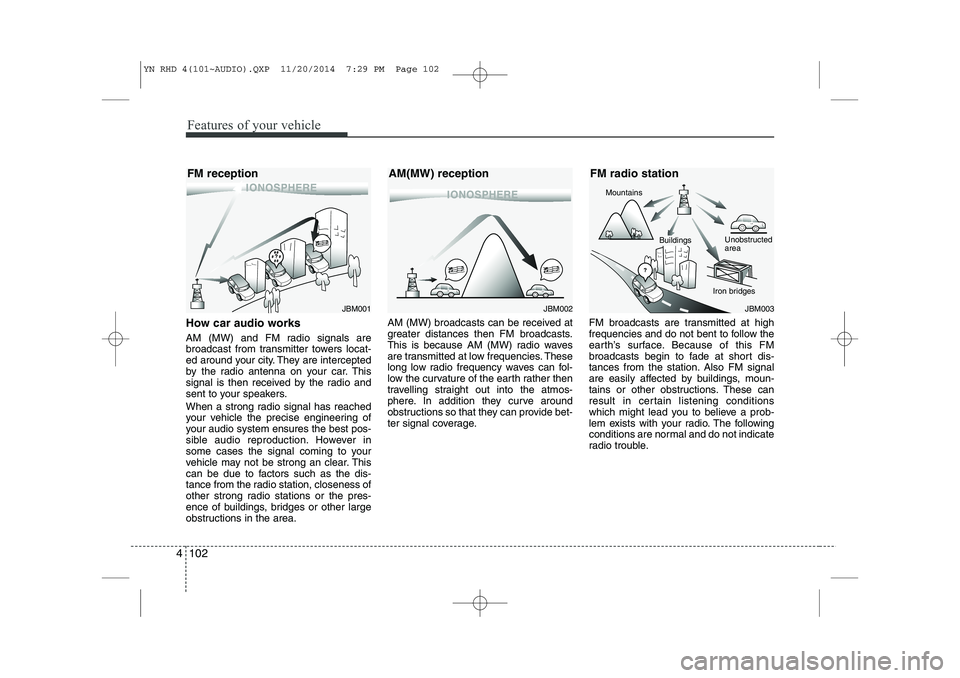
How car audio works
AM (MW) and FM radio signals are
broadcast from transmitter towers locat-
ed around your city. They are intercepted
by the radio antenna on your car. This
signal is then received by the radio and
sent to your speakers.
When a strong radio signal has reached
your vehicle the precise engineering of
your audio system ensures the best pos-
sible audio reproduction. However in
some cases the signal coming to your
vehicle may not be strong an clear. This
can be due to factors such as the dis-
tance from the radio station, closeness of
other strong radio stations or the pres-
ence of buildings, bridges or other large
obstructions in the area. AM (MW) broadcasts can be received at
greater distances then FM broadcasts.
This is because AM (MW) radio waves
are transmitted at low frequencies. These
long low radio frequency waves can fol-
low the curvature of the earth rather then
travelling straight out into the atmos-
phere. In addition they curve around
obstructions so that they can provide bet-
ter signal coverage.
FM broadcasts are transmitted at high
frequencies and do not bent to follow the
earth’s surface. Because of this FM
broadcasts begin to fade at short dis-
tances from the station. Also FM signal
are easily affected by buildings, moun-
tains or other obstructions. These can
result in certain listening conditions
which might lead you to believe a prob-
lem exists with your radio. The following
conditions are normal and do not indicate
radio trouble.
JBM002
AM(MW) receptionJBM003
FM radio station
Mountains
Unobstructed area
Iron bridges
Buildings
JBM001
FM reception
YN RHD 4(101~AUDIO).QXP 11/20/2014 7:29 PM Page 102
Page 247 of 480
4 103
Features of your vehicle
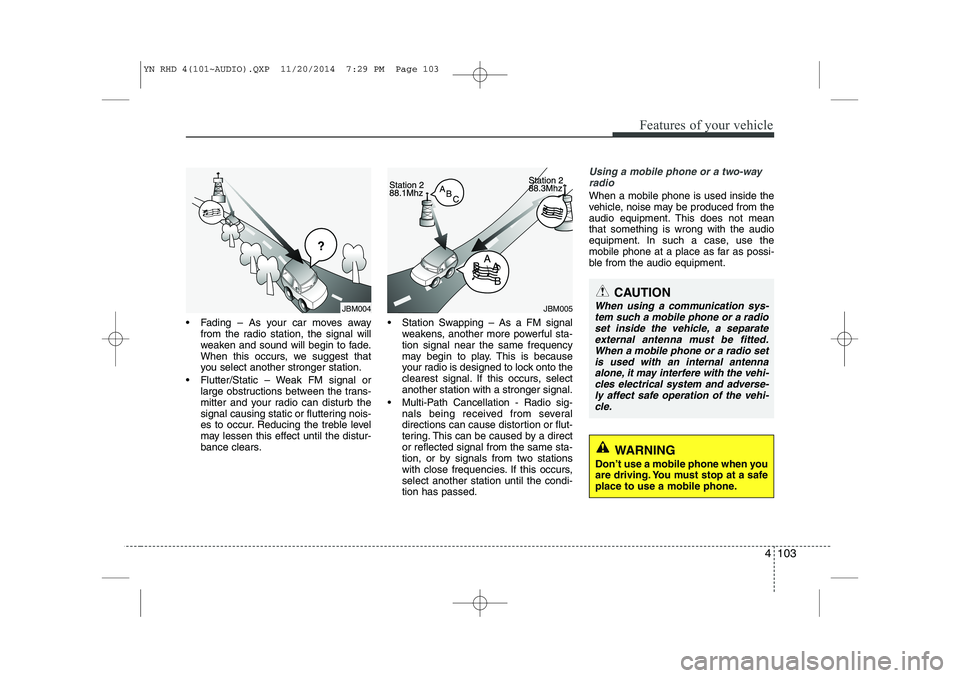
Fading – As your car moves awayfrom the radio station, the signal will
weaken and sound will begin to fade.
When this occurs, we suggest that
you select another stronger station.
Flutter/Static – Weak FM signal or large obstructions between the trans-
mitter and your radio can disturb the
signal causing static or fluttering nois-
es to occur. Reducing the treble level
may lessen this effect until the distur-
bance clears. Station Swapping – As a FM signal
weakens, another more powerful sta-tion signal near the same frequency
may begin to play. This is because
your radio is designed to lock onto the
clearest signal. If this occurs, selectanother station with a stronger signal.
Multi-Path Cancellation - Radio sig- nals being received from several
directions can cause distortion or flut-
tering. This can be caused by a director reflected signal from the same sta-
tion, or by signals from two stations
with close frequencies. If this occurs,select another station until the condi-tion has passed.
Using a mobile phone or a two-way
radio
When a mobile phone is used inside the
vehicle, noise may be produced from the
audio equipment. This does not meanthat something is wrong with the audio
equipment. In such a case, use the
mobile phone at a place as far as possi-
ble from the audio equipment.
JBM005
CAUTION
When using a communication sys-
tem such a mobile phone or a radio set inside the vehicle, a separateexternal antenna must be fitted.
When a mobile phone or a radio setis used with an internal antennaalone, it may interfere with the vehi- cles electrical system and adverse-
ly affect safe operation of the vehi- cle.
WARNING
Don’t use a mobile phone when you
are driving. You must stop at a safe
place to use a mobile phone.
JBM004
YN RHD 4(101~AUDIO).QXP 11/20/2014 7:29 PM Page 103
Page 248 of 480
Features of your vehicle
104
4
General information
RDS (Radio Data System)
Many VHF stations transmit RDS infor-
mation. The tuner evaluates the RDS
telegram and offers the following advan-tages:
PS (Program Service name): Display
of station name.
PTY (Program TYpe): Station selec-
tion by program type.
AF (Alternative Frequency):
Automatic re-tuning to best alternative
frequency.
TA (Traffic Announcement): Traffic
announcements.
EON (Enhanced Other Networks):
Automatic fade-in of traffic announce-
ments on other stations.
Notes on operating instructions
The following reading aids are used to
simplify these operating instructions:
Asks you to perform an action
Shows the unit’s reaction
✎ Provides extra info
Identifies a list
Class 1 laser product
CAUTION
Any inappropriate use of the device
may expose the user to invisiblelaser rays which exceed the limitsfor Class 1 laser products.CAUTION
Do not place beverages close to the audio system. The audio sys-tem mechanism may be damaged
if you spill them.
Do not strike or allow anything to impact the audio system, damageto the system mechanisms could occur.
WARNING
Don’t use a mobile phone when you
are driving. You must stop at a safe
place to use a mobile phone.
WARNING
When driving your vehicle, be sure
to keep the volume of the unit set
low enough to allow you to hear
sounds coming from the outsides
(e.g. aware of the road and trafficconditions).
YN RHD 4(101~AUDIO).QXP 11/20/2014 7:29 PM Page 104
Page 249 of 480
4 105
Features of your vehicle
Safety instructions Notes on USB stick (thumb drive)Notes on Bluetooth®Wireless
Technology devices
Notes on Bluetooth
®Wireless
Technology*
Bluetooth®Wireless Technology is a
short-range wireless radio connectivi-
ty technology used mainly for mobile
phones, hand-held PC’s and other
devices.
Bluetooth®Wireless Technology SIG
Inc. owns the Bluetooth®Wireless
Technology w ord, marking and logo;
and any use of such marks is under
license. Other trademarks and trade
names are those of their respective
owners.
Bluetooth®Wireless Technology oper-
ates in 2.4 GHz frequency range and
transmits voice and data at speeds of
up to 1 mbps within a range of up to10 m.
WARNING
Make all inputs via the remote con-
trol only when the vehicle is sta-
tionary, or have the passenger
make them. Otherwise, you may
endanger the occupants and other
road users.
WARNING
In rare cases it is possible that an
Bluetooth®Wireless Technology
device is not recognized by the unit
or may cause a malfunction. Please
only use
Bluetooth®Wireless
Technology devices that comply withthe
Bluetooth®Wireless Technology
specifications.
WARNING
We strongly recommend only using USB sticks (thumb drives)
of well-known manufacturers.
On no account must other USB devices such as hard discs or
other digital equipment or multiplug USB hub be connected to
the USB hub. Connecting other
devices can cause malfunction or
even destroy the audio equip-ment.
Avoid using the USB memory when it might hinder your safetydriving.
It is possible that noise is heard during playback when using the
AUX-IN together with the poweroutlet due to system-related not a
malfunction. If this happens, use
the power source of the AUX
device.
In rare cases it is possible that an USB stick (thumb drive) is not
recognized by the unit or may
cause a malfunction. Please only
use USB sticks that comply withthe USB thumb drive specifica-tions.
WARNING
Avoid inserting any foreign objects
into the slot of this player. Failure to
observe this may cause malfunc-
tion due to the precise mechanismof this unit.
WARNING
Keep the volume level low enough
to be aware of road and traffic con-ditions.
WARNING
Do not open covers and do not
repair yourself. Refer servicing to
qualified personnel.
YN RHD 4(101~AUDIO).QXP 11/20/2014 7:29 PM Page 105
Page 250 of 480
Features of your vehicle
106
4
The Head Unit supports the Hands
free Profile (HFP), the Advanced
Audio Distribution Profile (A2DP) and
the Audio Video Remote Control
Profile (AVRCP).
The Head Unit has been verified and
certified by the
Bluetooth®Wireless
Technology Qualification Program
(BQP) for compliance to the
Bluetooth®
Wireless Technology standards. For
more information, please check the
Bluetooth®Wireless Technology web site
(http://www.bluetooth.com/Bluetooth/
Connect/Products/) for the BQP productlisting.
* Only if this option is available on your Head Unit.
Notes on iPod®
Care of disc (if equipped)
If the temperature inside the car is too
high, open the car window for ventila-
tion before using your car audio.
It is illegal to copy and use MP3/WMA
files without permission. Use CDs that
are created only by lawful means.
Do not apply volatile agents such as
benzene and thinner, normal cleaners
and magnetic sprays made for ana-
logue disc onto CDs.
To prevent the disc surface from get-
ting damaged. Hold and carry CDs bythe edges or the edges of the centre
hole only.
Clean the disc surface with a piece of
clean soft cloth before playback (wipeit from the centre to the outside edge).
Do not damage the disc surface or
attach pieces of sticky tape or paperon it.
Make sure on undesirable matter
other than CDs are inserted into the
CD player.
Do not insert more than one CD at a
time. It is likely to block CD operation.
Keep CDs in their cases after use to
protect them from scratches or dirt.
Depending on the type of CD-R/CD-
RW CDs, certain CDs may not oper-
ate normally according to manufactur-ing companies or making and record-
ing methods. In such circumstances,
if you still continue to use those CDs,
they may cause the malfunction of
your car audio system.
Playing an incompatible Copy
Protected Audio CD
Some copy protected CDs which do not
comply with the international audio CD
standards (Red Book), may not play on
your car audio. Please note that if you try
to play copy protected CDs and the CD
player does not perform correctly the
CDs may be defective, not the CD player.
WARNING
The newly introduced iPod ®
with
new firmware may not be 100%
compatible and may not be sup-
ported by the system.
YN RHD 4(101~AUDIO).QXP 11/20/2014 7:29 PM Page 106
Page 251 of 480
4 107
Features of your vehicle
Notes on CD formats
The following CD formats are sup-
ported by the CD player:
CD Audio (CD-DA in accordance withthe Red Book Standard);
CD-R/RW (in accordance with
Orange Book, part 2/3)
Multi-session CD (in accordance with
multi-session CD specification 1.0).
Red Book
Red Book is the standard for audio CDs
(Compact Disc Digital Audio system, or
CDDA). It is named after one of a set ofcolour-bound books that contain the
technical specifications for all CD and
CDROM formats.
Orange Book
Orange Book is the standard for CD-R
duplicating (write-once) media. Compact
Disc ReWritable (CD-RW) is a rewritable
optical disc format. Known as CD-
Erasable (CD-E) during its development,
CD-RW was introduced in 1997, and was
preceded by the never officially releasedCD-MO in 1988. Multi Session Disc
A multi session disc is a compact disc to which data is added incrementally in
more than one recording, allowing you to
add, update, or “delete” files and directo-
ries. You could, theoretically, record audio
tracks in multiple sessions. However, an
audio CD player will only play the tracks
in the first session. However, the disc
cannot be played in a normal CD-ROM
drive or home or car stereo until the ses-sion is closed.
Handling CDs
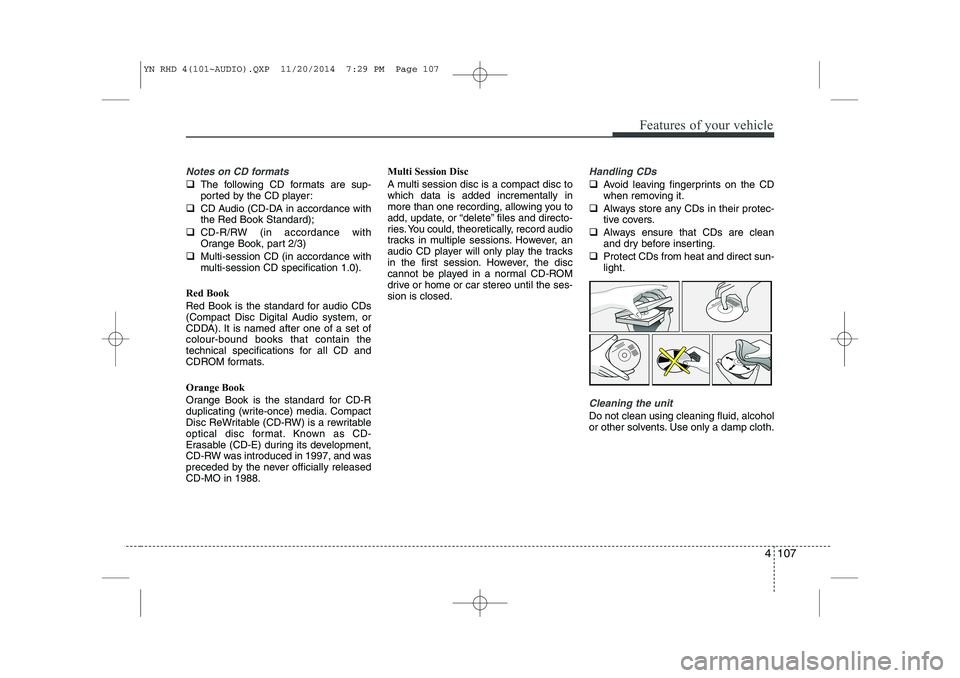
Avoid leaving fingerprints on the CD
when removing it.
Always store any CDs in their protec-
tive covers.
Always ensure that CDs are clean
and dry before inserting.
Protect CDs from heat and direct sun-light.
Cleaning the unit
Do not clean using cleaning fluid, alcohol
or other solvents. Use only a damp cloth.
YN RHD 4(101~AUDIO).QXP 11/20/2014 7:29 PM Page 107
Page 252 of 480
Features of your vehicle
108
4
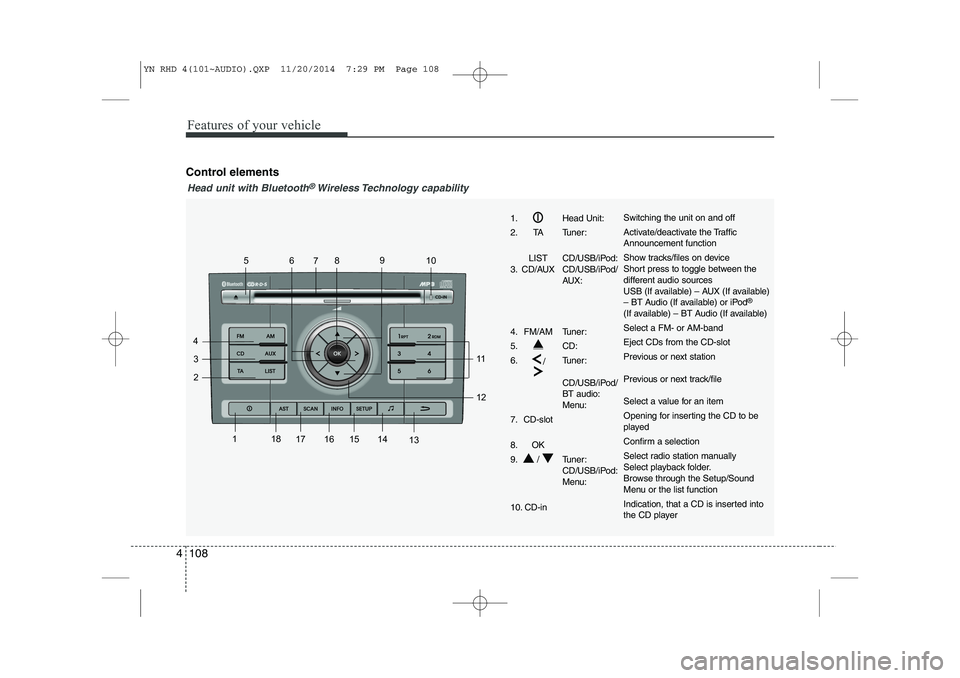
Control elements
1
2
3
4 56
78 9
10
11 12
13
14
15
161718
1. Head Unit:
2. TA Tuner:
LIST CD/USB/iPod:
3. CD/AUX CD/USB/iPod/ AUX:
4. FM/AM Tuner:
5. CD:6. /Tuner:
CD/USB/iPod/ BT audio:
Menu:
7. CD-slot
8. OK
9. / Tuner: CD/USB/iPod:
Menu:
10. CD-inSwitching the unit on and off
Activate/deactivate the Traffic Announcement function
Show tracks/files on device
Short press to toggle between the
different audio sources
USB (If available) – AUX (If available)
– BT Audio (If available) or iPod ®
(If available) – BT Audio (If available) Select a FM- or AM-bandEject CDs from the CD-slot
Previous or next station
Previous or next track/file
Select a value for an item
Opening for inserting the CD to be
played
Confirm a selection
Select radio station manually
Select playback folder.
Browse through the Setup/Sound
Menu or the list function
Indication, that a CD is inserted into
the CD player
Head unit with Bluetooth®Wireless Technology capability
YN RHD 4(101~AUDIO).QXP 11/20/2014 7:29 PM Page 108
Page 253 of 480
4 109
Features of your vehicle
1
2
3
4 56
78 9
10
11 12
13
14
15
1617
18
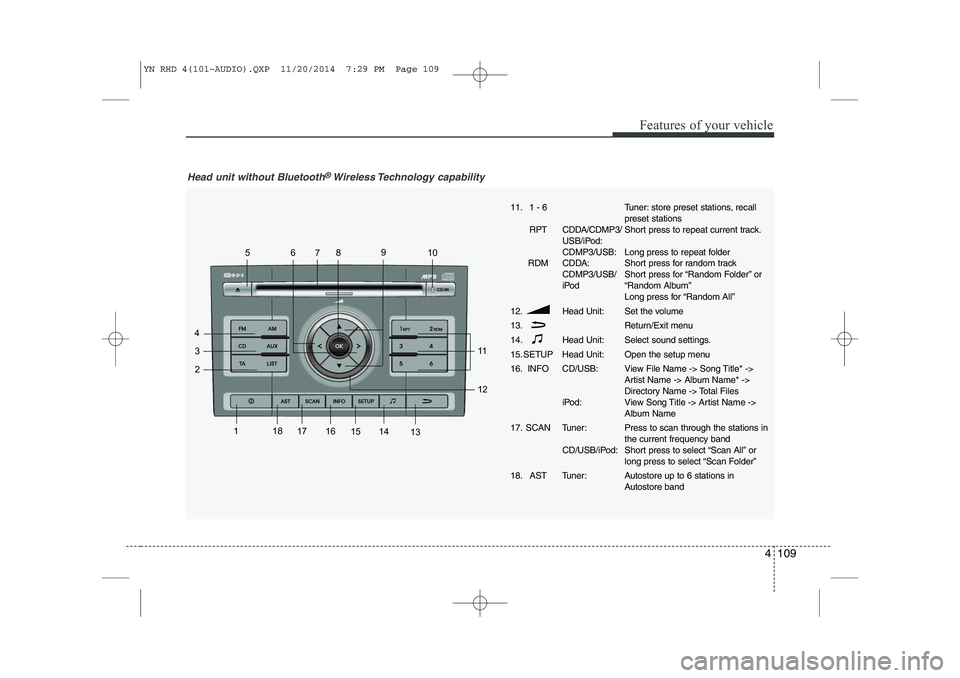
Head unit without Bluetooth®Wireless Technology capability
11. 1 - 6
RPT CDDA/CDMP3/ USB/iPod: CDMP3/USB:
RDM CDDA: CDMP3/USB/
iPod
12. Head Unit: 13.
14. Head Unit:
15. SETUP Head Unit:
16. INFO CD/USB:
iPod:
17. SCAN Tuner: CD/USB/iPod:
18. AST Tuner:Tuner: store preset stations, recall preset stations
Short press to repeat current track.
Long press to repeat folder
Short press for random track
Short press for “Random Folder” or
“Random Album”
Long press for “Random All”
Set the volume
Return/Exit menu
Select sound settings.
Open the setup menu
View File Name -> Song Title* ->
Artist Name -> Album Name* ->
Directory Name -> Total Files
View Song Title -> Artist Name ->
Album Name Press to scan through the stations in the current frequency band
Short press to select “Scan All” or
long press to select “Scan Folder”
Autostore up to 6 stations in
Autostore band
YN RHD 4(101~AUDIO).QXP 11/20/2014 7:29 PM Page 109
Page 254 of 480
Features of your vehicle
110
4
Inserting and removing CDs
Inserting a CD
Insert the CD into the drive (printed side up).
✎ Insert only one disk
✎ For audio/MP3 CDs, playback starts
automatically.
Removing a CD
Press the button and carefully
remove the CD.
Switching on/off
Press the button to switch the unit
on or off.
Switching on and off with the ignition key
If the unit is switched on, it can be
switched off and on automatically by
removing or inserting and turning the
ignition key. Automatic switch off
If the unit was turned on using the
button with the ignition off, it automatical-
ly switches itself off after 60 minutes.
Volume
Turn the knob to set the vol-
ume.
Menu operation
The central elements for operating the
menus are the , , , or OK
buttons.
WARNING
When setting the volume, please make sure that traffic noises
(horns, sirens, emergency vehicles,
etc.) are still audible.
YN RHD 4(101~AUDIO).QXP 11/20/2014 7:29 PM Page 110
Page 255 of 480
4 111
Features of your vehicle
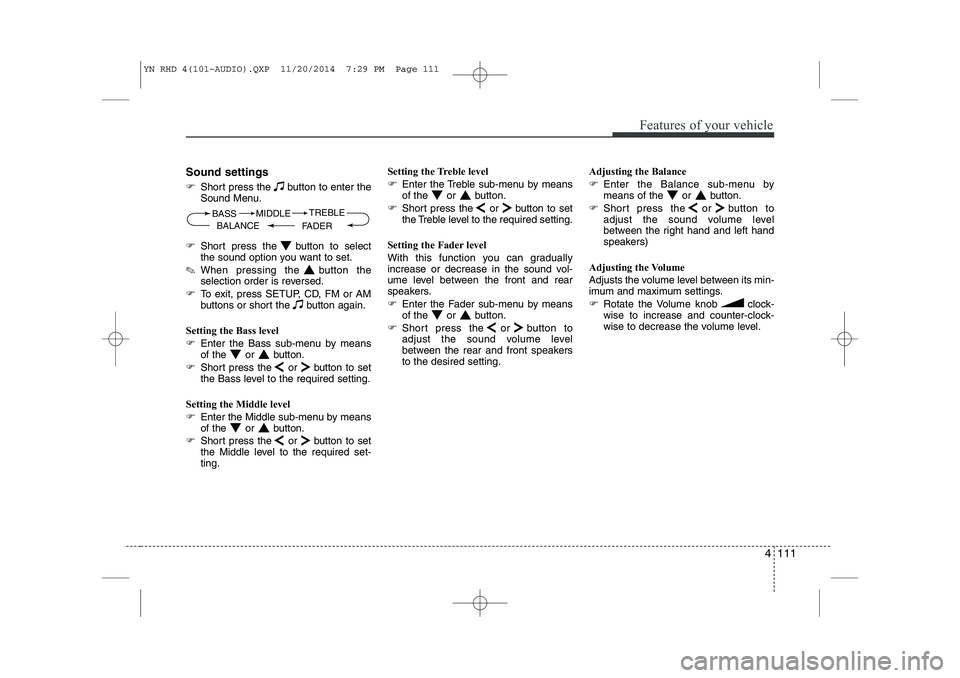
Sound settings
Short press the button to enter the
Sound Menu.
Short press the button to select
the sound option you want to set.
✎ When pressing the button the
selection order is reversed.
To exit, press SETUP, CD, FM or AM
buttons or short the button again.
Setting the Bass level
Enter the Bass sub-menu by means
of the or button.
Short press the or button to set
the Bass level to the required setting.
Setting the Middle level
Enter the Middle sub-menu by means
of the or button.
Short press the or button to set
the Middle level to the required set-ting. Setting the Treble level
Enter the Treble sub-menu by means
of the or button.
Short press the or button to set
the Treble level to the required setting.
Setting the Fader level
With this function you can gradually
increase or decrease in the sound vol-
ume level between the front and rear
speakers.
Enter the Fader sub-menu by means
of the or button.
Short press the or button to
adjust the sound volume level
between the rear and front speakersto the desired setting. Adjusting the Balance
Enter the Balance sub-menu by
means of the or button.
Short press the or button to
adjust the sound volume level
between the right hand and left hand
speakers)
Adjusting the Volume
Adjusts the volume level between its min-
imum and maximum settings.
Rotate the Volume knob clock-
wise to increase and counter-clock-
wise to decrease the volume level.
BASS
FADERTREBLE
BALANCE MIDDLE
YN RHD 4(101~AUDIO).QXP 11/20/2014 7:29 PM Page 111