display KIA VENGA 2015 Owners Manual
[x] Cancel search | Manufacturer: KIA, Model Year: 2015, Model line: VENGA, Model: KIA VENGA 2015Pages: 480, PDF Size: 23.15 MB
Page 4 of 480
4
INSTRUMENT PANEL OVERVIEW
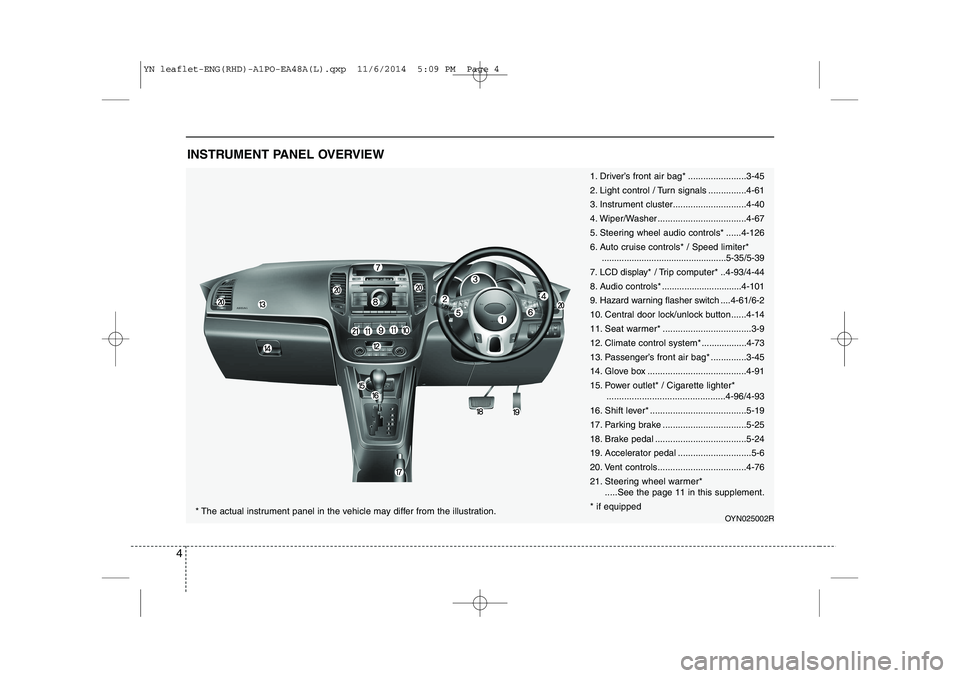
1. Driver’s front air bag* .......................3-45
2. Light control / Turn signals ...............4-61
3. Instrument cluster.............................4-40
4. Wiper/Washer ...................................4-67
5. Steering wheel audio controls* ......4-126
6. Auto cruise controls* / Speed limiter*..................................................5-35/5-39
7. LCD display* / Trip computer* ..4-93/4-44
8. Audio controls * ................................4-101
9. Hazard warning flasher switch ....4-61/6-2
10. Central door lock/unlock button......4-14
11. Seat warmer* ...................................3-9
12. Climate control system*..................4-73
13. Passenger’s front air bag* ..............3-45
14. Glove box .......................................4-91
15. Power outlet* / Cigarette lighter* ...............................................4-96/4-93
16. Shift lever* ......................................5-19
17. Parking brake .................................5-25
18. Brake pedal ....................................5-24
19. Accelerator pedal .............................5-6
20. Vent controls...................................4-7621.
Steering wheel warmer*
.....See the page 11 in this supplement.
* if equipped
OYN025002R* The actual instrument panel in the vehicle may differ from the illustration.
YN leaflet-ENG(RHD)-A1PO-EA48A(L).qxp 11/6/2014 5:09 PM Page 4
Page 20 of 480

20
❖❖Please see this page instead of page 4-82 in owner's manual.
AUTOMATIC CLIMATE CONTROL SYSTEM (IF EQUIPPED)
OYN045062L/OYN045141L
1. AUTO (automatic control) button
2. Temperature control knob
3. OFF button
4. Mode selection button
5. Fan speed control knob
6. Air conditioning button
7. Front windscreen defroster button
8. Rear window defroster button
9. Air intake control button
10. A/C display*
11. Climate button*
* if equipped
■
Type A
■Type B
YN leaflet-ENG(RHD)-A1PO-EA48A(L).qxp 11/6/2014 5:11 PM Page 20
Page 21 of 480
21
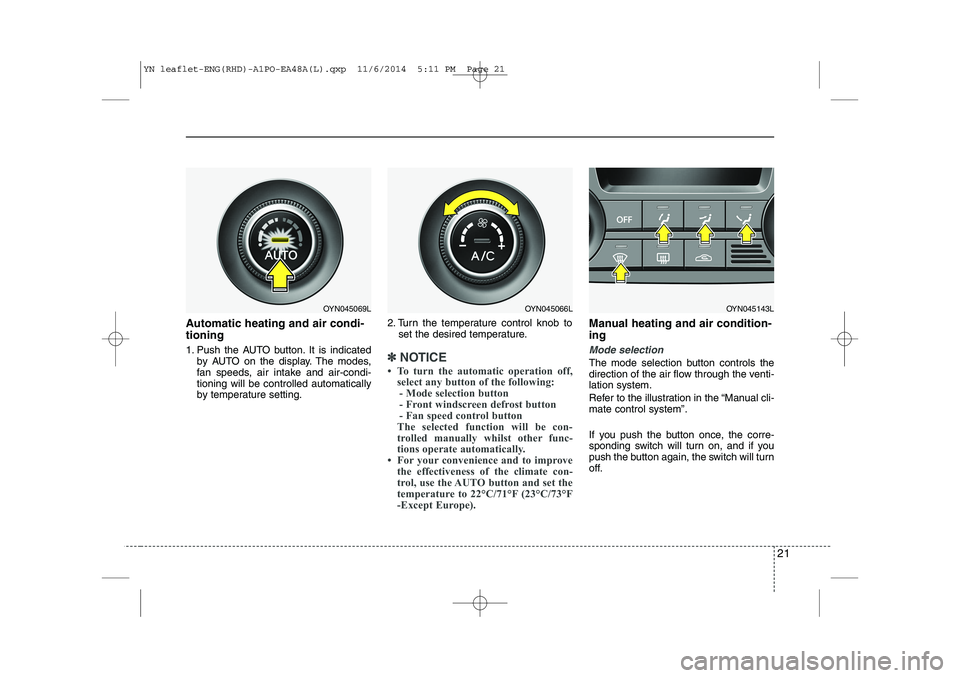
Automatic heating and air condi- tioning
1. Push the AUTO button. It is indicatedby AUTO on the display. The modes,
fan speeds, air intake and air-condi-tioning will be controlled automatically
by temperature setting. 2. Turn the temperature control knob to
set the desired temperature.
✽✽ NOTICE
To turn the automatic operation off, select any button of the following:- Mode selection button
- Front windscreen defrost button
- Fan speed control button
The selected function will be con-
trolled manually whilst other func-
tions operate automatically.
For your convenience and to improve the effectiveness of the climate con-
trol, use the AUTO button and set the
temperature to 22°C/71°F (23°C/73°F
-Except Europe).
Manual heating and air condition- ing
Mode selection
The mode selection button controls the
direction of the air flow through the venti-lation system.
Refer to the illustration in the “Manual cli- mate control system”.
If you push the button once, the corre-
sponding switch will turn on, and if you
push the button again, the switch will turn
off.
OYN045069LOYN045066LOYN045143L
YN leaflet-ENG(RHD)-A1PO-EA48A(L).qxp 11/6/2014 5:11 PM Page 21
Page 24 of 480
24
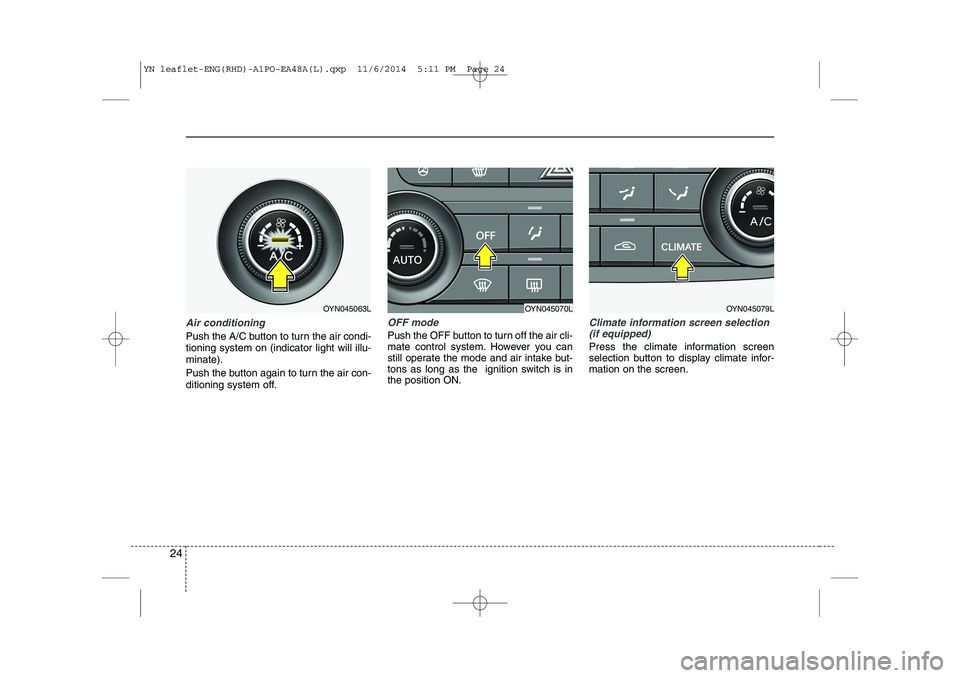
Air conditioning
Push the A/C button to turn the air condi- tioning system on (indicator light will illu-minate).
Push the button again to turn the air con-
ditioning system off.
OFF mode
Push the OFF button to turn off the air cli-
mate control system. However you can
still operate the mode and air intake but-
tons as long as the ignition switch is inthe position ON.
Climate information screen selection(if equipped)
Press the climate information screen
selection button to display climate infor-mation on the screen.
OYN045063LOYN045070LOYN045079L
YN leaflet-ENG(RHD)-A1PO-EA48A(L).qxp 11/6/2014 5:11 PM Page 24
Page 26 of 480
26
❖❖Please see this page instead of page 4-93 in owner's manual.
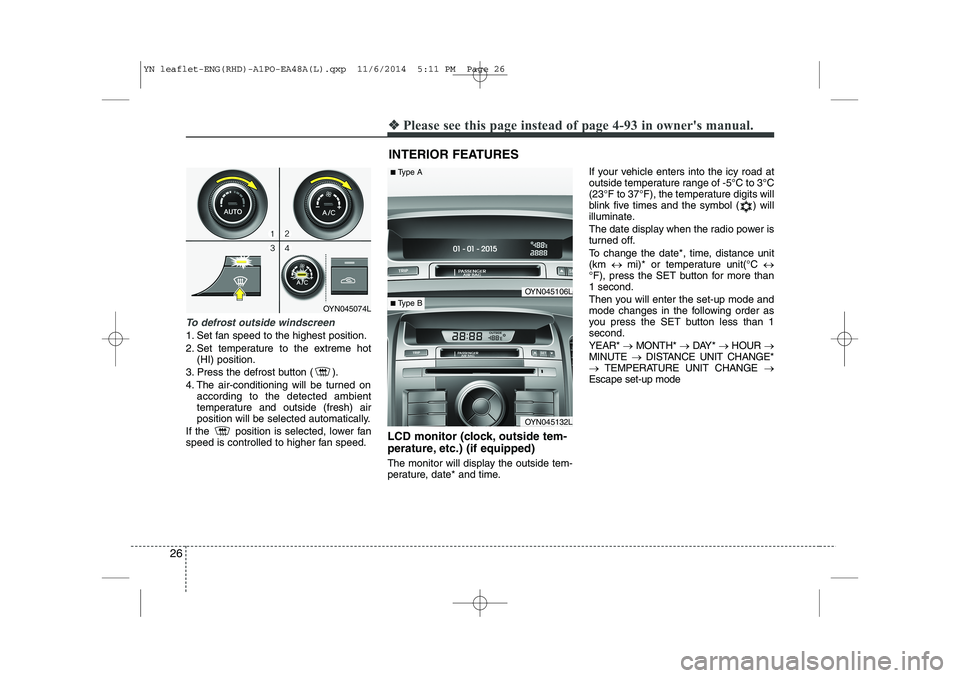
To defrost outside windscreen
1. Set fan speed to the highest position.
2. Set temperature to the extreme hot
(HI) position.
3. Press the defrost button ( ).
4. The air-conditioning will be turned on according to the detected ambient
temperature and outside (fresh) air
position will be selected automatically.
If the position is selected, lower fan
speed is controlled to higher fan speed. LCD monitor (clock, outside tem-
perature, etc.) (if equipped)
The monitor will display the outside tem-
perature, date* and time.If your vehicle enters into the icy road at
outside temperature range of -5°C to 3°C
(23°F to 37°F), the temperature digits will
blink five times and the symbol ( ) will
illuminate.
The date display when the radio power is
turned off.
To change the date*, time, distance unit (km
mi)* or temperature unit(°C
°F), press the SET button for more than1 second.
Then you will enter the set-up mode and
mode changes in the following order as
you press the SET button less than 1second. YEAR* MONTH* DAY* HOUR
MINUTE DISTANCE UNIT CHANGE*
TEMPERATURE UNIT CHANGE
Escape set-up mode
INTERIOR FEATURES
OYN045074L
OYN045106L
OYN045132L
■ Type A
■Type B
YN leaflet-ENG(RHD)-A1PO-EA48A(L).qxp 11/6/2014 5:11 PM Page 26
Page 82 of 480
25
Your vehicle at a glance
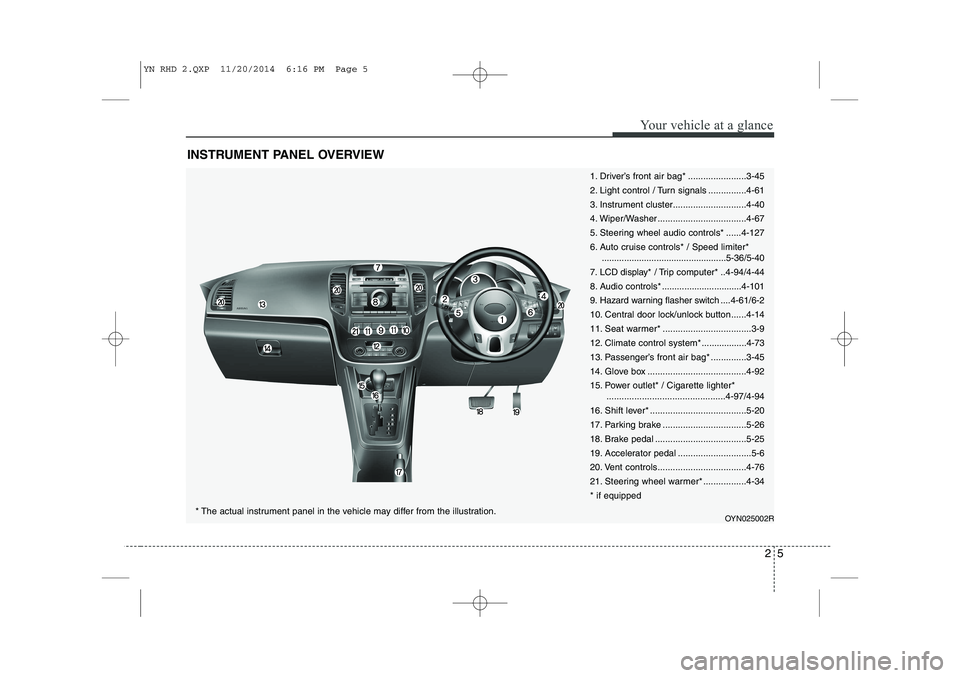
INSTRUMENT PANEL OVERVIEW
1. Driver’s front air bag* .......................3-45
2. Light control / Turn signals ...............4-61
3. Instrument cluster.............................4-40
4. Wiper/Washer ...................................4-67
5. Steering wheel audio controls* ......4-127
6. Auto cruise controls* / Speed limiter*..................................................5-36/5-40
7. LCD display* / Trip computer* ..4-94/4-44
8. Audio controls * ................................4-101
9. Hazard warning flasher switch ....4-61/6-2
10. Central door lock/unlock button......4-14
11. Seat warmer* ...................................3-9
12. Climate control system*..................4-73
13. Passenger’s front air bag* ..............3-45
14. Glove box .......................................4-92
15. Power outlet* / Cigarette lighter* ...............................................4-97/4-94
16. Shift lever* ......................................5-20
17. Parking brake .................................5-26
18. Brake pedal ....................................5-25
19. Accelerator pedal .............................5-6
20. Vent controls...................................4-7621.
Steering wheel warmer* .................4-34
* if equipped
OYN025002R
* The actual instrument panel in the vehicle may differ from the illustration.
YN RHD 2.QXP 11/20/2014 6:16 PM Page 5
Page 179 of 480
Features of your vehicle
36
4
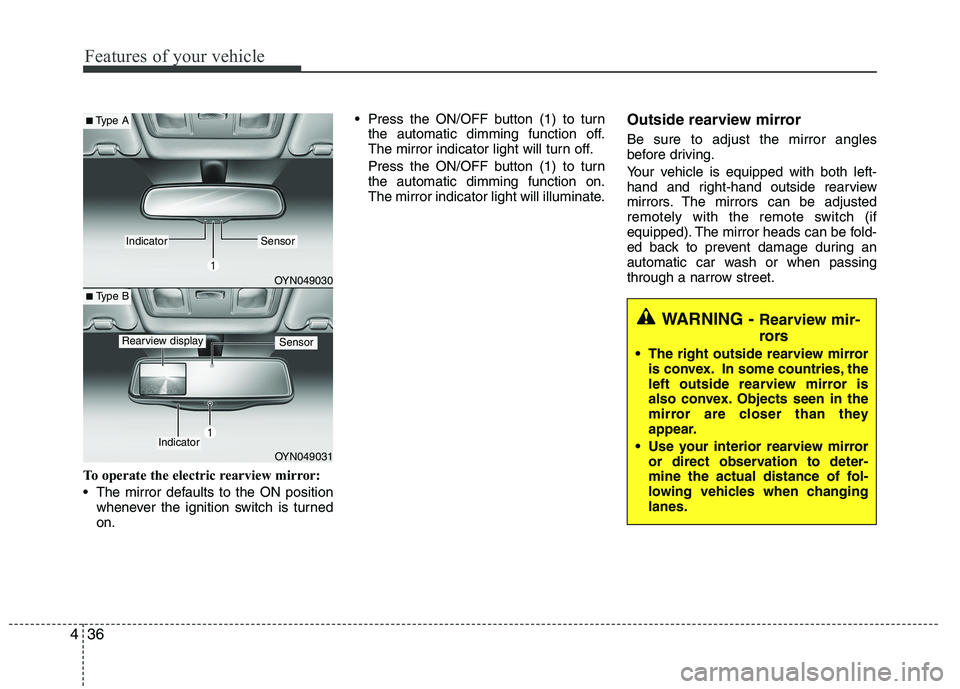
To operate the electric rearview mirror:
The mirror defaults to the ON position
whenever the ignition switch is turned on. Press the ON/OFF button (1) to turn
the automatic dimming function off.
The mirror indicator light will turn off.
Press the ON/OFF button (1) to turn the automatic dimming function on.
The mirror indicator light will illuminate. Outside rearview mirror Be sure to adjust the mirror angles
before driving.
Your vehicle is equipped with both left-
hand and right-hand outside rearview
mirrors. The mirrors can be adjusted
remotely with the remote switch (if
equipped). The mirror heads can be fold-
ed back to prevent damage during an
automatic car wash or when passing
through a narrow street.
WARNING -
Rearview mir-
rors
The right outside rearview mirror is convex. In some countries, the
left outside rearview mirror is
also convex. Objects seen in the
mirror are closer than they
appear.
Use your interior rearview mirror or direct observation to deter-
mine the actual distance of fol-
lowing vehicles when changinglanes.
OYN049030
OYN049031
■Type A
■ Type B
IndicatorSensor
Indicator
SensorRearview display
Page 187 of 480
Features of your vehicle
44
4
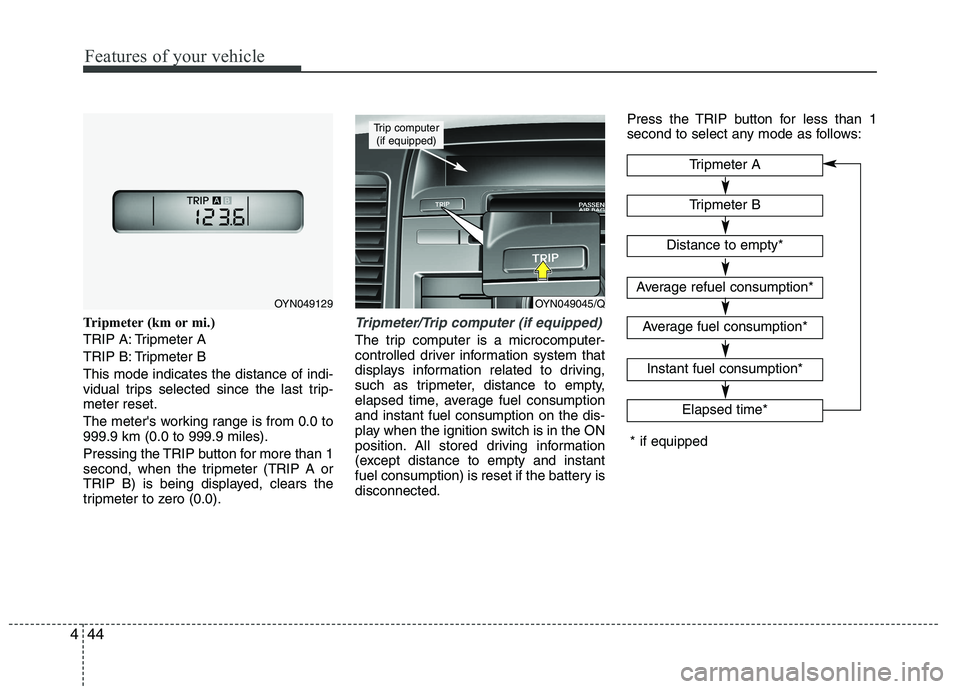
Tripmeter (km or mi.)
TRIP A: Tripmeter A
TRIP B: Tripmeter BThis mode indicates the distance of indi-
vidual trips selected since the last trip-meter reset.
The meter's working range is from 0.0 to 999.9 km (0.0 to 999.9 miles).
Pressing the TRIP button for more than 1
second, when the tripmeter (TRIP A or
TRIP B) is being displayed, clears the
tripmeter to zero (0.0).Tripmeter/Trip computer (if equipped)
The trip computer is a microcomputer-
controlled driver information system that
displays information related to driving,
such as tripmeter, distance to empty,
elapsed time, average fuel consumptionand instant fuel consumption on the dis-
play when the ignition switch is in the ON
position. All stored driving information
(except distance to empty and instant
fuel consumption) is reset if the battery isdisconnected. Press the TRIP button for less than 1
second to select any mode as follows:
Tripmeter B
Elapsed time*
Tripmeter A
Distance to empty*
Average refuel consumption*
Average fuel consumption*
Instant fuel consumption*
* if equipped
OYN049045/Q
Trip computer
(if equipped)
OYN049129
Page 188 of 480
445
Features of your vehicle
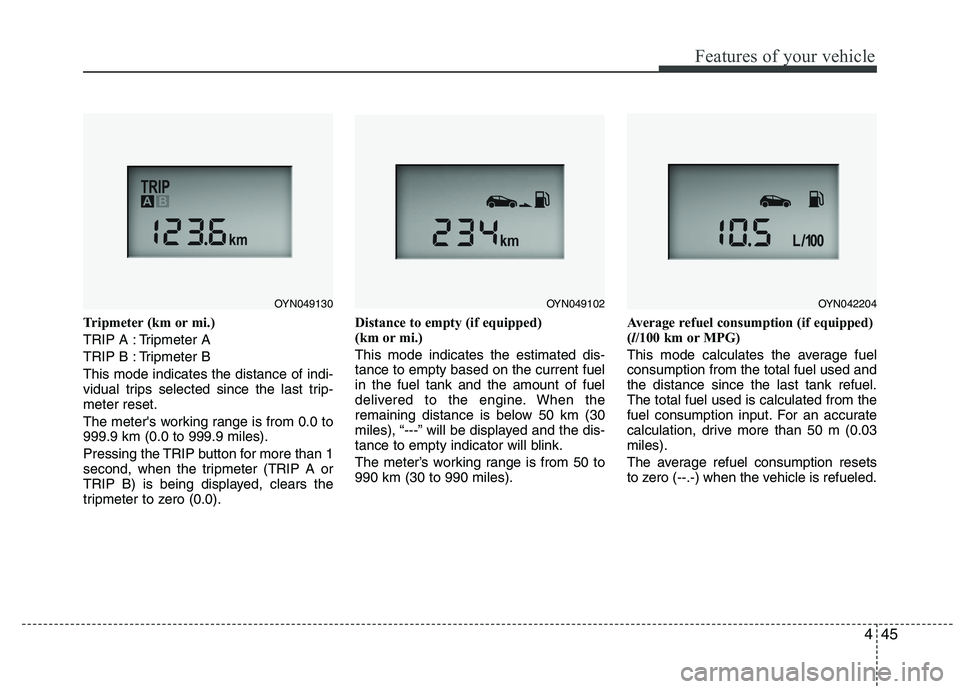
Tripmeter (km or mi.)
TRIP A : Tripmeter A
TRIP B : Tripmeter BThis mode indicates the distance of indi-
vidual trips selected since the last trip-meter reset.
The meter's working range is from 0.0 to 999.9 km (0.0 to 999.9 miles).
Pressing the TRIP button for more than 1
second, when the tripmeter (TRIP A or
TRIP B) is being displayed, clears the
tripmeter to zero (0.0).Distance to empty (if equipped)
(km or mi.) This mode indicates the estimated dis- tance to empty based on the current fuelin the fuel tank and the amount of fuel
delivered to the engine. When the
remaining distance is below 50 km (30
miles), “---” will be displayed and the dis-
tance to empty indicator will blink.
The meter’s working range is from 50 to 990 km (30 to 990 miles).
Average refuel consumption (if equipped) (
l/100 km or MPG)
This mode calculates the average fuelconsumption from the total fuel used andthe distance since the last tank refuel.The total fuel used is calculated from the
fuel consumption input. For an accurate
calculation, drive more than 50 m (0.03miles).
The average refuel consumption resets
to zero (--.-) when the vehicle is refueled.
OYN049130OYN049102OYN042204
Page 189 of 480
Features of your vehicle
46
4
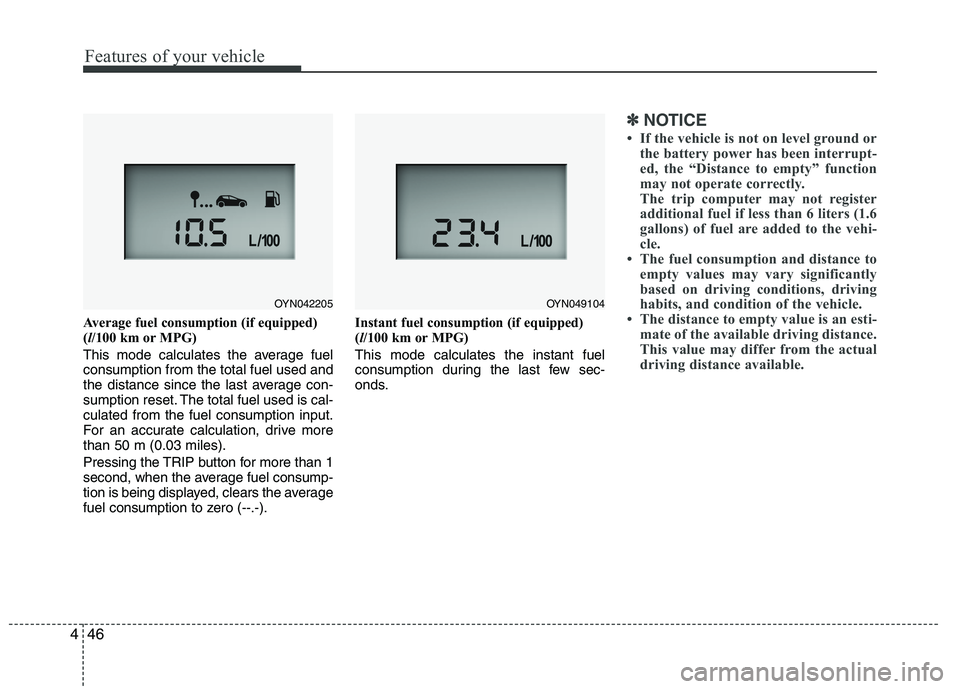
Average fuel consumption (if equipped) ( l/100 km or MPG)
This mode calculates the average fuelconsumption from the total fuel used and
the distance since the last average con-
sumption reset. The total fuel used is cal-culated from the fuel consumption input.
For an accurate calculation, drive morethan 50 m (0.03 miles).
Pressing the TRIP button for more than 1
second, when the average fuel consump-
tion is being displayed, clears the average
fuel consumption to zero (--.-). Instant fuel consumption (if equipped)(
l/100 km or MPG)
This mode calculates the instant fuel
consumption during the last few sec-
onds.
✽✽ NOTICE
If the vehicle is not on level ground or the battery power has been interrupt-
ed, the “Distance to empty” function
may not operate correctly.
The trip computer may not register
additional fuel if less than 6 liters (1.6
gallons) of fuel are added to the vehi-
cle.
The fuel consumption and distance to
empty values may vary significantly
based on driving conditions, driving
habits, and condition of the vehicle.
The distance to empty value is an esti-
mate of the available driving distance.
This value may differ from the actual
driving distance available.
OYN042205OYN049104