ECO mode KIA VENGA 2016 User Guide
[x] Cancel search | Manufacturer: KIA, Model Year: 2016, Model line: VENGA, Model: KIA VENGA 2016Pages: 404, PDF Size: 21.96 MB
Page 149 of 404
475
Features of your vehicle
Operating the air conditioning systemin the recirculated air position provides
maximum cooling, however, continual
operation in this mode may cause the
air inside the vehicle to become stale.
During cooling operation, you may occasionally notice a misty air flow
because of rapid cooling and humid air
intake. This is a normal system opera-
tion characteristics.
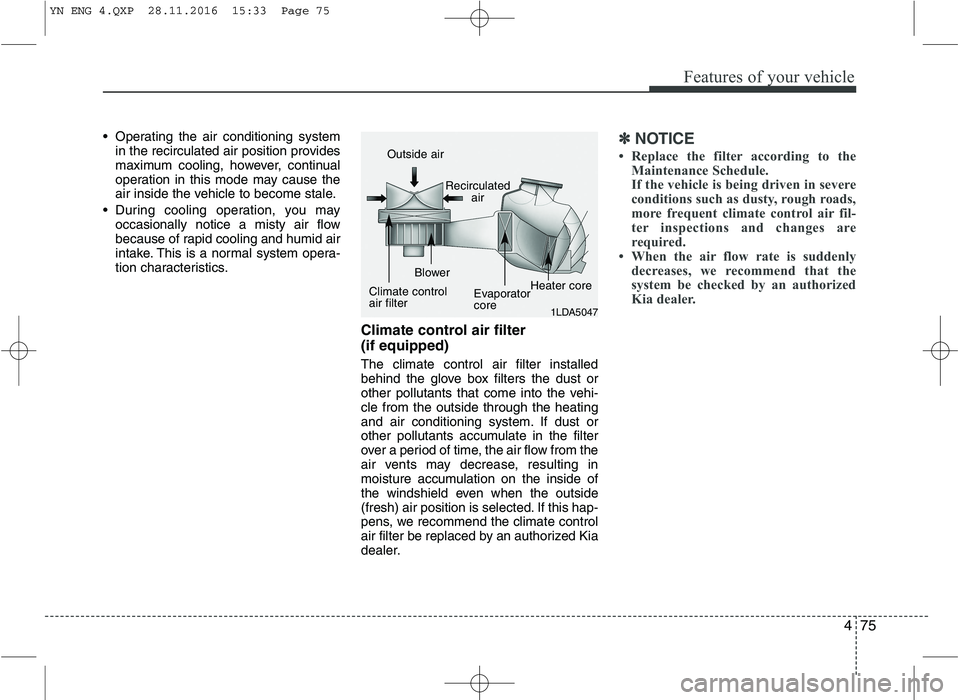
Climate control air filter (if equipped) The climate control air filter installed
behind the glove box filters the dust or
other pollutants that come into the vehi-cle from the outside through the heating
and air conditioning system. If dust or
other pollutants accumulate in the filter
over a period of time, the air flow from the
air vents may decrease, resulting in
moisture accumulation on the inside of
the windshield even when the outside
(fresh) air position is selected. If this hap-
pens, we recommend the climate control
air filter be replaced by an authorized Kia
dealer.✽✽NOTICE
Replace the filter according to the Maintenance Schedule.
If the vehicle is being driven in severe
conditions such as dusty, rough roads,
more frequent climate control air fil-
ter inspections and changes are
required.
When the air flow rate is suddenly
decreases, we recommend that the
system be checked by an authorized
Kia dealer.
1LDA5047
Outside air
Recirculatedair
Climate control air filter Blower
EvaporatorcoreHeater core
YN ENG 4.QXP 28.11.2016 15:33 Page 75
Page 154 of 404
Features of your vehicle
80
4
Mode selection
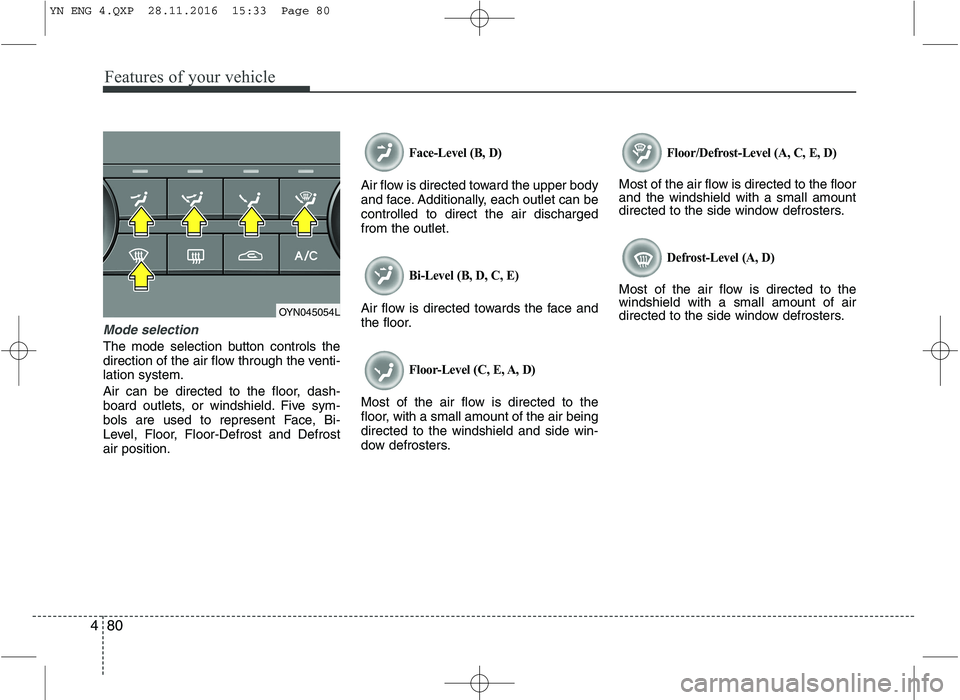
The mode selection button controls the
direction of the air flow through the venti-lation system.
Air can be directed to the floor, dash-
board outlets, or windshield. Five sym-
bols are used to represent Face, Bi-
Level, Floor, Floor-Defrost and Defrostair position.
Face-Level (B, D)
Air flow is directed toward the upper body
and face. Additionally, each outlet can becontrolled to direct the air dischargedfrom the outlet.
Bi-Level (B, D, C, E)
Air flow is directed towards the face and
the floor.
Floor-Level (C, E, A, D)
Most of the air flow is directed to the
floor, with a small amount of the air beingdirected to the windshield and side win-
dow defrosters.
Floor/Defrost-Level (A, C, E, D)
Most of the air flow is directed to the floor and the windshield with a small amount
directed to the side window defrosters.
Defrost-Level (A, D)
Most of the air flow is directed to thewindshield with a small amount of air
directed to the side window defrosters.
OYN045054L
YN ENG 4.QXP 28.11.2016 15:33 Page 80
Page 161 of 404
487
Features of your vehicle
Face-Level (B, D)
Air flow is directed toward the upper body
and face. Additionally, each outlet can becontrolled to direct the air dischargedfrom the outlet.
Floor-Level (C, E, A, D)
Most of the air flow is directed to the
floor.
Defrost-Level (A, D)
Most of the air flow is directed to thewindshield.
Also you may select 2~3 modes at the
same time for desired air flow.
- face ( ) + floor ( ) mode
- face ( ) + defrost ( ) mode
- floor ( ) + defrost ( ) mode
- face ( ) + floor ( ) + defrost ( ) mode Maximum (MAX) defrost mode
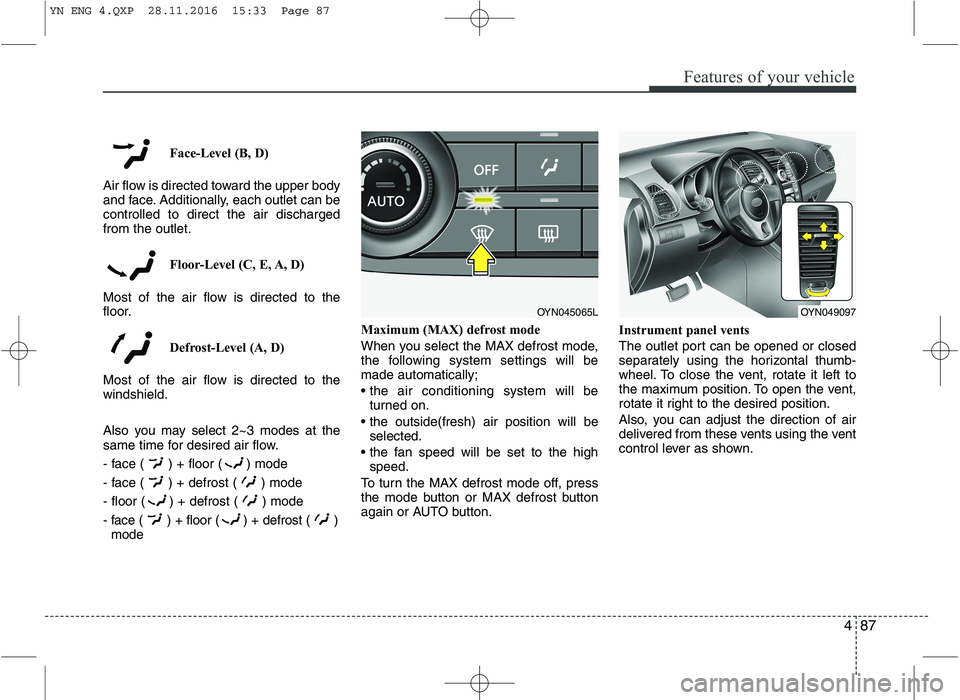
When you select the MAX defrost mode,
the following system settings will bemade automatically;
turned on.
selected.
speed.
To turn the MAX defrost mode off, press
the mode button or MAX defrost button
again or AUTO button. Instrument panel vents
The outlet port can be opened or closed
separately using the horizontal thumb-
wheel. To close the vent, rotate it left to
the maximum position. To open the vent,
rotate it right to the desired position.
Also, you can adjust the direction of air
delivered from these vents using the vent
control lever as shown.
OYN045065LOYN049097
YN ENG 4.QXP 28.11.2016 15:33 Page 87
Page 162 of 404
Features of your vehicle
88
4
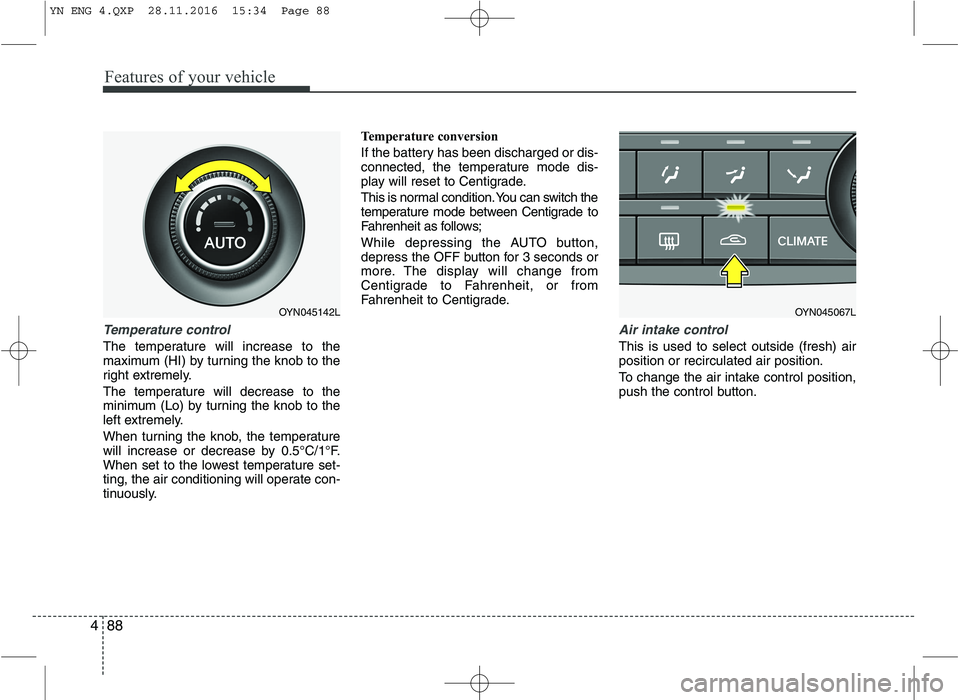
Temperature control
The temperature will increase to the
maximum (HI) by turning the knob to the
right extremely.
The temperature will decrease to the
minimum (Lo) by turning the knob to the
left extremely.
When turning the knob, the temperature
will increase or decrease by 0.5°C/1°F.
When set to the lowest temperature set-
ting, the air conditioning will operate con-
tinuously. Temperature conversion
If the battery has been discharged or dis-
connected, the temperature mode dis-
play will reset to Centigrade.
This is normal condition. You can switch the
temperature mode between Centigrade to
Fahrenheit as follows;
While depressing the AUTO button,
depress the OFF button for 3 seconds or
more. The display will change from
Centigrade to Fahrenheit, or from
Fahrenheit to Centigrade.
Air intake control
This is used to select outside (fresh) air position or recirculated air position.
To change the air intake control position,
push the control button.
OYN045067LOYN045142L
YN ENG 4.QXP 28.11.2016 15:34 Page 88
Page 169 of 404
495
Features of your vehicle
INTERIOR FEATURES
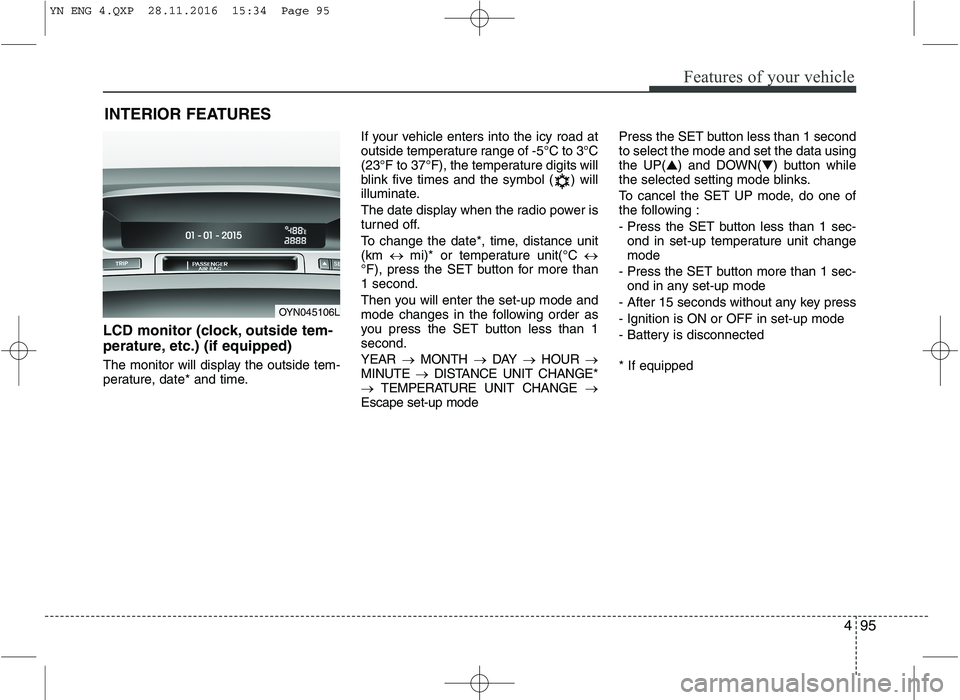
LCD monitor (clock, outside tem-
perature, etc.) (if equipped)
The monitor will display the outside tem-
perature, date* and time. If your vehicle enters into the icy road at
outside temperature range of -5°C to 3°C
(23°F to 37°F), the temperature digits will
blink five times and the symbol ( ) will
illuminate.
The date display when the radio power is
turned off.
To change the date*, time, distance unit (km
mi)* or temperature unit(°C
°F), press the SET button for more than1 second.
Then you will enter the set-up mode and
mode changes in the following order as
you press the SET button less than 1second. YEAR MONTH DAY HOUR
MINUTE DISTANCE UNIT CHANGE*
TEMPERATURE UNIT CHANGE
Escape set-up mode Press the SET button less than 1 second to select the mode and set the data usingthe UP(
▲) and DOWN( ▼) button while
the selected setting mode blinks.
To cancel the SET UP mode, do one of
the following :
- Press the SET button less than 1 sec-
ond in set-up temperature unit change mode
- Press the SET button more than 1 sec- ond in any set-up mode
- After 15 seconds without any key press
- Ignition is ON or OFF in set-up mode
- Battery is disconnected * If equipped
OYN045106L
YN ENG 4.QXP 28.11.2016 15:34 Page 95
Page 176 of 404
Features of your vehicle
102
4
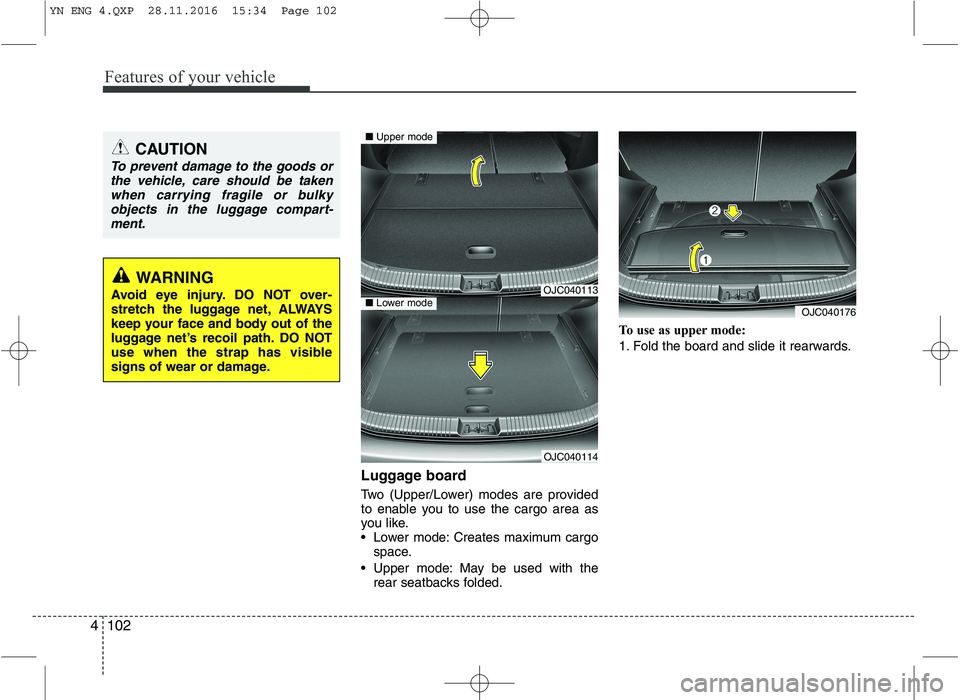
Luggage board
Two (Upper/Lower) modes are provided
to enable you to use the cargo area as
you like.
Lower mode: Creates maximum cargo
space.
Upper mode: May be used with the rear seatbacks folded. To use as upper mode:
1. Fold the board and slide it rearwards.
CAUTION
To prevent damage to the goods or
the vehicle, care should be takenwhen carrying fragile or bulky objects in the luggage compart-
ment.
WARNING
Avoid eye injury. DO NOT over-
stretch the luggage net, ALWAYS
keep your face and body out of the
luggage net’s recoil path. DO NOT
use when the strap has visible
signs of wear or damage.OJC040113
OJC040114
■ Upper mode
■Lower modeOJC040176
YN ENG 4.QXP 28.11.2016 15:34 Page 102
Page 190 of 404
Features of your vehicle
116
4
Frequency Scan
The tuner will tune to each available sta-
tion from the current waveband for 5 sec-
onds before scanning for the next higherfrequency station.
Short press the SCANbutton to acti-
vate/ deactivate the scan function.
Storing preset stations
In the FM 1 and 2 waveband there are 12
station presets and in the AM waveband
there are 6 station presets.
(Also see “Selecting FM or AM wave- band”).
Select the waveband, FM or AM.
Tune to the desired station.
Press and hold one of the preset (1 -
6) button till you hear a beep.
The station selected is stored under
the preset button.
Recalling preset stations
With this function you can recall a preset station.
Short press the desired preset button
(1 through 6) to recall the previouslyset station. Radio Data System (RDS)
Many FM stations broadcast RDS infor-
mation. The RDS provides you with infor-
mation of the following:
Traffic announcement (TA)
This function enables you to hear traffic
announcements (TA). You will also hear
traffic announcements when in CD/USB/
iPOD/ AUX mode.
Short press the TA button to
enable/disable function.
Press the SCAN button to scan for
Traffic Programme (TP) stations.
OR
Press the or to search for TP
stations.
Set the required volume for the traffic
announcements in the SETUP menu.
The TA symbol will be displayed when
TA is enabled.
✎ In FM mode: If no TP stations are
found, the unit will remain at the cur-
rent station displaying “NO TA/TP” for
5 seconds.
✎ In CD/USB/IPOD/AUX: If no TP sta-
tion is found, the unit will remain at the
current station. TP seek will be carried
out at the background periodically
every 30 seconds until a TP station is
found or TA will be disabled. TP lost ✎
If the TP signal of tuned station is lost
after 30 seconds, an automatic TP
seek for the next TP station will be
performed. If no TP station is found,the unit will remain at the current sta-
tion and display “TP LOST” for 5 sec-
onds.
TP seek will be performed periodical-
ly every 30 seconds until a TP station
is found.
Traffic announcements from other sta-
tions – EON With the EON function (Enhanced Other
Networks) you will hear traffic announce-
ments even if the set station does not
provide this service but is operating on a
network with other stations. ✎ If you have activated Traffic info, sta-
tions with EON will be treated like traf-
fic stations, i.e. the search will also
stop at these stations.
✎ When a traffic announcement is
made, the unit switches to a traffic
information station linked to EON.After the announcement, the unit
returns to the previous programme.
YN ENG 4(104~AUDIO).QXP 9/5/2016 4:29 PM Page 116
Page 193 of 404
4119
Features of your vehicle
Viewing Information of Audio Files
Short press the INFObutton.
Disk Title, Disk Artist, Track Title and
Track Artist can be displayed.
✎ If no information is available “NO
INFO” will be displayed, otherwise the
corresponding information will be dis-
played for 5 seconds.
To abort this mode: press one of the
following buttons - / , Fast
/ , RPT, RDM, LIST.
List Function Audio Files ✎ With this mode you can browse all
supported tracks on the CD.
The main menu of the LIST functionconsists of:
Short press LIST to enter track brows-ing.
Short press or button to
browse through the list of the selected
category.
Short press OK to playback of the
selected track.
To abort this mode: press one of the
following buttons / , Fast
/ , RPT, RDM, INFO, SOUND,
SETUP and LIST. Notes on WMA files
The following WMA files are supported:
Bit rate: Up to 192 kbit/s
Sampling frequency: Up to 44.1 kHz
WMA file names must have the
“.wma” extension.
Notes on MP3 files
The following MP3 files are supported by
the CD player:
Files conform with MPEG1/2 or 2.5-
Layer 3.
The format of the CD must be ISO
9660 Level 1 or Level 2 or Joliet with
sector format in Mode 1 or Mode 2
Form 1. Other formats cannot be
played reliably.
The maximum number of folders is99.
The Maximum number of folders and
number of files is 490. Additional files
and folders will be ignored.
Bit rate: Maximum of 320 kbit/s, con-
stant or variable.
Sampling frequency: Maximum of 48kHz.
Text display: ID3 tag V1 and ID3 tag
V2. MP3 tracks can contain addition
information such as artist, track and
album names (ID3 tags with maxi-
mum not more than 12 characters).
Characters other than upper
case/lower case letters (“Aa to Zz”)
and underscore (“_”) may not be dis-
played.
Only files with .mp3 extension are
recognized as MP3 files.
The unit may not play the first track in
the order that you wrote them to thedisc.
The unit plays only the first session ifthe disc contains both CD audio
tracks and MP3 files.
When playing a disc of 8 kbps or vari-
able bit rate (VBR), the elapsed play-
ing time in the display window maynot be correct.
Make sure that a MP3 CD-R/CD-RW
is burned that is formatted as a data
disc and NOT as an audio disc.
MP3 files are not compatible with
packet write data transfer.
YN ENG 4(104~AUDIO).QXP 9/5/2016 4:29 PM Page 119
Page 194 of 404
Features of your vehicle
120
4
Playing MP3/WMA files
Starting/Stopping playback
Press CD button to start playback.
Playback will stop when another source is selected.
Previous/Next Track
Press the or buttons to select
previous or next track.
Previous/Next Folder
Press the or button to select
the previous or next folder.
Fast Forward/Reverse
Press and hold the or button to
for fast reverse and fast forward.
✎ During fast forward and fast reverse
audio is audible at reduced volume.
Random
Short press the RDM button to select
the Random Folder option.
✎ All files in the Random Folder will be
played randomly.
Long press the RDM button to selectthe Random All option.
✎ All files on the CD will be played ran-
domly. Repeat
Short press the RPT button to select the Repeat file option.
✎ The current file will be repeated.
Long press the RPT button to select
the Repeat Folder option.
✎ All files in the current folder will berepeated.
Scan
Short press the SCAN button to select the Scan All option.
✎ All files in the CD will be scanned.
Long press the SCAN button to select
the Scan Folder option.
✎ The first file in each folder will bescanned.
CD plays the first 10 seconds of thesong.
When a folder ends: scanning contin-
ues with the first file of the next folder.
When a CD ends: scanning continues
with the first file of the first folder. Viewing Information of Compressed
Audio Files
Short press the INFObutton.
File name, Song title*, Album name,
Artist name, Directory name and Total
track can be displayed.
✎ If no ID3 Tag is available “NO INFO”
will be displayed, otherwise the corre-
sponding information will be displayed
for 5 seconds.
To abort this mode: press one of the
following buttons: or , Fast
or , RPT, RDM, INFO, SOUND,
SETUP and LIST.
List Function Compressed Audio Files ✎ With this mode you can browse fold-
ers and files located on the CD.
The main menu of the LIST functionconsists of:
Short press LIST to enter track brows-ing.
Short press or button to
browse through the list of the selected
category.
Short press OK to playback of the
selected track.
To abort this mode: press one of the
following buttons: or , Fast
or , RPT, RDM, INFO, SOUND,
SETUP and LIST.
YN ENG 4(104~AUDIO).QXP 9/5/2016 4:29 PM Page 120
Page 198 of 404
Features of your vehicle
124
4
Manual Seek – Fast Forward/Fast back-
ward
Press and hold the or button to
go fast forward or fast backward.
During manual seek audio is audible
at reduced volume.
Repeat File/Folder
Short press the RPTbutton to select
Repeat File.
The current file will be repeated.
Long press the RPTbutton to select
Repeat Folder.
All files within the current folder will be repeated.
To cancel the “Repeat File/Folder”
mode, short press the RPTbutton
again. Random Folder/All Files
Short press the RDMbutton to acti-
vate the “Random Folder” option.
All files in the folder will be played at
random.
OR
Long press the RDMbutton to acti-
vate the “Random All” option.
All files on the USB device will be
played at random.
To deactivate the “Random Folder/All
Files” feature, press the RDMbutton
again.
Scan File/Folder
Long press the SCANbutton to acti-
vate the “Scan Folder” option.
✎ The first track of each folder will be
scanned, except the root directory.
OR
Short press the SCANbutton to acti-
vate the “Scan All” option.
All files on the USB device will be scanned.
To deactivate the “Scan Folder/All
Files” feature, short press the SCAN
button again to abort “Scan All” Viewing MP3 Information
With this function text information of the
MP3 files can displayed on the LCD-
Display.
Short press the press INFObutton.
The following information will be shown
in the following sequence.
Filename (“NO INFO” will appear if
the file name contains characters that
do not pertain to the ASCII characterset)
ID3 tag info – Song Title (“NO INFO”
will appear if there is no Song Title
available)
ID3 tag info – Artist name (“NO INFO”
will appear if there is no Artist Name
available)
ID3 tag info – Album name (“NO
INFO” will appear if will appear if there
is no Album Name available).
Directory name
Total no. of files on the USB device
The information will be visible on the
LCD-display for 5 seconds.
YN ENG 4(104~AUDIO).QXP 9/5/2016 4:29 PM Page 124