warning light KIA VENGA 2016 Repair Manual
[x] Cancel search | Manufacturer: KIA, Model Year: 2016, Model line: VENGA, Model: KIA VENGA 2016Pages: 404, PDF Size: 21.96 MB
Page 238 of 404
Driving your vehicle
28
5
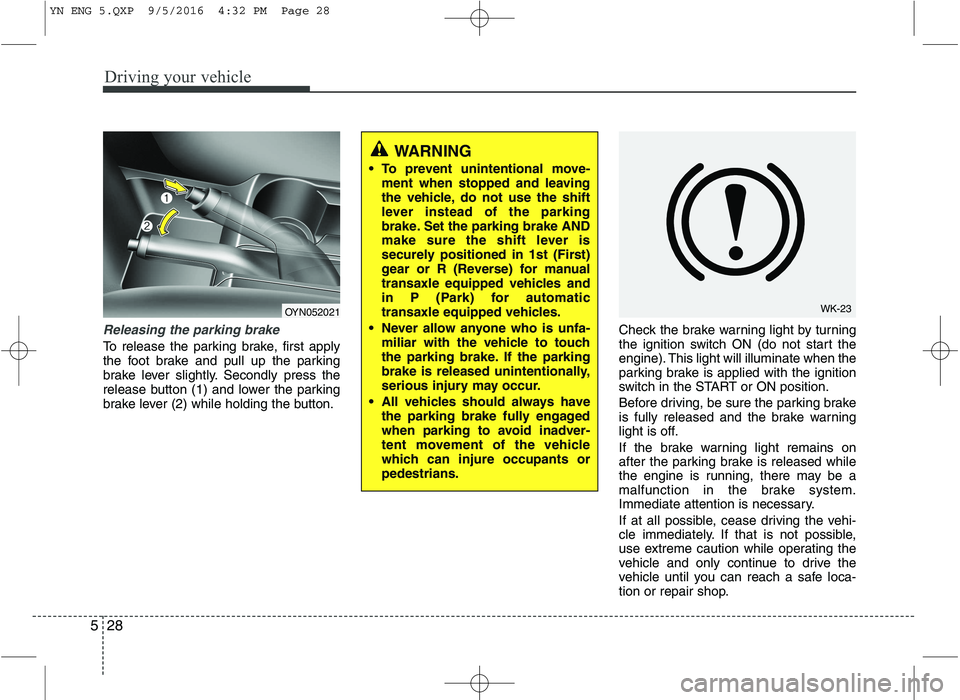
Releasing the parking brake
To release the parking brake, first apply
the foot brake and pull up the parking
brake lever slightly. Secondly press the
release button (1) and lower the parking
brake lever (2) while holding the button. Check the brake warning light by turning
the ignition switch ON (do not start the
engine). This light will illuminate when the
parking brake is applied with the ignition
switch in the START or ON position.
Before driving, be sure the parking brake
is fully released and the brake warning
light is off.
If the brake warning light remains on
after the parking brake is released while
the engine is running, there may be a
malfunction in the brake system.
Immediate attention is necessary.
If at all possible, cease driving the vehi-
cle immediately. If that is not possible,
use extreme caution while operating the
vehicle and only continue to drive the
vehicle until you can reach a safe loca-
tion or repair shop.
WARNING
To prevent unintentional move- ment when stopped and leaving
the vehicle, do not use the shift
lever instead of the parking
brake. Set the parking brake AND
make sure the shift lever is
securely positioned in 1st (First)
gear or R (Reverse) for manual
transaxle equipped vehicles and
in P (Park) for automatic
transaxle equipped vehicles.
Never allow anyone who is unfa- miliar with the vehicle to touch
the parking brake. If the parking
brake is released unintentionally,
serious injury may occur.
All vehicles should always have the parking brake fully engaged
when parking to avoid inadver-
tent movement of the vehicle
which can injure occupants orpedestrians.
WK-23OYN052021
YN ENG 5.QXP 9/5/2016 4:32 PM Page 28
Page 240 of 404
Driving your vehicle
30
5
✽✽
NOTICE
When you jump start your vehicle
because of a drained battery, the engine
may not run as smoothly and the ABS
warning light may turn on at the same
time. This happens because of the low
battery voltage. It does not mean your
ABS is malfunctioning.
Do not pump your brakes!
Have the battery recharged before driving the vehicle.
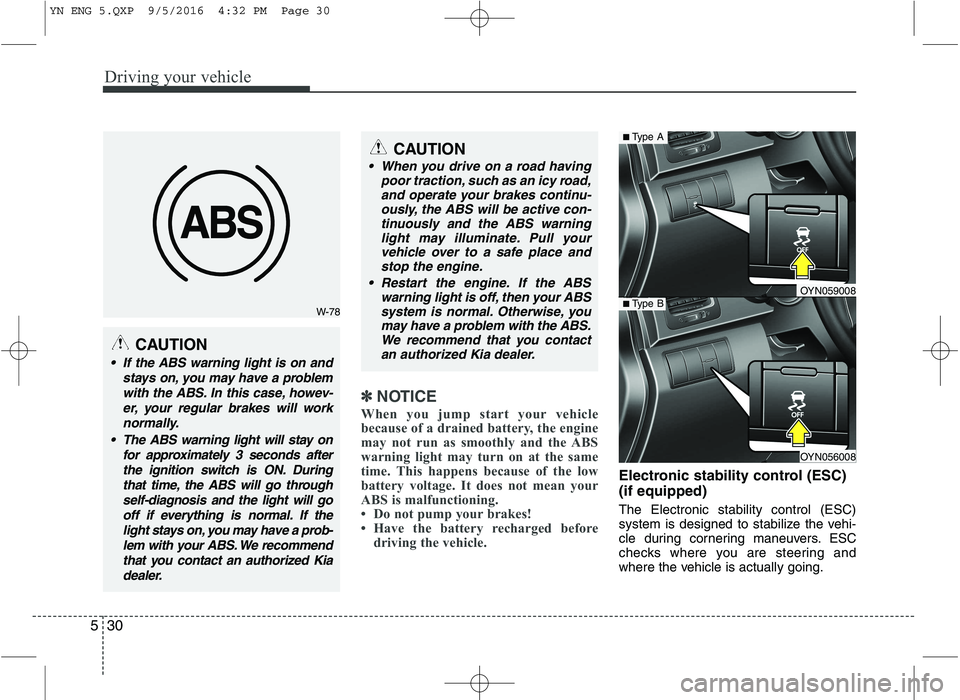
Electronic stability control (ESC) (if equipped) The Electronic stability control (ESC)
system is designed to stabilize the vehi-
cle during cornering maneuvers. ESC
checks where you are steering and
where the vehicle is actually going.
W-78
CAUTION
If the ABS warning light is on and
stays on, you may have a problemwith the ABS. In this case, howev- er, your regular brakes will worknormally.
The ABS warning light will stay on for approximately 3 seconds afterthe ignition switch is ON. Duringthat time, the ABS will go through self-diagnosis and the light will gooff if everything is normal. If thelight stays on, you may have a prob-lem with your ABS. We recommendthat you contact an authorized Kiadealer.
CAUTION
When you drive on a road having poor traction, such as an icy road,and operate your brakes continu-ously, the ABS will be active con-
tinuously and the ABS warninglight may illuminate. Pull yourvehicle over to a safe place andstop the engine.
Restart the engine. If the ABS warning light is off, then your ABSsystem is normal. Otherwise, youmay have a problem with the ABS.We recommend that you contact
an authorized Kia dealer.
OYN056008
■ Type A
■Type BOYN059008
YN ENG 5.QXP 9/5/2016 4:32 PM Page 30
Page 241 of 404
531
Driving your vehicle
ESC applies the brakes at individual
wheels and intervenes in the engine
management system to stabilize the
vehicle.The Electronic stability control (ESC) system is an electronic system designed
to help the driver maintain vehicle control
under adverse conditions. It is not a
substitute for safe driving practices.
Factors including speed, road conditions
and driver steering input can all affect
whether ESC will be effective in
preventing a loss of control. It is still your
responsibility to drive and corner at
reasonable speeds and to leave a
sufficient margin of safety.
When you apply your brakes under con-
ditions which may lock the wheels, you
may hear a “tik-tik’’ sound from the
brakes, or feel a corresponding sensation
in the brake pedal. This is normal and it
means your ESC is active.
✽✽
NOTICE
A click sound may be heard in the engine
compartment when the vehicle begins to
move after the engine is started. These
conditions are normal and indicate that
the Electronic stability control System is
functioning properly.
ESC operation
ESC ON condition
ON, ESC and ESC OFF indi-
cator lights illuminate for
approximately 3 seconds,
then ESC is turned on.
for at least half a second after
turning the ignition ON to turn
ESC off. (ESC OFF indicator
will illuminate). To turn theESC on, press the ESC OFF
button (ESC OFF indicatorlight will go off).
you may hear a slight ticking
sound. This is the ESC per-
forming an automatic system
self-check and does not indi-
cate a problem.
WARNING
Never drive too fast according to
the road conditions or too quickly
when cornering. Electronic stability
control (ESC) will not prevent acci-
dents. Excessive speed in turns,
abrupt maneuvers and hydroplan-ing on wet surfaces can still result
in serious accidents. Only a safe
and attentive driver can prevent
accidents by avoiding maneuvers
that cause the vehicle to lose trac-
tion. Even with ESC installed,
always follow all the normal precau-
tions for driving - including driving
at safe speeds for the conditions.
-
YN ENG 5.QXP 9/5/2016 4:32 PM Page 31
Page 243 of 404
533
Driving your vehicle
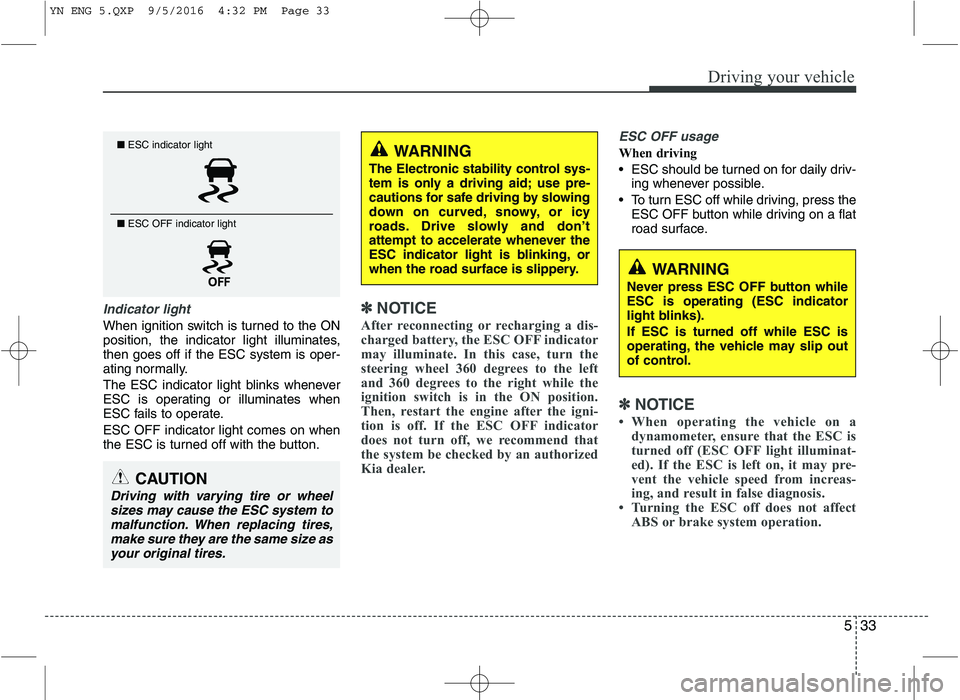
Indicator light
When ignition switch is turned to the ON
position, the indicator light illuminates,then goes off if the ESC system is oper-
ating normally.
The ESC indicator light blinks whenever
ESC is operating or illuminates when
ESC fails to operate. ESC OFF indicator light comes on when
the ESC is turned off with the button.
✽✽NOTICE
After reconnecting or recharging a dis-
charged battery, the ESC OFF indicator
may illuminate. In this case, turn the
steering wheel 360 degrees to the left
and 360 degrees to the right while the
ignition switch is in the ON position.
Then, restart the engine after the igni-
tion is off. If the ESC OFF indicator
does not turn off, we recommend that
the system be checked by an authorized
Kia dealer.
ESC OFF usage
When driving
ESC should be turned on for daily driv- ing whenever possible.
To turn ESC off while driving, press the ESC OFF button while driving on a flat
road surface.
✽✽ NOTICE
When operating the vehicle on a dynamometer, ensure that the ESC is
turned off (ESC OFF light illuminat-
ed). If the ESC is left on, it may pre-
vent the vehicle speed from increas-
ing, and result in false diagnosis.
Turning the ESC off does not affect ABS or brake system operation.
■ESC indicator light
■ ESC OFF indicator light
CAUTION
Driving with varying tire or wheel
sizes may cause the ESC system tomalfunction. When replacing tires,make sure they are the same size asyour original tires.
WARNING
The Electronic stability control sys-
tem is only a driving aid; use pre-
cautions for safe driving by slowing
down on curved, snowy, or icy
roads. Drive slowly and don’t
attempt to accelerate whenever the
ESC indicator light is blinking, or
when the road surface is slippery.
WARNING
Never press ESC OFF button while ESC is operating (ESC indicator
light blinks). If ESC is turned off while ESC is
operating, the vehicle may slip out
of control.
YN ENG 5.QXP 9/5/2016 4:32 PM Page 33
Page 244 of 404
Driving your vehicle
34
5
Hill-start assist control (HAC) (if equipped)
Hill start Assist Control is a comfort func-
tion. The main intend is to prevent the
vehicle from rolling backwards while driv-
ing off uphill on an inclined surface. HAC
holds the braking pressure builtup by
driver during stopping procedure for 2
seconds after releasing brake pedal.
During the pressure-hold period, the
driver has enough time to press the
accelerator pedal to drive off.
The braking pressure is reduced as soon
as the system detects the driver’s inten-
tion to drive off.✽✽
NOTICE
The HAC does not operate when the transaxle shift lever is in the P (Park)
or N (Neutral) position.
The HAC activates even though the
ESC is off but it does not activate
when the ESC has malfunctioned. Emergency Stop Signal (ESS) (if equipped) The Emergency Stop Signal system
alerts the driver behind by blinking the
stop light when the vehicle is braked rap-
idly and severely.
The system is activated when:
The vehicle suddenly stops (vehiclespeed is over 55km/h and the vehicle
deceleration at greater than 7 m/s 2
)
The ABS is activating
When the vehicle deceleration at less than 4 m/s 2
and the ABS deactivates or
the sudden stop situation is over, the
stop light blinking will stop. You can turn it
off manually by pushing the hazard warn-
ing flasher switch.
WARNING
The HAC is usually activated only
for 2 seconds. The driver should be
careful from the rolling backwardcausing the accident with behind
objects or human, when the driver
may feel the unintended rolling
backward while driving off on hilldue to insufficient brake hold pres-
sure built-up by driver during stop-
ping procedure.
CAUTION
The Emergency Stop Signal (ESS) system will not work if the hazardwarning flasher is already on.
YN ENG 5.QXP 9/5/2016 4:32 PM Page 34
Page 245 of 404
535
Driving your vehicle
Vehicle stability management (VSM) (if equipped)
This system provides further enhance-
ments to vehicle stability and steering
responses when a vehicle is driving on a
slippery road or a vehicle detected
changes in coefficient of friction between
right wheels and left wheels when brak-ing.
VSM operation
When the VSM is operating, the steering
wheel may be controlled.
When the vehicle stability management
is operating properly, you can feel a slight
pulsation in the vehicle. This is only the
effect of brake control and indicates noth-
ing unusual.
The VSM does not operate when:
Driving on bank road such as gradientor incline
Driving rearward
ESC OFF indicator light ( ) remains on the instrument cluster
EPS indicator light remains on the instrument cluster
VSM operation off
If you press the ESC OFF button to turn
off the ESC, the VSM will also cancel and
the ESC OFF indicator light ( ) illumi-
nates.
To turn on the VSM, press the button
again. The ESC OFF indicator light goesout.
Malfunction indicator
The VSM can be deactivated even if you
don’t cancel the VSM operation by press-
ing the ESC OFF button. It indicates thata malfunction has been detected some-
where in the Electric Power Steering sys-
tem or VSM system. If the ESC indicator
light ( ) or EPS warning light remains
on, we recommend that you contact an
authorized Kia dealer.
✽✽ NOTICE
The VSM is designed to function above approximately 15 km/h (9 mph)
on curves.
The VSM is designed to function
above approximately 30 km/h (18
mph) when a vehicle is braking on a
split-mu road. The split-mu road is
made of surfaces which have different
friction forces.
WARNING
The Vehicle Stability Management system is not a substitute for
safe driving practices but a sup-
plementary function only. It is theresponsibility of the driver to
always check the speed and the
distance to the vehicle ahead.
Always hold the steering wheel
firmly while driving.
Your vehicle is designed to acti- vate according to the driver’s
intention, even with installed
VSM. Always follow all the normal
precautions for driving at safe
speeds for the conditions –
including driving inclement
weather and on a slippery road.
Driving with varying tire or wheel sizes may cause the VSM system
to malfunction. When replacing
tires, make sure they are the
same size as your original tires.
YN ENG 5.QXP 9/5/2016 4:32 PM Page 35
Page 247 of 404
537
Driving your vehicle
The cruise control system allows you to
program the vehicle to maintain a con-stant speed without pressing the acceler-ator pedal. This system is designed to function
above approximately 40 km/h (25 mph).
✽✽NOTICE
During normal cruise control operation,
when the SET switch is activated or
reactivated after applying the brakes,
the cruise control will energize after
approximately 3 seconds. This delay is
normal.
✽
✽ NOTICE
To activate cruise control, depress the
brake pedal at least once after turning
the ignition switch to the ON position or
starting the engine. This is to check if
the brake switch which is important
part to cancel cruise control is in normal
condition.
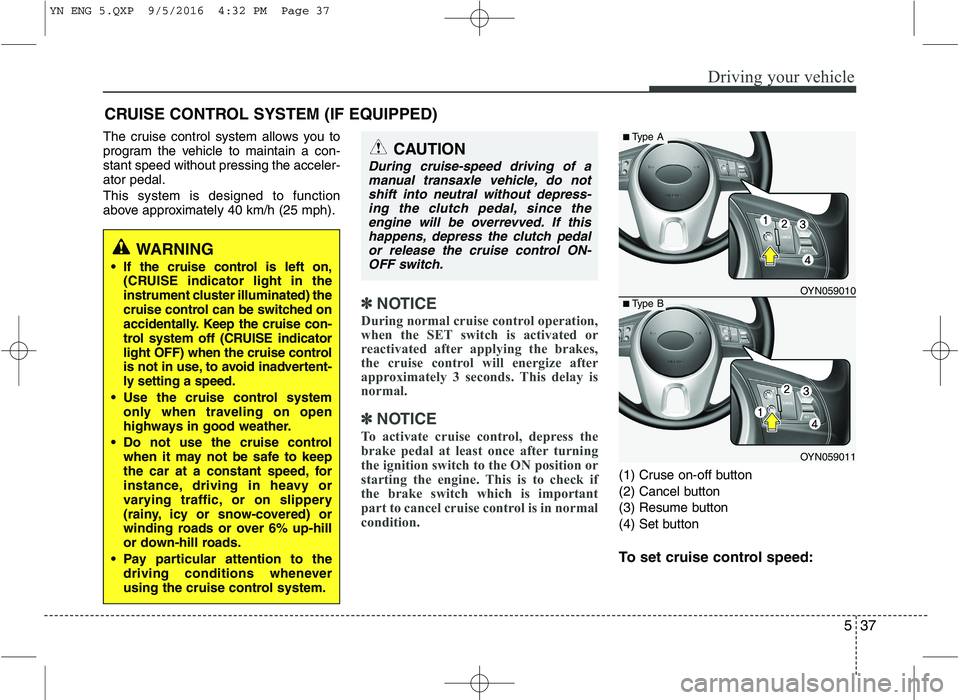
(1) Cruse on-off button
(2) Cancel button
(3) Resume button
(4) Set button
To set cruise control speed:
CRUISE CONTROL SYSTEM (IF EQUIPPED)
WARNING
If the cruise control is left on, (CRUISE indicator light in the
instrument cluster illuminated) the
cruise control can be switched on
accidentally. Keep the cruise con-
trol system off (CRUISE indicator
light OFF) when the cruise control
is not in use, to avoid inadvertent-
ly setting a speed.
Use the cruise control system only when traveling on open
highways in good weather.
Do not use the cruise control when it may not be safe to keep
the car at a constant speed, for
instance, driving in heavy or
varying traffic, or on slippery
(rainy, icy or snow-covered) or
winding roads or over 6% up-hill
or down-hill roads.
Pay particular attention to the driving conditions whenever
using the cruise control system.
CAUTION
During cruise-speed driving of a
manual transaxle vehicle, do notshift into neutral without depress-ing the clutch pedal, since theengine will be overrevved. If this happens, depress the clutch pedal
or release the cruise control ON-OFF switch.
OYN059011
■ Type A
■Type BOYN059010
YN ENG 5.QXP 9/5/2016 4:32 PM Page 37
Page 251 of 404
541
Driving your vehicle
You can set the speed limit when you
don’t want to drive over a specific speed.
If you drive over the preset speed limit,
the warning system operates (set speed
limit will blink and chime will sound) until
the vehicle speed returns within thespeed limit.
✽✽NOTICE
While speed limit control in operation,
the cruise control system cannot be acti-
vated.
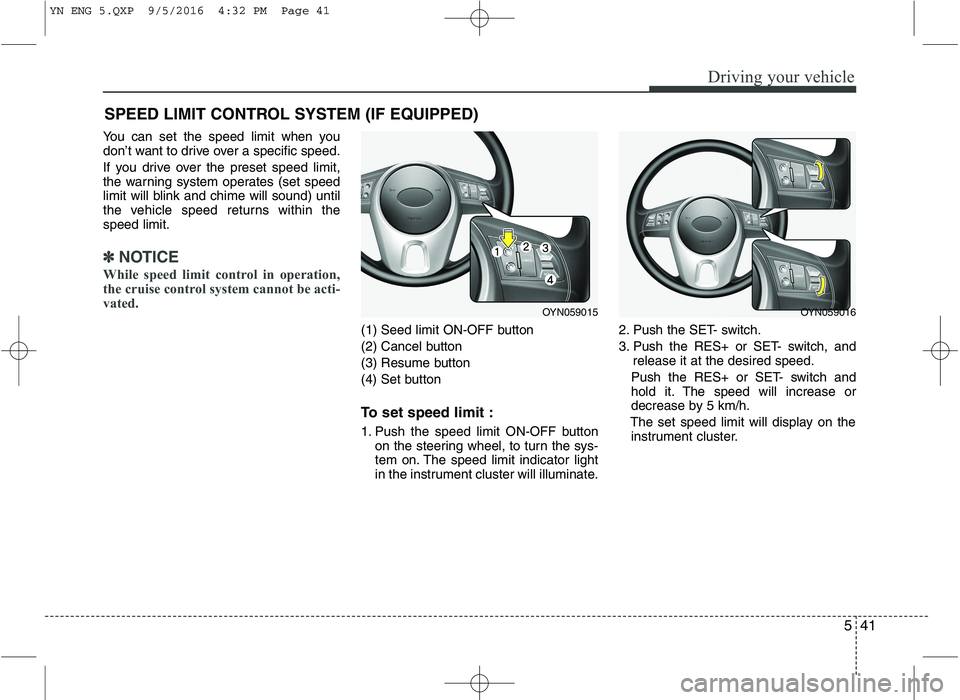
(1) Seed limit ON-OFF button
(2) Cancel button
(3) Resume button
(4) Set button
To set speed limit :
1. Push the speed limit ON-OFF button on the steering wheel, to turn the sys-
tem on. The speed limit indicator light
in the instrument cluster will illuminate. 2. Push the SET- switch.
3. Push the RES+ or SET- switch, and
release it at the desired speed.
Push the RES+ or SET- switch and
hold it. The speed will increase or
decrease by 5 km/h.
The set speed limit will display on the instrument cluster.
SPEED LIMIT CONTROL SYSTEM (IF EQUIPPED)
OYN059015OYN059016
YN ENG 5.QXP 9/5/2016 4:32 PM Page 41
Page 254 of 404
Driving your vehicle
44
5
Remember, your vehicle does not
require extended warm-up. After the
engine has started, allow the engine to
run for 10 to 20 seconds prior to plac-
ing the vehicle in gear. In very cold
weather, however, give your engine a
slightly longer warm-up period.
Don't "lug" or "over-rev" the engine. Lugging is driving too slowly in too
high a gear resulting engine bucking. If
this happens, shift to a lower gear.
Over-revving is racing the engine
beyond its safe limit. This can be avoid-
ed by shifting at the recommended
speeds. Use your air conditioning sparingly.
The air conditioning system is operat-
ed by engine power so your fuel econ-
omy is reduced when you use it.
Open windows at high speeds can reduce fuel economy.
Fuel economy is less in crosswinds and headwinds. To help offset some of
this loss, slow down when driving in
these conditions.
Keeping a vehicle in good operating con-
dition is important both for economy and
safety. Therefore, we recommend that the
system be serviced by an authorized Kia
dealer.
WARNING - Engine off dur-
ing motion
Never turn the engine off to coast
down hills or anytime the vehicle is
in motion. The power steering and
power brakes will not function
properly without the engine run-
ning. Instead, keep the engine on
and downshift to an appropriate
gear for engine braking effect. In
addition, turning off the ignition
while driving could engage the
steering wheel lock resulting in
loss of vehicle steering which
could cause serious injury ordeath.
YN ENG 5.QXP 9/5/2016 4:32 PM Page 44
Page 255 of 404
545
Driving your vehicle
Hazardous driving conditions
When hazardous driving conditions are
encountered such as water, snow, ice,
mud, sand, or similar hazards, followthese suggestions:
Drive cautiously and allow extra dis-tance for braking.
Avoid sudden braking or steering.
When braking with non-ABS brakes pump the brake pedal with a light up-
and-down motion until the vehicle isstopped. If stalled in snow, mud, or sand, use
second gear. Accelerate slowly to
avoid spinning the drive wheels.
Use sand, rock salt, tire chains, or other non-slip material under the drive
wheels to provide traction when stalled
in ice, snow, or mud. Reducing the risk of a rollover
This multi-purpose passenger vehicle is
defined as a Multi Purpose Vehicle
(MPV). MPV’s have higher ground clear-
ance and a narrower track to make them
capable of performing in a wide variety of
road applications. Specific design char-
acteristics give them a higher center of
gravity than ordinary vehicles. An advan-
tage of the higher ground clearance is a
better view of the road, which allows you
to anticipate problems. They are not
designed for cornering at the same
speeds as conventional passenger vehi-
cles. Due to this risk, driver and passen-
gers are strongly recommended to buck-
le their seat belts. In a rollover crash, an
unbelted person is more likely to die than
a person wearing a seat belt. There are
steps that a driver can make to reduce
the risk of a rollover. If at all possible,
avoid sharp turns or abrupt maneuvers,
do not load your roof rack with heavy
cargo, and never modify your vehicle in
any way.
SPECIAL DRIVING CONDITIONS
WARNING -
ABS
Do not pump the brake pedal on a
vehicle equipped with ABS.
WARNING - Downshifting
Downshifting with an automatic
transaxle, while driving on slipperysurfaces can cause an accident.
The sudden change in tire speed
could cause the tires to skid. Be
careful when downshifting on slip-
pery surfaces.
YN ENG 5.QXP 9/5/2016 4:32 PM Page 45