radio Lancia Thema 2013 Owner handbook (in English)
[x] Cancel search | Manufacturer: LANCIA, Model Year: 2013, Model line: Thema, Model: Lancia Thema 2013Pages: 336, PDF Size: 3.87 MB
Page 185 of 336
has been selected. Touch the back
arrow soft-key to return to the previous
menu.NOTE:
The seat will return to the
memorized seat location (if Recall
Memory with Remote Key Unlock is
set to ON) when the Remote Keyless
Entry (RKE) transmitter is used to
unlock the door. Refer to “Driver
Memory Seat” in “Understanding
The Features Of Your Vehicle” for
further information.
Engine Off Options
After pressing the Engine Off Options
soft-key the following settings will be
available.
Easy Exit Seat (for versions/
markets, where provided)This feature provides automatic driver
seat positioning to enhance driver
mobility when entering and exiting the
vehicle. To make your selection, touch
the Easy Exit Seats soft-key, until a
check-mark appears next to setting,
showing that setting has been selected.
Touch the back arrow soft-key to re-
turn to the previous menu.
Engine Off Power Delay (for
versions/markets, where provided)When this feature is selected, the power
window switches, radio, Uconnect™
phone system (for versions/markets,
where provided), DVD video system
(for versions/markets, where pro-
vided), power sunroof (for versions/
markets, where provided), and power
outlets will remain active for up to
10 minutes after the ignition is cycled
to OFF.
Opening either front door will
cancel this feature. To change the
Engine Off Power Delay status touch
the 0 seconds, 45 seconds, 5 minutes or
10 minutes soft-key. Then touch the
arrow back soft-key.
Headlight Off Delay
When this feature is selected, the
driver can choose to have the head-
lights remain on for 0, 30, 60, or
90 seconds when exiting the vehicle.
To change the Headlight Off Delay
status touch the + or - soft-key to
select your desired time interval.
Touch the back arrow soft-key to re-
turn to the previous menu. Compass Settings
After pressing the Compass Settings
soft-key the following settings will be
available.
Variance
Compass Variance is the difference
between Magnetic North and Geo-
graphic North. To compensate for
the differences the variance should be
set for the zone where the vehicle is
driven, per the zone map. Once
properly set, the compass will auto-
matically compensate for the differ-
ences, and provide the most accurate
compass heading.
NOTE: Keep magnetic materials
away from the top of the instru-
ment panel, such as iPod's, Mobile
Phones, Laptops and Radar Detec-
tors. This is where the compass
module is located, and it can cause
interference with the compass sen-
sor, and it may give false readings.
179
Page 188 of 336

iPod®/USB/MP3
CONTROL (for vehicles/
markets, where provided)
This feature allows an iPod® or exter-
nal USB device to be plugged into the
USB port.
iPod® control supports Mini, 4G,
Photo, Nano, 5G iPod® and iPhone®
devices. Some iPod® software ver-
sions may not fully support the iPod®
control features. Please visit Apple’s
website for software updates.
For further information, refer to the
Uconnect Touch™ User’s Manual.HARMAN KARDON®
Logic7® HIGH
PERFORMANCE
MULTICHANNEL
SURROUND SOUND
SYSTEM WITH
DRIVER-SELECTABLE
SURROUND (DSS)
(for versions/markets,
where required)
Your vehicle is equipped with a Har-
man Kardon® audio system with
GreenEdge™ technology that offers
superior sound quality, higher Sound
Pressure Levels (SPL) and reduced
energy consumption. The new system
utilizes proprietary amplifier and
speaker technologies delivering sub-
stantial increases in component and
system efficiency levels.
The 12 Channel Class D GreenEdge
high efficiency amplifier is governed
by a high voltage tracking power sup-
ply and drives a 7.5-channel play-
back architecture. The Harman Kar-
don® audio system offers the abilityto choose Logic 7 surround sound for
any audio source. The GreenEdge
high-efficiency speaker designs en-
sure the system has higher SPL and a
dramatic increase in dynamic sound
quality. The speakers are tuned for
maximum efficiency and perfectly
matched to the amplifier output stage
ensuring state of the art multi-seat
surround sound processing.
Logic7® multichannel surround-
sound technology delivers an immer-
sive, accurate sound-stage to every
seating position This surround effect is
available for audio from any source -
AM/FM/CD/ Satellite Radio or dash-
board AUX input; and is activated
through the Uconnect Touch™ Sys-
tem. Refer to “Surround Sound” under
“Uconnect Touch™ Settings” in “Un-
derstanding Your Instrument Panel”.Selecting “Audio Surround” through
the DSS modes activates the Harman
Kardon® Logic7® multichannel
surround-sound technology in your
vehicle. The “Video Surround” mode
is described under Driver-Selectable
Surround (DSS). The Video Surround
182
Page 189 of 336
Mode will only be available for video
media sources (DVDs, Video CDs, or
other video media supported by the
radio). Some audio will sound better
in DSS modes, others in Stereo mode.
When in “Audio Surround” mode,
balance is set automatically. Fader
control is available in surround mode
but should be set to the center position
for optimal surround performance.
STEERING WHEEL
AUDIO CONTROLS
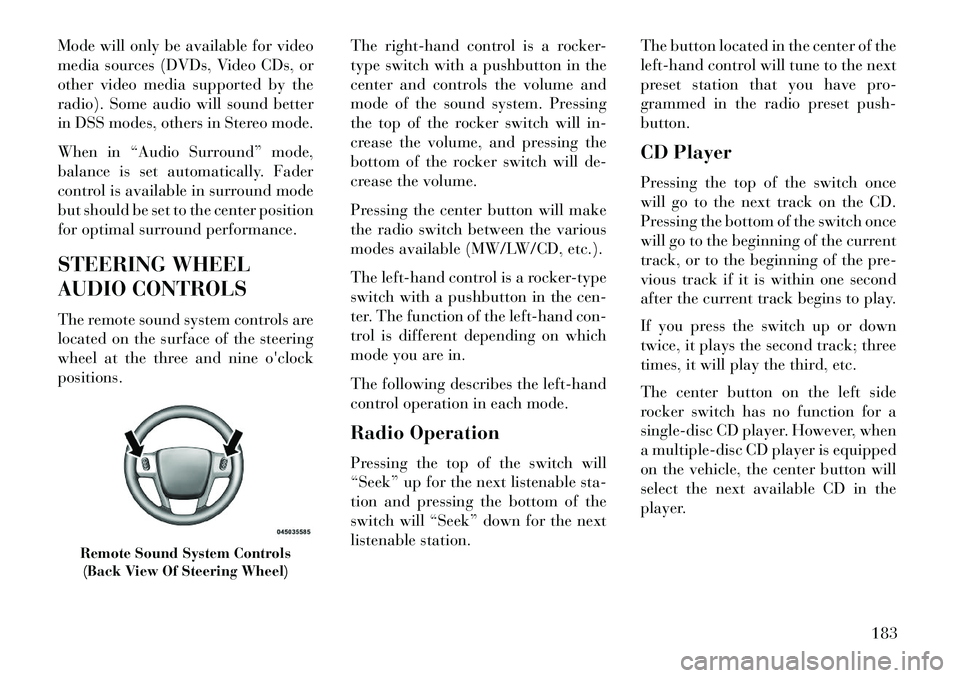
The remote sound system controls are
located on the surface of the steering
wheel at the three and nine o'clock
positions.The right-hand control is a rocker-
type switch with a pushbutton in the
center and controls the volume and
mode of the sound system. Pressing
the top of the rocker switch will in-
crease the volume, and pressing the
bottom of the rocker switch will de-
crease the volume.
Pressing the center button will make
the radio switch between the various
modes available (MW/LW/CD, etc.).
The left-hand control is a rocker-type
switch with a pushbutton in the cen-
ter. The function of the left-hand con-
trol is different depending on which
mode you are in.
The following describes the left-hand
control operation in each mode.
Radio Operation
Pressing the top of the switch will
“Seek” up for the next listenable sta-
tion and pressing the bottom of the
switch will “Seek” down for the next
listenable station.The button located in the center of the
left-hand control will tune to the next
preset station that you have pro-
grammed in the radio preset push-
button.
CD Player
Pressing the top of the switch once
will go to the next track on the CD.
Pressing the bottom of the switch once
will go to the beginning of the current
track, or to the beginning of the pre-
vious track if it is within one second
after the current track begins to play.
If you press the switch up or down
twice, it plays the second track; three
times, it will play the third, etc.
The center button on the left side
rocker switch has no function for a
single-disc CD player. However, when
a multiple-disc CD player is equipped
on the vehicle, the center button will
select the next available CD in the
player.
Remote Sound System Controls
(Back View Of Steering Wheel)
183
Page 190 of 336
CD/DVD DISC
MAINTENANCE
To keep a CD/DVD in good condition,
take the following precautions:
1. Handle the disc by its edge; avoid
touching the surface.
2. If the disc is stained, clean the
surface with a soft cloth, wiping from
center to edge.
3. Do not apply paper or tape to the
disc; avoid scratching the disc.
4. Do not use solvents such as ben-
zene, thinner, cleaners, or anti-static
sprays.
5. Store the disc in its case after play-
ing.
6. Do not expose the disc to direct
sunlight.
7. Do not store the disc where tem-
peratures may become too high.
NOTE: If you experience diffi-
culty in playing a particular disc, it
may be damaged (i.e., scratched,
reflective coating removed, a hair,moisture or dew on the disc) over-
sized, or have protection encoding.
Try a known good disc before con-
sidering disc player service.
RADIO OPERATION AND
MOBILE PHONES
Under certain conditions, the mobile
phone being on in your vehicle can
cause erratic or noisy performance
from your radio. This condition may
be lessened or eliminated by relocat-
ing the mobile phone antenna. This
condition is not harmful to the radio.
If your radio performance does not
satisfactorily “clear” by the reposi-
tioning of the antenna, it is recom-
mended that the radio volume be
turned down or off during mobile
phone operation.
CLIMATE CONTROLS
The air conditioning and heating sys-
tem is designed to make you comfort-
able in all types of weather. This sys-
tem can be operated through either
the Automatic Climate Controls on
the instrument panel or through the
Uconnect Touch™ system display.When the Uconnect Touch™ system
is in different modes (Radio, Player,
Settings, More, etc.) the driver and
passenger temperature settings will be
indicated at the top of the display.
GENERAL OVERVIEW
Hard-Keys
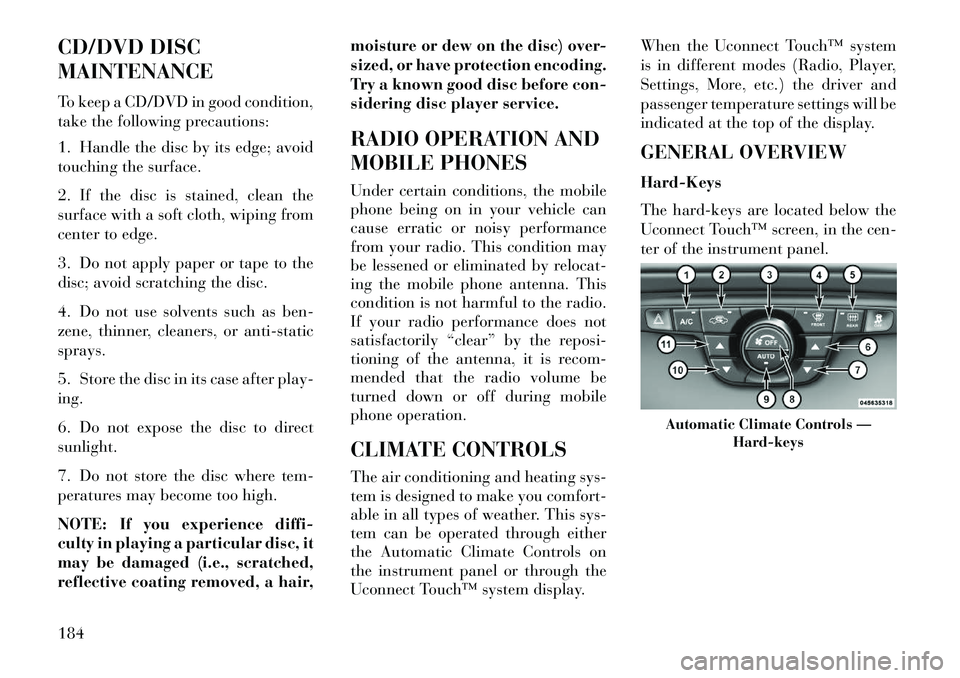
The hard-keys are located below the
Uconnect Touch™ screen, in the cen-
ter of the instrument panel.
Automatic Climate Controls —
Hard-keys
184
Page 221 of 336
The Electronic Brake Force Distribu-
tion (EBD) prevents the rear wheels
from over-braking and provides
greater control of available braking
forces applied to the rear axle.
When the vehicle is driven over
11 km/h, you may also hear a slight
clicking sound as well as some related
motor noises. These noises are the sys-
tem performing its self check cycle to
ensure that the ABS is working prop-
erly. This self check occurs each time
the vehicle is started and accelerated
past 11 km/h.
ABS is activated during braking un-
der certain road or stopping condi-
tions. ABS-inducing conditions can
include ice, snow, gravel, bumps, rail-
road tracks, loose debris, or panic
stops.
You also may experience the following
when the brake system goes into Anti-
Lock:
The ABS motor running (it maycontinue to run for a short time
after the stop), The clicking sound of solenoid
valves,
Brake pedal pulsations, and
A slight drop or fall away of the brake pedal at the end of the stop.
These are all normal characteristics of
ABS.
WARNING!
The ABS contains sophisticated electronic equipment that may be
susceptible to interference caused
by improperly installed or high
output radio transmitting equip-
ment. This interference can cause
possible loss of anti-lock braking
capability. Installation of such
equipment should be performed
by qualified professionals.
Pumping of the Anti-Lock Brakes will diminish their effectiveness
and may lead to a collision.
Pumping makes the stopping dis-
tance longer. Just press firmly on
your brake pedal when you need
to slow down or stop.
(Continued)
WARNING!(Continued)
The ABS cannot prevent the natu-
ral laws of physics from acting on
the vehicle, nor can it increase
braking or steering efficiency be-
yond that afforded by the condi-
tion of the vehicle brakes and tires
or the traction afforded. The ABS cannot prevent colli- sions, including those resulting
from excessive speed in turns,
following another vehicle too
closely, or hydroplaning.
The capabilities of an ABS
equipped vehicle must never be
exploited in a reckless or danger-
ous manner that could jeopardize
the user's safety or the safety of
others.
All vehicle wheels and tires must be
the same size and type and tires must
be properly inflated to produce accu-
rate signals for the computer.
215
Page 242 of 336

Tire Pressure Monitoring Low
Pressure WarningsThe TPM Telltale Light will
illuminate in the instrument
cluster and a chime will sound
when tire pressure is low in one or
more of the four active road tires. In
addition, the EVIC will display an
“Inflate Tire to XX” message for a
minimum of five seconds and a "LOW
TIRE" message and a graphic show-
ing the pressure values of each tire
with the low tire pressure values flash-
ing. The recommended cold placard
pressure inflation value is the pressure
value displayed in the "Inflate Tire to
XX" message displayed in the EVIC.
Should this occur, you should stop as
soon as possible and inflate the tires
with a low pressure condition (those
flashing in the EVIC graphic) to the
vehicle’s recommended cold placard
pressure inflation value. Once the sys-
tem receives the updated tire pres-
sures, the system will automatically update, the “Inflate Tire to XX” mes-
sage will no longer be displayed, the
graphic display in the EVIC will stop
flashing, and the TPM Telltale Light
will turn off. The vehicle may need to
be driven for up to 20 minutes above
24 km/h in order for the TPMS to
receive this information.
Service TPMS Warning
If a system fault is detected, the TPM
Telltale Light will flash on and off for
75 seconds and then remain on solid.
The system fault will also sound a
chime. In addition, the EVIC will dis-
play a "SERVICE TPM SYSTEM"
message for a minimum of five sec-
onds and then display dashes (- -) in
place of the pressure value to indicate
which sensor is not being received.
If the ignition switch is cycled, this
sequence will repeat, providing the
system fault still exists. If the system
fault no longer exists, the TPM Tell-
tale Light will no longer flash, and the
"SERVICE TPM SYSTEM" message
will no longer display, and a pressurevalue will display in place of the
dashes. A system fault can occur due
to any of the following:
1. Signal interference due to elec-
tronic devices or driving next to facili-
ties emitting the same radio frequen-
cies as the TPM sensors.
2. Installing aftermarket window
tinting that contains materials that
may block radio wave signals.
3. Accumulation of snow or ice
around the wheels or wheel housings.
4. Using tire chains on the vehicle.
5. Using wheels/tires not equipped
with TPM sensors.
The EVIC will also display a "SER-
VICE TPM SYSTEM" message for a
minimum of five seconds when a sys-
tem fault related to an incorrect sen-
sor location fault is detected. In this
case, the "SERVICE TPM SYSTEM"
message is then followed with a
graphic display with pressure values
still shown. This indicates that the
pressure values are still being received
from the TPM sensors but they may236
Page 267 of 336

PREPARATIONS FOR
JUMP-START
The battery is stored under an access
cover in the trunk. Remote battery
posts are located on the right side of
the engine compartment for jump-
starting.
NOTE: The remote battery posts
are viewed by standing on the right
side of the vehicle looking over the
fender.
WARNING!
Take care to avoid the radiatorcooling fan whenever the hood is
raised. It can start anytime the
ignition switch is ON. You can be
injured by moving fan blades.
Remove any metal jewelry such
as watch bands or bracelets that
might make an inadvertent elec-
trical contact. You could be seri-
ously injured.
Batteries contain sulfuric acid that can burn your skin or eyes
and generate hydrogen gas which
is flammable and explosive. Keep
open flames or sparks away from
the battery.
1. Set the parking brake, shift the
automatic transmission into PARK
and turn the ignition to LOCK.
2. Turn off the heater, radio, and all
unnecessary electrical accessories.
3. If using another vehicle to jump-
start the battery, park the vehicle
within the jumper cables reach, set
the parking brake and make sure the
ignition is OFF.
WARNING!
Do not allow vehicles to touch each
other as this could establish a
ground connection and personal
injury could result.
JUMP-STARTING
PROCEDUREWARNING!
Failure to follow this procedure
could result in personal injury or
property damage due to battery
explosion.CAUTION!
Failure to follow these procedures
could result in damage to the
charging system of the booster ve-
hicle or the discharged vehicle.
1. Connect the positive (+)end of the
jumper cable to the remote posi-
tive (+)post of the discharged vehicle.
2. Connect the opposite end of the
positive (+)jumper cable to the posi-
tive (+)post of the booster battery.
Remote Battery Post Locations
1 — Remote Positive (+)Post
2 — Remote Negative (-)Post
261
Page 301 of 336
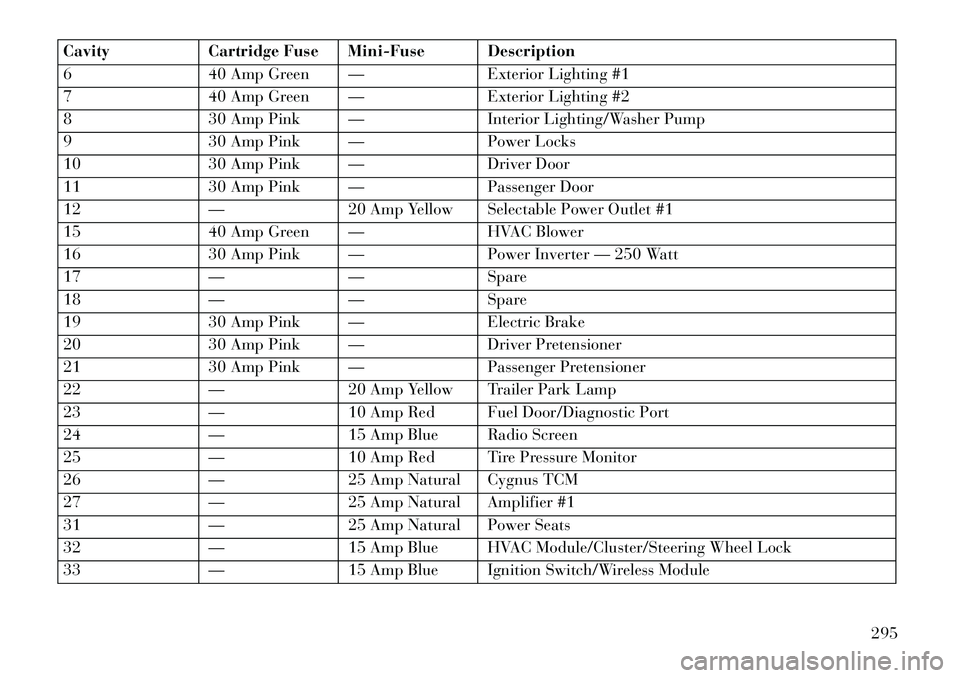
CavityCartridge Fuse Mini-Fuse Description
6 40 Amp Green — Exterior Lighting #1
7 40 Amp Green — Exterior Lighting #2
8 30 Amp Pink — Interior Lighting/Washer Pump
9 30 Amp Pink — Power Locks
10 30 Amp Pink — Driver Door
11 30 Amp Pink — Passenger Door
12 —20 Amp Yellow Selectable Power Outlet #1
15 40 Amp Green — HVAC Blower
16 30 Amp Pink — Power Inverter — 250 Watt
17 —— Spare
18 —— Spare
19 30 Amp Pink — Electric Brake
20 30 Amp Pink — Driver Pretensioner
21 30 Amp Pink — Passenger Pretensioner
22 —20 Amp Yellow Trailer Park Lamp
23 —10 Amp Red Fuel Door/Diagnostic Port
24 —15 Amp Blue Radio Screen
25 —10 Amp Red Tire Pressure Monitor
26 —25 Amp Natural Cygnus TCM
27 —25 Amp Natural Amplifier #1
31 —25 Amp Natural Power Seats
32 —15 Amp Blue HVAC Module/Cluster/Steering Wheel Lock
33 —15 Amp Blue Ignition Switch/Wireless Module
295
Page 302 of 336
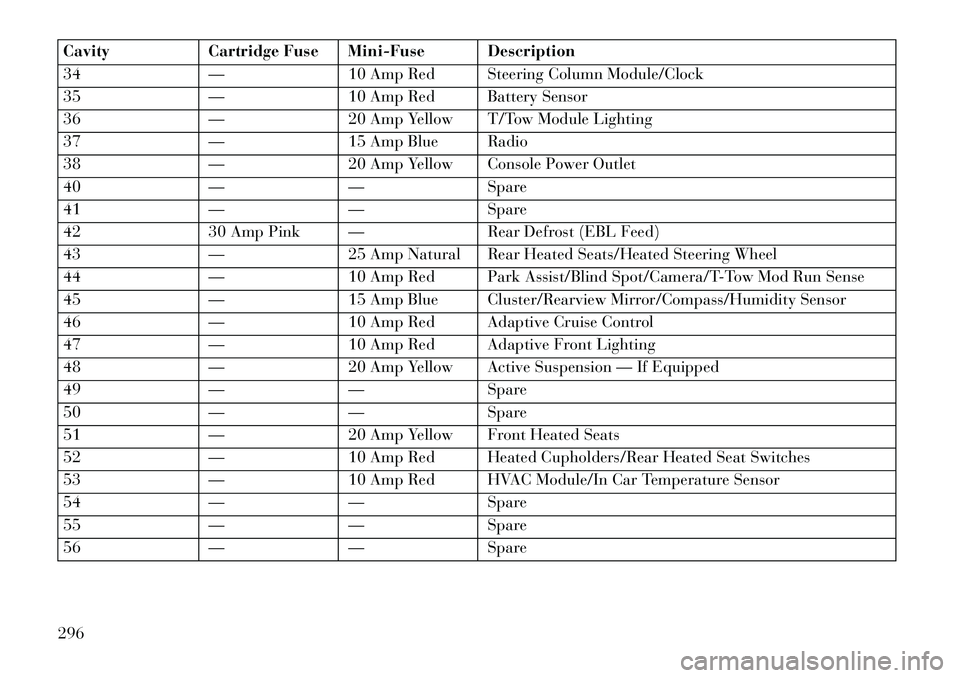
CavityCartridge Fuse Mini-Fuse Description
34 —10 Amp Red Steering Column Module/Clock
35 —10 Amp Red Battery Sensor
36 —20 Amp Yellow T/Tow Module Lighting
37 —15 Amp Blue Radio
38 —20 Amp Yellow Console Power Outlet
40 —— Spare
41 —— Spare
42 30 Amp Pink — Rear Defrost (EBL Feed)
43 —25 Amp Natural Rear Heated Seats/Heated Steering Wheel
44 —10 Amp Red Park Assist/Blind Spot/Camera/T-Tow Mod Run Sense
45 —15 Amp Blue Cluster/Rearview Mirror/Compass/Humidity Sensor
46 —10 Amp Red Adaptive Cruise Control
47 —10 Amp Red Adaptive Front Lighting
48 —20 Amp Yellow Active Suspension — If Equipped
49 —— Spare
50 —— Spare
51 —20 Amp Yellow Front Heated Seats
52 —10 Amp Red Heated Cupholders/Rear Heated Seat Switches
53 —10 Amp Red HVAC Module/In Car Temperature Sensor
54 —— Spare
55 —— Spare
56 —— Spare
296
Page 330 of 336

LATCH (Lower Anchors and Tetherfor CHildren) . . . . . . . . . . .51, 52
Latch Plate . . . . . . . . . . . . . . . . .30
Lead Free Gasoline . . . . . . . . . . .238
Leaks, Fluid . . . . . . . . . . . . . . . .58
Life of Tires . . . . . . . . . . . . . . .231
Light Bulbs . . . . . . . . . . . . .58, 298
Lights . . . . . . . . . . . . . . . . .58, 109
Airbag . . . . . . . .41, 45, 57, 160
Alarm . . . . . . . . . . . . . . . . .162
Anti-Lock . . . . . . . . . . . . . .161
Automatic Headlights . . . . . .109
Brake Assist Warning . . . . . . .220
Brake Warning . . . . . . . . . . .160
Bulb Replacement . . . . .298, 299
Dimmer Switch, Headlight . . .112
Electronic Stability Program (ESP)
Indicator . . . . . . . . . . . . . . .220
Exterior . . . . . . . . . . . . . . . . .58
Fog . . . . . . . . . . . . . . . . . . .158
Hazard Warning Flasher . . . . .254
Headlights . . . . . . . . . .109, 299
Headlights On Reminder . . . .111
Headlights On With Wipers . . .109
Headlight Switch . . . . . . . . . .109
High Beam . . . . . . . . . . . . . .112
High Beam Indicator . . . . . . .158
High Beam/Low Beam
Select . . . . . . . . . . . . . . . . .112 Illuminated Entry
. . . . . . . . . .17
Instrument Cluster . . . . . . . .109
Intensity Control . . . . . . . . . .113
Interior . . . . . . . . . . . . . . . .113
License . . . . . . . . . . . . . . . .301
Lights On Reminder . . . . . . .111
Low Fuel . . . . . . . . . . . . . . .166
Malfunction Indicator
(Check Engine) . . . . . . . . . . .159
Map Reading . . . . . . . . . . . .112
Parade Mode (Daytime
Brightness) . . . . . . . . . . . . . .114
Passing . . . . . . . . . . . . . . . .112
Reading . . . . . . . . . . . . . . . .112
Seat Belt Reminder . . . . . . . .162
Security Alarm (Theft
Alarm) . . . . . . . . . . . . . . . .162
Service . . . . . . . . . . . . .298, 299
Service Engine Soon (Malfunction
Indicator) . . . . . . . . . . . . . .159
SmartBeams . . . . . . . . . . . . .110
Theft Alarm (Security
Alarm) . . . . . . . . . . . . . . . .162
Tire Pressure Monitoring
(TPMS) . . . . . . . . . . . .158, 234
Traction Control . . . . . . . . . .220
Turn Signal . . . . . . . . . .58, 112
Vanity Mirror . . . . . . . . . . . . .69
Wait to Start . . . . . . . . . . . . .166 Warning (Instrument Cluster
Description)
. . . . . . . . . . . . .158
Loading Vehicle Tires . . . . . . . . . . . . . . . . . .225
Load Leveling System . . . . . . . . .152
Locks . . . . . . . . . . . . . . . . . . . . .20
Automatic Door . . . . . . . . . . .21
Auto Unlock . . . . . . . . . . . . . .21
Child Protection . . . . . . . . . . .21
Door . . . . . . . . . . . . . . . . . . .20
Power Door . . . . . . . . . . . . . .21
Lower Anchors and Tether for CHildren (LATCH) . . . . . . .51, 52
Low Tire Pressure System . . . . . .234
Lubrication, Body . . . . . . . . . . .278
Maintenance Free Battery . . . . . .276
Maintenance, General . . . . . . . . .273
Maintenance Procedures . . . . . . .273
Maintenance Schedule . . . . .310, 314
Maintenance, Sunroof . . . . . . . . .142
Malfunction Indicator Light (Check Engine) . . . . . . . . . . .159
Master Cylinder (Brakes) . . . . . . .285
Memory Feature (Memory Seat) . .105
Memory Seat . . . . . . . . . . . . . . .105
Memory Seats and Radio . . . . . . .105
Methanol . . . . . . . . . . . . . . . . .238
Methanol Fuel . . . . . . . . . . . . . .238
324