phone Lancia Thema 2013 Owner handbook (in English)
[x] Cancel search | Manufacturer: LANCIA, Model Year: 2013, Model line: Thema, Model: Lancia Thema 2013Pages: 336, PDF Size: 3.87 MB
Page 46 of 336
front passenger. Side air bags also
work with seat belts to improve occu-
pant protection.
Here are some simple steps you can
take to minimize the risk of harm
from a deploying air bag:
Children 12 years old and under
should always ride buckled up in a
rear seat.WARNING!Infants in rear-facing child restraints
should never ride in the front seat of
a vehicle with a passenger Advanced
Front Air Bag. An air bag deploy-
ment can cause severe injury or
death to infants in that position.Children that are not big enough to
wear the vehicle seat belt properly
(see Section on Child Restraints)
should be secured in the rear seat in
child restraints or belt-positioning
booster seats. Older children who do
not use child restraints or belt-
positioning booster seats should ride
properly buckled up in the rear seat.Never allow children to slide the
shoulder belt behind them or under
their arm.
You should read the instructions pro-
vided with your child restraint to make
sure that you are using it properly.All occupants should always wear
their lap and shoulder belts properly.
The driver and front passenger seats
should be moved back as far as prac-
tical to allow the Advanced Front Air
Bags room to inflate.
Do not lean against the door or win-
dow. If your vehicle has side air bags,
and deployment occurs, the side air
bags will inflate forcefully into the
space between you and the door.If the air bag system in this vehicle
needs to be modified to accommodate a
disabled person, contact the Customer
Center. Phone numbers are provided
under "If You Need Assistance".
WARNING!
Relying on the air bags alone
could lead to more severe injuries
in a collision. The air bags work
with your seat belt to restrain
you properly. In some collisions,
the air bags won't deploy at all.
Always wear your seat belts even
though you have air bags.
Being too close to the steering wheel or instrument panel during
Advanced Front Air Bag deploy-
ment could cause serious injury,
including death. Air Bags need
room to inflate. Sit back, com-
fortably extending your arms to
reach the steering wheel or in-
strument panel.
Side air bags also need room to inflate. Do not lean against the
door or window. Sit upright in the
center of the seat.
40
Page 66 of 336
UCONNECT™ PHONE (8.4/8.4N) . . . . . . . . . . . . . .74 UCONNECT TOUCH™ 8.4/8.4 NAV . . . . . . . . . . .74
OPERATION . . . . . . . . . . . . . . . . . . . . . . . . . . . .76
PHONE CALL FEATURES . . . . . . . . . . . . . . . . .81
UCONNECT™ PHONE FEATURES . . . . . . . . . . .84
ADVANCED PHONE CONNECTIVITY . . . . . . . . .87
THINGS YOU SHOULD KNOW ABOUT YOURUCONNECT™ PHONE . . . . . . . . . . . . . . . . . . . .87
GENERAL INFORMATION . . . . . . . . . . . . . . . . .92
VOICE COMMAND . . . . . . . . . . . . . . . . . . . . . . . . .92
Uconnect Touch™ 8.4/8.4 Nav . . . . . . . . . . . . . .92
Uconnect™ Voice Commands . . . . . . . . . . . . . . .93
Voice Tree . . . . . . . . . . . . . . . . . . . . . . . . . . . . .94
SEATS . . . . . . . . . . . . . . . . . . . . . . . . . . . . . . . . .100
POWER SEATS . . . . . . . . . . . . . . . . . . . . . . . .100
POWER LUMBAR(for versions/markets, where provided) . . . . . .101
HEATED SEATS (for versions/markets, where provided) . . . . . .102
VENTILATED SEATS (for versions/markets, where provided) . . . . . .103
HEAD RESTRAINTS . . . . . . . . . . . . . . . . . . . .104
FOLDING REAR SEAT . . . . . . . . . . . . . . . . . . .105
DRIVER MEMORY SEAT (for versions/markets, where provided) . . . . . . . .105
PROGRAMMING THE MEMORY FEATURE . . .106
60
Page 80 of 336
Blind Spot Alert OffWhen the BSM system is turned off,
there will be no visual or audible alerts
from either the BSM or RCP systems.NOTE:
The BSM system will store
the current operating mode when
the vehicle is shut off. Each time
the vehicle is started, the previously
stored mode will be recalled and
used.
Astronomy Zone — System
Temporarily Unavailable
The astronomy zone is when the ve-
hicles sensors cannot receive the sig-
nal of another vehicle approaching
due to interference in the reception of
the wavelength signal. When the ve-
hicle enters this zone the blind spot
system will become temporarily un-
available and the EVIC will display
the message “ Blind spot system
unavailable-Astronomy zone”. The
side mirrors LED’s will be lit up and
stay lit until the vehicle exits the zone. UCONNECT™ PHONE
(8.4/8.4N)
UCONNECT TOUCH™
8.4/8.4 NAV
Uconnect™ Phone is a voice-activated,
hands-free, in-vehicle communications
system. Uconnect™ Phone allows you
to dial a phone number with your
mobile phone.
Uconnect™ Phone supports the follow-
ing features:NOTE: Your phone must be
capable of SMS messaging via
Bluetooth® for messaging features
to work properly.
Your mobile phone’s audio is trans-
mitted through your vehicle’s audio
system; the system will automatically
mute your radio when using the
Uconnect™ Phone.
Uconnect™ Phone allows you to
transfer calls between the system and
your mobile phone as you enter or exit
your vehicle and enables you to mute
the system's microphone for private
conversation.
WARNING!
Any voice commanded system
should be used only in safe driving
conditions following all applicable
laws, including laws regarding
phone use. All attention should be
kept on the roadway ahead. Failure
to do so may result in an accident
causing serious injury or death.The Uconnect™ Phone is driven
through your Bluetooth® “Hands-Free
Profile” mobile phone. Uconnect™
features Bluetooth® technology - the
global standard that enables different
electronic devices to connect to each
other without wires or a docking sta-
tion, so Uconnect™ Phone works no
matter where you stow your mobile
phone (be it your purse, pocket, or
briefcase), as long as your phone is
turned on and has been paired to
the vehicle's Uconnect™ Phone. The
Uconnect™ Phone allows up to ten
mobile phones or audio devices to be
linked to the system. Only one linked
(or paired) mobile phone and one
audio device can be used with the
system at a time.
74
Page 81 of 336
Uconnect™ Phone ButtonThe Uconnect™ Phone
Button is used to get
into the phone mode and
make calls, show recent, in-
coming, outgoing calls, view phone-
book etc., When you press the button
you will hear a BEEP. The beep is
your signal to give a command.
Uconnect™ Voice Command Button
The Uconnect™ Voice
Command
Button is
only used for “barge in”
and when you are already
in a call and you want to send Tones
or make another call.
The
button is also used to ac-
cess the Voice Commands for the
Uconnect™ Voice Command fea-
tures if your vehicle is equipped.
Please see the Uconnect™ Voice
Command section for direction on
how to use the
button.
The Uconnect™ Phone is fully inte-
grated with the vehicle's audio sys-
tem. The volume of the Uconnect™ Phone can be adjusted either from the
radio volume control knob or from the
steering wheel radio control (right
switch), if so equipped.
Voice Activated Features:
Hands Free dialing via Voice (“Call
John Smiths Mobile” or, “Dial
248- 555-1212”).
Hands Free text to speech listening of your incoming SMS messages.
Hands Free text messaging (“Send a message to John Smiths Mobile”).
Redialing last dialed numbers (“Redial”).
Calling Back the last incoming call number (“Call Back”).
View Call logs on screen (“Show incoming calls”, “Show Outgoing
calls”, “Show missed Calls”, “Show
Recent Calls”).
Searching Contacts phone number (“Search for John Smith Mobile”). Screen Activated Features:
Dialing via Keypad using touch-
screen.
Viewing and Calling contacts from Phonebooks displayed on the
touch-screen.
Setting Favorite Contact Phone numbers so the are easily accessible
on the Main Phone screen.
Viewing and Calling contacts from Recent Call logs.
Reviewing your recent Incoming SMS.
Sending a text message via the touch-screen.
Listen to Music on your Bluetooth® Device via the touch-screen.
Pairing up to 10 phones/audio devices for easy access to connect to
them quickly.
75
Page 82 of 336

OPERATIONVoice commands can be used to oper-
ate the Uconnect™ Phone and to navi-
gate through the Uconnect™ Phone
menu structure. Voice commands are
required after most Uconnect™ Phone
prompts. There are two general meth-
ods for how Voice Command works:1. Say compound commands like
“Call John Smith mobile”.
2. Say the individual commands and
allow the system to guide you to com-
plete the task.
You will be prompted for a specific
command and then guided through
the available options.
Prior to giving a voice command,one must wait for the beep, which
follows the “Listen” prompt or an-
other prompt.
For certain operations, compound commands can be used. For ex-
ample, instead of saying “Call” and
then “John Smith” and then “mo-
bile”, the following compound
command can be said: “Call John
Smith mobile”. For each feature explanation in this
section, only the compound com-
mand form of the voice command is
given. You can also break the com-
mands into parts and say each part
of the command when you are
asked for it. For example, you can
use the compound command form
voice command “Search for John
Smith”, or you can break the com-
pound command form into two
voice commands: “Search Contact”
and when asked “John Smith”.
Please remember, the Uconnect™
Phone works best when you talk in
a normal conversational tone, as if
speaking to someone sitting a few
meters away from you.
Natural Speech
Your Uconnect™ Phone Voice system
uses a Natural Language Voice Rec-
ognition (VR) engine.
Natural speech allows the user to speak
commands in phrases or complete sen-
tences. The system filters out certain
non-word utterances and sounds such
as “ah” and “eh”. The system handles
fill-in words such as “I would like to”.
The system handles multiple inputs in
the same phrase or sentence such as
“make a phone call” and “to Kelly
Smith”. For multiple inputs in the
same phrase or sentence, the system
identifies the topic or context and pro-
vides the associated follow-up prompt
such as “Who do you want to call?”
in the case where a phone call was
requested but the specific name was
not recognized.The system utilizes continuous dialog;
when the system requires more infor-
mation from the user it will ask a ques-
tion to which the user can respond
without pressing the Voice Command
button.
Voice Command Tree
Refer to “Voice Tree” in this section.
Help Command
If you need assistance at any prompt,
or if you want to know your options at
any prompt, say “Help” following the
beep.
76
Page 83 of 336
To activate the Uconnect™ Phone
from idle, simply press the
button
and say a command or say “help”. All
Uconnect™ Phone sessions begin
with a press of the
button on the
radio control head.
Cancel Command
At any prompt, after the beep, you can
say “Cancel” and you will be returned
to the main menu.You can also press the
or
buttons when the system is listen-
ing for a command and be returned to
the main or previous menu.
NOTE: Pressing the
or
buttons while the system is
playing is known as “Barging In”,
refer to “Barge In — Overriding
Prompts” for further information.
Pair (Link) Uconnect™ Phone To
A Mobile Phone
To begin using your Uconnect™
Phone, you must pair your compatible
Bluetooth® enabled mobile phone.
To complete the pairing process,
you will need to reference your
mobile phone Owner's Manual. The
Uconnect™ website may also provide
detailed instructions for pairing.
NOTE:
You must have Bluetooth® en-
abled on your phone to complete
this procedure.
The vehicle must be in PARK.
1. Press the “Phone” soft-key on the
screen to begin.
2. If there is no phone currently con-
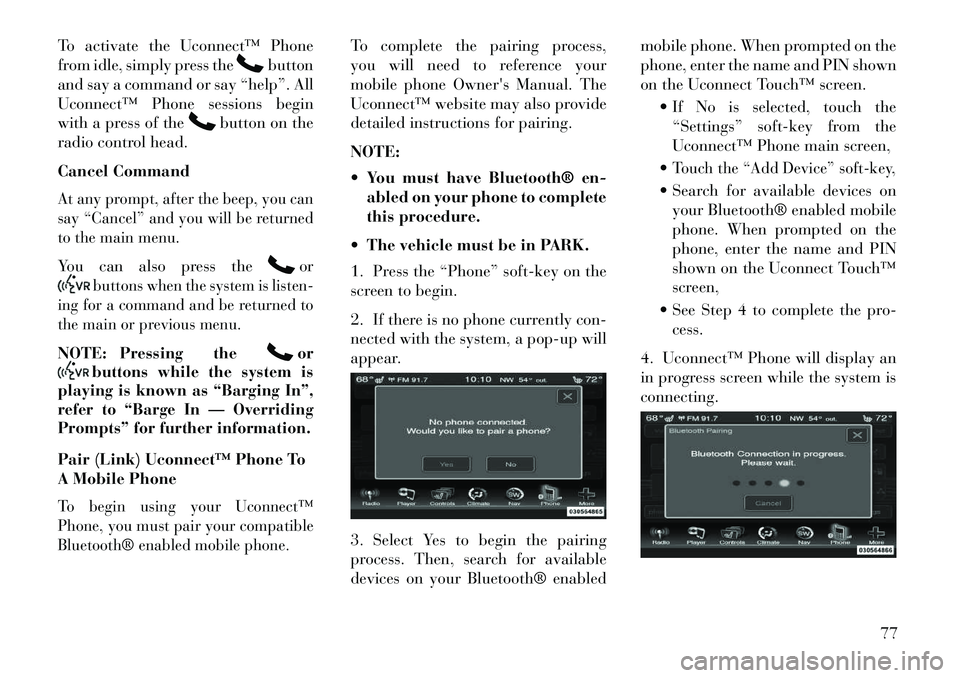
nected with the system, a pop-up will
appear.
3. Select Yes to begin the pairing
process. Then, search for available
devices on your Bluetooth® enabled mobile phone. When prompted on the
phone, enter the name and PIN shown
on the Uconnect Touch™ screen.
If No is selected, touch the“Settings” soft-key from the
Uconnect™ Phone main screen,
Touch the “Add Device” soft-key, Search for available devices on your Bluetooth® enabled mobile
phone. When prompted on the
phone, enter the name and PIN
shown on the Uconnect Touch™
screen,
See Step 4 to complete the pro- cess.
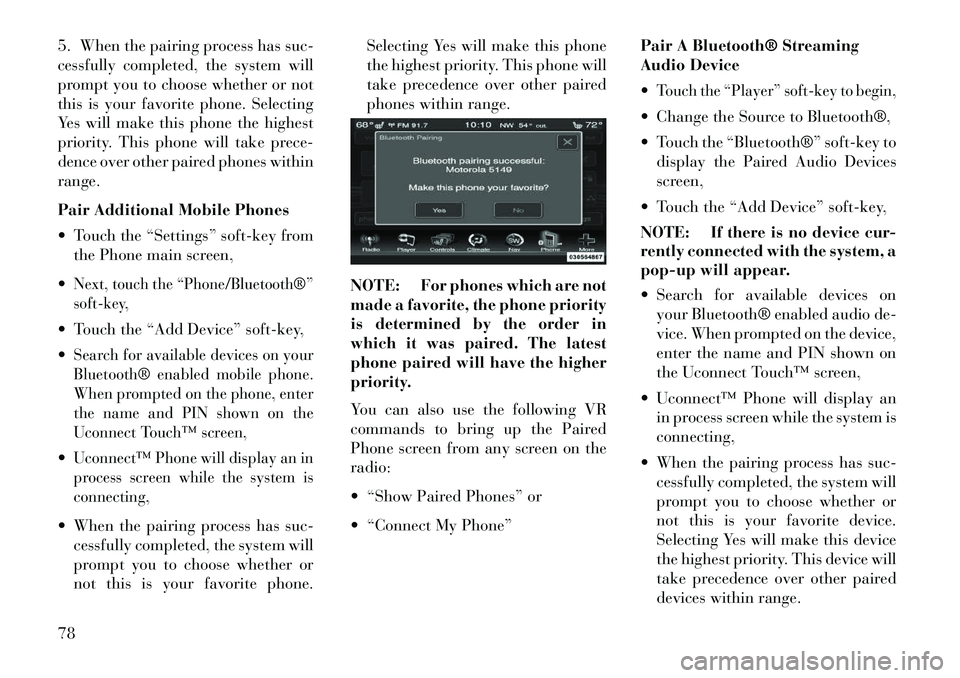
4. Uconnect™ Phone will display an
in progress screen while the system is
connecting.
77
Page 84 of 336
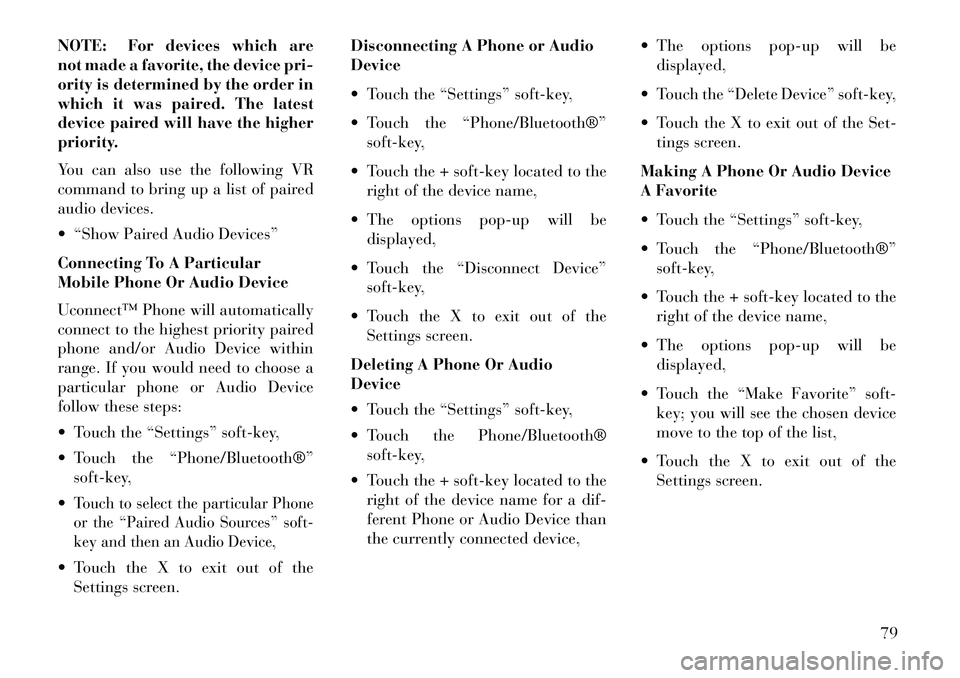
5. When the pairing process has suc-
cessfully completed, the system will
prompt you to choose whether or not
this is your favorite phone. Selecting
Yes will make this phone the highest
priority. This phone will take prece-
dence over other paired phones within
range.
Pair Additional Mobile Phones
Touch the “Settings” soft-key fromthe Phone main screen,
Next, touch the “Phone/Bluetooth®”
soft-key, Touch the “Add Device” soft-key,
Search for available devices on your
Bluetooth® enabled mobile phone.
When prompted on the phone, enter
the name and PIN shown on the
Uconnect Touch™ screen,Uconnect™ Phone will display an in
process screen while the system is
connecting, When the pairing process has suc- cessfully completed, the system will
prompt you to choose whether or
not this is your favorite phone. Selecting Yes will make this phone
the highest priority. This phone will
take precedence over other paired
phones within range.
NOTE: For phones which are not
made a favorite, the phone priority
is determined by the order in
which it was paired. The latest
phone paired will have the higher
priority.
You can also use the following VR
commands to bring up the Paired
Phone screen from any screen on the
radio:
“Show Paired Phones” or
“Connect My Phone” Pair A Bluetooth® Streaming
Audio Device
Touch the “Player” soft-key to begin, Change the Source to Bluetooth®,
Touch the “Bluetooth®” soft-key to
display the Paired Audio Devices
screen,
Touch the “Add Device” soft-key,
NOTE: If there is no device cur-
rently connected with the system, a
pop-up will appear.
Search for available devices on your Bluetooth® enabled audio de-
vice. When prompted on the device,
enter the name and PIN shown on
the Uconnect Touch™ screen,
Uconnect™ Phone will display an in process screen while the system is
connecting,
When the pairing process has suc- cessfully completed, the system will
prompt you to choose whether or
not this is your favorite device.
Selecting Yes will make this device
the highest priority. This device will
take precedence over other paired
devices within range.
78
Page 85 of 336
NOTE: For devices which are
not made a favorite, the device pri-
ority is determined by the order in
which it was paired. The latest
device paired will have the higher
priority.
You can also use the following VR
command to bring up a list of paired
audio devices.
“Show Paired Audio Devices”
Connecting To A Particular
Mobile Phone Or Audio Device
Uconnect™ Phone will automatically
connect to the highest priority paired
phone and/or Audio Device within
range. If you would need to choose a
particular phone or Audio Device
follow these steps:
Touch the “Settings” soft-key,
Touch the “Phone/Bluetooth®”soft-key,
Touch to select the particular Phone
or the “Paired Audio Sources” soft-
key and then an Audio Device, Touch the X to exit out of the Settings screen. Disconnecting A Phone or Audio
Device
Touch the “Settings” soft-key,
Touch the “Phone/Bluetooth®”
soft-key,
Touch the + soft-key located to the right of the device name,
The options pop-up will be displayed,
Touch the “Disconnect Device” soft-key,
Touch the X to exit out of the Settings screen.
Deleting A Phone Or Audio
Device
Touch the “Settings” soft-key,
Touch the Phone/Bluetooth® soft-key,
Touch the + soft-key located to the right of the device name for a dif-
ferent Phone or Audio Device than
the currently connected device, The options pop-up will be
displayed,
Touch the “Delete Device” soft-key,
Touch the X to exit out of the Set- tings screen.
Making A Phone Or Audio Device
A Favorite
Touch the “Settings” soft-key,
Touch the “Phone/Bluetooth®” soft-key,
Touch the + soft-key located to the right of the device name,
The options pop-up will be displayed,
Touch the “Make Favorite” soft- key; you will see the chosen device
move to the top of the list,
Touch the X to exit out of the Settings screen.
79
Page 86 of 336
Phonebook Download —
Automatic Phonebook Transfer
From Mobile PhoneIf equipped and specifically supported
by your phone, Uconnect™ Phone au-
tomatically downloads names (text
names) and number entries from the
mobile phone’s phonebook. Specific
Bluetooth® Phones with Phone Book
Access Profile may support this feature.
See Uconnect™ website for supported
phones. To call a name from a downloadedmobile phonebook, follow the pro-
cedure in “Call by Saying a Name”
section.
Automatic download and update, if supported, begins as soon as the
Bluetooth® wireless phone connec-
tion is made to the Uconnect™
Phone, for example, after you start
the vehicle.
A maximum of 1000 entries per phone will be downloaded and up-
dated every time a phone is con-
nected to the Uconnect™ Phone. Depending on the maximum num-
ber of entries downloaded, there
may be a short delay before the
latest downloaded names can be
used. Until then, if available, the
previously downloaded phonebook
is available for use.
Only the phonebook of the cur- rently connected mobile phone is
accessible.
This downloaded phonebook can-
not be edited or deleted on the
Uconnect™ Phone. These can only
be edited on the mobile phone. The
changes are transferred and up-
dated to Uconnect™ Phone on the
next phone connection.Managing Your Favorite
Phonebook
There are three ways you can add an
entry to your Favorite Phonebook.
1. During an active call of a number
to make a favorite, touch and hold a
favorite button on the top of the
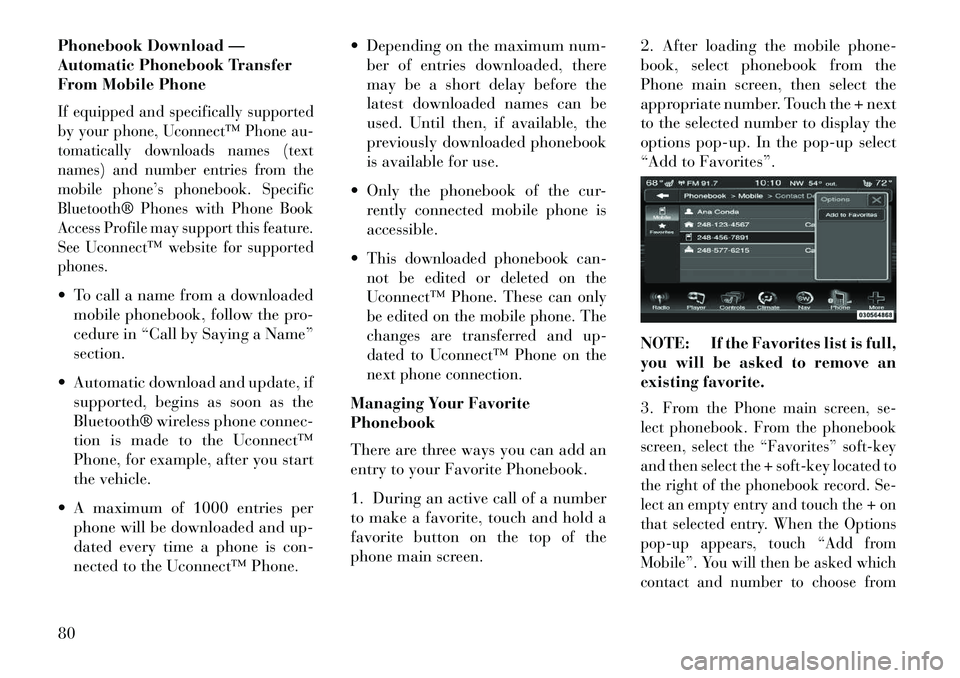
phone main screen. 2. After loading the mobile phone-
book, select phonebook from the
Phone main screen, then select the
appropriate number. Touch the + next
to the selected number to display the
options pop-up. In the pop-up select
“Add to Favorites”.
NOTE: If the Favorites list is full,
you will be asked to remove an
existing favorite.
3.
From the Phone main screen, se-
lect phonebook. From the phonebook
screen, select the “Favorites” soft-key
and then select the + soft-key located to
the right of the phonebook record. Se-
lect an empty entry and touch the + on
that selected entry. When the Options
pop-up appears, touch “Add from
Mobile”. You will then be asked which
contact and number to choose from
80
Page 87 of 336
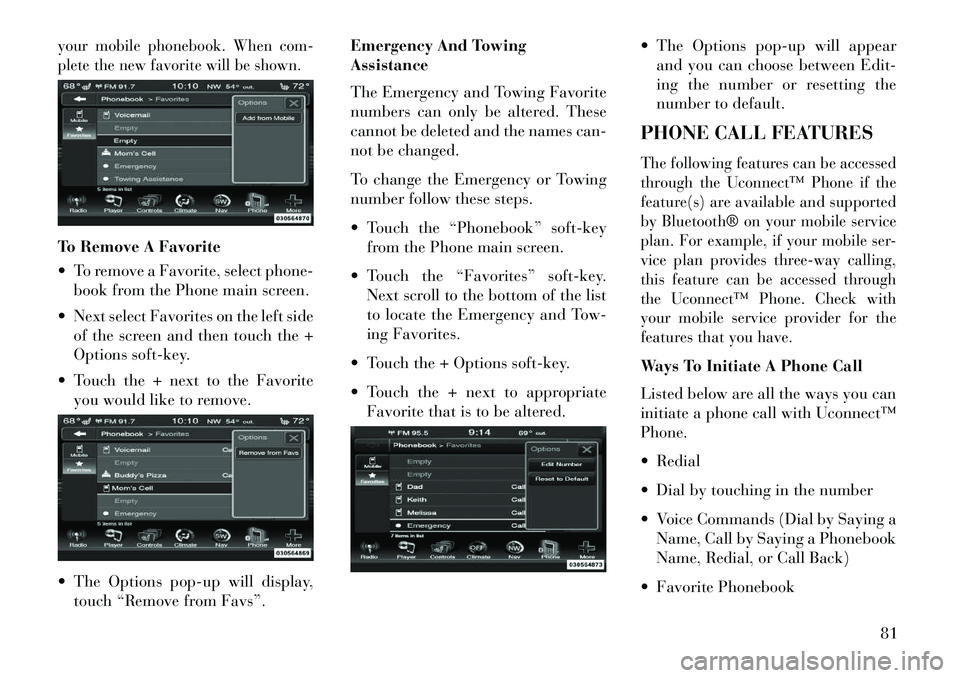
your mobile phonebook. When com-
plete the new favorite will be shown.To Remove A Favorite
To remove a Favorite, select phone-book from the Phone main screen.
Next select Favorites on the left side of the screen and then touch the +
Options soft-key.
Touch the + next to the Favorite you would like to remove.
The Options pop-up will display, touch “Remove from Favs”. Emergency And Towing
Assistance
The Emergency and Towing Favorite
numbers can only be altered. These
cannot be deleted and the names can-
not be changed.
To change the Emergency or Towing
number follow these steps.
Touch the “Phonebook” soft-key
from the Phone main screen.
Touch the “Favorites” soft-key. Next scroll to the bottom of the list
to locate the Emergency and Tow-
ing Favorites.
Touch the + Options soft-key.
Touch the + next to appropriate Favorite that is to be altered. The Options pop-up will appear
and you can choose between Edit-
ing the number or resetting the
number to default.
PHONE CALL FEATURES
The following features can be accessed
through the Uconnect™ Phone if the
feature(s) are available and supported
by Bluetooth® on your mobile service
plan. For example, if your mobile ser-
vice plan provides three-way calling,
this feature can be accessed through
the Uconnect™ Phone. Check with
your mobile service provider for the
features that you have.Ways To Initiate A Phone Call
Listed below are all the ways you can
initiate a phone call with Uconnect™
Phone.
Redial
Dial by touching in the number
Voice Commands (Dial by Saying a Name, Call by Saying a Phonebook
Name, Redial, or Call Back)
Favorite Phonebook
81