wipers Lancia Thema 2013 Owner handbook (in English)
[x] Cancel search | Manufacturer: LANCIA, Model Year: 2013, Model line: Thema, Model: Lancia Thema 2013Pages: 336, PDF Size: 3.87 MB
Page 67 of 336
LINKING AND UNLINKING THE REMOTEKEYLESS ENTRY TRANSMITTER TO
MEMORY . . . . . . . . . . . . . . . . . . . . . . . . . . . . .107
MEMORY POSITION RECALL . . . . . . . . . . . . .107
EASY ENTRY/EXIT SEAT (Available With Memory Seat Only) . . . . . . . . .107
TO OPEN AND CLOSE THE HOOD . . . . . . . . . . . .108
LIGHTS . . . . . . . . . . . . . . . . . . . . . . . . . . . . . . . .109
HEADLIGHT SWITCH . . . . . . . . . . . . . . . . . . .109
AUTOMATIC HEADLIGHTS . . . . . . . . . . . . . .109
HEADLIGHTS ON WITH WIPERS(Available With Automatic Headlights Only) . . .109 HEADLIGHT TIME DELAY . . . . . . . . . . . . . . .110
SMARTBEAM™(for versions/markets, where provided) . . . . . .110
DAYTIME RUNNING LIGHTS (for versions/markets, where provided) . . . . . .111
ADAPTIVE BI-XENON HIGH INTENSITY DISCHARGE HEADLIGHTS . . . . . . . . . . . . . . .111
LIGHTS-ON REMINDER . . . . . . . . . . . . . . . . .111
FOG LIGHTS . . . . . . . . . . . . . . . . . . . . . . . . . .111
MULTIFUNCTION LEVER . . . . . . . . . . . . . . . .112
TURN SIGNALS . . . . . . . . . . . . . . . . . . . . . . . .112
LANE CHANGE ASSIST . . . . . . . . . . . . . . . . . .112
HIGH/LOW BEAM SWITCH . . . . . . . . . . . . . .112
FLASH-TO-PASS . . . . . . . . . . . . . . . . . . . . . . .112
61
Page 68 of 336
COURTESY LIGHTS . . . . . . . . . . . . . . . . . . . .112
FRONT MAP/READING LIGHTS . . . . . . . . . . .112
AMBIENT LIGHT . . . . . . . . . . . . . . . . . . . . . . .113
INTERIOR LIGHTS . . . . . . . . . . . . . . . . . . . . .113
WINDSHIELD WIPERS AND WASHERS . . . . . . .114
INTERMITTENT WIPER SYSTEM . . . . . . . . . .115
MIST FEATURE . . . . . . . . . . . . . . . . . . . . . . . .115
WINDSHIELD WASHERS . . . . . . . . . . . . . . . .115
RAIN SENSING WIPERS(for versions/markets, where provided) . . . . . .115
HEADLIGHT WASHERS . . . . . . . . . . . . . . . . . . .116
TILT/TELESCOPING STEERING COLUMN . . . . .117
POWER TILT/TELESCOPING STEERING COLUMN
(for versions/markets, where provided) . . . . . . . . .117 HEATED STEERING WHEEL (for versions/markets, where provided) . . . . . . . .118
ADJUSTABLE PEDALS (for versions/markets, where provided) . . . . . . . .119
ELECTRONIC SPEED CONTROL . . . . . . . . . . . .120 TO ACTIVATE. . . . . . . . . . . . . . . . . . . . . . . . . .120
TO SET A DESIRED SPEED . . . . . . . . . . . . . . .120
TO DEACTIVATE . . . . . . . . . . . . . . . . . . . . . . .120
TO RESUME SPEED. . . . . . . . . . . . . . . . . . . . .120
TO VARY THE SPEED SETTING . . . . . . . . . . .120
TO ACCELERATE FOR PASSING . . . . . . . . . . .121
62
Page 115 of 336
WARNING!
Be sure the hood is fully latched
before driving your vehicle. If the
hood is not fully latched, it could
open when the vehicle is in motion
and block your vision. Failure to
follow this warning could result in
serious injury or death.
LIGHTS
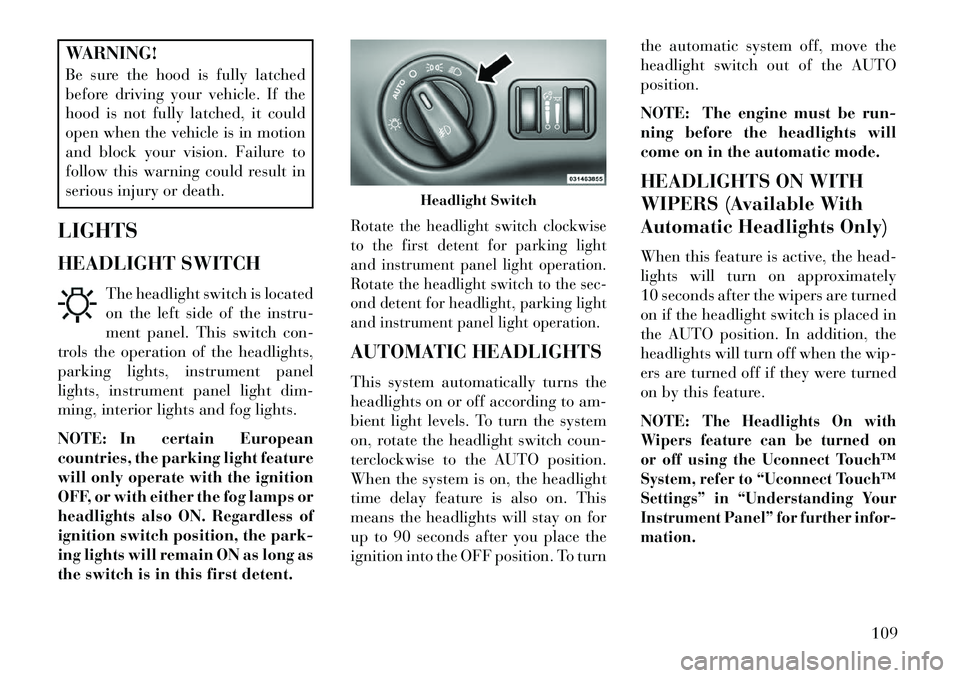
HEADLIGHT SWITCH The headlight switch is located
on the left side of the instru-
ment panel. This switch con-
trols the operation of the headlights,
parking lights, instrument panel
lights, instrument panel light dim-
ming, interior lights and fog lights.
NOTE: In certain European
countries, the parking light feature
will only operate with the ignition
OFF, or with either the fog lamps or
headlights also ON. Regardless of
ignition switch position, the park-
ing lights will remain ON as long as
the switch is in this first detent.
Rotate the headlight switch clockwise
to the first detent for parking light
and instrument panel light operation.
Rotate the headlight switch to the sec-
ond detent for headlight, parking light
and instrument panel light operation.AUTOMATIC HEADLIGHTS
This system automatically turns the
headlights on or off according to am-
bient light levels. To turn the system
on, rotate the headlight switch coun-
terclockwise to the AUTO position.
When the system is on, the headlight
time delay feature is also on. This
means the headlights will stay on for
up to 90 seconds after you place the
ignition into the OFF position. To turn the automatic system off, move the
headlight switch out of the AUTO
position.
NOTE: The engine must be run-
ning before the headlights will
come on in the automatic mode.
HEADLIGHTS ON WITH
WIPERS (Available With
Automatic Headlights Only)
When this feature is active, the head-
lights will turn on approximately
10 seconds after the wipers are turned
on if the headlight switch is placed in
the AUTO position. In addition, the
headlights will turn off when the wip-
ers are turned off if they were turned
on by this feature.
NOTE:
The Headlights On with
Wipers feature can be turned on
or off using the Uconnect Touch™
System, refer to “Uconnect Touch™
Settings” in “Understanding Your
Instrument Panel” for further infor-
mation.
Headlight Switch
109
Page 120 of 336
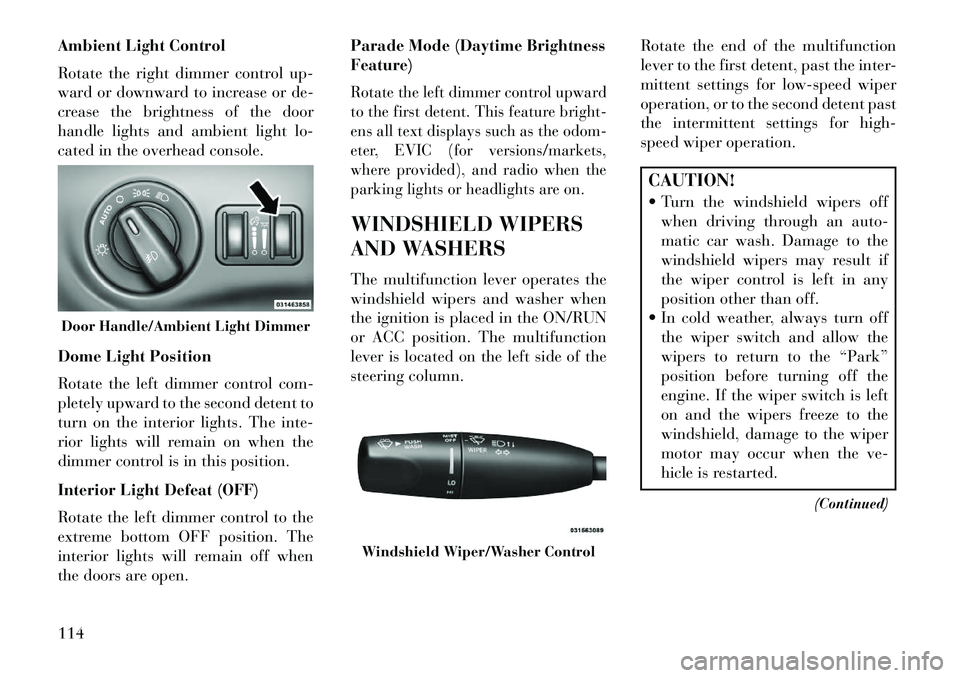
Ambient Light Control
Rotate the right dimmer control up-
ward or downward to increase or de-
crease the brightness of the door
handle lights and ambient light lo-
cated in the overhead console.
Dome Light Position
Rotate the left dimmer control com-
pletely upward to the second detent to
turn on the interior lights. The inte-
rior lights will remain on when the
dimmer control is in this position.
Interior Light Defeat (OFF)
Rotate the left dimmer control to the
extreme bottom OFF position. The
interior lights will remain off when
the doors are open.Parade Mode (Daytime Brightness
Feature)
Rotate the left dimmer control upward
to the first detent. This feature bright-
ens all text displays such as the odom-
eter, EVIC (for versions/markets,
where provided), and radio when the
parking lights or headlights are on.WINDSHIELD WIPERS
AND WASHERS
The multifunction lever operates the
windshield wipers and washer when
the ignition is placed in the ON/RUN
or ACC position. The multifunction
lever is located on the left side of the
steering column.
Rotate the end of the multifunction
lever to the first detent, past the inter-
mittent settings for low-speed wiper
operation, or to the second detent past
the intermittent settings for high-
speed wiper operation.
CAUTION!
Turn the windshield wipers off
when driving through an auto-
matic car wash. Damage to the
windshield wipers may result if
the wiper control is left in any
position other than off.
In cold weather, always turn off the wiper switch and allow the
wipers to return to the “Park”
position before turning off the
engine. If the wiper switch is left
on and the wipers freeze to the
windshield, damage to the wiper
motor may occur when the ve-
hicle is restarted.
(Continued)
Door Handle/Ambient Light Dimmer
Windshield Wiper/Washer Control
114
Page 121 of 336
CAUTION!(Continued)
Always remove any buildup of snow that prevents the wind-
shield wiper blades from return-
ing to the off position. If the wind-
shield wiper control is turned off
and the blades cannot return to
the off position, damage to the
wiper motor may occur.
INTERMITTENT WIPER
SYSTEM
Use the intermittent wiper when
weather conditions make a single
wiping cycle with a variable pause
between cycles desirable. Rotate the
end of the multifunction lever to the
first detent position, and then turn the
end of the lever to select the desired
delay interval. There are four delay
settings, which allow you to regulate
the wipe interval from a minimum of
one cycle every second to a maximum
of approximately 18 seconds between
cycles. The delay intervals will double
in duration when the vehicle speed is
16 km/h or less. MIST FEATURE
Rotate the end of the lever downward
to the Mist position to activate a single
wipe cycle to clear off road mist or
spray from a passing vehicle. The
wipers will continue to operate until
you release the multifunction lever.
NOTE: The mist feature does not
activate the washer pump; there-
fore, no washer fluid will be
sprayed on the windshield. The
wash function must be used in
order to spray the windshield with
washer fluid.
WINDSHIELD WASHERS
To use the washer, push the multi-
function lever inward (toward the
steering column) and hold it for as
long as washer spray is desired.
If you activate the washer while the
windshield wiper control is in the
delay range, the wipers will operate
for two wipe cycles after releasing the
lever and then resume the intermit-
tent interval previously selected.
If you activate the washer while the
windshield wiper is turned off, the
wipers will operate for three wipe
cycles and then turn off.
WARNING!Sudden loss of visibility through the
windshield could lead to a collision.
You might not see other vehicles or
other obstacles. To avoid sudden ic-
ing of the windshield during freez-
ing weather, warm the windshield
with the defroster before and during
windshield washer use.RAIN SENSING WIPERS
(for versions/markets,
where provided)
This feature senses moisture on the
windshield and automatically acti-
vates the wipers for the driver. The
feature is especially useful for road
splash or over spray from the wind-
shield washers of the vehicle ahead.
Rotate the end of the multifunction
lever to one of four settings to activate
this feature.
115
Page 122 of 336

The sensitivity of the system can be
adjusted with the multifunction lever.
Wiper delay position 1 is the least sen-
sitive, and wiper delay position 4 is the
most sensitive. Setting 3 should be used
for normal rain conditions. Settings 1
and 2 can be used if the driver desires
less wiper sensitivity. Settings 4 can be
used if the driver desires more sensitiv-
ity. The rain sense wipers will auto-
matically change between an intermit-
tent wipe, slow wipe and a fast wipe
depending on the amount of moisture
that is sensed on the windshield. Place
the wiper switch in the OFF position
when not using the system.The Rain Sensing feature can be
turned on and off using the Uconnect
Touch™ System, refer to “Uconnect
Touch™ Settings” in “Understanding
Your Instrument Panel” for further
information.
NOTE:
The Rain Sensing feature will not
operate when the wiper speed is
in the low or high position.
The Rain Sensing feature maynot function properly when ice
or dried salt water is present on
the windshield.
The use of products containing wax or silicone may reduce rain
sensor performance.
The Rain Sensing system has protec-
tive features for the wiper blades and
arms. It will not operate under the
following conditions:
Low Temperature Wipe Inhibit
— The Rain Sensing feature will
not operate when the ignition is
placed in the RUN position, the ve-
hicle is stationary and the outside
temperature is below 0°C, unless
the wiper control on the multifunc-
tion lever is moved, the vehicle
speed becomes greater than 0 km/h
or the outside temperature rises
above freezing.
Neutral Wipe Inhibit — The Rain
Sensing feature will not operate
when the ignition is placed in the
RUN position, the transmission
shift lever is in the NEUTRAL po-
sition and the vehicle speed is less than 8 km/h, unless the wiper con-
trol on the multifunction lever is
moved or the shift lever is moved
out of the NEUTRAL position.
HEADLIGHT WASHERS
The multifunction lever operates the
headlight washers when the ignition
switch is in the ON position and the
headlights are turned on. The multi-
function lever is located on the left
side of the steering column.
To use the headlight washers, push
the multifunction lever inward (to-
ward the steering column) to the sec-
ond detent and release it. The head-
light washers will spray a timed high-
pressure spray of washer fluid onto
each headlight lens. In addition, the
windshield washers will spray the
windshield and the windshield wipers
will cycle.
NOTE: After turning the ignition
switch and headlights ON, the
headlight washers will operate on
the first spray of the windshield
washer and then every eleventh
spray after that.
116
Page 182 of 336
Blind Spot Alert (for versions/
markets, where provided)
When this feature is selected, the
Blind Spot Alert feature can be set to
Off, Lights or Lights and Chime. The
Blind Spot Alert feature can be acti-
vated in “Lights” mode. When this
mode is selected, the Blind Spot Moni-
tor (BSM) system is activated and will
only show a visual alert in the outside
mirrors. When “Lights & Chime”
mode is activated, the Blind Spot
Monitor (BSM) will show a visual
alert in the outside mirrors as well as
an audible alert when the turn signal
is on. When “Off” is selected, the
Blind Spot Monitor (BSM) system is
deactivated. To change the Blind Spot
Alert status, touch the Off, Lights or
Lights & Chime soft-key. Then touch
the arrow back soft-key.
NOTE: If your vehicle has expe-
rienced any damage in the area
where the sensor is located, even if
the fascia is not damaged, the sen-
sor may have become misaligned.
Take your vehicle to an authorized
dealer to verify sensor alignment.Having a sensor that is misaligned
will result in the BSM not operat-
ing to specification.
ParkView® Backup Camera (for
versions/markets, where provided)
Your vehicle may be equipped with
the ParkView® Rear Back Up Cam-
era that allows you to see an on-screen
image of the rear surroundings of
your vehicle whenever the shift lever
is put into REVERSE. The image will
be displayed on the radio touchscreen
display along with a caution note to
“check entire surroundings” across
the top of the screen. After five sec-
onds, this note will disappear. The
ParkView® camera is located on the
rear of the vehicle above the rear Li-
cense plate. To make your selection,
touch the ParkView® Backup Cam-
era soft-key, until a check-mark ap-
pears next to setting, showing that
setting has been selected. Touch the
back arrow soft-key to return to the
previous menu.
Rain Sensing Auto Wipers (for
versions/markets, where provided)
When this feature is selected, the sys-
tem will automatically activate the
windshield wipers if it senses moisture
on the windshield. To make your se-
lection, touch the Rain Sensing soft-
key, until a check-mark appears next
to setting, showing that setting has
been selected. Touch the back arrow
soft-key to return to the previous
menu.
Hill Start Assist
When this feature is selected, the Hill
Start Assist (HSA) system is active.
Refer to “Electronic Brake Control
System” in “Starting And Operating”
for system function and operating in-
formation. To make your selection,
touch the Hill Start Assist soft-key,
until a check-mark appears next to
setting, showing that setting has been
selected. Touch the back arrow soft-
key to return to the previous menu.
176
Page 183 of 336
Lights
After pressing the Lights soft-key the
following settings will be available.
Headlight Off DelayWhen this feature is selected, the driver
can choose to have the headlights re-
main on for 0, 30, 60, or 90 seconds
when exiting the vehicle. To change the
Headlight Off Delay status touch the 0,
30, 60 or 90 soft-key. Then touch the
arrow back soft-key. Headlight Illumination On
Approach
When this feature is selected, the
headlights will activate and remain on
for 0, 30, 60, or 90 seconds when the
doors are unlocked with the Remote
Keyless Entry (RKE) transmitter. To
change the Illuminated Approach sta-
tus, touch the + or - soft-key to select
your desired time interval. Touch the
back arrow soft-key to return to the
previous menu. Headlights With Wipers (for
versions/markets, where provided)
When this feature is selected, and the
headlight switch is in the AUTO posi-
tion, the headlights will turn on
approximately 10 seconds after the
wipers are turned on. The headlights
will also turn off when the wipers are
turned off if they were turned on by
this feature. To make your selection,
touch the Headlights With Wipers
soft-key, until a check-mark appears
next to setting, showing that setting
has been selected. Touch the back
arrow soft-key to return to the previ-
ous menu.
Auto Dim High Beams
“SmartBeam™” (for versions/
markets, where provided)
When this feature is selected, the high
beam headlights will deactivate auto-
matically under certain conditions. To
make your selection, touch the Auto
High Beams soft-key, until a check-
mark appears next to setting, showing
that setting has been selected. Touch
the back arrow soft-key to return to the previous menu. Refer to “Lights/
SmartBeam™ (for versions/markets,
where provided)” in “Understanding
The Features Of Your Vehicle” for fur-
ther information.
Daytime Running Lights (for
versions/markets, where provided)
When this feature is selected, the
headlights will turn on whenever the
engine is running. To make your se-
lection, touch the Daytime Running
Lights soft-key, until a check-mark
appears next to setting, showing that
setting has been selected. Touch the
back arrow soft-key to return to the
previous menu.
Steering Directed Lights (for
versions/markets, where provided)When this feature is selected, the head-
lights turn relative to a change in direc-
tion of the steering wheel. To make
your selection, touch the Steering Di-
rected Lights soft-key, until a check-
mark appears next to setting, showing
that setting has been selected. Touch
the back arrow soft-key to return to the
previous menu.
177
Page 216 of 336
WARNING!Do not downshift for additional en-
gine braking on a slippery surface.
The drive wheels could lose their grip
and the vehicle could skid, causing a
collision or personal injury.ALL-WHEEL DRIVE
(AWD) (for versions/
markets, where provided)
This vehicle is equipped with an
active on-demand All-Wheel Drive
(AWD) system which makes available
optimum traction for a wide variety of
road surface and driving conditions.
The system minimizes wheel slip by
automatically redirecting torque to
the front and rear wheels as necessary.To maximize fuel economy, your AWD
vehicle automatically defaults to rear-
wheel drive (RWD) when road and
environmental conditions are such
that wheel slip is unlikely to occur.
When specific road and environmental
conditions require increased levels of
road traction, the vehicle automati-
cally shifts into AWD mode. AutomaticAWD operation could be activated by
outside temperature, wheel slip, or
other predetermined conditions (there
may be a slight delay for AWD engage-
ment after a wheel slip condition
occurs). AWD can also be manually
selected by moving the shift lever into
the AutoStick® mode (+/-) (for
versions/markets, where provided) or
activating the windshield wipers for an
extended period of time. Drive mode,
RWD or AWD, is displayed momen-
tarily in the Electronic Vehicle Infor-
mation Center (EVIC) in the gage area
of the vehicle display when the trans-
mission is first shifted into gear, and if
the drive mode changes during vehicle
operation.
NOTE: If the “SERVICE AWD
SYSTEM” warning message ap-
pears after engine start up, or dur-
ing driving, it means that the AWD
system is not functioning properly
and that service is required. Refer
to “Electronic Vehicle Information
Center (EVIC)” in “Understanding
Your Instrument Panel” for further
information.
CAUTION!
All wheels must have the same size
and type tires. Unequal tire sizes
must not be used. Unequal tire size
may cause failure of the front dif-
ferential and/or the transfer case.
DRIVING ON SLIPPERY
SURFACES
ACCELERATION
Rapid acceleration on snow covered,
wet, or other slippery surfaces may
cause the driving wheels to pull errati-
cally to the right or left. This phenom-
enon occurs when there is a difference
in the surface traction under the rear
(driving) wheels.WARNING!Rapid acceleration on slippery sur-
faces is dangerous. Unequal traction
can cause sudden pulling of the rear
wheels. You could lose control of the
vehicle and possibly have a collision.
Accelerate slowly and carefully
whenever there is likely to be poor
traction (ice, snow, wet mud, loose
sand, etc.).
210
Page 226 of 336

READY ALERT BRAKING
Ready Alert Braking may reduce the
time required to reach full braking
during emergency braking situations.
It anticipates when an emergency
braking situation may occur by moni-
toring how fast the throttle is released
by the driver. When the throttle is
released very quickly, Ready Alert
Braking applies a small amount of
brake pressure. This brake pressure
will not be noticed by the driver. The
brake system uses this brake pressure
to allow a fast brake response if the
driver applies the brakes.
RAIN BRAKE SUPPORT
Rain Brake Support may improve
braking performance in wet condi-
tions. It will periodically apply a small
amount of brake pressure to remove
any water buildup on the front brake
rotors. It only functions when the
windshield wipers are in the LO or HI
mode, it does not function in the in-
termittent mode. When Rain Brake
Support is active, there is no notifica-
tion to the driver and no driver inter-
action is required.
ESC ACTIVATION/
MALFUNCTION INDICATOR
LIGHT AND ESC OFF
INDICATOR LIGHT
The “ESC Activation/Mal-
function Indicator Light” in
the instrument cluster will
come on when the ignition
switch is turned to the ON position.
It should go out with the engine run-
ning. If the “ESC Activation/
Malfunction Indicator Light” comes
on continuously with the engine run-
ning, a malfunction has been detected
in the ESC system. If this light re-
mains on after several ignition cycles,
and the vehicle has been driven sev-
eral kilometers at speeds greater than
48 km/h, see your authorized dealer
as soon as possible to have the prob-
lem diagnosed and corrected.
The “ESC Activation/Malfunction
Indicator Light” (located in the in-
strument cluster) starts to flash as
soon as the tires lose traction and the
ESC system becomes active. The
“ESC Activation/Malfunction Indica-
tor Light” also flashes when TCS is active. If the “ESC Activation/
Malfunction Indicator Light” begins
to flash during acceleration, ease up
on the accelerator and apply as little
throttle as possible. Be sure to adapt
your speed and driving to the prevail-
ing road conditions.
NOTE:
The “ESC Activation/Malfunc-
tion Indicator Light” and the
“ESC OFF Indicator Light” come
on momentarily each time the ig-
nition switch is turned ON.Each time the ignition is turned
ON, the ESC system will be ON
even if it was turned off
previously.The ESC system will make buzz-
ing or clicking sounds when it is
active. This is normal; the sounds
will stop when ESC becomes in-
active following the maneuver
that caused the ESC activation.
The “ESC OFF Indicator
Light” indicates the Elec-
tronic Stability Control
(ESC) is off.
220