fuel Lancia Ypsilon 2011 Owner handbook (in English)
[x] Cancel search | Manufacturer: LANCIA, Model Year: 2011, Model line: Ypsilon, Model: Lancia Ypsilon 2011Pages: 299, PDF Size: 13.35 MB
Page 6 of 299
VERY IMPORTANTREFUELLING
Petrol engines: only refuel with unleaded petrol
with octane rating (RON) not less than 95 in
compliance with the European Standard EN228.
The use of petrol that does not conform to the
above-mentioned specification will cause the
EOBD warning light to come on and the irregular
operation of the engine.
Diesel engines: refuel only with diesel fuel
conforming to the European specification
EN590. The use of other products or mixtures
may damage the engine beyond repair and
consequently invalidate the warranty.
STARTING THE ENGINE
Make sure that the handbrake is engaged; place
the gear lever in neutral. Fully depress the clutch
pedal, without pressing the accelerator, then
turn the ignition key to the MAR position and
wait for the
and
warning lights to
switch off (diesel versions); turn the ignition key
to the AVV position and release it as soon as
the engine starts.
PARKING ON FLAMMABLE MATERIAL
The catalytic converter develops high
temperatures during operation. Do not park the
car on grass, dry leaves, pine needles or other
flammable material: fire hazard.
RESPECTING THE ENVIRONMENT
The car is fitted with a system that allows
continuous diagnosis of the components related
to emissions to ensure increased respect for
the environment.
ELECTRICAL ACCESSORIES
If, after buying the car, you decide to add
electrical accessories (with the risk of gradually
draining the battery), contact a Lancia
Dealership. They can calculate the overall
electrical requirement and check that the car's
electric system can support the required load.
CODE card(for versions/markets, where provided)
Keep it in a safe place, not in the car. Make sure
you have the electronic code written on the
CODE card with you at all times.
SCHEDULED SERVICING
Correct maintenance of the car is essential for
ensuring that it maintains its performance and its
safety features, its environmental friendliness
and low running costs for a long time to come.
THE OWNER MANUAL CONTAINS…
... important information, advice and warnings
for correct use, driving safety and maintenance of
your car over time. Special attention must be
paid to the symbols provided
(safety of
persons)
(environmental protection)
(car
integrity).
Page 8 of 299
CONTROL PANEL AND
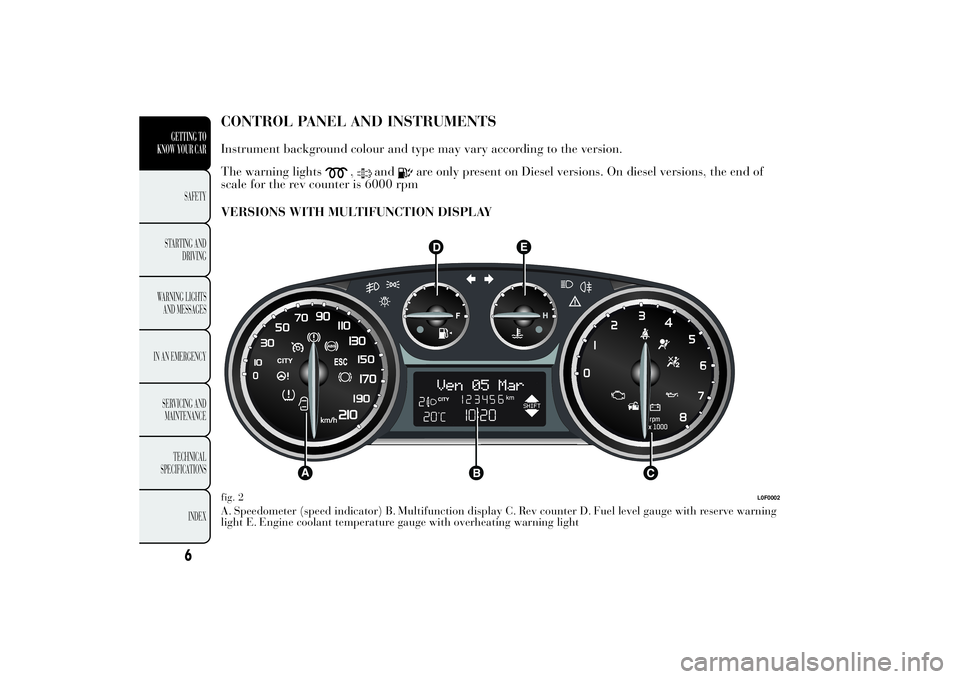
INSTRUMENTSInstrument background colour and type may vary according to the version.
The warning lights
,
and
are only present on Diesel versions. On diesel versions, the end of
scale for the rev counter is 6000 rpm
VERSIONS WITH MULTIFUNCTION DISPLAY
A. Speedometer (speed indicator) B. Multifunction display C. Rev counter D. Fuel level gauge with reserve warning
light E. Engine coolant temperature gauge with overheating warning lightfig. 2
L0F0002
6
GETTING TO
KNOW YOUR CAR
SAFETY
STARTING
AND
DRIVING
WARNING LIGHTS
AND MESSAGES
IN AN EMERGENCY
SERVICING AND
MAINTENANCE
TECHNICAL
SPECIFICATIONS
INDEX
Page 9 of 299
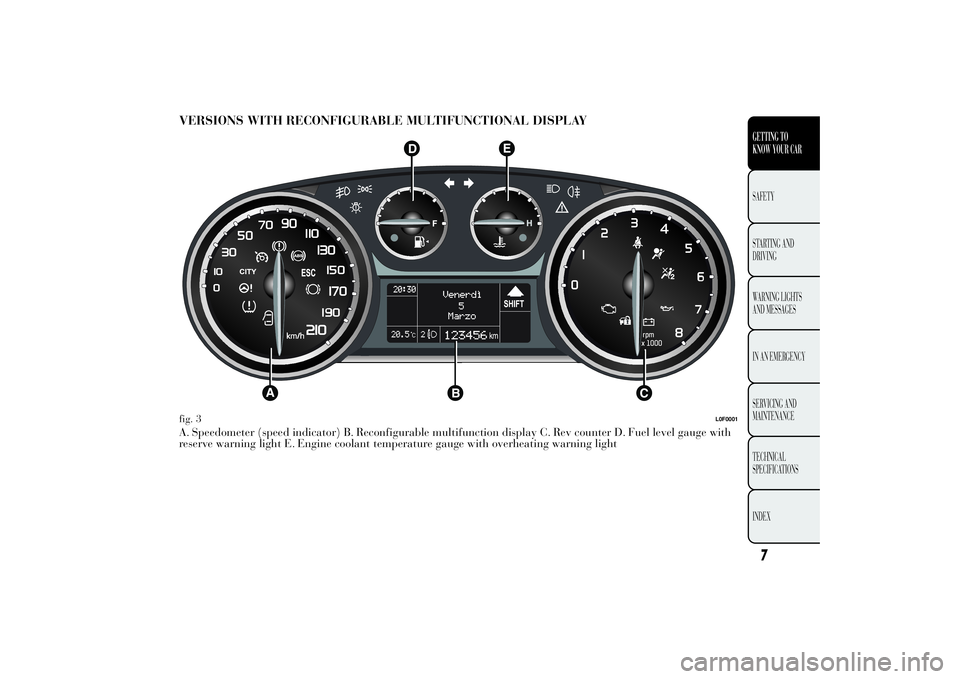
VERSIONS WITH RECONFIGURABLE MULTIFUNCTIONAL DISPLAYA. Speedometer (speed indicator) B. Reconfigurable multifunction display C. Rev counter D. Fuel level gauge with
reserve warning light E. Engine coolant temperature gauge with overheating warning lightfig. 3
L0F0001
7GETTING TO
KNOW YOUR CARSAFETY
STARTING
AND
DRIVING
WARNING LIGHTS
AND MESSAGES
IN AN EMERGENCY
SERVICING AND
MAINTENANCE
TECHNICAL
SPECIFICATIONS
INDEX
Page 10 of 299
SPEEDOMETER (SPEED INDICATOR)
Shows the car speed (speedometer).
REV COUNTER
This indicates the engine rpm.
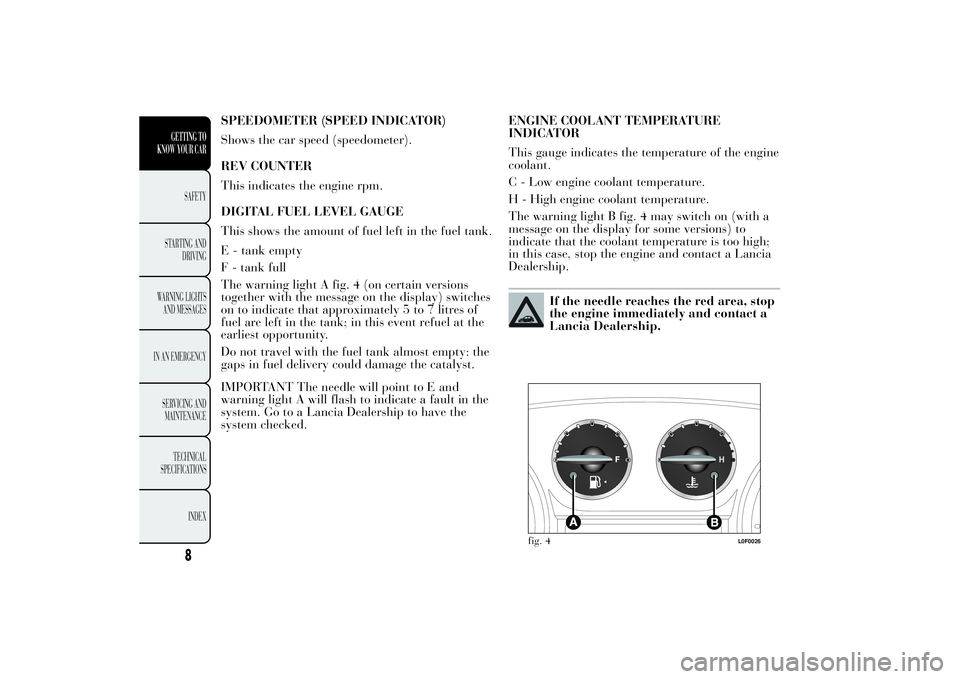
DIGITAL FUEL LEVEL GAUGE
This shows the amount of fuel left in the fuel tank.
E - tank empty
F - tank full
The warning light A fig. 4 (on certain versions
together with the message on the display) switches
on to indicate that approximately 5 to 7 litres of
fuel are left in the tank; in this event refuel at the
earliest opportunity.
Do not travel with the fuel tank almost empty: the
gaps in fuel delivery could damage the catalyst.
IMPORTANT The needle will point to E and
warning light A will flash to indicate a fault in the
system. Go to a Lancia Dealership to have the
system checked.ENGINE COOLANT TEMPERATURE
INDICATOR
This gauge indicates the temperature of the engine
coolant.
C - Low engine coolant temperature.
H - High engine coolant temperature.
The warning light B fig. 4 may switch on (with a
message on the display for some versions) to
indicate that the coolant temperature is too high;
in this case, stop the engine and contact a Lancia
Dealership.
If the needle reaches the red area, stop
the engine immediately and contact a
Lancia Dealership.
fig. 4
L0F0026
8
GETTING TO
KNOW YOUR CAR
SAFETY
STARTING
AND
DRIVING
WARNING LIGHTS
AND MESSAGES
IN AN EMERGENCY
SERVICING AND
MAINTENANCE
TECHNICAL
SPECIFICATIONS
INDEX
Page 12 of 299

RECONFIGURABLE MULTIFUNCTION
DISPLAY "STANDARD" SCREEN
The following information is shown on the display
fig. 6 :ATimeBDate or trip distance display in kilometres (or
miles)CGear Shift Indicator (for versions/markets,
where provided)D
Start&Stop function indication (for versions/
markets, where provided)
EMilometer (display of distance travelled in
kilometres/miles)FHeadlamp alignment position (only with dipped
headlights on)G
Outside temperature
H
Car status indications (e.g. doors open, possible
ice on road, etc.)On some versions the display shows the turbine
pressure.
GEAR SHIFT INDICATOR
The GSI (Gear Shift Indicator) system advises the
driver to change gear through a specific indication
on the control panel fig. 7. Through the GSI, the
driver is notified that changing gear will allow
a reduction in fuel consumption.
When the SHIFT UP icon (
SHIFT) is shown on
the display, the GSI is advising the driver to
engage a higher gear, while the SHIFT DOWN (
SHIFT) icon advises the driver to engage a
lower gear.
The indication in the instrument panel remains on
until the driver changes gear or the driving
conditions return to a situation where changing
gear is not required to improve consumption.
fig. 6
L0F1007
fig. 7
L0F1010
10GETTING TO
KNOW YOUR CAR
SAFETY
STARTING
AND
DRIVING
WARNING LIGHTS
AND MESSAGES
IN AN EMERGENCY
SERVICING AND
MAINTENANCE
TECHNICAL
SPECIFICATIONS
INDEX
Page 19 of 299
If the set distance unit is "km", the fuel
consumption unit will be displayed in km/l or
l/100 km. If the distance unit of measurement
stored is "mi," the display shows the amount of
fuel consumed in "mpg".
❒press
or
to make your choice;
❒when you select “Temperature”, pressing the
button
briefly makes "°C" or "°F" appear
on the display depending on the previous
setting;
❒pressor
to make your choice;
Once the required settings are made, briefly press
button
to go back to the submenu screen or
hold the button down to return to the main menu
screen without storing.
Hold down the
button again to return to the
standard screen or to the main menu according to
where you are in the menu.
Language (Language selection)
Display messages can be shown in the following
languages: Italian, English, German, Portuguese,
Spanish, French, Dutch, Polish. Turkish and
Brazilian.
To set the desired language, proceed as follows:
❒briefly press the button
: the previously set
language starts flashing on the display;❒press
or
to make your choice;
❒press the
button briefly to return to the menu
screen or give the button a long press to return
to the standard screen without storing.
Warnings volume (Adjusting the alert/warning
acoustic signal volume)
With this function the volume of the buzzer which
accompanies the display of any failure/warning
can be adjusted according to 8 levels.
To set the desired volume, proceed as follows:
❒press thebutton briefly, making the display
flash the previously set volume level;
❒pressor
to make your choice;
❒press the
button briefly to return to the menu
screen or give the button a long press to return
to the standard screen without storing.
Button volume (Adjusting the button volume)
With this function it is possible to adjust (to eight
levels) the volume of the acoustic signal emitted
when thebutton is held down to exit a submenu
and return to the standard menu
To set the desired volume, proceed as follows:
❒press thebutton briefly, making the display
flash the previously set volume level;
17GETTING TO
KNOW YOUR CARSAFETY
STARTING
AND
DRIVING
WARNING LIGHTS
AND MESSAGES
IN AN EMERGENCY
SERVICING AND
MAINTENANCE
TECHNICAL
SPECIFICATIONS
INDEX
Page 22 of 299
Note“Trip B” may be disabled (see “Activating
Trip B”). “Range” and “Instantaneous fuel
consumption" parameters cannot be reset.
Values displayed
Range
This indicates the approximate distance which can
be travelled with the present amount of fuel in
the tank. The message “----” will appear on the
display in the following cases:
❒range value lower than 50 km (or 30 mi)
❒car parked with engine running for a long
period.
IMPORTANT The range value variation can be
affected by several factors: driving style, type
of route (motorway, towns and cities, mountain
roads, etc.), conditions of use (load, tyre pressures,
etc.). Trip planning must therefore take the above
into account.
Distance travelled
Shows the distance covered since the start of the
new journey.
Average consumption
Shows the approximate average fuel consumption
since the start of the new journey.Instantaneous consumption
This indicates the fuel consumption. The value is
constantly updated.. The display will show "----"
if the car is parked with the engine running.
Average speed
This shows the car average speed as a function of
the overall time elapsed since the start of the
new mission.
Trip time
Shows the time elapsed since the start of a new
journey.
Indications on display
Each time a value is displayed, the following
information is shown fig. 9:
❒A - animated icon in the upper part;
❒B - name, value and unit of measure of the
selected parameter (e.g. "Range 150 km");
❒C - the word "Trip" (or "Trip A" or "Trip B").
After a few seconds the name and value of the
selected parameter are replaced by an icon fig. 10.
The icons relating to the various parameters are
the following:
❒
"Range";
❒
"Average consumption A” (if Trip A is
active, or “B” if Trip B is active);
❒
"Distance" (if Trip A is active, or
“B” if Trip B is active);
20GETTING TO
KNOW YOUR CAR
SAFETY
STARTING
AND
DRIVING
WARNING LIGHTS
AND MESSAGES
IN AN EMERGENCY
SERVICING AND
MAINTENANCE
TECHNICAL
SPECIFICATIONS
INDEX
Page 26 of 299

THE KEYSCODE CARD
(for versions/markets, where provided)
The CODE cardfig. 12 which comes with the keys,
bears:
A: an electronic code;
B: the mechanical code for the keys which is to be
given to the Lancia Dealership should duplicate
keys be requested.
Keep the codes in a safe place, not in the car.
IMPORTANT All the keys and the CODE card
must be handed over to the new owner when
selling the car.KEY WITHOUT REMOTE CONTROL
The metal insert A fig. 13 enables:
❒the ignition switch;
❒the door locks;
❒the fuel cap lock/release (for versions/markets,
where provided).
KEY WITH REMOTE CONTROL
(for versions/markets, where provided)
The metal insert A fig. 14 enables:
❒the ignition switch;
❒the door locks;
❒the fuel cap lock/release (for versions/markets,
where provided).
Press button B to open/close the metal insert.
fig. 12
L0F0009
fig. 13
L0F0077
24GETTING TO
KNOW YOUR CAR
SAFETY
STARTING
AND
DRIVING
WARNING LIGHTS
AND MESSAGES
IN AN EMERGENCY
SERVICING AND
MAINTENANCE
TECHNICAL
SPECIFICATIONS
INDEX
Page 27 of 299

Unlocking the doors and the tailgate
Briefly press button
: for unlocking of doors and
luggage compartment, timed switching-on of
internal roof lights and double flashing of
direction indicators (for versions/markets, where
provided).
Door lock is automatically released if the fuel
cut-off system trips.
Once the doors are locked, if one or more doors or
the boot are not closed correctly, the LED and
direction indicators start flashing quickly.
Locking the doors and the tailgate
Briefly press button: for locking of doors and
luggage compartment, with switching-off of roof
light and single flashing of direction indicators
(for versions/markets, where provided).If one or more doors are open, the doors will not
be locked. This is indicated by a rapid flashing of
the direction indicators (for versions/markets,
where provided). The doors are locked if the
luggage compartment is open
When a speed of over 20 km/h is reached, the
doors are automatically locked if this specific
function has been set (only on versions with
multi-function reconfigurable display).
When the doors are locked from outside the car
(using the remote control), A LED above the
button will switch on for a few seconds and
then start flashing (deterrent function).
When the doors are locked from inside the car (by
pressing the
button) the LED will remain on
constantly.
Opening the luggage compartment
Press thebutton to open the luggage
compartment using the remote control.
The direction indicators will flash twice to indicate
that the luggage compartment has been opened.
The electronic components inside the
key may be damaged if the key is
subjected to strong shocks. In order to
ensure complete efficiency of the electronic
devices inside the key, it should never be
exposed to direct sunlight.
fig. 14
L0F0075
25GETTING TO
KNOW YOUR CARSAFETY
STARTING
AND
DRIVING
WARNING LIGHTS
AND MESSAGES
IN AN EMERGENCY
SERVICING AND
MAINTENANCE
TECHNICAL
SPECIFICATIONS
INDEX
Page 62 of 299

CENTRAL LOCKING
Press button
fig. 45 to lock all the doors
simultaneously (the LED on the button will light
up when the doors are locked). Locking takes
place irrespective of the position of the ignition
key.
DUALDRIVE ELECTRIC POWER STEERING
(for versions/markets, where provided)
Press the CITY button fig. 46 to activate the
function (see paragraph "Dualdrive electric power
steering" in this chapter). When this function is
active, the word CITY on the instrument panel
will light up. To deactivate the function press the
button again.ECO FUNCTION
(for versions/markets, where provided)
Press the ECO button fig. 47 for at least 5 seconds
to activate the function.
When the ECO function is activated, the car is set
for city driving, characterised by less effort on
the steering wheel (Dualdrive system on) and
reduced fuel consumption. When this function is
activated, the word ECO on the display will light
up on some versions.
This function stays in the memory and, when the
vehicle is started again, the system keeps the
setting it had before the engine was stopped. Press
the ECO button again to deactivate the function
and restore the normal driving setting.
fig. 45
L0F0081
fig. 46
L0F0043
60GETTING TO
KNOW YOUR CAR
SAFETY
STARTING
AND
DRIVING
WARNING LIGHTS
AND MESSAGES
IN AN EMERGENCY
SERVICING AND
MAINTENANCE
TECHNICAL
SPECIFICATIONS
INDEX