lights Lexus CT200h 2011 (in English) Owner's Guide
[x] Cancel search | Manufacturer: LEXUS, Model Year: 2011, Model line: CT200h, Model: Lexus CT200h 2011Pages: 696
Page 247 of 696
247
2-3. Operating the lights and windshield wipers
2
When driving
CT200h_EE (OM76041E)
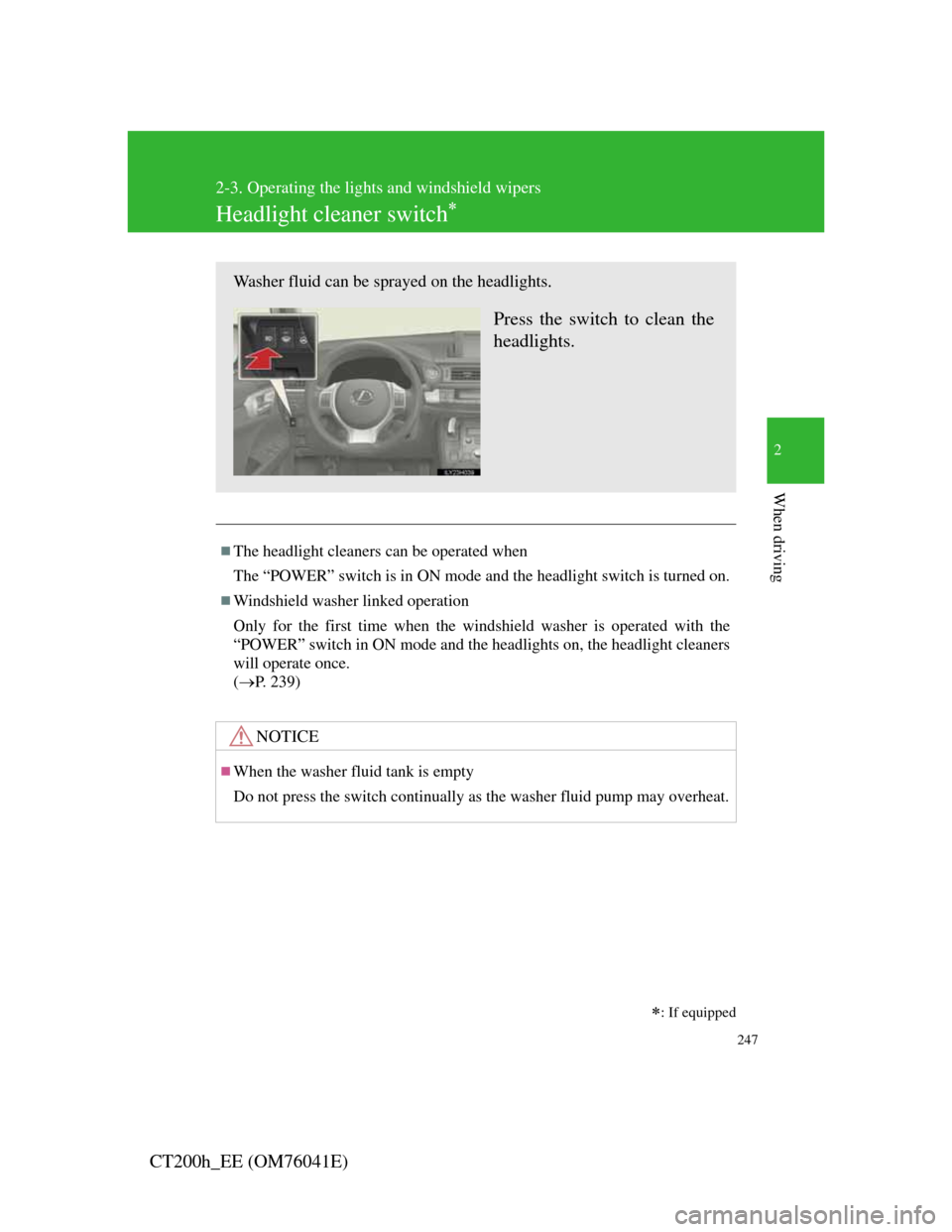
Headlight cleaner switch
: If equipped
The headlight cleaners can be operated when
The “POWER” switch is in ON mode and the headlight switch is turned on.
Windshield washer linked operation
Only for the first time when the windshield washer is operated with the
“POWER” switch in ON mode and the headlights on, the headlight cleaners
will operate once.
(P. 239)
NOTICE
When the washer fluid tank is empty
Do not press the switch continually as the washer fluid pump may overheat.
Washer fluid can be sprayed on the headlights.
Press the switch to clean the
headlights.
Page 281 of 696

281
2-4. Using other driving systems
2
When driving
CT200h_EE (OM76041E)
Rear view monitor system camera
The camera uses a special lens. The
distance of the image that appears on
the screen differs from the actual dis-
tance.
In the following cases, it may be diffi-
cult to see the images on the screen,
even when the system is functioning
correctly.
• In the dark (e.g. at night).
• If the temperature near the lens is
extremely high or low.
• If water droplets get on the camera,
or when humidity is high (e.g. when
it rains).
• If foreign matter (e.g. snow or mud)
get on the camera lens.
• If the sun or headlights are shining
directly into the camera lens.
• When the camera has scratches or
dirt on it.
• A bright object such as a white wall
is reflected in the mirror surface
over the monitor.
• When the camera is used under flu-
orescent light, sodium lights, or
li h h li h d
Page 282 of 696

282
2-4. Using other driving systems
CT200h_EE (OM76041E)
Smear effect
Flicker effect
When the camera is used under fluorescent lights, sodium lights, mercury
lights, etc., the lights and the illuminated areas may appear to flicker.
If a bright light (e.g. sunlight reflected off
the vehicle body) is picked up by the
camera, a smear effect
* peculiar to the
camera may occur.
*: Smear effect — A phenomenon that
occurs when a bright light (for exam-
ple, sunlight reflected off the vehicle
body) is picked up by the camera;
when transmitted by the camera, the
light source appears to have a vertical
streak above and below it.
Page 286 of 696
286
2-4. Using other driving systems
CT200h_EE (OM76041E)
VSC + (Vehicle Stability Control +)
Provides cooperative control of the ABS, TRC, VSC and EPS.
Helps to maintain directional stability when swerving on slippery
road surfaces by controlling steering performance.
Hill-start assist control
P. 290
PCS (Pre-Crash Safety System) (if equipped)
P. 292
Emergency brake signal
When the brakes are applied suddenly, the stop lights automatically
flash to alert the vehicle behind.
Page 290 of 696

290
2-4. Using other driving systems
CT200h_EE (OM76041E)
Hill-start assist control
Hill-start assist control can be operated when
The shift position is in a position other than P.
The parking brake is not applied.
The accelerator pedal is not depressed.
Hill-start assist control
While hill-start assist control is operating, the brakes remain automati-
cally applied after the driver releases the brake pedal. The stop lights and
the high mounted stoplight turn on.
Hill-start assist control operates for about 2 seconds after the brake pedal
is released.
If the slip indicator does not flash and the buzzer does not sound when
the brake pedal is further depressed, slightly reduce the pressure on the
brake pedal (do not allow the vehicle to roll backward) and then firmly
depress it again. If the system still does not operate, check if the operat-
ing conditions explained above have been met.
Hill-start assist control helps to prevent the vehicle from rolling back-
wards when starting on an incline or slippery slope.
To engage hill-start assist
control, further depress the
brake pedal when the vehicle
is stopped completely.
A buzzer will sound once to
indicate the system is acti-
vated. The slip indicator will
also start flashing.
Page 295 of 696

295
2-4. Using other driving systems
2
When driving
CT200h_EE (OM76041E)
Conditions that may trigger the system even if there is no possibility of a
collision
When there is an object by the roadside at the entrance to a curve
When passing an oncoming vehicle on a curve
When driving over a narrow iron bridge
When there is a metal object on the road surface
When driving on an uneven road surface (nose up, nose down)
When passing an oncoming vehicle on a left-turn (left-hand drive vehi-
cles) or right-turn (right-hand drive vehicles)
When your vehicle rapidly closes on the vehicle in front
When a grade separation/interchange, sign, billboard, or other structure
appears to be directly in the vehicle’s line of travel
When the steep angle of the road causes a metal object located beneath
the road surface to be seen ahead of the vehicle
When an extreme change in vehicle height occurs
When the axis of the radar is out of adjustment
When passing through certain toll gates
When passing through an overpass
When the system is activated in the situations described above, there is also
a possibility that the seat belts will retract quickly and the brakes will be
applied with a force greater than normal. When the seat belt is locked in the
retracted position, stop the vehicle in a safe place, release the seat belt and
refasten it.
Obstacles not detected
The sensor cannot detect plastic obstacles such as traffic cones. There may
also be occasions when the sensor cannot detect pedestrians, animals, bicy-
cles, motorcycles, trees, or snowdrifts.
When there is a malfunction in the system
Warning lights and/or warning messages will turn on or flash. (P. 558,
565)
Page 311 of 696
3Interior features
311
CT200h_EE (OM76041E)
3-3. Using the Bluetooth® audio
system
Bluetooth
® audio system . 381
Using the Bluetooth®
audio system .................. 387
Operating a Bluetooth
®
enabled portable player .. 392
Setting up a Bluetooth
®
enabled portable player .. 396
Bluetooth
® audio system
setup ............................... 401
3-4. Using the hands-free phone
system (for cellular phones)
Hands-free system for
cellular phone................. 402
Using the hands-free system
(for cellular phone) ........ 411
Making a phone call ......... 417
Setting a cellular phone.... 422
Security and system setup 426
Using the phone book ...... 4313-5. Using the interior lights
Interior lights list ............. 438
• Personal/interior light
main switch.................... 439
• Front personal/interior
lights .............................. 439
• Rear interior light .......... 440
3-6. Using the storage features
List of storage features .... 441
• Glove box ...................... 442
• Console box ................... 443
• Cup holders.................... 444
• Bottle holders................. 445
• Auxiliary boxes ............. 446
3-7. Other interior features
Sun visors ........................ 448
Vanity mirrors .................. 449
Clock................................ 450
Power outlet ..................... 451
Heated steering wheel...... 453
Seat heaters ...................... 455
Floor mat.......................... 457
Luggage compartment
features .......................... 459
Page 438 of 696
438
CT200h_EE (OM76041E)
3-5. Using the interior lights
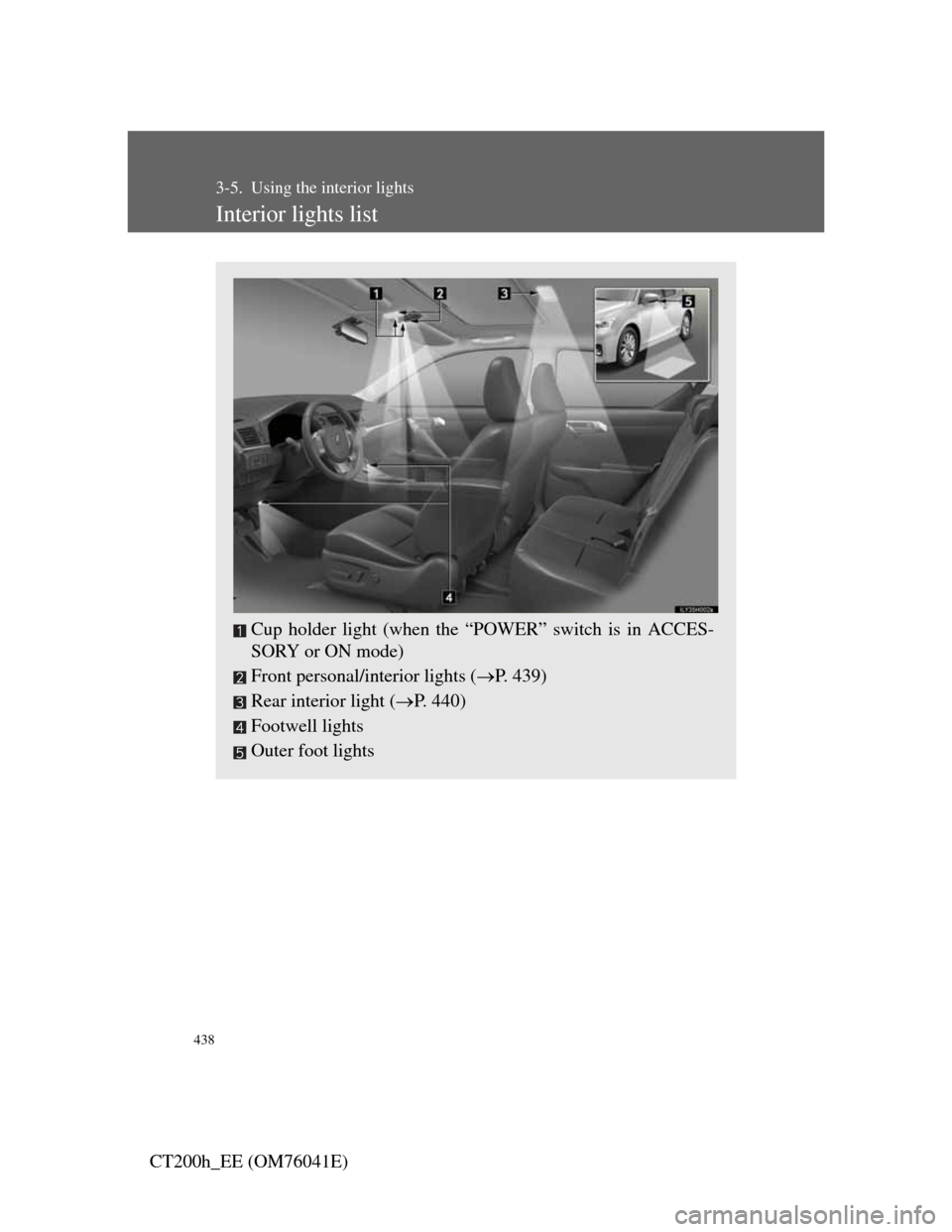
Interior lights list
Cup holder light (when the “POWER” switch is in ACCES-
SORY or ON mode)
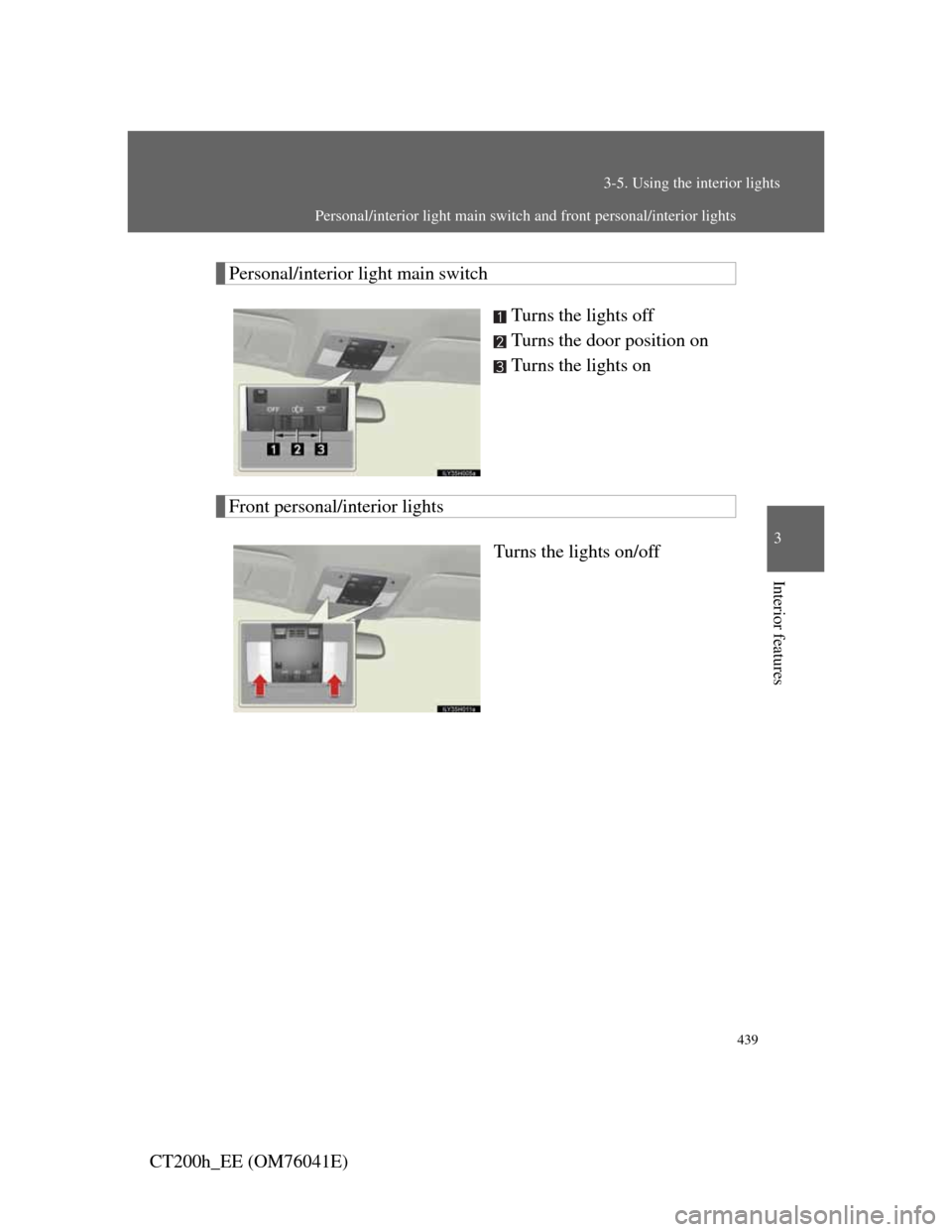
Front personal/interior lights (P. 439)
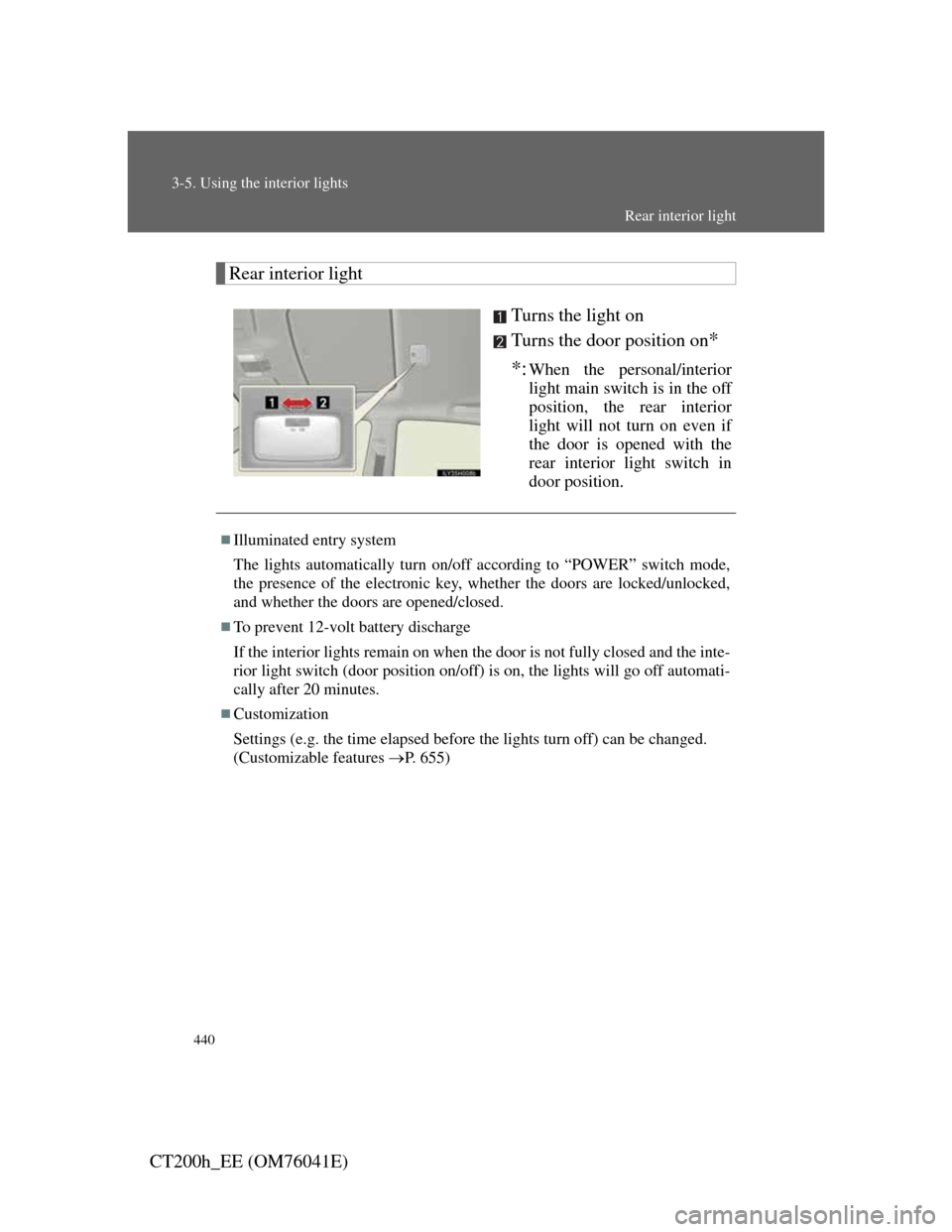
Rear interior light (P. 440)
Footwell lights
Outer foot lights
Page 439 of 696
439
3-5. Using the interior lights
3
Interior features
CT200h_EE (OM76041E)
Personal/interior light main switch
Turns the lights off
Turns the door position on
Turns the lights on
Front personal/interior lights
Turns the lights on/off
Personal/interior light main switch and front personal/interior lights
Page 440 of 696
440
3-5. Using the interior lights
CT200h_EE (OM76041E)
Rear interior light
Turns the light on
Turns the door position on
*
*:
When the personal/interior
light main switch is in the off
position, the rear interior
light will not turn on even if
the door is opened with the
rear interior light switch in
door position.
Illuminated entry system
The lights automatically turn on/off according to “POWER” switch mode,
the presence of the electronic key, whether the doors are locked/unlocked,
and whether the doors are opened/closed.
To prevent 12-volt battery discharge
If the interior lights remain on when the door is not fully closed and the inte-
rior light switch (door position on/off) is on, the lights will go off automati-
cally after 20 minutes.
Customization
Settings (e.g. the time elapsed before the lights turn off) can be changed.
(Customizable features P. 655)
Rear interior light