air condition Lexus CT200h 2012 Owner's Manual (in English)
[x] Cancel search | Manufacturer: LEXUS, Model Year: 2012, Model line: CT200h, Model: Lexus CT200h 2012Pages: 710
Page 1 of 710

TABLE OF CONTENTS
1
CT200h_OM_OM76067E_(EE)
1Before driving
Information on the hybrid system and adjusting and op-
erating features such as door locks, mirrors, and steer-
ing column
2When drivingDriving, stopping and safe-driving information
3Interior featuresAir conditioning and audio systems, as well as other in-
terior features for a comfortable driving experience
4Maintenance and
careCleaning and protecting your vehicle, performing do-it-
yourself maintenance, and maintenance information
5When trouble
arisesWhat to do if the vehicle needs to be towed, gets a flat
tire, or is involved in an accident
6Vehicle specifica-
tionsDetailed vehicle information
IndexAlphabetical listing of information contained in this
manual
Page 2 of 710
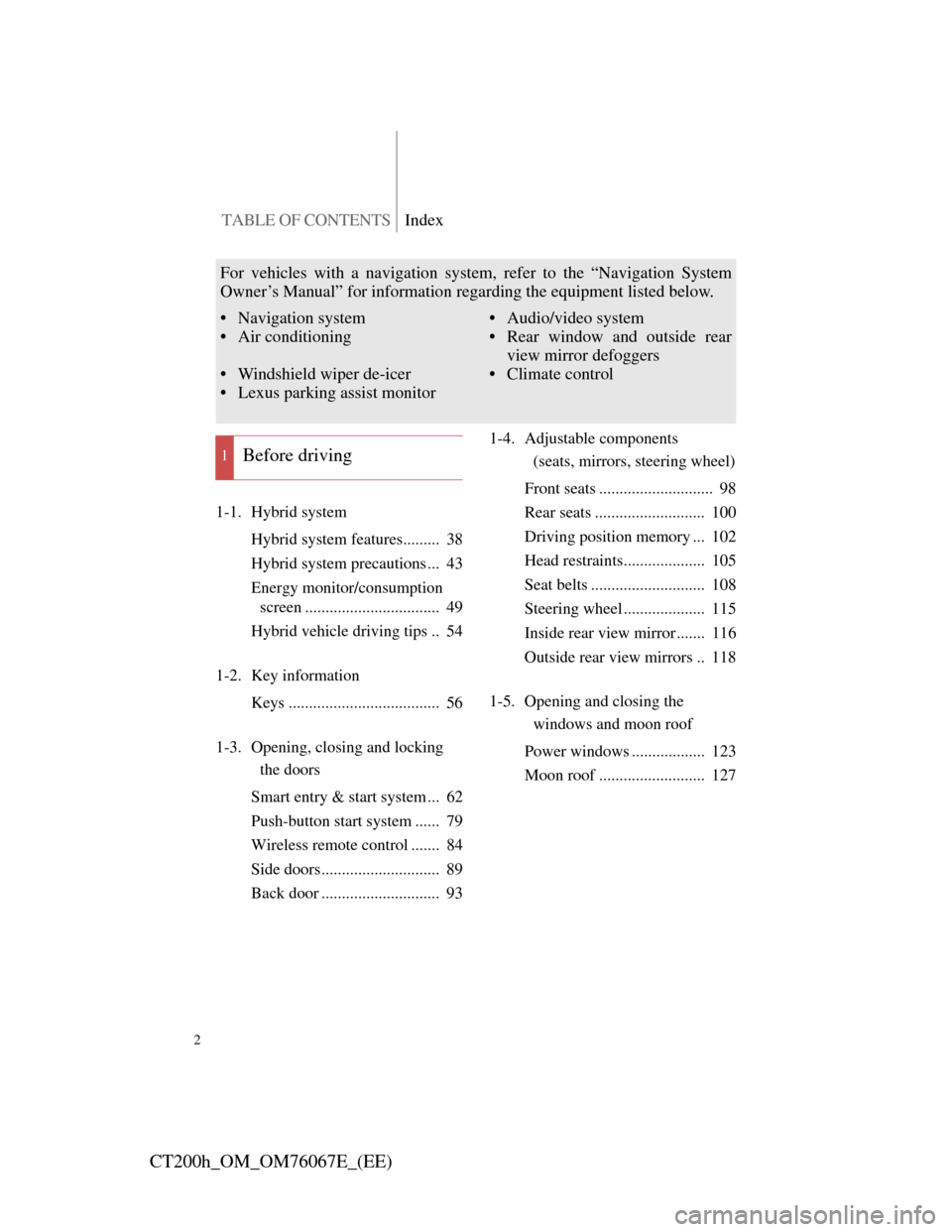
TABLE OF CONTENTSIndex
2
CT200h_OM_OM76067E_(EE)
1-1. Hybrid system
Hybrid system features......... 38
Hybrid system precautions ... 43
Energy monitor/consumption
screen ................................. 49
Hybrid vehicle driving tips .. 54
1-2. Key information
Keys ..................................... 56
1-3. Opening, closing and locking
the doors
Smart entry & start system ... 62
Push-button start system ...... 79
Wireless remote control ....... 84
Side doors............................. 89
Back door ............................. 931-4. Adjustable components
(seats, mirrors, steering wheel)
Front seats ............................ 98
Rear seats ........................... 100
Driving position memory ... 102
Head restraints.................... 105
Seat belts ............................ 108
Steering wheel .................... 115
Inside rear view mirror ....... 116
Outside rear view mirrors .. 118
1-5. Opening and closing the
windows and moon roof
Power windows .................. 123
Moon roof .......................... 127
1Before driving
For vehicles with a navigation system, refer to the “Navigation System
Owner’s Manual” for information regarding the equipment listed below.
• Navigation system
• Air conditioning
• Windshield wiper de-icer
• Lexus parking assist monitor• Audio/video system
• Rear window and outside rear
view mirror defoggers
• Climate control
Page 4 of 710

TABLE OF CONTENTSIndex
4
CT200h_OM_OM76067E_(EE)
3-1. Using the air conditioning sys-
tem
and defogger
Automatic air conditioning
system .............................. 318
Rear window and outside
rear view mirror defogger
switch ............................... 329
Windshield wiper de-icer ... 330
3-2. Using the audio system
Audio system types ............ 331
Using the radio ................... 335
Using the CD player........... 341
Playing MP3 and WMA
discs ................................. 350
Operating an iPod............... 359
Operating a USB memory .. 370
Optimal use of the audio
system .............................. 379
Using the AUX port ........... 382
Using the steering wheel
audio switches .................. 3843-3. Using the Bluetooth
® audio
system
Bluetooth
® audio system ... 388
Using the Bluetooth
® audio
system .............................. 394
Operating a Bluetooth
®
enabled portable player .... 399
Setting up a Bluetooth
®
enabled portable player .... 403
Bluetooth
® audio system
setup ................................. 408
3-4. Using the hands-free phone
system (for cellular phones)
Hands-free system for
cellular phone ................... 409
Using the hands-free system
(for cellular phone) .......... 418
Making a phone call ........... 424
Setting a cellular phone ...... 429
Security and system setup .. 433
Using the phone book ........ 438
3Interior features
Page 5 of 710

1
2
3
4
5
6
5
CT200h_OM_OM76067E_(EE)
3-5. Using the interior lights
Interior lights list ................ 445
• Personal/interior light
main switch ...................... 446
• Front personal/interior
lights................................. 446
• Rear interior light ............. 447
3-6. Using the storage features
List of storage features ....... 448
• Glove box ......................... 449
• Console box ..................... 450
• Cup holders ...................... 451
• Bottle holders ................... 452
• Auxiliary boxes ................ 453
3-7. Other interior features
Sun visors ........................... 457
Vanity mirrors .................... 458
Clock .................................. 459
Power outlet ....................... 460
Heated steering wheel ........ 463
Seat heaters ........................ 465
Floor mat ............................ 467
Luggage compartment
features ............................. 4694-1. Maintenance and care
Cleaning and protecting
the vehicle exterior........... 476
Cleaning and protecting
the vehicle interior ........... 482
4-2. Maintenance
Maintenance
requirements..................... 485
4-3. Do-it-yourself maintenance
Do-it-yourself service
precautions ....................... 488
Hood ................................... 492
Positioning a floor jack ...... 494
Engine compartment .......... 496
12-volt battery .................... 508
Tires ................................... 515
Tire inflation pressure ........ 519
Wheels................................ 521
Air conditioning filter ........ 523
Electronic key battery ........ 527
Checking and replacing
fuses ................................. 532
Light bulbs ......................... 546
4Maintenance and care
Page 14 of 710
14
CT200h_OM_OM76067E_(EE)
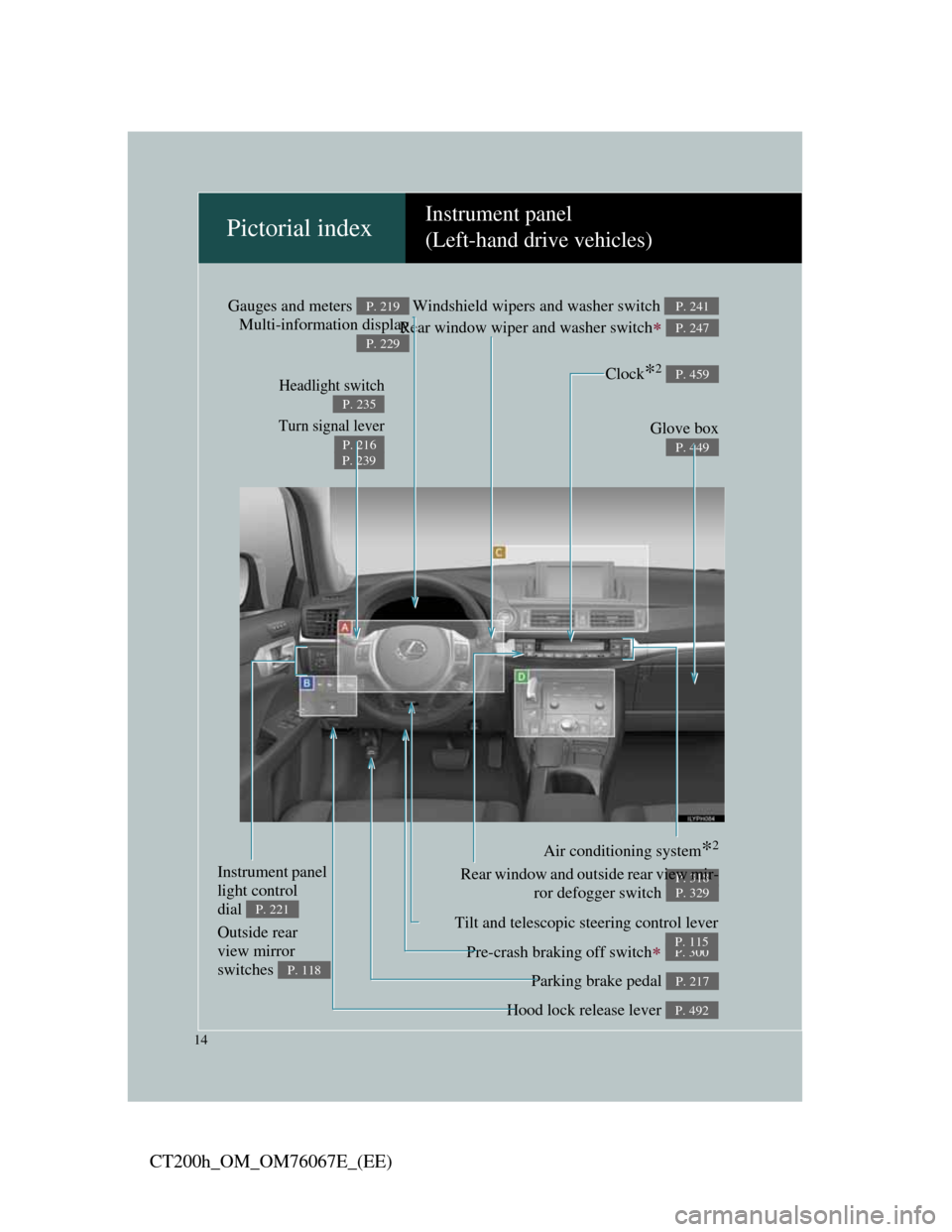
Pictorial indexInstrument panel
(Left-hand drive vehicles)
Headlight switch
Turn signal lever
P. 235
P. 216
P. 239
Pre-crash braking off switch P. 300
Parking brake pedal P. 217
Hood lock release lever P. 492
Tilt and telescopic steering control lever
P. 115
Glove box
P. 449
Windshield wipers and washer switch
Rear window wiper and washer switch
P. 241
P. 247
Gauges and meters
Multi-information displayP. 219
P. 229
Air conditioning system*2
P. 318Rear window and outside rear view mir-
ror defogger switch
P. 329
Instrument panel
light control
dial
P. 221
Outside rear
view mirror
switches
P. 118
Clock*2 P. 459
Page 24 of 710
24
CT200h_OM_OM76067E_(EE)
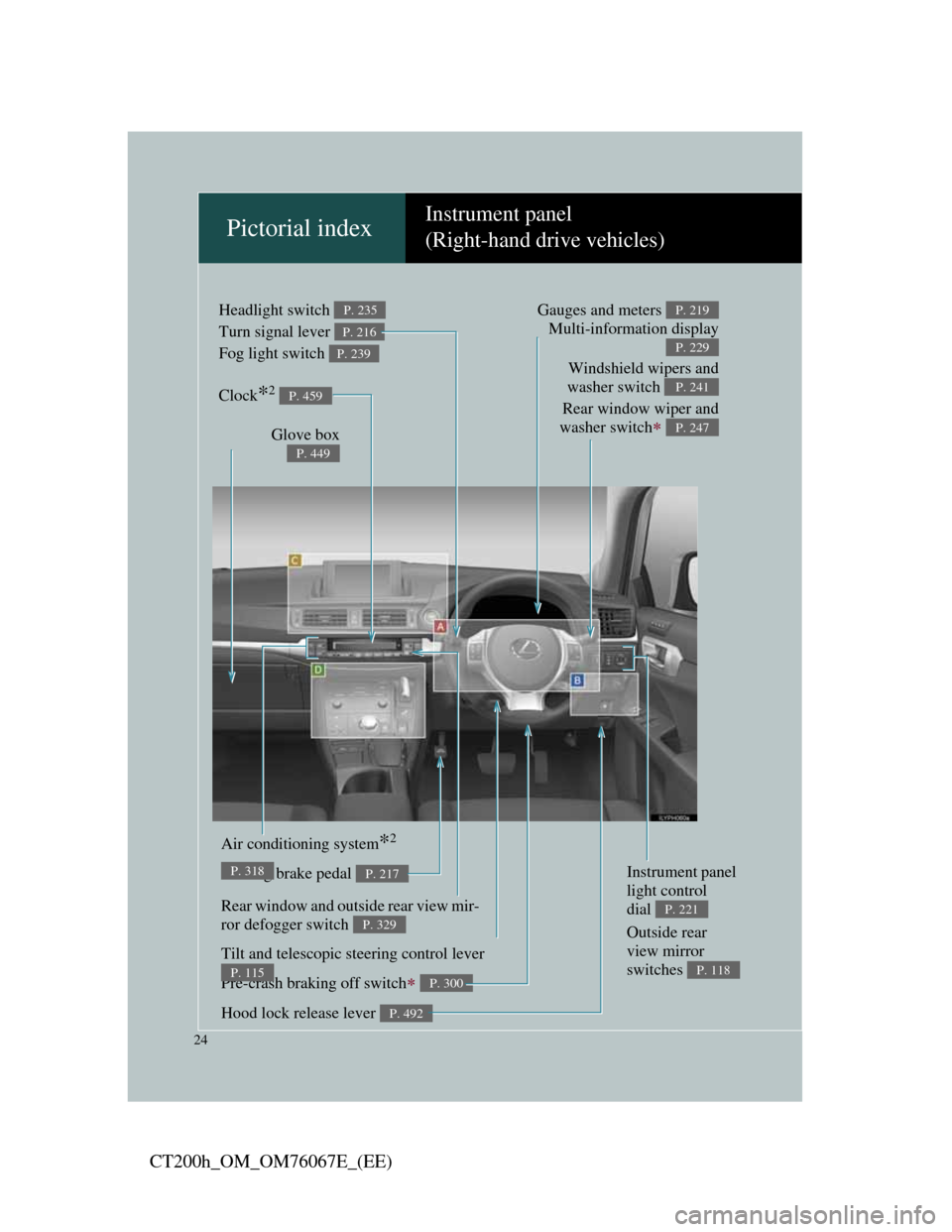
Pictorial indexInstrument panel
(Right-hand drive vehicles)
Headlight switch
Turn signal lever
Fog light switch P. 235
P. 216
P. 239
Pre-crash braking off switch P. 300
Parking brake pedal P. 217
Hood lock release lever P. 492
Tilt and telescopic steering control lever
P. 115
Air conditioning system*2
P. 318
Rear window and outside rear view mir-
ror defogger switch
P. 329
Glove box
P. 449
Windshield wipers and
washer switch
Rear window wiper and
washer switch
P. 241
P. 247
Gauges and meters
Multi-information displayP. 219
P. 229
Instrument panel
light control
dial
P. 221
Outside rear
view mirror
switches
P. 118
Clock*2 P. 459
Page 43 of 710
43
1
1-1. Hybrid system
Before driving
CT200h_OM_OM76067E_(EE)
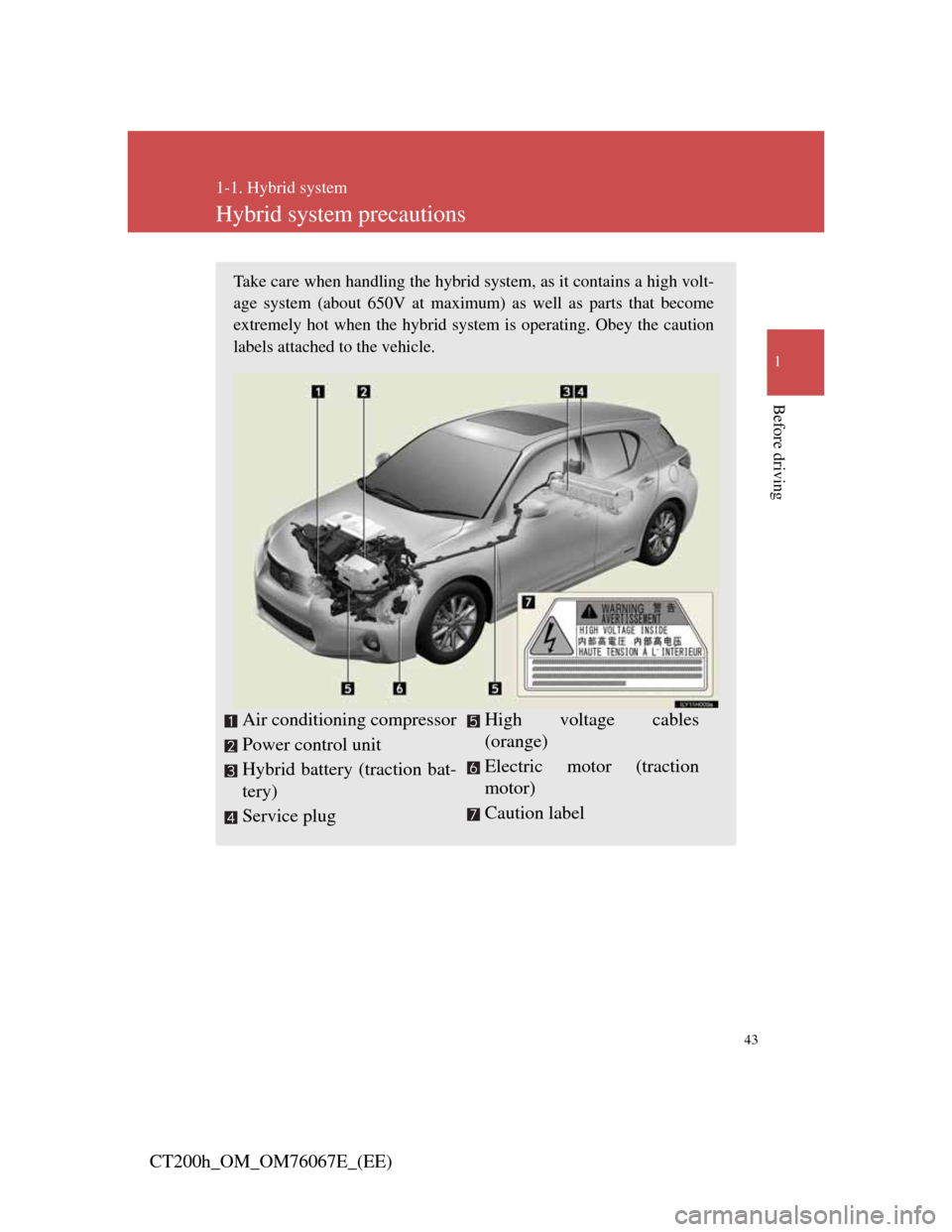
Hybrid system precautions
Take care when handling the hybrid system, as it contains a high volt-
age system (about 650V at maximum) as well as parts that become
extremely hot when the hybrid system is operating. Obey the caution
labels attached to the vehicle.
Air conditioning compressor
Power control unit
Hybrid battery (traction bat-
tery)
Service plug High voltage cables
(orange)
Electric motor (traction
motor)
Caution label
Page 54 of 710
54
1-1. Hybrid system
CT200h_OM_OM76067E_(EE)
Hybrid vehicle driving tips
For economical and ecological driving, pay attention to the following
points:
Using Eco drive mode
When using Eco drive mode, the torque corresponding to the accel-
erator pedal depression amount can be generated more smoothly
than it is in normal conditions. In addition, the operation of the air
conditioning system (heating/cooling) will be minimized, improv-
ing the fuel economy.
(P. 209)
Use of Hybrid System Indicator
The Eco-friendly driving is possible by keeping the indicate of
Hybrid System Indicator within Eco area. (P. 222)
When braking the vehicle
Make sure to operate the brakes gently and in good time. A greater
amount of electrical energy can be retained when slowing down.
Delays
Repeated acceleration and deceleration, as well as long waits at
traffic lights, will lead to bad fuel consumption. Check traffic
reports before leaving and avoid delays as much as possible. When
encountering a delay, gently release the brake pedal to allow the
vehicle to move forward slightly while avoiding overuse of the
accelerator pedal. Doing so can help control excessive gasoline
consumption.
Highway driving
Control your speed and keep at a constant speed. Also, before stop-
ping at a toll booth or similar, allow plenty of time to release the
ldllhbkA fli
Page 55 of 710
55
1-1. Hybrid system
1
Before driving
CT200h_OM_OM76067E_(EE)
Air conditioning
Use the air conditioning only when necessary. Doing so can help
control excessive gasoline consumption.
In summer: In high temperatures, use the recirculated air mode.
Doing so will help to reduce the burden on the air conditioner and
reduce fuel consumption as well.
In winter: Because the gasoline engine will not automatically cut
out until the gasoline engine and the interior of the vehicle are
warm, it will consume fuel. Also, fuel consumption can be
improved by avoiding overuse of the heater.
Checking tire inflation pressure
Make sure to check the tire inflation pressure frequently. Improper
tire inflation pressure can cause poor fuel consumption.
Also, as snow tires can cause large amounts of friction, their use on
dry roads can lead to poor fuel consumption. Use a tire that is
appropriate for the season.
Luggage
Carrying heavy luggage can lead to poor fuel consumption. Avoid
carrying unnecessary luggage. Installing a large roof rack can also
cause poor fuel consumption.
Warming up before driving
Since the gasoline engine starts up and cuts out automatically when
cold, warming up the engine is unnecessary. Moreover, frequently
driving short distances will cause the engine to repeatedly warm up,
which can lead to poor fuel consumption.
Page 86 of 710

86
1-3. Opening, closing and locking the doors
CT200h_OM_OM76067E_(EE)
Conditions affecting operation
The smart entry & start system, push-button start system, wireless remote
control and immobilizer system use weak radio waves. In the following sit-
uations, the communication between the electronic key and the vehicle may
be affected, preventing the smart entry & start system, push-button start sys-
tem, wireless remote control and immobilizer system from operating prop-
erly.
(Ways of coping: P. 630)
When the electronic key battery is depleted
Near a TV tower, electric power plant, gas station, radio station, large
display, airport or other facility that generates strong radio waves or elec-
trical noise
When carrying a portable radio, cellular phone, cordless phone or other
wireless communication devices
When the electronic key is in contact with, or is covered by the follow-
ing metallic objects
• Cards to which aluminum foil is attached
• Cigarette boxes that have aluminum foil inside
• Metallic wallets or bags
• Coins
• Hand warmers made of metal
• Media such as CDs and DVDs
When other wireless key (that emit radio waves) is being used nearby
When carrying the electronic key together with the following devices
that emit radio waves
• Another vehicle’s electronic key or a wireless key that emits radio
waves
• Personal computers or personal digital assistants (PDAs)
• Digital audio players
• Portable game systems
If window tint with a metallic content or metallic objects are attached to
the rear window