interior lights Lexus CT200h 2012 Owner's Manual (in English)
[x] Cancel search | Manufacturer: LEXUS, Model Year: 2012, Model line: CT200h, Model: Lexus CT200h 2012Pages: 710
Page 5 of 710

1
2
3
4
5
6
5
CT200h_OM_OM76067E_(EE)
3-5. Using the interior lights
Interior lights list ................ 445
• Personal/interior light
main switch ...................... 446
• Front personal/interior
lights................................. 446
• Rear interior light ............. 447
3-6. Using the storage features
List of storage features ....... 448
• Glove box ......................... 449
• Console box ..................... 450
• Cup holders ...................... 451
• Bottle holders ................... 452
• Auxiliary boxes ................ 453
3-7. Other interior features
Sun visors ........................... 457
Vanity mirrors .................... 458
Clock .................................. 459
Power outlet ....................... 460
Heated steering wheel ........ 463
Seat heaters ........................ 465
Floor mat ............................ 467
Luggage compartment
features ............................. 4694-1. Maintenance and care
Cleaning and protecting
the vehicle exterior........... 476
Cleaning and protecting
the vehicle interior ........... 482
4-2. Maintenance
Maintenance
requirements..................... 485
4-3. Do-it-yourself maintenance
Do-it-yourself service
precautions ....................... 488
Hood ................................... 492
Positioning a floor jack ...... 494
Engine compartment .......... 496
12-volt battery .................... 508
Tires ................................... 515
Tire inflation pressure ........ 519
Wheels................................ 521
Air conditioning filter ........ 523
Electronic key battery ........ 527
Checking and replacing
fuses ................................. 532
Light bulbs ......................... 546
4Maintenance and care
Page 11 of 710
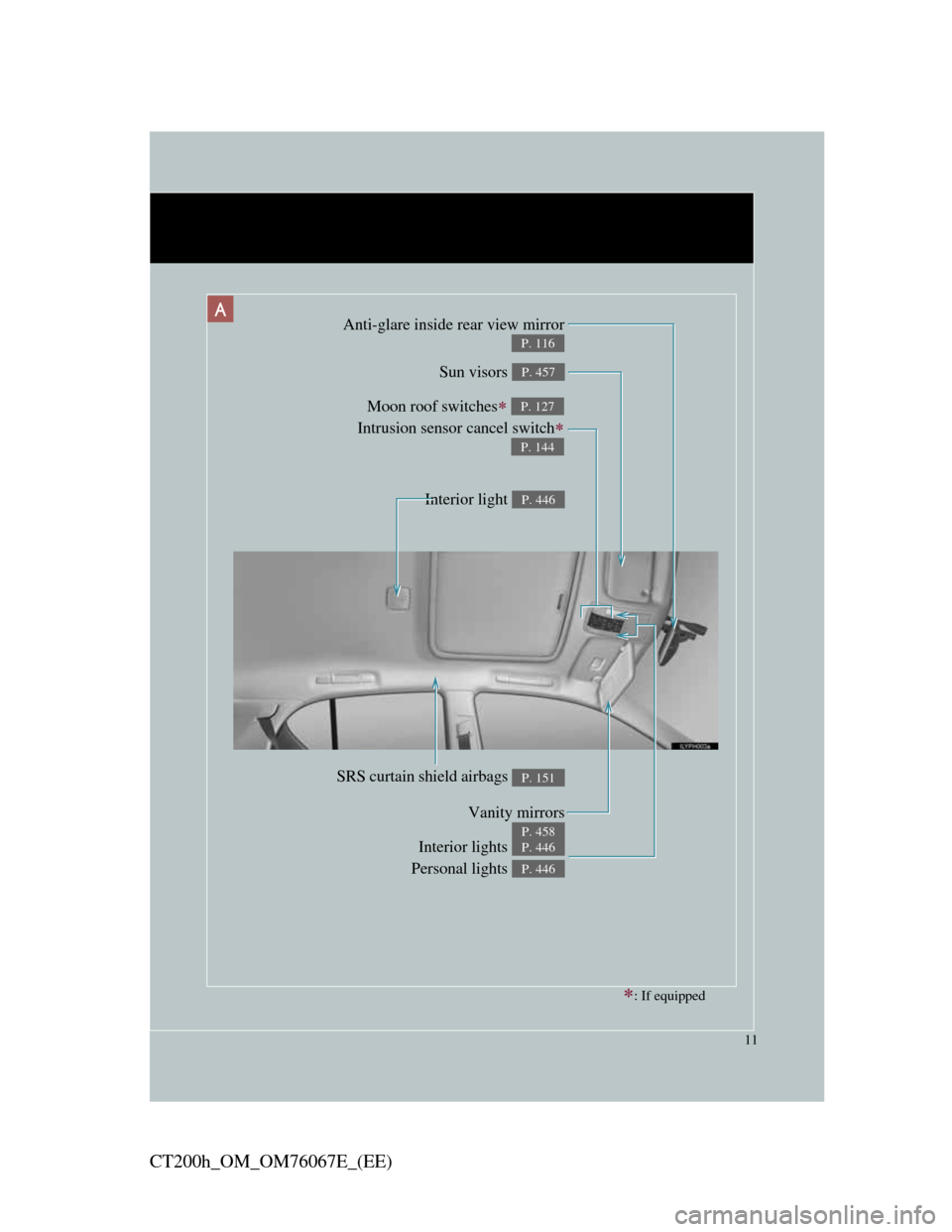
11
CT200h_OM_OM76067E_(EE)
Anti-glare inside rear view mirror
P. 116
Sun visors P. 457
SRS curtain shield airbags P. 151
Interior lights
Personal lights P. 446
P. 446
Moon roof switches
Intrusion sensor cancel switch
P. 127
P. 144
Vanity mirrors
P. 458
Interior light P. 446
A
: If equipped
Page 21 of 710
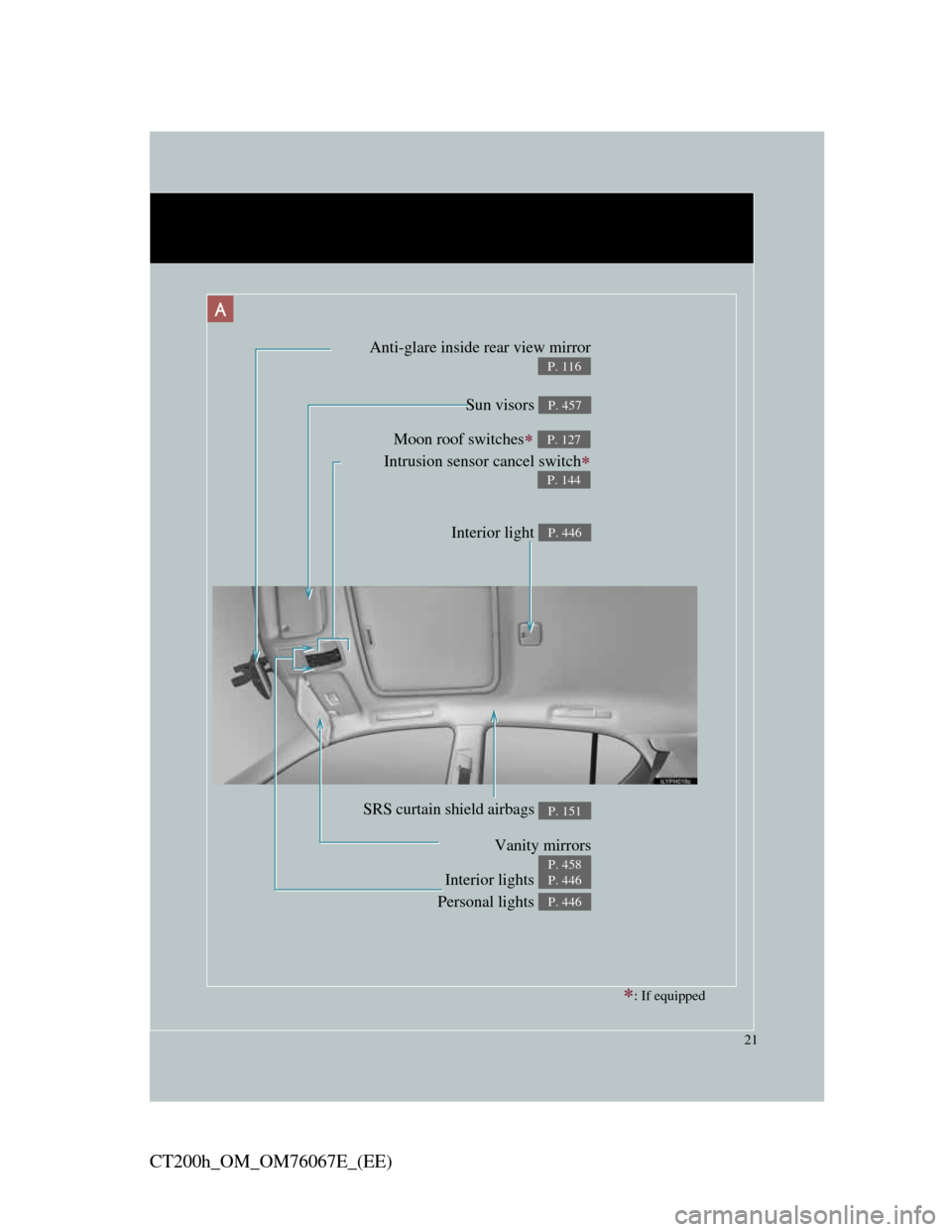
21
CT200h_OM_OM76067E_(EE)
Anti-glare inside rear view mirror
P. 116
Sun visors P. 457
SRS curtain shield airbags P. 151
Interior lights
Personal lights P. 446
P. 446
Moon roof switches
Intrusion sensor cancel switch
P. 127
P. 144
Vanity mirrors
P. 458
: If equipped
Interior light P. 446
A
Page 317 of 710
3Interior features
317
CT200h_OM_OM76067E_(EE)
3-3. Using the Bluetooth® audio
system
Bluetooth
® audio system . 388
Using the Bluetooth®
audio system .................. 394
Operating a Bluetooth
®
enabled portable
player ............................. 399
Setting up a Bluetooth
®
enabled portable
player ............................. 403
Bluetooth
® audio system
setup ............................... 408
3-4. Using the hands-free phone
system (for cellular phones)
Hands-free system for
cellular phone................. 409
Using the hands-free system
(for cellular phone) ........ 418
Making a phone call ......... 424
Setting a cellular phone.... 429
Security and system
setup ............................... 433
Using the phone book ...... 4383-5. Using the interior lights
Interior lights list ............. 445
• Personal/interior light
main switch.................... 446
• Front personal/interior
lights .............................. 446
• Rear interior light .......... 447
3-6. Using the storage features
List of storage features .... 448
• Glove box ...................... 449
• Console box ................... 450
• Cup holders.................... 451
• Bottle holders................. 452
• Auxiliary boxes ............. 453
3-7. Other interior features
Sun visors ........................ 457
Vanity mirrors .................. 458
Clock................................ 459
Power outlet ..................... 460
Heated steering wheel...... 463
Seat heaters ...................... 465
Floor mat.......................... 467
Luggage compartment
features .......................... 469
Page 447 of 710

445
3
Interior features
CT200h_OM_OM76067E_(EE)
3-5. Using the interior lights
Interior lights list
Cup holder light (when the “POWER” switch is in ACCES-
SORY or ON mode)
Front personal/interior lights (P. 446)
Rear interior light (P. 447)
Footwell lights
Outer foot lights
When the instrument panel light control dial is turned fully down,
the cup holder light and the footwell lights will turn off. (P. 221)
Page 448 of 710

446
3-5. Using the interior lights
CT200h_OM_OM76067E_(EE)
Personal/interior light main switch
Turns the lights off
Turns the door position on
Turns the lights on
Front personal/interior lights
Turns the lights on/off
Personal/interior light main switch and front personal/interior lights
Page 449 of 710
447
3-5. Using the interior lights
3
Interior features
CT200h_OM_OM76067E_(EE)
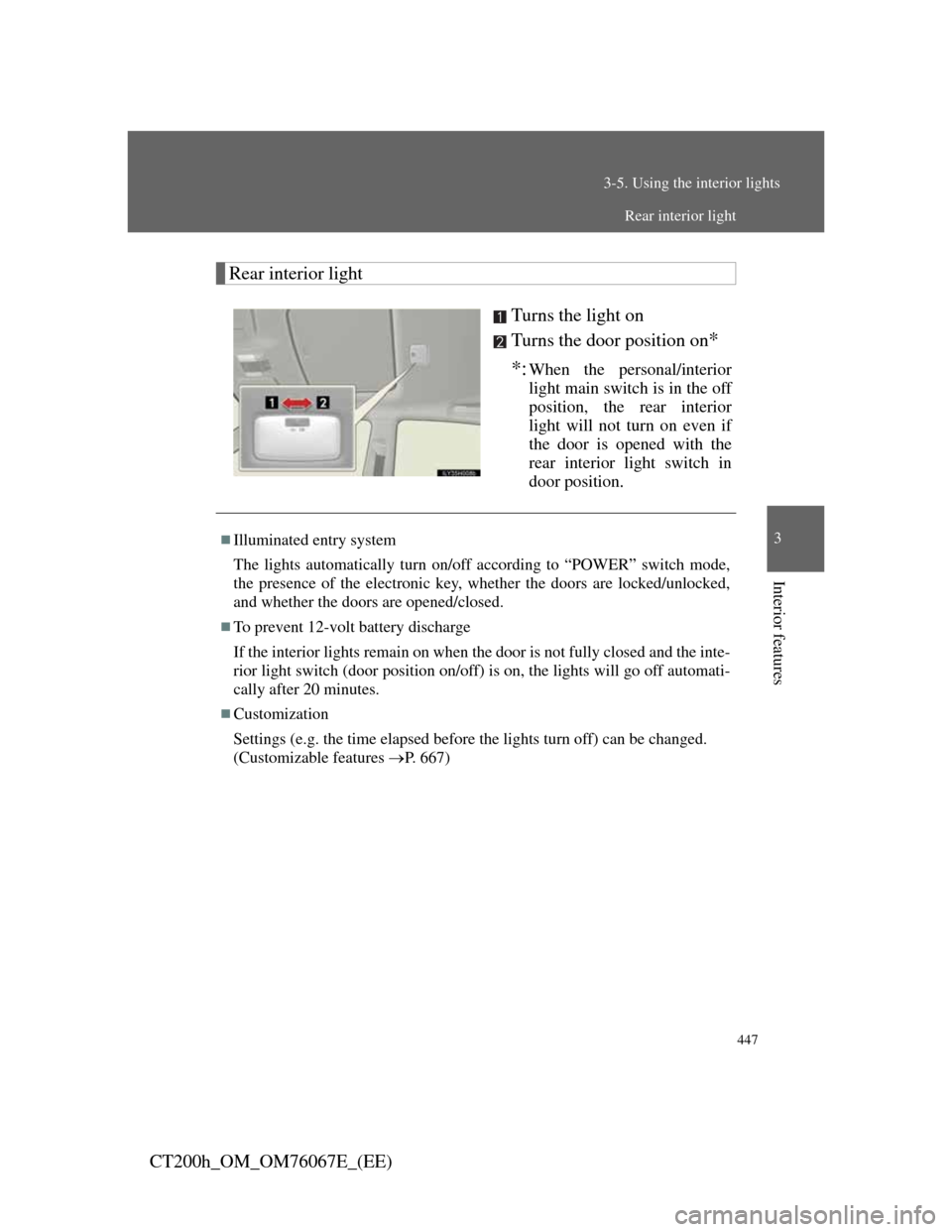
Rear interior light
Turns the light on
Turns the door position on
*
*:
When the personal/interior
light main switch is in the off
position, the rear interior
light will not turn on even if
the door is opened with the
rear interior light switch in
door position.
Illuminated entry system
The lights automatically turn on/off according to “POWER” switch mode,
the presence of the electronic key, whether the doors are locked/unlocked,
and whether the doors are opened/closed.
To prevent 12-volt battery discharge
If the interior lights remain on when the door is not fully closed and the inte-
rior light switch (door position on/off) is on, the lights will go off automati-
cally after 20 minutes.
Customization
Settings (e.g. the time elapsed before the lights turn off) can be changed.
(Customizable features P. 667)
Rear interior light
Page 460 of 710
458
3-7. Other interior features
CT200h_OM_OM76067E_(EE)
Vanity mirrors
NOTICE
To prevent 12-volt battery discharge
Do not leave the vanity lights on for extended periods while the hybrid sys-
tem is off.
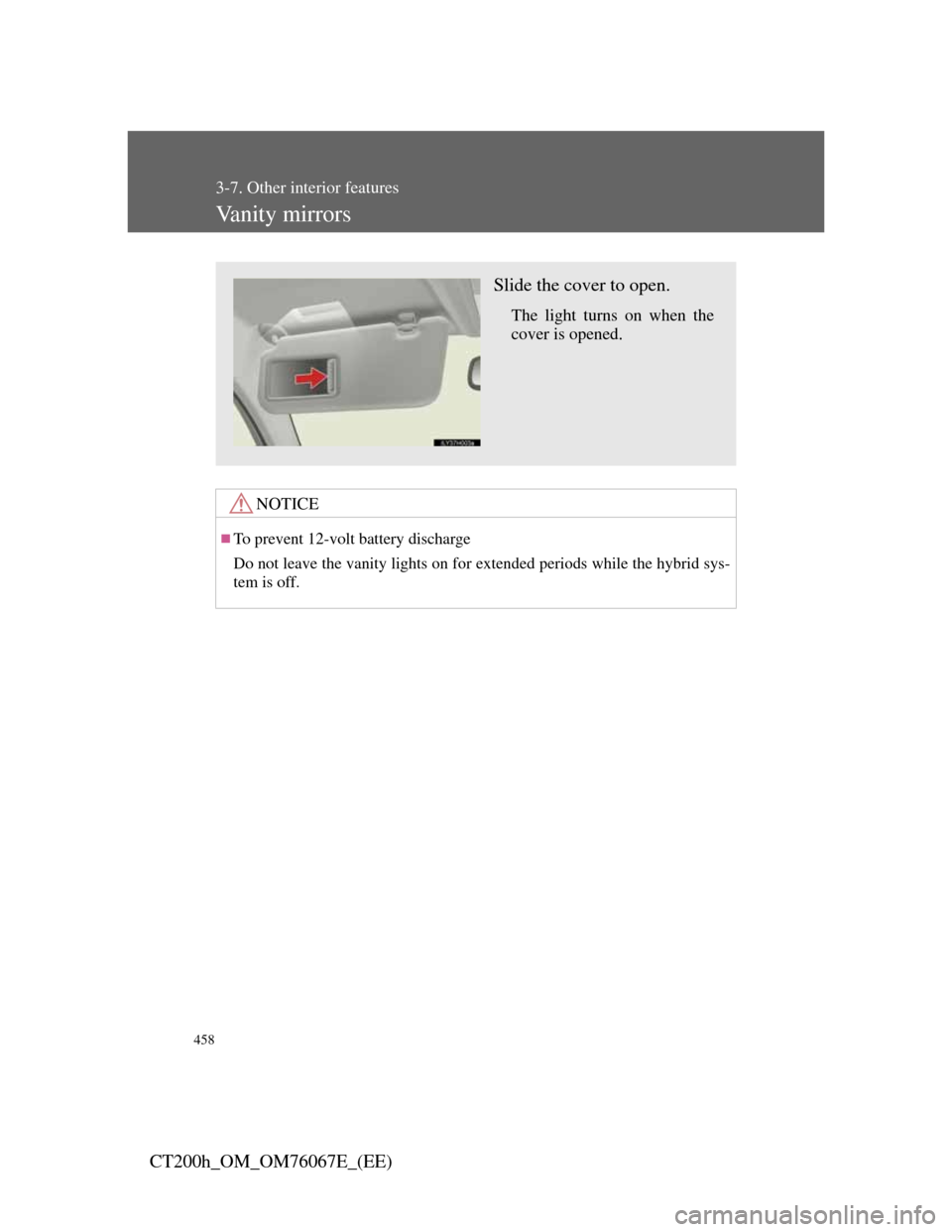
Slide the cover to open.
The light turns on when the
cover is opened.
Page 540 of 710
538
4-3. Do-it-yourself maintenance
CT200h_OM_OM76067E_(EE)
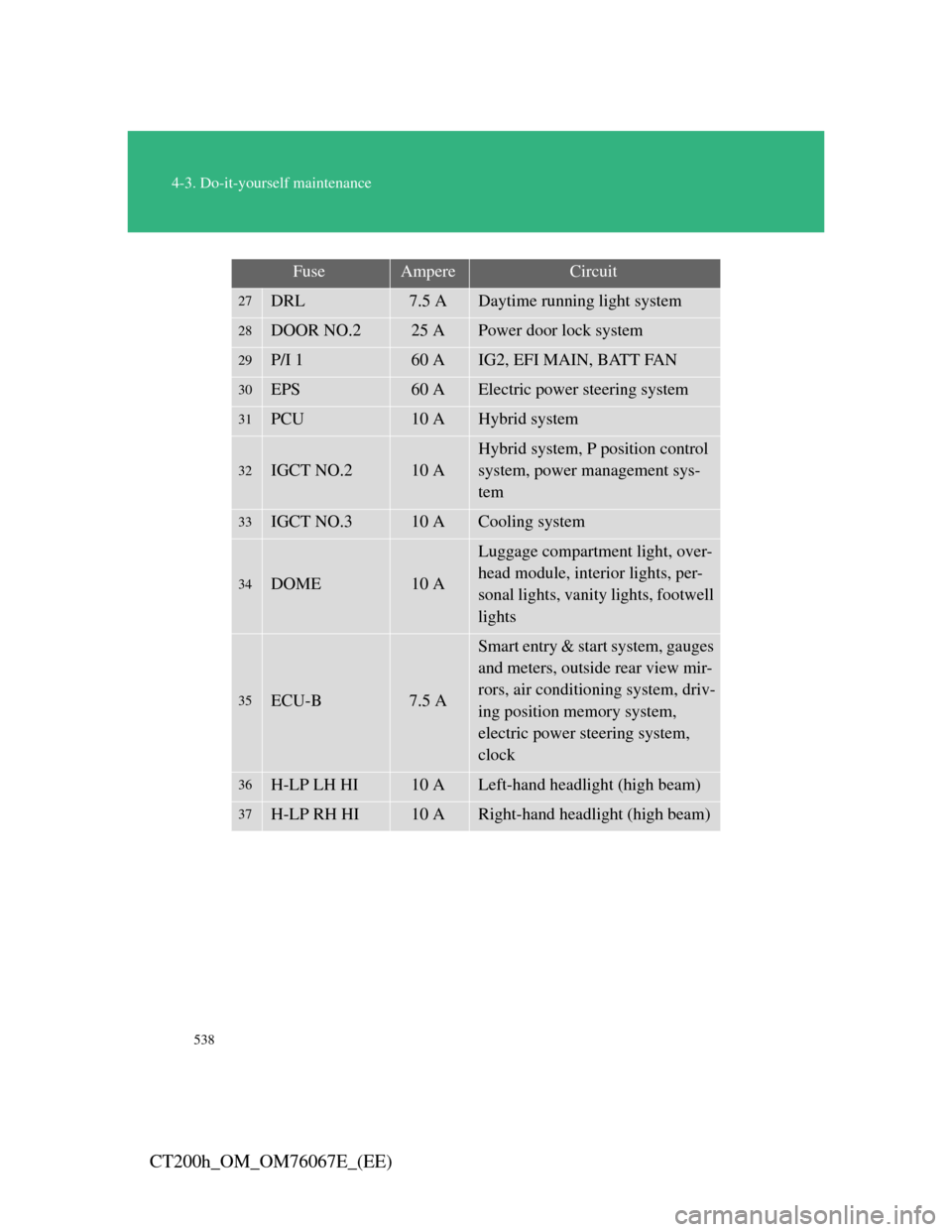
27DRL7.5 ADaytime running light system
28DOOR NO.225 APower door lock system
29P/I 160 AIG2, EFI MAIN, BATT FAN
30EPS60 AElectric power steering system
31PCU10 AHybrid system
32IGCT NO.210 A
Hybrid system, P position control
system, power management sys-
tem
33IGCT NO.310 ACooling system
34DOME10 A
Luggage compartment light, over-
head module, interior lights, per-
sonal lights, vanity lights, footwell
lights
35ECU-B7.5 A
Smart entry & start system, gauges
and meters, outside rear view mir-
rors, air conditioning system, driv-
ing position memory system,
electric power steering system,
clock
36H-LP LH HI10 ALeft-hand headlight (high beam)
37H-LP RH HI10 ARight-hand headlight (high beam)
FuseAmpereCircuit
Page 629 of 710
5
627
5-2. Steps to take in an emergency
When trouble arises
CT200h_OM_OM76067E_(EE)
If the hybrid system will not start
Reasons for the hybrid system not starting vary depending on the situ-
ation. Check the following and perform the appropriate procedure:
The hybrid system will not start even though the correct start-
ing procedure is being followed. (P. 198)
One of the following may be the cause of the problem:
The electronic key may not be functioning properly.
* (P.
630)
There may not be sufficient fuel in the vehicle’s tank.
Refuel the vehicle.
There may be a malfunction in the immobilizer system.
*
(P. 135)
There may be a malfunction in the P position control sys-
tem.
* (P. 202, 580)
*: It may not be possible to shift the shift position other than P.
The interior lights and headlights are dim, or the horn does not
sound or sounds at a low volume.
One of the following may be the cause of the problem:
The 12-volt battery may be discharged. (P. 508)
The 12-volt battery terminal connections may be loose or