Fuel Lexus CT200h 2013 (in English) User Guide
[x] Cancel search | Manufacturer: LEXUS, Model Year: 2013, Model line: CT200h, Model: Lexus CT200h 2013Pages: 688
Page 101 of 688
1012. Instrument cluster
2
Instrument cluster
CT200h_OM_OM76102E_(EE)
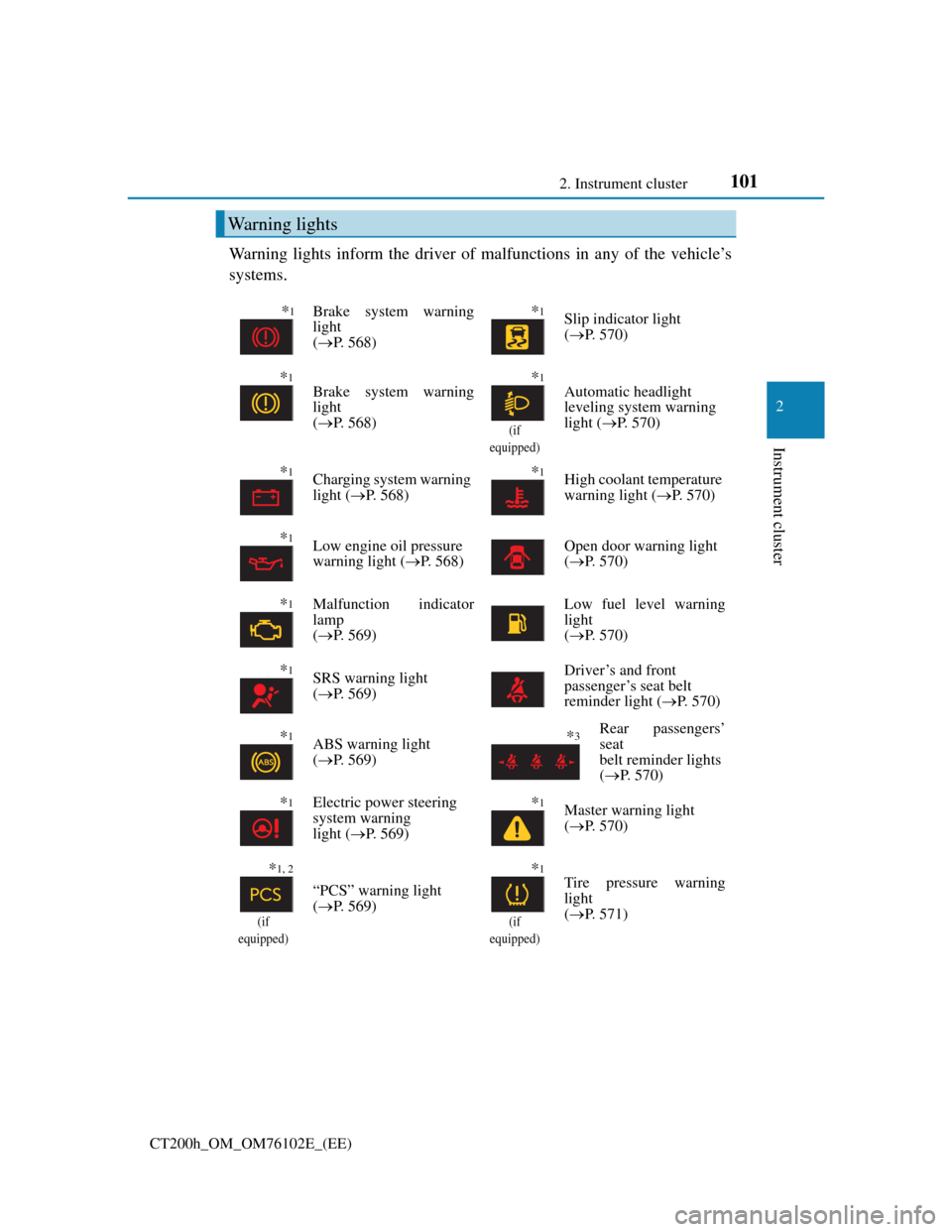
Warning lights inform the driver of malfunctions in any of the vehicle’s
systems.
Warning lights
*1Brake system warning
light
(P. 568)*1Slip indicator light
(P. 570)
*1Brake system warning
light
(P. 568)*1
(if
equipped)
Automatic headlight
leveling system warning
light (P. 570)
*1Charging system warning
light (P. 568)*1High coolant temperature
warning light (P. 570)
*1Low engine oil pressure
warning light (P. 568)Open door warning light
(P. 570)
*1Malfunction indicator
lamp
(P. 569)Low fuel level warning
light
(P. 570)
*1SRS warning light
(P. 569)Driver’s and front
passenger’s seat belt
reminder light (P. 570)
*1ABS warning light
(P. 569)*3Rear passengers’
seat
belt reminder lights
(P. 570)
*1Electric power steering
system warning
light (P. 569)*1Master warning light
(P. 570)
*1, 2
(if
equipped)
“PCS” warning light
(P. 569)
*1
(if
equipped)
Tire pressure warning
light
(P. 571)
Page 105 of 688
1052. Instrument cluster
2
Instrument cluster
CT200h_OM_OM76102E_(EE)
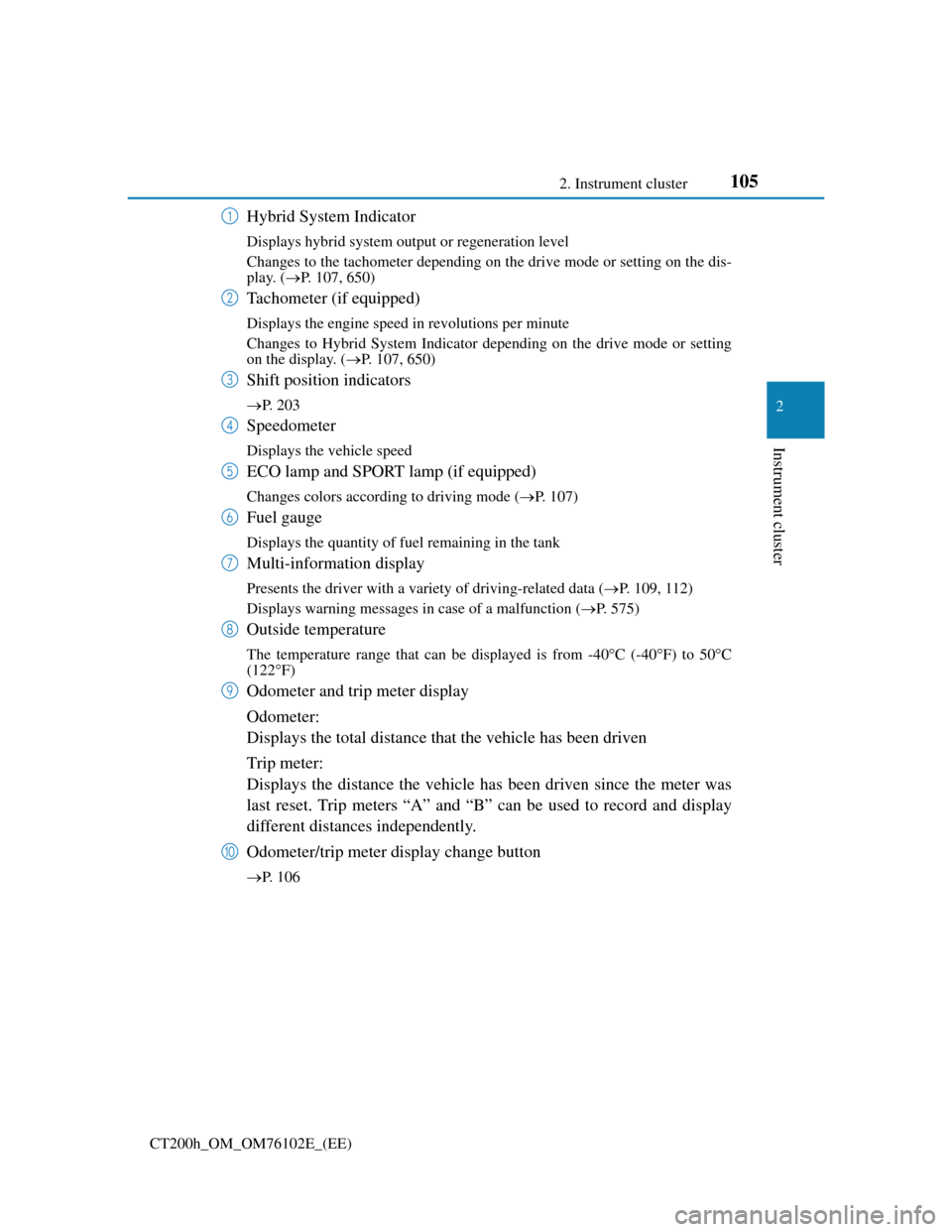
Hybrid System Indicator
Displays hybrid system output or regeneration level
Changes to the tachometer depending on the drive mode or setting on the dis-
play. (P. 107, 650)
Tachometer (if equipped)
Displays the engine speed in revolutions per minute
Changes to Hybrid System Indicator depending on the drive mode or setting
on the display. (P. 107, 650)
Shift position indicators
P. 203
Speedometer
Displays the vehicle speed
ECO lamp and SPORT lamp (if equipped)
Changes colors according to driving mode (P. 107)
Fuel gauge
Displays the quantity of fuel remaining in the tank
Multi-information display
Presents the driver with a variety of driving-related data (P. 109, 112)
Displays warning messages in case of a malfunction (P. 575)
Outside temperature
The temperature range that can be displayed is from -40C (-40F) to 50C
(122F)
Odometer and trip meter display
Odometer:
Displays the total distance that the vehicle has been driven
Trip meter:
Displays the distance the vehicle has been driven since the meter was
last reset. Trip meters “A” and “B” can be used to record and display
different distances independently.
Odometer/trip meter display change button
P. 106
1
2
3
4
5
6
7
8
9
10
Page 108 of 688
1082. Instrument cluster
CT200h_OM_OM76102E_(EE)
Engine speed
On hybrid vehicles, engine speed is precisely controlled in order to help improve
fuel efficiency and reduce exhaust emissions etc.
There are times when the engine speed that is displayed may differ even when
vehicle operation and driving conditions are the same.
Outside temperature display
In the following situations, the correct outside temperature may not be dis-
played, or the display may take longer than normal to change.
• When stopped, or driving at low speeds (less than 20 km/h [12 mph])
• When the outside temperature has changed suddenly (at the entrance/exit of
a garage, tunnel, etc.)
When “--” or “E” is displayed, the system may be malfunctioning.
Take your vehicle to any authorized Lexus dealer or repairer, or another duly
qualified and equipped professional.
Customization
Settings (e.g. on/off operation of the ECO lamp) can be changed.
(Customizable features: P. 650)
NOTICE
To prevent damage to the engine and its components
Vehicles with tachometer: Do not let the indicator needle of the tachometer
enter the red zone, which indicates the maximum engine speed.
The engine may be overheating if the high coolant temperature warning light
comes on or flashes. In this case, immediately stop the vehicle in a safe place,
and check the engine after it has cooled completely. (P. 628)
Page 109 of 688
109
2 2. Instrument cluster
Instrument cluster
CT200h_OM_OM76102E_(EE)
Multi-information display (with monochrome
display)
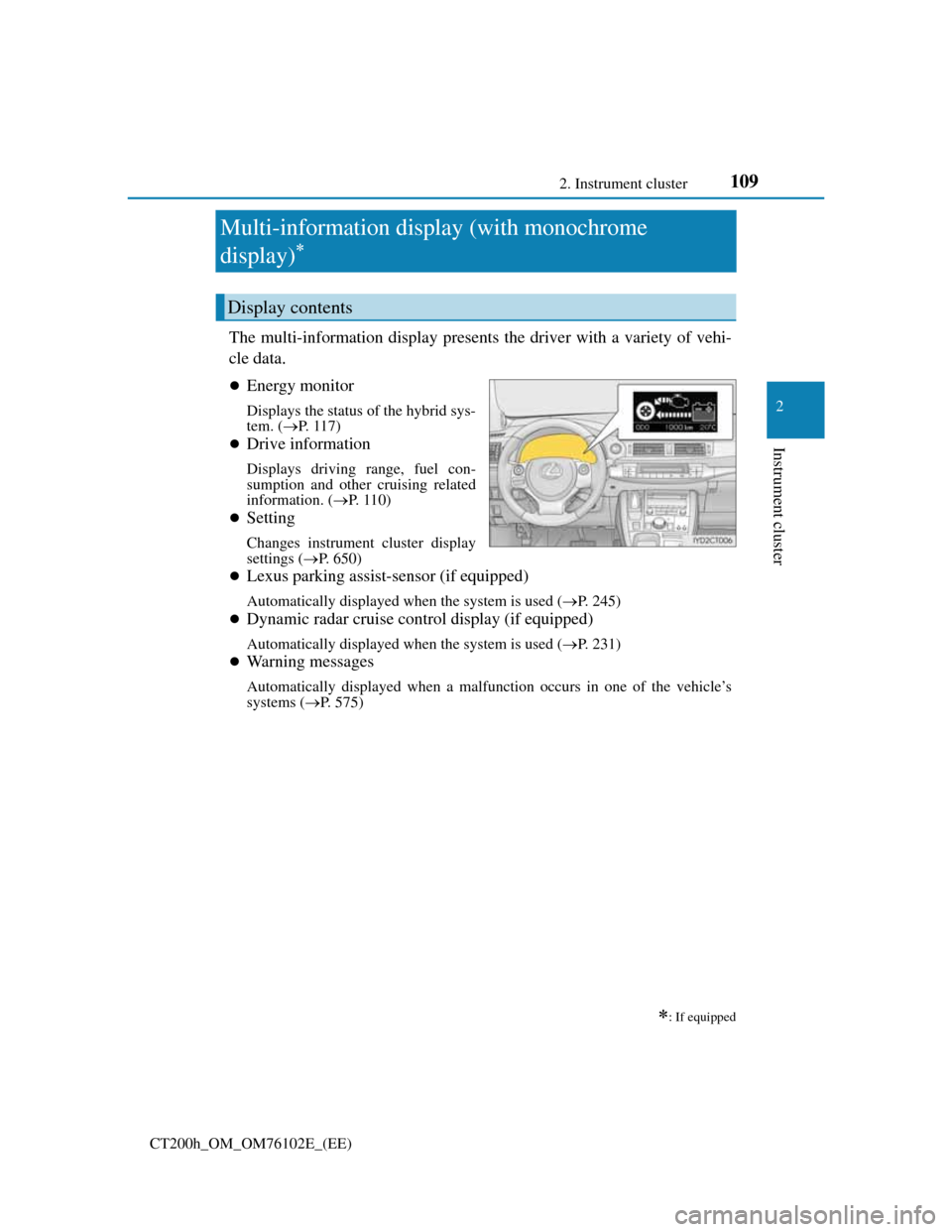
The multi-information display presents the driver with a variety of vehi-
cle data.
Energy monitor
Displays the status of the hybrid sys-
tem. (P. 117)
Drive information
Displays driving range, fuel con-
sumption and other cruising related
information. (P. 1 1 0 )
Setting
Changes instrument cluster display
settings (P. 650)
Lexus parking assist-sensor (if equipped)
Automatically displayed when the system is used (P. 245)
Dynamic radar cruise control display (if equipped)
Automatically displayed when the system is used (P. 231)
Warning messages
Automatically displayed when a malfunction occurs in one of the vehicle’s
systems (P. 575)
: If equipped
Display contents
Page 110 of 688
1102. Instrument cluster
CT200h_OM_OM76102E_(EE)
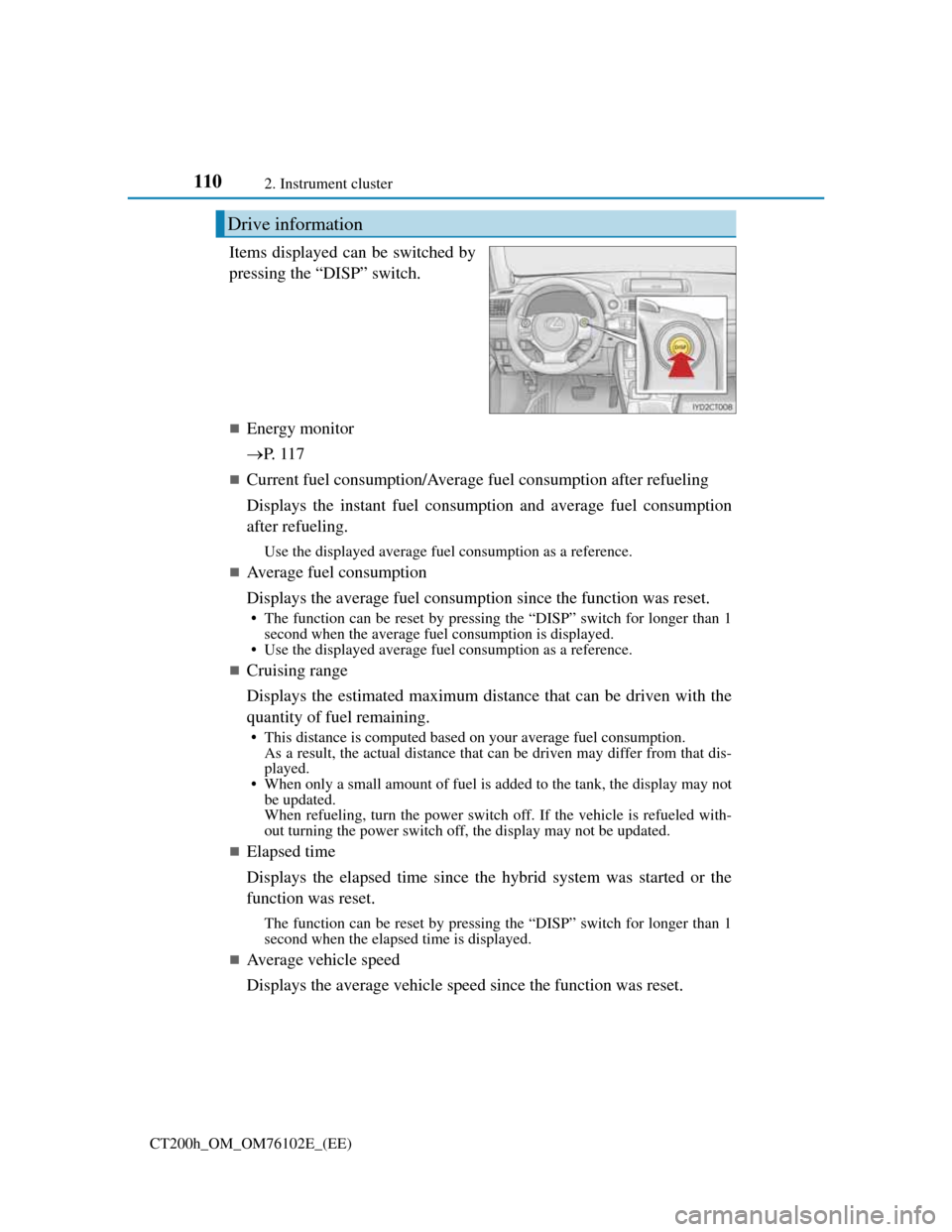
Items displayed can be switched by
pressing the “DISP” switch.
Energy monitor
P. 1 1 7
Current fuel consumption/Average fuel consumption after refueling
Displays the instant fuel consumption and average fuel consumption
after refueling.
Use the displayed average fuel consumption as a reference.
Average fuel consumption
Displays the average fuel consumption since the function was reset.
• The function can be reset by pressing the “DISP” switch for longer than 1
second when the average fuel consumption is displayed.
• Use the displayed average fuel consumption as a reference.
Cruising range
Displays the estimated maximum distance that can be driven with the
quantity of fuel remaining.
• This distance is computed based on your average fuel consumption.
As a result, the actual distance that can be driven may differ from that dis-
played.
• When only a small amount of fuel is added to the tank, the display may not
be updated.
When refueling, turn the power switch off. If the vehicle is refueled with-
out turning the power switch off, the display may not be updated.
Elapsed time
Displays the elapsed time since the hybrid system was started or the
function was reset.
The function can be reset by pressing the “DISP” switch for longer than 1
second when the elapsed time is displayed.
Average vehicle speed
Displays the average vehicle speed since the function was reset.
Drive information
Page 115 of 688
1152. Instrument cluster
2
Instrument cluster
CT200h_OM_OM76102E_(EE)
Items displayed can be switched by pressing or of the meter control
switches to select and pressing or .
Current fuel consumption*1
Displays the current rate of fuel consumption
Average fuel consumption (after reset*2/after start/after refuel)*1
Displays the average fuel consumption since the function was reset, the
hybrid system was started, and the vehicle was refueled, respectively
Use the displayed average fuel consumption as a reference.
Average vehicle speed (after reset*2/after start)*1
Displays the average vehicle speed since the function was reset and the
hybrid system was started, respectively
Elapsed time (after reset*2/after start)*1
Displays the elapsed time since the function was reset and the hybrid
system was started, respectively
Distance (driving range/after start)*1
Displays the estimated maximum distance that can be driven with the
quantity of fuel remaining and the distance driven after the hybrid sys-
tem was started respectively.
• This distance is computed based on your average fuel consumption. As a
result, the actual distance that can be driven may differ from that displayed.
• When only a small amount of fuel is added to the tank, the display may not
be updated.
When refueling, turn the power switch off. If the vehicle is refueled with-
out turning the power switch off, the display may not be updated.
Energy monitor
P. 1 1 7
Display off
A blank screen is displayed
*1: Displayed when the item is set in “Drive Info 1” or “Drive Info 2”. (P. 650)
*2: The function can be reset by pressing the of the meter control switches for
longer than 1 second when the item to reset is displayed.
If there is more than one item that can be reset, the item selection screen will
appear.
Drive information
Page 121 of 688
1212. Instrument cluster
2
Instrument cluster
CT200h_OM_OM76102E_(EE)
These images are examples only, and may vary slightly from actual con-
ditions.
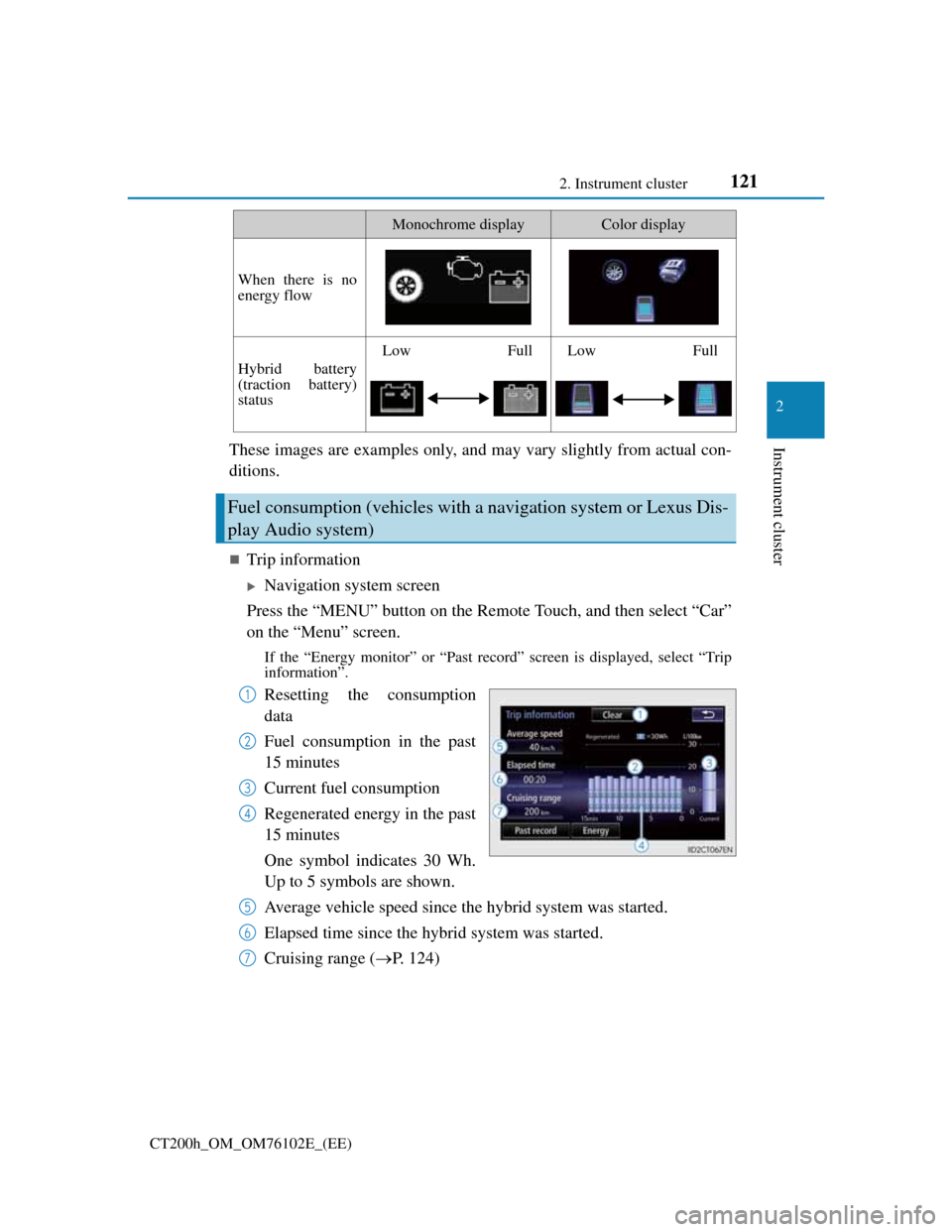
Trip information
Navigation system screen
Press the “MENU” button on the Remote Touch, and then select “Car”
on the “Menu” screen.
If the “Energy monitor” or “Past record” screen is displayed, select “Trip
information”.
Resetting the consumption
data
Fuel consumption in the past
15 minutes
Current fuel consumption
Regenerated energy in the past
15 minutes
One symbol indicates 30 Wh.
Up to 5 symbols are shown.
Average vehicle speed since the hybrid system was started.
Elapsed time since the hybrid system was started.
Cruising range (P. 124)
When there is no
energy flow
Hybrid battery
(traction battery)
status
LowFullLowFull
Fuel consumption (vehicles with a navigation system or Lexus Dis-
play Audio system)
Monochrome displayColor display
1
2
3
4
5
6
7
Page 122 of 688

1222. Instrument cluster
CT200h_OM_OM76102E_(EE)
Lexus Display Audio screen
Press the “MENU” button on the Lexus Display Audio controller, and
then select “Car” on the “MENU” screen.
If the “Trip information” screen does not appear, move the controller to the
right and select “Trip information”.
Fuel consumption in the past
15 minutes
Current fuel consumption
Regenerated energy in the past
15 minutes
One symbol indicates 30 Wh.
Up to 5 symbols are shown.
Average vehicle speed since
the hybrid system was started.
Elapsed time since the hybrid system was started.
Cruising range (P. 124)
Average fuel consumption for the past 15 minutes is divided by color
into past averages and averages attained since the power switch was
last turned to ON mode. Use the displayed average fuel consumption
as a reference.
The image is an example only.
1
2
3
4
5
6
Page 123 of 688
1232. Instrument cluster
2
Instrument cluster
CT200h_OM_OM76102E_(EE)
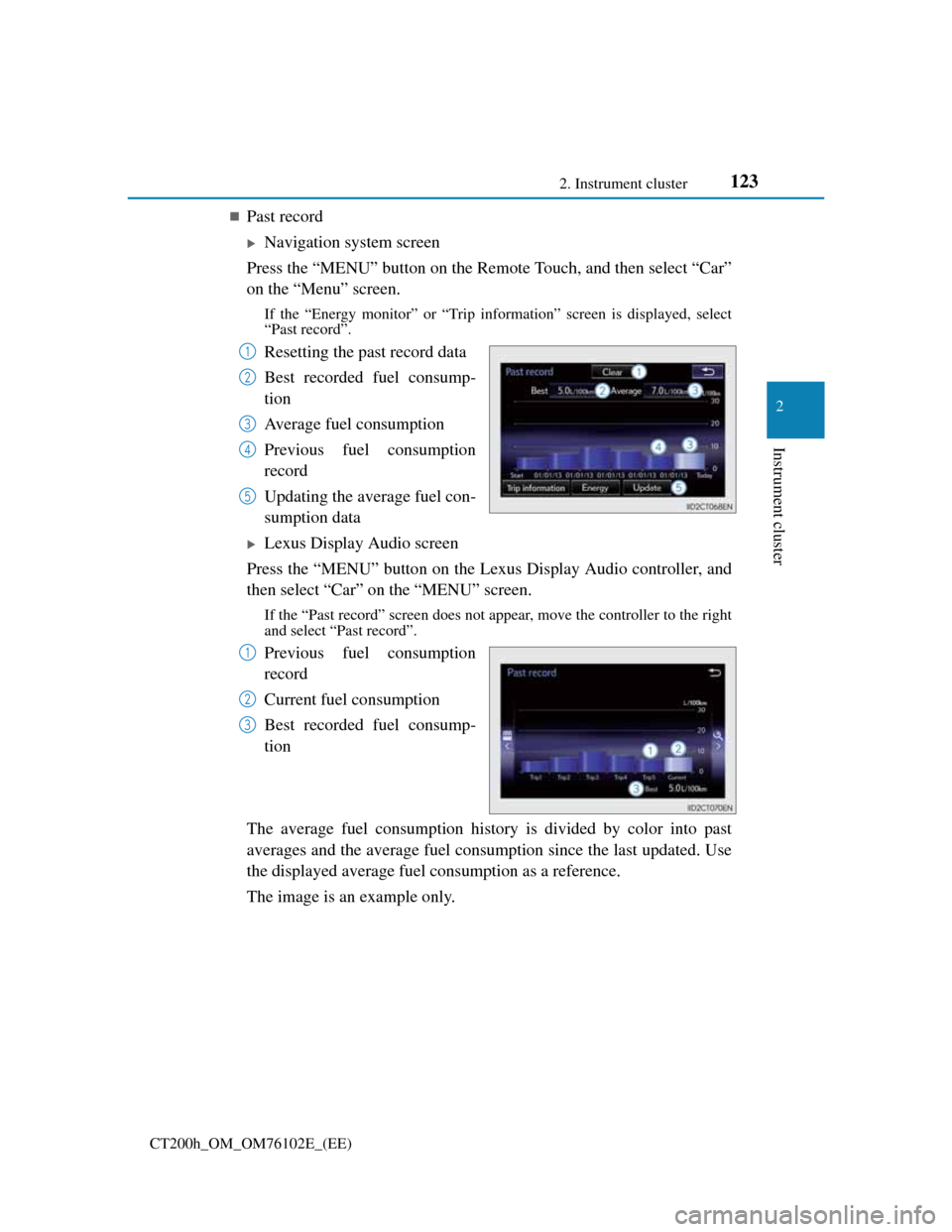
Past record
Navigation system screen
Press the “MENU” button on the Remote Touch, and then select “Car”
on the “Menu” screen.
If the “Energy monitor” or “Trip information” screen is displayed, select
“Past record”.
Resetting the past record data
Best recorded fuel consump-
tion
Average fuel consumption
Previous fuel consumption
record
Updating the average fuel con-
sumption data
Lexus Display Audio screen
Press the “MENU” button on the Lexus Display Audio controller, and
then select “Car” on the “MENU” screen.
If the “Past record” screen does not appear, move the controller to the right
and select “Past record”.
Previous fuel consumption
record
Current fuel consumption
Best recorded fuel consump-
tion
The average fuel consumption history is divided by color into past
averages and the average fuel consumption since the last updated. Use
the displayed average fuel consumption as a reference.
The image is an example only.
1
2
3
4
5
1
2
3
Page 124 of 688

1242. Instrument cluster
CT200h_OM_OM76102E_(EE)
Updating the past record data
Vehicles with a navigation system
Update the average fuel consumption by selecting “Update” to measure the cur-
rent fuel consumption again.
Vehicles with a Lexus Display Audio system
Update the average fuel consumption by moving the controller to the left and
select “Update” to measure the current fuel consumption again.
Resetting the data
Vehicles with a navigation system
The fuel consumption data can be deleted by selecting “Clear”.
Vehicles with a Lexus Display Audio system
The fuel consumption data can be deleted by moving the controller to the left and
select “Clear”.
Cruising range
Displays the estimated maximum distance that can be driven with the quantity of
fuel remaining.
This distance is computed based on your average fuel consumption.
As a result, the actual distance that can be driven may differ from that displayed.