steering wheel Lexus CT200h 2015 (in English) Owner's Guide
[x] Cancel search | Manufacturer: LEXUS, Model Year: 2015, Model line: CT200h, Model: Lexus CT200h 2015Pages: 634
Page 230 of 634

CT200h_OM_OM76174U_(U)
2294-5. Using the driving support systems
4
Driving
WA R N I N G
■When using the Lexus parking assist monitor system
The parking assist monitor is a supplemental device intended to assist the driver when
backing up. When backing up, be sure to check visually behind and all around the vehi-
cle before proceeding.
Observe the following precautions to avoid an accident that could result in death or
serious injuries.
●Never depend on the parking assist monitor entirely when backing up. The image
and the position of the guide lines displayed on the screen may differ from the actual
state.
Use caution, just as you would when backing up any vehicle.
●Be sure to back up slowly, depressing the brake pedal to control vehicle speed.
●If you seem likely to hit nearby vehicles, obstacles, people or mount the shoulder,
depress the brake pedal to stop the vehicle.
●The instructions given are only guidelines.
When and how much to turn the steering wh eel will vary according to traffic condi-
tions, road surface conditions, vehicle condit ion, etc. when parking. It is necessary to
be fully aware of this before using the parking assist system.
●When parking, be sure to check that the parking space will accommodate your vehi-
cle before maneuvering into it.
●Do not use the parking assist monitor in the following cases:
• On icy or slick road surfaces, or in snow
• When using tire chains or emergency tires
• When the back door is not closed completely
• On roads that are not flat or straight, such as curves or slopes.
●In low temperatures, the screen may darken or the image may become faint. The
image could distort when the vehicle is moving, or you may become unable to see the
image on the screen. Be sure to check direct visually and with the mirrors all around
the vehicle before proceeding.
●If the tire sizes are changed, the position of the guide lines displayed on the screen
may change.
●The camera uses a special lens. The distances between objects and pedestrians that
appear in the image displayed on the scre en will differ from the actual distances.
( → P. 2 2 4 )
●Estimated course line display mode: If the steering wheel is straight and the vehicle
width guide lines and the estimated course lines are not in alignment, have the vehicle
inspected by your Lexus dealer.
Page 233 of 634
232
CT200h_OM_OM76174U_(U)4-5. Using the driving support systems
Driving assist systems
◆ABS (Anti-lock Brake System)
Helps to prevent wheel lock when the brakes are applied suddenly, or if the
brakes are applied while driving on a slippery road surface
◆Brake assist
Generates an increased level of braking force after the brake pedal is
depressed when the system detects a panic stop situation
◆VSC (Vehicle Stability Control)
Helps the driver to control skidding when swerving suddenly or turning on
slippery road surfaces
◆TRAC (Traction Control)
Helps to maintain drive power and prevent the drive wheels from spinning
when starting the vehicle or accelerating on slippery roads
◆EPS (Electric Power Steering)
Employs an electric motor to reduce the amount of effort needed to turn the
steering wheel
◆Enhanced VSC (Enhanced Vehicle Stability Control)
Provides cooperative control of the ABS, TRAC, VSC and EPS.
Helps to maintain directional stability when swerving on slippery road sur-
faces by controlling steering performance.
◆Hill-start assist control
→
P. 2 3 6
◆PCS (Pre-Collision System) (if equipped)
→P. 2 3 8
To help enhance driving safety and performance, the following systems oper-
ate automatically in response to various driving situations. Be aware, however,
that these systems are supplementary and should not be relied upon too
heavily when operating the vehicle.
Page 234 of 634
CT200h_OM_OM76174U_(U)
2334-5. Using the driving support systems
4
Driving
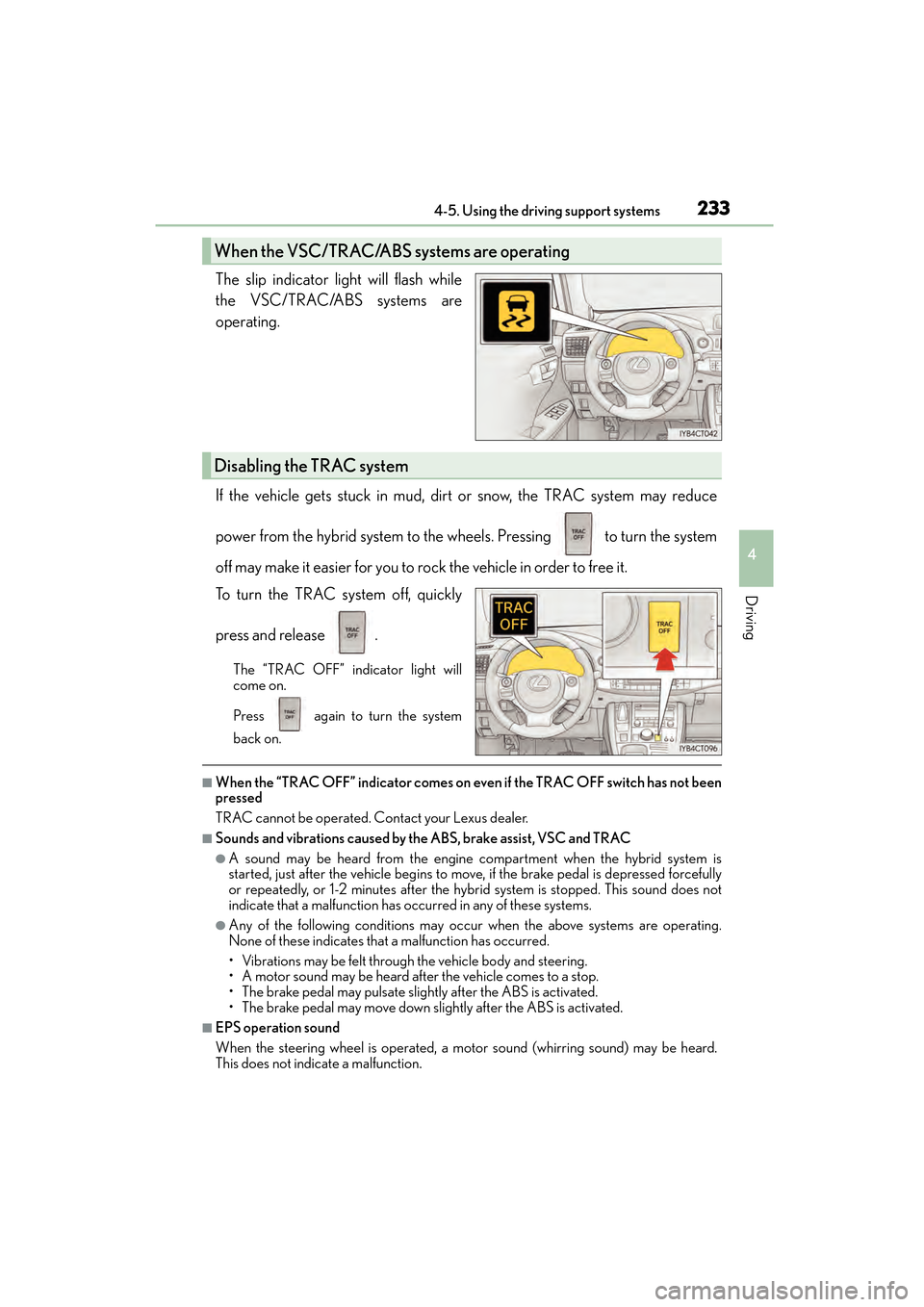
The slip indicator light will flash while
the VSC/TRAC/ABS systems are
operating.
If the vehicle gets stuck in mud, dirt or snow, the TRAC system may reduce
power from the hybrid system to the wheels. Pressing to turn the system
off may make it easier for you to rock the vehicle in order to free it.
To turn the TRAC system off, quickly
press and release .
The “TRAC OFF” indicator light will
come on.
Press again to turn the system
back on.
■When the “TRAC OFF” indicator comes on even if the TRAC OFF switch has not been
pressed
TRAC cannot be operated. Contact your Lexus dealer.
■Sounds and vibrations caused by the ABS, brake assist, VSC and TRAC
●A sound may be heard from the engine compartment when the hybrid system is
started, just after the vehicle begins to move, if the brake pedal is depressed forcefully
or repeatedly, or 1-2 minutes after the hybrid system is stopped. This sound does not
indicate that a malfunction has occurred in any of these systems.
●Any of the following conditions may occur when the above systems are operating.
None of these indicates that a malfunction has occurred.
• Vibrations may be felt through the vehicle body and steering.
• A motor sound may be heard after the vehicle comes to a stop.
• The brake pedal may pulsate slightly after the ABS is activated.
• The brake pedal may move down slightly after the ABS is activated.
■EPS operation sound
When the steering wheel is operated, a motor sound (whirring sound) may be heard.
This does not indicate a malfunction.
When the VSC/TRAC/ABS systems are operating
Disabling the TRAC system
Page 235 of 634

234
CT200h_OM_OM76174U_(U)4-5. Using the driving support systems
■Reduced effectiveness of the EPS system
The effectiveness of the EPS system is reduced to prevent the system from overheating
when there is frequent steering input over an extended period of time. The steering
wheel may feel heavy as a result. Should this occur, refrain from excessive steering input
or stop the vehicle and turn the hybrid system off. The EPS system should return to nor-
mal within 10 minutes.
■Automatic reactivation of TRAC system
After turning the TRAC system off, the system will be automatically re-enabled in the fol-
lowing situations:
●When the power switch is turned off
●The TRAC will turn on when vehicle speed increases
Page 248 of 634
CT200h_OM_OM76174U_(U)
2474-6. Driving tips
4
Driving
WA R N I N G
■Driving with snow tires
Observe the following precautions to reduce the risk of accidents.
Failure to do so may result in a loss of vehicle control and cause death or serious injury.
●Use tires of the specified size.
●Maintain the recommended level of air pressure.
●Do not drive in excess of 75 mph (120 km/h), regardless of the type of snow tires
being used.
●Use snow tires on all, not just some wheels.
■Driving with tire chains
Observe the following precautions to reduce the risk of accidents.
Failure to do so may result in the vehicle being unable to be driven safely, and may
cause death or serious injury.
●Do not drive in excess of the speed limit specified for the tire chains being used, or 30
mph (50 km/h), whichever is lower.
●Avoid driving on bumpy road surfaces or over potholes.
●Avoid sudden acceleration, abrupt steering, sudden braking and shifting operations
that cause sudden engine braking.
●Slow down sufficiently before entering a cu rve to ensure that vehicle control is main-
tained.
■When parking the vehicle
When parking the vehicle without applying the parking brake, make sure to chock the
wheels. If you do not chock the wheels, the vehicle may move unexpectedly, possibly
resulting in an accident.
NOTICE
■Repairing or replacing snow tires
Request repairs or replacement of snow tires from Lexus dealers or legitimate tire
retailers.
This is because the removal and attachment of snow tires affects the operation of the
tire pressure warning valves and transmitters.
■Fitting tire chains
The tire pressure warning valves and transmitters may not function correctly when tire
chains are fitted.
Page 250 of 634
249
CT200h_OM_OM76174U_(U)
5Audio system
5-1. Basic OperationsAudio system types .................. 252
Using the steering wheel audio switches ......................... 254
AUX port/USB port................ 255
5-2. Using the audio system Optimal use of the audio system ......................................... 257
5-3. Using the radio Radio operation ......................... 259
5-4. Playing audio CDs and MP3/WMA discs
CD player operation................ 265
5-5. Using an external device Listening to an iPod ...................272
Listening to a USB memory device .......................................... 278
Using the AUX port................. 283
Page 251 of 634
250
CT200h_OM_OM76174U_(U)
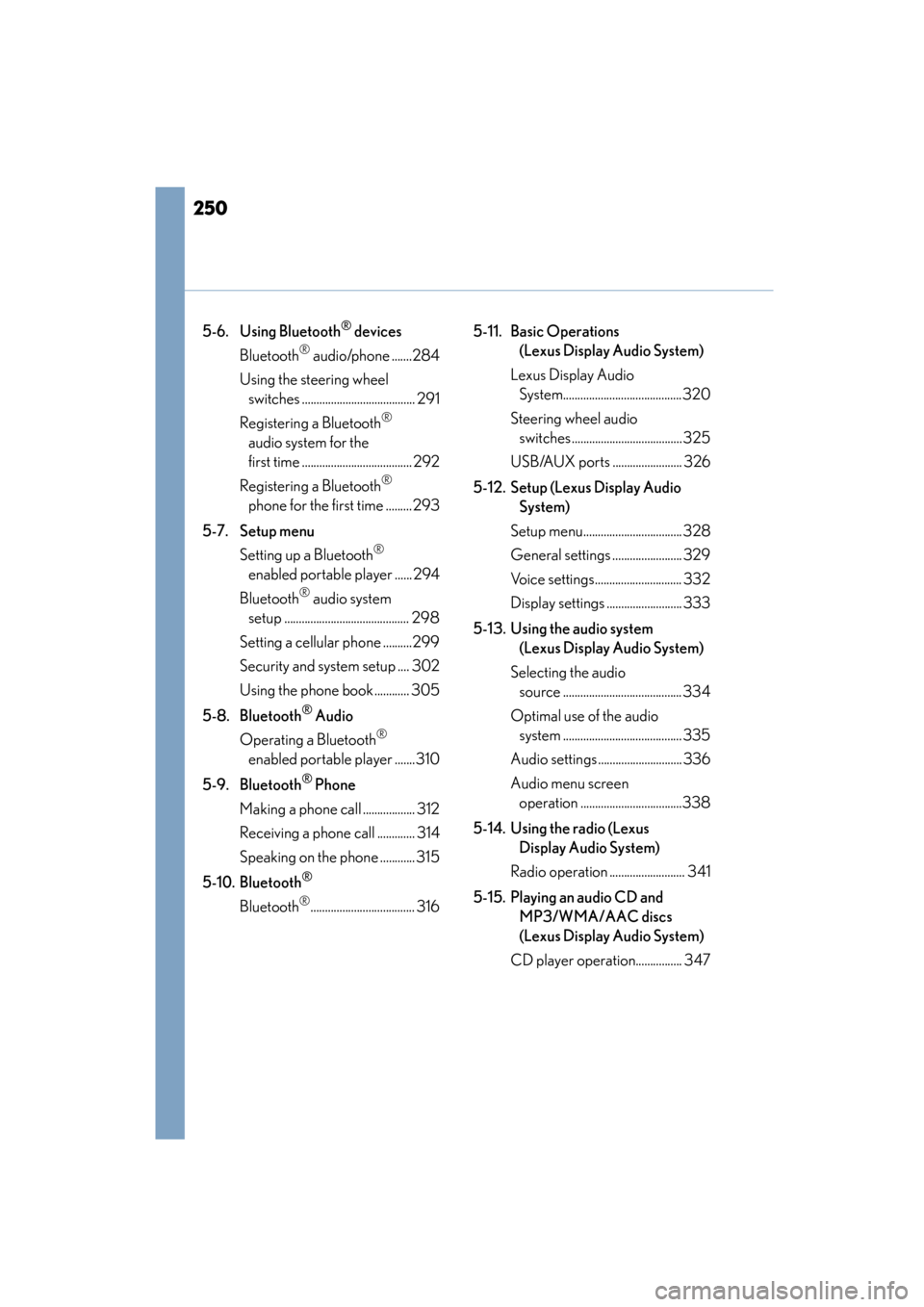
5-6. Using Bluetooth® devices
Bluetooth
® audio/phone .......284
Using the steering wheel switches ....................................... 291
Registering a Bluetooth
®
audio system for the
first time ...................................... 292
Registering a Bluetooth
®
phone for the first time ......... 293
5-7. Setup menu Setting up a Bluetooth
®
enabled portable player ...... 294
Bluetooth
® audio system
setup ........................................... 298
Setting a cellular phone ..........299
Security and system setup .... 302
Using the phone book ............ 305
5-8. Bluetooth
® Audio
Operating a Bluetooth
®
enabled portable player .......310
5-9. Bluetooth
® Phone
Making a phone call .................. 312
Receiving a phone call ............. 314
Speaking on the phone ............ 315
5-10. Bluetooth
®
Bluetooth®.................................... 316 5-11. Basic Operations
(Lexus Display Audio System)
Lexus Display Audio System.........................................320
Steering wheel audio switches ...................................... 325
USB/AUX ports ........................ 326
5-12. Setup (Lexus Display Audio System)
Setup menu.................................. 328
General settings ........................ 329
Voice settings.............................. 332
Display settings .......................... 333
5-13. Using the audio system (Lexus Display Audio System)
Selecting the audio source ......................................... 334
Optimal use of the audio system ......................................... 335
Audio settings............................. 336
Audio menu screen operation ...................................338
5-14. Using the radio (Lexus Display Audio System)
Radio operation .......................... 341
5-15. Playing an audio CD and MP3/WMA/AAC discs
(Lexus Display Audio System)
CD player operation................ 347
Page 252 of 634
251
CT200h_OM_OM76174U_(U)
Audio system5
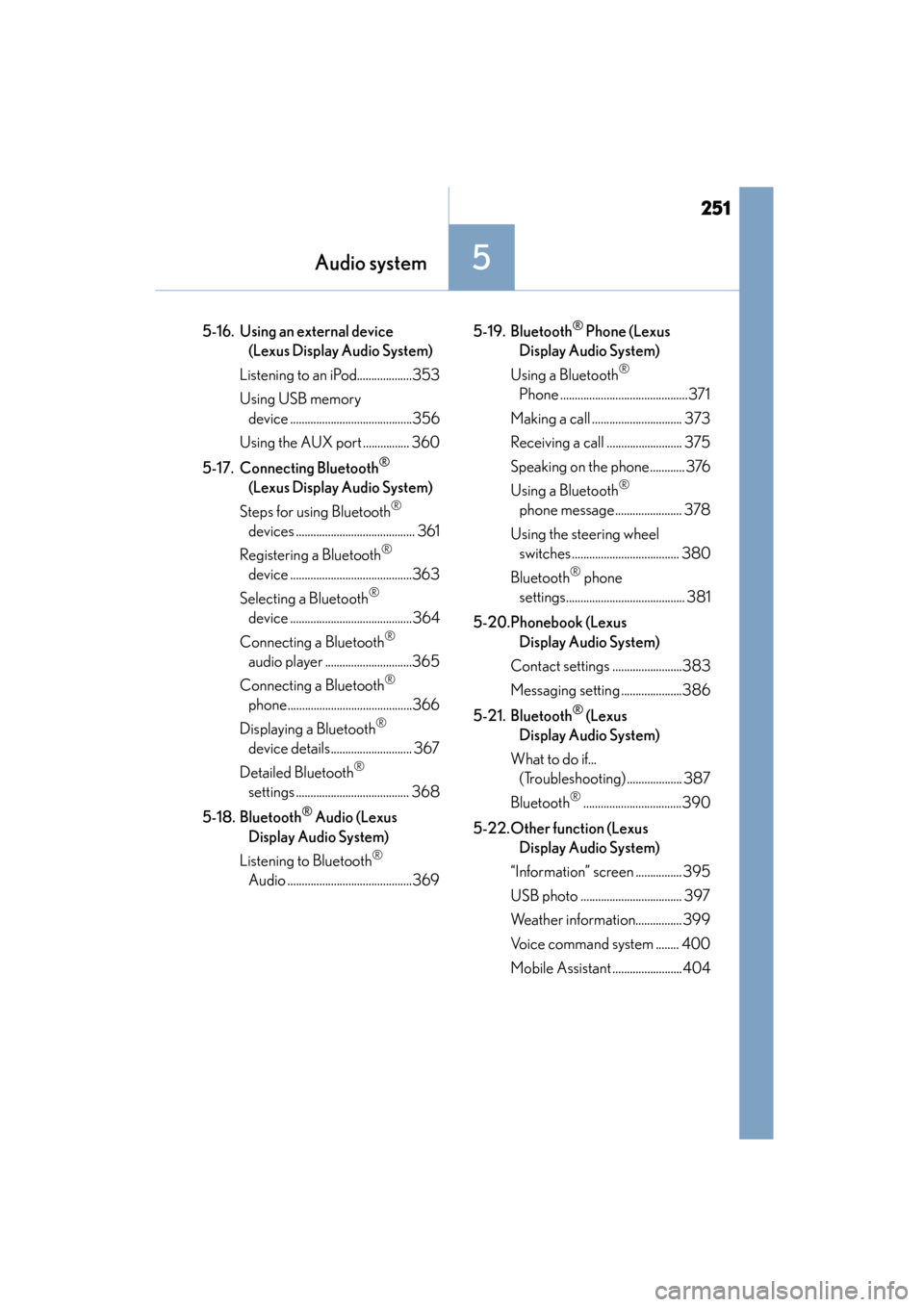
5-16. Using an external device (Lexus Display Audio System)
Listening to an iPod...................353
Using USB memory device ..........................................356
Using the AUX port ................ 360
5-17. Connecting Bluetooth
®
(Lexus Display Audio System)
Steps for using Bluetooth
®
devices ......................................... 361
Registering a Bluetooth
®
device ..........................................363
Selecting a Bluetooth
®
device ..........................................364
Connecting a Bluetooth
®
audio player ..............................365
Connecting a Bluetooth
®
phone...........................................366
Displaying a Bluetooth
®
device details............................ 367
Detailed Bluetooth
®
settings ....................................... 368
5-18. Bluetooth
® Audio (Lexus
Display Audio System)
Listening to Bluetooth
®
Audio ...........................................369 5-19. Bluetooth
® Phone (Lexus
Display Audio System)
Using a Bluetooth
®
Phone ............................................371
Making a call ............................... 373
Receiving a call .......................... 375
Speaking on the phone............ 376
Using a Bluetooth
®
phone message....................... 378
Using the steering wheel switches ..................................... 380
Bluetooth
® phone
settings......................................... 381
5-20.Phonebook (Lexus Display Audio System)
Contact settings ........................383
Messaging setting .....................386
5-21. Bluetooth
® (Lexus
Display Audio System)
What to do if... (Troubleshooting) ................... 387
Bluetooth
®..................................390
5-22.Other function (Lexus Display Audio System)
“Information” screen ................ 395
USB photo ................................... 397
Weather information................ 399
Voice command system ........ 400
Mobile Assistant ........................404
Page 255 of 634

254
CT200h_OM_OM76174U_(U)5-1. Basic Operations
Using the steering wheel audio switches
Volume switch:
• Press: Increases/decreases vol-
ume
• Press and hold: Continuously
increases/decreases volume
Radio mode: • Press: Selects a radio station
• Press and hold: Seeks up/down
CD, MP3/WMA disc, Bluetooth
®, iPod or USB mode:
• Press: Selects a track/file/song
• Press and hold: Selects a folder or album (MP3/WMA disc, Bluetooth
®,
iPod or USB)
“MODE” switch: • Press: Turns the power on, selects an audio source
•Press and hold: Turns the power off
■Canceling automatic selection of a radio station
Press the “ ∧” or “ ∨” button again.
Some audio features can be controlle d using the switches on the steering
wheel.
Operation may differ depending on the type of audio system or navigation
system. For details, refer to the manual provided with the audio system or nav-
igation system.
1
2
WA R N I N G
■To reduce the risk of an accident
Exercise care when operating the audio switches on the steering wheel.
3
Page 292 of 634

291
CT200h_OM_OM76174U_(U)5-6. Using Bluetooth
® devices
5
Audio system
Using the steering wheel switches
Vo l u m e
The voice guidance volume cannot
be adjusted using this button.
Off-hook switch
Turns the hands-free system on/
starts a call
On-hook switch
Turns the hands-free system off/ends
a call/refuses a call
Talk switch
Turns the voice command system on (press)/turns the voice command system
off (press and hold)
The steering wheel switches can be us
ed to operate a connected cellular
phone, or portable digital a udio player (portable player) ( →P. 254).
Operating Bluetooth® device using the s teering wheel switches
1
2
3
4