lights Lexus CT200h 2015 (in English) Service Manual
[x] Cancel search | Manufacturer: LEXUS, Model Year: 2015, Model line: CT200h, Model: Lexus CT200h 2015Pages: 634
Page 228 of 634

CT200h_OM_OM76174U_(U)
2274-5. Using the driving support systems
4
Driving
●Distance guidelines
Visually check the surroundings
and the area behind the vehicle.
On the screen, it appears that a
truck is parking at point . How-
ever, in reality if you back up to
point , you will hit the truck.
On the screen, it appears that
is closest and is farthest away.
However, in reality, the distance to and is the same and is
farther than and .
■If you notice any symptoms
If you notice any of the following symp toms, refer to the likely cause and the
solution, and re-check.
If the symptom is not resolved by the solution, have the vehicle inspected by
your Lexus dealer.
2
1
1
3
132
13
Things you should know
Likely causeSolution
‰ The image is difficult to see
• The vehicle is in a dark area
• The temperature around the lens is
either high or low
• The outside temperature is low
• There are water droplets on the cam- era
• It is raining or humid
• Foreign matter (mud etc.) is adhering to the camera
• There are scratches on the camera
• Sunlight or headlights are shining directly into the camera
• The vehicle is under fluorescent lights,
sodium lights, mercury lights etc.
If this happens due to these causes, it
does not indicate a malfunction.
Back up while visually checking the vehi-
cle’s surroundings. (Use the monitor
again once conditions have been
improved.)
The image on the Lexus parking assist
monitor system screen can be adjusted.
(→ P. 333)
Page 231 of 634

230
CT200h_OM_OM76174U_(U)4-5. Using the driving support systems
NOTICE
■How to use the camera
●The parking assist monitor may not operate properly in the following cases.
• If the back of the vehicle is hit, the position and mounting angle of the camera may
change.
• As the camera has a water proof construction, do not detach, disassemble or modify it. This may cause incorrect operation.
• Do not strongly rub the camera lens. If the camera lens is scratched, it cannot
transmit a clear image.
• Do not allow organic solvent, car wax, window cleaner or glass coat to adhere to
the camera. If this happens, wipe it off as soon as possible.
• If the temperature changes rapidly, such as when hot water is poured on the vehi- cle in cold weather, the system may not operate normally.
• When washing the vehicle, do not apply intensive bursts of water to the camera or camera area. Doing so may result in the camera malfunctioning.
• When the camera is used under fluorescen t lights, sodium light or mercury light
etc., the lights and the illuminated areas may appear to flicker.
●Do not expose the camera to strong impact as this could cause a malfunction.
If this happens, have the vehicle inspected by your Lexus dealer as soon as possible.
Page 237 of 634

236
CT200h_OM_OM76174U_(U)4-5. Using the driving support systems
Hill-start assist control
To engage hill-start assist control, fur-
ther depress the brake pedal when the
vehicle is stopped completely.
A buzzer will sound once to indicate the
system is activated
. The slip indicator
will also start flashing.
■Hill-start assist control operating conditions
●The system operates in the following situations:
• The shift position is in a position other than P.
• The parking brake is not applied.
• The accelerator pedal is not depressed.
●Hill-start assist control cannot be operated while the slip indicator light is illuminated.
■Hill-start assist control
●While hill-start assist control is operating, the brakes remain automatically applied after
the driver releases the brake pedal. The stop lights and the high mounted stoplight turn
on.
●Hill-start assist control operates for about 2 seconds after the brake pedal is released.
●If the slip indicator does not flash and the buzzer does not sound when the brake pedal
is further depressed, slightly reduce the pressure on the brake pedal (do not allow the
vehicle to roll backward) and then firmly de press it again. If the system still does not
operate, check if the operating conditions explained above have been met.
Assists with starting off and temporarily maintains braking power even if the
foot is removed from the brake pedal when starting off on an incline or a slip-
pery slope.
Page 242 of 634
CT200h_OM_OM76174U_(U)
2414-5. Using the driving support systems
4
Driving
■Automatic cancelation of the pre-collision system
When a malfunction occurs due to sensor contamination, etc. that results in the sensors
being unable to detect obstacles, the pre-collision system will be automatically disabled.
In this case, the system will not activat e even if there is a collision possibility.
■When there is a malfunction in the system, or if the system is temporarily unusable
Warning lights and/or warning messages will turn on or flash. ( →P. 5 2 7 , 5 3 4 )
■Certification
XFor vehicles sold in the U.S.A.
FCC ID: HYQDNMWR004
This device complies with part 15 of the FCC Rules. Operation is subject to the following
two conditions: (1) This device may not cause harmful interference, and (2) this device
must accept any interference received, including interference that may cause undesired
operation.
FCC WARNING
Changes or modifications not expressly approved by the party responsible for compli-
ance could void the user’s authority to operate the equipment.
Radiofrequency radiation exposure Information:
This equipment complies with FCC radiation exposure limits set forth for an uncontrolled
environment.
This equipment should be installed and operated with minimum distance of 20 cm
between the radiator (antenna) and your body.
This transmitter must not be co-located or operating in conjunction with any other
antenna or transmitter.
XFor vehicles sold in Canada
This device complies with Industry Canada licence-exempt RSS standard(s).
Operation is subject to the following two conditions: (1) this device may not cause inter-
ference, and (2) this device must accept any interference, including interference that
may cause undesired operation of the device.
WA R N I N G
■Limitations of the pre-collision system
Do not overly rely on the pre-collision system. Always drive safely, taking care to
observe your surroundings and checking for any obstacles or other road hazards.
Failure to do so may cause an accident resulting in death or serious injury.
Page 245 of 634
244
CT200h_OM_OM76174U_(U)4-6. Driving tips
◆Delays
Repeated acceleration and deceleration, as well as long waits at traffic lights,
will lead to bad fuel economy. Check
traffic reports before leaving and avoid
delays as much as possible. When drivin g in a traffic jam, gently release the
brake pedal to allow the vehicle to move forward slightly while avoiding over-
use of the accelerator pedal. Doing so can help control excessive gasoline
consumption.
◆Highway driving
Control and maintain the vehicle at a cons tant speed. Before stopping at a toll
booth or similar, allow plenty of time to release the accelerator and gently
apply the brakes. A greater amount of electrical energy can be regenerated
when slowing down.
◆Air conditioning
Use the air conditioning only when necessary. Doing so can help reduce
excessive gasoline consumption.
In summer: When the ambient temperature is high, use the recirculated air
mode. Doing so will help to reduce the burden on the air conditioning system
and reduce fuel consumption as well.
In winter: Because the gasoline engine will not automatically cut out until it
and the interior of the vehicle are warm, it will consume fuel. Fuel consumption
can be improved by avoiding overuse of the heater.
◆Checking tire inflation pressure
Make sure to check the tire inflation pressure frequently. Improper tire infla-
tion pressure can cause poor fuel economy.
Also, as snow tires can cause large amounts of friction, their use on dry roads
can lead to poor fuel economy. Use tires that are appropriate for the season.
◆Luggage
Carrying heavy luggage will lead to poor fuel economy. Avoid carrying
unnecessary luggage. Installing a large roof rack will also cause poor fuel
economy.
◆Warming up before driving
Since the gasoline engine starts up and cuts out automatically when cold,
warming up the engine is unnecessary. Moreover, frequently driving short dis-
tances will cause the engine to repeatedly warm up, which can lead to excess
fuel consumption.
Page 246 of 634
245
CT200h_OM_OM76174U_(U)4-6. Driving tips
4
Driving
Winter driving tips
●Use fluids that are appropriate to the prevailing outside temperatures.
•Engine oil
• Engine/power control unit coolant
•Washer fluid
●Have a service technician inspect the condition of the 12-volt battery.
●Have the vehicle fitted with four snow tires or purchase a set of tire chains for
the front tires.
Ensure that all tires are the same size and brand, and that chains match the size of the
tires.
Perform the following according to the driving conditions:
●Do not try to forcibly open a window or move a wiper that is frozen. Pour
warm water over the frozen area to melt the ice. Wipe away the water imme-
diately to prevent it from freezing.
●To ensure proper operation of the climate control system fan, remove any
snow that has accumulated on the air inlet vents in front of the windshield.
●Check for and remove any excess ice or snow that may have accumulated on
the exterior lights, vehicle’s roof, chassis, around the tires or on the brakes.
●Remove any snow or mud from the bottom of your shoes before getting in the
vehicle.
Carry out the necessary preparations and inspections before driving the vehi-
cle in winter. Always drive the vehicle in a manner appropriate to the prevail-
ing weather conditions.
Preparation for winter
Before driving the vehicle
Page 334 of 634
333
CT200h_OM_OM76174U_(U)5-12. Setup (Lexus Display Audio System)
5
Audio system
Display settings
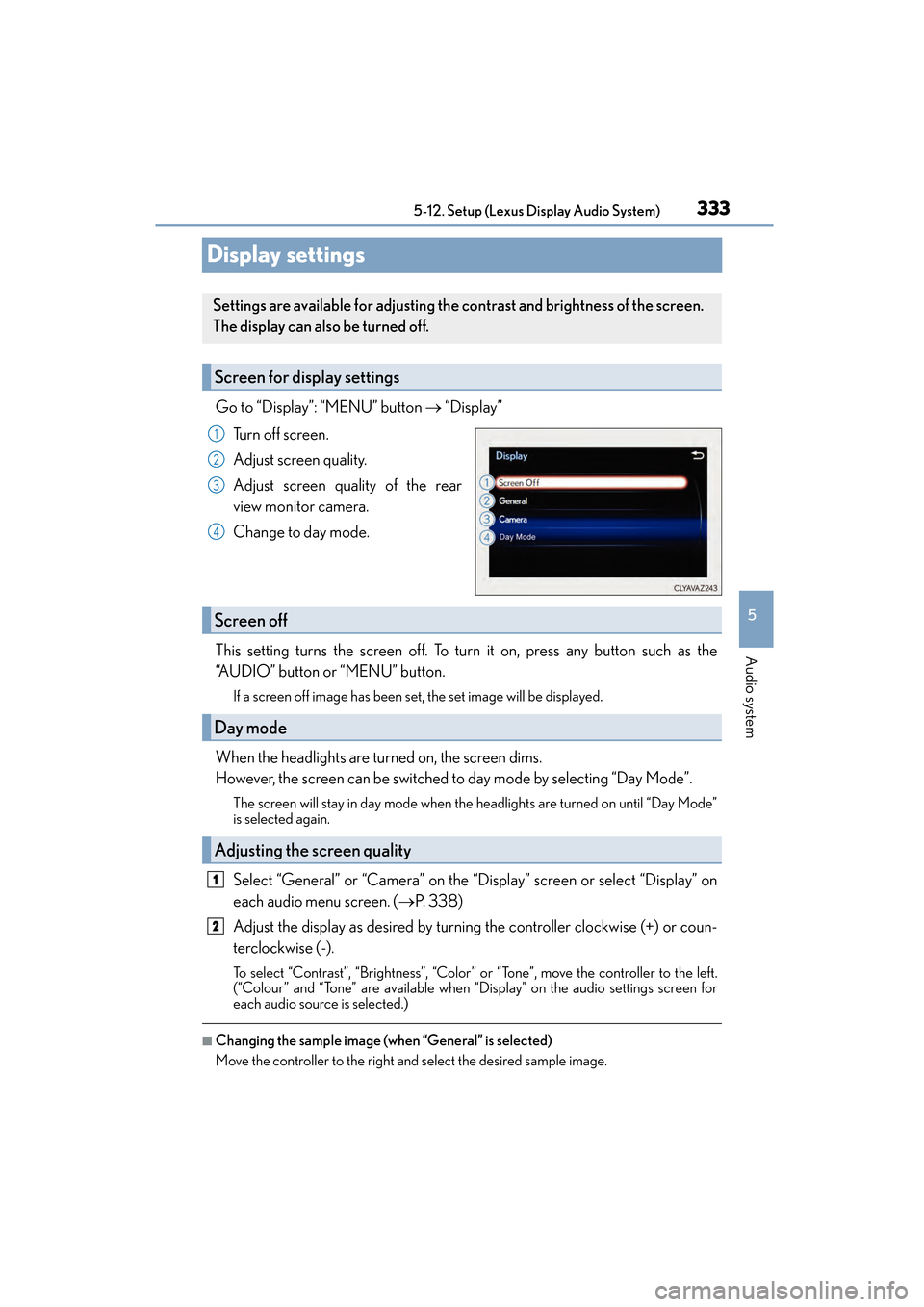
Go to “Display”: “MENU” button
→ “Display”
Tu r n o f f s c r e e n .
Adjust screen quality.
Adjust screen quality of the rear
view monitor camera.
Change to day mode.
This setting turns the screen off. To tu rn it on, press any button such as the
“AUDIO” button or “MENU” button.
If a screen off image has been set, the set image will be displayed.
When the headlights are turned on, the screen dims.
However, the screen can be switched to day mode by selecting “Day Mode”.
The screen will stay in day mode when the headlights are turned on until “Day Mode”
is selected again.
Select “General” or “Camera” on the “Display” screen or select “Display” on
each audio menu screen. ( →P. 3 3 8 )
Adjust the display as desired by turnin g the controller clockwise (+) or coun-
terclockwise (-).
To select “Contrast”, “Brightness”, “Color” or “Tone”, move the controller to the left.
(“Colour” and “Tone” are available when “Display” on the audio settings screen for
each audio source is selected.)
■Changing the sample image (when “General” is selected)
Move the controller to the right and select the desired sample image.
Settings are available for adjusting the contrast and brightness of the screen.
The display can also be turned off.
Screen for display settings
1
2
3
4
Screen off
Day mode
Adjusting the screen quality
1
2
Page 408 of 634

407
CT200h_OM_OM76174U_(U)
6Interior features
6-1. Using the air conditioning system and defogger
Automatic air conditioning system (Vehicles with a
navigation system or Lexus
Display Audio System)......... 408
Automatic air conditioning system (Vehicles without a
navigation system or Lexus
Display Audio System)........... 416
Heated steering wheel/ seat heaters................................ 423
• Heated steering wheel....... 424
• Seat heaters............................ 424 6-2. Using the interior lights
Interior lights list ......................... 425• Personal/interior light main switch ............................. 425
•Front personal/ interior lights .......................... 426
• Rear interior light ................. 426
6-3. Using the storage features List of storage features .............427• Glove box ............................... 428
• Console box........................... 428
•Cup holders/ bottle holders/
door pockets.......................... 428
• Auxiliary boxes .....................430
Luggage compartment features........................................ 432
6-4. Using the other interior features
Other interior features ............ 437 • Sun visors ................................ 437
• Vanity mirrors ........................ 437
• Clock ........................................438
• Power outlet ...........................438
• Assist grips.............................. 440
Garage door opener..................441
Compass ....................................... 447
Safety Connect ........................... 453
Page 426 of 634

425
CT200h_OM_OM76174U_(U)6-2. Using the interior lights
6
Interior features
Interior lights list
Outer foot lights
Cup holder light (when the power switch is in ACCESSORY or ON mode)
Front personal/interior lights (
→P. 4 2 6 )
Rear interior light ( →P. 4 2 6 )
Footwell lights
When the instrument panel light control dial is turned fully down, the cup holder light
and the footwell lights will turn off. ( →P. 8 5 )
Turns the lights off
Turns the door position on
Turns the lights on
Personal/interior light main switch
1
2
3
4
5
1
2
3
Page 427 of 634
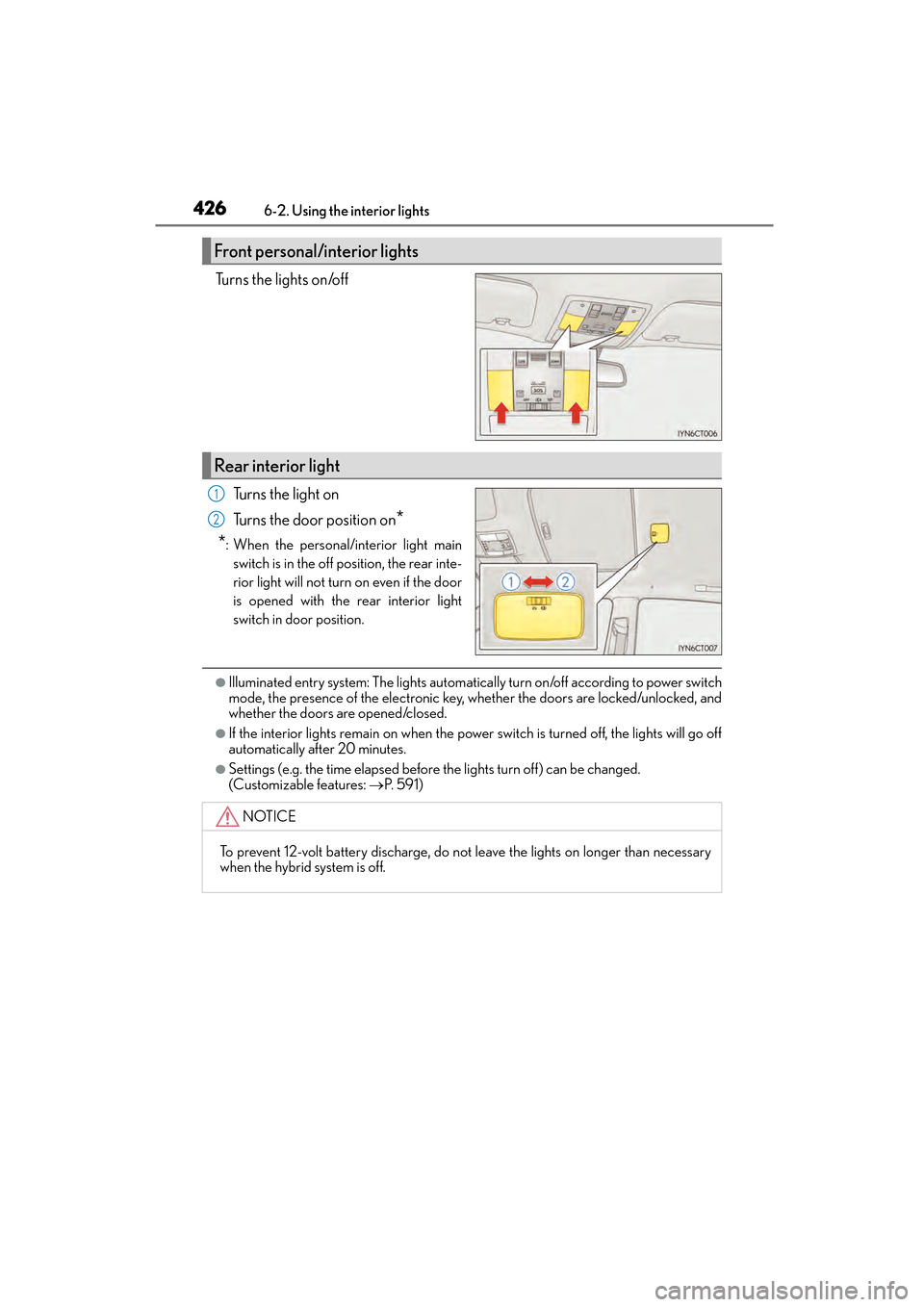
426
CT200h_OM_OM76174U_(U)6-2. Using the interior lights
Turns the lights on/off
Turns the light on
Turns the door position on
*
*
: When the personal/interior light main switch is in the off position, the rear inte-
rior light will not turn on even if the door
is opened with the rear interior light
switch in door position.
●Illuminated entry system: The lights automati cally turn on/off according to power switch
mode, the presence of the electronic key, whether the doors are locked/unlocked, and
whether the doors are opened/closed.
●If the interior lights remain on when the power switch is turned off, the lights will go off
automatically after 20 minutes.
●Settings (e.g. the time elapsed before the lights turn off) can be changed.
(Customizable features: →P. 5 9 1 )
Front personal/interior lights
Rear interior light
1
2
NOTICE
To prevent 12-volt battery discharge, do not leave the lights on longer than necessary
when the hybrid system is off.