Usb Lexus CT200h 2016 (in English) User Guide
[x] Cancel search | Manufacturer: LEXUS, Model Year: 2016, Model line: CT200h, Model: Lexus CT200h 2016Pages: 632, PDF Size: 8.5 MB
Page 280 of 632
2805-5. Using an external device
CT200h_OM_OM76197U_(U)
■Repeating a file
Press the “2” button.
To cancel, press the button again.
■Repeating all the files in a folder
Press and hold the “2” button until you hear a beep.
To cancel, press the button again.
Press the “TEXT” button.
Each time the button is pressed, the display changes in the following order: Elapsed
time Folder name File name Album title Track title Artist name
■USB memory functions
Depending on the USB memory that is conne cted to the system, certain functions may
not be available. Disconnecting the device and reconnecting it once again may resolve
some malfunctions.
■Display
P. 2 6 8
■Error messages
“ERROR”:
This indicates a problem in the USB memory or its connection.
“NO MUSIC”:
This indicates that no MP3/WMA files are included in the USB memory.
■USB memory
●Compatible devices
USB memory that can be used for MP3 and WMA playback
●Compatible device formats
The following device formats can be used:
• USB communication formats: USB2.0 FS (12mbps)
• File formats: FAT16/32 (Windows)
• Correspondence class: Mass storage class
MP3 and WMA files written in any format other than those listed above may not play
correctly, and their file names and fold er names may not be displayed correctly.
Items related to standards and limitations are as follows:
• Maximum directory hierarchy: 8 levels
• Maximum number of folders in a device: 999 (including the root)
• Maximum number of files in a device: 65025
• Maximum number of files per folder: 255
Repeat play
Switching the display
Page 281 of 632

CT200h_OM_OM76197U_(U)
2815-5. Using an external device
5
Audio system
●MP3 and WMA files
MP3 (MPEG Audio LAYER 3) is a standard audio compression format.
Files can be compressed to approximately 1 /10 of their original size using MP3 com-
pression.
WMA (Windows Media Audio) is a Microsoft audio compression format.
This format compresses audio data to a size smaller than that of the MP3 format.
There is a limit to the MP3 and WMA file st andards that can be used and to the media/
formats on which the files are recorded.
●MP3 file compatibility
• Compatible standards MP3 (MPEG1 AUDIO LAYERII, III, MPEG2 AUDIO LAYERII, III, MPEG2.5)
• Compatible sampling frequencies
MPEG1 AUDIO LAYERII, III: 32, 44.1, 48 (kHz)
MPEG2 AUDIO LAYERII, III: 16, 22.05, 24 (kHz)
MPEG2.5: 8, 11.025, 12 (kHz)
• Compatible bit rates (compatible with VBR) MPEG1 AUDIO LAYERII, III: 32-320 (kbps)
MPEG2 AUDIO LAYERII, III: 32-160 (kbps)
MPEG2.5: 32-160 (kbps)
• Compatible channel modes: stereo, joint stereo, dual channel and monaural
●WMA file compatibility
• Compatible standards WMA Ver. 9
• Compatible sampling frequencies HIGH PROFILE 32, 44.1, 48 (kHz)
• Compatible bit rates
HIGH PROFILE 32-320 (kbps, VBR)
●File names
The only files that can be recognized as MP3/WMA and played are those with the
extension .mp3 or .wma.
●ID3 and WMA tags
ID3 tags can be added to MP3 files, making it possible to record the track title, artist
name, etc.
The system is compatible with ID3 Ver. 1.0, 1.1, and Ver. 2.2, 2.3, 2.4 ID3 tags. (The
number of characters is based on ID3 Ver. 1.0 and 1.1.)
WMA tags can be added to WMA files, making it possible to record the track title and
artist name in the same way as with ID3 tags.
●MP3 and WMA playback
• When a device containing MP3 or WMA f iles is connected, all files in the USB
memory device are checked. Once the file check is finished, the first MP3 or WMA
file is played. To make the file check finish more quickly, we recommend that you do
not include any files other th an MP3 or WMA files or create any unnecessary fold-
ers.
• When the USB device is connected and the audio source is changed to USB mem-
ory mode, the USB device will start playing the first file in the first folder. If the same
device is removed and reinserted (and the contents have not been changed), the
USB device will resume play from the sa me point in which it was last used.
Page 282 of 632
2825-5. Using an external device
CT200h_OM_OM76197U_(U)
●Extensions
If the file extensions .mp3 and .wma are used for files other th an MP3 and WMA files,
they will be mistakenly recognized and played as MP3 an d WMA files. This may result
in large amounts of interference and damage to the speakers.
●Playback
• To play MP3 files with steady sound quality, we recommend a fixed bit rate of at least
128 kbps and a sampling frequency of 44.1 kHz.
• There is a wide variety of freeware an d other encoding software for MP3 and WMA
files on the market, and depending on the st atus of the encoding and the file format,
poor sound quality or noise at the start of playback may result. In some cases, play-
back may not be possible at all.
• Microsoft, Windows, and Windows Media are registered trademarks of Microsoft
Corporation in the U.S.A. and other countries.
WA R N I N G
■Caution while driving
Do not connect USB memory or operate the controls.
NOTICE
■To prevent damage to USB memory
●Do not leave USB memory in the vehicle. The temperature inside the vehicle may
become high, resulting in damage to the player.
●Do not push down on or apply unnecessary pressure to the USB memory while it is
connected as this may damage the USB memory or its terminal.
●Do not insert foreign objects into the port as this may damage the USB memory or its
terminal.
Page 325 of 632
325
CT200h_OM_OM76197U_(U)5-11. Basic Operations (Lexus Display Audio System)
5
Audio system
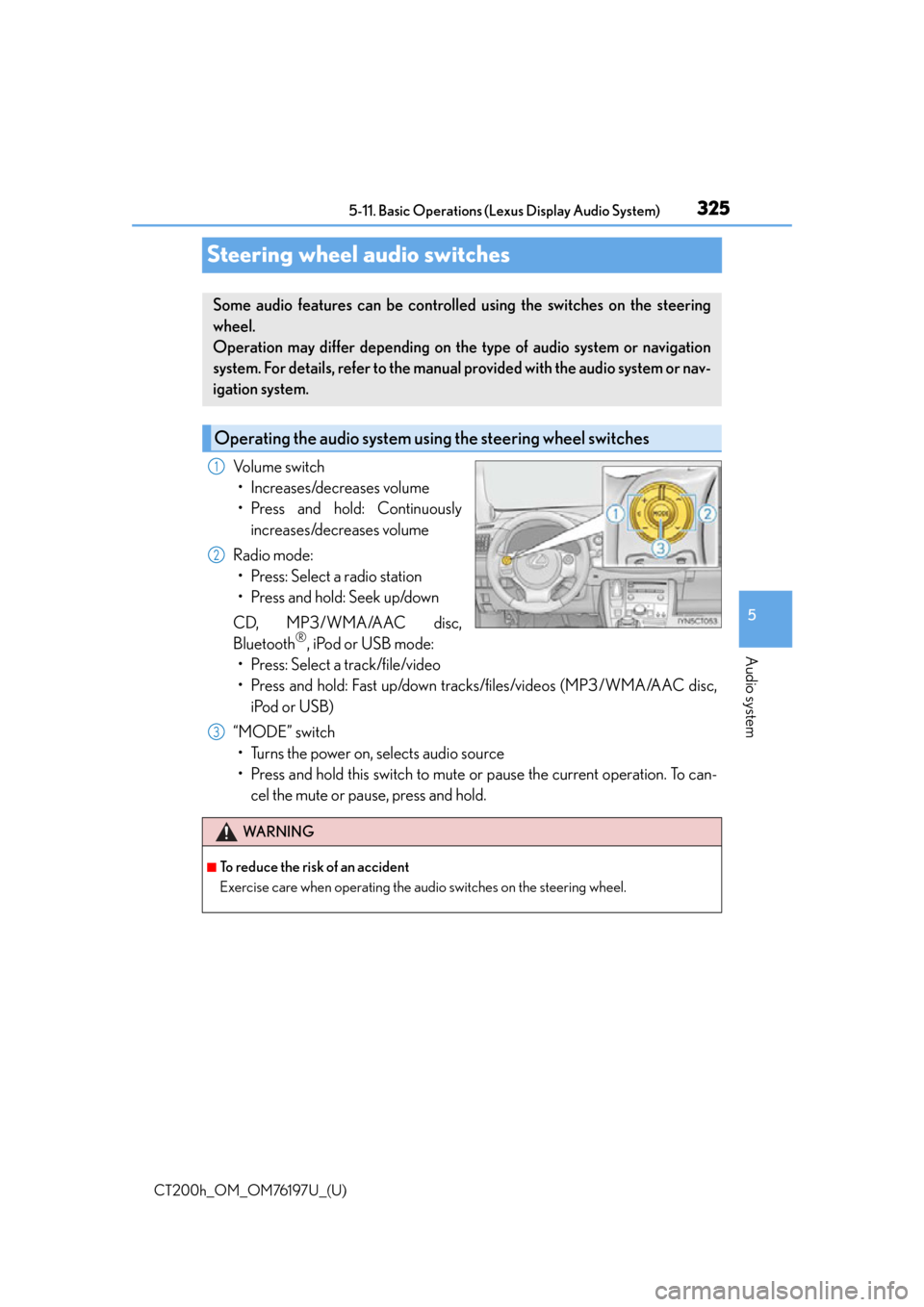
Steering wheel audio switches
Volume switch
• Increases/decreases volume
• Press and hold: Continuously increases/decreases volume
Radio mode: • Press: Select a radio station
• Press and hold: Seek up/down
CD, MP3/WMA/AAC disc,
Bluetooth
®, iPod or USB mode:
• Press: Select a track/file/video
• Press and hold: Fast up/down tracks/files/videos (MP3/WMA/AAC disc, iPod or USB)
“MODE” switch • Turns the power on, selects audio source
• Press and hold this switch to mute or pause the current operation. To can- cel the mute or pause, press and hold.
Some audio features can be controlled using the switches on the steering
wheel.
Operation may differ depending on th e type of audio system or navigation
system. For details, refer to the manual provided with the audio system or nav-
igation system.
Operating the audio system us ing the steering wheel switches
1
2
WA R N I N G
■To reduce the risk of an accident
Exercise care when operating the audio switches on the steering wheel.
3
Page 326 of 632

326
CT200h_OM_OM76197U_(U)5-11. Basic Operations (Lexus Display Audio System)
USB/AUX ports
Press down and release the lid.
Open the cover.
Connect an iPod, USB memory device or portable audio player to the USB/
AUX port as indicated below. Select “iPod”, “USB”, “AUX” or “A/V” on the
audio source selection screen and the device can be operated via Lexus Dis-
play Audio system.
Connecting using the USB/AUX port
1
2
Page 327 of 632

CT200h_OM_OM76197U_(U)
3275-11. Basic Operations (Lexus Display Audio System)
5
Audio system
■iPod
Open the cover and connect an iPod using an iPod cable.
Turn on the power of the iPod if it is not turned on.
■USB memory
Open the cover and connect the USB memory device.
Turn on the power of the USB memory device if it is not turned on.
■Portable audio player
Open the cover and connect the portable audio player.
Turn on the power of the portable audio player if it is not turned on.
WA R N I N G
■While driving
Do not connect a device or operate the device controls.
Page 330 of 632
3305-12. Setup (Lexus Display Audio System)
CT200h_OM_OM76197U_(U)
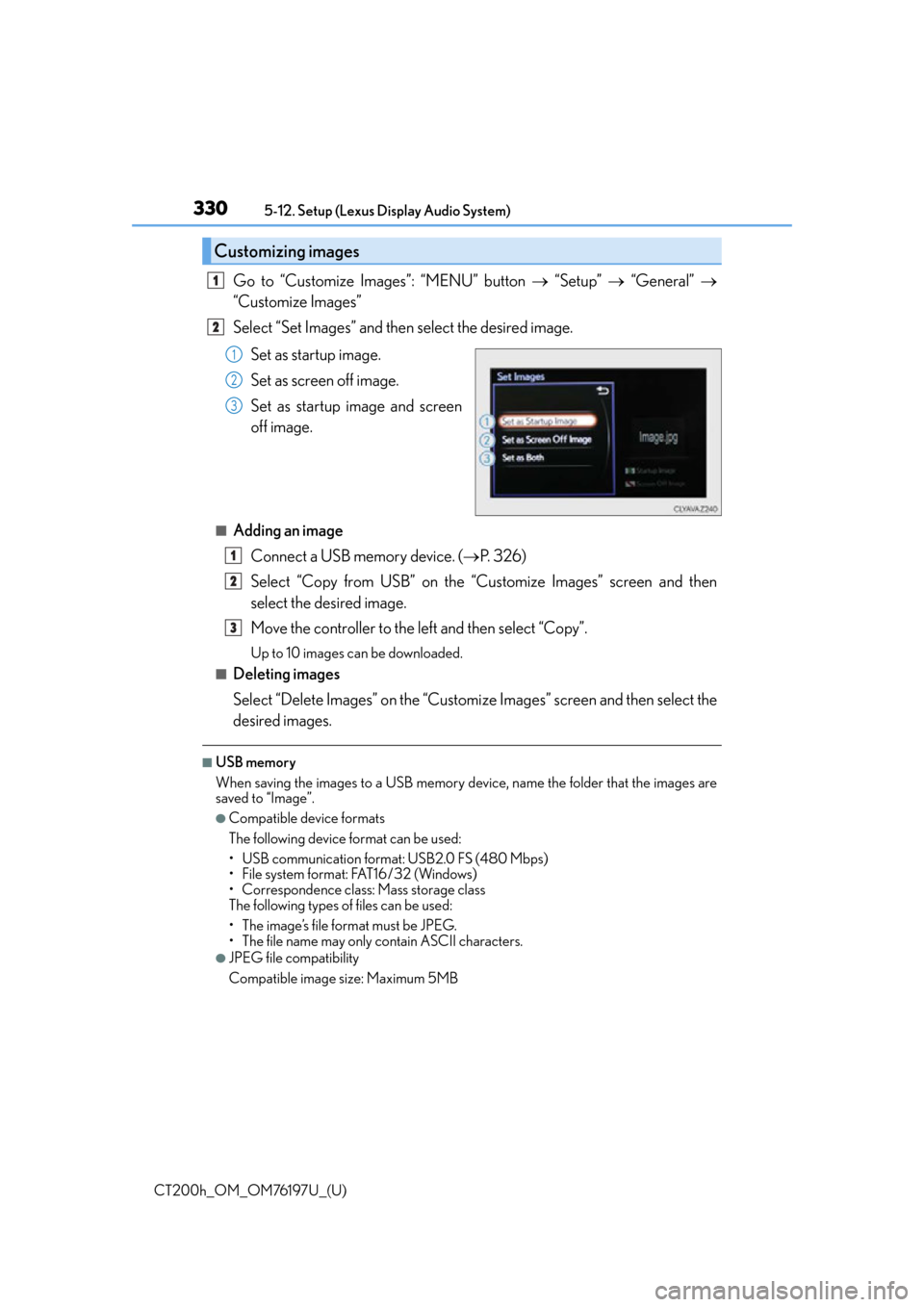
Go to “Customize Images”: “MENU” button “Setup” “General”
“Customize Images”
Select “Set Images” and then select the desired image.
Set as startup image.
Set as screen off image.
Set as startup image and screen
off image.
■Adding an imageConnect a USB memory device. ( P. 3 2 6 )
Select “Copy from USB” on the “Customize Images” screen and then
select the desired image.
Move the controller to the left and then select “Copy”.
Up to 10 images can be downloaded.
■Deleting images
Select “Delete Images” on the “Customize Images” screen and then select the
desired images.
■USB memory
When saving the images to a USB memory device, name the folder that the images are
saved to “Image”.
●Compatible device formats
The following device format can be used:
• USB communication format: USB2.0 FS (480 Mbps)
• File system format: FAT16/32 (Windows)
• Correspondence class: Mass storage class
The following types of files can be used:
• The image’s file format must be JPEG.
• The file name may only contain ASCII characters.
●JPEG file compatibility
Compatible image size: Maximum 5MB
Customizing images
1
2
1
2
3
1
2
3
Page 331 of 632

CT200h_OM_OM76197U_(U)
3315-12. Setup (Lexus Display Audio System)
5
Audio system
“MENU” button “Setup” “General” “Delete Personal Data”
Select “Delete”.
Check carefully beforehand, as data cannot be retrieved once deleted.
The following personal data will be deleted or changed to its default settings.
• Phonebook data
• Call history data
•Favorite data
•Bluetooth
® devices data
•Phone sound settings
• Detailed Bluetooth
® settings
• Audio/video setting
• Preset switch data
•Last used radio station
• Customized image data
•FM info setting
• iPod tagging information
• Software update history
• Software update detail information
•Phone disp lay setting
• Contact/call history setting
• Messaging setting
• Traffic information map
• Weather information
• Phonebook data for voice recognition
• Music data for voice recognition
NOTICE
■To prevent damage to the USB memory device or its terminals
P. 3 5 9
Deleting personal data
1
2
Page 336 of 632
336
CT200h_OM_OM76197U_(U)5-13. Using the audio system (Lexus Display Audio System)
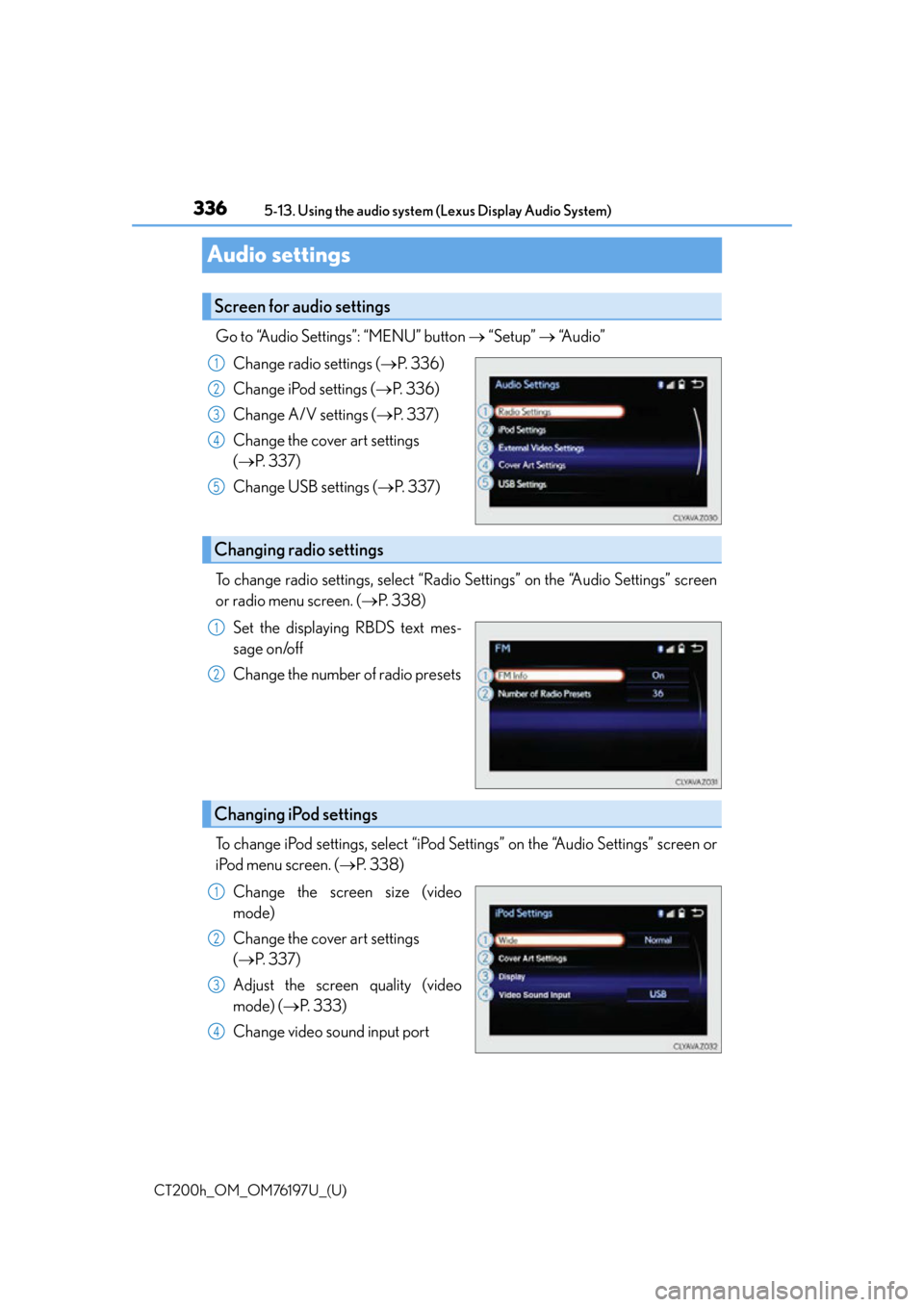
Audio settings
Go to “Audio Settings”: “MENU” button
“Setup” “Audio”
Change radio settings ( P. 3 3 6 )
Change iPod settings ( P. 3 3 6 )
Change A/V settings ( P. 3 3 7 )
Change the cover art settings
( P. 3 3 7 )
Change USB settings ( P. 3 3 7 )
To change radio settings, select “Radio Settings” on the “Audio Settings” screen
or radio menu screen. ( P. 3 3 8 )
Set the displaying RBDS text mes-
sage on/off
Change the number of radio presets
To change iPod settings, select “iPod Se ttings” on the “Audio Settings” screen or
iPod menu screen. ( P. 3 3 8 )
Change the screen size (video
mode)
Change the cover art settings
( P. 3 3 7 )
Adjust the screen quality (video
mode) ( P. 333)
Change video sound input port
Screen for audio settings
1
2
3
4
5
Changing radio settings
1
2
Changing iPod settings
1
2
3
4
Page 337 of 632
CT200h_OM_OM76197U_(U)
3375-13. Using the audio system (Lexus Display Audio System)
5
Audio system
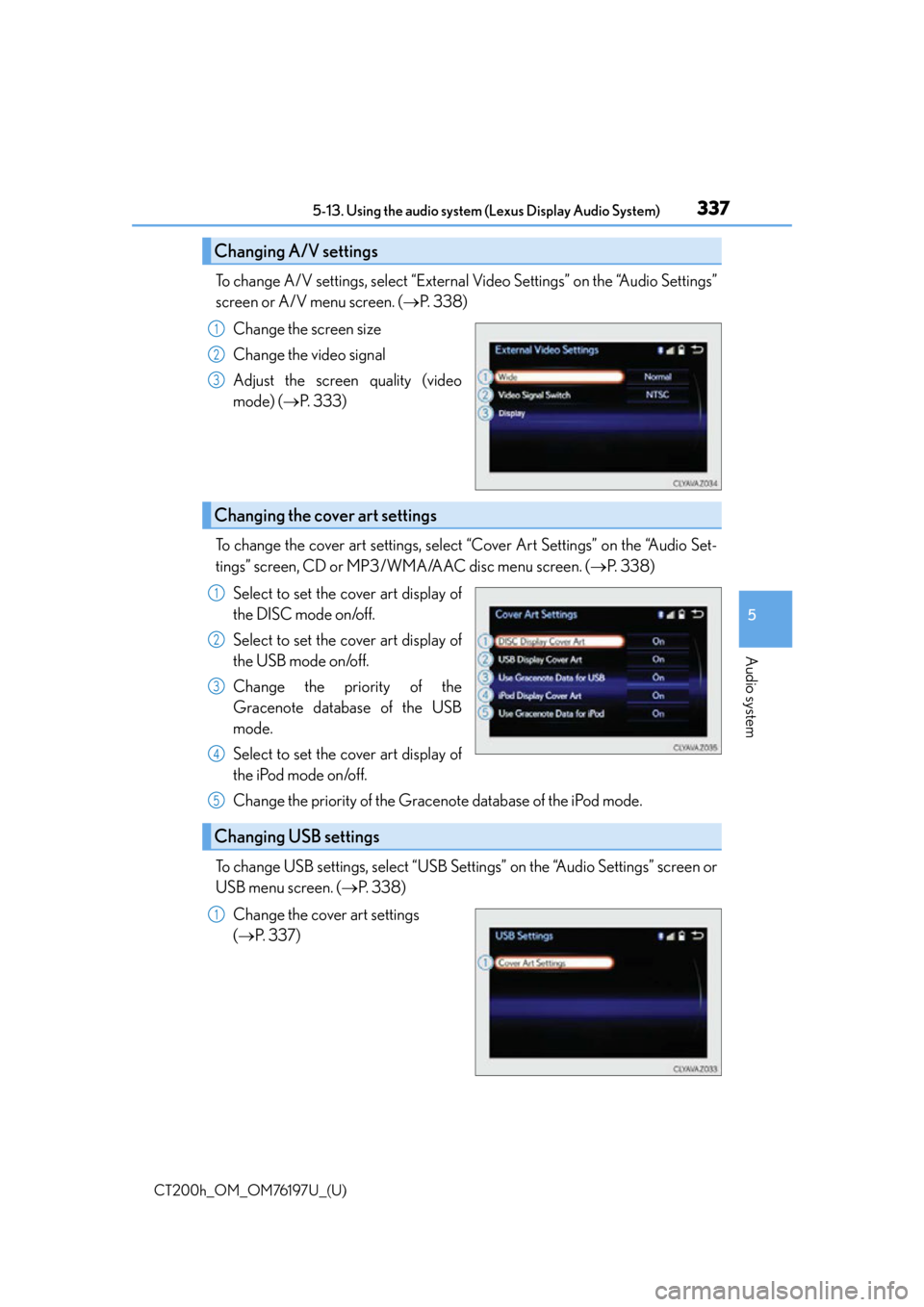
To change A/V settings, select “External Video Settings” on the “Audio Settings”
screen or A/V menu screen. ( P. 3 3 8 )
Change the screen size
Change the video signal
Adjust the screen quality (video
mode) ( P. 333)
To change the cover art settings, select “Cover Art Settings” on the “Audio Set-
tings” screen, CD or MP3/WMA/AAC disc menu screen. ( P. 3 3 8 )
Select to set the cover art display of
the DISC mode on/off.
Select to set the cover art display of
the USB mode on/off.
Change the priority of the
Gracenote database of the USB
mode.
Select to set the cover art display of
the iPod mode on/off.
Change the priority of the Gracenote database of the iPod mode.
To change USB settings, select “USB Settings” on the “Audio Settings” screen or
USB menu screen. ( P. 3 3 8 )
Change the cover art settings
( P. 3 3 7 )
Changing A/V settings
1
2
3
Changing the cover art settings
1
2
3
4
Changing USB settings
5
1