AUX Lexus CT200h 2016 (in English) Owner's Guide
[x] Cancel search | Manufacturer: LEXUS, Model Year: 2016, Model line: CT200h, Model: Lexus CT200h 2016Pages: 632, PDF Size: 8.5 MB
Page 409 of 632
409
CT200h_OM_OM76197U_(U)
6Interior features
6-1. Using the air conditioning system and defogger
Automatic air conditioning system (Vehicles with a
navigation system or Lexus
Display Audio System)........... 410
Automatic air conditioning system (Vehicles without a
navigation system or Lexus
Display Audio System)........... 418
Heated steering wheel/ seat heaters................................425
• Heated steering wheel....... 426
• Seat heaters............................ 426 6-2. Using the interior lights
Interior lights list ..........................427• Personal/interior light main switch ..............................427
•Front personal/ interior lights .......................... 428
• Rear interior light ................. 428
6-3. Using the storage features List of storage features ............ 429• Glove box ...............................430
• Console box...........................430
•Cup holders/bottle holders/
door pockets ..........................430
• Auxiliary boxes ..................... 432
Luggage compartment features........................................ 434
6-4. Using the other interior features Other interior features ............ 439• Sun visors ................................ 439
• Vanity mirrors ........................ 439
• Clock ........................................ 440
• Power outlet ........................... 440
• Assist grips.............................. 442
Garage door opener................ 443
Compass ....................................... 449
LEXUS Enform Safety Connect ...................................... 455
Page 429 of 632

429
CT200h_OM_OM76197U_(U)6-3. Using the storage features
6
Interior features
List of storage features
Auxiliary boxes (
P. 4 3 2 )
Glove box ( P. 4 3 0 )
Bottle holders/door pockets
( P. 4 3 1 ) Console box (
P. 4 3 0 )
Cup holders ( P. 4 3 0 )1
2
3
4
5
WA R N I N G
●Do not leave glasses, lighters or spray cans in the storage spaces, as this may cause
the following when cabin temperature becomes high:
• Glasses may be deformed by heat or cracked if they come into contact with other stored items.
• Lighters or spray cans may explode. If they come into contact with other stored items, the lighter may catch fire or the spray can may release gas, causing a fire
hazard.
●When driving or when the storage compartments are not in use, keep the lids closed.
In the event of sudden braking or sudden swerving, an accident may occur due to an
occupant being struck by an open lid or the items stored inside.
Page 432 of 632
432
CT200h_OM_OM76197U_(U)6-3. Using the storage features
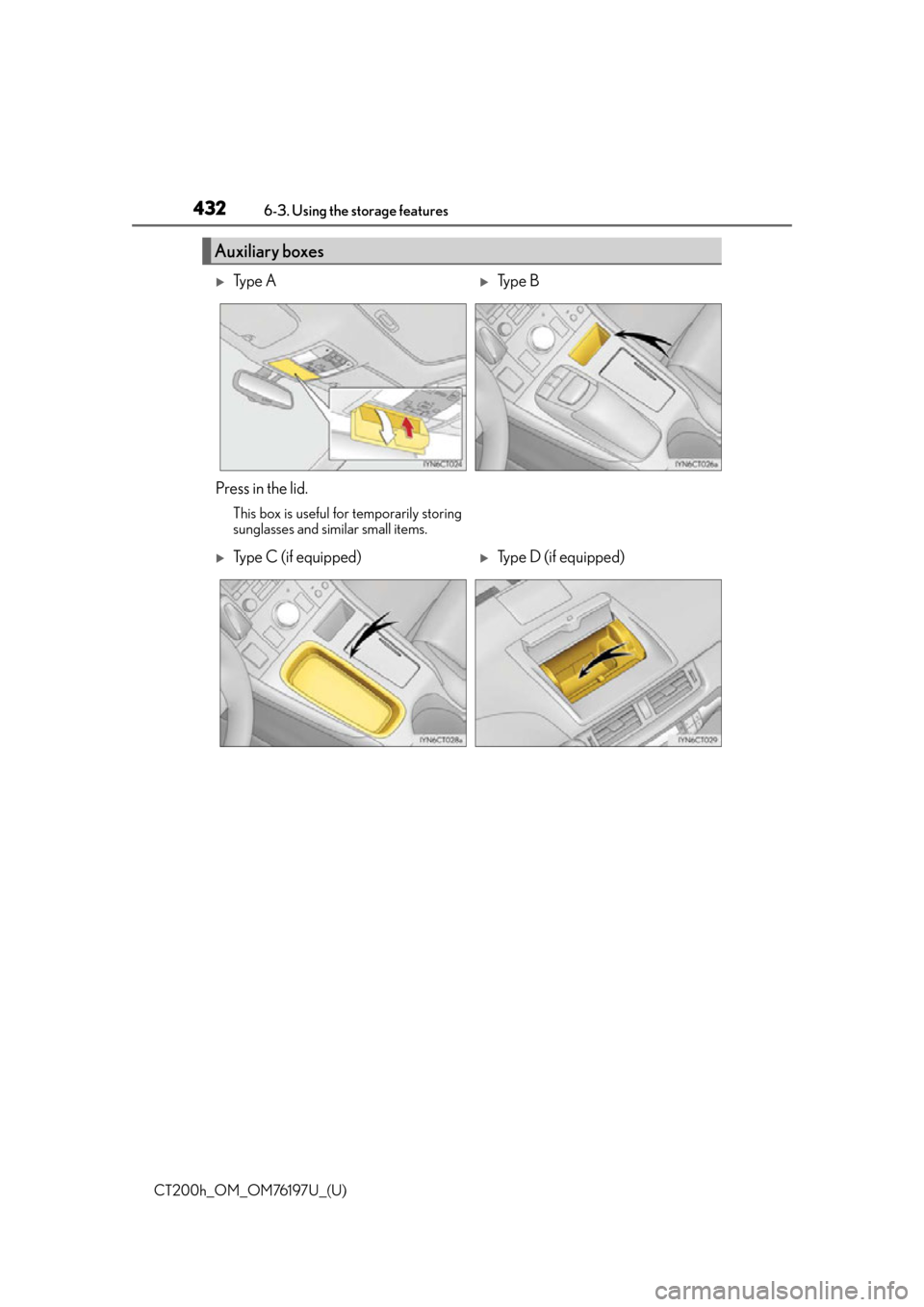
Auxiliary boxes
Ty p e ATy p e B
Press in the lid.
This box is useful for temporarily storing
sunglasses and similar small items.
Type C (if equipped)Type D (if equipped)
Page 433 of 632

CT200h_OM_OM76197U_(U)
4336-3. Using the storage features
6
Interior features
■Auxiliary box (type D) (if equipped)
If an object has fallen down the back of the lid,
the fallen object can be retrieved by removing
the cover inside the auxiliary box.
Remove the mat.
Remove the cover using a flathead screw-
driver protected with tape etc.
WA R N I N G
Do not store items heavier than 0.44 lb. (200 g).
Doing so may cause the auxiliary box to open and the items inside may fall out, result-
ing in an accident. (type A)
NOTICE
Do not leave items in the auxiliary box or on the dashboard for long periods of time
when the vehicle is in the sun.
The inside of the auxiliary box and the dashboard will become extremely hot compared
to other parts of the vehicle, and the item s could be deformed or damaged. (type D)
1
2
Page 435 of 632
CT200h_OM_OM76197U_(U)
4356-3. Using the storage features
6
Interior features
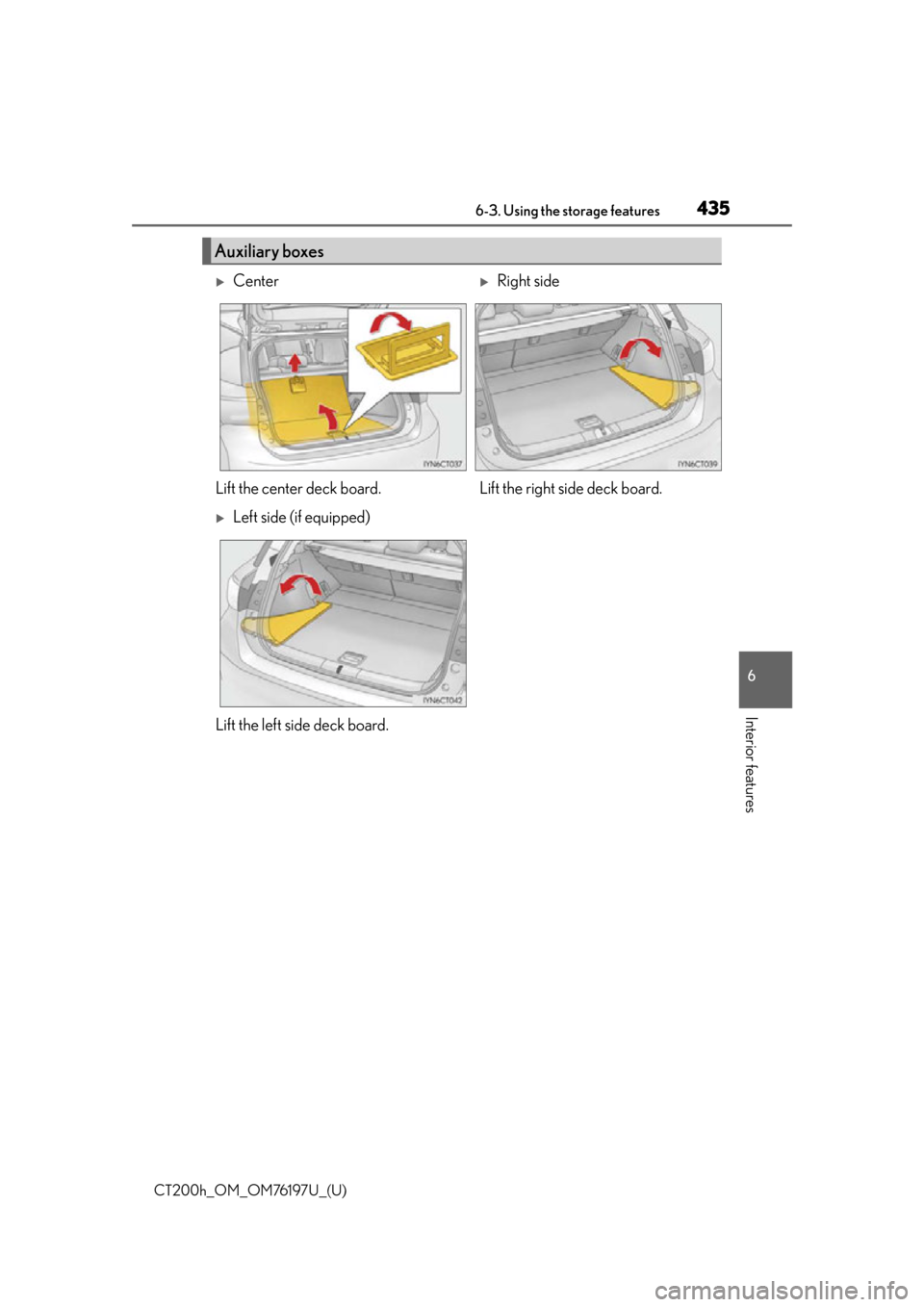
Auxiliary boxes
Center Right side
Lift the center deck board. Lift the right side deck board.
Left side (if equipped)
Lift the left side deck board.
Page 437 of 632
CT200h_OM_OM76197U_(U)
4376-3. Using the storage features
6
Interior features
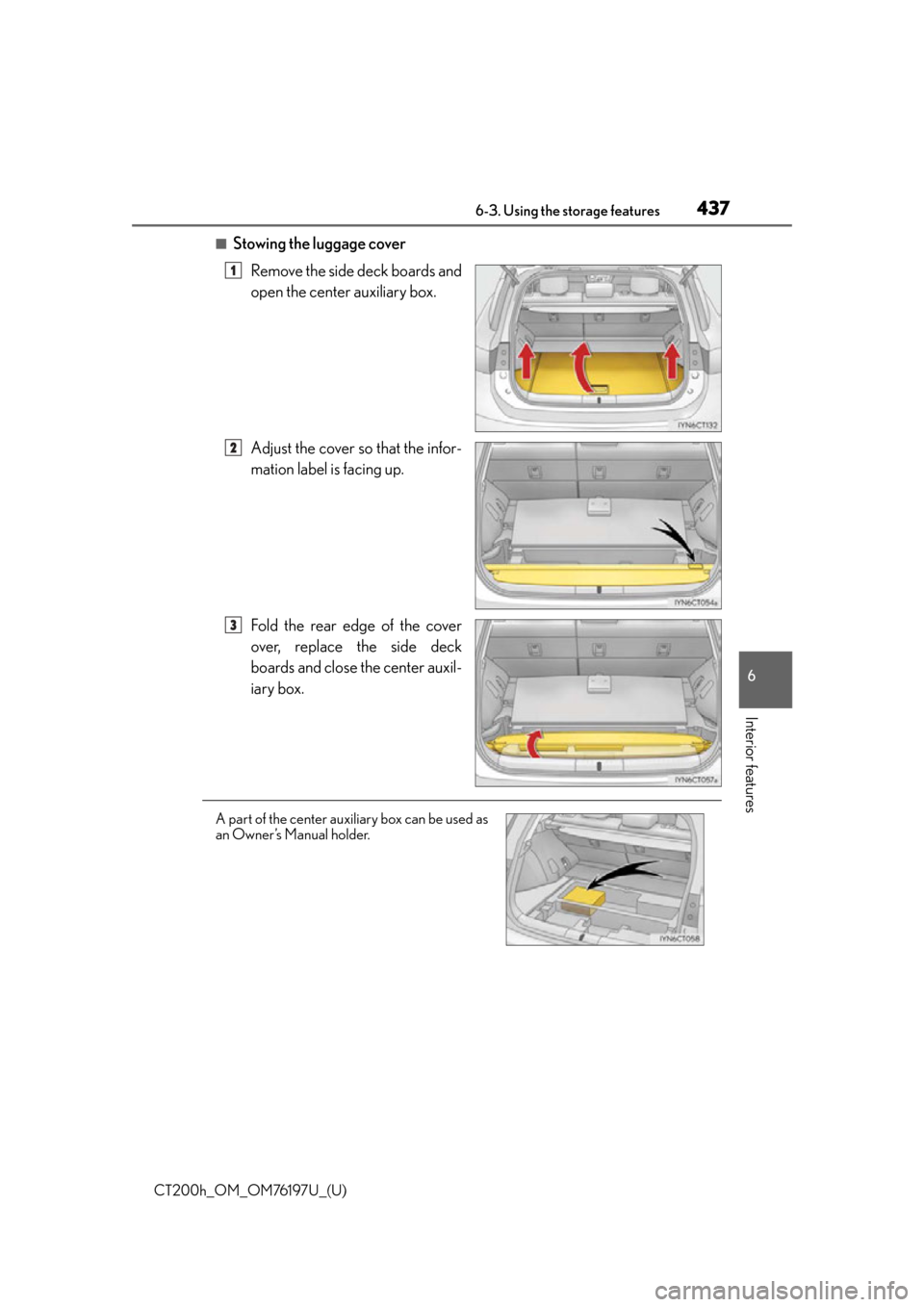
■Stowing the luggage coverRemove the side deck boards and
open the center auxiliary box.
Adjust the cover so that the infor-
mation label is facing up.
Fold the rear edge of the cover
over, replace the side deck
boards and close the center auxil-
iary box.
1
2
3
A part of the center auxiliary box can be used as
an Owner’s Manual holder.
Page 438 of 632

438
CT200h_OM_OM76197U_(U)6-3. Using the storage features
WA R N I N G
●To avoid injury, always return the cargo hooks to their stowed positions when not in
use.
●If the deck boards are removed, return them to their original positions before driving.
In the event of sudden braking, an acci
dent may occur due to an occupant being
struck by the deck boards or the items stored in the auxiliary box.
●Do not allow children to climb on the lugg age cover. Climbing on the luggage cover
could result in damage to the luggage cover, possibly causing death or serious injury
to the child.
Page 441 of 632

CT200h_OM_OM76197U_(U)
4416-4. Using the other interior features
6
Interior features
Open the cover.
Auxiliary box (if equipped)
Press the button.
Open the cover.
●The power outlet can be used when the power switch is in ACCESSORY or ON mode.
2
1
2
●The gap in the lid allows power cables to be
passed through even when the lid is closed.
(auxiliary box)
Page 475 of 632
475
CT200h_OM_OM76197U_(U)7-3. Do-it-yourself maintenance
7
Maintenance and care
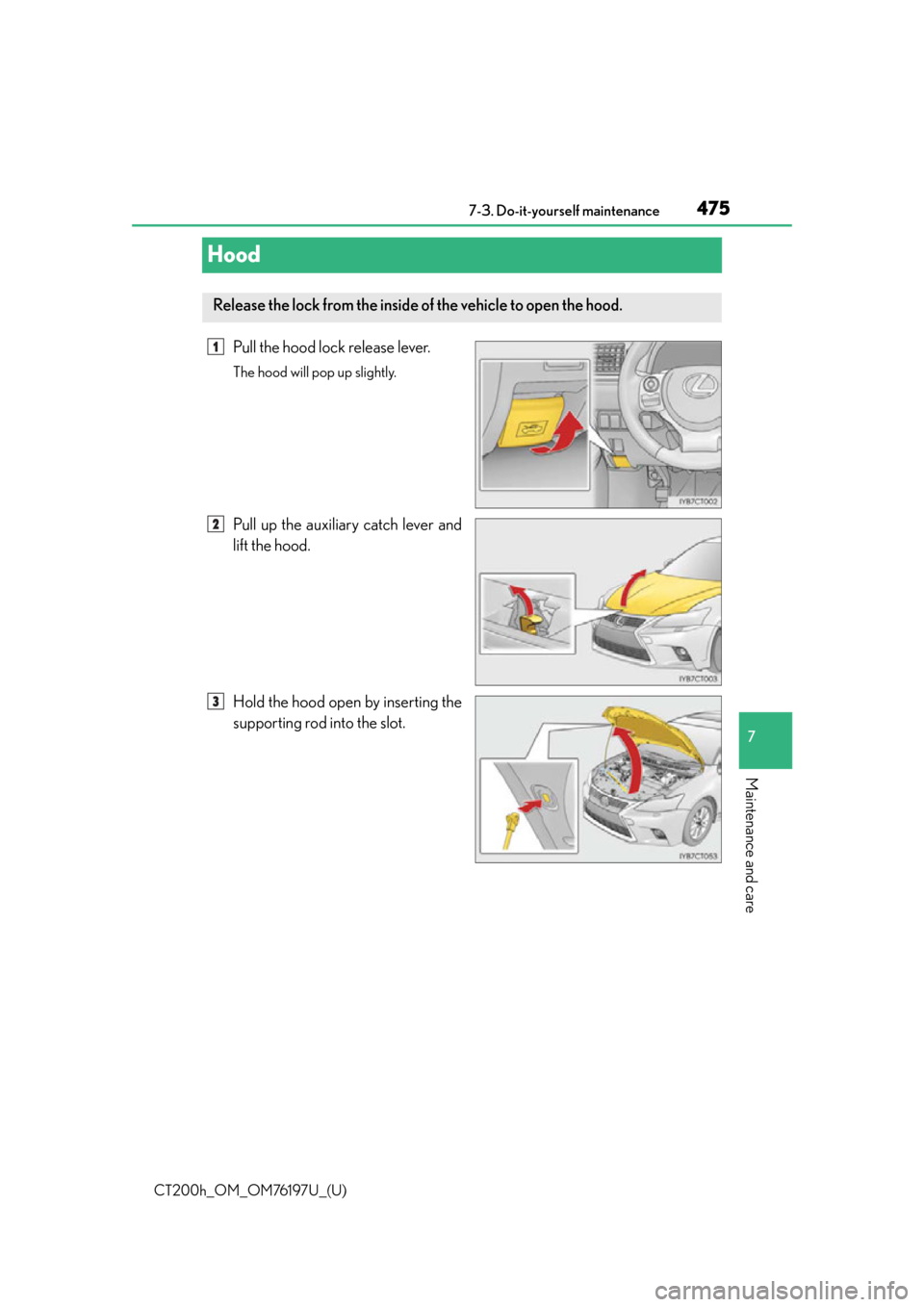
Hood
Pull the hood lock release lever.
The hood will pop up slightly.
Pull up the auxiliary catch lever and
lift the hood.
Hold the hood open by inserting the
supporting rod into the slot.
Release the lock from the inside of the vehicle to open the hood.
1
2
3
Page 486 of 632
486
CT200h_OM_OM76197U_(U)7-3. Do-it-yourself maintenance
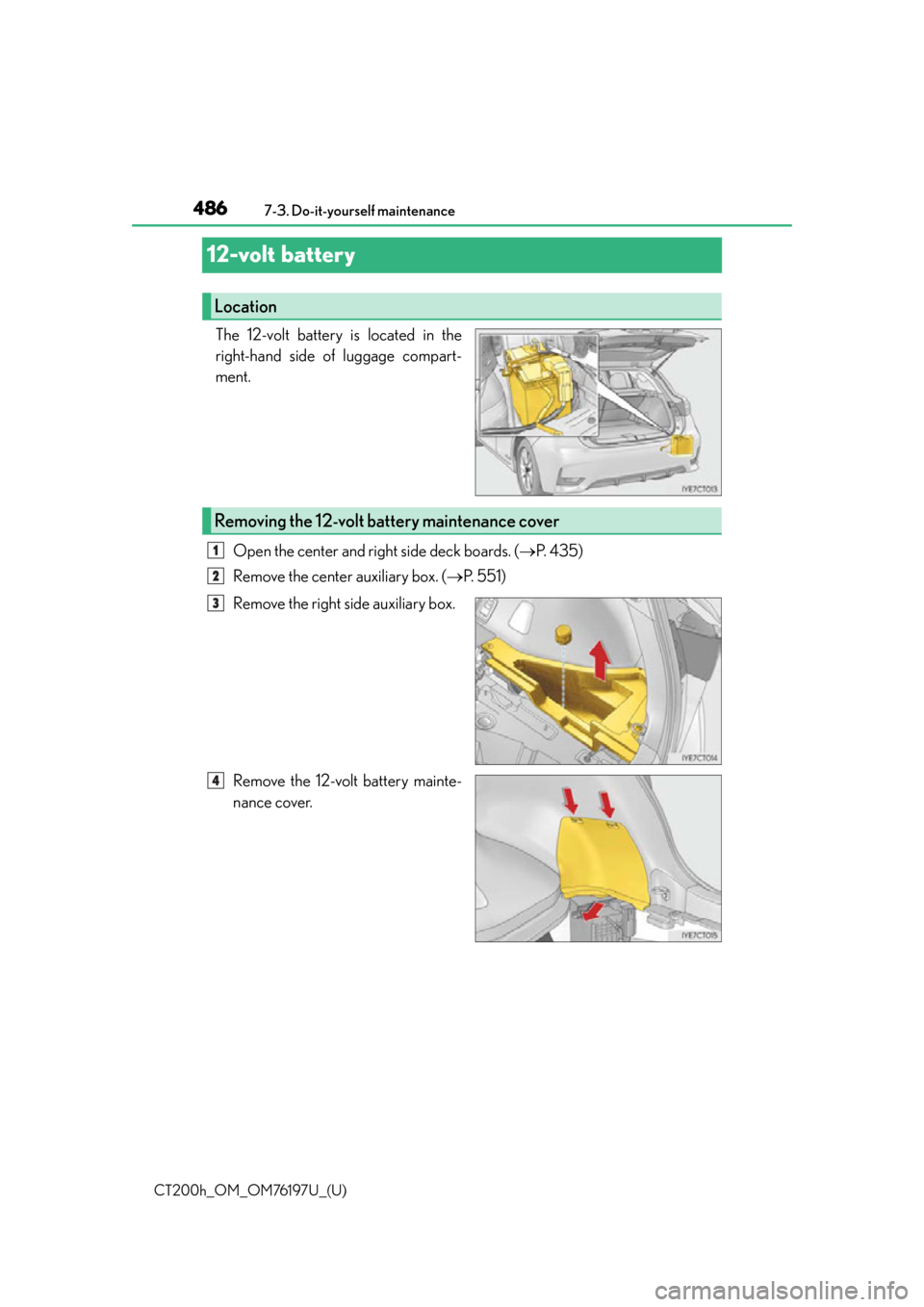
12-volt battery
The 12-volt battery is located in the
right-hand side of luggage compart-
ment.
Open the center and right side deck boards. ( P. 4 3 5 )
Remove the center auxiliary box. ( P. 5 5 1 )
Remove the right side auxiliary box.
Remove the 12-volt battery mainte-
nance cover.
Location
Removing the 12-volt battery maintenance cover
1
2
3
4