audio Lexus ES300h 2013 Owner's Manual
[x] Cancel search | Manufacturer: LEXUS, Model Year: 2013, Model line: ES300h, Model: Lexus ES300h 2013Pages: 910, PDF Size: 9.95 MB
Page 457 of 910
456
ES350 300h_OM_OM33A01U_(U)
5-3. Using the Lexus Display Audio system
There are two connecting methods available-automatic and manual.
■Automatic
When you register your phone, auto connection will be activated.
Always set it to this mode and leave the Bluetooth
® phone in a place
where connection can be established.
When the “START STOP ENGINE” <“POWER”> switch is turned to
ACCESSORY or IGNITION ON
for a nearby cellular phone you have registered.
Next, the system automatically connects with the most recent of the
phones connected to in the past. Then, the connection result is dis-
played.
Depending on the type of phone, phone operations may be required
(to confirm if connection is to be received or not) even when automati-
cally connected.
Connecting a Bluetooth® phone
Page 458 of 910
ES350 300h_OM_OM33A01U_(U)
4575-3. Using the Lexus Display Audio system
5
Interior features
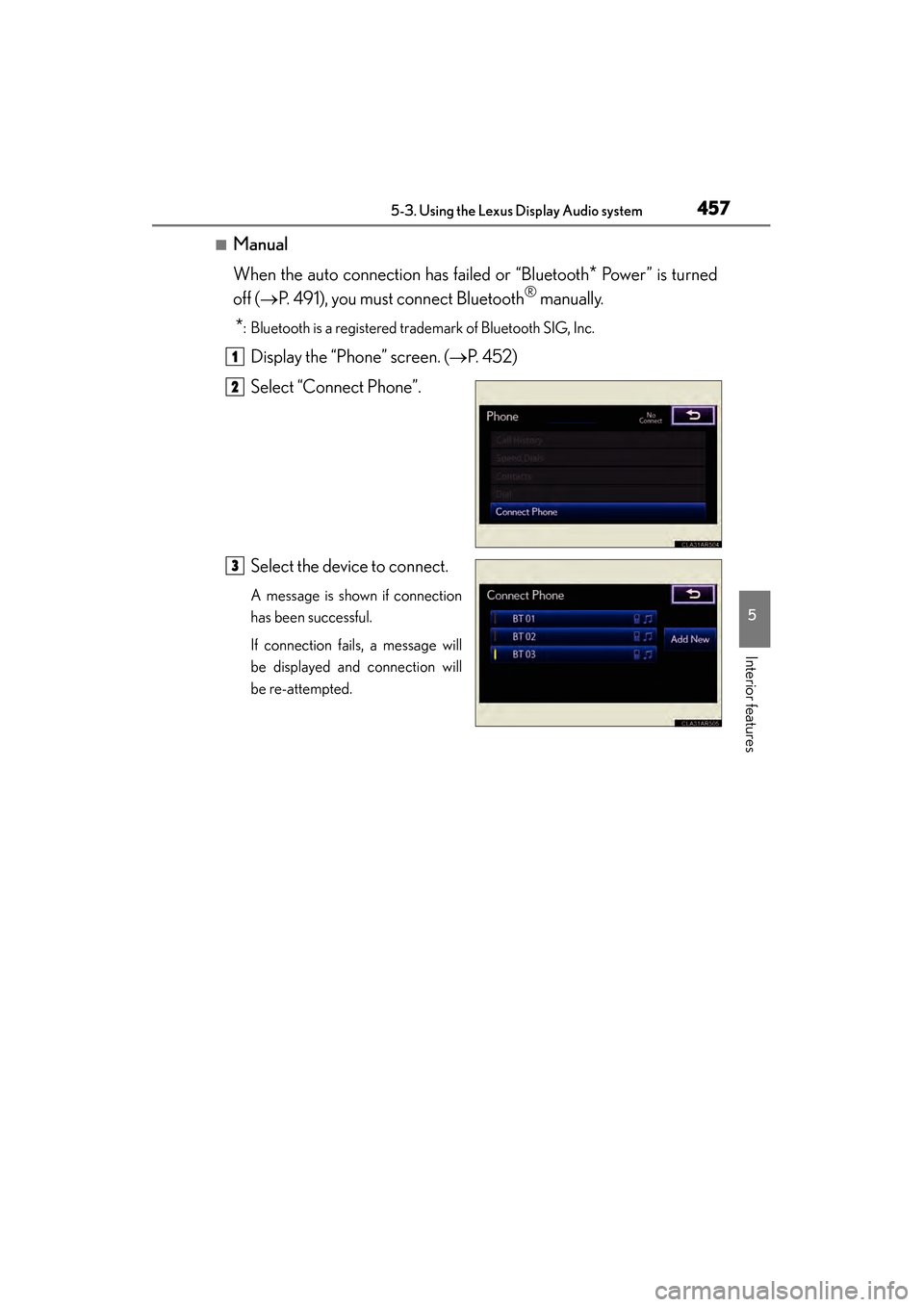
■Manual
When the auto connection has failed or “Bluetooth
* Power” is turned
off ( →P. 491), you must connect Bluetooth
® manually.
*: Bluetooth is a registered trademark of Bluetooth SIG, Inc.
Display the “Phone” screen. ( →P. 4 5 2 )
Select “Connect Phone”.
Select the device to connect.
A message is shown if connection
has been successful.
If connection fails, a message will
be displayed and connection will
be re-attempted.
1
2
3
Page 459 of 910
458
ES350 300h_OM_OM33A01U_(U)
5-3. Using the Lexus Display Audio system
■Reconnecting to the Bluetooth® phone
If the system cannot connect due to poor signal strength with the “START STOP
ENGINE” <“POWER”> switch in ACCESSORY or IGNITION ON
the system will automatically attempt to reconnect.
If the phone is turned off, the system will not attempt to reconnect. In this case, con-
nection must be made manually, or the phone must be re-selected.
■Connecting the phone while Bluetooth® audio is playing
●Bluetooth® audio will stop temporarily.
●It may take time to connect.
Page 460 of 910
ES350 300h_OM_OM33A01U_(U)
4595-3. Using the Lexus Display Audio system
5
Interior features
Once the Bluetooth® phone is registered, you can make a call using the
following procedure:
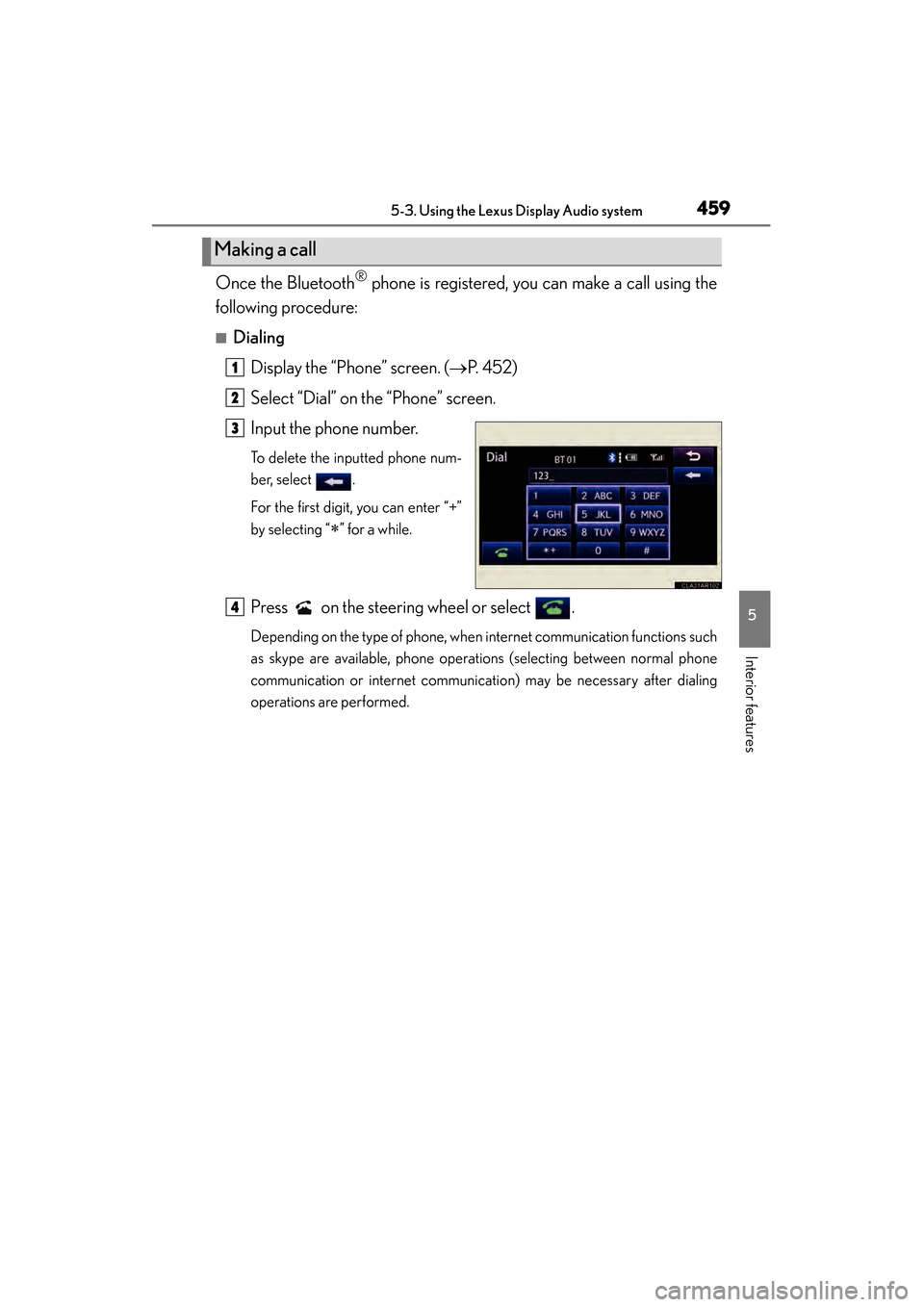
■Dialing
Display the “Phone” screen. ( →P. 4 5 2 )
Select “Dial” on the “Phone” screen.
Input the phone number.
To delete the inputted phone num-
ber, select .
For the first digit, you can enter “+”
by selecting “
∗” for a while.
Press on the steering wheel or select .
Depending on the type of phone, when internet communication functions such
as skype are available, phone operations (selecting between normal phone
communication or internet communication) may be necessary after dialing
operations are performed.
Making a call
1
2
3
4
Page 461 of 910
460
ES350 300h_OM_OM33A01U_(U)
5-3. Using the Lexus Display Audio system
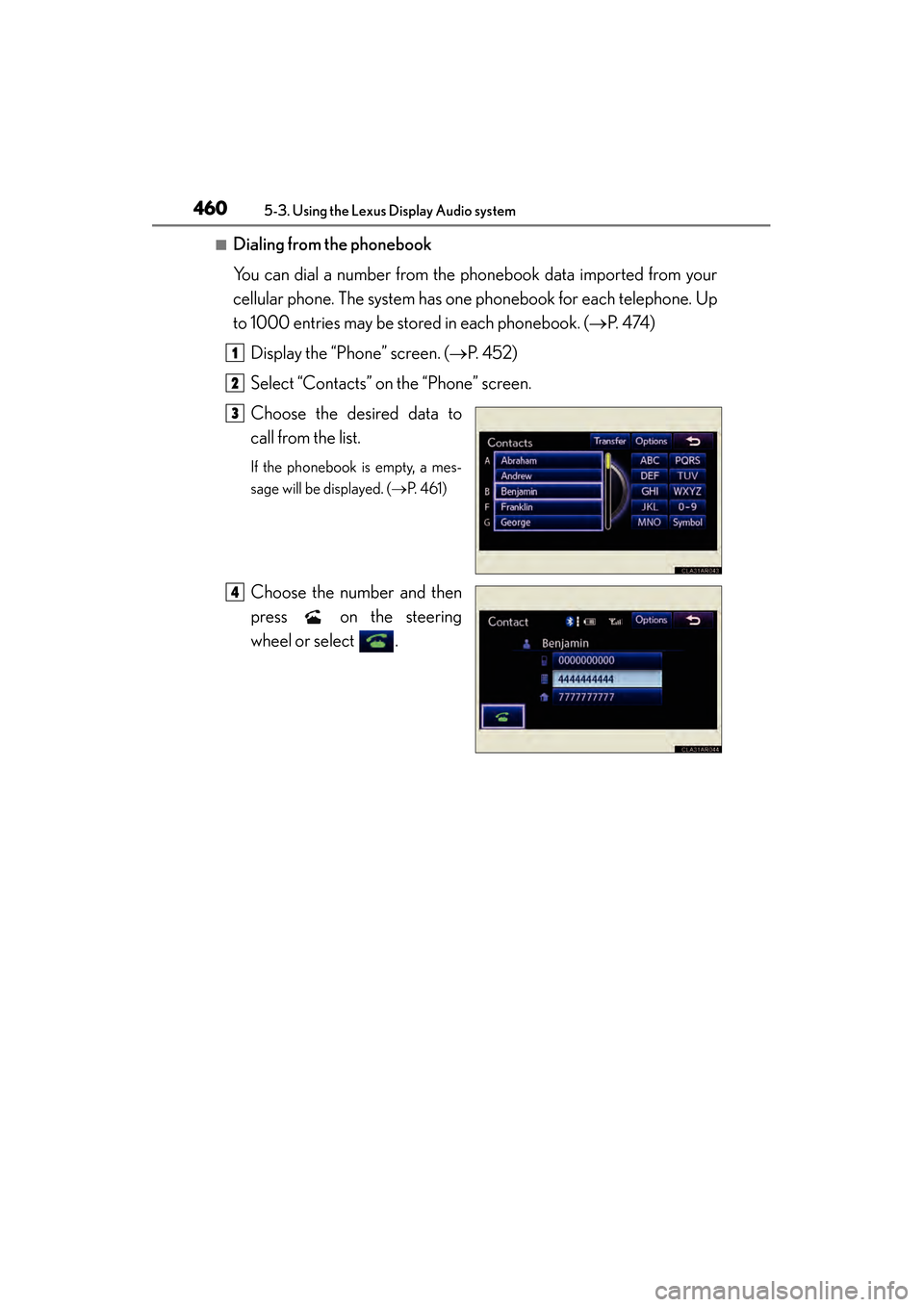
■Dialing from the phonebook
You can dial a number from the phonebook data imported from your
cellular phone. The system has one phonebook for each telephone. Up
to 1000 entries may be stored in each phonebook. (→P. 4 74 )
Display the “Phone” screen. ( →P. 4 5 2 )
Select “Contacts” on the “Phone” screen.
Choose the desired data to
call from the list.
If the phonebook is empty, a mes-
sage will be displayed. ( →P. 4 6 1 )
Choose the number and then
press on the steering
wheel or select .
1
2
3
4
Page 462 of 910
ES350 300h_OM_OM33A01U_(U)
4615-3. Using the Lexus Display Audio system
5
Interior features
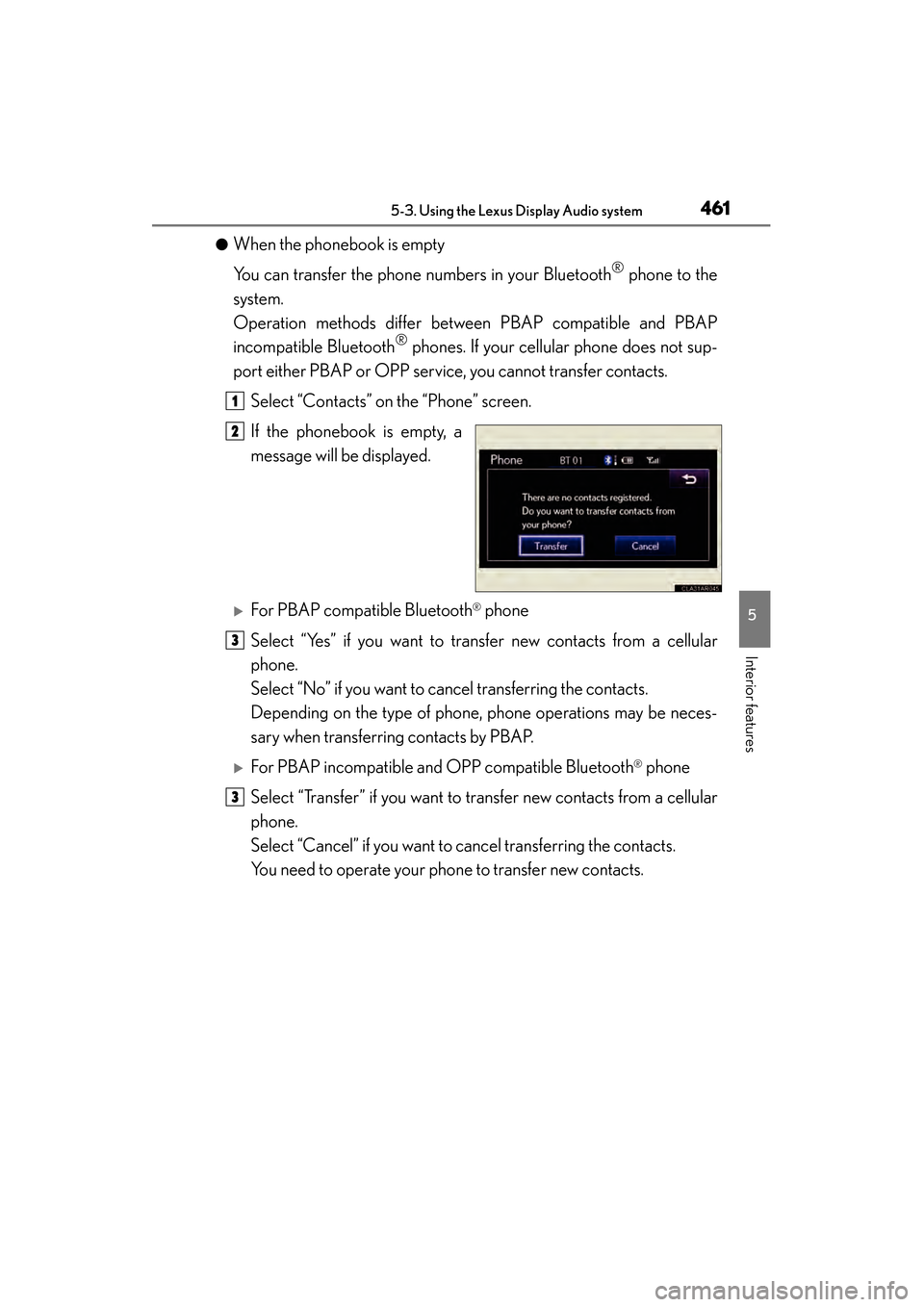
●When the phonebook is empty
You can transfer the phone numbers in your Bluetooth
® phone to the
system.
Operation methods differ between PBAP compatible and PBAP
incompatible Bluetooth
® phones. If your cellular phone does not sup-
port either PBAP or OPP service, you cannot transfer contacts.
Select “Contacts” on the “Phone” screen.
If the phonebook is empty, a
message will be displayed.
XFor PBAP compatible Bluetooth® phone
Select “Yes” if you want to transfer new contacts from a cellular
phone.
Select “No” if you want to cancel transferring the contacts.
Depending on the type of phone, phone operations may be neces-
sary when transferring contacts by PBAP.
XFor PBAP incompatible and OPP compatible Bluetooth® phone
Select “Transfer” if you want to transfer new contacts from a cellular
phone.
Select “Cancel” if you want to cancel transferring the contacts.
You need to operate your phone to transfer new contacts.
1
2
3
3
Page 463 of 910
462
ES350 300h_OM_OM33A01U_(U)
5-3. Using the Lexus Display Audio system
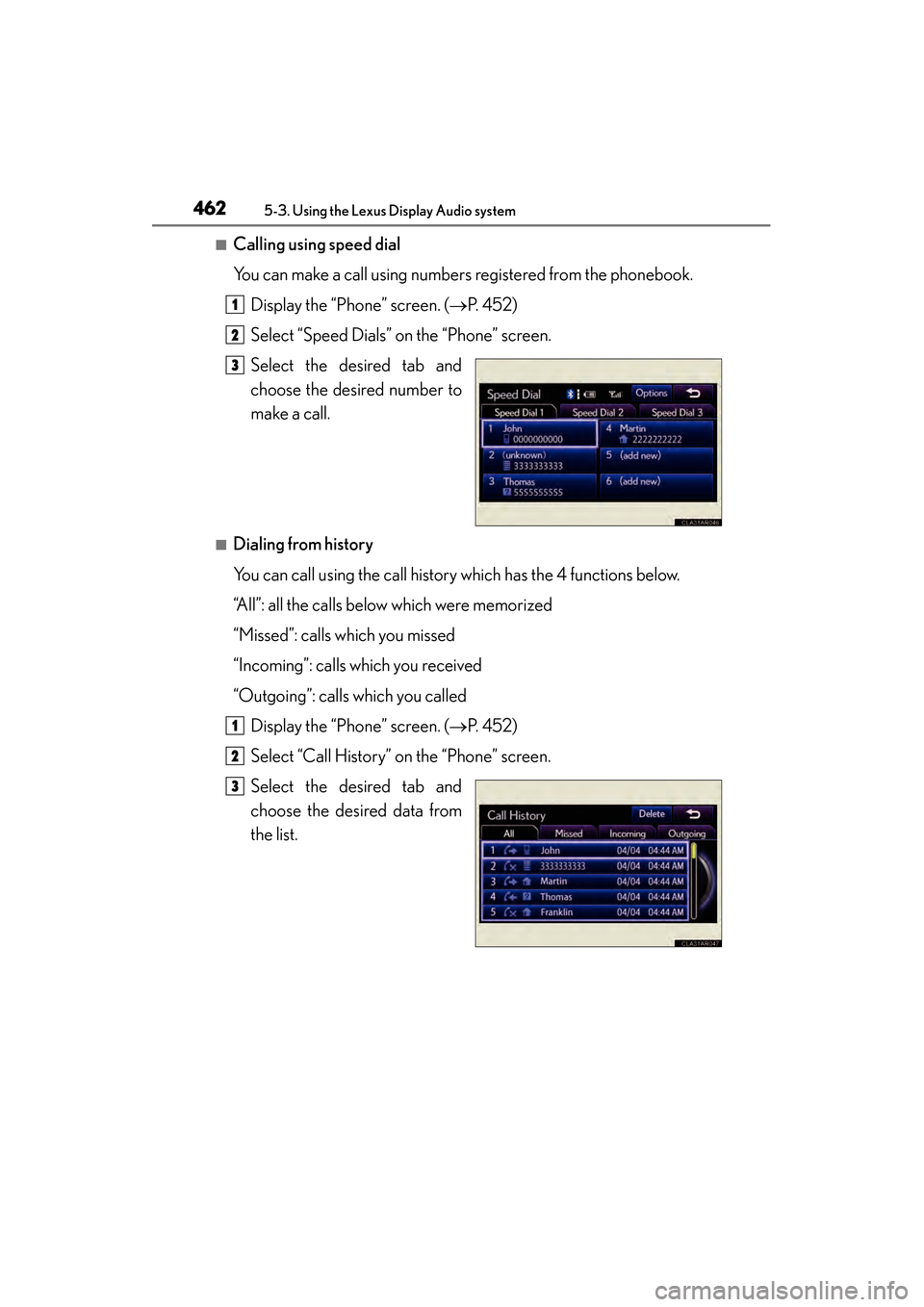
■Calling using speed dial
You can make a call using numbers registered from the phonebook.Display the “Phone” screen. ( →P. 4 5 2 )
Select “Speed Dials” on the “Phone” screen.
Select the desired tab and
choose the desired number to
make a call.
■Dialing from history
You can call using the call history which has the 4 functions below.
“All”: all the calls below which were memorized
“Missed”: calls which you missed
“Incoming”: calls which you received
“Outgoing”: calls which you called Display the “Phone” screen. ( →P. 4 5 2 )
Select “Call History” on the “Phone” screen.
Select the desired tab and
choose the desired data from
the list.
1
2
3
1
2
3
Page 464 of 910
ES350 300h_OM_OM33A01U_(U)
4635-3. Using the Lexus Display Audio system
5
Interior features
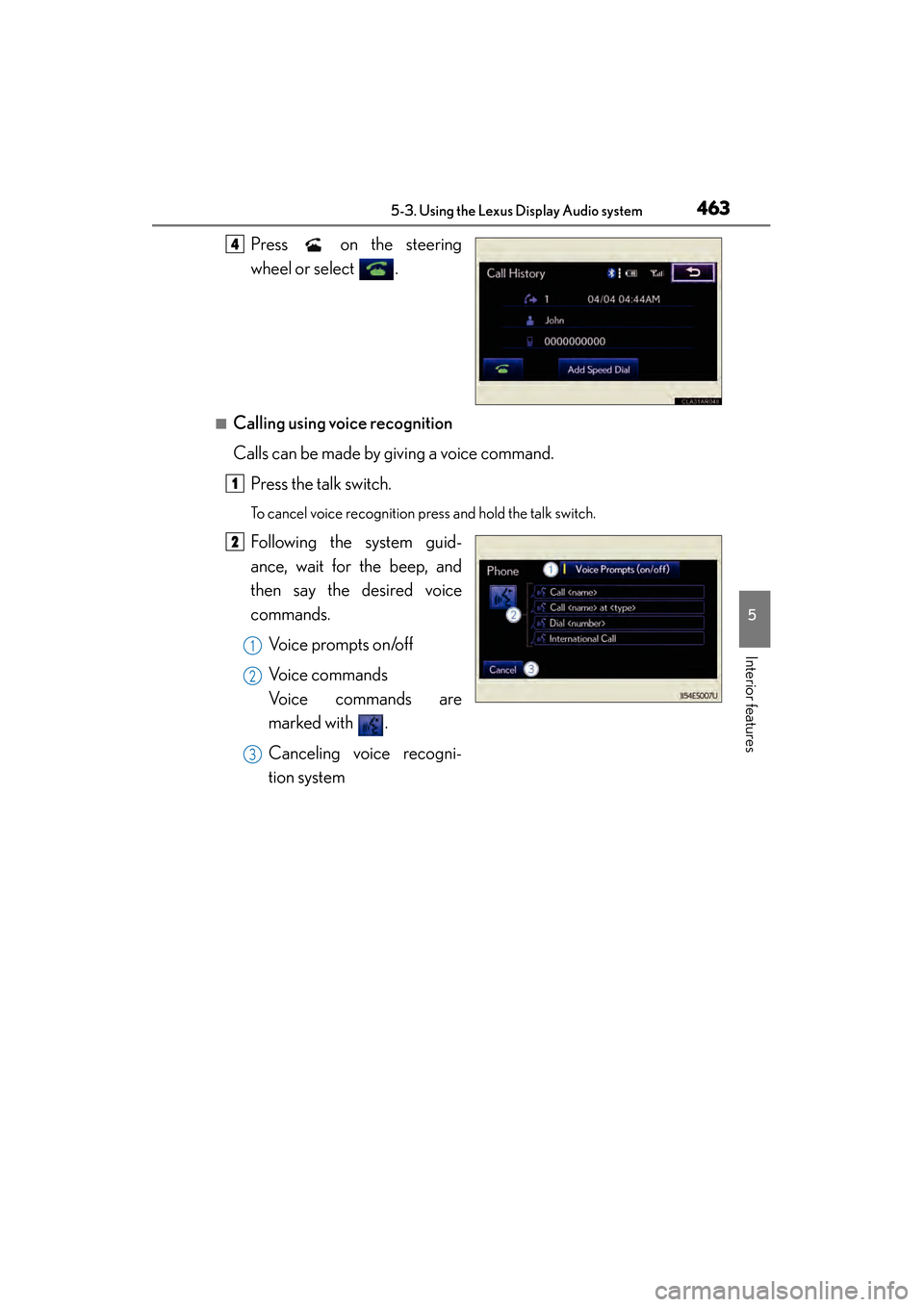
Press on the steering
wheel or select .
■Calling using voice recognition
Calls can be made by giving a voice command.Press the talk switch.
To cancel voice recognition press and hold the talk switch.
Following the system guid-
ance, wait for the beep, and
then say the desired voice
commands. Voice prompts on/off
Voice commands
Voice commands are
marked with .
Canceling voice recogni-
tion system
4
1
2
1
2
3
Page 465 of 910
464
ES350 300h_OM_OM33A01U_(U)
5-3. Using the Lexus Display Audio system
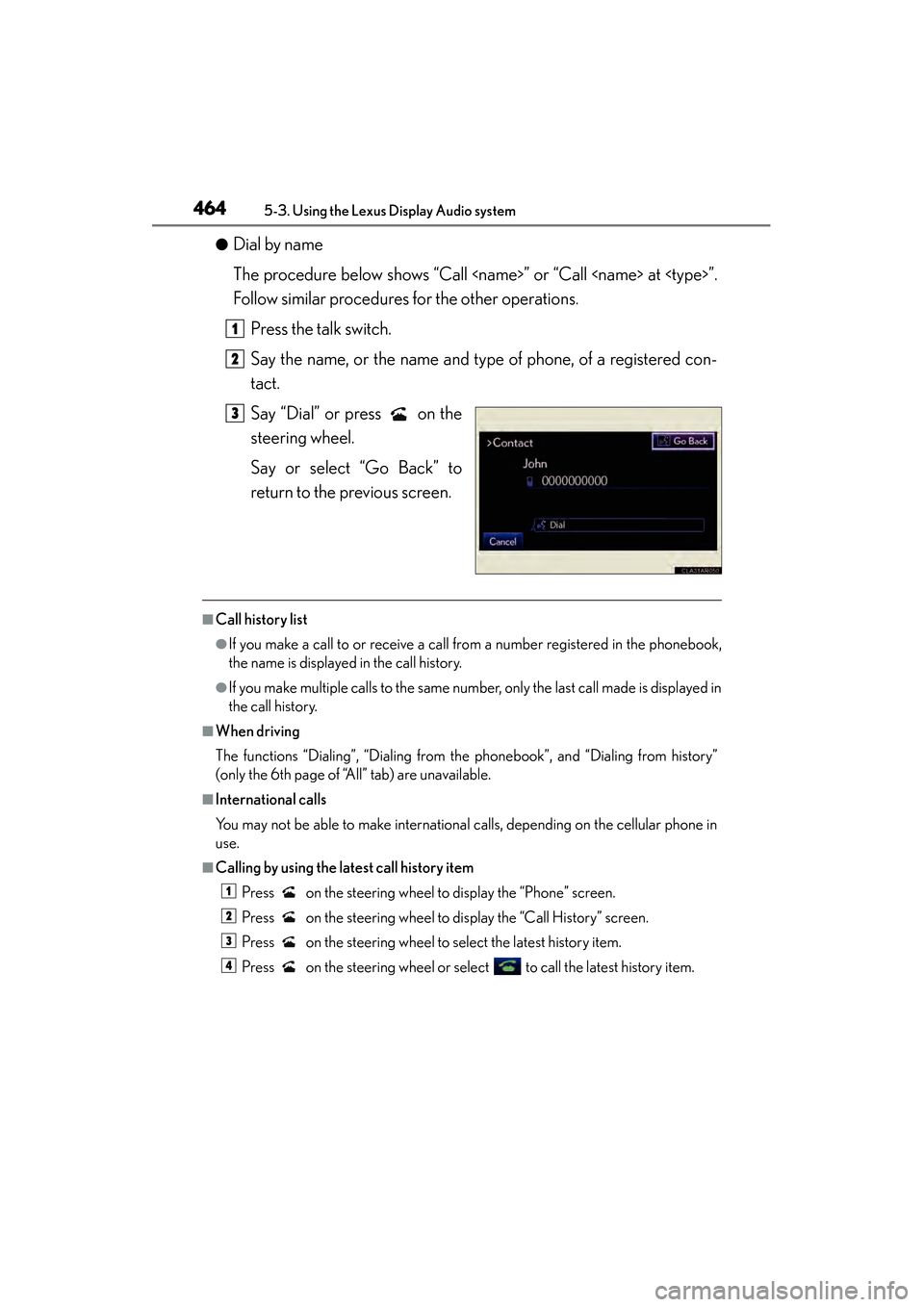
●Dial by name
The procedure below shows “Call
Follow similar procedures for the other operations.Press the talk switch.
Say the name, or the name and type of phone, of a registered con-
tact.
Say “Dial” or press on the
steering wheel.
Say or select “Go Back” to
return to the previous screen.
■Call history list
●If you make a call to or receive a call from a number registered in the phonebook,
the name is displayed in the call history.
●If you make multiple calls to the same number, only the last call made is displayed in
the call history.
■When driving
The functions “Dialing”, “Dialing from th e phonebook”, and “Dialing from history”
(only the 6th page of “All” tab) are unavailable.
■International calls
You may not be able to make international calls, depending on the cellular phone in
use.
■Calling by using the latest call history item
Press on the steering wheel to display the “Phone” screen.
Press on the steering wheel to display the “Call History” screen.
Press on the steering wheel to select the latest history item.
Press on the steering wheel or select to call the latest history item.
1
2
3
1
2
3
4
Page 466 of 910
ES350 300h_OM_OM33A01U_(U)
4655-3. Using the Lexus Display Audio system
5
Interior features
■Vo i c e g u i d a n c e f u n c t i o n
●Voice guidance for the voice recognition system can be skipped by pressing the
talk switch.
●When “Voice Prompts (on/off)” is selected, voice recognition will be temporarily
suspended. Press the talk switch again.
●Voice guidance can be canceled by setting voice prompts to off. Use this setting
when it is desirable to say a command immediately after pressing the talk switch.
■Using voice command
●Using voice command “Call
• In the same manner as it is displayed on the screen, “Call
phone, of a contact.
For example: “Call”, “John Smith” or “Call”, “Mary Davis”, “at”, “Mobile”
• There are 4 types of phones: Home, Mobile, Work and Other.
• Short or abbreviated names in the phonebook may not be recognized. Change names in the phonebook to full names.
• Sometimes a voice recognition result confirmation screen will be displayed. After confirming the result, say “Yes” or “No”.
• When the system recognizes multiple names from the phonebook, a name can- didate list will be displayed on the screen. If the desired name is not displayed on
the top of the screen, say the number of the name from the candidate list (num-
ber 1 or number 2) to select a name from the candidate list.
• When a contact has multiple phone numbers registered in the phonebook, a candidate list will be displayed. If the desired phone number is not displayed on
the top of the screen, say the number of the desired phone number from the
candidate list (number 1 or number 2) to select a phone number from the candi-
date list.