audio Lexus ES300h 2013 Owner's Manual
[x] Cancel search | Manufacturer: LEXUS, Model Year: 2013, Model line: ES300h, Model: Lexus ES300h 2013Pages: 910, PDF Size: 9.95 MB
Page 427 of 910
426
ES350 300h_OM_OM33A01U_(U)
5-3. Using the Lexus Display Audio system
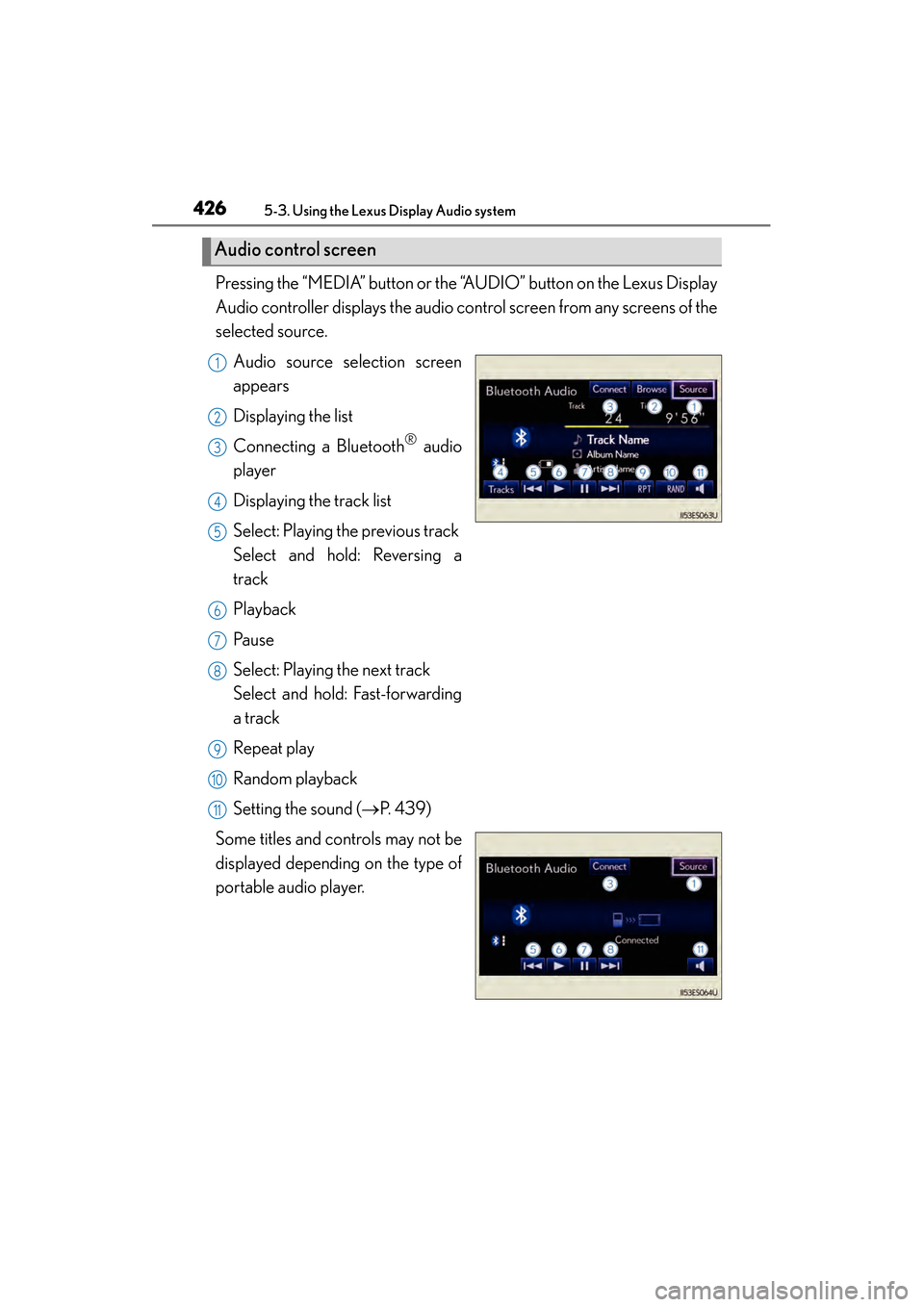
Pressing the “MEDIA” button or the “AUDIO” button on the Lexus Display
Audio controller displays the audio control screen from any screens of the
selected source.Audio source selection screen
appears
Displaying the list
Connecting a Bluetooth
® audio
player
Displaying the track list
Select: Playing the previous track
Select and hold: Reversing a
track
Playback
Pa u s e
Select: Playing the next track
Select and hold: Fast-forwarding
a track
Repeat play
Random playback
Setting the sound ( →P. 4 3 9 )
Some titles and controls may not be
displayed depending on the type of
portable audio player.
Audio control screen
1
2
3
4
5
6
7
8
9
10
11
Page 428 of 910
ES350 300h_OM_OM33A01U_(U)
4275-3. Using the Lexus Display Audio system
5
Interior features
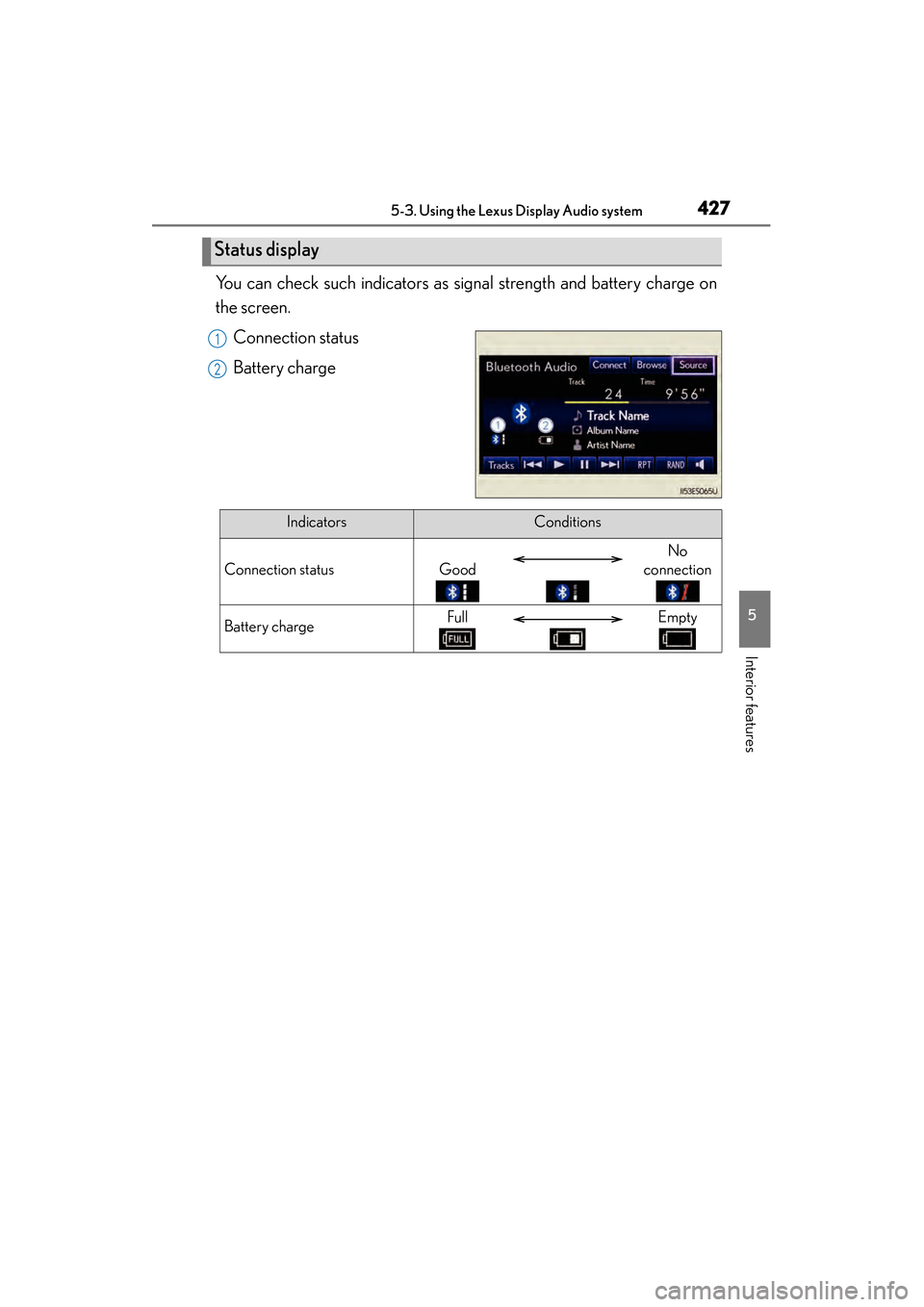
You can check such indicators as signal strength and battery charge on
the screen.Connection status
Battery charge
Status display
1
2
IndicatorsConditions
Connection statusGood
No
connection
Battery chargeFullEmpty
Page 429 of 910
428
ES350 300h_OM_OM33A01U_(U)
5-3. Using the Lexus Display Audio system
To use the Bluetooth® audio system, you need to register your portable
audio player into the system. Once registered, you can enjoy your music
on the vehicle’s audio system.
You can register up to 5 devices in the system.
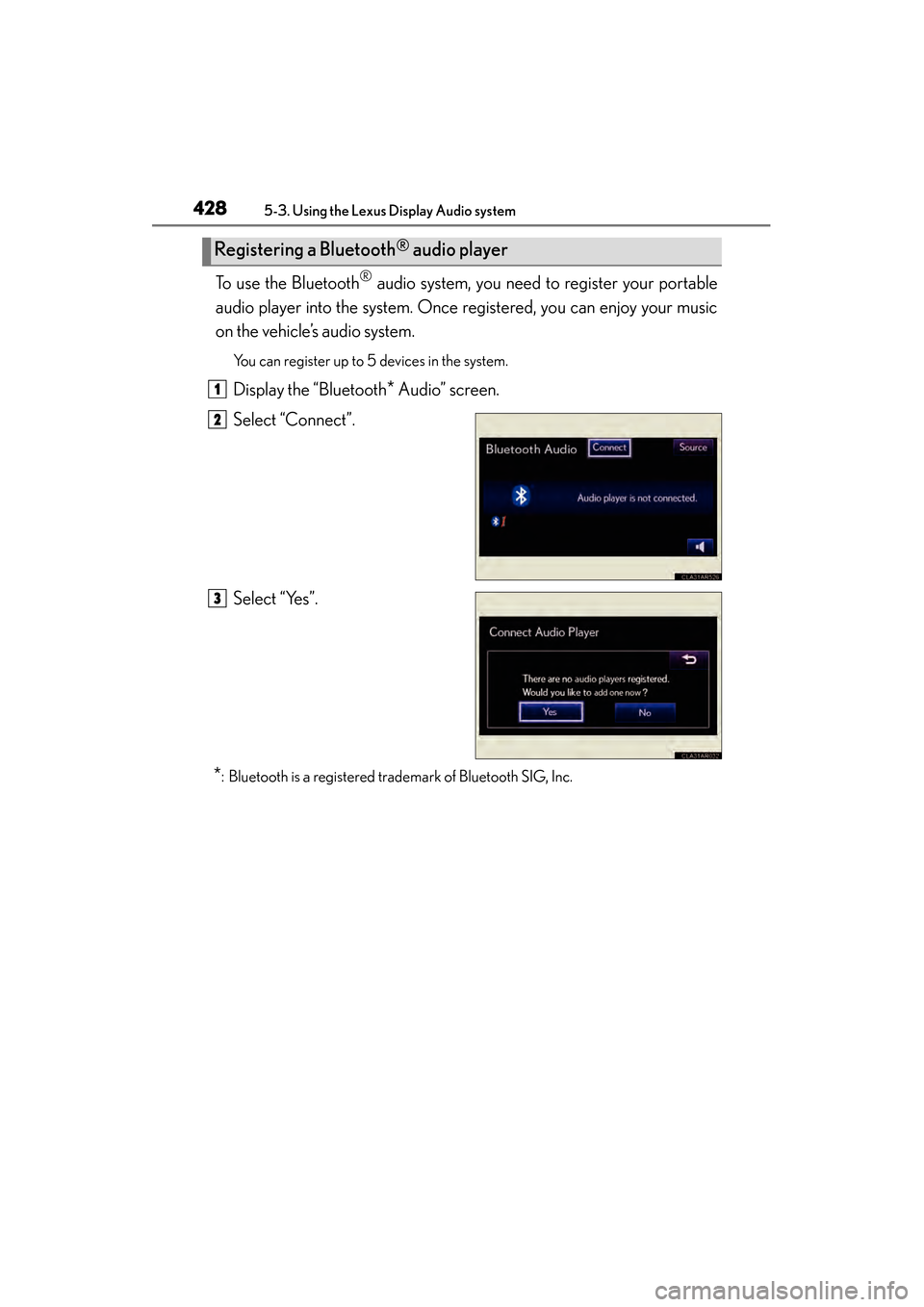
Display the “Bluetooth* Audio” screen.
Select “Connect”.
Select “Yes”.
*: Bluetooth is a registered trademark of Bluetooth SIG, Inc.
Registering a Bluetooth® audio player
1
2
3
Page 430 of 910
ES350 300h_OM_OM33A01U_(U)
4295-3. Using the Lexus Display Audio system
5
Interior features
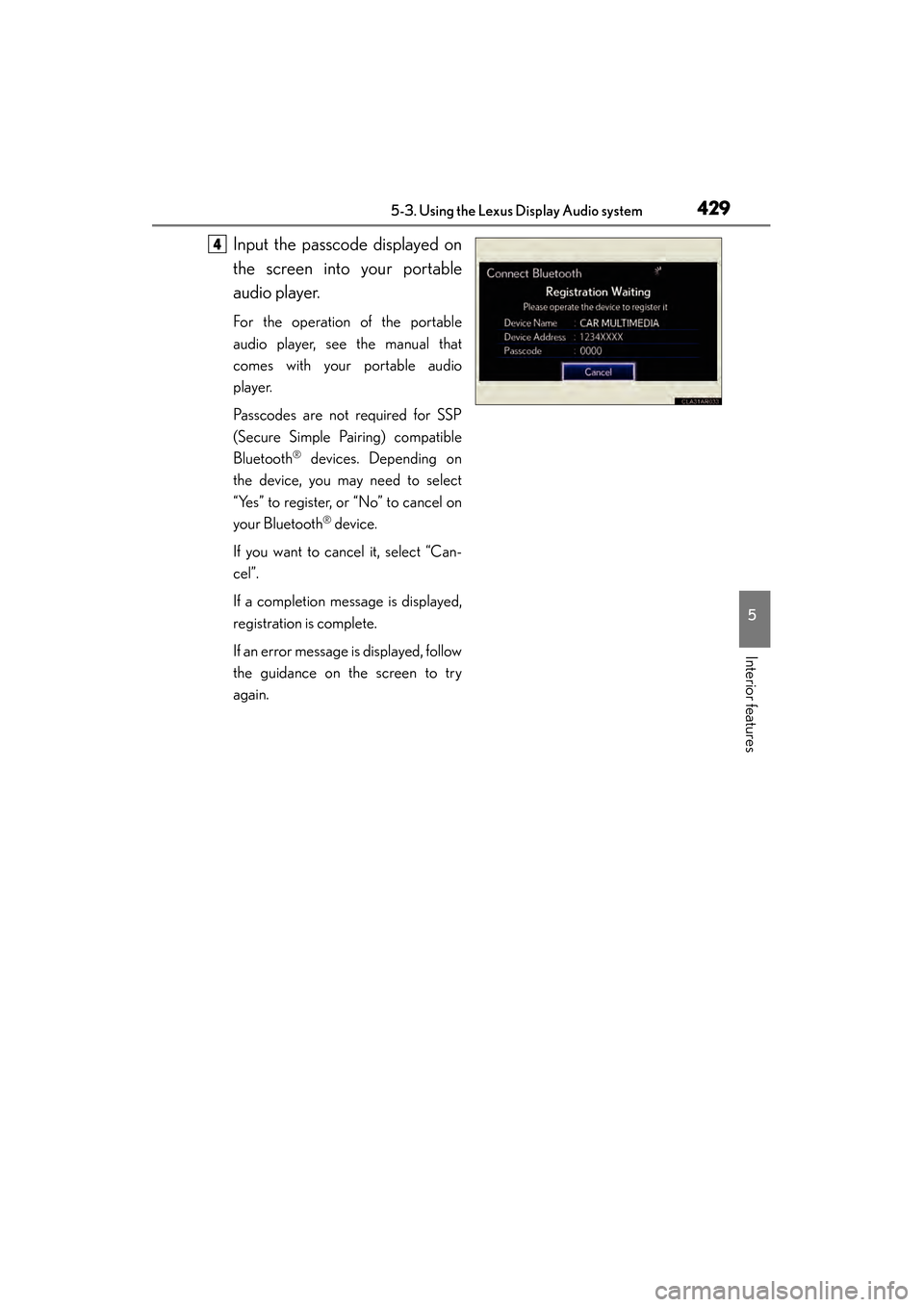
Input the passcode displayed on
the screen into your portable
audio player.
For the operation of the portable
audio player, see the manual that
comes with your portable audio
player.
Passcodes are not required for SSP
(Secure Simple Pairing) compatible
Bluetooth
® devices. Depending on
the device, you may need to select
“Yes” to register, or “No” to cancel on
your Bluetooth
® device.
If you want to cancel it, select “Can-
cel”.
If a completion message is displayed,
registration is complete.
If an error message is displayed, follow
the guidance on the screen to try
again.
4
Page 431 of 910
430
ES350 300h_OM_OM33A01U_(U)
5-3. Using the Lexus Display Audio system
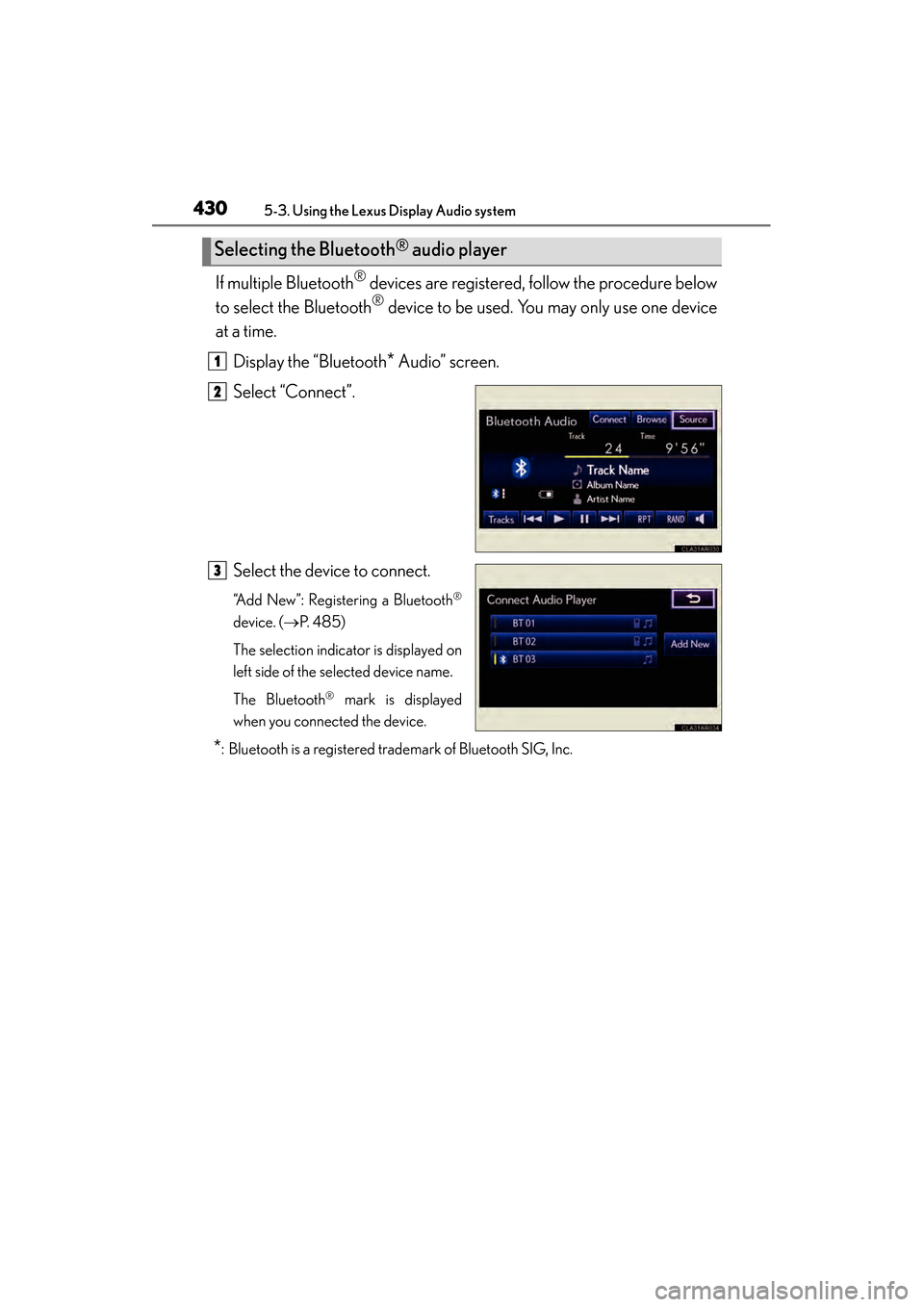
If multiple Bluetooth® devices are registered, follow the procedure below
to select the Bluetooth
® device to be used. You may only use one device
at a time.
Display the “Bluetooth
* Audio” screen.
Select “Connect”.
Select the device to connect.
“Add New”: Registering a Bluetooth®
device. ( →P. 4 8 5 )
The selection indicator is displayed on
left side of the selected device name.
The Bluetooth
® mark is displayed
when you connected the device.
*: Bluetooth is a registered trademark of Bluetooth SIG, Inc.
Selecting the Bluetooth® audio player
1
2
3
Page 432 of 910
ES350 300h_OM_OM33A01U_(U)
4315-3. Using the Lexus Display Audio system
5
Interior features
There are two connection methods available.
■When the connection method is set to “From Vehicle”
When the portable audio player is on standby for the connection, it will
be automatically connected whenever the “START STOP ENGINE”
<“POWER”> switch is in either ACCESSORY or IGNITION ON
■When the connection method is set to “From Audio Player”
Operate the portable player and connect it to the Bluetooth
® audio
system.
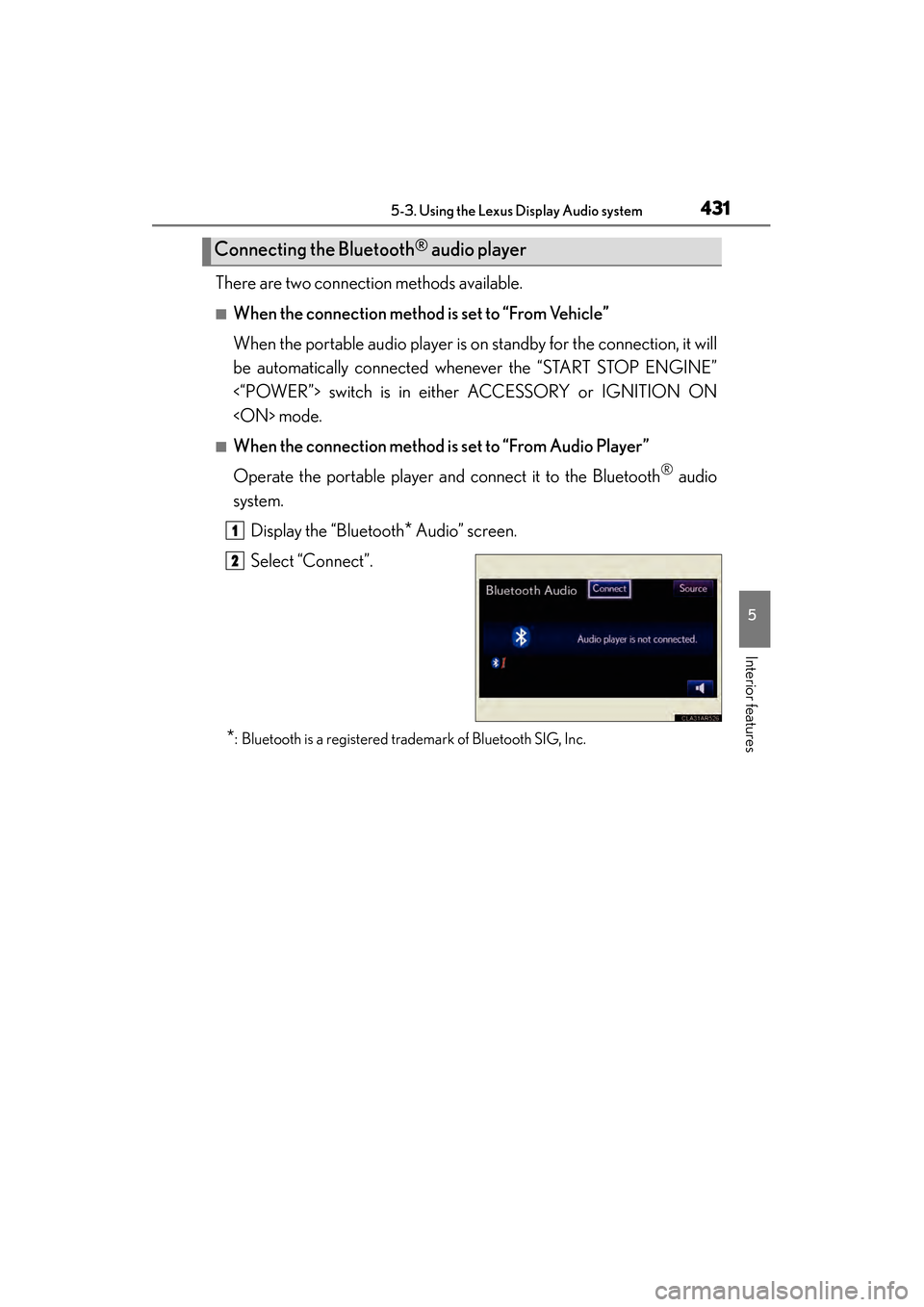
Display the “Bluetooth
* Audio” screen.
Select “Connect”.
*: Bluetooth is a registered trademark of Bluetooth SIG, Inc.
Connecting the Bluetooth® audio player
1
2
Page 433 of 910
432
ES350 300h_OM_OM33A01U_(U)
5-3. Using the Lexus Display Audio system
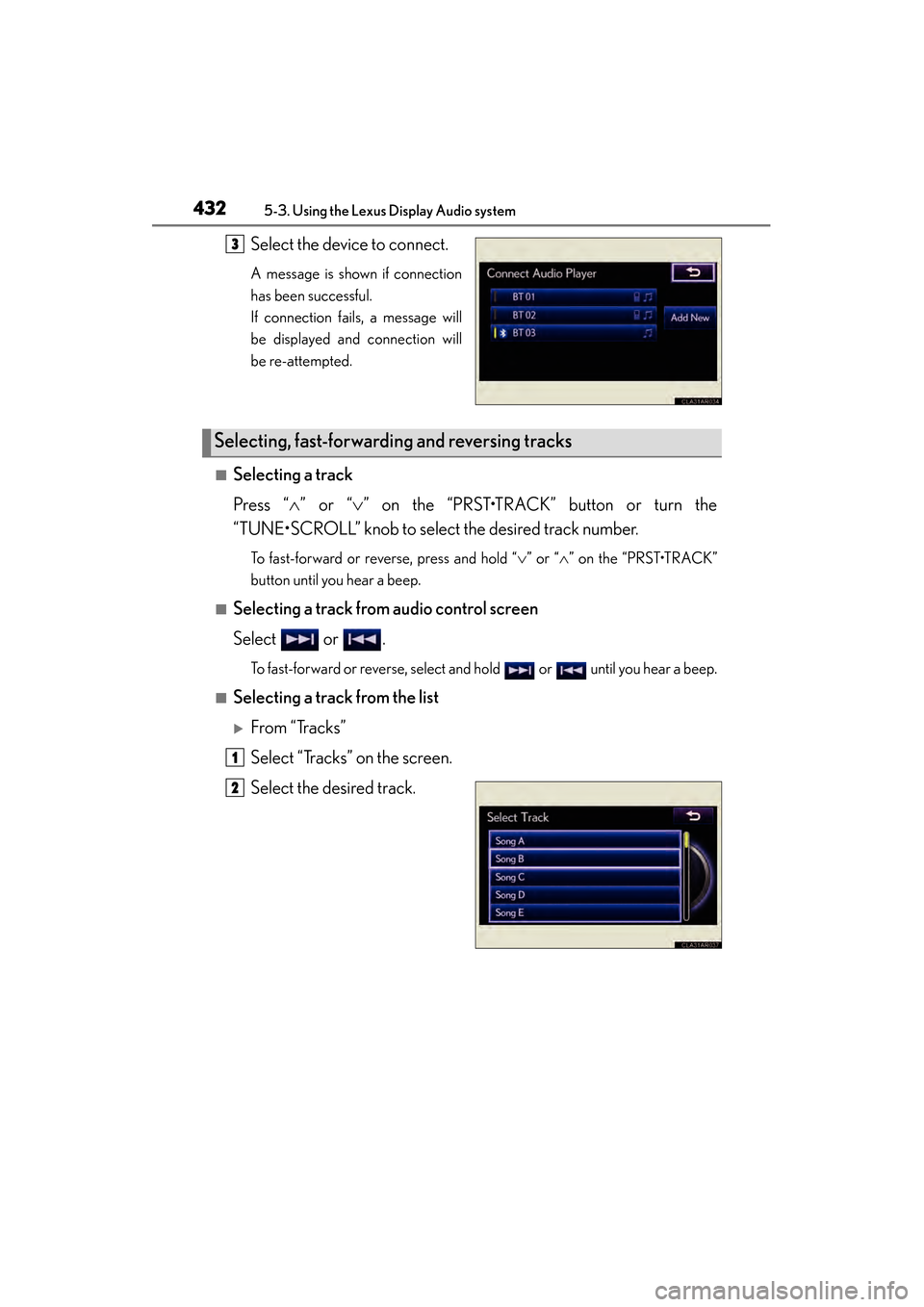
Select the device to connect.
A message is shown if connection
has been successful.
If connection fails, a message will
be displayed and connection will
be re-attempted.
■Selecting a track
Press “∧” or “ ∨” on the “PRST•TRACK” button or turn the
“TUNE•SCROLL” knob to select the desired track number.
To fast-forward or reverse, press and hold “ ∨” or “∧ ” on the “PRST•TRACK”
button until you hear a beep.
■Selecting a track from audio control screen
Select or .
To fast-forward or reverse, select and hold or until you hear a beep.
■Selecting a track from the list
XFrom “Tracks”
Select “Tracks” on the screen.
Select the desired track.
3
Selecting, fast-forwarding and reversing tracks
1
2
Page 434 of 910
ES350 300h_OM_OM33A01U_(U)
4335-3. Using the Lexus Display Audio system
5
Interior features
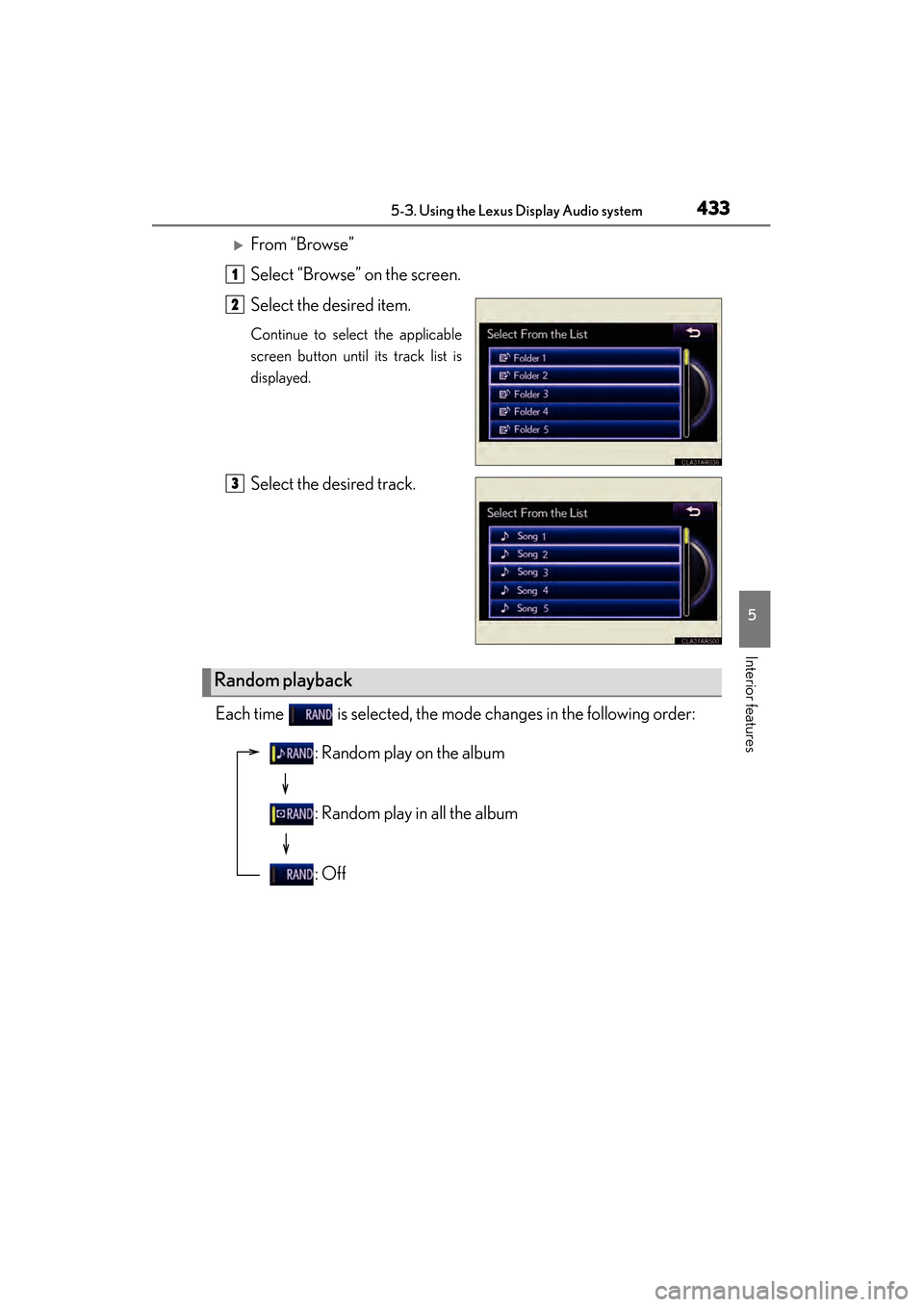
XFrom “Browse”
Select “Browse” on the screen.
Select the desired item.
Continue to select the applicable
screen button until its track list is
displayed.
Select the desired track.
Each time is selected, the mode changes in the following order:
1
2
3
Random playback
: Random play on the album
: Random play in all the album
: Off
Page 435 of 910
434
ES350 300h_OM_OM33A01U_(U)
5-3. Using the Lexus Display Audio system
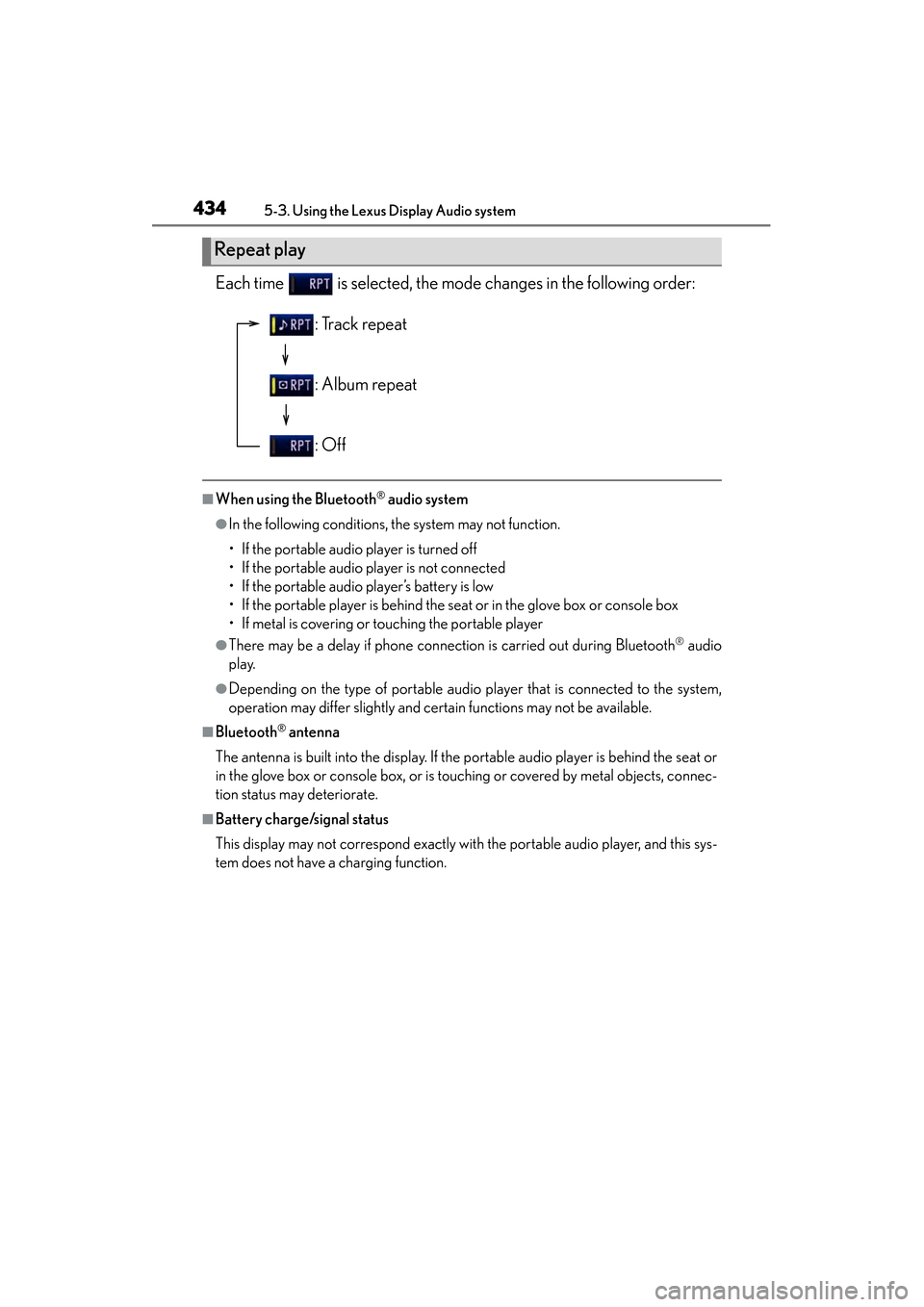
Each time is selected, the mode changes in the following order:
■When using the Bluetooth® audio system
●In the following conditions, the system may not function.
• If the portable audio player is turned off
• If the portable audio player is not connected
• If the portable audio player’s battery is low
• If the portable player is behind the seat or in the glove box or console box
• If metal is covering or touching the portable player
●There may be a delay if phone connection is carried out during Bluetooth® audio
play.
●Depending on the type of portable audio player that is connected to the system,
operation may differ slightly and certain functions may not be available.
■Bluetooth® antenna
The antenna is built into the display. If the portable audio player is behind the seat or
in the glove box or console box, or is touching or covered by metal objects, connec-
tion status may deteriorate.
■Battery charge/signal status
This display may not correspond exactly with the portable audio player, and this sys-
tem does not have a charging function.
Repeat play
: Track repeat
: Album repeat
: Off
Page 436 of 910
ES350 300h_OM_OM33A01U_(U)
4355-3. Using the Lexus Display Audio system
5
Interior features
■About Bluetooth®
■Compatible models
Portable audio players must correspond to the specifications.
●Bluetooth® specifications:
Ver. 1.1, or higher (Recommended: Ver. 2.1 + EDR or higher)
●Profiles:
• A2DP (Advanced Audio Distribution Profile) Ver. 1.0, or higher (Recommended: Ver. 1.2 or higher)
This is a profile to transmit stereo audio or high quality sounds to the headphone.
• AVRCP (Audio/Video Remote Control Profile) Ver. 1.0 or higher (Recommended: Ver. 1.4 or higher)
This is a profile to remote control the A/V equipment.
However, please note that some functions may be limited depending on the type of
portable audio player. The Bluetooth
® word mark and logos are
registered trademarks owned by Bluetooth
SIG, Inc. and any use of such marks by
PIONEER CORPORATION is under
license. Other trademarks and trade names
are those of their respective owners.