ABS Lexus ES300h 2013 User Guide
[x] Cancel search | Manufacturer: LEXUS, Model Year: 2013, Model line: ES300h, Model: Lexus ES300h 2013Pages: 910, PDF Size: 9.95 MB
Page 409 of 910
408
ES350 300h_OM_OM33A01U_(U)
5-3. Using the Lexus Display Audio system
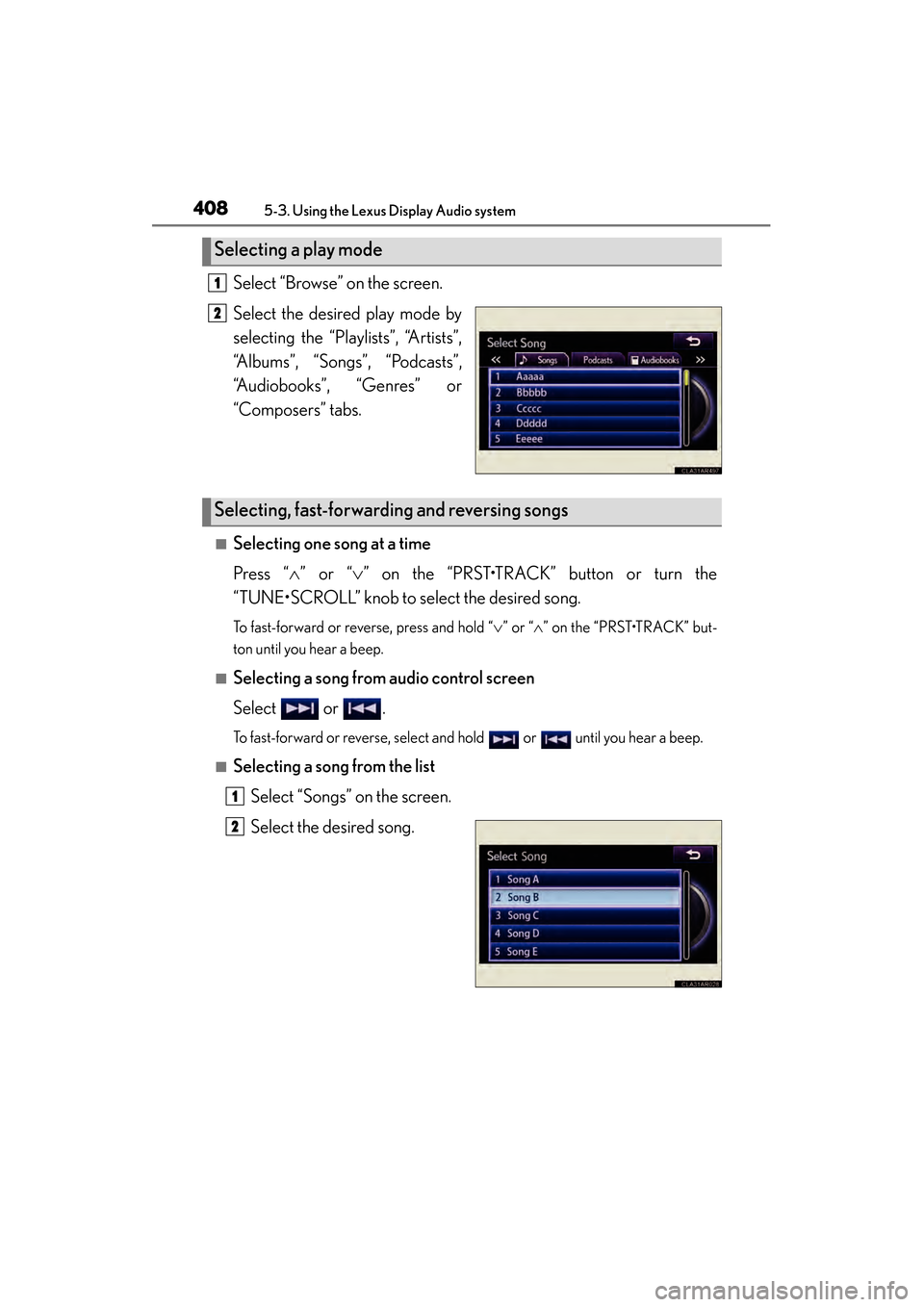
Select “Browse” on the screen.
Select the desired play mode by
selecting the “Playlists”, “Artists”,
“Albums”, “Songs”, “Podcasts”,
“Audiobooks”, “Genres” or
“Composers” tabs.
■Selecting one song at a time
Press “∧” or “ ∨” on the “PRST•TRACK” button or turn the
“TUNE•SCROLL” knob to select the desired song.
To fast-forward or reverse, press and hold “ ∨” or “ ∧” on the “PRST•TRACK” but-
ton until you hear a beep.
■Selecting a song from audio control screen
Select or .
To fast-forward or reverse, select and hold or until you hear a beep.
■Selecting a song from the list
Select “Songs” on the screen.
Select the desired song.
Selecting a play mode
1
2
Selecting, fast-forwarding and reversing songs
1
2
Page 440 of 910
439
ES350 300h_OM_OM33A01U_(U)
5-3. Using the Lexus Display Audio system
5
Interior features
Optimal use of the audio system
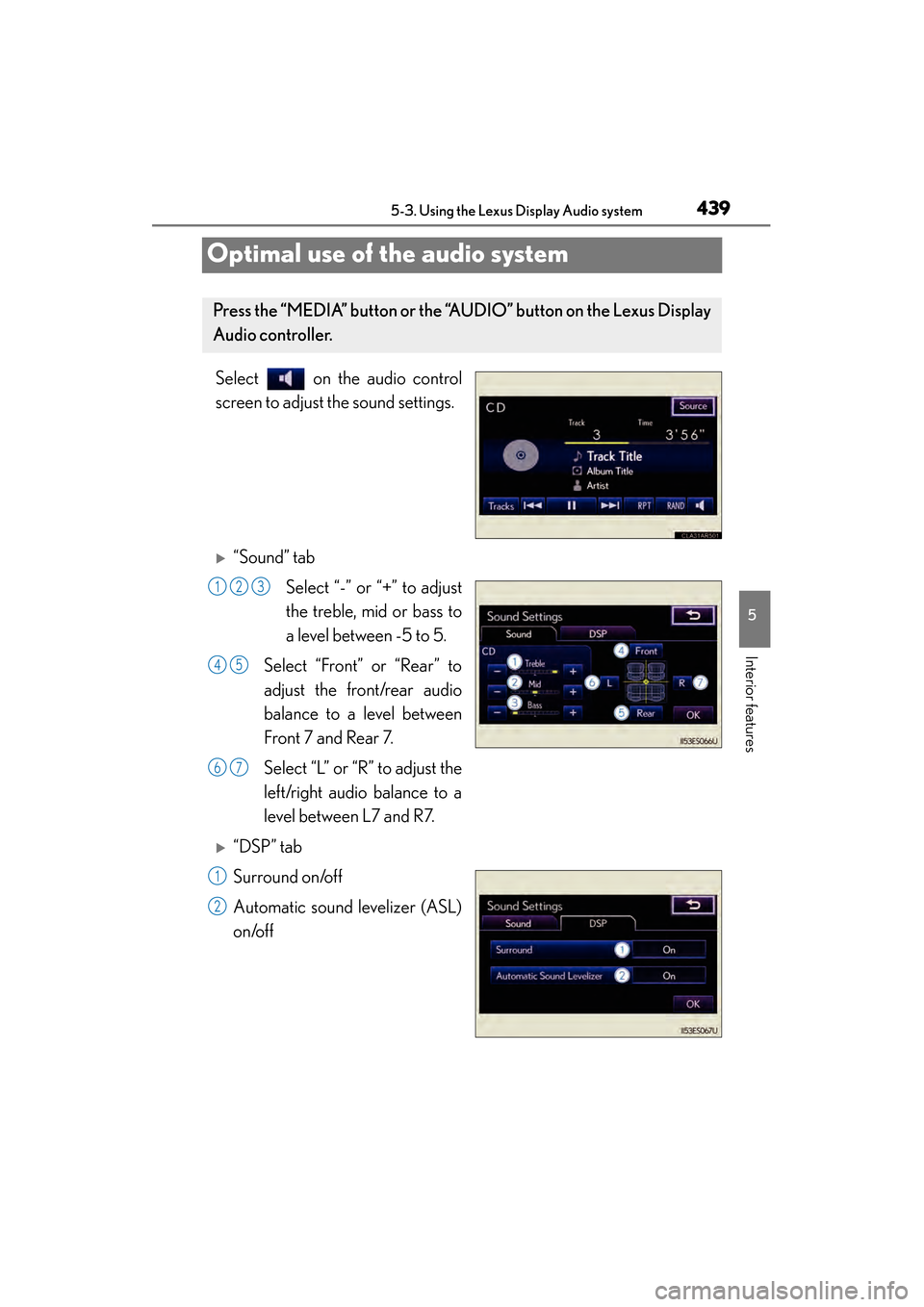
Select on the audio control
screen to adjust the sound settings.
X“Sound” tabSelect “-” or “+” to adjust
the treble, mid or bass to
a level between -5 to 5.
Select “Front” or “Rear” to
adjust the front/rear audio
balance to a level between
Front 7 and Rear 7.
Select “L” or “R” to adjust the
left/right audio balance to a
level between L7 and R7.
X“DSP” tab
Surround on/off
Automatic sound levelizer (ASL)
on/off
Press the “MEDIA” button or the “AUDIO” button on the Lexus Display
Audio controller.
123
45
67
1
2
Page 685 of 910
684
ES350 300h_OM_OM33A01U_(U)
6-3. Do-it-yourself maintenance
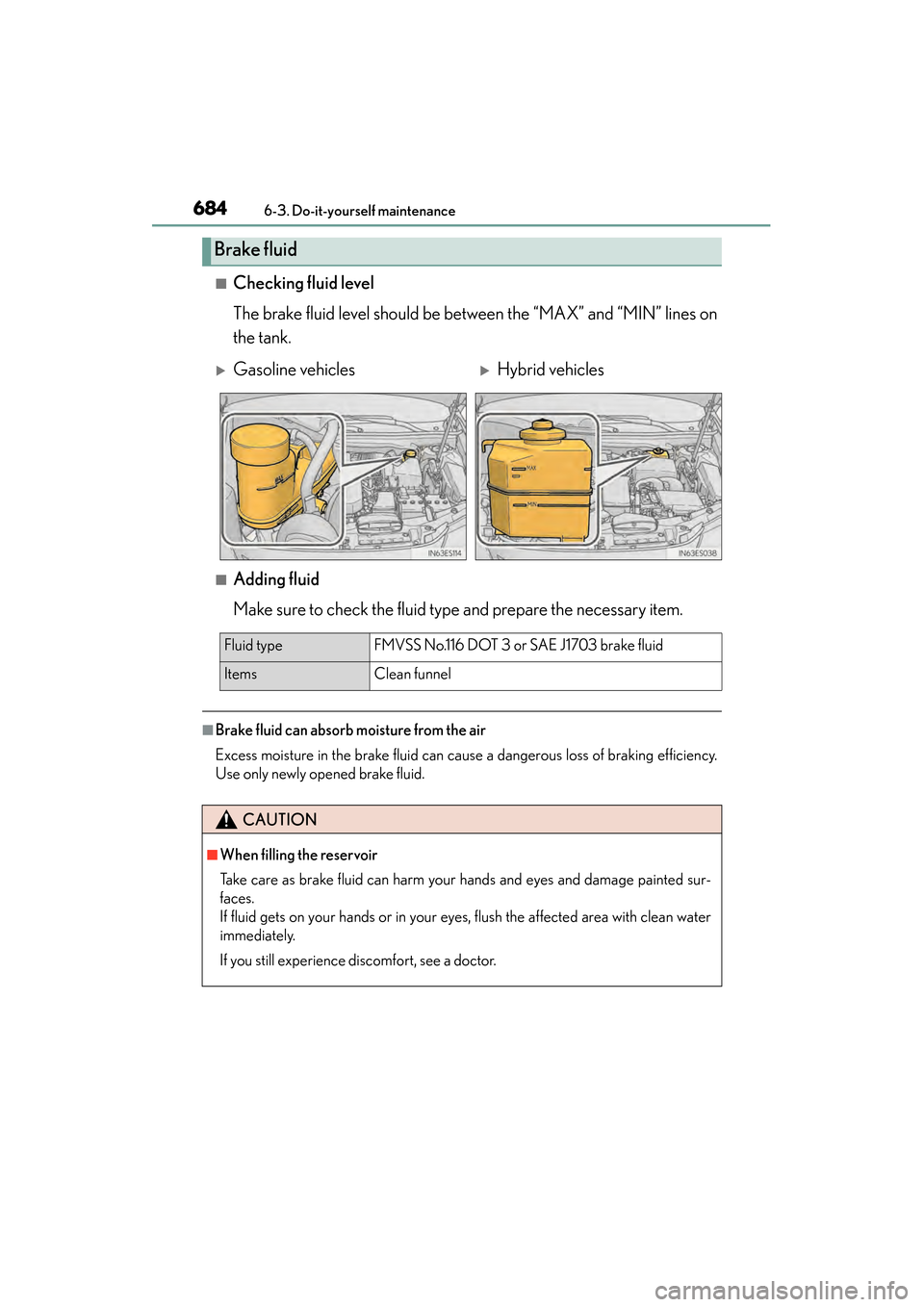
■Checking fluid level
The brake fluid level should be between the “MAX” and “MIN” lines on
the tank.
■Adding fluid
Make sure to check the fluid type and prepare the necessary item.
■Brake fluid can absorb moisture from the air
Excess moisture in the brake fluid can cause a dangerous loss of braking efficiency.
Use only newly opened brake fluid.
Brake fluid
XGasoline vehiclesXHybrid vehicles
Fluid typeFMVSS No.116 DOT 3 or SAE J1703 brake fluid
Items Clean funnel
CAUTION
■When filling the reservoir
Take care as brake fluid can harm your hands and eyes and damage painted sur-
faces.
If fluid gets on your hands or in your eyes, flush the affected area with clean water
immediately.
If you still experience discomfort, see a doctor.
Page 717 of 910
716
ES350 300h_OM_OM33A01U_(U)
6-3. Do-it-yourself maintenance
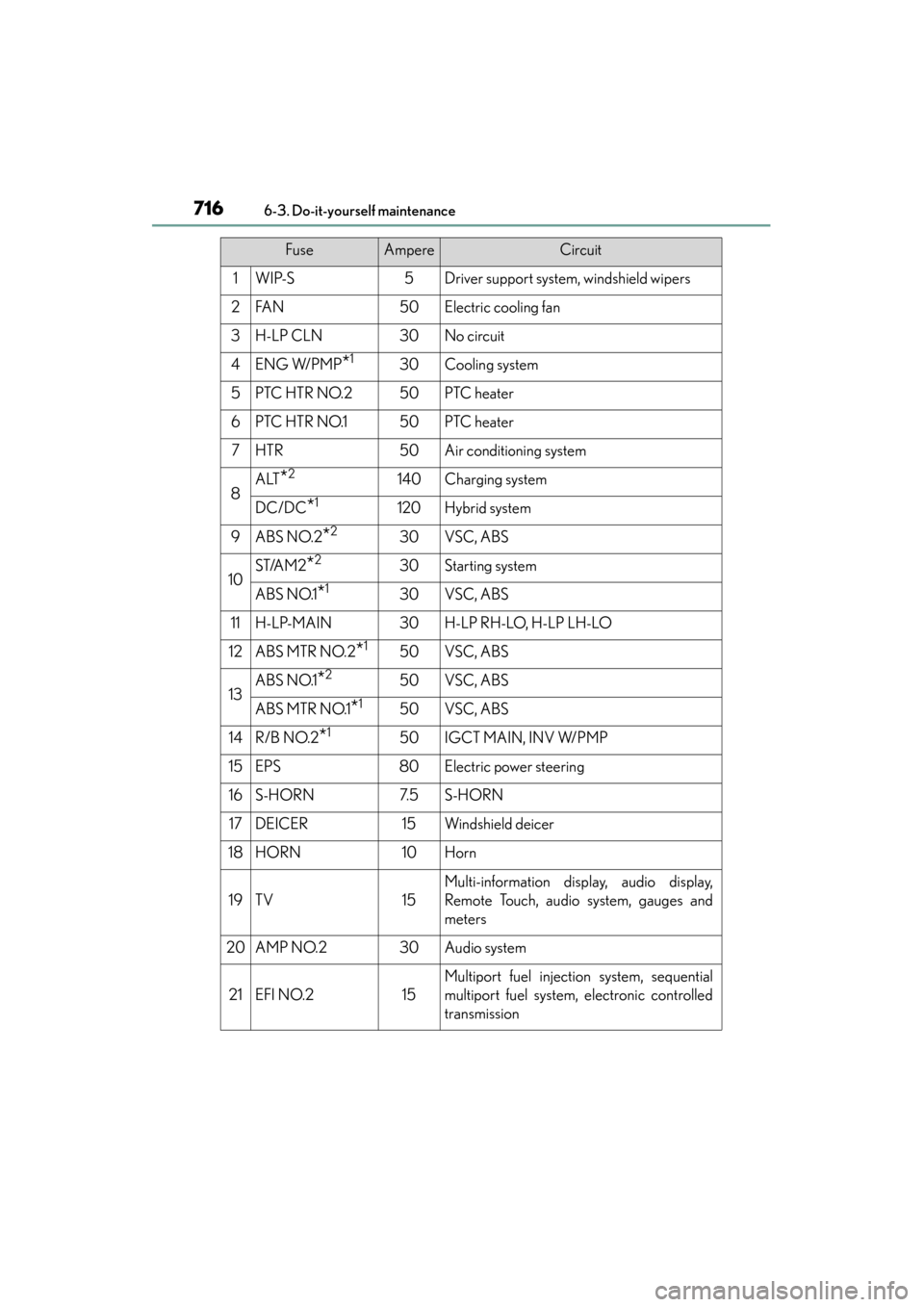
FuseAmpereCircuit
1WIP-S5Driver support system, windshield wipers
2FA N50Electric cooling fan
3H-LP CLN30No circuit
4ENG W/PMP*130Cooling system
5PTC HTR NO.250PTC heater
6PTC HTR NO.150PTC heater
7HTR50Air conditioning system
8ALT*2140Charging system
DC/DC*1120Hybrid system
9ABS NO.2*230VSC, ABS
10ST/AM2*230Starting system
ABS NO.1*130VSC, ABS
11H-LP-MAIN30H-LP RH-LO, H-LP LH-LO
12ABS MTR NO.2*150VSC, ABS
13ABS NO.1*250VSC, ABS
ABS MTR NO.1*150VSC, ABS
14R/B NO.2*150IGCT MAIN, INV W/PMP
15EPS80Electric power steering
16S-HORN7. 5S-HORN
17DEICER15Windshield deicer
18HORN10Horn
19TV15
Multi-information display, audio display,
Remote Touch, audio system, gauges and
meters
20AMP NO.230Audio system
21EFI NO.215
Multiport fuel injection system, sequential
multiport fuel system, electronic controlled
transmission
Page 718 of 910
ES350 300h_OM_OM33A01U_(U)
7176-3. Do-it-yourself maintenance
6
Maintenance and care
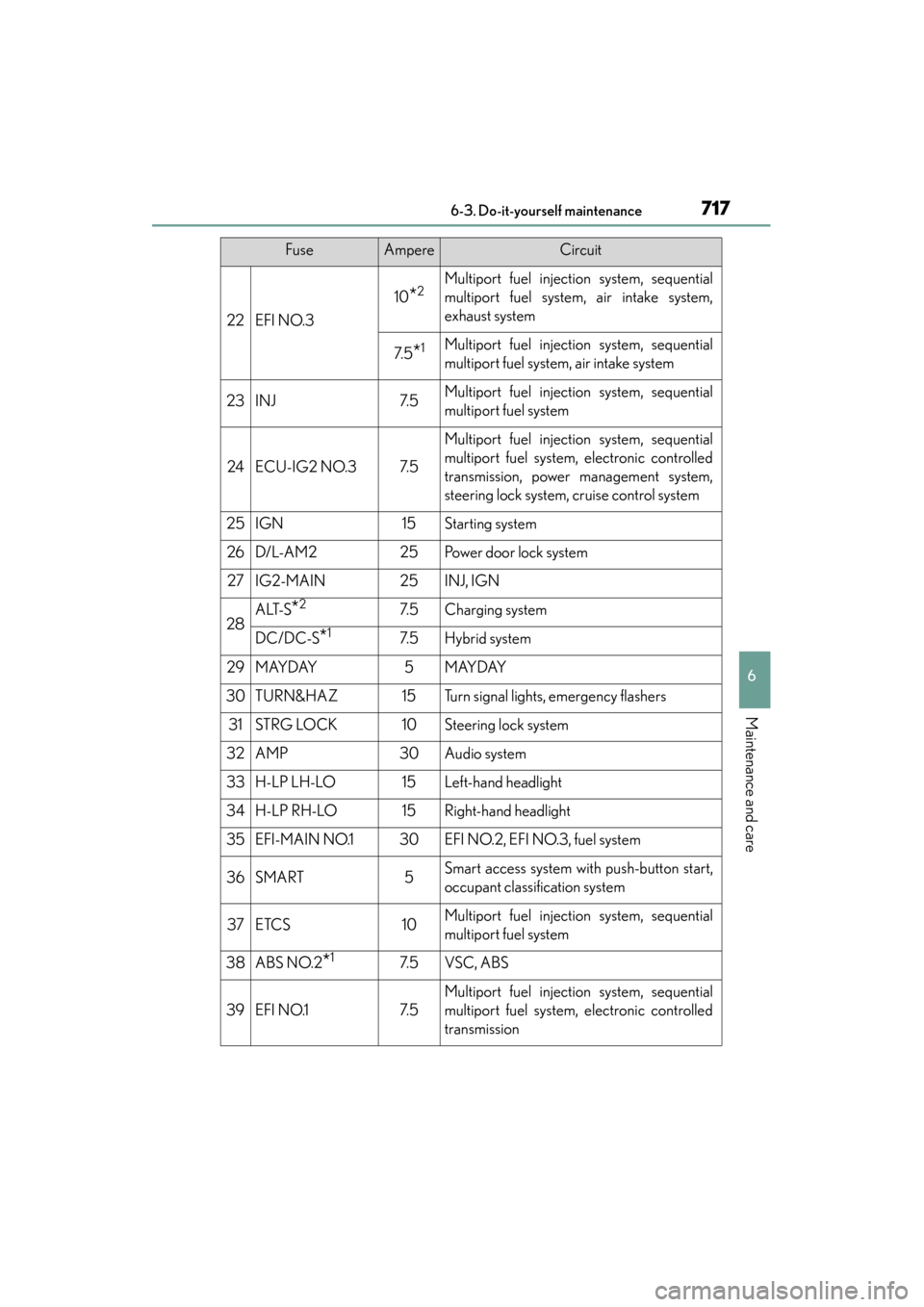
22EFI NO.3
10*2Multiport fuel injection system, sequential
multiport fuel system, air intake system,
exhaust system
7. 5*1Multiport fuel injection system, sequential
multiport fuel system, air intake system
23INJ7. 5Multiport fuel injection system, sequential
multiport fuel system
24ECU-IG2 NO.37. 5
Multiport fuel injection system, sequential
multiport fuel system, electronic controlled
transmission, power management system,
steering lock system, cruise control system
25IGN15Starting system
26D/L-A M225Po w e r d o o r l o c k s y s t e m
27IG2-MAIN25INJ, IGN
28ALT-S*27. 5Charging system
DC/DC-S*17. 5Hybrid system
29MAYDAY5MAYDAY
30TURN&HAZ15Turn signal lights, emergency flashers
31STRG LOCK10Steering lock system
32AMP30Audio system
33H-LP LH-LO15Left-hand headlight
34H-LP RH-LO15Right-hand headlight
35EFI-MAIN NO.130EFI NO.2, EFI NO.3, fuel system
36SMART5Smart access system with push-button start,
occupant classification system
37ETCS10Multiport fuel injection system, sequential
multiport fuel system
38ABS NO.2*17. 5VSC, ABS
39EFI NO.17. 5
Multiport fuel injection system, sequential
multiport fuel system, electronic controlled
transmission
FuseAmpereCircuit
Page 721 of 910
720
ES350 300h_OM_OM33A01U_(U)
6-3. Do-it-yourself maintenance
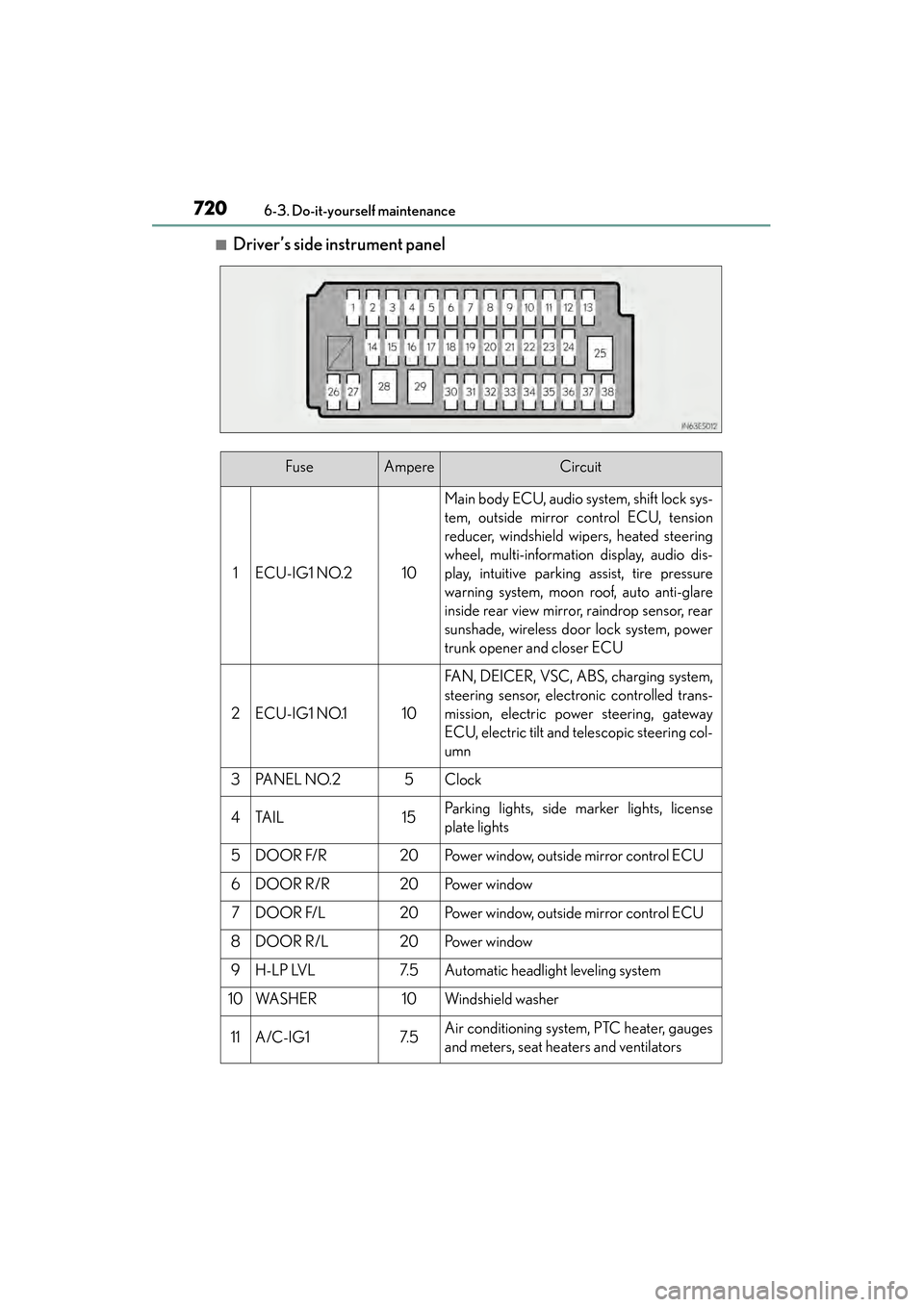
■Driver’s side instrument panel
FuseAmpereCircuit
1ECU-IG1 NO.210
Main body ECU, audio system, shift lock sys-
tem, outside mirror control ECU, tension
reducer, windshield wipers, heated steering
wheel, multi-information display, audio dis-
play, intuitive parking assist, tire pressure
warning system, moon roof, auto anti-glare
inside rear view mirror, raindrop sensor, rear
sunshade, wireless door lock system, power
trunk opener and closer ECU
2ECU-IG1 NO.110
FAN, DEICER, VSC, ABS, charging system,
steering sensor, electronic controlled trans-
mission, electric power steering, gateway
ECU, electric tilt and telescopic steering col-
umn
3PA N E L N O. 25Clock
4TA I L15Parking lights, side marker lights, license
plate lights
5DOOR F/R20Power window, outside mirror control ECU
6DOOR R/R20Po w e r w i n d o w
7DOOR F/L20Power window, outside mirror control ECU
8DOOR R/L20Po w e r w i n d o w
9H-LP LVL7. 5Automatic headlight leveling system
10WA S H E R10Windshield washer
11A/C-IG17. 5Air conditioning system, PTC heater, gauges
and meters, seat heaters and ventilators
Page 722 of 910
ES350 300h_OM_OM33A01U_(U)
7216-3. Do-it-yourself maintenance
6
Maintenance and care
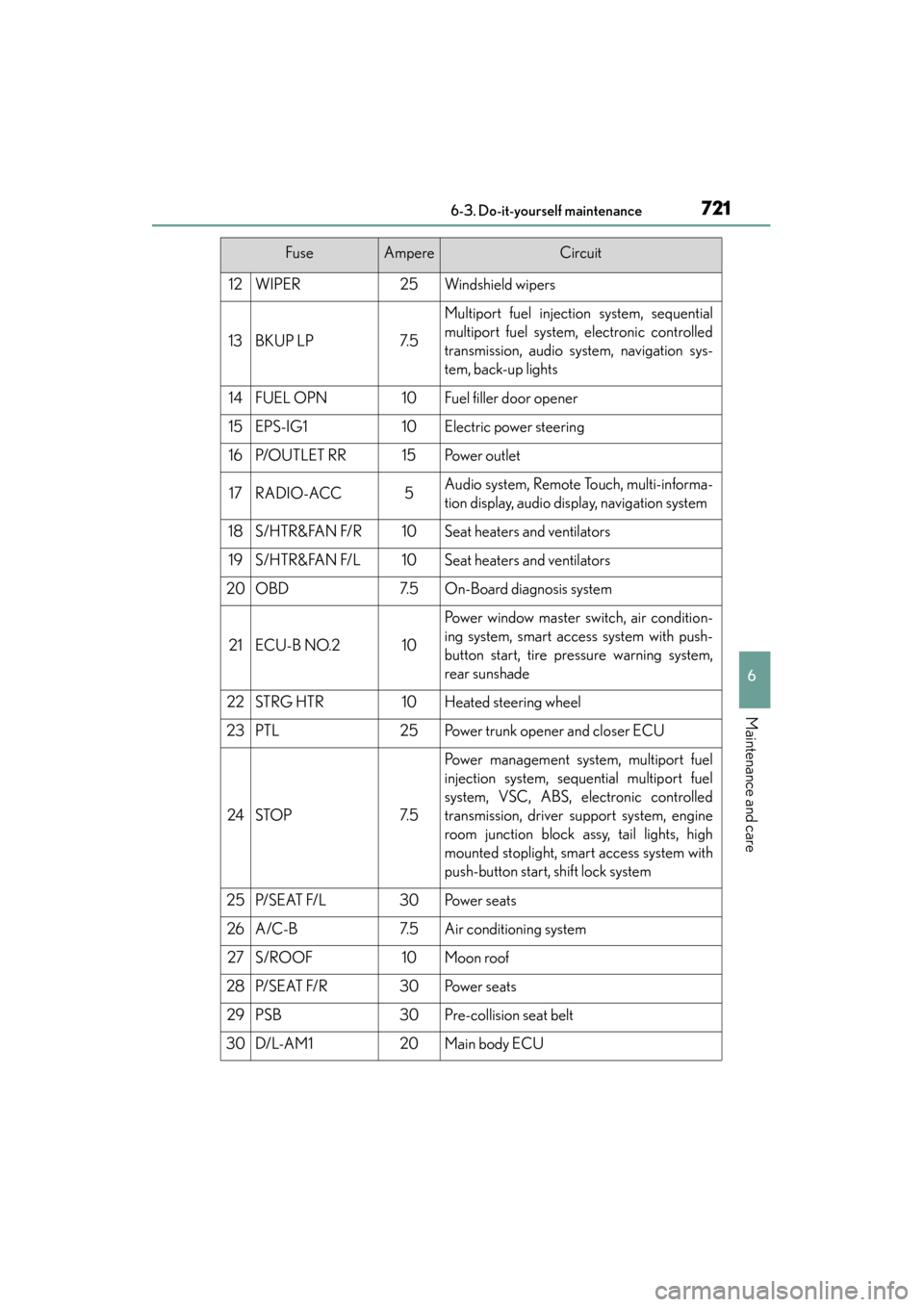
12WIPER25Windshield wipers
13BKUP LP7. 5
Multiport fuel injection system, sequential
multiport fuel system, electronic controlled
transmission, audio system, navigation sys-
tem, back-up lights
14FUEL OPN10Fuel filler door opener
15EPS-IG110Electric power steering
16P/O U T L E T R R15Po w e r o u t l e t
17RADIO-ACC5Audio system, Remote Touch, multi-informa-
tion display, audio display, navigation system
18S / H T R & FA N F/ R10Seat heaters and ventilators
19S / H T R & FA N F/ L10Seat heaters and ventilators
20OBD7. 5On-Board diagnosis system
21ECU-B NO.210
Power window master switch, air condition-
ing system, smart access system with push-
button start, tire pressure warning system,
rear sunshade
22STRG HTR10Heated steering wheel
23PTL25Power trunk opener and closer ECU
24STOP7. 5
Power management system, multiport fuel
injection system, sequential multiport fuel
system, VSC, ABS, electronic controlled
transmission, driver support system, engine
room junction block assy, tail lights, high
mounted stoplight, smart access system with
push-button start, shift lock system
25P/ S E AT F/ L30Po w e r s e a t s
26A/C-B7. 5Air conditioning system
27S/ROOF10Moon roof
28P/ S E AT F/ R30Po w e r s e a t s
29PSB30Pre-collision seat belt
30D/L-A M120Main body ECU
FuseAmpereCircuit
Page 723 of 910
722
ES350 300h_OM_OM33A01U_(U)
6-3. Do-it-yourself maintenance
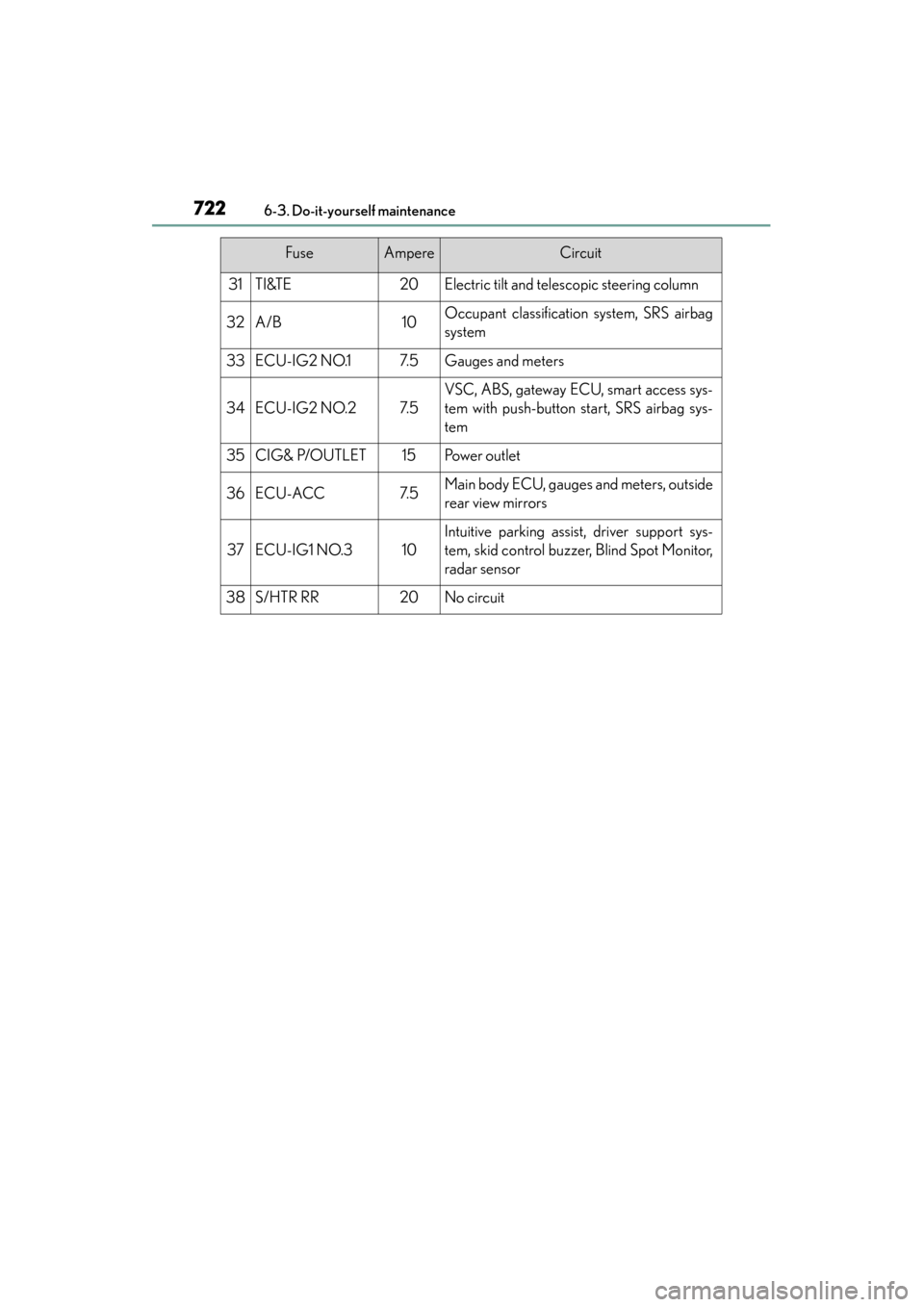
31TI&TE20Electric tilt and telescopic steering column
32A/B10Occupant classification system, SRS airbag
system
33ECU-IG2 NO.17. 5Gauges and meters
34ECU-IG2 NO.27. 5
VSC, ABS, gateway ECU, smart access sys-
tem with push-button start, SRS airbag sys-
tem
35CIG& P/OUTLET15Po w e r o u t l e t
36ECU-ACC7. 5Main body ECU, gauges and meters, outside
rear view mirrors
37ECU-IG1 NO.310
Intuitive parking assist, driver support sys-
tem, skid control buzzer, Blind Spot Monitor,
radar sensor
38S/HTR RR20No circuit
FuseAmpereCircuit
Page 727 of 910
726
ES350 300h_OM_OM33A01U_(U)
6-3. Do-it-yourself maintenance
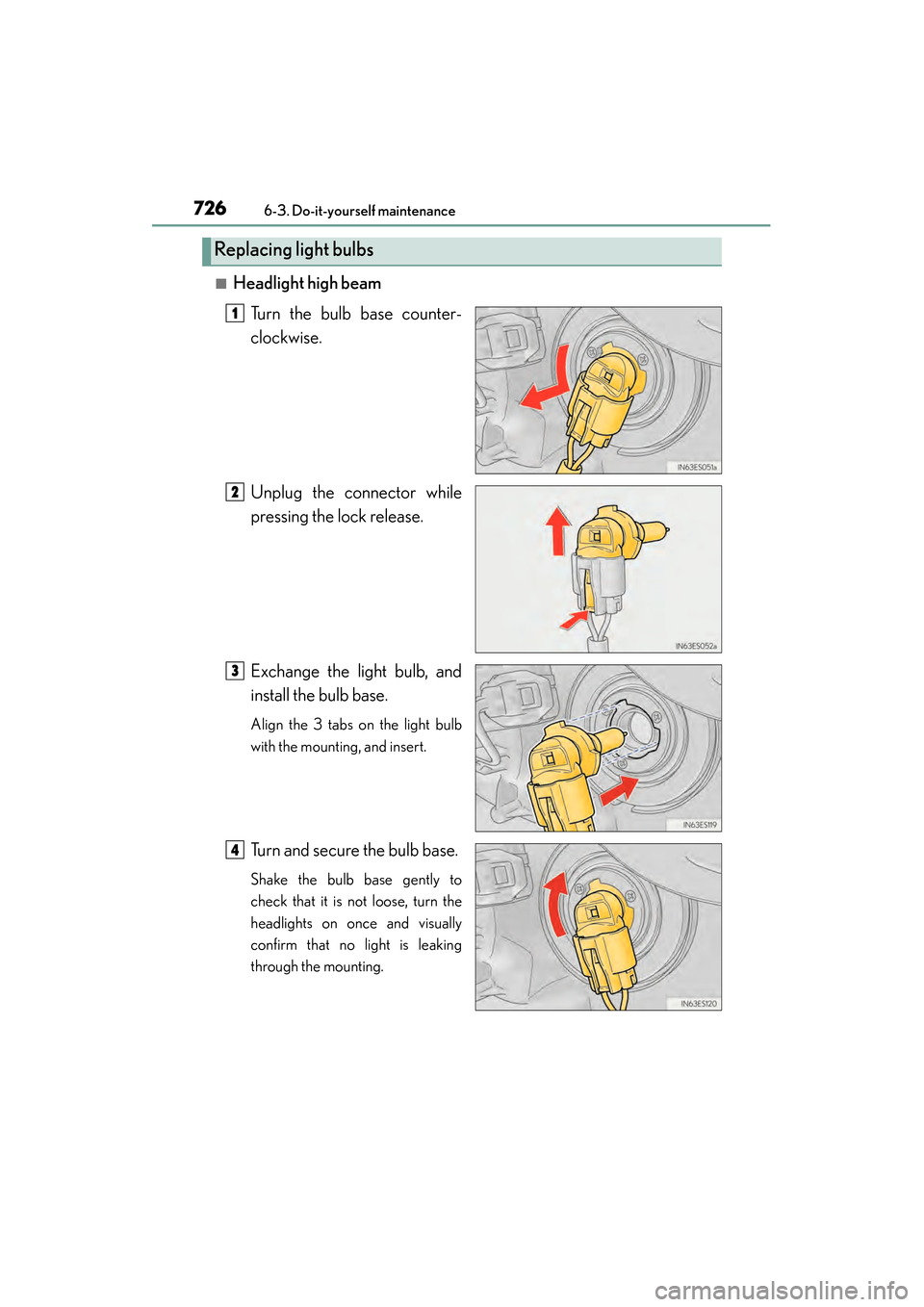
■Headlight high beamTurn the bulb base counter-
clockwise.
Unplug the connector while
pressing the lock release.
Exchange the light bulb, and
install the bulb base.
Align the 3 tabs on the light bulb
with the mounting, and insert.
Turn and secure the bulb base.
Shake the bulb base gently to
check that it is not loose, turn the
headlights on once and visually
confirm that no light is leaking
through the mounting.
Replacing light bulbs
1
2
3
4
Page 728 of 910
ES350 300h_OM_OM33A01U_(U)
7276-3. Do-it-yourself maintenance
6
Maintenance and care
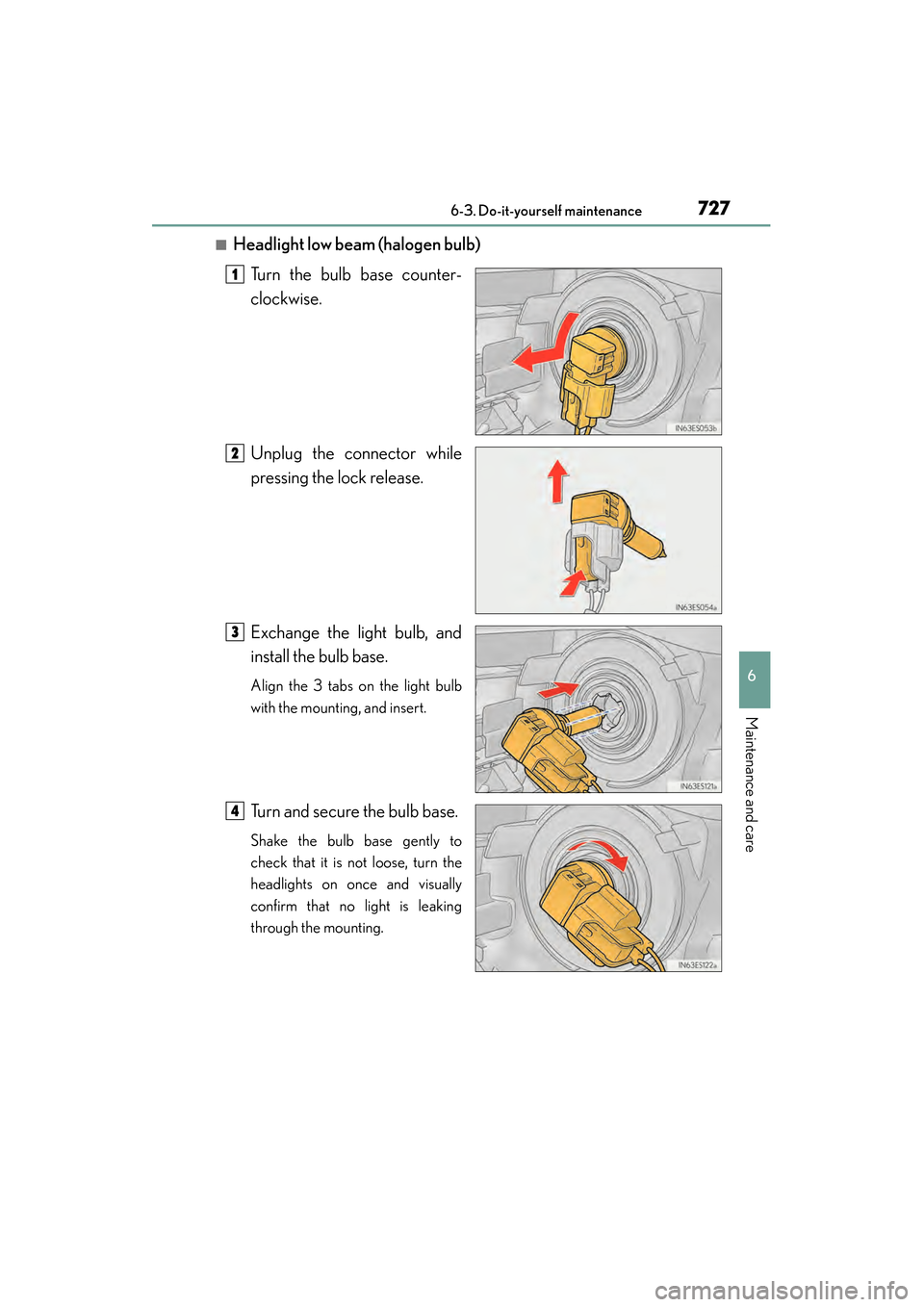
■Headlight low beam (halogen bulb)Turn the bulb base counter-
clockwise.
Unplug the connector while
pressing the lock release.
Exchange the light bulb, and
install the bulb base.
Align the 3 tabs on the light bulb
with the mounting, and insert.
Turn and secure the bulb base.
Shake the bulb base gently to
check that it is not loose, turn the
headlights on once and visually
confirm that no light is leaking
through the mounting.
1
2
3
4